


Advanced Redirect Manager 301
Our powerful, yet user-friendly, interface allows you to manage your site’s URLs with precision. Create all types of redirects (301, 302, 307, 308) with ease, including complex wildcard rules. But we don’t stop there…

Use with caution
Advanced Redirect Manager 301 works, but test it on a staging site before relying on it in 2026. It runs on 70+ sites, is rated 5/5 and was last updated 4 months ago, and scores 60/100 on our health check.
- Small user base (70+ active installs)
- Very few reviews so far
How does it stack up?
Side-by-side on installs, updates, ratings & support


Daily downloads
Download spikes usually follow a new release — each site that auto-updates counts as a download.
Rankings
Where Advanced Redirect Manager 3… stands todayWordPress.org search rankings
Live position in the plugin search, top 100| Keyword | Position |
|---|---|
| 301 | #15 |
| 404 | >100 |
| broken links | #73 |
| link scanner | #37 |
| redirect | #53 |
Version adoption
Share of active sites per release.
Rating breakdown
★★★★★★★★★★ 5 from 1 reviews
About Advanced Redirect Manager 301
From the official readme · v1.0.3Description
Our powerful, yet user-friendly, interface allows you to manage your site’s URLs with precision. Create all types of redirects (301, 302, 307, 308) with ease, including complex wildcard rules. But we don’t stop there. You can also serve specific client error codes like 410 (Gone) for permanently removed content or 451 (Unavailable For Legal Reasons). Advanced Redirect Manager actively monitors your site for “Page Not Found” (404) errors, allowing you to turn lost traffic into successful conversions with just a few clicks.
Tired of losing visitors to broken links and 404 errors? Advanced Redirect Manager is your all-in-one solution for complete link management and site health monitoring. Go beyond simple redirects and take full control of your site’s URL structure, user experience, and SEO performance.
What truly sets us apart is the proactive Link Scanner. Don’t wait for users to report broken links. Our intelligent scanner crawls your posts and pages, identifying both internal and external broken links before they can harm your site’s reputation and search engine rankings.
Why Choose Advanced Redirect Manager?
- Complete URL Control: A clean, intuitive interface for creating and managing all standard redirects (301, 308, 302, 307) and serving specific client errors like 410 (Gone) and 451 (Unavailable For Legal Reasons).
- Powerful Wildcard Redirects: Redirect entire directories or URL patterns with a single rule (e.g., /blog/* to /articles/$1).
- Intelligent 404 Error Logging: Automatically captures 404 errors, showing you exactly which pages visitors are trying to access. Create a redirect directly from the log!
- Proactive Broken Link Scanner: Find and fix broken links throughout your content before Google or your visitors do. Checks both internal and external URLs.
- SEO-Friendly: Maintaining a clean link structure and fixing 404s are crucial for SEO. Our plugin makes it simple.
- Performance-Oriented: Built with performance in mind, using WordPress Object Cache to minimize database queries on high-traffic sites.
- Developer-Friendly: Clean, well-structured, and object-oriented code.
Whether you’re migrating a website, restructuring your content, or simply want to ensure a flawless user experience, Advanced Redirect Manager provides the professional tools you need in one powerful package.
Features in Detail
Redirect Rules Tab
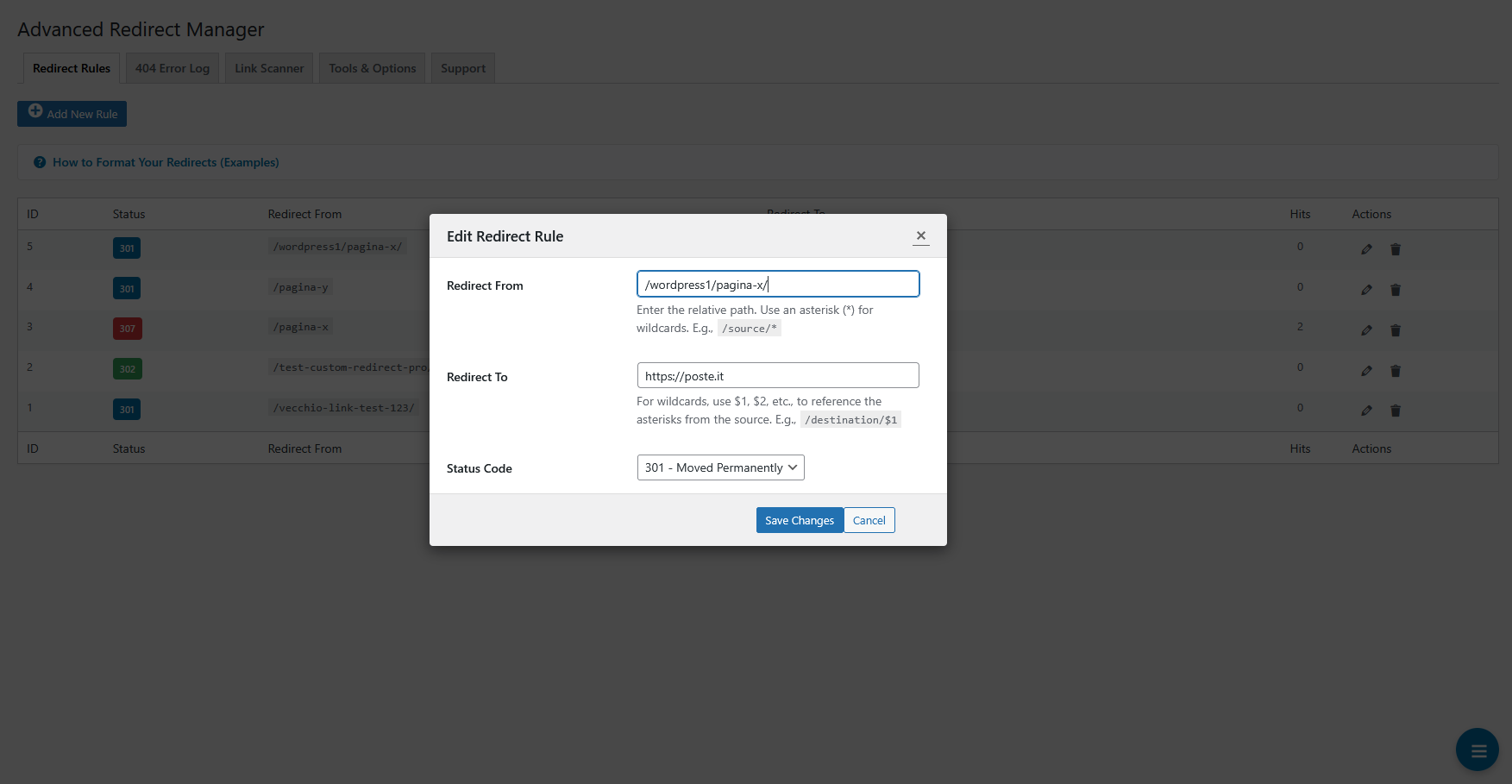
- Add, Edit, and Delete Rules: Manage all your redirects from a single, AJAX-powered table.
- Wildcard Support: Use an asterisk (
*) to match patterns. Use$1,$2in the destination URL to reference captured values. - Smart “Redirect To” Search: Start typing in the “Redirect To” field to instantly search for posts, pages, and categories on your site. No more guessing permalinks!
- Hit Counter & Last Used: Track how many times each redirect has been used and see the date of the last hit.
- In-context Help: Clear examples and instructions on how to format your redirects are available directly on the page.
404 Error Log Tab
- Real-time Logging: Captures the URL, timestamp, referrer, and user agent for every 404 error.
- One-Click Redirect Creation: Found a 404 error for an old page? Click “Create Redirect” directly from the log to open the rule editor with the URL pre-filled.
- Clean & Filtered Log: Automatically ignores common bot traffic and requests for non-existent files (
.css.map,favicon.ico) to keep your log relevant. - Log Management: Easily clear the entire 404 log with a single click.
Link Scanner Tab
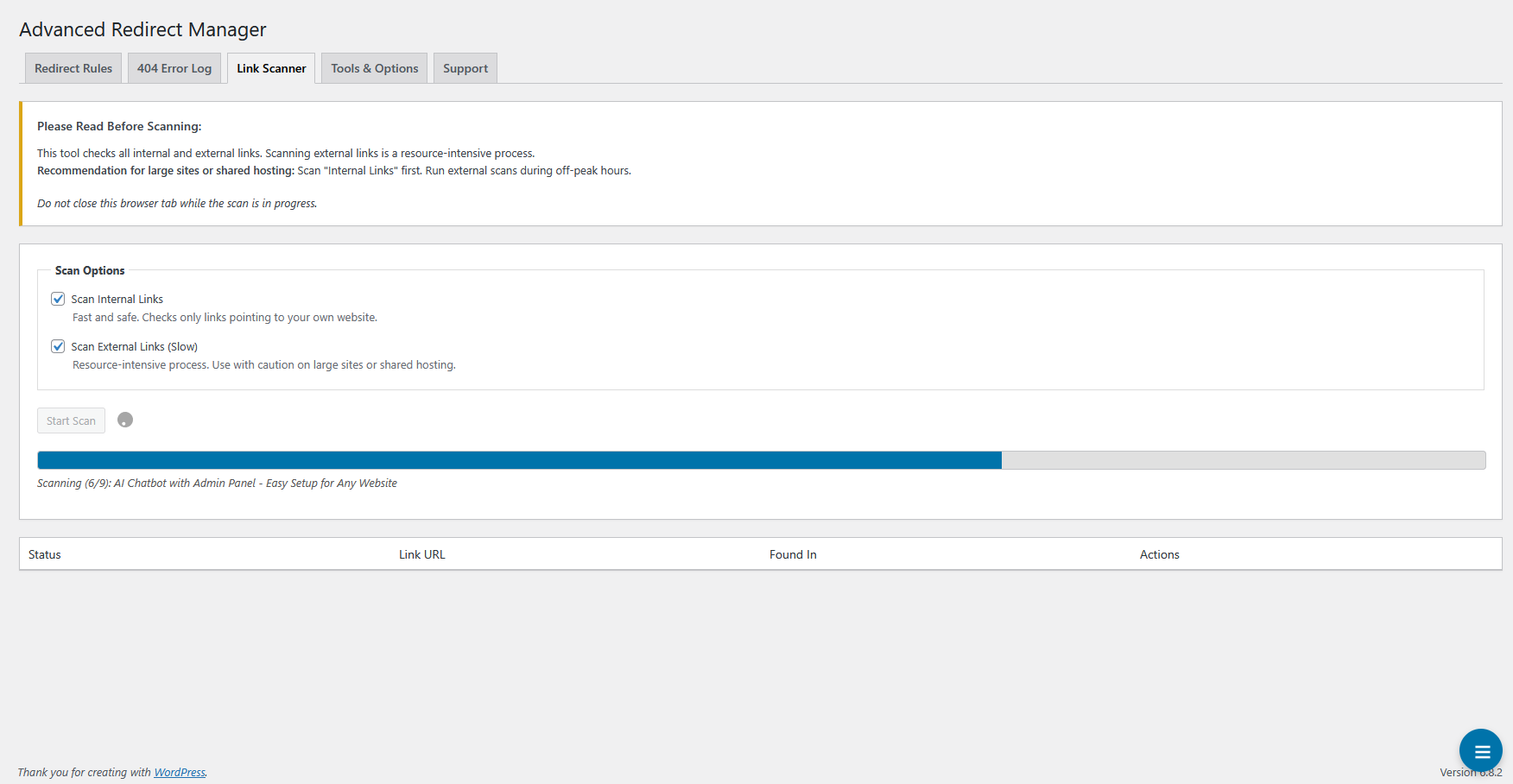
- Scan Internal & External Links: Choose to scan links pointing to your own site, external sites, or both.
- Intelligent Chunking: The scanner processes your site content in small batches to prevent server timeouts, making it safe for large websites and shared hosting.
- Actionable Results: The scanner lists all broken links (4xx/5xx errors) and connection errors, showing you the exact post or page where the link was found.
- Contextual Actions:
- For internal broken links, you can create a redirect rule directly from the results.
- For external broken links, a convenient “Edit Post” button takes you straight to the editor to fix the link.
Tools & Options Tab
- Import/Export via CSV: Backup all your redirect rules to a CSV file or migrate them to another site. The importer is smart enough to handle new rules and update existing ones.
- Bulk Actions:
- Reset all redirect hit counters to zero.
- Permanently delete all redirect rules in one go (with multiple confirmations to prevent accidents).
Installation
- Upload the
advanced-redirect-managerfolder to the/wp-content/plugins/directory. - Activate the plugin through the ‘Plugins’ menu in WordPress.
- Go to Settings > Redirect Manager to start creating redirect rules and monitoring your site.
That’s it! The plugin will automatically start logging 404 errors.
Frequently asked questions
Does this plugin affect my site’s performance?
We’ve built Advanced Redirect Manager with performance as a top priority. The redirection engine is highly optimized and uses the built-in WordPress Object Cache. On sites with a persistent object cache (like Redis or Memcached), this means virtually zero database load for handling redirects after the first visit. The Link Scanner runs only when you trigger it manually and uses AJAX chunking to avoid slowing down your server.
What’s the difference between a 301, 302, 307 and 308 redirect?
301 (Moved Permanently): The classic permanent redirect. It tells search engines that a page has moved permanently and they should transfer all SEO value to the new URL. Important: A 301 redirect may allow browsers to change the request method from POST to GET. 308 (Permanent Redirect): The modern and stricter version of the 301. It also signals a permanent move and transfers SEO value, but it strictly preserves the original request method. This means a POST request will remain a POST request to the new URL, which is crucial for forms or API endpoints. 302 (Found) & 307 (Temporary Redirect)…
Can I use wildcards? How do they work?
Yes! Use an asterisk (*) in the “Redirect From” field. Each * captures a segment of the URL. You can then use $1, $2, etc., in the “Redirect To” field to place the captured segments. Example: Redirect From: /products/category-*/item-* Redirect To: /shop/$1/product/$2 This would redirect /products/category-books/item-123 to /shop/books/product/123.
Does the Link Scanner run automatically in the background?
No. To ensure it doesn’t impact your site’s performance without your knowledge, the Link Scanner is a tool that you must run manually from the plugin’s admin page.
What happens when I uninstall the plugin?
Upon uninstallation (by clicking “Delete” in the Plugins screen), Advanced Redirect Manager cleans up after itself completely. It will remove its custom database table, all of its options from the wp_options table, and any related transients. Your data will be permanently deleted. If you only “Deactivate” the plugin, all your rules and data are kept safe for when you reactivate it.
Changelog
1.0.3
- New Feature: Added support for serving 410 Gone and 451 Unavailable For Legal Reasons status codes for specific URLs.
- Enhancement: The status code selector in the rule editor is now grouped by category (Permanent, Temporary, Error) for a better user experience.
- Enhancement: Added distinct status badges and colors for the new 410 and 451 codes in the main redirect table for easy identification.
- Tweak: Updated plugin documentation and help texts to include information about the new 410 and 451 status codes.
1.0.2
- New Feature: Added “NewCodeByte Apps” section for a cleaner and more intuitive user experience, a new “NewCodeByte Apps” tab to showcase other available plugins from the author.
1.0.1
- New Feature: Added support for 308 Permanent Redirects, the modern and more precise alternative to 301s.
- Enhancement: Improved sanitization and validation on all user inputs and server variables for maximum security, following the latest WordPress standards.
- Enhancement: Updated the codebase to ensure full compatibility with the latest versions of PHP and WordPress, removing all deprecated notices.
- Enhancement: Improved the AJAX-powered table loading mechanism for a smoother and more reliable user experience in the admin area.
1.0
- Initial public release.
- Let the redirects begin!
Screenshots




For developers
Is this your plugin? Show off the numbers.
Add a live badge to your site, docs or GitHub README. It updates on its own — no account needed.
Best Advanced Redirect Manager 301 alternatives
All 301 plugins →




FAQ
Advanced Redirect Manager 301: quick answers
Straight answers, pulled from live WordPress.org data.
Live data from WordPress.org · checked Sep 30, 2026
Is Advanced Redirect Manager 301 free?
Yes. Advanced Redirect Manager 301 is free to download and use from the official WordPress.org plugin directory.
Is Advanced Redirect Manager 301 safe to use in 2026?
Advanced Redirect Manager 301 works, but test it on a staging site before relying on it in 2026. It runs on 70+ sites, is rated 5/5 and was last updated 4 months ago, and scores 60/100 on our health check.
How many websites use Advanced Redirect Manager 301?
Advanced Redirect Manager 301 is active on 70+ WordPress websites and has been downloaded 1,261 times since it launched in August 2025. It was downloaded 91 times in the last 30 days.
Does Advanced Redirect Manager 301 work with WordPress 7.1?
Advanced Redirect Manager 301 is officially tested up to WordPress 7.0.6, while the latest release is 7.1.2. It may still work, but try it on a staging site first.
What PHP version does Advanced Redirect Manager 301 need?
Advanced Redirect Manager 301 requires PHP 7.4 or higher. Most hosts run PHP 8.x today, so it works on any modern WordPress hosting.
When was Advanced Redirect Manager 301 last updated?
The latest version, 1.0.3, was released on May 25, 2026 (4 months ago).
Who makes Advanced Redirect Manager 301?
Advanced Redirect Manager 301 is developed and maintained by NewCodeByte.
What are the best alternatives to Advanced Redirect Manager 301?
The most popular alternatives to Advanced Redirect Manager 301 are Redirection (2M+ installs), Redirection (100K+ installs) and WP 404 Auto Redirect to Sim… (30K+ installs).
Powered by PageForge
Want thousands of pages that rank like these? Build them in an afternoon.
This directory runs on the same engine as PageForge. Turn any spreadsheet, CSV or API into thousands of fast, SEO-ready WordPress pages — with schema, internal links and AI-written copy baked in.
- CSV, Google Sheets & API data sources
- AI content, schema & internal links per page
- Works with Elementor, Gutenberg, Yoast & Rank Math
- Free on WordPress.org — no credit card


