



Post Redirection – 301, 404 Redirects
Post Redirection – 301, 404 Redirects lets you quickly redirect pages, posts, custom types, and URLs to new locations for seamless navigation.

Use with caution
Post Redirection works, but test it on a staging site before relying on it in 2026. It runs on 50+ sites, is rated 5/5 and was last updated 6 months ago, and scores 53/100 on our health check.
- Small user base (50+ active installs)
- Very few reviews so far
- Only tested up to WordPress 6.9 (latest is 7.1)
How does it stack up?
Side-by-side on installs, updates, ratings & support


Daily downloads
Download spikes usually follow a new release — each site that auto-updates counts as a download.
Rankings
Where Post Redirection stands todayWordPress.org search rankings
Live position in the plugin search, top 100| Keyword | Position |
|---|---|
| 301 | #24 |
| 302 | #34 |
| 404 | #46 |
| redirection | #52 |
| seo | >100 |
Version adoption
Share of active sites per release.
Rating breakdown
★★★★★★★★★★ 5 from 1 reviews
About Post Redirection – 301, 404 Redirects
From the official readme · v1.0.2Description
Post Redirection – 301, 404 Redirects is a powerful plugin which provides the functionality redirect pages, posts, custom post types and custom source URL to another location quickly (for internal or external URLs). Includes individual post/page options, redirects for custom post types, non-existent 301 Redirects, New window functionality, and rel=nofollow functionality. All 404 error pages redirect to the homepage.
FREE FEATURES
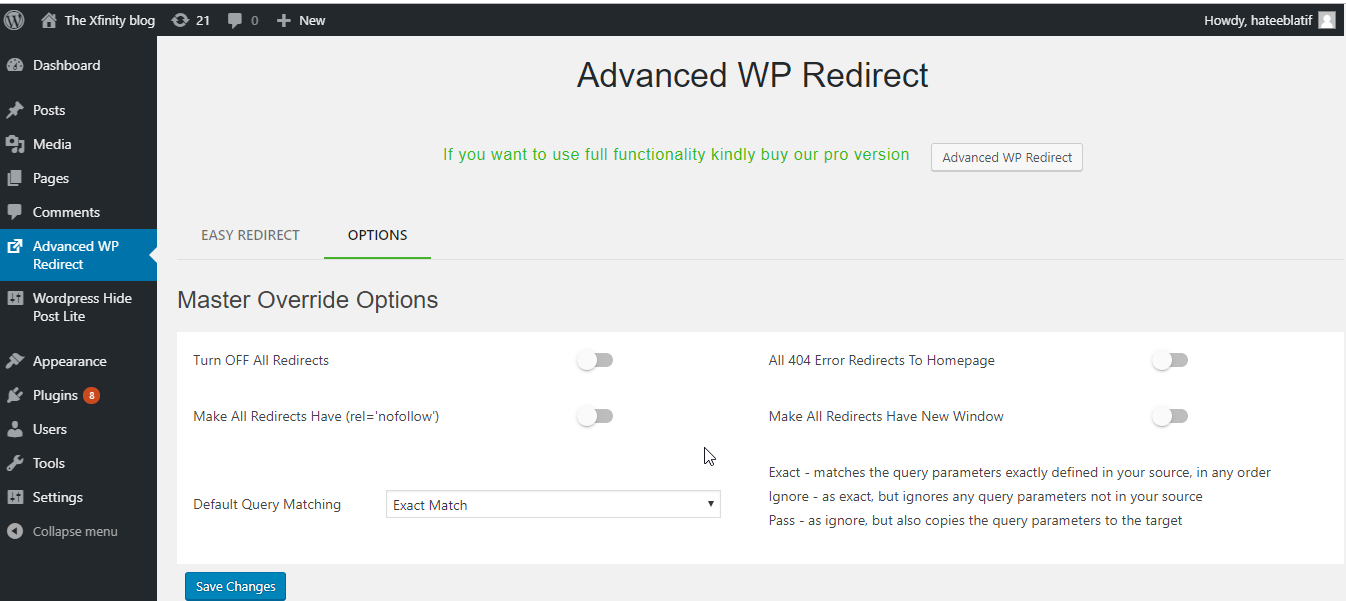
Master Override Options
► Turn OFF All Redirects: is turn off all redirections.
► All 404 Error Redirects: To Homepage this option redirect all 404 error to the homepage.
► Make All Redirects Have (rel=’nofollow’): this option all source URL make nofollow.
► Make All Redirects Have New Window: this option all redirect source URL open in new tab.
► Default Query Matching: this option set default option in add new redirect.
URL Nofollow and New tab
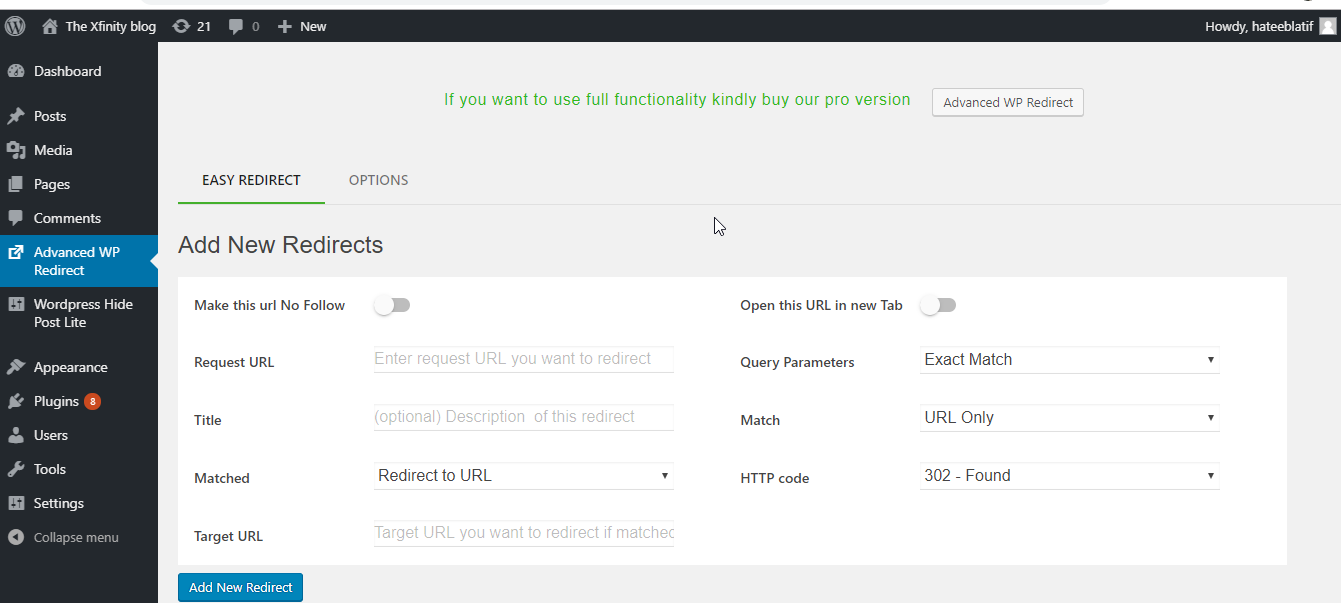
► Make this url No Follow:this option make source URL have a nofollow link.
► Open this URL in new Tab:this option open URL in new tab.
Redirect Match Options
► Redirect to URL: Redirect to URL with following http codes (301,302,303,304,307,308).301 code move permanently your source URL so 301 code use carefully.
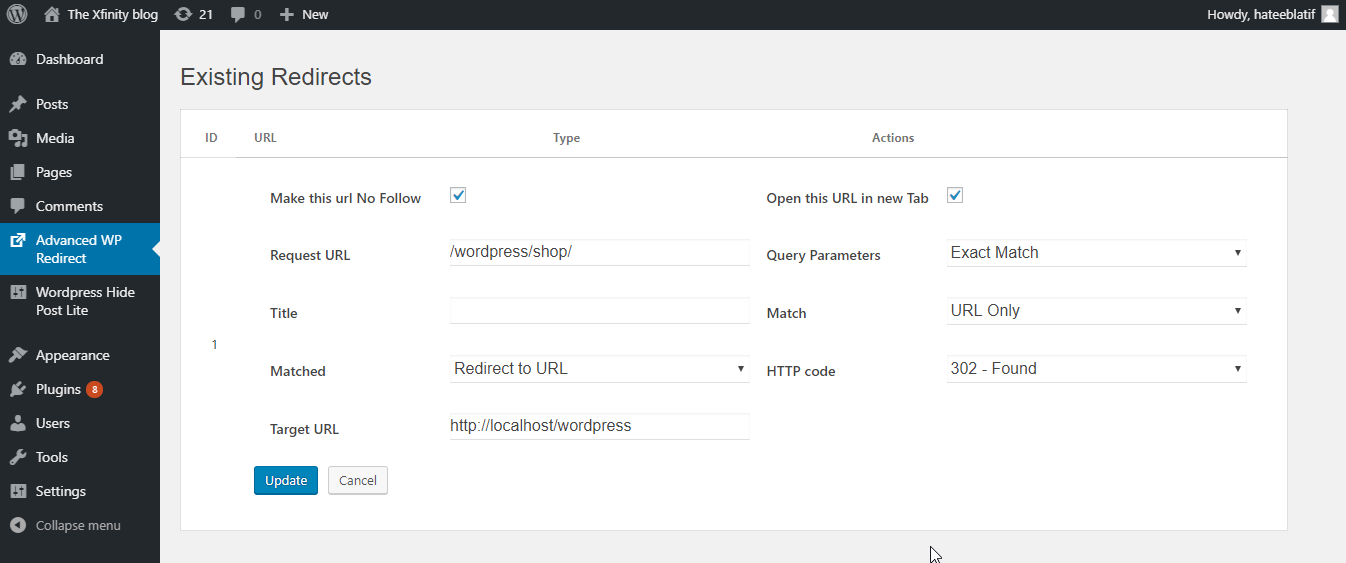
► Edit and Delete Redirect:If you want edit and delete the redirect. Click on Highlight edit and delete icons.
PRO VERSION
Basic Options
► Basic options:In basic options, you include redirecting Meta box in custom post type through switch button Custom Post Types. If you show redirect column in post list table you can switch ON of Show Redirect Column button. If you want to hidden redirect Meta box form page, post and custom posts type mark to check and click save changes.
Master Override Options
► Make All Redirects GOTO This URL:this option set one target URL of redirections.
Groups
► Groups:In this feature, you divide redirects into different groups. You can add, update and delete groups. You can view all the redirects of specific groups
Query Parameters Matching
► Exact Match:matches the URL query parameters in any order.
► Ignore Query Parameters: this option ignores query parameter in the URL.
► Ignore and Pass Query Parameter to target URL:this option ignores the query parameter and attach to the target URL.
URL Match Options:
► URL Only:If you select URL Only option target URL Input appear only.
► URL and Login status:If you select URL and Login status option two input box appear. One for if user login then redirect to this URL and second input if user logout then redirect to this URL.
► URL and Role:If you select URL and Role option three input box appear. One for select user role. Second input if user role match then redirect to this URL and Third input if user unmatched then redirect to this URL.
► URL and IP:If you select URL and IP option three input box appear. One for input IP Address. Second input if IP match then redirect to this URL and third input if IP unmatched then redirect to this URL.
Redirect Match Options
► Redirect to Random Post:This option redirect to random post in your WordPress blog post with following http codes (301,302,303,304,307,308).301 code move permanently your source URL so 301 code use carefully.
► Pass Through:Pass through ignore the http code direct to redirect your target URL.
► Error 404: This option redirect to Error 404 with http code errors with following http codes (400,401,403,404,410).
► Do nothing:This option do nothing if source URL match current URL.
Clean Up Options
► WP Post Redirect:provide feature if you delete all redirects and all setting of redirects.
MAY BE YOU NEED
WP Post Hide: Control the visibility of post type items like pages, posts and custom post type. Hidden in a specific part. But another part still visible.
WooCommerce Sales Notifications:Live Sale Notification For Woocommerce is the best WooCommerce plugin to boost your sales. This plugin allows you to display recent orders on a popup with customer and product information.
WooCommerce Review for Discount:WooCommerce Reviews for Discount plugin allows you to offer discounts to your customers for their reviews and recommendations. A positive review is a most powerful tool to drive repeat purchases, up-sells, and new sales.
WooCommerce Spin Popup:WooCommerce Spin Popup helps shop owners to increase Sales and Leads. Spin Wheel for WooCommerce helps you to collect email of users by giving them discount which is completely controlled by you.
Woocommerce Currency Converter:Woocommerce Currency Converter is the WooCommerce Multi Currency plugin that allows your site visitors to switch products prices currencies according to set currencies rates in real-time.
Woocommerce Checkout Upsell Order Bump:Woocommerce Checkout Upsell Order Bump is a WooCommerce plugin that offers product suggestions and order bumps with tempting discounts to the customers on the checkout page.
Premium Plugins link
EasyMail- WooCommerce Email Template Customizer:Your transactional emails don’t have to be so bland anymore. EasyMail Email Template Customizer for WooCommerce allows you to customize your transactional email templates and create beautiful, professional looking emails that keep customers impressed – even post-purchase.
WooCommerce Category Merger:WooCommerce Category Merger is a WooCommerce plugin that merge multiple terms (woocommerce categories,woocommerce tags,) into one term (woocommerce category,woocommerce tag).
WooCommerce Hide Product:WooCommerce Hide Product allows you to hide a specific product from your website homepage, category, or search result page while still allowing others to view it if they have the direct link.
WebPio – WordPress WebP Converter:WebPio – WordPress WebP Converter plugin allows you to convert JPEG and PNG images to WebP Format without losing image quality.
Revio – WooCommerce Reviews for Discount:WooCommerce Reviews for Discount plugin allows you to offer discounts to your customers for their reviews and recommendations. A positive review is a most powerful tool to drive repeat purchases, up-sells, and new sales.
Live Sales Notification:WooCommerce Recent Sales Popup is a Live Sales Popup plugin that increases sales and show social proof to customers that your site is busy and trustworthy.
WooCommerce Catalog Mode:WooCommerce Catalog Mode allows you to turn your Shop into a Catalog Mode, by hiding price or Add to cart button on product pages and replace it with inquiry form.
Contact Form 7 Verification:is the best wordpress plugin for providing email and mobile number verification for all CF7 forms.
Free shipping bar for WooCommerce:is the best WooCommerce plugin that increases order revenue using free shipping as a marketing tool.
WordPress Coupon and Voucher Creator:is the best plugin for providing coupons and gift vouchers to your site visitors. People are always seeking ways to spend wisely. Most customers look for a coupon before visiting a retailer because everyone wants to save money. This plugin provides the opportunity of saving a few bucks that leads to more sales for your online business.
WordPress Post Hide:Control the visibility of post type items like pages, posts and custom post type. Hidden in specific part. But other part still visible.
WordPress Category Merger:is a WordPress plugin that merge multiple terms (categories, tags, custom categories, custom tags) into one term (category, tag, custom category, custom tag).
WooCommerce Lucky Wheel: helps shop owners to increase Sales and Leads. Spin Wheel for WooCommerce helps you to collect email of users by giving them discount which is completely controlled by you.
WooCommerce Product Duplicator:Most of the time Store manager or WooCommerce Admin needs to create a Product which is slightly different than existing Product.
WordPress Page Duplicator:duplicate selected page/post with find and replace functionality.
WooCommerce Wishlist:is a SIMPLE and MUST have plugin to let your customers list down their Favourite Products. It will boost up your sales and Conversions as well as site traffic because of Social Sharing Module.
WooCommerce Custom Order Number:A Common problem of all WooCommerce store is the random order numbers. Random order numbers are NOT easy to remember if you are in hurry and searching for one order out of thousand. Also this does not seem to be an order number of my store.
Seo Image Optimizer for WordPress and WooCommerce:is a SIMPLE and MUST have plugin to Gain more traffic and sales From Search Engine Like GOOGLE , YAHOO , BING Image Search!. It Dramatically increase Traffic of your WordPress Website , Blog and Woocommerce Store
Documentation
Plugin Links
► Project Page
► Documentation
► Pro Plugins link
► Report Bugs/Issues
Installation
- Unzip the download package
- Upload
WP Post Redirectionto the/wp-content/plugins/directory - Activate the plugin through the ‘Plugins’ menu in WordPress
Changelog
Important fix for saving redirects over AJAX and correct URL handling. Update recommended.
1.0.2
- Fixed redirect rules not saving when adding or editing via AJAX: serialized form data must not be passed through
sanitize_textarea_field()beforeparse_str(), because WordPress strips percent-encoded bytes (%5B,%5D,%2F, etc.), which broke nested field names and mangled request/target URLs. - Fixed support form AJAX payload parsing using the same approach for consistency.
- Hardened PHPCS nonce-suppression scope for admin AJAX handlers that verify the nonce in a shared helper.
- Readme title aligned with the plugin header name for directory checks.
1.0.1
- Maintenance and compatibility updates.
1.0.0
- Fix deprecated function
0.0.6
fix deprecated function
0.0.5
fix save data bud
0.0.4
fix bud support page
0.0.3
Add support page
0.0.2
0.0.1
~ The first released.
Screenshots
For developers
Is this your plugin? Show off the numbers.
Add a live badge to your site, docs or GitHub README. It updates on its own — no account needed.
Best Post Redirection alternatives
All 301 plugins →





FAQ
Post Redirection: quick answers
Straight answers, pulled from live WordPress.org data.
Live data from WordPress.org · checked Oct 1, 2026
Is Post Redirection free?
Yes. Post Redirection is free to download and use from the official WordPress.org plugin directory.
Is Post Redirection safe to use in 2026?
Post Redirection works, but test it on a staging site before relying on it in 2026. It runs on 50+ sites, is rated 5/5 and was last updated 6 months ago, and scores 53/100 on our health check.
How many websites use Post Redirection?
Post Redirection is active on 50+ WordPress websites and has been downloaded 3,219 times since it launched in August 2019. It was downloaded 87 times in the last 30 days.
Does Post Redirection work with WordPress 7.1?
Post Redirection is officially tested up to WordPress 6.9.9, while the latest release is 7.1.2. It may still work, but try it on a staging site first.
What PHP version does Post Redirection need?
Post Redirection requires PHP 7.0 or higher. Most hosts run PHP 8.x today, so it works on any modern WordPress hosting.
When was Post Redirection last updated?
The latest version, 1.0.2, was released on April 6, 2026 (6 months ago).
Who makes Post Redirection?
Post Redirection is developed and maintained by Xfinitysoft.
What are the best alternatives to Post Redirection?
The most popular alternatives to Post Redirection are Redirection (2M+ installs), Redirection (100K+ installs) and WP 404 Auto Redirect to Sim… (30K+ installs).
Powered by PageForge
Want thousands of pages that rank like these? Build them in an afternoon.
This directory runs on the same engine as PageForge. Turn any spreadsheet, CSV or API into thousands of fast, SEO-ready WordPress pages — with schema, internal links and AI-written copy baked in.
- CSV, Google Sheets & API data sources
- AI content, schema & internal links per page
- Works with Elementor, Gutenberg, Yoast & Rank Math
- Free on WordPress.org — no credit card


