



Advanced Social icons
Advanced social icons help you quickly add icons with links to your profile on different social media platforms.

Consider an alternative
Advanced Social icons shows warning signs in 2026 — compare the alternatives below before installing. It runs on 100+ sites and was last updated 1 year ago, and scores 34/100 on our health check.
- Small user base (100+ active installs)
- Very few reviews so far
- No update in over a year
- Only tested up to WordPress 6.8 (latest is 7.1)
Daily downloads
Download spikes usually follow a new release — each site that auto-updates counts as a download.
Rankings
Where Advanced Social icons stands todayWordPress.org search rankings
Live position in the plugin search, top 100| Keyword | Position |
|---|---|
| Advanced Social Icons | >100 |
| custom social icons | >100 |
| Font Awesome social widget | >100 |
| social media | >100 |
| social share | >100 |
Version adoption
Share of active sites per release.
About Advanced Social icons
From the official readme · v3.6Description
Advanced social icons help you quickly add icons with links to your profiles on different social media platforms. The plugin uses icons from Font Awesome, which gives you the possibility to display various popular social icons via widgets. You can use custom icons to add links to anything you want.
No configuration is necessary, other than having links to your social media profiles in the built-in WordPress menus. Add links to any of these social sites under Appearance > Menus, then enable the plugin.
Supported Sites
bitbucket.org           dribbble.com         dropbox.com
facebook.com            flickr.com           foursquare.com
github.com              gittip.com           instagram.com
linkedin.com            mailto:(email)       pinterest.com
plus.google.com         renren.com           stackoverflow.com
trello.com              tumblr.com           twitter.com
vk.com                  weibo.com            xing.com
youtube.com

* Requires asi_latest_social_icons be turned on. (See below.)
Option: Icon Sizes
To vary icon sizes, add this to your theme’s functions.php file: (Default is 2x)
add_filter( 'asi_social_icons_size', function(){return "normal"; } );
add_filter( 'asi_social_icons_size', function(){return "large"; } );
add_filter( 'asi_social_icons_size', function(){return "2x"; } );
add_filter( 'asi_social_icons_size', function(){return "3x"; } );
add_filter( 'asi_social_icons_size', function(){return "4x"; } );
Option: Add More Icons
Add icons from FontAwesome for other URLs. For example, an RSS feed:
add_filter( 'asi_networks_social_icons', 'asi_networks_social_icons');
function asi_networks_social_icons( $networks ) {

    $extra_icons = array (
        '/feed' => array(                  // Enable this icon for any URL containing this text
            'name' => 'RSS',               // Default menu item label
            'class' => 'rss',              // Custom class
            'icon' => 'icon-rss',          // FontAwesome class
            'icon-sign' => 'icon-rss-sign' // May not be available. Check FontAwesome.
        ),
    );

    $extra_icons = array_merge( $networks, $extra_icons );
    return $extra_icons;
}
Features and Options
Supports FontAwesome icons.
Support custom icons
Drag and drop for icon sorting.
Option to easily change icon size.
More features coming on updates.
Here’s a link to the documentation for the plugin. This will help you learn more about its features and how to use it.
Documentation
For any feedback or queries regarding this plugin, please contact our Support team.
Installation
- Search for “Advance Social Icons” under
WordPress Admin > Plugins > Add New - Activate the plugin.
Frequently asked questions
Can you add X icon?
Advance Social Icons is dependent on the FontAwesome icon library. If an icon exists in FontAwesome, you can add a filter for it using the asi_networks_social_icons example shown in the plugin description. If an icon does not exist in FontAwesome, you can add custom icon in your menu item and set custom size yourself.
Does this plugin install all of FontAwesome?
Yes. The plugin installs the complete FontAwesome package. You can use any of the icons in your HTML.
Can we display the title with an icon?
Yes, you can display the title with Font Awesome icons only. In the next version, we’ll update to have this work with custom icons. To display icon title, add this to your theme’s functions.php file: add_filter( 'asi_social_icons_hide_text', '__return_false' );
How can we display custom icons?
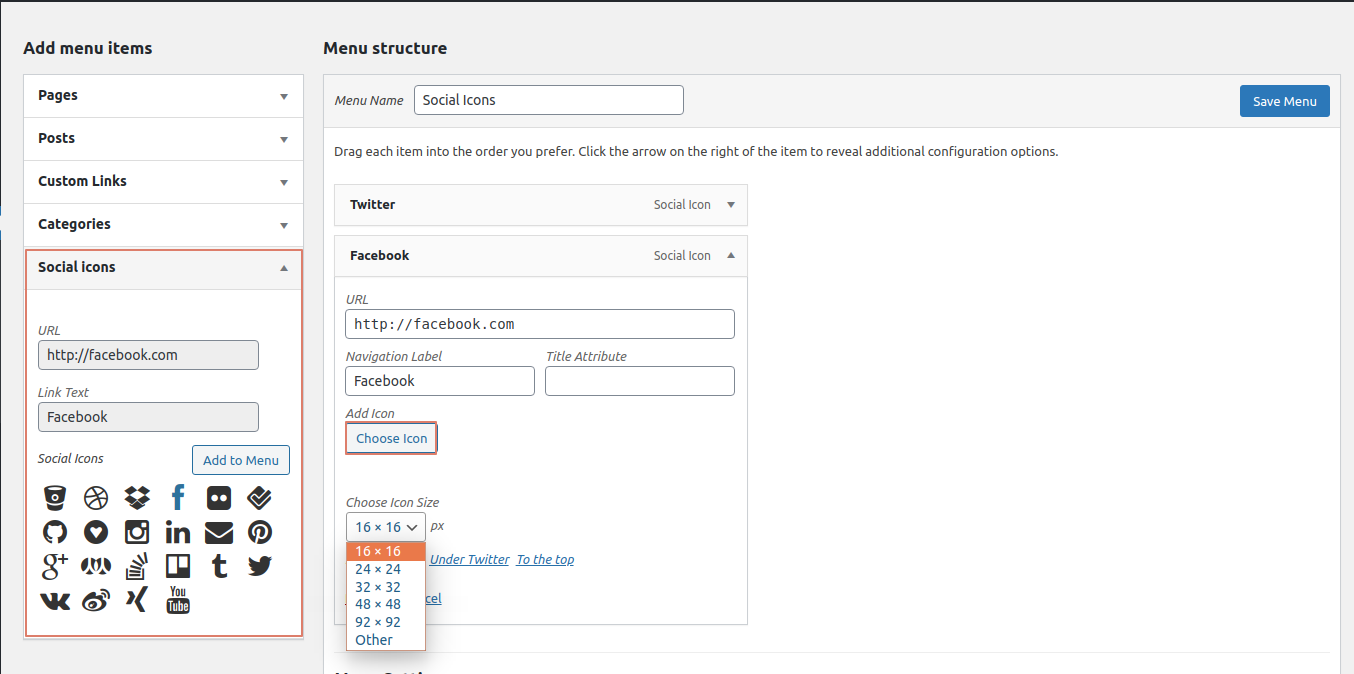
To display a custom icon, simply click the choose icon button in the menu item and adjust the size from the drop-down. You can manually define the size of the icon, too.
How to display social icons?
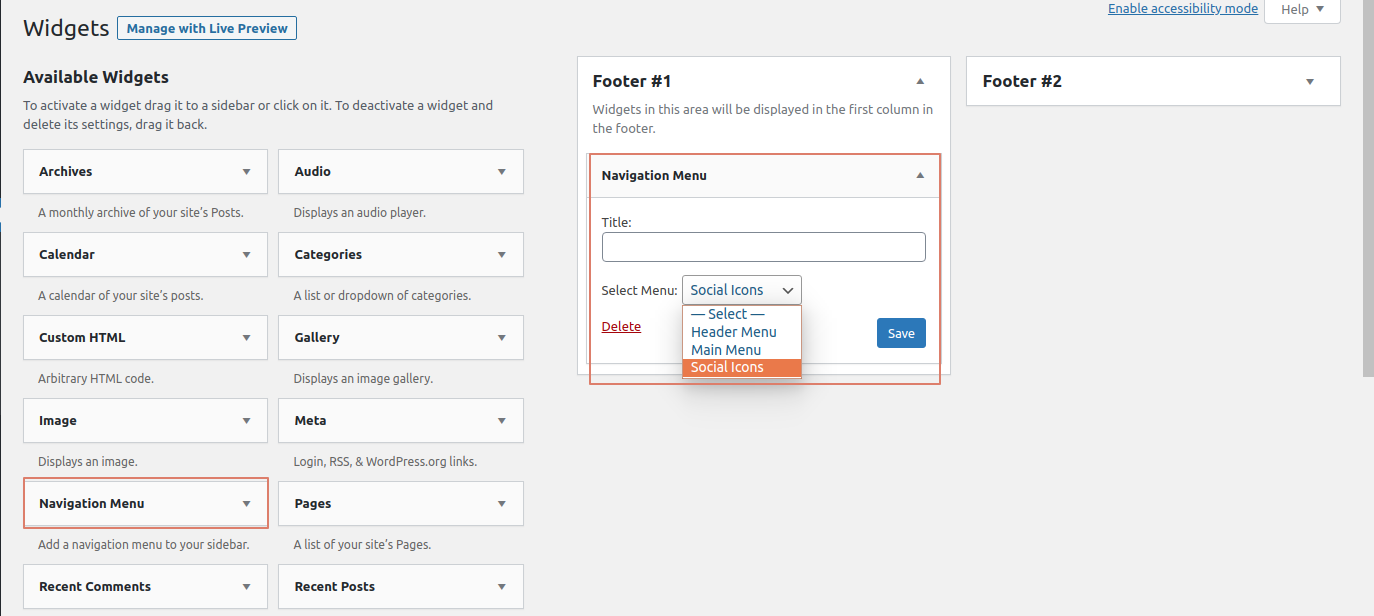
To display icons please follow these steps. 1] Create a menu under Appearance > Menus. 2] Choose any of social icon from Social Icons tab from the Add menu items column. 3] Once added the item to the menu, save it. 4] Go to Appearance > Widgets, You can drag the navigation menu/custom menu widget in your sidebars and change the settings from the widget form itself. 5] Call this sidebar to display social icons anywhere, in your site.
Changelog
Stable Release.
3.6
Stable Release.
3.5
Stable Release.
3.4
Stable Release.
3.3
Stable Release.
3.2
Stable Release.
3.1
Stable Release.
Screenshots



For developers
Is this your plugin? Show off the numbers.
Add a live badge to your site, docs or GitHub README. It updates on its own — no account needed.
FAQ
Advanced Social icons: quick answers
Straight answers, pulled from live WordPress.org data.
Live data from WordPress.org · checked Sep 30, 2026
Is Advanced Social icons free?
Yes. Advanced Social icons is free to download and use from the official WordPress.org plugin directory.
Is Advanced Social icons safe to use in 2026?
Advanced Social icons shows warning signs in 2026 — compare the alternatives below before installing. It runs on 100+ sites and was last updated 1 year ago, and scores 34/100 on our health check.
How many websites use Advanced Social icons?
Advanced Social icons is active on 100+ WordPress websites and has been downloaded 5,642 times since it launched in February 2020. It was downloaded 85 times in the last 30 days.
Does Advanced Social icons work with WordPress 7.1?
Advanced Social icons is officially tested up to WordPress 6.8.10, while the latest release is 7.1.2. It may still work, but try it on a staging site first.
What PHP version does Advanced Social icons need?
Advanced Social icons requires PHP 7.4 or higher. Most hosts run PHP 8.x today, so it works on any modern WordPress hosting.
When was Advanced Social icons last updated?
The latest version, 3.6, was released on April 24, 2025 (1 year ago).
Who makes Advanced Social icons?
Advanced Social icons is developed and maintained by Galaxy Weblinks.
Powered by PageForge
Want thousands of pages that rank like these? Build them in an afternoon.
This directory runs on the same engine as PageForge. Turn any spreadsheet, CSV or API into thousands of fast, SEO-ready WordPress pages — with schema, internal links and AI-written copy baked in.
- CSV, Google Sheets & API data sources
- AI content, schema & internal links per page
- Works with Elementor, Gutenberg, Yoast & Rank Math
- Free on WordPress.org — no credit card


