


Admin Commenters Comments Count
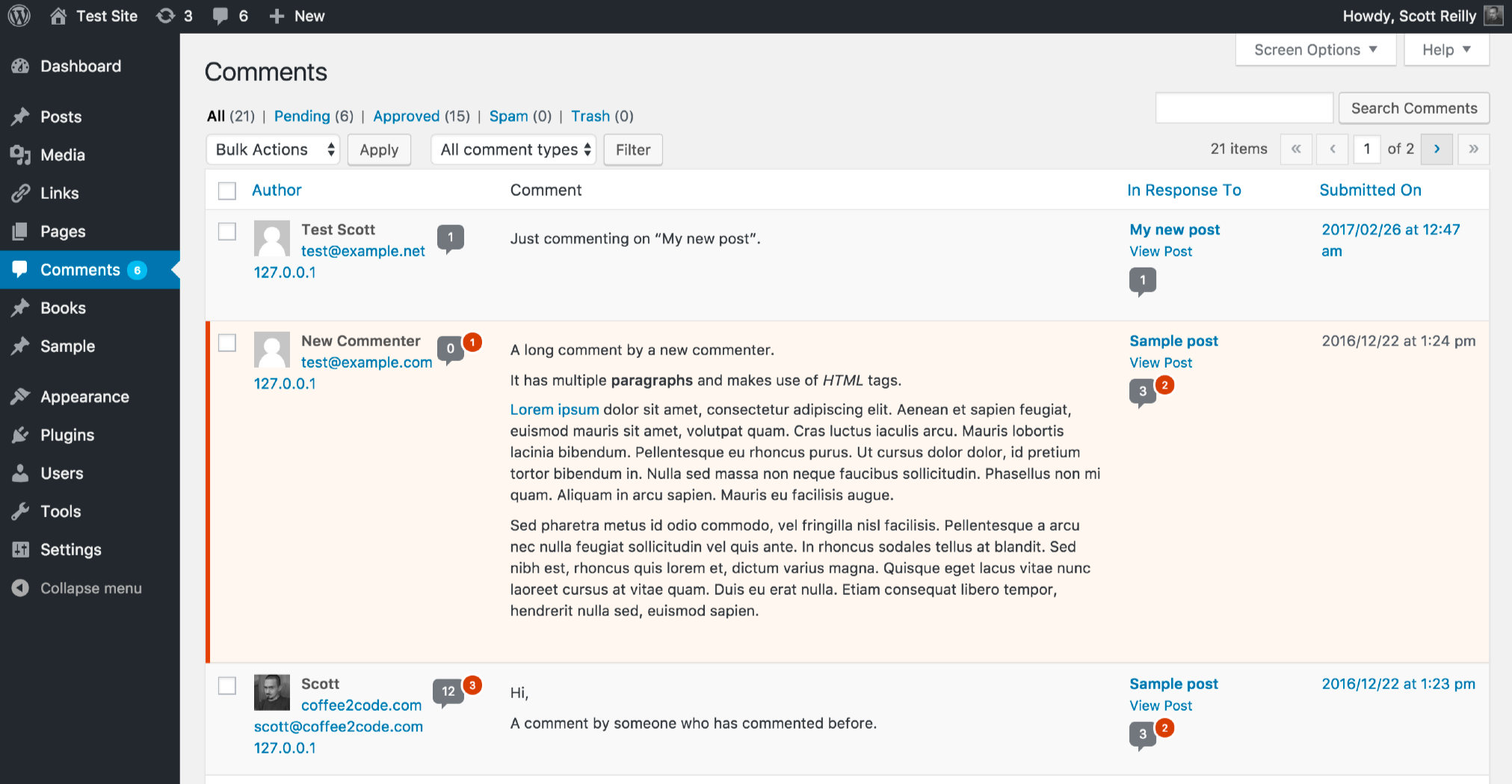
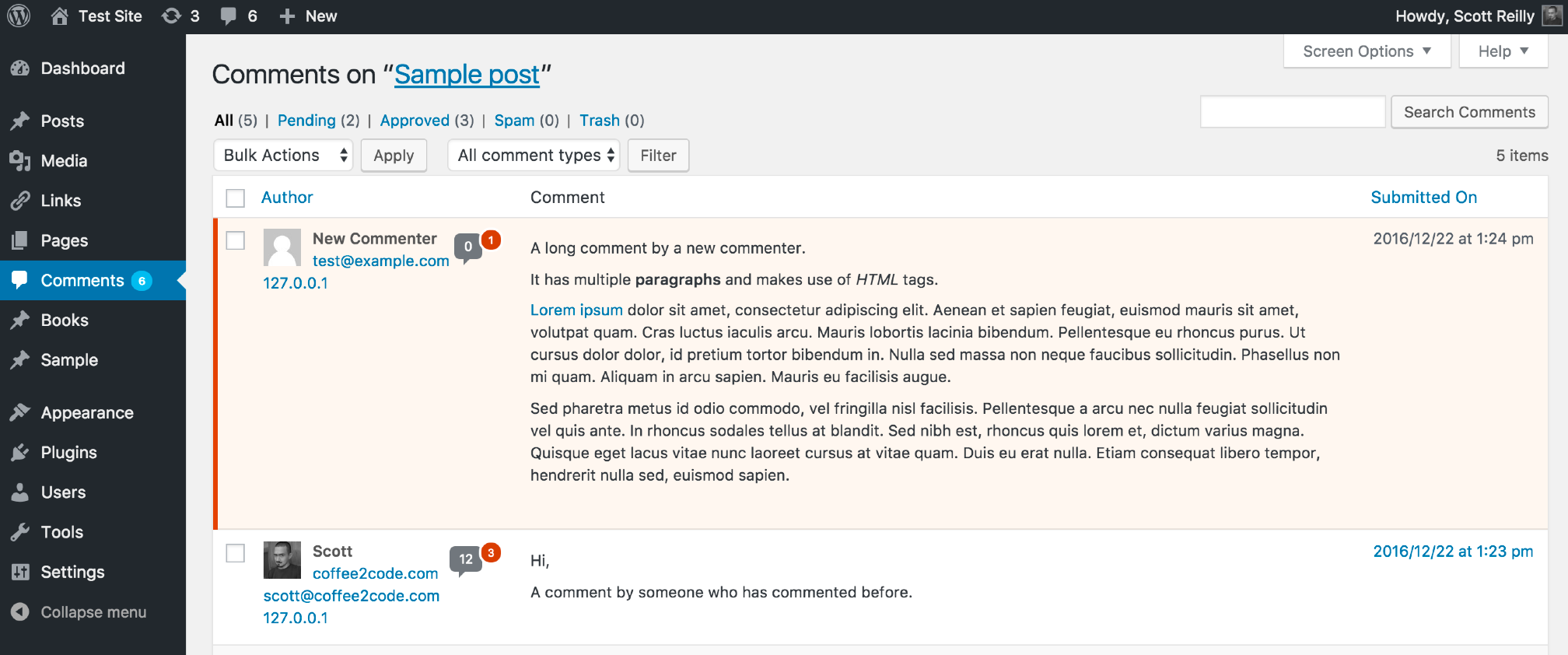
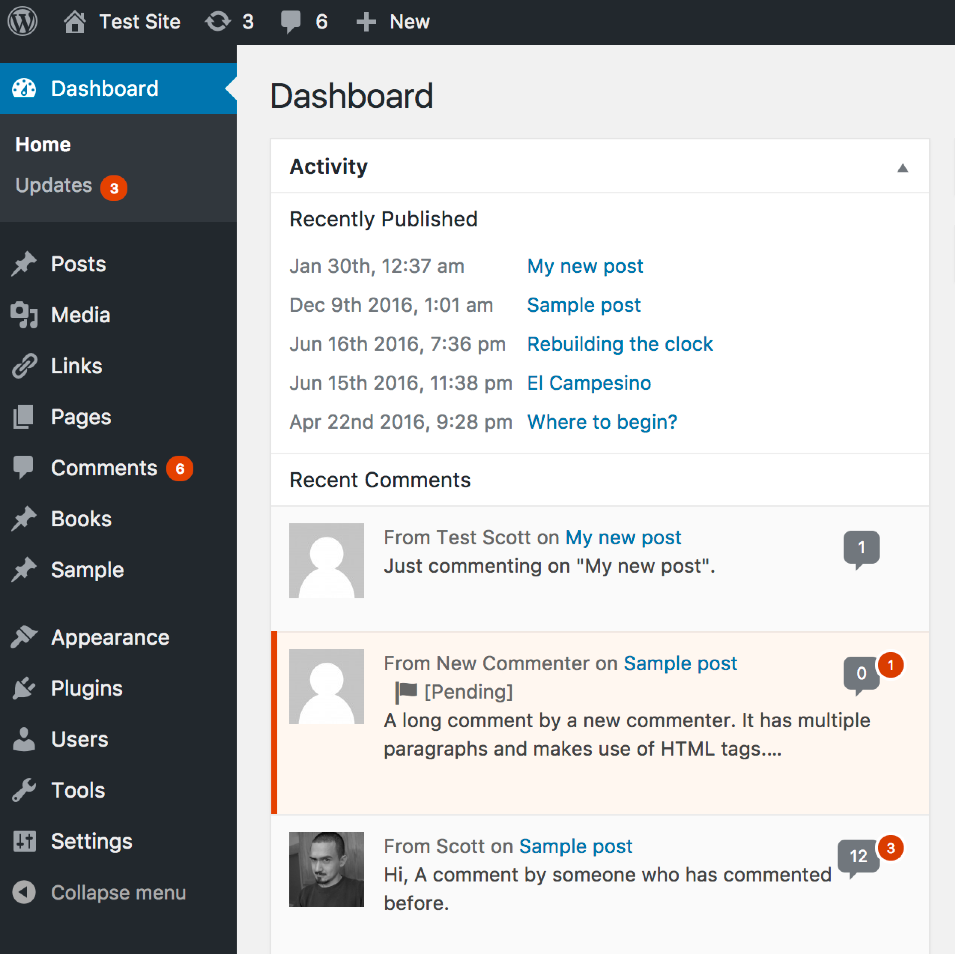
Next to all appearances of each commenter’s name in the admin, this plugin shows a comments bubble identical to the one shown for posts in the admin listing of posts. The comments bubble shows the number of approved…

Consider an alternative
Admin Commenters Comments Count shows warning signs in 2026 — compare the alternatives below before installing. It runs on 100+ sites, is rated 5/5 and was last updated 5 years ago, and scores 37/100 on our health check.
- Small user base (100+ active installs)
- No update in 5 years
- Only tested up to WordPress 5.7 (latest is 7.1)
How does it stack up?
Side-by-side on installs, updates, ratings & support


Daily downloads
Download spikes usually follow a new release — each site that auto-updates counts as a download.
Rankings
Where Admin Commenters Comments C… stands todayWordPress.org search rankings
Live position in the plugin search, top 100| Keyword | Position |
|---|---|
| comment | >100 |
| comment author | >100 |
| comment count | >100 |
| commenters | #88 |
| comments | >100 |
Version adoption
Share of active sites per release.
Rating breakdown
★★★★★★★★★★ 5 from 8 reviews
About Admin Commenters Comments Count
From the official readme · v1.9.6Description
Next to all appearances of each commenter’s name in the admin, this plugin shows a comments bubble identical to the one shown for posts in the admin listing of posts. The comments bubble shows the number of approved comments for that person and potentially a red superscript circle indicating the number of pending comments for the person (assuming they have any). The comment counts are linked to listings of comments associated solely with that particular commenter.
By default in WordPress, it is not possible to tell via a single glance whether a particular commenter has commented before or how many times the’ve commented.
This plugin adds this handy capability to the WordPress admin pages that allows you to:
- Quickly identify a first-time commenter
- Quickly identify unfamiliar commenters that have in fact commented before
- Quickly see how many total comments a particular commenter has made, and how many comments are pending
- Easily navigate to a listing of all approved comments and all moderated comments by a commenter, in order to see what post and when they last commented (or first commented), get a feel for the nature of their comments, or find something they’ve said in the past
Specifically, the linked comment count appears next to commenters in:
- The “Comments” listing of comments (including comment search results)
- The “Comments for ‘POST_TITLE'” listing of post-specific comments
- The “Discussion” box of the “Edit Post” page for a post with comments
- The “Recent Comments” admin dashboard widget
- The “Users” listing of users (as the column “Comments”)
Commenters are identified by the email address they provided when commenting. If your site does not require that commenters submit their email address when commenting, this plugin will use the commenter’s name as the identifier, though since this is a publicly viewable piece of data it’s possible that multiple people could be posting under the same “name”, so this method has the potential to be not as accurate.
Links: Plugin Homepage | Plugin Directory Page | GitHub | Author Homepage
Installation
- Install via the built-in WordPress plugin installer. Or download and unzip
admin-commenters-comments-count.zipinside the plugins directory for your site (typicallywp-content/plugins/) - Activate the plugin through the ‘Plugins’ admin menu in WordPress
Frequently asked questions
Why would I want to see a count of how many comments someone made?
There are many reasons, some of which might include: Quickly identify a first-time commenter Quickly identify unfamiliar commenters that have in fact commented before Quickly see how many total comments a particular commenter has made, and how many comments are pending Easily navigate to a listing of all approved comments and all moderated comments by a commenter, in order to see what post and when they last commented (or first commented), get a feel for the nature of their comments, or find something they’ve said in the past
How does the plugin know about all of the comments someone made to the site?
Commenters are identified by the email address they provided when making a comment. If commenters are allowed to omit providing an email address, then their name is used to identify them (though this is potentially less accurate).
Why does it report someone as having less comments than I know they’ve actually made?
Since commenters are identified by the email address they provided when making a comment, if they supply an alternative email address for a comment, the plugin treats that email address as a separate person.
How do I hide (or show) the “Comments” column in the listing of the admin Users page?
Click the “Screen Options” link in the upper-right of the page. It will slide down a form. Click (or unclick) the checkbox for “Comments” to show (or hide) the column.
Does this plugin include unit tests?
Yes.
Changelog
Bugfix update: prevented PHP warnings when running under PHP 8.
1.9.6 (2021-05-01)
- Fix: Change
__wakeup()method visibility fromprivatetopublicto avoid warnings under PHP8 - Fix: Throw an error when attempting to unserialize an instance of the class to actually prevent it from happening
1.9.5 (2021-04-22)
- Change: Note compatibility through WP 5.7+
- Change: Update copyright date (2021)
- New: Add a few more possible TODO items
1.9.4 (2020-09-13)
- Change: Convert to use of strict equality checks
- Change: Restructure unit test file structure
- New: Create new subdirectory
phpunit/to house all files related to unit testing - Change: Move
bin/tophpunit/bin/ - Change: Move
tests/bootstrap.phptophpunit/ - Change: Move
tests/tophpunit/tests/ - Change: Rename
phpunit.xmltophpunit.xml.distper best practices
- New: Create new subdirectory
- Change: Note compatibility through WP 5.5+
- Change: Tweak inline function documentation
- Change: Update list of TODO items to add some considerations to an existing item, fix a type, change sublist syntax
- Unit tests:
- New: Add tests for
add_user_column(),enqueue_admin_css(),handle_column_data()
- New: Add tests for
Full changelog is available in CHANGELOG.md.
Screenshots


For developers
Is this your plugin? Show off the numbers.
Add a live badge to your site, docs or GitHub README. It updates on its own — no account needed.
Best Admin Commenters Comments Cou… alternatives
All comment plugins →





FAQ
Admin Commenters Comments Count: quick answers
Straight answers, pulled from live WordPress.org data.
Live data from WordPress.org · checked Oct 11, 2026
Is Admin Commenters Comments Count free?
Yes. Admin Commenters Comments Count is free to download and use from the official WordPress.org plugin directory.
Is Admin Commenters Comments Count safe to use in 2026?
Admin Commenters Comments Count shows warning signs in 2026 — compare the alternatives below before installing. It runs on 100+ sites, is rated 5/5 and was last updated 5 years ago, and scores 37/100 on our health check.
How many websites use Admin Commenters Comments Count?
Admin Commenters Comments Count is active on 100+ WordPress websites and has been downloaded 19,542 times since it launched in June 2009. It was downloaded 113 times in the last 30 days.
Does Admin Commenters Comments Count work with WordPress 7.1?
Admin Commenters Comments Count is officially tested up to WordPress 5.7.20, while the latest release is 7.1.3. It may still work, but try it on a staging site first.
When was Admin Commenters Comments Count last updated?
The latest version, 1.9.6, was released on May 2, 2021 (5 years ago).
Who makes Admin Commenters Comments Count?
Admin Commenters Comments Count is developed and maintained by Scott Reilly.
What are the best alternatives to Admin Commenters Comments Count?
The most popular alternatives to Admin Commenters Comments Count are DCO Comment Attachment (5K+ installs), Bulk Delete Comments (5K+ installs) and One Click Close Comments (5K+ installs).
Powered by PageForge
Want thousands of pages that rank like these? Build them in an afternoon.
This directory runs on the same engine as PageForge. Turn any spreadsheet, CSV or API into thousands of fast, SEO-ready WordPress pages — with schema, internal links and AI-written copy baked in.
- CSV, Google Sheets & API data sources
- AI content, schema & internal links per page
- Works with Elementor, Gutenberg, Yoast & Rank Math
- Free on WordPress.org — no credit card


