


2ranq Forms
Form builder with conditional logic, multi-step forms and file uploads. Every feature free, nothing locked behind a paywall.

Solid choice
2ranq Forms is a solid plugin choice in 2026, with a few things worth checking first. It runs on 10+ sites and was last updated 1 month ago, and scores 62/100 on our health check.
- Tested with the latest WordPress (7.1)
- Small user base (10+ active installs)
- Very few reviews so far
How does it stack up?
Side-by-side on installs, updates, ratings & support



Daily downloads
Download spikes usually follow a new release — each site that auto-updates counts as a download.
Rankings
Where 2ranq Forms stands todayWordPress.org search rankings
Live position in the plugin search, top 100| Keyword | Position |
|---|---|
| conditional logic | >100 |
| contact form | >100 |
| form builder | >100 |
| forms | >100 |
| multi-step | >100 |
Version adoption
Share of active sites per release.
About 2ranq Forms
From the official readme · v1.2.0Description
2ranq Forms is a drag and drop form builder. Everything it does is free. There is
no pro tier, no trial, and no feature that stops working after a while.
What it does
- Drag and drop builder with a live preview of your real form
- 23 field types, including name, address, phone with per country checks, date, time, rating, ranking, picture choice, signature, password and file upload
- Conditional logic: show or hide any field based on what was answered earlier
- Multi-step forms with a progress bar and per step validation
- File uploads with type, size and content checks
- Entries stored in your own database, with their own screen in the dashboard
- Email notification on every entry, with a reply address taken from the form
- A Design tab with 45 ready made styles, and a setting for every colour, corner, space and button
- 13 full width sections that wrap around a form, with heading, contact details and photo
- Gutenberg block, Elementor widget and a plain shortcode
- 29 ready made forms in nine groups: start here, contact, bookings and appointments, quotes and orders, applications step by step, verification and documents, support, sign ups and events, feedback and surveys. Seven of them are split into steps
Built to stay light
Nothing is sent to the visitor on pages that have no form on them. Forms use plain
JavaScript, so jQuery is not loaded on your site because of us. No payment library
ships inside the plugin. A page with a form loads about 8 KB of stylesheet and
6 KB of script, gzipped, and the sections stylesheet is a separate file that only
loads on pages that use a section.
It works without JavaScript too
If scripts are blocked, every step is shown at once, every field is shown, and the
form submits normally. The server checks the same rules either way, so nothing is
lost and nothing slips through.
Your data stays yours
Entries are stored in a table in your own database and files in your own uploads
folder. Nothing is ever sent to us: there is no account, no licence check and no
usage report. Storing the visitor IP address can be turned off in the settings.
The plugin can connect to a small number of outside services, but every one of
them is switched off until you turn it on and enter your own keys. They are all
listed under External services below, with what is sent and when.
External services
Out of the box this plugin does not connect to any external service. Nothing is
sent to 2ranq at any point. The services below are optional: each one is off
until you switch it on in the plugin settings and enter your own keys, and each
one only sends data for the forms where you have enabled it.
If you enable one of them, personal data from that form reaches that company, so
say so in your own privacy notice.
Google reCAPTCHA
Used to stop automated spam, if you pick it as your spam check.
The reCAPTCHA script (https://www.google.com/recaptcha/api.js) is loaded in the
visitor’s browser on every page that shows a protected form, which lets Google see
the visitor’s IP address and browser. When the form is submitted, the token from
that widget and your secret key are sent from your server to
https://www.google.com/recaptcha/api/siteverify to be verified. The answers typed
into the form are never sent.
Service provided by Google. Terms of service: https://policies.google.com/terms
Privacy policy: https://policies.google.com/privacy
hCaptcha
Used for the same job as reCAPTCHA, for people who would rather not send their
visitors to Google.
The hCaptcha script (https://js.hcaptcha.com/1/api.js) is loaded in the visitor’s
browser on every page that shows a protected form, which lets hCaptcha see the
visitor’s IP address and browser. When the form is submitted, the token and your
secret key are sent from your server to https://api.hcaptcha.com/siteverify to be
verified. The answers typed into the form are never sent.
Service provided by Intuition Machines, Inc. Terms of service:
https://www.hcaptcha.com/terms
Privacy policy: https://www.hcaptcha.com/privacy
Cloudflare Turnstile
Used for the same job as reCAPTCHA, usually without showing the visitor anything
to click.
The Turnstile script (https://challenges.cloudflare.com/turnstile/v0/api.js) is
loaded in the visitor’s browser on every page that shows a protected form, which
lets Cloudflare see the visitor’s IP address and browser. When the form is
submitted, the token and your secret key are sent from your server to
https://challenges.cloudflare.com/turnstile/v0/siteverify to be verified. The
answers typed into the form are never sent.
Service provided by Cloudflare, Inc. Terms of service:
https://www.cloudflare.com/terms/
Privacy policy: https://www.cloudflare.com/privacypolicy/
Mailchimp
Used to add the person who filled in the form to one of your audiences.
After an entry is saved, and only for a form where you have chosen Mailchimp, your
server sends the email address from the entry, the name if the form has a name or
text field, and any tags you set, to
https://.api.mailchimp.com/3.0/lists//members, authenticated with
your own API key. The person is added with the status “subscribed”, so ask for
their consent on the form itself. The data centre prefix comes from your key and
the audience id is the one you enter yourself.
Service provided by Intuit Mailchimp. Terms of use:
https://mailchimp.com/legal/terms/
Privacy policy: https://mailchimp.com/legal/privacy/
Slack
Used to post every new entry into a channel, so a team sees it without opening the
dashboard.
After an entry is saved, the form name and the submitted answers are sent to the
incoming webhook address you paste into the settings, on hooks.slack.com. Nothing
is sent until that address is entered.
Service provided by Slack Technologies. Terms of service:
https://slack.com/terms-of-service
Privacy policy: https://slack.com/trust/privacy/privacy-policy
A webhook address of your own
Used to send the entry to any address you give, which is how people reach Zapier,
Make, n8n or their own system.
After an entry is saved, the entry is sent as JSON to the address you typed into
the form settings: the entry and form ids, the form name, your site address, the
time, and every submitted field. An optional secret of yours travels in an
X-Ranq-Secret header. There is no fixed provider behind this one: the address is
yours, so the terms and the privacy policy are those of whatever service you point
it at.
Credits and origin
2ranq Forms is written by Quantum, Serbia, and published by 2ranq
(https://2ranq.com). The plugin page is at
https://2ranq.com/plugins/2ranq-forms/. Copyright (c) 2026 Quantum. The plugin is
free software under the GNU General Public License, version 2 or later. The full
text is in LICENSE.txt inside the plugin folder.
The layouts are not guesswork. In August 2026 we measured seventeen live sites we
build and maintain, and the numbers decided the defaults: field height, corner
rounding, how a contact section splits into columns, and how many fields a real
contact form has. The thirteen ready made sections are copies of those sites,
rebuilt field by field, with sample details that belong to nobody: phone numbers
from the 555-01xx range and email addresses on the reserved .example domain.
Installation
- Upload the plugin folder to
/wp-content/plugins/, or install it from your dashboard. - Activate it through the Plugins screen.
- Open 2ranq Forms, pick a template or start blank, and build your form.
- Add the form to a page with the block, the Elementor widget, or the shortcode.
Changelog
Recommended for every site with page caching. A visitor sending from a cached page is no longer silently thrown away, every rejected send now shows a message and keeps the typed values, and Cloudflare Turnstile joins reCAPTCHA and hCaptcha.
1.2.0
- A send from a cached page no longer disappears. The security token in a form dies after a day, while a cache plugin can serve the same page for a week, and a visitor sending from such a page was thrown away without a word and without their text. The token is now only asked of logged-in visitors, where it does its real CSRF job. A public form is guarded by the hidden trap field and the rate limit, which do not age with the page. Contact Form 7 and Gravity Forms handle a public form the same way.
- No rejected send is silent any more. When a check says no, the visitor is told on the page, and every field gives them back what they typed: text, choices, ticks, stars, ranking order, name, address, phone. A password is never printed back, and a browser does not allow a file to be put back into a file box.
- Cloudflare Turnstile is back as the third spam check, next to Google reCAPTCHA and hCaptcha. It sat out the first release over a false positive in the directory’s machine check, not over anything in how it works. Off until you enter your own keys, like the other two.
1.1.0
- The notification about a new entry now arrives as a card: the answers one under another, the form name, the site and the time at the top, and a button that opens that entry in the dashboard.
- You pick the colour of the frame per form. The frame, the strip on top and the button take it. When the colour is light the button keeps black text on its own, so it stays readable.
- Plain text is still there, as a choice under Email notification, and it also travels inside the card for a reader that does not draw HTML.
- The link in the notification now leads to the entry itself instead of the list of entries.
- Everything a visitor typed is escaped before it enters the message, so an answer is text and never markup.
- A dropdown, a radio button and a checkbox now say what the visitor chose, not the value stored behind it.
I am already a customerinstead ofi-am-already-a-customer, in the notification, on the Entries screen, in the export and in the webhook. An answer whose choice is no longer on the form is still shown as it was stored. - The Entries screen shows every form in the picker. It stopped at a hundred, so a form below that could not be chosen, and a link straight to one of its entries opened a screen that said zero entries while the entries were listed under it.
- The Entries screen counts the entries of all forms in one query instead of one query per form.
- The version number in the code and in the plugin header now match. They had drifted apart at 1.0.1.
1.0.1
- Password protected forms now limit how many times the password can be tried from one address. Ten tries in ten minutes, adjustable with the
ranq_forms_password_rate_limitfilter. - The cookie that remembers a given password now carries SameSite=Lax.
- On a network of sites, a site added after the plugin was switched on now gets its entries table. Before this it did not, and forms on that site had nowhere to save.
- Corrected the front end size written in this readme to the measured one.
1.0.0
- First public release.
- Conditional logic, multi-step forms and file uploads.
- Gutenberg block and Elementor widget.
- Email notification on every entry.
- Phone field with a country code and per country digit checks.
- Multi-step forms with five ready made step bars.
- 23 field types, 45 ready made styles, 29 templates, 13 ready made sections.
- Optional connections to Google reCAPTCHA, hCaptcha, Mailchimp, Slack and a webhook of your own, all off by default.
Screenshots


For developers
Is this your plugin? Show off the numbers.
Add a live badge to your site, docs or GitHub README. It updates on its own — no account needed.
Best 2ranq Forms alternatives
All conditional logic plugins →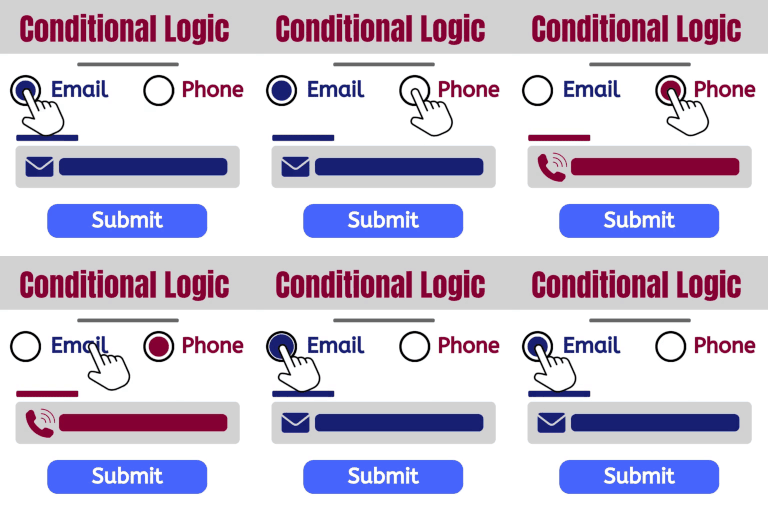





FAQ
2ranq Forms: quick answers
Straight answers, pulled from live WordPress.org data.
Source: WordPress.org
Is 2ranq Forms free?
Yes. 2ranq Forms is free to download and use from the official WordPress.org plugin directory.
Is 2ranq Forms safe to use in 2026?
2ranq Forms is a solid plugin choice in 2026, with a few things worth checking first. It runs on 10+ sites and was last updated 1 month ago, and scores 62/100 on our health check.
How many websites use 2ranq Forms?
2ranq Forms is active on 10+ WordPress websites and has been downloaded 525 times since it launched in September 2026. It was downloaded 125 times in the last 30 days.
Does 2ranq Forms work with WordPress 7.1?
Yes. The developer has tested 2ranq Forms up to WordPress 7.1.5, the latest release. It requires WordPress 6.6 or newer.
What PHP version does 2ranq Forms need?
2ranq Forms requires PHP 7.4 or higher. Most hosts run PHP 8.x today, so it works on any modern WordPress hosting.
When was 2ranq Forms last updated?
The latest version, 1.2.0, was released on October 24, 2026 (1 month ago).
Who makes 2ranq Forms?
2ranq Forms is developed and maintained by 2ranq.
What are the best alternatives to 2ranq Forms?
The most popular alternatives to 2ranq Forms are Conditional Fields for Cont… (100K+ installs), Conditional Fields for Elem… (10K+ installs) and If-So Dynamic Content (7K+ installs).
Powered by PageForge
One template and a spreadsheet. A real page for every search.
PageForge turns each row of a CSV into a WordPress page with its own title, URL, SEO fields and schema, built on the layout you already designed. Free on WordPress.org.
- CSV and XLSX, plus Google Sheets on Professional and Enterprise
- Its own title, URL, SEO fields and schema for every page
- Works with the block editor, Elementor, Divi and Avada
- Free on WordPress.org, no credit card