
☀️ Summer Sale: Extra 10% Off Annual & Lifetime Plans Use SUMMER10
Claim Deal →

Everything You Need to Scale Programmatic SEO in WordPress

PageForge features bring the operational pieces of programmatic SEO into one WordPress workflow: structured CSV or Google Sheets data, reusable templates, flexible tokens, optional AI assistance, SEO metadata, schema, internal discovery, draft-first review, and controlled publishing. Build repeatable page families without giving up WordPress ownership or rebuilding every page by hand.

Start with a small controlled campaign, validate the template and data, then expand the workflow when the page family proves useful.
Direct answer

What does PageForge actually do?

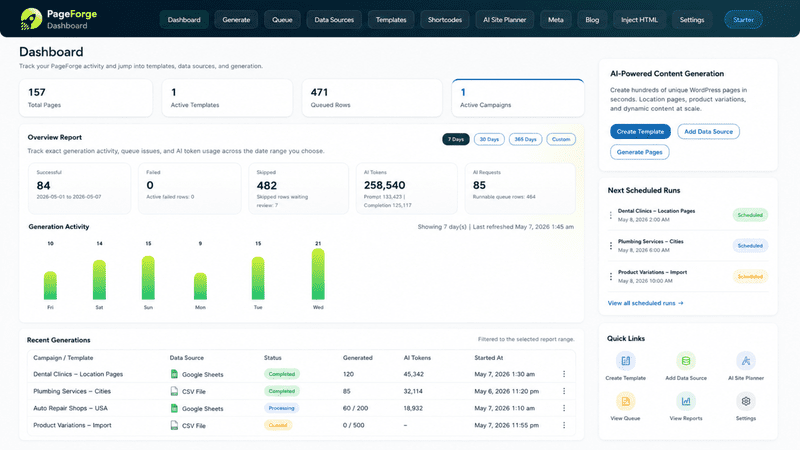
PageForge is not simply a “make lots of pages” button. It is a WordPress-native production system for repeatable page families: plan the structure, prepare source data, build the reusable layout, map dynamic fields, generate drafts, review the output, connect pages through internal architecture, and publish in controlled batches.

One governed workflow instead of a stack of disconnected handoffs

Without a governed workflow, large SEO campaigns tend to split across spreadsheets, copied WordPress pages, separate metadata tools, manual internal-link edits, AI documents, and publishing checklists. That makes systematic errors expensive: one incorrect formula, slug pattern, template section, or source field can be repeated across hundreds of URLs.

PageForge centralizes the repetitive production layer while leaving strategy and judgment with the team. Structured source fields control reusable values; WordPress owns the final content; AI remains optional; and draft-first QA gives editors a chance to catch systematic problems before they reach a larger batch.

Generate at scale

Turn structured data into editable WordPress content without manual duplication

The core PageForge workflow is deterministic: define the intended page family, prepare reliable source fields, build the reusable layout, map the values, generate representative drafts, and only then process a larger batch. This makes scale a production decision rather than a substitute for page quality.

From rows to WordPress records

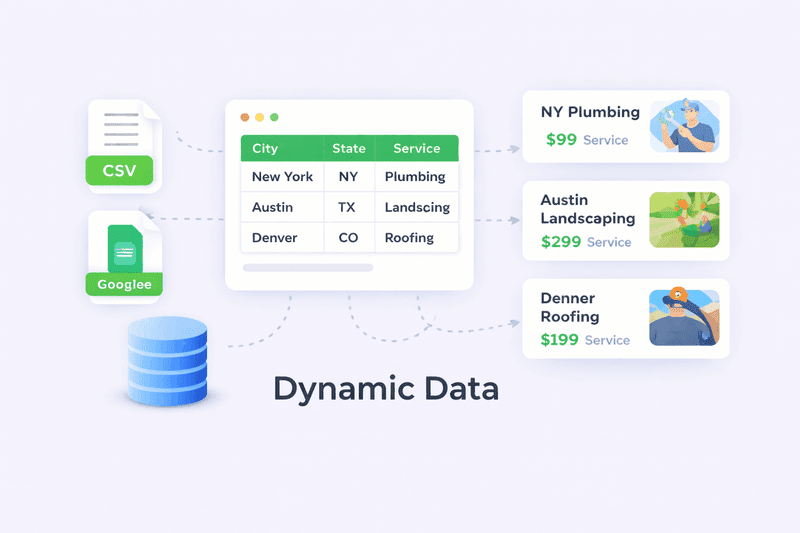
Each approved source row can become a WordPress record, while each column can supply page-specific values. That model works for location pages, directories, SaaS integrations, comparison libraries, product/use-case combinations, event pages, service-area pages, and other repeatable structures.

The important design question is not “how many pages can we create?” It is “which combinations represent a real user intent and have enough verified information to deserve a separate URL?” PageForge handles repetitive production after that decision has been made.
WordPress Bulk Page Generator

Create repeatable page families from structured data and a reusable WordPress layout. Choose the destination content type, status, URL pattern, dynamic content fields, SEO settings, and review workflow instead of duplicating pages manually.

CSV to WordPress Pages

Use CSV as a transparent source of truth for titles, slugs, page facts, content blocks, images, metadata, schema fields, links, and publishing instructions. CSV keeps the first campaign easy to inspect, version, review, and reproduce.

Google Sheets to WordPress

Move larger collaborative campaigns into a governed Google Sheets Pro workflow when teams need shared updates, review status, approvals, queues, scheduling, and ongoing source operations.

Flexible templates and dynamic tokens

Use structured columns as reusable tokens in titles, slugs, body sections, excerpts, SEO fields, schema, supported builder content, links, and campaign-specific fields. Design once, then test the variable data against edge cases before scaling.

Pages, Posts, and supported CPTs

Route generated records into the WordPress content type that matches the information architecture. PageForge supports standard Pages, Posts, PageForge content, and supported custom post type workflows instead of forcing every campaign into one page model.

Duplicate protection and controlled batches

PageForge checks intended slugs to reduce accidental duplicate creation. Combine that with representative pilot rows, draft statuses, and controlled batches so systematic errors are fixed before they become a site-wide cleanup project.
AI is optional

Use AI where it improves the workflow—not as a requirement for every page

PageForge can connect to OpenAI, Claude, Gemini, or DeepSeek when an authorized user configures a provider. The core structured page workflow does not require AI. That separation matters because many fields—addresses, prices, service names, product attributes, URLs, schema properties, approved claims—are safer when they come directly from governed data.

AI should expand useful variation, not invent the business

Use AI for the parts that benefit from language generation: drafting an answer-first introduction, adapting approved facts to a specific audience, expanding a comparison, planning supporting articles, or producing metadata candidates. Keep factual business data, compliance-sensitive statements, pricing, availability, locations, and other public claims tied to trusted sources.

For larger campaigns, reviewers should test representative long names, missing optional fields, edge-case combinations, and several search intents before approving a prompt or template for wider use. The fastest way to fix a systematic AI problem is upstream—in the instructions, source model, or template—not by manually editing hundreds of pages afterward.

AI Content Generator

Use optional AI assistance to draft page-specific sections when the structured campaign needs more than deterministic token replacement. Ground prompts in approved source facts and keep the result editable and reviewable.

AI Blog Generator

Create supporting article drafts for keyword clusters and content gaps around the page system. Review search intent, structure, facts, internal links, metadata, voice, and originality before a draft becomes public.

Bulk AI Meta Optimization

Generate and review title and meta-description candidates across larger WordPress page sets while preserving uniqueness, source facts, length constraints, brand rules, and the ability to edit individual records.

AI Site Planner

Plan page families, keyword patterns, information architecture, supporting content, and source fields before the generation step. The planner helps turn an idea into a structured campaign model rather than producing random URL permutations.
SEO infrastructure

Optimize the system around the pages, not only the words inside them

A scalable page family needs more than content. Titles, descriptions, URLs, schema, internal links, duplicate handling, discovery hubs, canonicals, status rules, and ongoing maintenance all become part of the production model. PageForge keeps those repeatable fields close to the same source and template workflow.

Metadata, schema, URLs, and internal discovery belong in the template model

If a campaign treats these fields as manual finishing work, the SEO layer quickly drifts away from the source data. A location changes but the schema does not. A title gets edited without the H1. A slug conflicts with an older page. New pages are published without any route from a hub.

PageForge is strongest when the page system is designed before generation: define the naming pattern, required metadata, schema properties, parent/hub relationships, internal-link sources, and review rules at the same time you design the template and source columns.

Schema Markup Automation

Map structured data into page-specific JSON-LD and validate that the output accurately represents the visible page. Schema supports understanding and eligibility; it is not a guarantee that a search engine will show a rich result.

Internal Linking for Programmatic SEO

Build hubs, contextual links, breadcrumbs, parent-child structures, and browsable collections so large page sets remain discoverable to users and crawlers instead of becoming isolated URLs.

SEO titles and descriptions

Create dynamic title and meta-description patterns and sync supported fields with Yoast SEO or Rank Math. Review titles at the campaign level for uniqueness, intent, truncation risk, and brand consistency.

URL and slug governance

Define predictable slug patterns, keep stable identifiers in the source, prevent accidental duplicates, and decide URL ownership before generation. Avoid publishing near-identical pages only because a keyword variation exists.

PageForge Sitemap discovery

Use the native PageForge Sitemap block or shortcode to create structured HTML hubs for generated content. These pages can help visitors browse a location, service, category, or campaign collection and give crawlers another route to important URLs.

Campaign hygiene

Use draft pilots, duplicate checks, canonicals, indexability review, consistent parent structures, accurate schema, and removal or consolidation rules as part of the campaign—not as cleanup after thousands of URLs have already been published.
Publishing and operations

Scale the release process as carefully as the generation process

Creating a thousand records is easy compared with operating them responsibly. Larger campaigns need clear statuses, queues, approvals, schedules, publication logs, update rules, and rollback thinking so the team knows what changed and why.

Controlled publishing protects both quality and infrastructure

A successful pilot does not mean every planned row should be published immediately. Release a representative batch, confirm HTTP status, canonicals, schema, mobile rendering, internal links, sitemap inclusion, and conversion paths, then expand when the system behaves as expected.

PageForge Free is suitable for controlled CSV-based validation. PageForge Pro is designed for larger operational workflows that can include Google Sheets, queues, scheduling, drip publishing, AI content per page, bulk AI metadata, and deeper reports depending on the current plan and version.

Programmatic SEO Page Scheduler

Use documented Pro queue, scheduling, drip-publishing, and larger background processing workflows when a campaign needs controlled release instead of one large publishing event.

Draft and Pending Review

Generate representative pages into a non-public state, verify token replacement and layout, and let editorial or SEO reviewers approve the page family before larger publication.

Queue processing

Break larger generation jobs into safer operations, especially when hosting resources, builder metadata, AI requests, or large source files make one synchronous process impractical.

Source and template updates

Treat campaign changes as governed operations. Identify the affected records, update the source or template, test the change on drafts, record the outcome, and avoid uncontrolled edits that make WordPress and the source disagree.

Reporting and activity

Use PageForge reporting and campaign activity as operational feedback, then combine it with Search Console, analytics, conversion data, and editorial review to decide which page families should expand, improve, consolidate, or stop.

Rollback mindset

Before a large change, know how to identify the generated records, which source version created them, what URLs are affected, and how the team would unpublish, redirect, restore, or regenerate them if a systematic issue appears.
Keep the design workflow

Reuse supported WordPress layouts instead of rebuilding every generated page

PageForge is designed to work with normal WordPress content and documented builder workflows. The template is the visual contract: finish the responsive layout, identify which elements are shared and which are dynamic, then map structured values into supported positions.

Elementor Programmatic SEO

For Elementor campaigns, build the page once with the final responsive hierarchy, conversion blocks, screenshots, proof, FAQs, and shared content. Then connect PageForge data to supported dynamic positions so every generated page inherits the same tested design system.

Because generated content remains in WordPress, an editor can still open a page later and make a page-specific improvement. The automation provides consistency; it should not remove the ability to exercise editorial judgment.

Gutenberg

Reuse supported block layouts, standard WordPress fields, and the native PageForge Sitemap block for campaign hubs and generated-content discovery.

Elementor

Clone supported Elementor layouts and replace mapped dynamic values while preserving a WordPress-native editing workflow.

Divi

Use documented Divi workflow support where the generated layout and token positions have been tested against the active site setup.

SEO plugins

Sync supported metadata fields with Yoast SEO or Rank Math rather than maintaining a second disconnected metadata store.
Use cases

PageForge works best when the page pattern is repeatable and the value is real

The ideal PageForge campaign has a clear page model, reliable data, a reusable structure, and enough page-specific information to justify separate URLs. Scale is useful when it helps users reach a more precise answer—not when it creates thousands of near-empty keyword permutations.

Local SEO without doorway-page thinking

A location template should not be a generic paragraph with only the city name changed. Useful local pages can include accurate service availability, real service areas, hours, location-specific proof, local teams, customer considerations, directions, relevant FAQs, service differences, nearby coverage, and intentional internal navigation.

Use the same principle for every other page family: decide what changes because the underlying entity or intent changes, store those facts in the source, and make the template capable of expressing those differences. If two rows have no meaningful distinction, they may not deserve two public URLs.

Local SEO and location networks

Build verified city, suburb, service-area, franchise, or multi-location pages from structured local data. Add page-specific proof, business details, service differences, location context, internal links, and a clear next action.

SaaS integration and audience libraries

Create structured integration, industry, audience, use-case, alternative, or comparison page families when every URL answers a distinct evaluation question and connects to the wider product information architecture.

Agencies and repeatable client delivery

Standardize source schemas, templates, review checklists, metadata rules, and reporting across client campaigns while keeping each client’s facts, brand voice, design system, and search strategy separate.

Directories and marketplaces

Turn verified listing data into structured WordPress records with predictable URLs, taxonomies, schema, filterable relationships, hubs, and editorial ownership. Do not create empty combinations that have no useful listing inventory.

Ecommerce category and use-case pages

Use structured product, category, audience, material, size, location, or use-case data to support meaningful landing pages where the store has enough differentiated inventory and context to serve the query.

Supporting content clusters

Use the AI Blog Generator or normal editorial workflow to create supporting guides, comparisons, FAQs, tutorials, and educational posts that link naturally into the commercial page family and help users understand the category.
The PageForge method

A controlled eight-stage workflow from idea to maintained WordPress page family

The fastest production system is the one that catches repeatable errors before they repeat. Treat each stage as a gate. When a problem affects multiple rows, correct the source, prompt, mapping, template, or publication rule upstream instead of patching each page manually.

1

Define the page family and intent

Document the user problem, URL pattern, entity or combination represented by each row, and which permutations should not become separate pages.

2

Prepare the structured source

Create stable IDs, required fields, page-specific facts, link targets, metadata inputs, schema properties, ownership fields, and approval states in CSV or the appropriate Pro source.

3

Build the reusable WordPress template

Finish the responsive design, shared copy, conversion components, conditional areas, screenshots, proof, FAQs, and navigation before mapping dynamic values.

4

Map tokens and fields

Connect source columns to titles, slugs, headings, text, images, buttons, excerpts, SEO fields, schema, post type, status, parent relationships, and other supported positions.

5

Generate a representative pilot

Choose rows that expose edge cases: long names, missing optional values, different page types, multiple links, unusual image dimensions, and rejected approval states.

6

Review the complete output

Inspect visible content, factual accuracy, H1s, URLs, canonicals, metadata, schema, internal links, mobile layout, calls to action, and indexability before approving the model.

7

Publish or schedule controlled batches

Release only approved records, use queue or scheduling workflows where appropriate, and record enough information to understand which source version produced each public page.

8

Measure, refresh, consolidate

Use search and conversion data to improve successful templates, strengthen weak pages, merge overlapping intent, remove low-value output, and keep structured source data current.
Feature explorer

Choose the PageForge workflow you want to go deeper on

This hub summarizes the complete product. The dedicated pages below explain individual workflows in more depth, including preparation, implementation, safeguards, use cases, FAQs, and publication considerations. Use them to evaluate the feature that matches your campaign rather than forcing every requirement into one generic product page.

Programmatic SEO WordPress Plugin

See the complete WordPress-native programmatic SEO workflow, from structured data and templates to metadata, schema, internal links, review, and publishing.

CSV to WordPress Pages

Turn spreadsheet rows into editable WordPress pages, posts, or supported custom post types while keeping titles, slugs, content, metadata, schema, images, and links under one source-of-truth workflow.

Google Sheets to WordPress

Use a governed Google Sheet as a collaborative Pro data source for larger production workflows, review states, controlled generation, scheduling, and update operations.

AI Content Generator for WordPress

Add optional AI-assisted page content where the campaign needs more page-specific copy while retaining human review, structured source facts, and WordPress editability.

Bulk AI Meta Optimization

Create, review, and update SEO title and meta-description candidates across larger page sets without manually opening every WordPress record.

AI Site Planner

Plan page families, keyword patterns, site structure, supporting content, and data requirements before committing to a large programmatic campaign.

WordPress Bulk Page Generator

Generate repeatable WordPress page families from structured data with reusable layouts, dynamic fields, controlled statuses, and draft-first quality assurance.

AI Blog Generator for WordPress

Create supporting blog drafts around campaign topics and keyword clusters, then review the article structure, metadata, internal links, voice, and factual accuracy before publication.

Local SEO Location Page Generator

Build useful city, suburb, service-area, franchise, and multi-location page systems from verified local data instead of manually duplicating location landing pages.

Elementor Programmatic SEO

Reuse supported Elementor layouts while mapping structured data into page-specific content, URLs, SEO fields, images, buttons, and conversion elements.

Schema Markup Automation for WordPress

Map structured source fields into page-specific JSON-LD and validate that the final schema accurately describes the visible WordPress page.

Programmatic SEO Page Scheduler

Use Pro queue, scheduling, drip-publishing, and controlled release workflows for larger campaigns instead of publishing everything at once.

Internal Linking for Programmatic SEO

Connect large page families through contextual links, hubs, breadcrumbs, parent-child structures, and PageForge discovery tools so important pages are not orphaned.
WordPress-native ownership

Your generated pages stay inside the CMS your team already controls

PageForge is designed to reduce repetitive production work without moving the campaign into a closed landing-page system. The output remains WordPress content, which keeps editing, review, publishing, redirects, templates, SEO plugins, taxonomies, permissions, and the rest of the site workflow in one familiar environment.

Edit after generation

Open an individual WordPress record and strengthen a section, correct a fact, add proof, improve the CTA, or adjust its status without regenerating the entire campaign.

Govern URLs over time

Unpublish weak pages, merge overlapping intent, preserve high-value URLs, configure redirects after inspection, and update internal links as the site architecture evolves.

Keep the template reusable

Improve the shared layout when a change should affect the whole page family, but preserve page-specific editorial control when one URL needs a unique explanation or asset.

Own the maintenance process

Store campaign source data, page IDs, status, ownership, and update rules so a future editor can understand how the page family was produced and how it should be maintained.
Choose the right operating level

Start with a controlled workflow, then automate the parts that become repetitive

PageForge Free and Pro serve the same strategic principle: structured data plus reusable WordPress templates. The difference is how much operational automation the campaign needs. Do not buy complexity before the page model, source data, and review process are proven.

PageForge Free

Use PageForge Free to validate the model.

  • CSV-based structured generation
  • Reusable templates and flexible tokens
  • Pages, Posts, and supported content types
  • Supported builder workflows
  • SEO metadata and schema workflows
  • Duplicate protection and sitemap discovery
  • Optional AI planning, meta, and supporting blog tools with your own provider key

Free is a strong fit for pilots, smaller campaigns, and teams that want to prove the workflow before adding deeper automation.

PageForge Pro

Use PageForge Pro when operations become the bottleneck.

  • Google Sheets workflows
  • Larger generation automation
  • Queues and scheduled generation
  • Drip and scheduled publishing
  • AI content for individual generated pages
  • Bulk AI metadata workflows
  • Deeper reports and planning outputs
  • Source, token, and template update workflows
  • Larger agency and multi-site operations

Specific limits and entitlements can change by plan or version, so check the live pricing page before committing to a fixed capability.

Why PageForge

Consolidate the repetitive production layer without pretending automation replaces SEO judgment

The main PageForge advantage is workflow consolidation. A strategy still needs keyword research, search-intent decisions, useful page-specific information, editorial review, authority, links, technical health, and maintenance. PageForge makes the repeatable WordPress production layer faster and more governable so the team can spend more time on those decisions.

One source model

Keep page-specific facts, naming patterns, URLs, metadata inputs, schema properties, links, and review states in a structured source instead of scattering them across manual page edits.

One reusable design system

Build the responsive page once, test it against difficult values, and reuse the proven structure rather than duplicating a page and hoping every manual edit remains consistent.

Optional AI where it adds value

Call language models for planning, metadata, supporting articles, or page-specific copy when needed. Keep deterministic business facts deterministic.

SEO fields in the production workflow

Treat titles, descriptions, schema, internal discovery, URL patterns, and duplicate handling as part of generation rather than disconnected cleanup tasks.

Controlled publication

Generate drafts, review representative rows, queue larger jobs, schedule releases, and maintain a record of the campaign instead of pushing every possible URL live immediately.

Normal WordPress output

Keep the final records in WordPress so the team retains familiar editing, roles, templates, SEO plugins, taxonomies, redirects, and long-term ownership.
Workflow comparison

The difference is not only how pages are created—it is how the campaign is governed afterward

Choose the simplest system that meets the operational requirement. Manual work is sometimes correct. A basic importer may be enough for a deterministic migration. PageForge becomes valuable when generation, SEO fields, AI assistance, internal architecture, review, and publishing controls need to operate as one repeatable WordPress workflow.

Manual WordPress duplication

Works for a handful of pages but becomes difficult to keep URLs, content, metadata, schema, links, and updates synchronized as the page family grows.

Best for: one-off or highly bespoke pages.

Basic importer / bulk page tool

Moves data into WordPress faster, but may leave planning, AI, metadata, schema, internal discovery, scheduling, review, and ongoing maintenance in separate workflows.

Best for: simple deterministic imports with limited operational needs.

PageForge governed workflow

Connects structured data, reusable templates, supported SEO fields, schema, internal discovery, optional AI, draft review, and deeper Pro publishing operations around one repeatable WordPress page system.

Best for: repeatable SEO page families that need governance as well as generation.

SEO quality safeguards

Scale only the page systems that deserve to exist

Automation is not automatically good or bad for SEO. The risk comes from using scale to publish thin, repetitive, inaccurate, or unnecessary URLs. PageForge should be used as a governed production tool: useful page model first, reliable data second, reusable template third, controlled generation fourth.

The minimum quality gate before a large campaign

  • Start with intent, not keyword permutations. A separate URL should answer a distinct need or represent a real entity, location, product, audience, service, or comparison.
  • Store page-specific information. The template can be shared, but the page needs verified values that make it useful on its own.
  • Test representative rows first. Include edge cases before approving the template or prompt for a larger run.
  • Use draft-first QA. Review content, links, URLs, metadata, schema, images, mobile layout, and conversion actions together.
  • Do not publish every possible combination. Exclude weak, empty, duplicate, or overlapping rows even when the generator can technically create them.
  • Keep human approval for important claims. AI or source automation should never invent regulated, contractual, pricing, medical, financial, legal, or otherwise sensitive public statements.
  • Measure and prune. Strengthen pages that prove useful, consolidate overlapping intent, and remove page families that do not serve users.
  • No ranking guarantees. Search engines decide crawling, indexing, and ranking; PageForge controls production, not those outcomes.
Frequently asked questions

PageForge feature and workflow FAQs

These answers describe the current public PageForge product positioning. Plan-specific entitlements can change over time, so fixed limits and automation availability should be checked against the live pricing page before publication or client commitments.

What is PageForge?

PageForge is a WordPress-native programmatic SEO and bulk page generation system. It combines structured data, reusable WordPress templates, flexible dynamic tokens, SEO metadata, schema, internal-link discovery, publishing controls, and optional AI tools so teams can create and manage repeatable page families without manually rebuilding every page.

Can PageForge create Pages, Posts, and custom post types?

Yes. The current public PageForge workflow supports WordPress Pages, Posts, and supported custom post types. The exact destination should be chosen based on the site architecture, template, taxonomy, and editorial workflow rather than using one content type for every campaign.

Does PageForge work from CSV files?

Yes. CSV is the core structured-data workflow in PageForge Free. Each CSV row can represent an intended WordPress record, while CSV columns can supply titles, slug inputs, content fields, excerpts, metadata, schema values, images, links, and other reusable values mapped into the template.

Does PageForge connect Google Sheets to WordPress?

Google Sheets is a PageForge Pro workflow. It is useful when several team members maintain a shared source, review fields, or campaign status. A governed sheet should still use stable IDs, protected columns, validation rules, and draft-first testing before larger publishing operations.

Does PageForge work with Elementor, Gutenberg, and Divi?

PageForge supports standard WordPress content and documented builder workflows including Gutenberg, Elementor, and Divi. The safest process is to finish and test the reusable responsive layout first, then map dynamic fields into supported content positions and review representative generated pages on desktop, tablet, and mobile.

Do I need AI to use PageForge?

No. AI is optional. The core CSV and reusable-template workflow can operate without an AI provider. AI tools are available for planning, metadata, supporting blog drafts, and deeper Pro content workflows when a configured provider is used.

Which AI providers can PageForge use?

The current public PageForge listing documents support for OpenAI, Claude, Gemini, and DeepSeek through user-supplied API credentials. Provider availability, models, usage limits, billing, privacy, and regional availability are controlled by the selected external service.

Can PageForge create SEO titles, descriptions, and schema?

Yes. PageForge supports dynamic SEO title and meta-description patterns, supported Yoast SEO and Rank Math metadata fields, and schema output for generated pages. The final metadata and JSON-LD should still be reviewed to confirm that each page is unique where required and accurately represents its visible content.

How does PageForge help with internal linking?

PageForge supports structured internal discovery through the native PageForge Sitemap block and shortcode, and campaigns can also use contextual links, hub pages, breadcrumbs, parent-child relationships, and related-page sections. Internal linking should reflect user navigation and site hierarchy, not simply connect every page to every other page.

Can PageForge create local SEO location pages?

Yes. PageForge is well suited to repeatable local page families such as service-and-city pages, service-area pages, franchise locations, multi-location businesses, and other location combinations. Every public page should contain verified page-specific information and a useful reason to exist beyond swapping a location keyword.

Can I generate pages as drafts before publishing?

Yes. Draft-first generation is one of the safest ways to launch a programmatic campaign. Start with representative rows, inspect content, URLs, media, metadata, schema, internal links, conversion paths, and responsive behavior, then correct systematic issues in the source or template before releasing a larger batch.

Can PageForge schedule or drip-publish pages?

Queue processing, scheduling, drip publishing, and larger automation workflows are documented PageForge Pro capabilities. Availability can depend on the active plan and version, so the live pricing and product screens should be checked before making plan-specific commitments to a client or publishing fixed limits on a marketing page.

Can I edit PageForge-generated pages later?

Yes. Generated output remains WordPress content. Editors can open the page or post, update content, change its status, add manual improvements, redirect it, unpublish it, or remove it according to the normal WordPress workflow and the site’s SEO governance.

Does PageForge guarantee rankings or indexation?

No. No plugin can guarantee search rankings, crawling, or indexation. PageForge reduces repetitive WordPress production work and helps keep large campaigns structured. Search performance still depends on intent match, page usefulness, originality, technical health, internal links, authority, competition, crawlability, and ongoing maintenance.

Who is PageForge best for?

PageForge is useful for SEO teams, agencies, local and multi-location businesses, SaaS companies, ecommerce stores, directories, affiliate projects, marketplaces, publishers, and other WordPress sites that have a repeatable page pattern backed by reliable structured data and a clear review process.

Start with a controlled pilot

Build the first page family, review the output, then scale what works

Install PageForge Free, create a small CSV with representative rows, build the reusable template, and generate drafts first. When the workflow is proven and operations become the bottleneck, compare Pro plans for Google Sheets, queues, scheduling, larger AI workflows, reporting, and deeper automation.


Sarah is here to help!
Hi there! 👋 Need help finding what you're looking for?
Sarah
Sarah
Online & Ready to Help
Hi there! 👋 Need help finding what you're looking for?

We'll use this to continue our conversation

Just now ✓ Verified

Join 500+ SEO Pros Scaling Their Strategy

Get exclusive programmatic SEO tactics, AI content workflows, and the latest PageForge updates delivered straight to your inbox. Stay ahead of the algorithm.

We care about your data in our privacy policy.