


Serious Slider
Serious Slider is a free highly efficient SEO friendly fully translatable accessibility ready image slider for WordPress. Seriously!

Solid choice
Serious Slider is a solid plugin choice in 2026, with a few things worth checking first. It runs on 20K+ sites, is rated 3.4/5 and was last updated 1 month ago, and scores 64/100 on our health check.
- Proven at scale on 20K+ active sites
- Tested with the latest WordPress (7.1)
- Low rating so far — 3.4/5 from only 8 reviews
How does it stack up?
Side-by-side on installs, updates, ratings & support



Daily downloads
Download spikes usually follow a new release — each site that auto-updates counts as a download.
Rankings
Where Serious Slider stands todayWordPress.org search rankings
Live position in the plugin search, top 100| Keyword | Position |
|---|---|
| image slider | #30 |
| responsive slider | #17 |
| slider | #19 |
| slideshow | #29 |
| wordpress slider | #10 |
Version adoption
Share of active sites per release.
Rating breakdown
★★★★★★★★★★ 3.4 from 8 reviews
About Serious Slider
From the official readme · v1.4.2Description
Overview
Serious Slider is a free highly efficient SEO friendly fully translatable accessibility ready image slider for WordPress.
Create beautiful, responsive slideshows within seconds. Use minimum styling and JavaScript with hardware accelerated CSS3 transitions to create a really fluid experience.
Serious Slider uses the very familiar WordPress dashboard interface for creating slides and sliders so there’s absolutely no learning curve. You just select the media image and press “Create Slider”. After that it’s like adding or editing WordPress posts, using featured images and other meta information like buttons and URLs.
Serious Slider works with all WordPress themes and has been designed to integrate seamlessly with our own themes.
Main Features
- Create unlimited sliders with unlimited slides. The only limit is your imagination on how to use them.
- Add titles, texts, buttons and links to each slide. All slide texts support HTML tags and even other shortcodes.
- Easy to use media button. Effortlessly add slideshows in posts, pages or custom post types via the “Add Slider” media button in the WordPress text editor. Then just select your desired image slider from a dropdown list, no need to remember or copy slider IDs
- Auto-generated Shortcodes and PHP integration. Use the auto generated shortcode to integrate slideshows with themes or other plugins. Copy-paste the auto generated PHP code to integrate with custom code.
- Serious Slider Block. Insert slideshows in the content managed with the block editor
- Serious Slider Widget. Display slideshows in sidebars via the classic Serious Slider widget
- Use multiple sliders in the same page.
- Use multiple instances of the same slider with distinct visual configurations.
- Familiar admin user interface. Create sliders and slides with the familiarity of managing posts and categories, without having to learn another user interface
- Lightweight and powerful. Only minimum JavaScript and CSS3 are being loaded on your site
- Fast slider creation. Create awesome, responsive WordPress slideshows in a matter of seconds
- Browser compatibility. The image slider looks and behaves great on various devices and browsers
- 8+ Appearance Styles. Choose from different appearance styles to make the navigation arrows, bullets, buttons and colors match your site.
- 7+ Transition Effects. Fade, Slide, Overslide, Underslide, Parallax, Horizontal flip and Vertical Flip.
- 5+ Caption Text Animations. Choose how caption text appears on the slide: Fade, Slide, Blur and Zoom In/Out.
- Highly customizable. Customize image sizes, timings, text size and alignment, text shadow, background color and accent color.
- Individual options for each slider. All the customization options and set individually for every slider and locally for each slider block instance.
- Translation ready. Every single line of text in the slider is translatable both in the front-end as well in the back-end. Compatible with multi-language plugins (WPML, qTranslate, PolyLang).
- SEO friendly. Built with search engines in mind, the slider uses correct HTML semantics.
- Accessibility ready.
- Once click demo content. It’s that easy, you’re one click away from having a working image slider to get you started.
Customization Features
- Add individual URLs to target specific pages
- Add slide buttons with customizable link, link text and “open in new window” option
- Choose how to make text over images more visible: either add text shadow, multiline text background or full caption background
- Choose from 8 slider styles, 7 transition effects and 5 caption text animations
- Customize block instances separately from the general slider options
- Customize your slider’s transition duration and delay
- Choose between auto-height and fixed size for your images
- Customize your slider’s font size, text alignment, caption size and accent color
Functionality Features
- Our image slider uses WordPress core functionality only, providing you with the familiar WordPress interface for creating both slides and slides.
- Easily transfer existing slides from one slider to another
- Schedule slides to automatically become visible at any time in the future.
- Quickly restore deleted slides from the Trash
- Use WordPress’ text editor to add HTML content to your slides
- Bulk edit slides and slides
Installation
Automatic installation
- Navigate to Plugins in your dashboard and click the Add New button.
- Type in “Cryout Serious Slider” in the search box on the right and press Enter, then click the Install button next to the plugin title.
- After installation Activate the plugin, look for Serious Slider in the dashboard menu to set up a slider.
Manual installation
- Upload
cryout-serious-sliderfolder to the/wp-content/plugins/directory - Activate the plugin through the ‘Plugins’ menu in WordPress
- Navigate to Serious Slider in the dashboard menu to set up a slider.
Creating the first slider
- Create a sample slider using the plugin’s demo content functionality, or
- Follow our slider set-up tutorial
Changelog
1.4.2
Release date – 2026.10.05
- Restored shortcode support within slide content while retaining shortcode recursion protection
- Added some missing parameters in shortcode hints list
- Fixed some more Plugin Check validation issues
- Tested for compatibility with WordPress 7.1
1.4.1
Release date – 2026.08.10
- Fixed stored XSS vulnerability allowing an authenticated user (with at least contributor level) to inject unfiltered data through shortcode attributes – reported by WordFence
- Fixed fatal error in inc/blocks.php with Plesk WP Toolkit Scan and WP_CLI use
- Hardened validation of shortcode attributes, slider ID in widget call, image list in slider generation code, option values in taxonomy parameters saving
1.4.0
Release date – 2026.07.05
- Added block functionality with slides preview and options control
- The slider block can be customized with local options separate from the slider’s set options
- Full control of all the slider options through the block editor panels
- Quick links to the (classic) slider and slides management sections
- Optimized slider-specific styling and JavaScript generation and enqueuing processes
- Added recursion protection in slide content output (mainly to protect against slider-within-slider in the block editor) – this removes shortcode support within the slide content
- Rewrote the slider meta options interface to make use of the new centralized options code
- Bumped required WordPress version to 5.0 as that’s the minimum version integrating blocks functionality
1.3.2
Release date – 2026.06.10
- Fixed indicators navigation not working since 1.3.0 (due to over-sanitization)
- Reworked sanitization for sliders styling and scripting to better meet Plugin Check (PCP) validation
- Add support for overriding all configuration parameters in shortcode call and added usage hint on the admin screen
- Added dark 2 color scheme
- Tested for compatibility with WordPress 7.0
1.3.1
Release date – 2026.04.03
- Fixed slides buttons missing in 1.3.0 due to a typo
- Fixed broken ‘slide’ transition animation in 1.3.0 due to over-sanitized styling
- Fixed slider styling not being instance-specific and last styling applying to all instances placed on the same page
1.3.0
Release date – 2026.03.12
- Fixed insufficient permissions check in slide image handling code allowing users with at least subscriber level access to delete images from slider – reported by Legion Hunter to patchstack.com and kr0d to Wordfence
- Rewrote initialization to resolve the ‘_load_textdomain_just_in_time() was called incorrectly’ notice introduced by WordPress 6.7
- Hardened permissions checks in functions handling sliders configuration parameters
- Improved sanitization and escaping according to the Plugin Check (PCP) recommendations
- Improved slider generation workflow to reset form after dynamic creation
- Improved performance by loading scripts in footer
- Fixed jQuery.isFunction() and jQuery.fn.bind() deprecation notices
- Tested for compatibility with WordPress 6.9
- Bumped required PHP version to 7.0
Screenshots


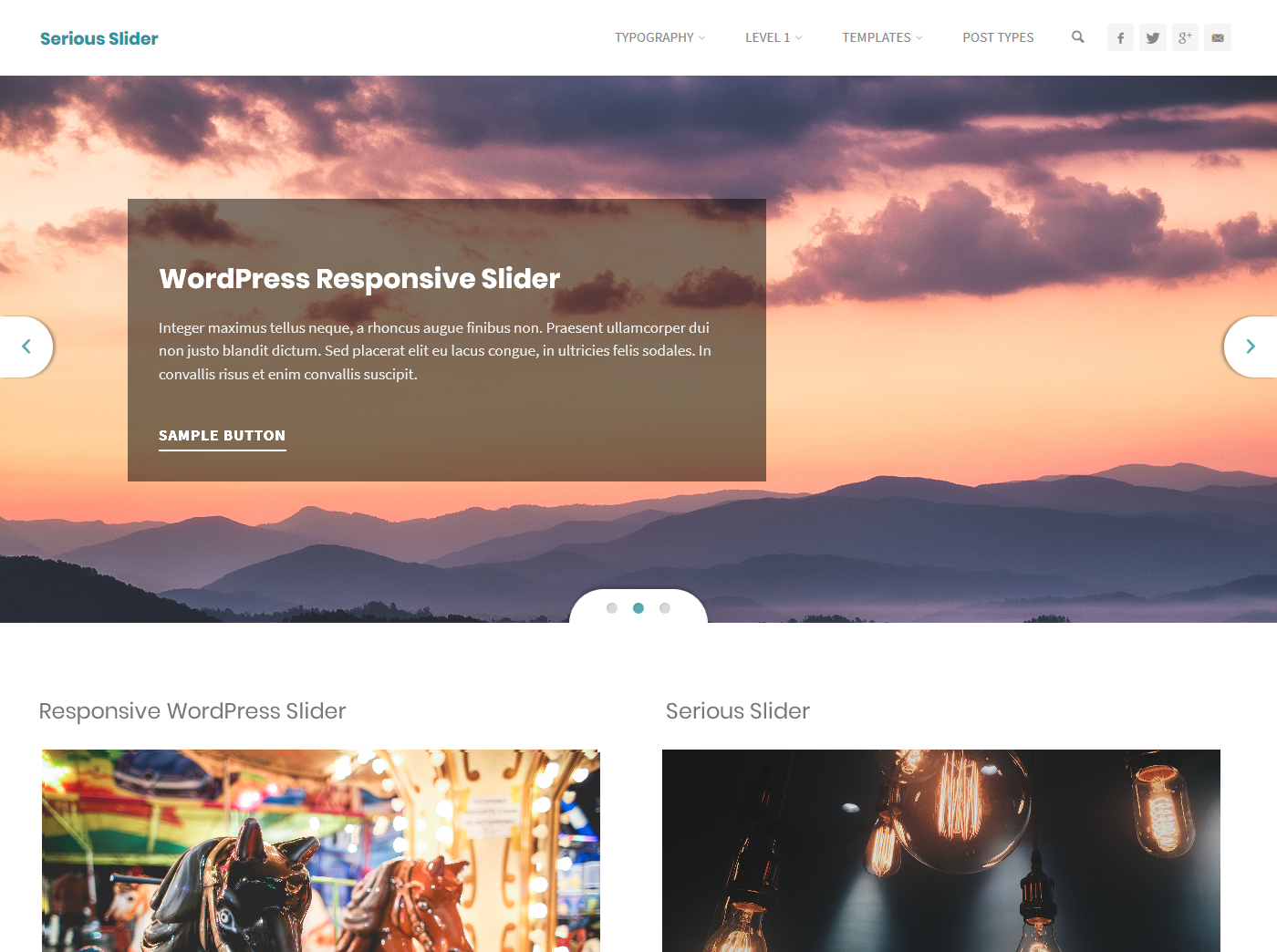


For developers
Is this your plugin? Show off the numbers.
Add a live badge to your site, docs or GitHub README. It updates on its own — no account needed.
Best Serious Slider alternatives
All image slider plugins →





FAQ
Serious Slider: quick answers
Straight answers, pulled from live WordPress.org data.
Source: WordPress.org
Is Serious Slider free?
Yes. Serious Slider is free to download and use from the official WordPress.org plugin directory.
Is Serious Slider safe to use in 2026?
Serious Slider is a solid plugin choice in 2026, with a few things worth checking first. It runs on 20K+ sites, is rated 3.4/5 and was last updated 1 month ago, and scores 64/100 on our health check.
How many websites use Serious Slider?
Serious Slider is active on 20K+ WordPress websites and has been downloaded 572,991 times since it launched in May 2016. It was downloaded 4,184 times in the last 30 days.
Does Serious Slider work with WordPress 7.1?
Yes. The developer has tested Serious Slider up to WordPress 7.1.4, the latest release. It requires WordPress 5.0 or newer.
What PHP version does Serious Slider need?
Serious Slider requires PHP 7.0 or higher. Most hosts run PHP 8.x today, so it works on any modern WordPress hosting.
When was Serious Slider last updated?
The latest version, 1.4.2, was released on October 5, 2026 (1 month ago).
Who makes Serious Slider?
Serious Slider is developed and maintained by CryoutCreations.
What are the best alternatives to Serious Slider?
The most popular alternatives to Serious Slider are Smart Slider 3 (800K+ installs), Slider, Gallery, and Carous… (500K+ installs) and Prime Slider (100K+ installs).
Powered by PageForge
One template and a spreadsheet. A real page for every search.
PageForge turns each row of a CSV into a WordPress page with its own title, URL, SEO fields and schema, built on the layout you already designed. Free on WordPress.org.
- CSV and XLSX, plus Google Sheets on Professional and Enterprise
- Its own title, URL, SEO fields and schema for every page
- Works with the block editor, Elementor, Divi and Avada
- Free on WordPress.org, no credit card