


Debugger & Troubleshooter
Debug and troubleshoot WordPress safely: simulate plugin and theme changes, log and group errors, and find what slows your pages down.

Solide Wahl
Debugger & Troubleshooter is a solid plugin choice in 2026, with a few things worth checking first. It runs on 90+ sites, is rated 5/5 and was last updated 16 hours ago, and scores 75/100 on our health check.
- Actively developed — last update 16 hours ago
- Getestet mit dem neuesten WordPress (7.1)
- Kleine Benutzerbasis (90+ aktive Installationen)
- Bisher sehr wenige Bewertungen
Wie stapelt es sich?
Side-by-side bei Installationen, Updates, Bewertungen und Support



Tägliche Downloads
Download-Spitzen folgen normalerweise einer neuen Version - jede Website, die automatisch aktualisiert wird, gilt als Download.
Ranglisten
Where Debugger & Troubleshooter stands todayWordPress.org Ranglisten suchen
Live-Position in der Plugin-Suche, Top 100| Stichwort | Position |
|---|---|
| compatibility | >100 |
| debug | #54 |
| Entwickler | >100 |
| PHP Info | #32 |
| troubleshoot | #10 |
Versionsübernahme
Anteil aktiver Sites pro Release.
Bewertungsaufschlüsselung
★★★★★★★★★★ 5 from 1 reviews
About Debugger & Troubleshooter
From the official readme · v1.6.1Beschreibung
The “Debugger & Troubleshooter” plugin provides essential tools for WordPress site administrators to diagnose and resolve issues efficiently. It offers a dedicated section in the WordPress dashboard that displays comprehensive site health information and powerful debugging toggles.
Hauptmerkmale:
- Troubleshooting Mode: Activate a unique, session-based “Troubleshooting Mode” for your current browser session. This means any changes you make are temporary and only visible to you. This mode allows you to:
- Simulate Plugin Deactivation: Selectively “deactivate” plugins. The plugin’s assets and code will be disabled for your session only.
- Simulate Theme Switching: Preview any installed theme, while the public-facing site continues to use the active theme.
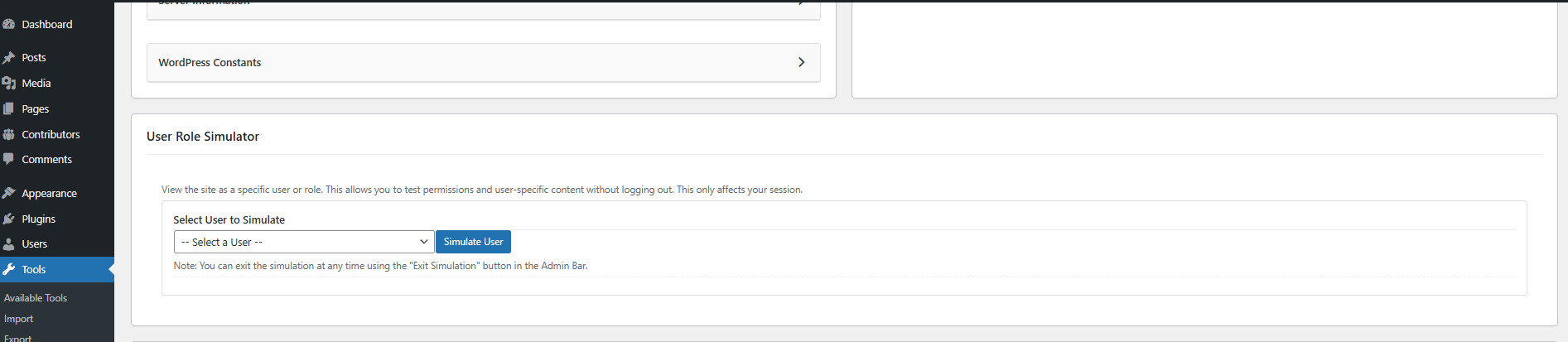
- User Role Simulator: View your site as any other user or role (e.g., Subscriber, Editor) to test permissions and content visibility. This is session-based and includes a safe “Exit” button in the Admin Bar.
- Live Debugging: Start logging PHP errors, warnings, notices and WordPress deprecation notices with a single click, without editing
wp-config.php. Errors are logged without being displayed on the site. - Smart Log Viewer: Repeated errors are grouped with a count, filterable by level (Fatal, Warning, Notice, Deprecated, Database) and by source, and searchable. Every entry shows which plugin or theme caused it, even when the error is thrown inside WordPress core (identified from the stack trace). Includes auto-refresh, download and clear.
- Performance Profiler: See why a page is slow. For your own requests only, it records load time, memory, a hook timeline, database query time per plugin, slow and duplicate queries, external HTTP requests and per-plugin load time. A live summary appears in the admin bar.
- Comprehensive Site Information: Get a quick, organized overview of your WordPress environment in collapsible cards. This includes detailed PHP, Database, and Server information, a full list of all themes and plugins with their status, and important WordPress constants.
- Copy to Clipboard: A one-click button allows you to copy all the site information, making it incredibly easy to share with support forums or developers.
- SMTP / Mail Debugger: Send a test email and see the exact error if delivery fails.
- PHP Compatibility Checker: Scan WordPress core, your active theme and active plugins for deprecated functions and syntax that may break when upgrading PHP. Results displayed in a responsive card layout with clear warnings and incompatibility counts.
- Conflict Checker: Systematically identify plugin conflicts through a binary search process. Narrow down suspect plugins by answering whether each group resolves the issue, all within a safe session-based mode.
- Safe Debugging & Cache Bypassing: All troubleshooting actions are session-based. The plugin automatically attempts to bypass caching when Troubleshooting Mode is active, ensuring your changes are reflected instantly.
- User-Friendly Interface: An intuitive dashboard interface makes it easy to access all features.
- Admin Notices: Clear notices alert you when Troubleshooting Mode is active.
This plugin is an invaluable tool for developers, site administrators, and anyone who needs to debug WordPress issues without risking site downtime or affecting user experience.
Verwendung
Once the plugin is installed and activated, navigate to Tools > Debugger & Troubleshooter in your WordPress dashboard.
1. Site Information
The top section provides a comprehensive overview of your WordPress environment, organized into collapsible cards that are closed by default. Click on any card title to expand it and view the details.
2. Troubleshooting Mode
This session-based feature allows you to simulate theme switches and plugin deactivations without affecting your live website for other visitors.
3. User Role Simulator
Safely view your site as another user or role (e.g., “Subscriber” or “Editor”) without knowing their password. This is perfect for testing capabilities and content restrictions.
4. Live Debugging
Log errors without editing wp-config.php.
- Enable Live Debug: Click this button to start logging PHP errors, warnings, notices and WordPress deprecation notices to
wp-content/debug.log(or your customWP_DEBUG_LOGpath). Errors are never shown to visitors. - Smart Log Viewer: Errors are grouped, colour-coded by level and attributed to the plugin or theme responsible. Click an entry to see the full message and stack trace. Use the level buttons, source dropdown and search box to narrow things down, or switch to the Raw view to see the log as-is. Turn on Auto-refresh to watch new errors arrive.
- Download / Clear Log: Save a copy of the full log, or clear it with a click.
5. SMTP / Mail Debugger
Send a test email to check your site’s mail configuration. If sending fails, the exact error is shown.
6. Conflict Checker
If you are experiencing an issue on your site, use the Conflict Checker to identify the culprit plugin. The plugin systematically deactivates groups of plugins using your session-based Troubleshooting Mode, asking whether the issue persists after each step. Once the culprit is found, you can deactivate it with one click.
7. PHP Compatibility Checker
Check whether WordPress core, your active theme and your active plugins are ready for a newer PHP version. Select a target version and click “Run Compatibility Check” to get a report for each item, with clear warnings and incompatibility counts.
8. Performance Profiler
Open the Performance tab and click Enable Profiler. For the next 24 hours, every request you make (front end, admin, AJAX and REST) is profiled. Visitors and other users are not affected. A summary (time, queries, memory) appears in the admin bar; click it to open the full report with the timeline, query time per plugin, slowest and duplicate queries, external HTTP requests and plugin load times.
Installation
- Download the plugin ZIP file.
- Upload the plugin to your WordPress site:
- Navigate to Plugins > Add New in your WordPress dashboard.
- Click the “Upload Plugin” button.
- Choose the downloaded ZIP file and click “Install Now”.
- Activate the plugin through the ‘Plugins’ menu in WordPress.
- Once activated, go to Tools > Debugger & Troubleshooter to access the plugin’s features.
Manual Installation (if needed):
- Extract the
debugger-troubleshooter.zipfile. - Upload the
debugger-troubleshooterfolder to the/wp-content/plugins/directory via FTP or your hosting’s file manager. - Activate the plugin through the ‘Plugins’ menu in WordPress.
Änderungsprotokoll
Important fix: "Deactivate Plugin Globally" in the Conflict Checker could deactivate other plugins too. Also a more accurate PHP Compatibility Checker with far fewer false warnings, correct database details on SQLite sites, and internal code cleanup.
1.6.1 – 2026-11-20
- Fix (Important): “Deactivate Plugin Globally” in the Conflict Checker no longer deactivates every plugin that was switched off in the last step of the check. It now deactivates only the identified plugin, and it also works when your last answer was “fixed” (previously it did nothing in that case). Activating or deactivating plugins from the Plugins screen while Troubleshooting Mode is on now changes only that plugin on the live site, instead of saving your simulated plugin list for everyone.
- Fix: PHP Compatibility Checker no longer reports false matches in comments, strings and heredocs, or method calls such as
$collection->each(). It now reads PHP code with PHP’s own tokenizer instead of text patterns. - Enhancement: PHP Compatibility Checker scans every PHP file in a plugin or theme (previously only the first 40), skips
node_modules, and shows how many files were scanned. It also detectsmoney_format(),fgetss(),strftime()and other removed or deprecated functions. - Fix: The WordPress core compatibility check now compares versions correctly (WordPress 6.10 was treated as older than 6.4) and reports the most serious problem first.
- Fix: Site Information on SQLite sites (WordPress Studio, Playground) shows the real SQLite version and database file instead of an emulated MySQL version, and no longer relies on
DB_NAMEandDB_HOST, which may not be defined. - Fix: The “Go to Debugger & Troubleshooter page” link in the Troubleshooting Mode notice pointed to the wrong page.
- Developer: The main plugin file is split into one class per feature under
includes/, and automated tests were added for the compatibility scanner, Conflict Checker and log parser. No settings, data or behaviour change for users.
1.6.0 – 2026-11-10
- Fix (Important): Live Debug now actually logs errors. Previously it tried to define
WP_DEBUGafter WordPress had already defined it, so it had no effect on most sites and wrongly reported thatWP_DEBUGwas “already defined as false in wp-config.php”. - Feature: Live Debug also logs WordPress deprecation and
_doing_it_wrong()notices, with the file and line of the plugin or theme responsible. - Feature: Smart Log Viewer: grouped entries with counts, level and source filters, search, plugin/theme attribution (including from stack traces), expandable stack traces, auto-refresh, download and raw view.
- Feature: Performance Profiler: per-request load time, memory, hook timeline, query time by plugin, slow and duplicate queries, external HTTP requests (query strings redacted) and per-plugin load time, plus a live admin bar summary.
- Fix: The log viewer and Clear Log now use the log file actually in use (a custom
WP_DEBUG_LOGpath or PHP’serror_logsetting) instead of always assumingwp-content/debug.log. - Fix: Reading the log no longer scans the whole file; only the last 2 MB is read, keeping large logs fast.
- Enhancement: Tabs can be opened directly via URL hash (e.g.
#performance).
1.5.1 – 2026-10-20
- Security Fix (Critical): Fixed a privilege escalation in the User Role Simulator. A simulated low-privilege user could start another simulation for any account, including an administrator. Starting a simulation now requires
manage_options, the target user is validated, and tokens are bound to the administrator who created them. - Security Fix (High): Simulation and troubleshooting tokens now expire after 24 hours, are bound to the creating user, and are cleaned up on uninstall. The “Exit Simulation” action now uses a dedicated nonce.
- Security Fix (Medium): The simulated theme is now validated against installed themes before Troubleshooting Mode applies it.
- Compatibility: Tested up to WordPress 7.1.
- Fix: Updated the asset cache-busting version and removed the unused
Domain Pathheader. - Fix: Live Debug now warns when
WP_DEBUGis already defined inwp-config.phpand cannot be overridden. - Fix: Hardened filesystem handling when installing the troubleshooting MU plugin and clearing the debug log.
- Fix: Added translator comments and ordered placeholders; replaced direct filesystem calls with WordPress APIs.
1.5.0 – 2026-06-04
- Feature: Added Plugin Compatibility Checker to scan and report PHP version compatibility across all installed plugins.
- Feature: Added Conflict Checker to systematically identify plugin conflicts through binary search.
- Fix: Added HTML escaping to all dynamically injected compatibility result content.
- Fix: Removed unused
$rolesvariable from User Simulation section.
1.4.1 – 2026-05-20
- Enhancement: Tested up to WordPress 7.0.
- Feature: Added “SMTP / Mail Debugger” to test and verify site mail configuration.
- Feature: Captures detailed WP_Error data and PHP environment diagnostics upon mail delivery failure.
- Enhancement: Improved AJAX feedback loops and visual status indicators in the dashboard.
- Fix: Resolved minor UI layout issues in the Site Information cards.
1.4.0 – 2026-03-19
- Security Fix (Critical): Resolved a privilege escalation vulnerability where unauthenticated users could bypass authentication via the User Simulation feature.
- Security Fix (High): Patched an authorization bypass in the Troubleshooting Mode configuration. State is now securely validated against database records using cryptographic tokens.
- Security Fix (Medium): Added strict nonces to the “Exit Simulation” admin bar action to prevent Cross-Site Request Forgery (CSRF).
- Fix: Completely overhauled the “Troubleshooting Mode” plugin logic. The plugin now correctly intercepts early plugin loading via an automatically dropping MU (Must-Use) plugin template, resolving the issue where plugins were not adequately disabled during simulations.
- Fix: Disconnected WP_Filesystem API usage from AJAX context actions down to native PHP handlers to prevent silent AJAX failures on servers requiring FTP credentials.
- Fix: Adjusted the “Exit Simulation” JavaScript rendering hook to ensure the “Exit Simulation” admin bar button functions properly on the front-end.
Screenshots




Für Entwickler
Ist das dein Plugin? Zeigen Sie die Zahlen.
Fügen Sie Ihrer Website, Docs oder GitHub Readme ein Live-Badge hinzu. Es wird von selbst aktualisiert - kein Konto erforderlich.
Best Debugger & Troubleshooter alternatives
All compatibility plugins →





Fragen und Antworten
Debugger & Troubleshooter: quick answers
Gerade Antworten, gezogen von Live WordPress.org Daten.
Quelle: WordPress.org
Is Debugger & Troubleshooter free?
Yes. Debugger & Troubleshooter is free to download and use from the official WordPress.org plugin directory.
Is Debugger & Troubleshooter safe to use in 2026?
Debugger & Troubleshooter is a solid plugin choice in 2026, with a few things worth checking first. It runs on 90+ sites, is rated 5/5 and was last updated 16 hours ago, and scores 75/100 on our health check.
How many websites use Debugger & Troubleshooter?
Debugger & Troubleshooter is active on 90+ WordPress websites and has been downloaded 2,694 times since it launched in July 2025. It was downloaded 484 times in the last 30 days.
Does Debugger & Troubleshooter work with WordPress 7.1?
Yes. The developer has tested Debugger & Troubleshooter up to WordPress 7.1.5, the latest release. It requires WordPress 5.0 or newer.
What PHP version does Debugger & Troubleshooter need?
Debugger & Troubleshooter requires PHP 7.4 or higher. Most hosts run PHP 8.x today, so it works on any modern WordPress hosting.
When was Debugger & Troubleshooter last updated?
The latest version, 1.6.1, was released on November 20, 2026 (16 hours ago).
Who makes Debugger & Troubleshooter?
Debugger & Troubleshooter is developed and maintained by Jhimross Olinares.
What are the best alternatives to Debugger & Troubleshooter?
The most popular alternatives to Debugger & Troubleshooter are Plugin Compatibility Checker (10K+ installs), Better Plugin Compatibility… (4K+ installs) and Eli's PHP Compatibility Sca… (1K+ installs).
Angetrieben von PageForge
Eine Vorlage und eine Tabelle. Eine echte Seite für jede Suche.
PageForge Verwandelt jede Zeile eines CSV in eine WordPress-Seite mit eigenem Titel, URL, SEO Felder und Schema entworfen. Kostenlos auf WordPress.org.
- CSV und XLSX, plus Google Sheets auf Beruf und Unternehmen
- seinen eigenen Titel, URL, SEO Felder und Schema für jede Seite
- Arbeitet mit dem Blockeditor, Elementor, Divi und Avada
- Kostenlos auf WordPress.org, keine Kreditkarte