


BrightLeaf Digital PHP Compatibility Scanner
This plugin scans your installed plugins and themes for potential PHP compatibility issues when upgrading to newer PHP versions.

Mit Vorsicht verwenden
BrightLeaf Digital PHP Compatib… works, but test it on a staging site before relying on it in 2026. It runs on 500+ sites and was last updated 5 days ago, and scores 59/100 on our health check.
- Aktiv entwickelt – letztes Update vor 5 Tagen
- Getestet mit dem neuesten WordPress (7.1)
- Momentum — downloads up 499% vs the previous 30 days
- Kleine Benutzerbasis (500+ aktive Installationen)
- Bisher sehr wenige Bewertungen
Wie stapelt es sich?
Side-by-side bei Installationen, Updates, Bewertungen und Support


Tägliche Downloads
Download-Spitzen folgen normalerweise einer neuen Version - jede Website, die automatisch aktualisiert wird, gilt als Download.
Ranglisten
Where BrightLeaf Digital PHP Comp… stands todayWordPress.org Ranglisten suchen
Live-Position in der Plugin-Suche, Top 100| Stichwort | Position |
|---|---|
| compatibility | #22 |
| php | #37 |
| Plugins | >100 |
| scan | >100 |
| themes | >100 |
Versionsübernahme
Anteil aktiver Sites pro Release.
About BrightLeaf Digital PHP Compatibility Sc…
From the official readme · v1.1.2Beschreibung
PHP Compatibility Scanner helps you assess whether your site’s code (plugins and themes) is likely to run on newer versions of PHP. It performs static analysis using PHP_CodeSniffer and the PHPCompatibilityWP ruleset to flag code patterns that are incompatible with the selected target PHP version.
From BrightLeaf Digital, makers of the GravityOps add-ons for Gravity Forms.
What the plugin does (at a glance):
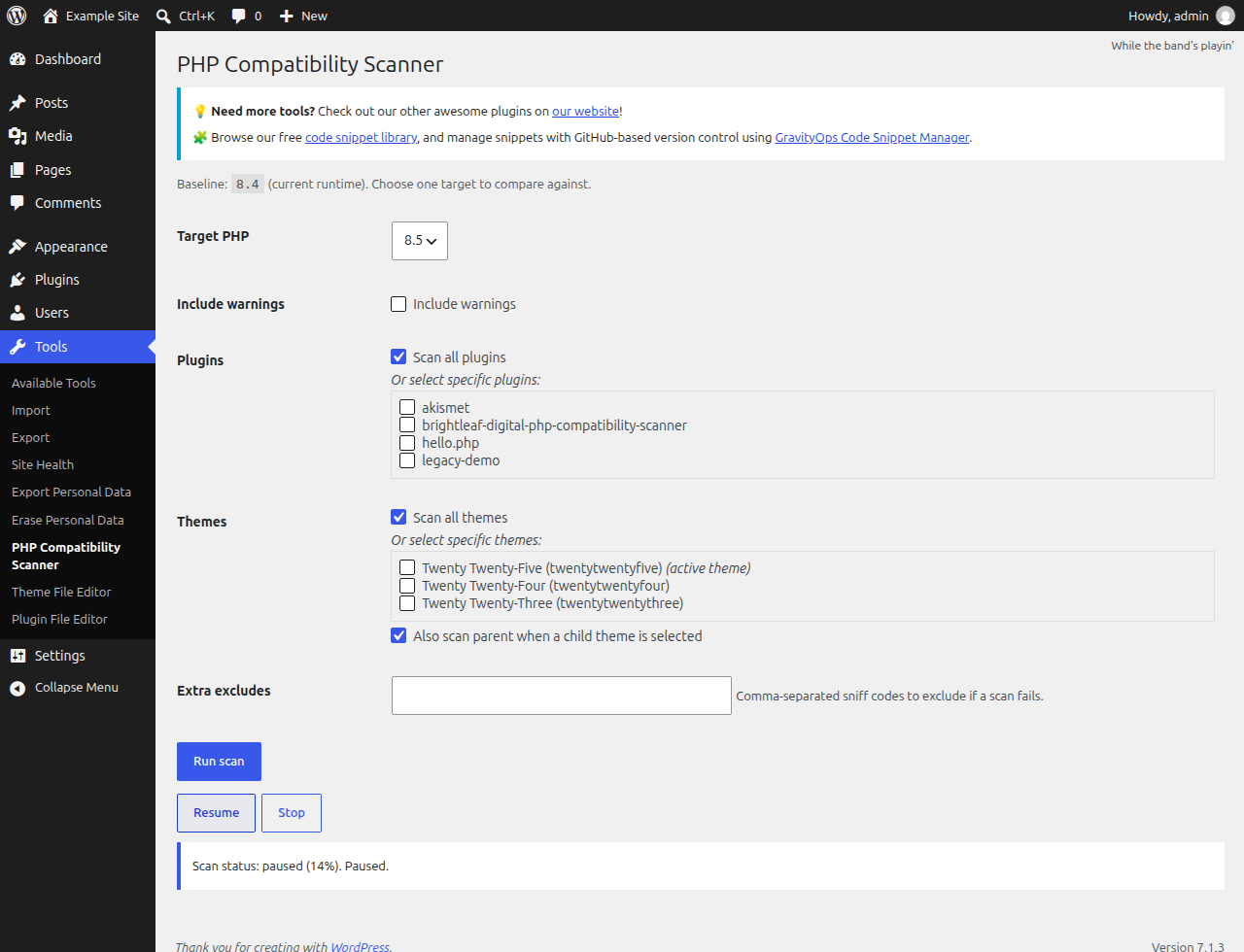
– Compares your current runtime PHP (baseline) to a selected target PHP version (8.0–8.5).
– Scans plugins and themes, then highlights only the new issues that would appear on the target version (the “delta”).
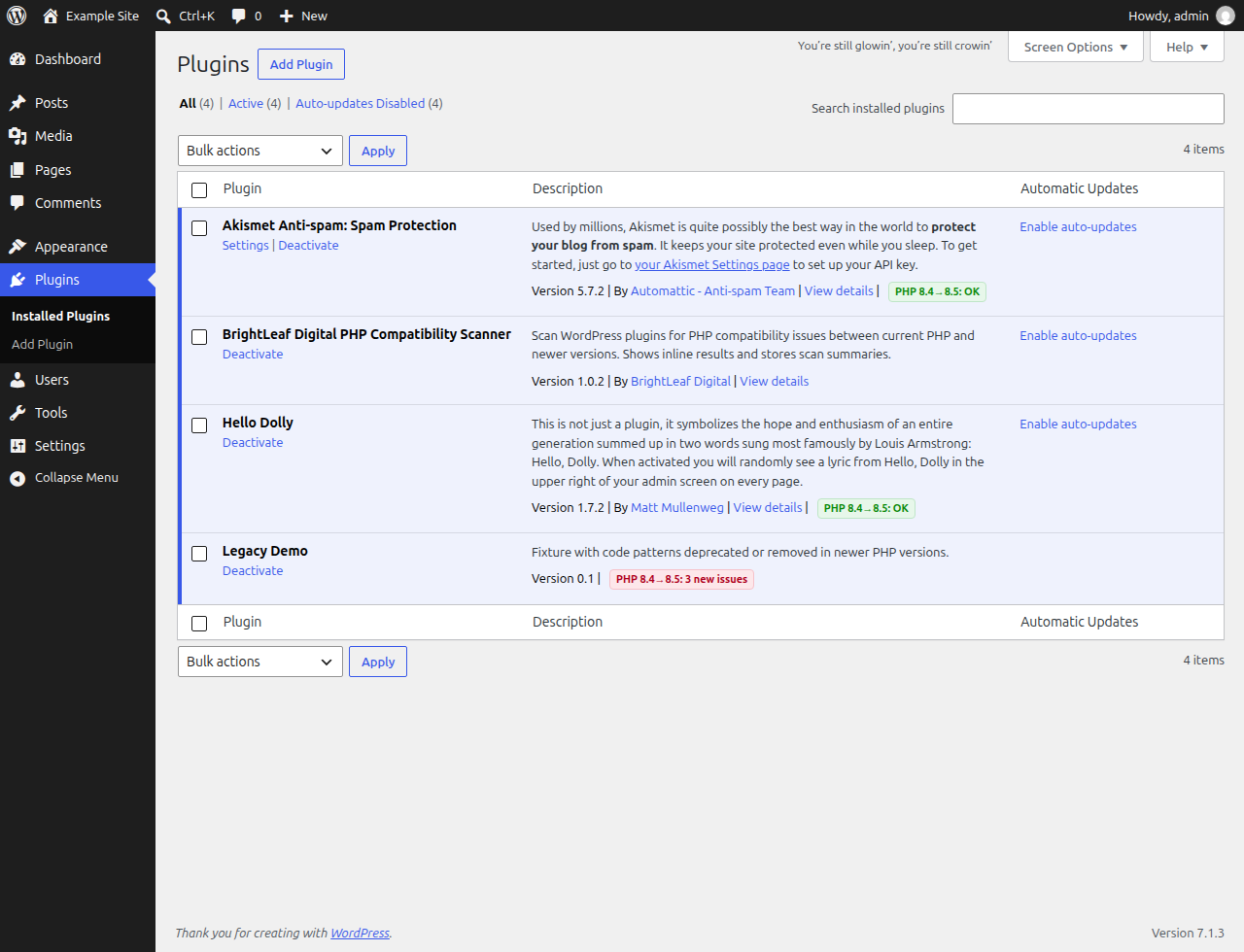
– Shows results in a clear report on the Tools screen and adds small badges on the Plugins list screen.
– Lets you pause, resume, or stop a running scan.
Important limitations of static analysis:
– Static analysis can miss issues in dynamic code paths and can generate false positives. Treat results as guidance, not guarantees. Always test site functionality on a staging environment before upgrading PHP in production.
Merkmale
- Select a target PHP version (8.0, 8.1, 8.2, 8.3, 8.4, 8.5)
- Scan all plugins or select specific ones
- Scan all themes or select specific ones, with an option to also scan a parent if a child theme is selected
- Pause/Resume/Stop controls for long scans
- Clear report of only the new issues between baseline (current runtime) and target
- Plugin list badges showing a quick summary for the last scan
Community Help
For how-to questions and examples of what others have built, visit the GravityOps Help community.
If you opened a support thread on WordPress.org, continue that conversation there. The community is an additional place for help and ideas.
Externe Dienste
Scanning runs entirely on your server. Your code and scan results are never sent anywhere.
The plugin includes the shared GravityOps library from BrightLeaf Digital, which connects to brightleafdigital.io in these cases:
- GravityOps product catalog. When an administrator uses the WordPress admin (or shortly afterwards, through WP-Cron), the library downloads the GravityOps product catalog (names, versions, icons, links and announcements) from brightleafdigital.io, at most about twice a day. The request sends no personal data or site content; like any web request, it reveals your server’s IP address.
- Newsletter signup. Only if you choose to subscribe to GravityOps Weekly, the email address you enter is sent to brightleafdigital.io.
- Feedback prompts. Only if you choose to answer the short GravityOps survey or open the review prompt, your answers, or the plugin and version being reviewed, are sent to brightleafdigital.io.
- Support access. Only if you grant BrightLeaf Digital support access, TrustedLogin creates a temporary login and notifies BrightLeaf Digital through TrustedLogin and brightleafdigital.io.
BrightLeaf Digital: Privacy Policy. TrustedLogin: Authorized User Terms, Privacy Policy.
Installation
- Install the plugin via Plugins → Add New → Upload Plugin, or place the
brightleaf-digital-php-compatibility-scannerfolder intowp-content/plugins/. - Aktivieren Sie das Plugin über das „Plugins“-Menü in WordPress.
- Go to Tools → PHP Compatibility Scanner.
- Choose a Target PHP version higher than your current runtime.
- Select what to scan (plugins and/or themes) and click “Run scan”.
Änderungsprotokoll
1.1.2 | Nov 15, 2026
- Added a one-time request to rate the plugin on WordPress.org, shown after two completed scans or two weeks, whichever comes first. You can dismiss it or ask to be reminded later; uninstalling removes its saved settings.
- Added an FAQ on what to do with scan results, and a note about BrightLeaf Digital.
- Updated the GravityOps shared library.
1.1.1 | Nov 11, 2026
- Fixed a stopped scan sometimes reporting every plugin as compatible. Items the scan never reached are now listed as not scanned.
- Fixed slow plugins being scanned twice at the same time, which could garble the progress of large scans.
- A plugin that keeps timing out no longer stalls the scan: after three tries it is listed as could not be scanned and the scan moves on.
- The scan screen now says when it cannot reach your server instead of retrying silently.
- Pausing or stopping while a large plugin is being scanned is no longer lost.
- Uninstalling the plugin now removes its stored scan data.
1.1.0 | Nov 10, 2026
- Joins the GravityOps suite: the plugin now includes the shared GravityOps library, which adds the GravityOps dashboard with other free and premium tools, announcements and an optional newsletter signup.
- The scanning engine now loads only while a scan is running, keeping it off every other admin page. If another plugin has already loaded its own copy of the engine (for example Plugin Check), the scan stops with a clear message instead of giving unreliable results.
- Fixed a possible error on the Plugins screen when another plugin passes unexpected plugin information.
- Added a Community Help section and an External services section to this readme.
1.0.2 | Oct 22, 2026
- Fix: scans reported every plugin and theme as compatible because the scanning engine did not load.
- Fix: a scan that cannot run is now reported as failed instead of compatible.
- Single-file plugins (such as Hello Dolly) can now be scanned and show a result badge.
- Temporary scan report files are now cleaned up after each scan.
- Tested with WordPress 7.1 and PHP 8.5.
- Corrected the menu and folder names in the installation steps.
1.0.1
- Add support for PHP 8.5
Screenshots

Für Entwickler
Ist das dein Plugin? Zeigen Sie die Zahlen.
Fügen Sie Ihrer Website, Docs oder GitHub Readme ein Live-Badge hinzu. Es wird von selbst aktualisiert - kein Konto erforderlich.
Best BrightLeaf Digital PHP Compat… alternatives
All compatibility plugins →





Fragen und Antworten
BrightLeaf Digital PHP Compatibilit…: quick answers
Gerade Antworten, gezogen von Live WordPress.org Daten.
Quelle: WordPress.org
Is BrightLeaf Digital PHP Compatib… free?
Yes. BrightLeaf Digital PHP Compatib… is free to download and use from the official WordPress.org plugin directory.
Is BrightLeaf Digital PHP Compatib… safe to use in 2026?
BrightLeaf Digital PHP Compatib… works, but test it on a staging site before relying on it in 2026. It runs on 500+ sites and was last updated 5 days ago, and scores 59/100 on our health check.
How many websites use BrightLeaf Digital PHP Compatib…?
BrightLeaf Digital PHP Compatib… is active on 500+ WordPress websites and has been downloaded 3,809 times since it launched in November 2025. It was downloaded 1,755 times in the last 30 days.
Does BrightLeaf Digital PHP Compatib… work with WordPress 7.1?
Yes. The developer has tested BrightLeaf Digital PHP Compatib… up to WordPress 7.1.5, the latest release. It requires WordPress a recent version or newer.
What PHP version does BrightLeaf Digital PHP Compatib… need?
BrightLeaf Digital PHP Compatib… requires PHP 7.4 or higher. Most hosts run PHP 8.x today, so it works on any modern WordPress hosting.
When was BrightLeaf Digital PHP Compatib… last updated?
The latest version, 1.1.2, was released on November 15, 2026 (5 days ago).
Who makes BrightLeaf Digital PHP Compatib…?
BrightLeaf Digital PHP Compatib… is developed and maintained by BrightLeaf Digital.
What are the best alternatives to BrightLeaf Digital PHP Compatib…?
The most popular alternatives to BrightLeaf Digital PHP Compatib… are Plugin Compatibility Checker (10K+ installs), Better Plugin Compatibility… (4K+ installs) and Eli's PHP Compatibility Sca… (1K+ installs).
Angetrieben von PageForge
Eine Vorlage und eine Tabelle. Eine echte Seite für jede Suche.
PageForge Verwandelt jede Zeile eines CSV in eine WordPress-Seite mit eigenem Titel, URL, SEO Felder und Schema entworfen. Kostenlos auf WordPress.org.
- CSV und XLSX, plus Google Sheets auf Beruf und Unternehmen
- seinen eigenen Titel, URL, SEO Felder und Schema für jede Seite
- Arbeitet mit dem Blockeditor, Elementor, Divi und Avada
- Kostenlos auf WordPress.org, keine Kreditkarte