

Plugin Compatibility Checker
Scan and check your WordPress site for PHP, Database (MySQL/MariaDB), and Plugin compatibility to ensure safe upgrades to WordPress 7.0 and beyond.

Sichere Auswahl
Yes — Plugin Compatibility Checker is a safe, well-maintained plugin to use in 2026. It runs on 10K+ sites, is rated 4.2/5 and was last updated 4 weeks ago, and scores 82/100 on our health check.
- Bewährt im Maßstab auf 10k + aktiven Standorten
- Aktiv entwickelt — letztes Update vor 4 Wochen
- Getestet mit dem neuesten WordPress (7.1)
- Momentum — downloads up 281.6% vs the previous 30 days
Wie stapelt es sich?
Side-by-side bei Installationen, Updates, Bewertungen und Support


Tägliche Downloads
Download-Spitzen folgen normalerweise einer neuen Version - jede Website, die automatisch aktualisiert wird, gilt als Download.
Ranglisten
Where Plugin Compatibility Checker stands todayWordPress.org Ranglisten suchen
Live-Position in der Plugin-Suche, Top 100| Stichwort | Position |
|---|---|
| compatibility | #1 |
| mysql compatibility | #2 |
| php compatibility | #2 |
| php upgrade | #8 |
| php version | #18 |
Versionsübernahme
Anteil aktiver Sites pro Release.
Bewertungsaufschlüsselung
★★★★★★★★★★ 4.2 from 12 reviews
About Plugin Compatibility Checker
From the official readme · v7.0.9Beschreibung
The Plugin Compatibility Checker helps you keep your WordPress site stable and secure by scanning installed plugins for PHP, Database, and WordPress version compatibility.
🆕 WordPress 7.0 Database Readiness
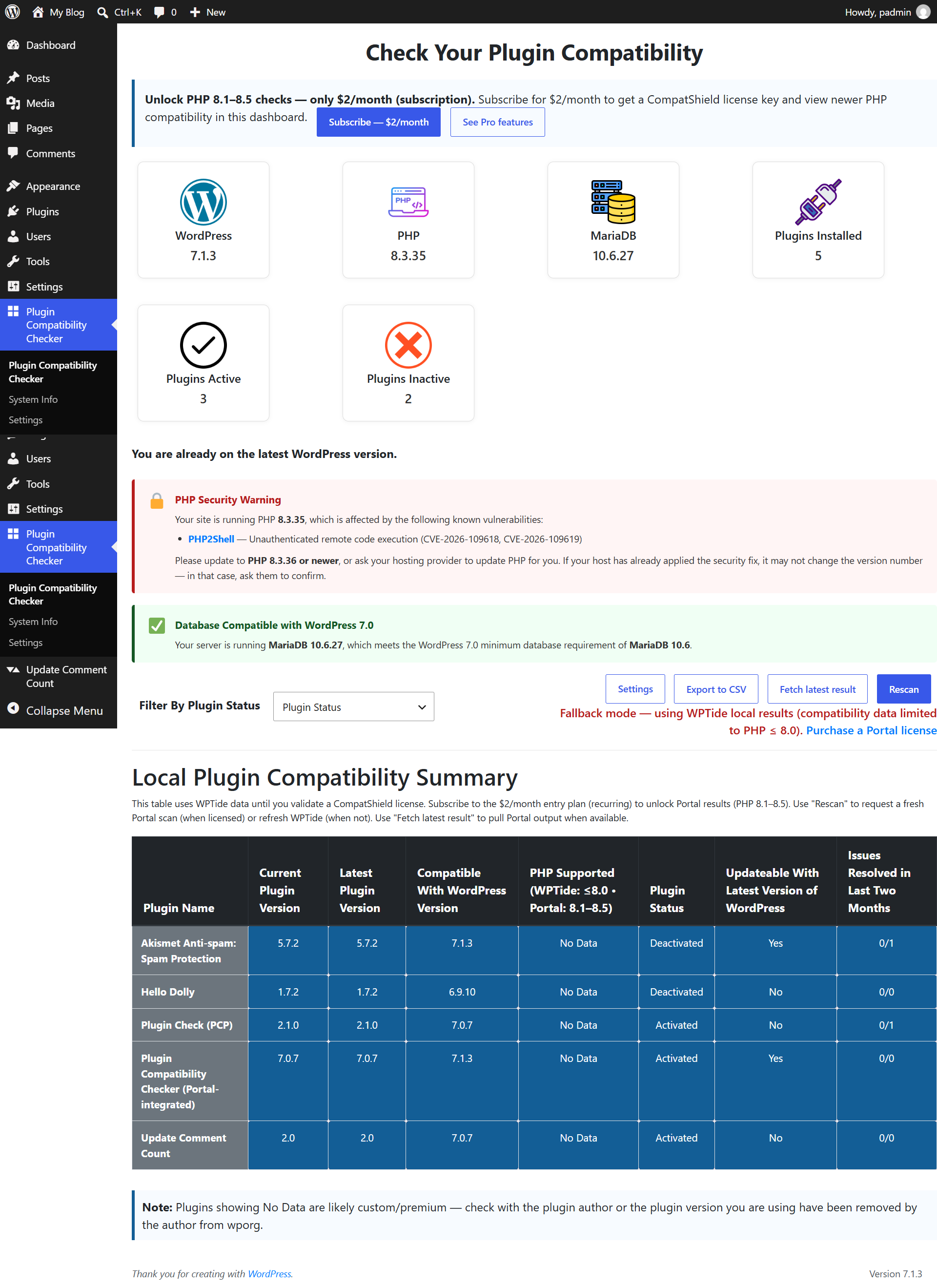
WordPress 7.0 introduces stricter database requirements (MySQL 8.0+ / MariaDB 10.6+). Many hosting environments still run older database versions which may silently block updates. This plugin now detects database compatibility and warns you before upgrading.
🆕 PHP Security Notice
The plugin now checks your PHP version against a list of known PHP vulnerabilities (for example PHP2Shell, CVE-2026-109618 / CVE-2026-109619). If your PHP version is affected, a warning appears on the plugin dashboard with the vulnerability name and CVE, and asks you to update PHP or contact your hosting provider. This warning is shown to all users, no license needed.
$2/month License Required (Entry Plan)
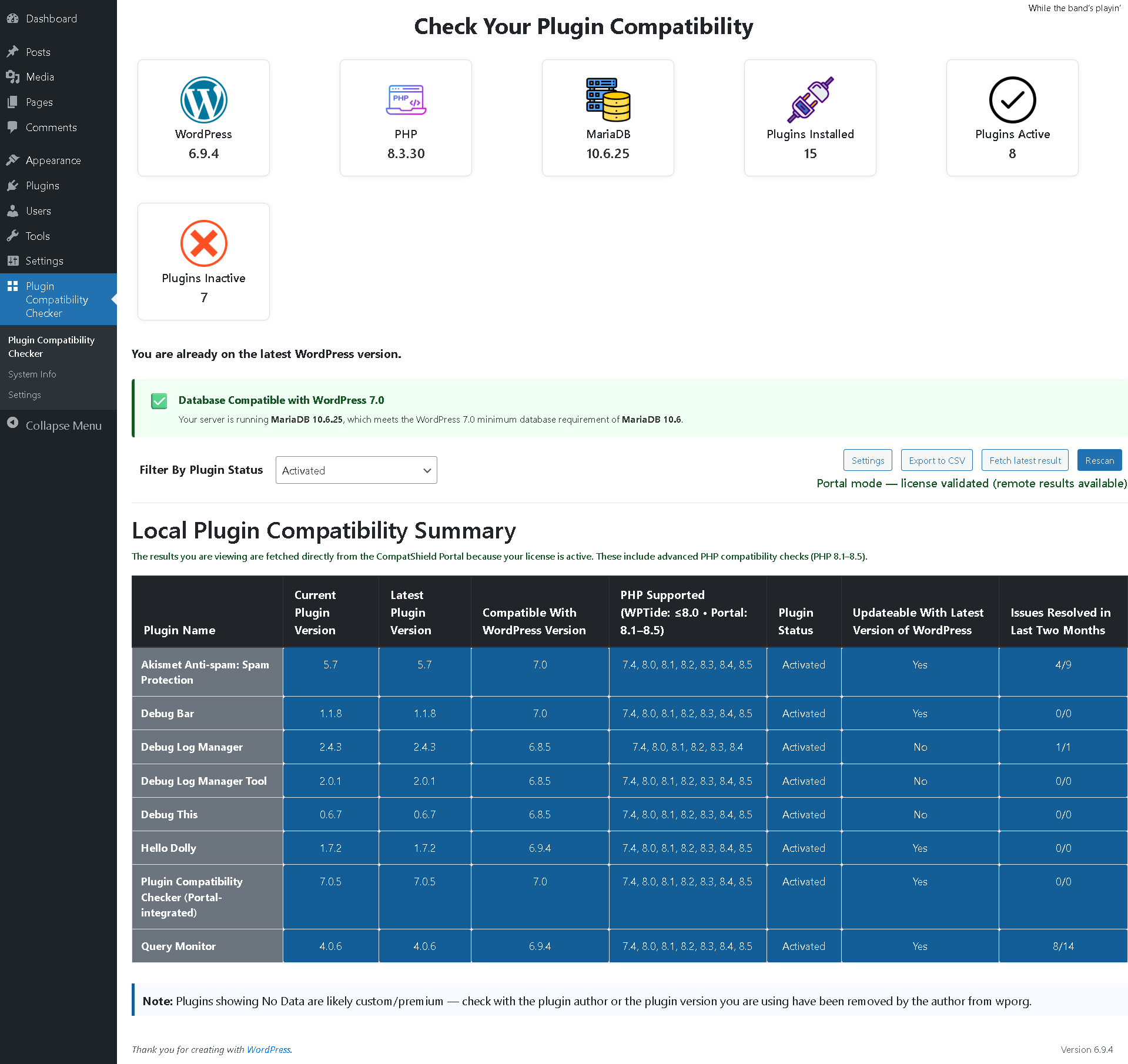
You must subscribe to the CompatShield Portal ($2/month recurring) to obtain a license key. Once activated, you will be able to see plugin compatibility results (up to PHP 8.5) and database compatibility directly inside your WordPress admin.
📺 Video Tutorial
Watch step-by-step how to activate your license & run your first scan:
Quick Setup Steps
1) Subscribe → Get your license key from the Portal
2) Add your domain inside the License tab
3) Copy your License Key
4) Paste License Key inside Plugin Settings in WP Admin
5) Click Validate License
6) Click Save Settings
7) Go to Plugin Main Page → Click Rescan
Pro Version (Upgrade)
Upgrading to Pro unlocks the full CompatShield Portal Dashboard with advanced features — vulnerability summary, detailed scan results, notifications, historic analysis, plugin issues overview, premium ZIP upload scanning, and multi-layer compatibility intelligence including database upgrade readiness.
Subscribe / Upgrade to Pro: https://www.compatshield.com/
✨ Key Features
-
PHP Compatibility Check – Scan plugins for PHP compatibility.
- $2/month license: Shows PHP compatibility results directly inside WP Plugin backend (up to PHP 8.5)
- Pro license: Deeper breakdowns, insights, and analysis inside Portal Dashboard
-
Database Compatibility Check (NEW 🚀) – Detect MySQL/MariaDB version and ensure WordPress 7.0 readiness.
- Detects outdated MySQL (< 8.0) and MariaDB (< 10.6)
- Warns if hosting environment may block WordPress updates
- Helps prevent upgrade failures
- Pro: Advanced insights and upgrade recommendations
-
PHP Security Notice (NEW 🚀) – Detects if your PHP version is affected by a known vulnerability.
- Shows the vulnerability name and CVE ids
- Tells you which PHP version to update to, or to ask your host to update
- The list is updated regularly by CompatShield, no plugin update needed
- Available to all users, no license required
-
Plugin Rescan – Quickly rescan whenever you install or update plugins.
-
Email Notifications (Pro) – Get notified when scans complete or risks are detected.
-
Portal Integration (Pro) – View full detailed results in the CompatShield Portal Dashboard.
-
Vulnerability Summary (Pro) – Basic vulnerability insights available in the Portal.
-
“No Data” Plugins Handling – Easily identify custom/premium plugins or removed versions not available on WordPress.org.
🔑 Entry Plan vs Pro Plan
-
PHP Compatibility Check
$2 Plan: WP Admin Results up to PHP 8.5
Pro Plan: Detailed compatibility insights in Portal Dashboard -
Database Compatibility Check
$2 Plan: Basic DB version detection in WP Admin
Pro Plan: Full upgrade readiness insights + risk analysis + recommendations -
Vulnerability Summary
$2 Plan: Not available
Pro Plan: Available in Portal -
Email Notifications
$2 Plan: Not available
Pro Plan: Available -
Portal Dashboard
$2 Plan: Not available
Pro Plan: Full access (compatibility + vulnerabilities + detailed summaries + site overview) -
Custom/Premium Plugins ZIP Scanning
$2 Plan: Not available
Pro Plan: Supported via Portal ZIP uploader
Externe Dienste
This plugin connects to the following services. No personal data or site address is sent in any of these requests unless stated.
WordPress.org API (api.wordpress.org) – Used on the dashboard to look up the latest WordPress version and public plugin details (plugin slug). Only the public plugin slug is sent. Provided by WordPress.org: Privacy Policy.
WPTide (wptide.org) – Used on the dashboard to read the published PHP compatibility audit of a WordPress.org plugin (plugin slug and version). Only the public plugin slug and version are sent. Provided by the WordPress Tide project: Privacy Policy.
CompatShield PHP security list (www.compatshield.com/portal-api/php-vulnerabilities) – Used to download a public list of known PHP vulnerabilities so the dashboard can warn you if your PHP version is affected. The request sends no data about your site; the comparison with your PHP version happens locally. The list is cached for 6 hours. Provided by CompatShield: Terms | Privacy Policy.
CompatShield Portal (www.compatshield.com/portal-api) – Used only after you enter a license key. Sends your license key, your site’s domain name, the WordPress, PHP and database versions, the server operating system and type, and the name, slug and version of your installed plugins and active theme, so that it can run the scan and return results. Provided by CompatShield: Terms | Privacy Policy.
Installation
- Upload
plugin-compatibility-checkerto the/wp-content/plugins/directory. - Aktivieren Sie das Plugin über das Menü Plugins in WordPress.
- Subscribe inside the Portal ($2/month) and enter your license key to unlock compatibility up to PHP 8.5 and database checks.
- (Optional) Upgrade to Pro to enable Portal Dashboard and advanced features.
Änderungsprotokoll
7.0.9
- Improved: clearer PHP security notice with simpler guidance (ask your host for the patch, or update PHP).
- Improved: PHP versions that are no longer supported (7.4 and older) now get their own guidance, since the fix is applied by hosts without a new version number.
7.0.8
- New: PHP security warning on the dashboard when your PHP version is affected by a known vulnerability (currently PHP2Shell, CVE-2026-109618 / CVE-2026-109619).
- Docs: added External services disclosure.
Screenshots
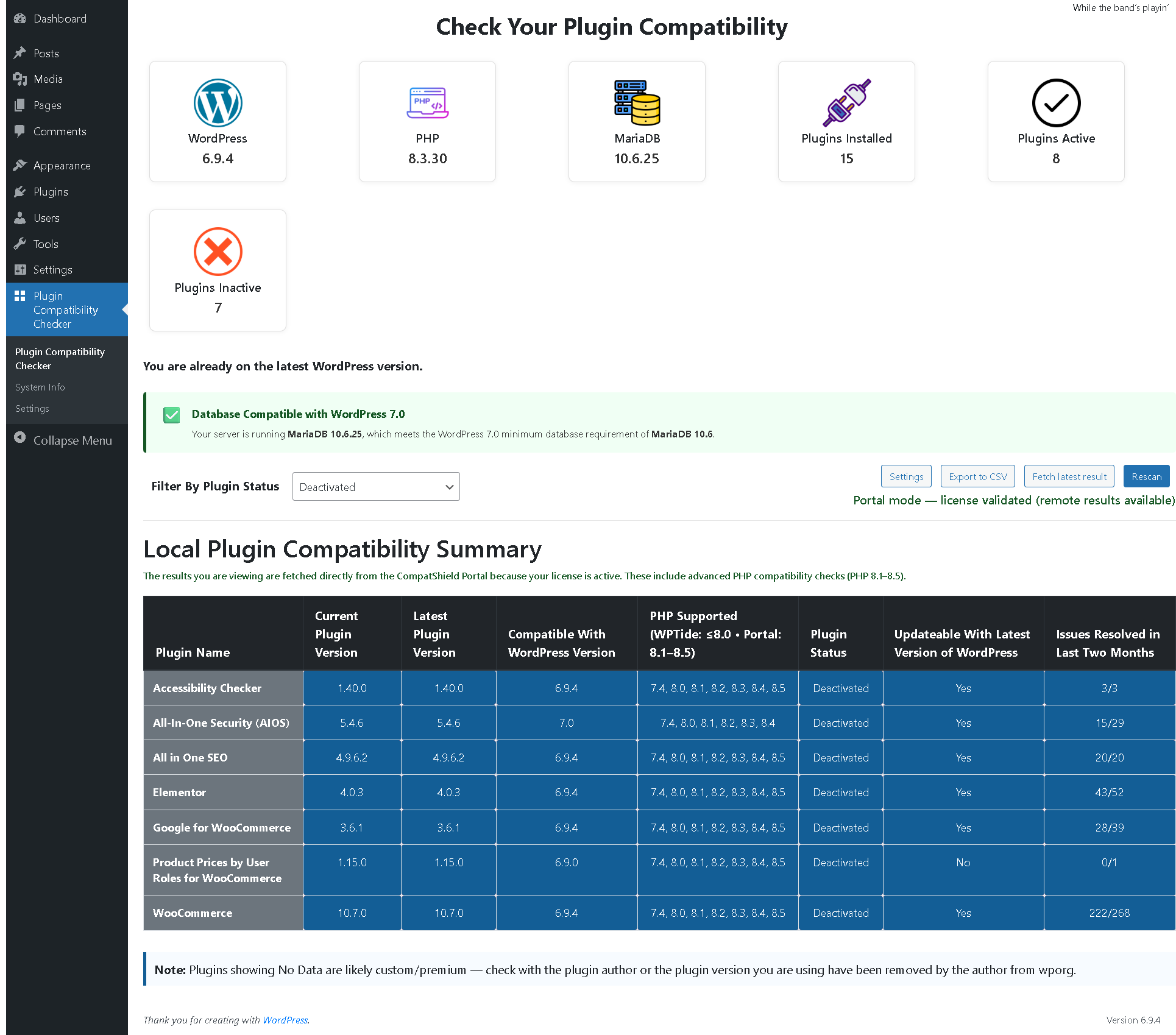
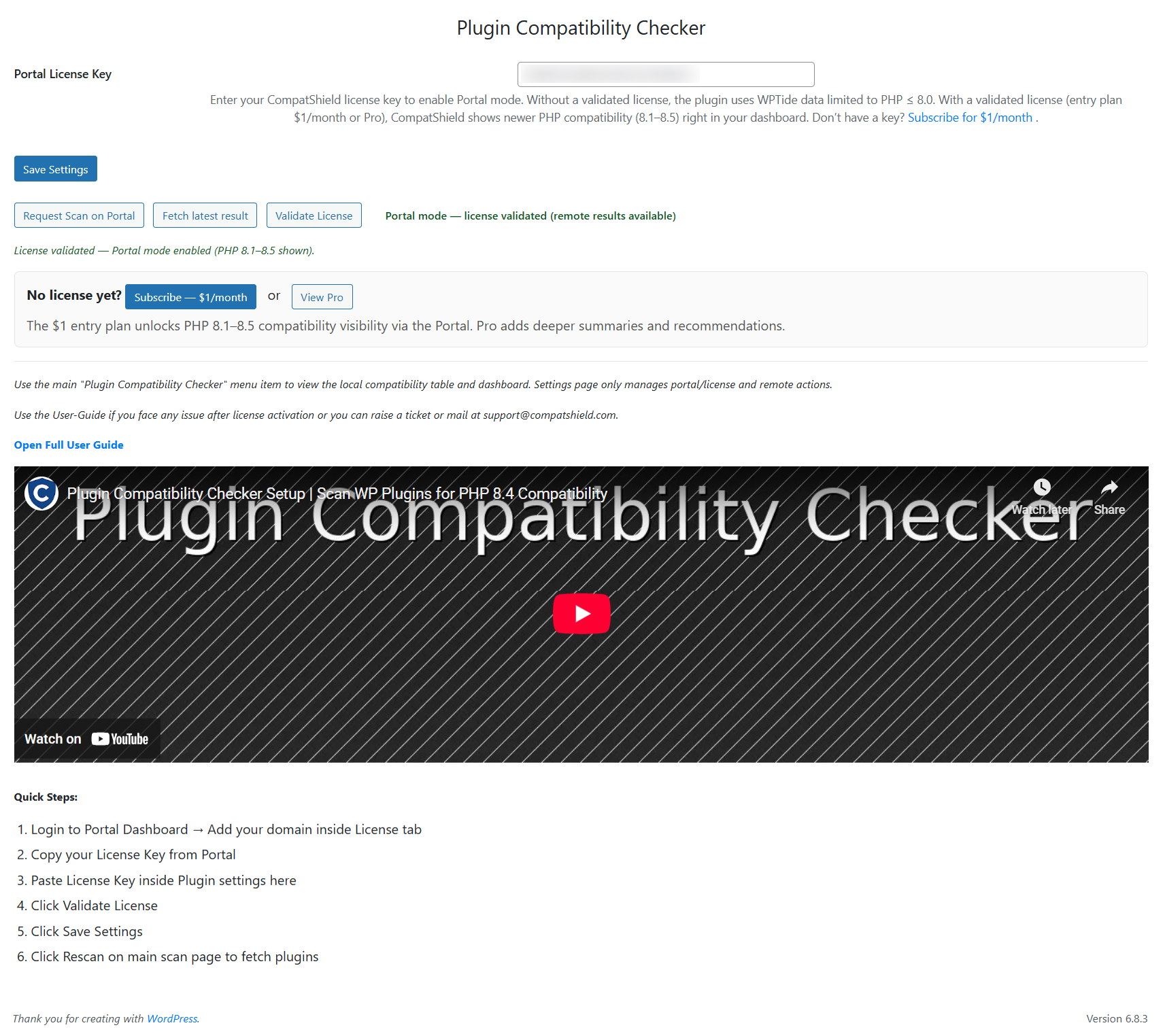
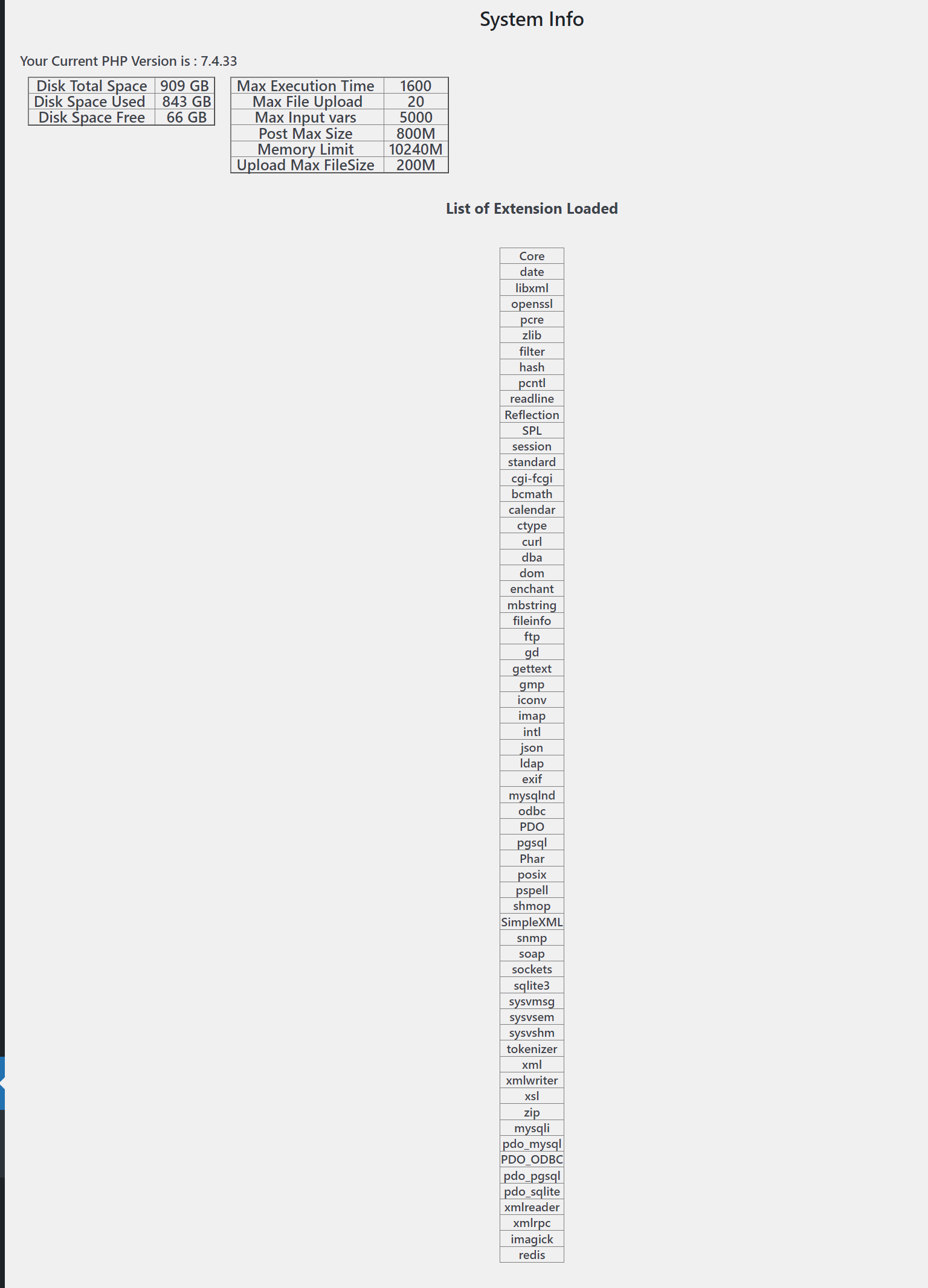
Für Entwickler
Ist das dein Plugin? Zeigen Sie die Zahlen.
Fügen Sie Ihrer Website, Docs oder GitHub Readme ein Live-Badge hinzu. Es wird von selbst aktualisiert - kein Konto erforderlich.
Best Plugin Compatibility Checker alternatives
All compatibility plugins →




Fragen und Antworten
Plugin Compatibility Checker: quick answers
Gerade Antworten, gezogen von Live WordPress.org Daten.
Quelle: WordPress.org
Is Plugin Compatibility Checker free?
Yes. Plugin Compatibility Checker is free to download and use from the official WordPress.org plugin directory.
Is Plugin Compatibility Checker safe to use in 2026?
Yes — Plugin Compatibility Checker is a safe, well-maintained plugin to use in 2026. It runs on 10K+ sites, is rated 4.2/5 and was last updated 4 weeks ago, and scores 82/100 on our health check.
How many websites use Plugin Compatibility Checker?
Plugin Compatibility Checker is active on 10K+ WordPress websites and has been downloaded 121,372 times since it launched in August 2020. It was downloaded 8,926 times in the last 30 days.
Does Plugin Compatibility Checker work with WordPress 7.1?
Yes. The developer has tested Plugin Compatibility Checker up to WordPress 7.1.5, the latest release. It requires WordPress 5.0 or newer.
What PHP version does Plugin Compatibility Checker need?
Plugin Compatibility Checker requires PHP 7.2 or higher. Most hosts run PHP 8.x today, so it works on any modern WordPress hosting.
When was Plugin Compatibility Checker last updated?
The latest version, 7.0.9, was released on October 23, 2026 (4 weeks ago).
Who makes Plugin Compatibility Checker?
Plugin Compatibility Checker is developed and maintained by CompatShield.
What are the best alternatives to Plugin Compatibility Checker?
The most popular alternatives to Plugin Compatibility Checker are Better Plugin Compatibility… (4K+ installs), Eli's PHP Compatibility Sca… (1K+ installs) and BrightLeaf Digital PHP Comp… (500+ installs).
Angetrieben von PageForge
Eine Vorlage und eine Tabelle. Eine echte Seite für jede Suche.
PageForge Verwandelt jede Zeile eines CSV in eine WordPress-Seite mit eigenem Titel, URL, SEO Felder und Schema entworfen. Kostenlos auf WordPress.org.
- CSV und XLSX, plus Google Sheets auf Beruf und Unternehmen
- seinen eigenen Titel, URL, SEO Felder und Schema für jede Seite
- Arbeitet mit dem Blockeditor, Elementor, Divi und Avada
- Kostenlos auf WordPress.org, keine Kreditkarte