

CompatNav – PHP Upgrade Checker
PHP compatibility check before you upgrade: scans every plugin and theme locally and shows what will break on PHP 8.0–8.5.

Solide Wahl
CompatNav – PHP Upgrade Checker is a solid plugin choice in 2026, with a few things worth checking first. It runs on 400+ sites and was last updated 4 weeks ago, and scores 70/100 on our health check.
- Aktiv entwickelt — letztes Update vor 4 Wochen
- Getestet mit dem neuesten WordPress (7.1)
- Momentum — downloads up 19.3% vs the previous 30 days
- Kleine Benutzerbasis (400+ aktive Installationen)
- Bisher sehr wenige Bewertungen
Wie stapelt es sich?
Side-by-side bei Installationen, Updates, Bewertungen und Support



Tägliche Downloads
Download-Spitzen folgen normalerweise einer neuen Version - jede Website, die automatisch aktualisiert wird, gilt als Download.
Ranglisten
Where CompatNav stands todayWordPress.org Ranglisten suchen
Live-Position in der Plugin-Suche, Top 100| Stichwort | Position |
|---|---|
| compatibility | >100 |
| php | #31 |
| php compatibility | #22 |
| php version | #33 |
| upgrade | #9 |
Versionsübernahme
Anteil aktiver Sites pro Release.
About CompatNav – PHP Upgrade Checker
From the official readme · v1.3.0Beschreibung
CompatNav is a PHP compatibility checker for your site. Before you or your host move it to a newer PHP version, CompatNav reads the code of every installed plugin and theme and tells you, in plain words, what will break and what will only show deprecation notices.
Documentation and guides: compatnav.com
Was du bekommst
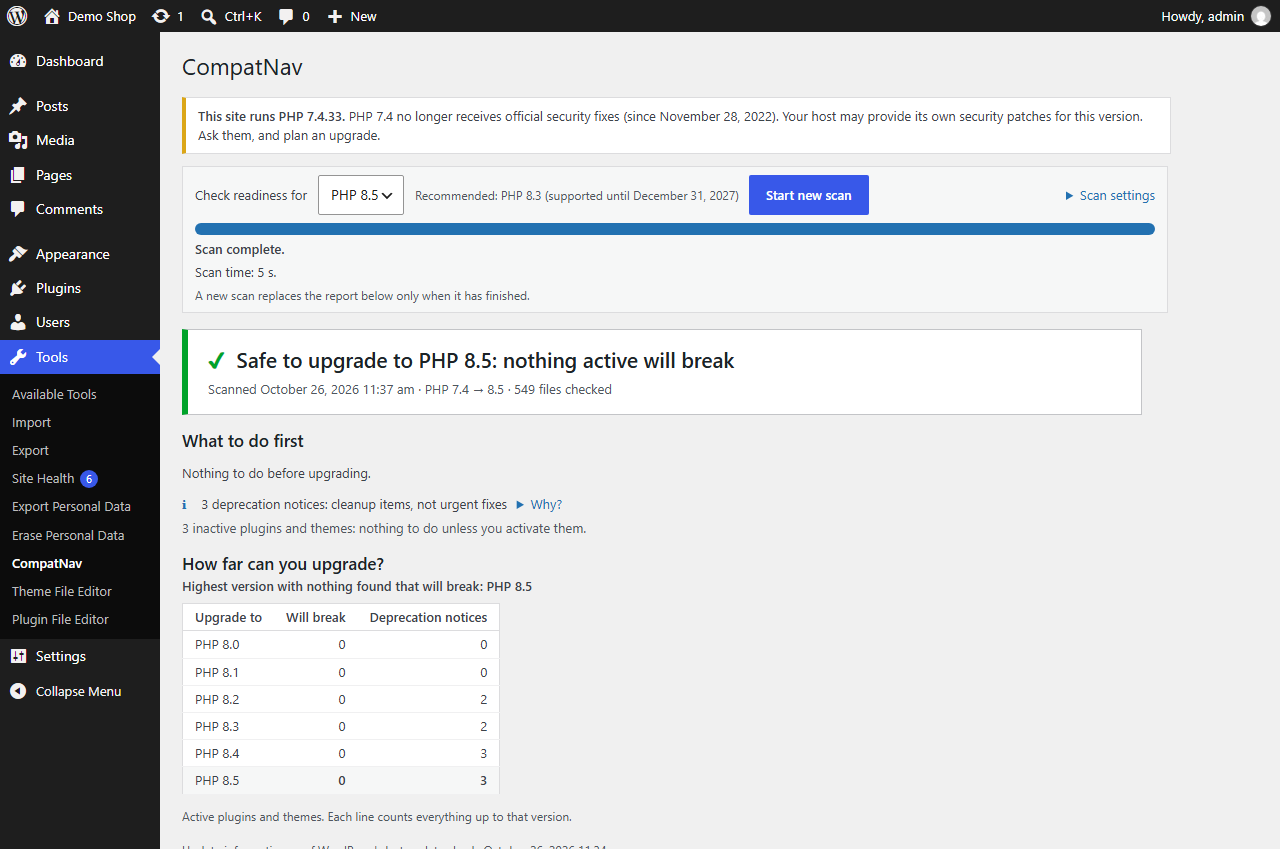
- One clear answer. “Safe to upgrade to PHP 8.5”, or “Not ready yet” with a short “What to do first” list.
- How far you can upgrade. For each PHP version up to the one you chose: what will break and how many deprecation notices come up, and the highest version with nothing found that will break. All from one scan.
- Your PHP version’s support status. Whether the PHP version your site runs still gets official fixes, and until when (dates from php.net, bundled with the plugin). Before your first scan, CompatNav suggests a target that keeps getting security fixes for at least a year.
- Checks for PHP 8.0 to 8.5. 58 checks for the changes each PHP version brings, from removed functions to new deprecations. You choose the version you plan to move to.
- Only what changes for your site. CompatNav compares the PHP version your site runs today with the one you choose, and reports only what changes between the two.
- Few, meaningful results. Each check looks for exact code patterns, and code that is already protected (by a PHP version check or
function_exists()) is not reported. On three of the most-installed plugins (about 7,800 PHP files together), it reports 27 items for an upgrade from PHP 7.4 to 8.5 (tested in September 2026), all of them deprecation notices, each checked by hand. - Next steps you can act on. For each plugin and theme: whether an update is available, whether the code looks like your own, a plain explanation of each issue, and a before/after example for whoever maintains the code.
- Reports to share. Download a self-contained HTML report (opens in any browser, can be printed to PDF) or a CSV file, or copy a plain-text summary for your developer or host (no site name or address in it; also as a .txt file).
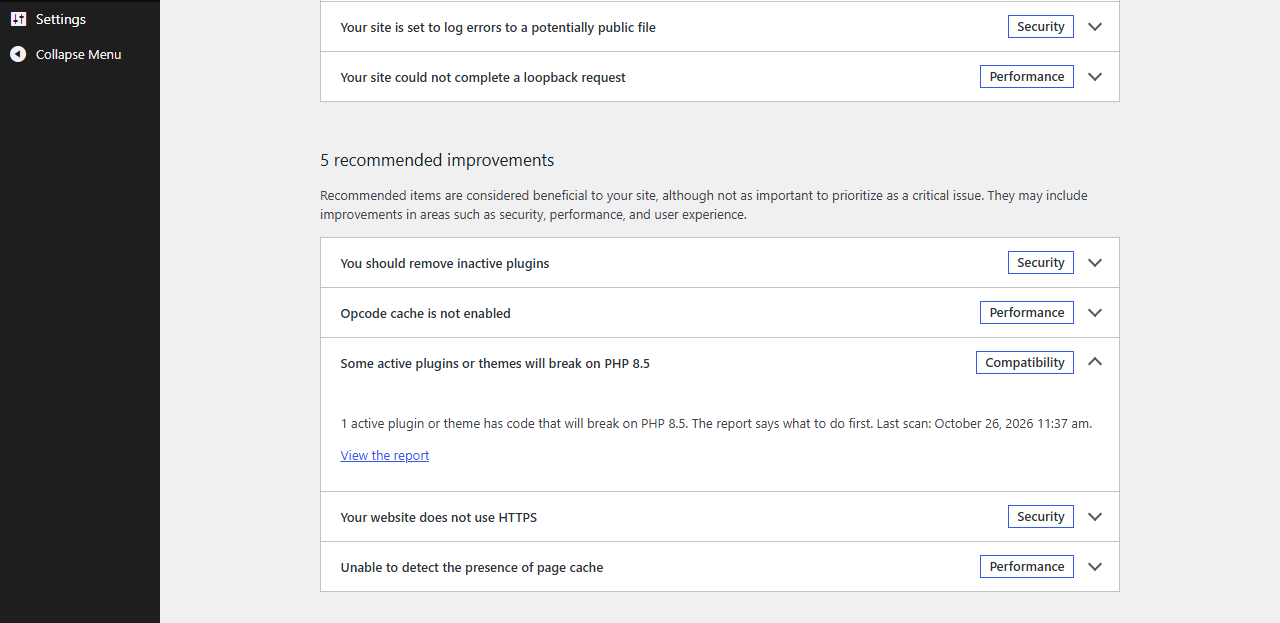
- In Site Health too. WordPress’s Site Health shows whether the last scan found something that will break. It reads the stored report and never starts a scan.
- Built not to hang. The scan runs in short background steps with a progress bar, and you can pause, resume or cancel it. A file too heavy for your server’s memory is skipped and listed, and the scan continues. On a test site with 17 plugins and themes (8,374 PHP files), a full scan took about 70 seconds.
Private by design
- The scan runs entirely on your own server. No code, file names or results are sent anywhere, and CompatNav makes no external requests.
- It only reads files. It never runs or changes the code it checks.
- It stores only scan results (file paths, line numbers, check IDs), never personal data.
Honest about its limits
CompatNav reads code; it does not run it. Some problems only appear when code runs with real data, and no code reader can see those. Files that could not be checked are listed with the reason, and while any active file could not be checked, the verdict never says “Safe to upgrade”.
Documentation and guides
The CompatNav website explains how to read the report and what to do when a plugin isn’t ready yet, with plain guides to PHP upgrades: PHP 8.2’s end of life, what changes in PHP 8.4 and 8.5, and how to fix a critical error after a PHP update.
Libraries
CompatNav includes PHP-Parser by Nikita Popov (BSD 3-Clause license), copied under CompatNav’s own namespace so it can never clash with another plugin’s copy.
Installation
- In your WordPress admin, go to Plugins → Add New Plugin and search for “CompatNav”, or upload the zip file.
- Aktivieren Sie das Plugin.
- Go to Tools → CompatNav. Next to “Check readiness for”, choose the PHP version you plan to upgrade to, then click “Start scan”.
Änderungsprotokoll
1.3.0
- New: “How far can you upgrade?” For each PHP version up to the one you chose, what will break and how many deprecation notices come up, and the highest version with nothing found that will break. From the same scan, nothing extra to run.
- New: the PHP version your site runs and its official support status (active support, security fixes only, or no longer supported), from dates bundled with the plugin.
- New: before your first scan, the version picker suggests a PHP version that still gets security fixes for at least a year. You can still choose any version.
- New: “Copy for your developer or host”: a plain-text summary of the report to paste into an email or a support ticket, or to download as a .txt file. No site name or address is included.
- New: a line in WordPress’s Site Health (Tools → Site Health) and a CompatNav section on its Info tab. They read the last report and never start a scan.
- New: a “Run a scan” link on CompatNav’s row of the Plugins screen.
- The checks, the scan and its results are the same as in 1.2.1.
1.2.1
- After a completed scan, the bottom of the report has one short line with links to the support forum and to the review form on wordpress.org.
- The description and FAQ now answer common questions about PHP security updates and PHP versions that no longer get official releases.
- Nothing else changes: the scan, its results and the downloadable reports are the same as in 1.2.0.
1.2.0
- Nothing changes in how you use CompatNav: the screen, the scan and the reports work as before.
- While a scan that was not started from the CompatNav screen is running (for example a scheduled scan), the progress box says who started it and that it continues in the background.
- “Started by” can now name the add-on that started a scan, e.g. “Started by: scheduled scan (name of the add-on)”.
- Developer API 1.1 (see the FAQ): check a piece of code, check a plugin or theme zip file without unpacking it (kept apart from your report), list the report’s files, and let an add-on show its own tab on the CompatNav screen. Without such an add-on, the screen has no tabs.
- More accurate PHP 8.2 check for “self::…” and “parent::…” callbacks: it now reports them only where PHP itself calls them (for example array_map() or call_user_func()), not every text that merely looks like one.
1.1.0
- Nothing changes in how you use CompatNav: the screen, the scan and the reports work as before.
- When a scan was not started from the CompatNav screen (for example by a scheduled task or a command-line tool), the report now says so, e.g. “Started by: scheduled scan”. Scans started from the screen show nothing new.
- The downloadable report’s section for developers now says how the scan ran: the PHP version it compared against, and the server’s memory and time limits.
- Adds a developer API for add-ons (see the FAQ).
- Sturdier background scans: an unexpected error while reading one file no longer holds up the scan, and scans started from different places never mix up their progress.
1.0.0
- Erste Veröffentlichung.
Screenshots


Für Entwickler
Ist das dein Plugin? Zeigen Sie die Zahlen.
Fügen Sie Ihrer Website, Docs oder GitHub Readme ein Live-Badge hinzu. Es wird von selbst aktualisiert - kein Konto erforderlich.
Best CompatNav alternatives
All compatibility plugins →




Fragen und Antworten
CompatNav – PHP Upgrade Checker: quick answers
Gerade Antworten, gezogen von Live WordPress.org Daten.
Quelle: WordPress.org
Is CompatNav – PHP Upgrade Checker free?
Yes. CompatNav – PHP Upgrade Checker is free to download and use from the official WordPress.org plugin directory.
Is CompatNav – PHP Upgrade Checker safe to use in 2026?
CompatNav – PHP Upgrade Checker is a solid plugin choice in 2026, with a few things worth checking first. It runs on 400+ sites and was last updated 4 weeks ago, and scores 70/100 on our health check.
How many websites use CompatNav – PHP Upgrade Checker?
CompatNav – PHP Upgrade Checker is active on 400+ WordPress websites and has been downloaded 1,425 times since it launched in September 2026. It was downloaded 1,026 times in the last 30 days.
Does CompatNav – PHP Upgrade Checker work with WordPress 7.1?
Yes. The developer has tested CompatNav – PHP Upgrade Checker up to WordPress 7.1.5, the latest release. It requires WordPress 6.0 or newer.
What PHP version does CompatNav – PHP Upgrade Checker need?
CompatNav – PHP Upgrade Checker requires PHP 7.4 or higher. Most hosts run PHP 8.x today, so it works on any modern WordPress hosting.
When was CompatNav – PHP Upgrade Checker last updated?
The latest version, 1.3.0, was released on October 27, 2026 (4 weeks ago).
Who makes CompatNav – PHP Upgrade Checker?
CompatNav – PHP Upgrade Checker is developed and maintained by COMPATNAV.
What are the best alternatives to CompatNav – PHP Upgrade Checker?
The most popular alternatives to CompatNav – PHP Upgrade Checker are Plugin Compatibility Checker (10K+ installs), Better Plugin Compatibility… (4K+ installs) and Eli's PHP Compatibility Sca… (1K+ installs).
Angetrieben von PageForge
Eine Vorlage und eine Tabelle. Eine echte Seite für jede Suche.
PageForge Verwandelt jede Zeile eines CSV in eine WordPress-Seite mit eigenem Titel, URL, SEO Felder und Schema entworfen. Kostenlos auf WordPress.org.
- CSV und XLSX, plus Google Sheets auf Beruf und Unternehmen
- seinen eigenen Titel, URL, SEO Felder und Schema für jede Seite
- Arbeitet mit dem Blockeditor, Elementor, Divi und Avada
- Kostenlos auf WordPress.org, keine Kreditkarte