


WP Debugging
A support/troubleshooting plugin for WordPress.

Escolha sólida
WP Debugging is a solid plugin choice in 2026, with a few things worth checking first. It runs on 10K+ sites, is rated 5/5 and was last updated 3 months ago, and scores 69/100 on our health check.
- Comprovado em escala em sites ativos de mais de 10 mil
- Amado pelos usuários — 5/5 de 21 avaliações
- Testado com as últimas WordPress (7.1)
Como ele se acumula?
Lado a lado em instalações, atualizações, avaliações e suporte



Downloads diários
Os picos de download geralmente seguem uma nova versão — cada site que atualiza automaticamente é um download.
Rankings
Where WP Debugging stands todayWordPress.org Classificações de pesquisa
Posição ao vivo na pesquisa de plugins, top 100| Palavra chave | Posição |
|---|---|
| debug | #15 |
| support | >100 |
| wp-config | #5 |
Adoção da versão
Compartilhamento de sites ativos por lançamento.
Divisão de classificação
★★★★★ ★★★★★ 5 de 21 comentários
About WP Debugging
From the official readme · v2.12.6Descrição
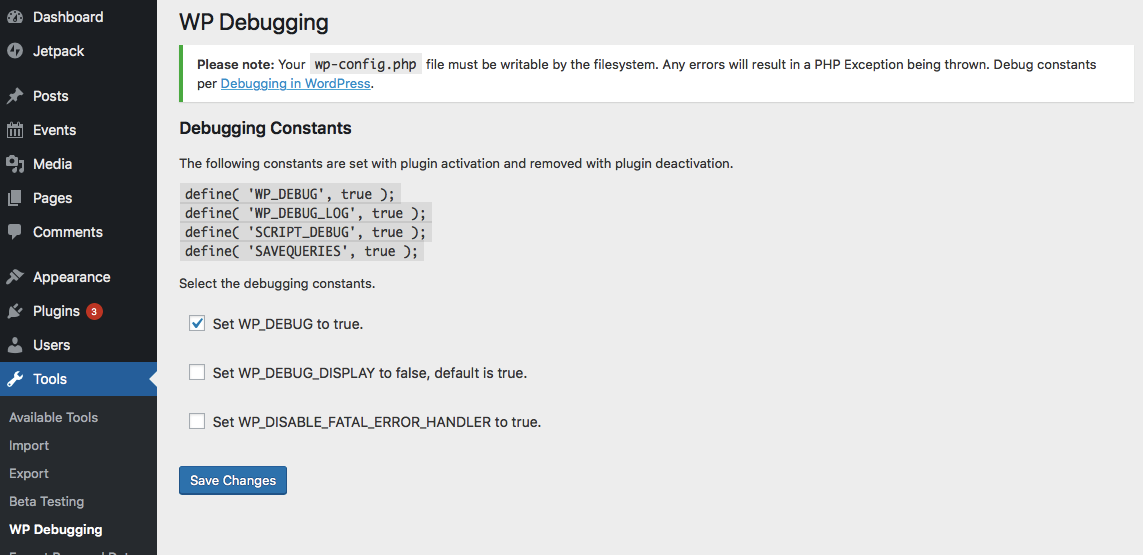
This plugin sets the following debug constants in wp-config.php on plugin activation and removes them on plugin deactivation. Any errors will result in a PHP Exception being thrown. Debug constants per Debugging in WordPress.
Default settings:
define( 'WP_DEBUG_LOG', true );
define( 'SCRIPT_DEBUG', true );
define( 'SAVEQUERIES', true );
@ini_set( ‘display_errors’, 1 ); is set when the plugin is active. WP_DEBUG is set to true when the plugin is first run, thereafter it can be turned off in the Settings.
The Settings page allows the user to set the following.
define( 'WP_DEBUG', true ); // Default on initial plugin installation.
define( 'WP_DEBUG_DISPLAY', false ); // Default when not declared is true.
define( 'WP_DISABLE_FATAL_ERROR_HANDLER', true ); // WordPress 5.2 WSOD Override.
When the plugin is deactivated best efforts are made to re-add pre-existing constants to their former state. When the plugin is activated the default settings and any saved settings are restored.
This plugin uses the wp-cli/wp-config-transformer command for writing constants to wp-config.php.
Debug Quick Look from Andrew Norcross is included with this plugin to assist in reading the debug.log file. If you already have this plugin installed you should delete it when WP Debugging is not active.
Query Monitor and Debug Bar plugins are optional dependencies to aid in debugging and troubleshooting. The notice for installation will recur 45 days after being dismissed.
If you have a non-standard location for your wp-config.php file you can use the filter wp_debugging_config_path to return the file path for your installation.
The filter wp_debugging_add_constants allows the user to add constants to wp-config.php.
The filter returns an array where the key is the name of the constant and the value is an array of data containing the value as a string and a boolean to indicate whether or not the value should be passed without quotes.
$my_constants = [
    'my_test_constant' =>
    [
        'value' => 'abc123',
        'raw' => false,
    ],
    'another_test_constant' => [ 'value' => 'true' ],
];
The value option contains the constant’s value as a string.
The raw option means that instead of placing the value inside the config as a string it will become unquoted. The default is true. Set as false for non-boolean values.
Exemplo:
add_filter(
    'wp_debugging_add_constants',
    function( $added_constants ) {
        $my_constants = [
            'my_test_constant'      => [
                'value' => '124xyz',
                'raw'   => false,
            ],
            'another_test_constant' => [ 'value' => 'true' ],
        ];
        return array_merge( $added_constants, $my_constants );
    },
    10,
    1
);
This will create the following constants.
define( 'MY_TEST_CONSTANT', '124xyz' );
define( 'ANOTHER_TEST_CONSTANT', true );
Development
PRs are welcome against the develop branch on GitHub.
Log de Changes
2.12.6 / 2026-08-13
- update
norcross/debug-quick-lookto better format JSON - update GitHub Actions
2.12.2 / 2024-12-02
- add GA to generate POT
- update for PCP
2.12.1 / 2024-11-08
- move
register_activation_hookandregister_deactivation_hookup the chain
2.12.0 / 2024-11-01
- exit early(ish) if not on WP Debugging settings page
- composer update
- remove
load_plugin_textdomain()
2.11.24 / 2024-04-29
- update link to Debugging in WordPress, thanks @tobifjellner
- cast variable to array in
Bootstrap::deactivate()fix for PHP 8.3
2.11.23 / 2024-03-04
- composer update
- WPCS updates
Capturas de tela
Para desenvolvedores
Este é o seu plugin? Mostre os números.
Adicione um crachá ao vivo ao seu site, Documentos ou Readme do GitHub. Ele é atualizado por conta própria - nenhuma conta necessária.
Best WP Debugging alternatives
All debug plugins →



FAQ
WP Debugging: quick answers
Respostas diretas, extraídas de dados ao vivo WordPress.org.
Fonte: WordPress.org
Is WP Debugging free?
Yes. WP Debugging is free to download and use from the official WordPress.org plugin directory.
Is WP Debugging safe to use in 2026?
WP Debugging is a solid plugin choice in 2026, with a few things worth checking first. It runs on 10K+ sites, is rated 5/5 and was last updated 3 months ago, and scores 69/100 on our health check.
How many websites use WP Debugging?
WP Debugging is active on 10K+ WordPress websites and has been downloaded 502,629 times since it launched in February 2019. It was downloaded 4,845 times in the last 30 days.
Does WP Debugging work with WordPress 7.1?
Yes. The developer has tested WP Debugging up to WordPress 7.1.5, the latest release. It requires WordPress 5.2 or newer.
What PHP version does WP Debugging need?
WP Debugging requires PHP 5.6 or higher. Most hosts run PHP 8.x today, so it works on any modern WordPress hosting.
When was WP Debugging last updated?
The latest version, 2.12.6, was released on August 13, 2026 (3 months ago).
Who makes WP Debugging?
WP Debugging is developed and maintained by Andy Fragen.
What are the best alternatives to WP Debugging?
The most popular alternatives to WP Debugging are WP Crontrol (300K+ installs), Query Monitor (200K+ installs) and Debug Bar (20K+ installs).
Alimentado por PageForge
Um modelo e uma planilha. Uma página real para cada pesquisa.
PageForge Transforma cada linha de um CSV em uma página WordPress com seu próprio título, URL, SEO campos e esquema, construído no layout que você já desenhou. Gratuito em WordPress.org.
- CSV e XLSX, mais Google Sheets em Profissional e Empresarial
- Seu próprio título, URL, SEO campos e esquema para cada página
- Funciona com o editor de blocos, Elementor, Divi e Avada
- Gratuito em WordPress.org, sem cartão de crédito