


Debug Log Manager – Conveniently Monitor and Inspect Errors
Log PHP, database and JavaScript errors via WP_DEBUG with one click. Conveniently create, view, filter and clear the debug.log file.

Escolha segura
Yes — Debug Log Manager is a safe, well-maintained plugin to use in 2026. It runs on 10K+ sites, is rated 5/5 and was last updated 1 month ago, and scores 90/100 on our health check.
- Comprovado em escala em sites ativos de mais de 10 mil
- Amado pelos usuários — 5/5 de 25 avaliações
- Testado com as últimas WordPress (7.1)
Como ele se acumula?
Lado a lado em instalações, atualizações, avaliações e suporte


Downloads diários
Os picos de download geralmente seguem uma nova versão — cada site que atualiza automaticamente é um download.
Rankings
Where Debug Log Manager stands todayWordPress.org Classificações de pesquisa
Posição ao vivo na pesquisa de plugins, top 100| Palavra chave | Posição |
|---|---|
| debug | #2 |
| developer | #20 |
| errors | #1 |
Adoção da versão
Compartilhamento de sites ativos por lançamento.
Divisão de classificação
★★★★★ ★★★★★ 5 de 25 comentários
About Debug Log Manager
From the official readme · v2.5.3Descrição
Debug Log Manager allows you to:
- Enable WP_DEBUG with one click to log PHP, database and JavaScript errors when you need to, and disable it when you’re done. No need to manually edit wp-config.php file.
- Create the debug.log file for you in a non-default location with a custom file name for enhanced security.
- Copy the content of the default / existing debug.log file into the custom debug.log file, and delete the default / existing debug.log file. So there is continuation in logging and enhanced security going forward.
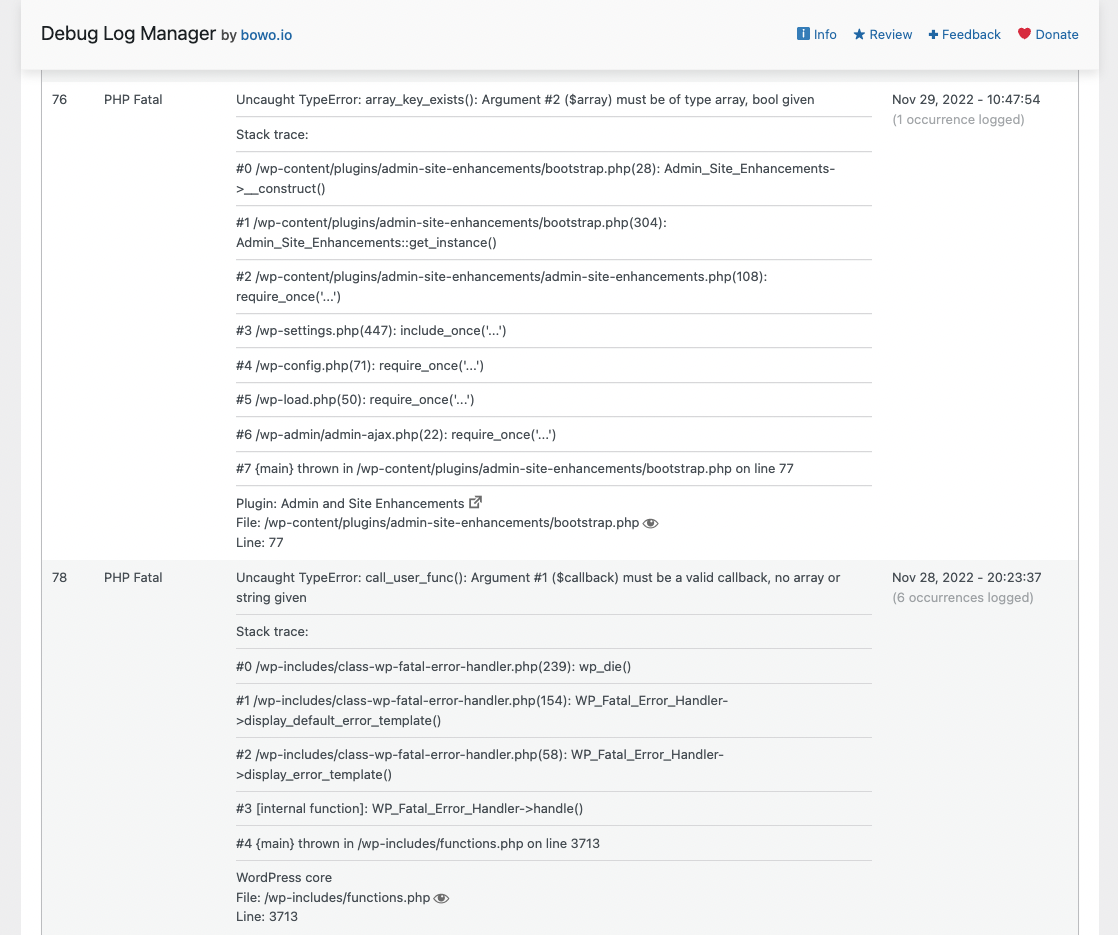
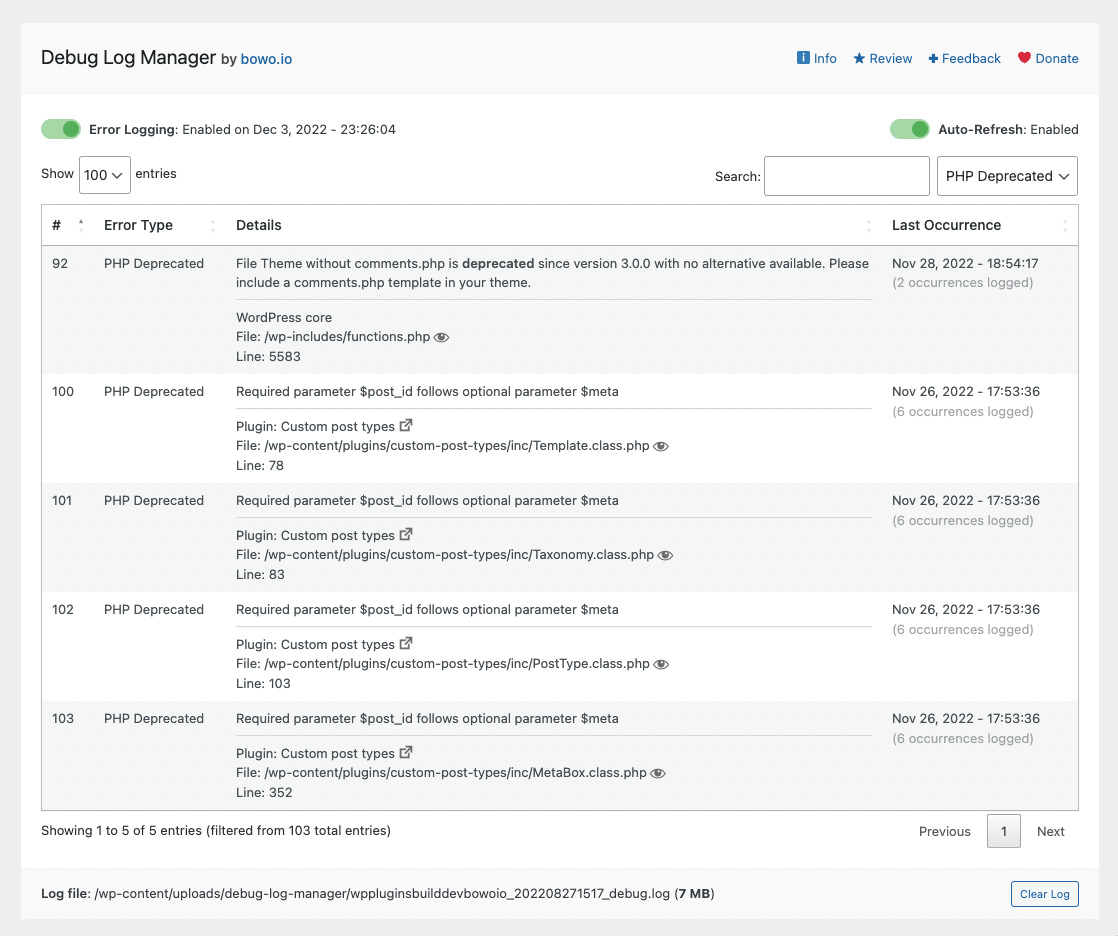
- Parse the debug.log file and view distinct errors and when they last occurred, which is better than looking at the raw log file (potentially) full of repetitive errors.
- Quickly find and filter more specific errors for your debugging work.
- Make error details easier to read by identifying error source (core / plugin / theme) and separating file path and line number.
- Easily view files where PHP errors occurred. This includes WordPress core, plugin and theme files.
- Enable auto-refresh to automatically load new log entries. No need to manually reload the browser tab, or to
tail -fthe log file on the command line. - Easily clear the debug.log file to save disk space and more easily observe newly occurring errors on your site.
- Show an indicator on the admin bar when error logging is enabled.
- Add a dashboard widget showing the latest errors logged.
- Use
error_log()to output error info into your debug log. e.g.error_log( $error_message )for simple, string-based error message, orerror_log( json_encode( $error ) )when inspecting a more complex error info, e.g. array or object. - Auto-trim debug.log file size so it does not grow larger than the available memory. This prevents out-of-memory error when trying to parse and view the debug.log file.
A simpler and more compact version of Debug Log Manager is included as part of the System Dashboard plugin, should you prefer a single plugin that does more.
What Users Say
“This is a great plugin for dev especially for people who tinker in the code.” ~PK Son
“I have used a couple of other logger plugins and this is by far the best one.” ~Brian Henry
“Another massive time-saving tool.“ ~Jeff Starr
Give Back
- A nice review would be great!
- Give feedback and help improve future versions.
- Help translate into your language.
- Github repo to contribute code.
- Sponsor my work.
Check These Out Too
- System Dashboard: Central dashboard to monitor various WordPress components, processes and data, including the server.
- Variable Inspector: Inspect PHP variables on a central dashboard in wp-admin for convenient debugging.
- Admin and Site Enhancements helps you to easily enhance various admin workflows and site aspects while replacing multiple plugins doing it.
- WordPress Newsboard: The latest news, articles, podcasts and videos from 100+ WordPress-focused sources.
Log de Changes
2.5.3 (2026.10.19)
- Security: Fixed stored cross-site scripting in JavaScript error log details. Encoded markup submitted to
log_js_errorsis decoded and stripped before it is written, and log details are escaped before they are returned to the log page auto-refresh. Props to Wordfence for the responsible disclosure and verification for the fix.
2.5.2 (2026.06.26)
- Added mechanism to prevent memory exhaustion error when parsing a large debug.log file. Props to @lbdesign for reporting this issue.
2.5.1 (2026.05.28)
- Security: Hardened unauthenticated
log_js_errorsAJAX endpoint against log injection (CVE-2026-9016). Added same-site Origin/Referer validation, rate limiting, stricter field sanitization, fixed[DLM JS]log prefix, capability check for wp-admin requests, and parser fix so browser-submitted entries cannot be misclassified as PHP errors. Props to Endang Alfarisi for responsibly disclosing this via Wordfence.
2.5.0 (2026.05.22)
- Added a mechanism that automatically limit / trims the debug.log file size so it never grows larger than the available memory. Props to @kham7236 for reporting the “allowed memory size exhausted” error that prompted this improvement.
- Fix undefined plugin/theme source variables when parsing debug log entries. Props to Mr_sordum for reporting the issue.
- Confirmed compatibility with WordPress 7.0
2.4.3 (2025.09.24)
- Rename constants used in DLM to prevent conflict with similar constant names in the Download Monitor plugin. Props to Nicolas C. for reporting the issue.
2.4.2 (2025.09.17)
- Additional measure to fix PHP fatal error that occurs in a certain scenario. Props to Michael K. for reporting the issue in detail.
2.4.1 (2025.09.17)
- Fixed PHP fatal error that occurs in a certain scenario. Props to Pedro and @guytimes for reporting the issue in detail here and here.
2.4.0 (2025.09.12)
- When DLM is unable to parse a log entry properly, it will now output the raw entry instead of “No error message specified…”. Props to Michael Kupietz for prompting this improvement.
- DLM will now work with WP installations where the plugins and themes folder paths is non-standard, e.g. something other than /wp-content/plugins/ and /wp-content/themes/. Props to Michael Kupietz for prompting this improvement.
- Added an option to disable javascript error logging.
- Added an option to not modify SCRIPT_DEBUG value when toggling error logging. Props to Christine for prompting this improvement.
- Added an option to not process log entries with non-UTC timezone(s), which can be resource-intensive when log file size is significantly large. Props to Michael Kupietz for prompting this improvement.
2.3.6 (2025.04.28)
- Added compatibility with debug log entries that are in timezones other than UTC. Props to @mroesele for reporting an issue with entries marked with Europe/Berlin timezone.
- Confirmed compatibility with WP v6.8
2.3.5 (2025.04.05)
- Fixed XSS vulnerability responsibly disclosed by Yassine Neggaoui regarding the parsing of debug.log entries without proper sanitization.
2.3.4 (2025.02.19)
- Fix admin bar icon not being displayed. Props to @tobias_conrad for prompting this fix.
2.3.3 (2024.03.20)
- Properly escape unescaped $variables for improved security. Making good use of the excellent Plugin Check (PCP) plugin.
2.3.2 (2024.03.20)
- Fixed XSS vulnerability responsibly disclosed by Majed Refaea via pathstack.
- Fixed Broken Access Control vulnerability responsibly disclosed by Majed Refaea via pathstack.
- Fixed CSRF attack vulnerability responsibly disclosed by Dhabaleshwar Das via pathstack.
- Enable detection of change in WordPress installation path, e.g. when pushing from dev to production, or migrating to new host, and update the debug log file location settings. This should fix issue where the debug log entry viewer stopped working on such scenarios. To make sure Debug Log Manager works on the new site / destination, please deactivate and reactivate it. Props to @jeswd for reporting it here and @jrmyfranck and @drhnews for reporting it here.
2.3.1 (2023.11.30)
- Improved the randomness of the debug log file name for improved security.
2.3.0 (2023.11.29)
- Improved parsing of log entries with more than one set of bracketed info, e.g. [timestamp] [WARNING] detail info about error. It was parsed as “No error message specified…”. Props to @azzuwayed for providing the one important line of code with the right preg_replace regex pattern to fix that. I find people who can churn out regex patterns as needed to have a special superpower!
2.2.2 (2023.11.29)
- [SECURITY] Improved security of ajax call to clear log file. Authorized only for site admins and secured to prevent CSRF with nonce. Props to Dmitrii Ignatyev again for reminding to check on this one as well.
2.2.1 (2023.11.29)
- [IMPORTANT][SECURITY] Fixed a security issue where the debug log manager directory can be opened in the browser allowing visitors to see and download the debug log file which may contain sensitive information. Once you update to v2.2.1, please visit the debug log page at least once. This will create an empty index.php file in the DLM directory and prevent the issue. This vulnerability was responsibly disclosed by Dmitrii Ignatyev from CleanTalk inc. on November 2, 2023. Apologies if this took me a while to get around to as I was fully occupied with the launch of ASE Pro.
2.2.0 (2023.06.26)
- Hide dashboard widget and admin bar icon for non-administrator users
- Stop public.js from loading on the frontend if logging is disabled
2.1.4 (2023.04.15)
- Add link to WordPress Newsboard in footer
- [SPONSORSHIP] If you like or have benefited from this plugin in your personal project(s), paid work and/or client site(s), please kindly consider sponsoring the ongoing development and maintenance of this plugin (and my other plugins) from as little as USD 1 / month. Thank you!
2.1.3 (2023.02.25)
- Fixed “Undefined offset” error. Props to @guyinpv for reporting the issue.
2.1.0 (2023.02.21)
- Correctly parse the content of entries added via the
error_log()function. Instead ofprint_r(), please usejson_encode(), if you’re trying to output a PHP$variablecontaining an array or object into the debug log. e.g.error_log( json_encode( $variable_name ) ). Props to @guyinpv for reporting the issue.
2.0.0 (2022.12.03)
- WordPres core, plugin or theme files where PHP errors occurred can now be easily viewed by simply clicking on the file path in each error entry. This is done using core’s plugin/theme editor (modified to load in view-only mode) and the wordpress-develop repo on Github for core files.
- SCRIPT_DEBUG constant is now set to true in wp-config when error logging is enabled, which should help with debugging javascript errors.
- Added a button to disable plugin/theme editor below the error entries table. This is for when you’re done with debugging, i.e. you’ve disabled error logging and cleared the debug log file, and wants to keep things secure.
1.9.1 (2022.12.02)
- Fixed styling issue for external link dashicon in entries when datatable is auto-refreshed.
1.9.0 (2022.12.02)
- Detect PHP Exception error type and add it to the entries table filter.
- Make error entries easier to read by identifying error source (core / plugin / theme) and separating file path and line number.
1.8.7 (2022.10.22)
- Fix for missing wp_date() function for WordPress before v5.3.
- Suppress all admin notices when viewing log entries. Thanks to a nice patch from @brianhenryie.
- Improve inline comments for some of the code.
1.8.6 (2022.10.09)
- Fix wrong reference to old app.js. Change to admin.js.
1.8.5 (2022.10.08)
- Smooth out the behaviour of scroll-to-fix-on-top the position of DLM page’s header.
- Change default number of entries to show on dashboard widget from 10 to 5.
1.8.4 (2022.10.08)
- Fix for syntax error as reported by @michel-jongbloed.
1.8.3 (2022.10.07)
- CSS fix for dashboard widget to ensure error messages wrap properly, i.e. not overflow the widget container.
1.8.2 (2022.10.05)
- CSS fixes for dashboard widget footer as well as main page header and footer sizing.
1.8.0 (2022.10.02)
- Add dashboard widget showing the latest errors logged, the error logging status and a link to the Debug Log Manager page.
1.7.0 (2022.09.28)
- Internationalize the plugin. i.e. make it ready for localization (translation into various languages). Do help make Debug Log Manager available in your language. Thank you!
1.6.4 (2022.09.27)
- Fix PHP Warning issue: “Trying to access array offset on value of type bool” reported by @brianhenryie and @hogash.
1.6.3 (2022.09.27)
- Further fixes (HTML, CSS, JS) to ensure error details are properly wrapped inside the data table and not cause the table to overflow the page width. This includes scenarios when auto-refresh is enabled and pagination is in use.
1.6.2 (2022.09.26)
- CSS fix to ensure error details are properly wrapped inside the data table and not cause the table to overflow the page width.
1.6.1 (2022.09.26)
- Improve detection of anchor text in wp-config.php for the WP_Config_Transformer class. Make sure toggling of WP_DEBUG works for wp-config.php that uses either “Happy publishing” or “Happy blogging”.
1.6.0 (2022.09.25)
- Add admin bar status icon. Will only show up if error logging is enabled and on pages other than the Debug Log Manager main page, including the front end.
1.5.3 (2022.09.24)
- Improve log parser for handling error messages that contain the # and [ characters, e.g. “Argument #1” or “[internal function]”
1.5.2 (2022.09.22)
- Disable auto-refresh when pagination is used. Otherwise, table will always go back to the first page.
1.5.1 (2022.09.21)
- Fix typo in Error Type dropdown filter for ‘JavaScript’ preventing filter to work properly for this error type.
1.5.0 (2022.09.21)
- Add Error Type dropdown filter.
1.4.0 (2022.09.21)
- JavaScript errors on wp-admin and the front end is now logged by default.
- Improve copy around error types for simplicity and clarity.
- Fix an issue where AJAX calls for the auto-refresh feature won’t properly stop in multiple scenarios of clicking the Error Logging and/or Auto-Refresh toggles.
1.3.3 (2022.09.20)
- Bug fix: undefined function wp_filesize() in bootstrap.php. Props to @gleysen for reporting it.
1.3.1 (2022.09.18)
- Fix bugs around the auto-refresh feature. Disabling auto-refresh works only on the toggle and wp_option entry but not on the actual ajax calls. If auto-refresh is enabled, it only worked on clicking the toggle but not on page load. Both issues are fixed.
1.3.0 (2022.09.18)
- Implement toast notifications on various action completions, e.g. clearing log file.
- Change date format to M j, Y – H:i:s, e.g. Dec 31, 2021 – 20:06:34.
- Implment auto-refresh feature that will automatically load the latest error entries every 5 seconds.
1.2.0 (2022.09.16)
- Fix detection of existing debug log file, if there is one, so it is copied correctly into DLM’s debug log file.
- Auto update entries table when logging is enabled, including when copying entries from existing debug.log file.
- Code refactor: added autoloader of plugin’s PHP classes.
1.1.0 (2022.09.13)
- Improve implementation of WP PHP Coding Standards across the codebase.
- Improve variable sanitization and escaping.
- Set initial data table sort based on the # column so that Last Occurence column is properly sorted according to the timestamp.
- Add get_value() method to WP_Config_Transformer class to work with existing debug log constants in wp-config.php.
- Enable $options argument for the add() and update() method in WP_Config_Transformer to ensure formatting of debug log constants is correct in wp-config.php.
1.0.1 (2022.08.31)
- Refactor code for better organization and maintainability.
- Improve plugin description / README.md.
1.0.0 (2022.08.29)
- Initial stable release.
Capturas de tela


Para desenvolvedores
Este é o seu plugin? Mostre os números.
Adicione um crachá ao vivo ao seu site, Documentos ou Readme do GitHub. Ele é atualizado por conta própria - nenhuma conta necessária.
Best Debug Log Manager alternatives
All debug plugins →



FAQ
Debug Log Manager: quick answers
Respostas diretas, extraídas de dados ao vivo WordPress.org.
Fonte: WordPress.org
Is Debug Log Manager free?
Yes. Debug Log Manager is free to download and use from the official WordPress.org plugin directory.
Is Debug Log Manager safe to use in 2026?
Yes — Debug Log Manager is a safe, well-maintained plugin to use in 2026. It runs on 10K+ sites, is rated 5/5 and was last updated 1 month ago, and scores 90/100 on our health check.
How many websites use Debug Log Manager?
Debug Log Manager is active on 10K+ WordPress websites and has been downloaded 180,825 times since it launched in September 2022. It was downloaded 9,407 times in the last 30 days.
Does Debug Log Manager work with WordPress 7.1?
Yes. The developer has tested Debug Log Manager up to WordPress 7.1.5, the latest release. It requires WordPress 4.6 or newer.
What PHP version does Debug Log Manager need?
Debug Log Manager requires PHP 5.6 or higher. Most hosts run PHP 8.x today, so it works on any modern WordPress hosting.
When was Debug Log Manager last updated?
The latest version, 2.5.3, was released on October 19, 2026 (1 month ago).
Who makes Debug Log Manager?
Debug Log Manager is developed and maintained by Bowo.
What are the best alternatives to Debug Log Manager?
The most popular alternatives to Debug Log Manager are WP Crontrol (300K+ installs), Query Monitor (200K+ installs) and Debug Bar (20K+ installs).
Alimentado por PageForge
Um modelo e uma planilha. Uma página real para cada pesquisa.
PageForge Transforma cada linha de um CSV em uma página WordPress com seu próprio título, URL, SEO campos e esquema, construído no layout que você já desenhou. Gratuito em WordPress.org.
- CSV e XLSX, mais Google Sheets em Profissional e Empresarial
- Seu próprio título, URL, SEO campos e esquema para cada página
- Funciona com o editor de blocos, Elementor, Divi e Avada
- Gratuito em WordPress.org, sem cartão de crédito