


Debug Log Viewer
Effortlessly view, search, filter and manage your WordPress debug.log in the admin dashboard. Real-time monitoring and email alerts

Escolha sólida
Debug Log Viewer is a solid plugin choice in 2026, with a few things worth checking first. It runs on 1K+ sites, is rated 4/5 and was last updated 3 weeks ago, and scores 74/100 on our health check.
- Desenvolvido ativamente — última atualização 3 semanas atrás
- Testado com as últimas WordPress (7.1)
- Momentum — downloads up 174.3% vs the previous 30 days
- Muito poucos comentários até agora
Como ele se acumula?
Lado a lado em instalações, atualizações, avaliações e suporte


Downloads diários
Os picos de download geralmente seguem uma nova versão — cada site que atualiza automaticamente é um download.
Rankings
Where Debug Log Viewer stands todayWordPress.org Classificações de pesquisa
Posição ao vivo na pesquisa de plugins, top 100| Palavra chave | Posição |
|---|---|
| debug | #6 |
| debugging | #32 |
| developer-tools | #30 |
| error log | #16 |
| log | #28 |
Adoção da versão
Compartilhamento de sites ativos por lançamento.
Divisão de classificação
★★★★★★★★★★ 4 from 3 reviews
About Debug Log Viewer
From the official readme · v2.5.3Descrição
Debug Log Viewer: Your Essential WordPress Debugging Tool
Tired of struggling to access and understand your WordPress debug.log file?
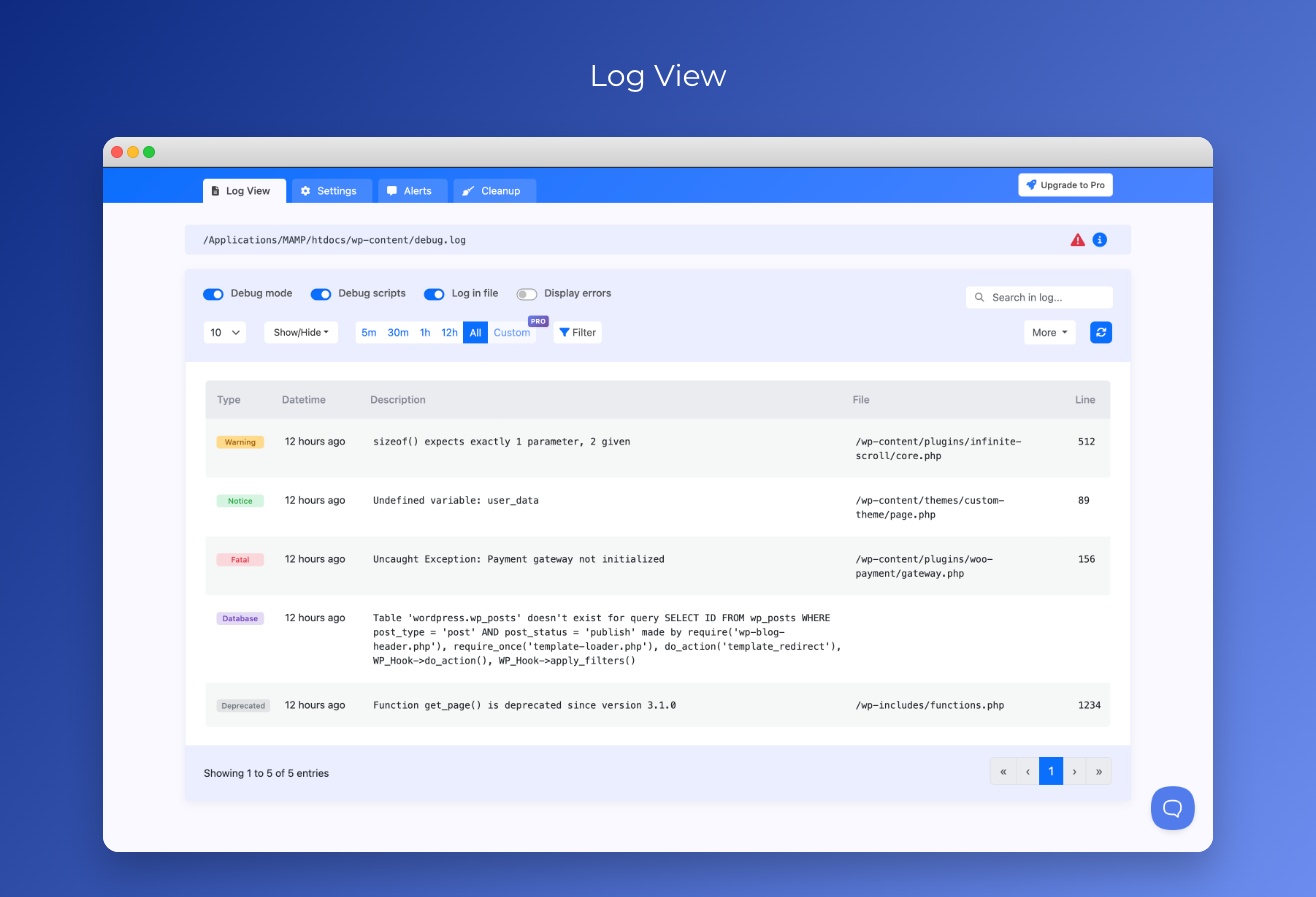
Debug Log Viewer simplifies WordPress debugging by providing a user-friendly interface to view, search, and manage your debug.log directly within your WordPress admin area.
It is designed for WordPress developers, site administrators, freelancers, and anyone who needs to quickly identify and resolve website issues.
Debug Log Viewer helps you find errors faster without using FTP, hosting panels, or manually opening log files.
Gain Real-Time Insights into Your WordPress Site Health
Monitor errors, warnings, and deprecated function notices in real-time. Debug Log Viewer helps you identify problems early and maintain a more stable WordPress environment.
Key Features for Efficient WordPress Debugging
- Real-Time Log Viewer: Monitor your WordPress debug.log file in real-time, directly from your WordPress dashboard. No more hunting for files via FTP or cPanel!
- Easy Debug Log Access: Access and view your full debug log within a clean and intuitive interface.
- Smart Search: Find log entries quickly with intelligent search that matches space-separated words in any order.
- Advanced Search & Filtering: Quickly find specific log entries with powerful search and filtering options. Filter by error type, keywords, and date range (Pro). Use regular expressions for complex search patterns (Pro).
- Pagination: Navigate through large debug logs with ease using pagination, ensuring smooth performance even with extensive logs.
- Email Alerts for Errors: Get email alerts when new errors are logged. Pro users can customize error severity levels and recipients.
Flexible Settings Panel
- Control WP_DEBUG Constants: Enable or disable WP_DEBUG and WP_DEBUG_LOG constants directly from the plugin settings.
- Customize Logging Options: Configure your debug log settings to match your needs.
- Custom Log Path Support: Automatically detect and read custom debug.log locations.
Benefits of Using Debug Log Viewer
- Save Time and Effort: Stop manually accessing and parsing your debug log file.
- Faster Error Detection: Monitor errors as they happen and reduce troubleshooting time.
- Simplified Troubleshooting: Quickly identify the source of errors and warnings.
Debug Log Viewer Pro Features
Upgrade to Pro and get advanced tools for professional WordPress debugging and site maintenance:
- Regular Expression Search: Use powerful regex patterns to find complex log entries and patterns.
- Advanced Email Alerts: Choose error levels and send notifications to multiple recipients.
- CSV Export: Export debug log entries for analysis, reporting, or sharing.
- Custom Date Range Filtering: Analyze logs from specific time periods.
- Infinite Scroll Log Viewer: Browse large log files smoothly without pagination interruptions.
- Advanced Log Cleanup Controls: Manage debug.log size with custom limits, schedules, cleanup methods, and retention settings.
- Cleanup History: Review previous cleanup actions and track log maintenance.
Why choose Debug Log Viewer Pro?
Managing WordPress errors is not only about viewing logs.
Large debug files can consume disk space, become difficult to analyze, and slow down troubleshooting.
Pro gives you automation tools to monitor, export, filter, and maintain your debug logs efficiently.
Who is Debug Log Viewer For?
- WordPress developers
- Website administrators
- Freelancers managing client sites
- Agencies maintaining WordPress websites
- Anyone who wants an easy way to monitor WordPress errors
Instalação
- Installation: Install Debug Log Viewer from the WordPress Plugin Directory or upload the plugin zip file through your WordPress admin.
- Activation: Activate the plugin from your Plugins page.
- Access: Navigate to the “Debug Log Viewer” menu in your WordPress dashboard to start monitoring your debug log.
Log de Changes
2.5.3
- Dependências atualizadas
- UI fixes
2.5
- Dependências atualizadas
- Added Smart Search: Intelligent search that matches space-separated words in any order
- Added Regular Expression Search for advanced pattern matching (Pro feature)
2.4
- UI and design improvements
- Correções de bugs
2.2.3
- Full-width layout
- Changed log file info panels
- Improved review banner
- UI and design improvements
- Package updates
2.1
- Added Auto-Cleanup feature to automatically manage debug.log file size (Pro: configurable 1-5000MB, Free: fixed at 50MB)
- Three cleanup methods available: Truncate (keep recent logs), Clear (remove all), Archive & Rotate (backup before clearing)
- Added cleanup history tracking with expandable view for up to 50 entries (Pro only)
- Various UI improvements, package upgrade and code optimizations
2.0.7
- Added ability to choose timezone for log entries
Capturas de tela


Para desenvolvedores
Este é o seu plugin? Mostre os números.
Adicione um crachá ao vivo ao seu site, Documentos ou Readme do GitHub. Ele é atualizado por conta própria - nenhuma conta necessária.
Best Debug Log Viewer alternatives
All debug plugins →




FAQ
Debug Log Viewer: quick answers
Respostas diretas, extraídas de dados ao vivo WordPress.org.
Fonte: WordPress.org
Is Debug Log Viewer free?
Yes. Debug Log Viewer is free to download and use from the official WordPress.org plugin directory.
Is Debug Log Viewer safe to use in 2026?
Debug Log Viewer is a solid plugin choice in 2026, with a few things worth checking first. It runs on 1K+ sites, is rated 4/5 and was last updated 3 weeks ago, and scores 74/100 on our health check.
How many websites use Debug Log Viewer?
Debug Log Viewer is active on 1K+ WordPress websites and has been downloaded 21,911 times since it launched in October 2024. It was downloaded 2,145 times in the last 30 days.
Does Debug Log Viewer work with WordPress 7.1?
Yes. The developer has tested Debug Log Viewer up to WordPress 7.1.5, the latest release. It requires WordPress 5.8 or newer.
What PHP version does Debug Log Viewer need?
Debug Log Viewer requires PHP 7.2 or higher. Most hosts run PHP 8.x today, so it works on any modern WordPress hosting.
When was Debug Log Viewer last updated?
The latest version, 2.5.3, was released on November 5, 2026 (3 weeks ago).
Who makes Debug Log Viewer?
Debug Log Viewer is developed and maintained by Oleksandr Lysyi.
What are the best alternatives to Debug Log Viewer?
The most popular alternatives to Debug Log Viewer are WP Crontrol (300K+ installs), Query Monitor (200K+ installs) and Debug Bar (20K+ installs).
Alimentado por PageForge
Um modelo e uma planilha. Uma página real para cada pesquisa.
PageForge Transforma cada linha de um CSV em uma página WordPress com seu próprio título, URL, SEO campos e esquema, construído no layout que você já desenhou. Gratuito em WordPress.org.
- CSV e XLSX, mais Google Sheets em Profissional e Empresarial
- Seu próprio título, URL, SEO campos e esquema para cada página
- Funciona com o editor de blocos, Elementor, Divi e Avada
- Gratuito em WordPress.org, sem cartão de crédito