


Accessibilité WP
WP Accessibility corrige les problèmes courants d'accessibilité sur votre site WordPress.

Choix
Yes — WP Accessibility is a safe, well-maintained plugin to use in 2026. It runs on 60K+ sites, is rated 4.8/5 and was last updated 4 weeks ago, and scores 94/100 on our health check.
- Prouvé à grande échelle sur plus de 60 000 sites actifs
- Loved by users — 4.8/5 from 68 reviews
- Développé activement — Dernière mise à jour il y a 4 semaines
- Testé avec le dernier WordPress (7.1)
Comment s'accumule-t-il ?
Côte à côte sur les installations, les mises à jour, les évaluations et le support



Téléchargements quotidiens
Les pics de téléchargement suivent généralement une nouvelle version - chaque site qui met à jour automatiquement compte comme un téléchargement.
Classements
Where WP Accessibility stands todayWordPress.org Classements de recherche
Position en direct dans la recherche de plugins, Top 100| Mot-clé | Position |
|---|---|
| a11y | #2 |
| accessibilité | #1 |
| Alt Text | #27 |
| section508 | #1 |
| wcag | #10 |
Adoption de version
Part de sites actifs par version.
Répartition des notes
★★★★★★★★★★ 4.8 from 68 reviews
About WP Accessibility
À partir du Lisezmoi officiel · v2.4.5Description
This plug-in helps with a variety of common accessibility problems in WordPress themes. While most accessibility issues can’t be addressed without directly changing your theme, WP Accessibility adds a number of helpful accessibility features with a minimum amount of setup or expert knowledge.
WP Accessibility is not intended to make your site compatible with any accessibility guidelines.
All features can be disabled according to your theme’s needs. For advanced users, all of the functions based on modifying stylesheets can be customized using your own custom styles by placing the appropriate stylesheet in your theme directory.
Theme Accessibility Features added by WP Accessibility
These are features that address issues caused by inaccessible themes.
- Add skip links with user-defined targets. (Customizable targets and appearance.)
- Add language and text direction attributes to your HTML attribute if missing.
- Add an outline to the keyboard focus state for focusable elements.
- Add labels to standard WordPress form fields (search, comments)
- Add post titles to “read more” links.
- Remove tabindex from elements that are focusable.
- Remove user-scalable=no and maximum-scale=1 to allow resizing.
WordPress Core Accessibility Issues fixed by WP Accessibility
These are features that address issues caused by current or past WordPress core accessibility issues. (Issues added in content, such as target or title attributes, are persistent even when WordPress is updated.)
- Force a search page error when a search is made with an empty text string. (If your theme has a search.php template.)
- Remove redundant title attributes from tag clouds.
- Disable default enabling of full screen block editor.
- Reverse infinite scrolling by default as of WordPress 7.1.
Content specific fixes:
- Strip title attributes from images inserted into content.
- Remove the target attribute from links.
Accessibility Tools in WP Accessibility:
These are tools provided to help you identify issues you may need to fix.
- Enforcement & reporting on missing alt attributes on images while editing.
- Identify images without alt attributes in the Media Library
- Test the color contrast between two provided hexadecimal color values.
- Enable diagnostic CSS to show CSS-detectable problems in visual editor or on front-end of site.
- Search your media library on content in alt text fields.
Accessible Content Features
- Add a long description to images. Use the image’s “Description” field to add long descriptions.
- Add a visibility toggle for alternative text on images.
- Add simplified content summaries for your posts.
Learn more! Read about the accessibility issues corrected by WP Accessibility!
The plug-in is intended to help with deficiencies commonly found in themes and to solve some issues in WordPress core. It can’t correct every problem (by a long shot), but provides tools to fix some issues, supplement the accessibility of your site, or identify problems.
Statistics Collection
WP Accessibility includes a statistics collection feature to help you identify how WP Accessibility is used on your site. This package does not collect any personally identifying data.
Learn more about WP Accessibility statistics.
Contribute!
Installation
- Download the plugin’s zip file, extract the contents, and upload them to your wp-content/plugins folder.
- Login to your WordPress dashboard, click “Plugins”, and activate WP Accessibility.
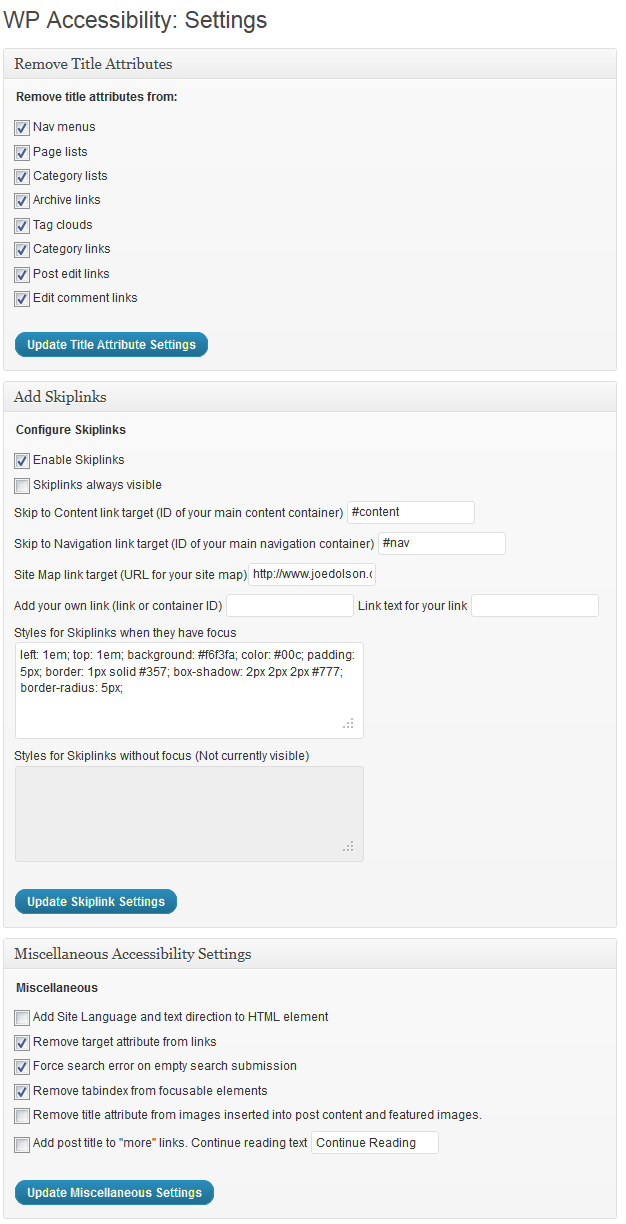
- Customise your settings on the Settings > WP Accessibility page.
Journal de modifications
2.1.6 Security Fix. Please update promptly.
Future
2.4.5
- Bug fix: Broken nonce prevented simplified content summary from saving.
2.4.4
- Security: Fix potential disclosure of private data via the
longdescparameter. - Bug fix: Color contrast form target wrong admin page.
- Bug fix: Remove extraneous ‘p’ parameter on longdesc targets.
- Bug fix: Get post ID from parent
articleif not on img. - Change: Improve
titleelement on longdesc target page. - Updates & hardening to meet current WordPress plugin standards.
2.4.3
- Bug fix: If array value passed to search parameter, PHP fatal triggered due to unguarded expectation that GET parameter is a string.
- Bug fix: User-scalable should not be restored if maximum-scale check is run after updating user-scalable. Props @YuriDevAT
- Bug fix: Typo in setAttribute prevented setting text direction to RTL.
- Change: Instead of setting maximum-scale to 5 (allowing 500% increase), remove the parameter. Props @YuriDevAT
- Tooling: Add e2e test suite for main features.
2.4.2
- Bug fix: Improper checking of default font factor setting when unset. Props @spirosdi
2.4.1
- Bug fix: Unverified adminbar variable broke font-resizing for public visitors.
Captures d'écran
Pour les développeurs
Est-ce votre plugin ? Montrez les chiffres.
Ajoutez un badge en direct à votre site, docs ou github readme. Il se met à jour par lui-même - aucun compte n'est nécessaire.
Best WP Accessibility alternatives
All a11y plugins →


FAQ
WP Accessibility: quick answers
Réponses directes, extraites des données en direct WordPress.org.
Source : WordPress.org
Is WP Accessibility free?
Yes. WP Accessibility is free to download and use from the official WordPress.org plugin directory.
Is WP Accessibility safe to use in 2026?
Yes — WP Accessibility is a safe, well-maintained plugin to use in 2026. It runs on 60K+ sites, is rated 4.8/5 and was last updated 4 weeks ago, and scores 94/100 on our health check.
How many websites use WP Accessibility?
WP Accessibility is active on 60K+ WordPress websites and has been downloaded 2,100,425 times since it launched in October 2012. It was downloaded 50,677 times in the last 30 days.
Does WP Accessibility work with WordPress 7.1?
Yes. The developer has tested WP Accessibility up to WordPress 7.1.5, the latest release. It requires WordPress 6.4 or newer.
What PHP version does WP Accessibility need?
WP Accessibility requires PHP 7.4 or higher. Most hosts run PHP 8.x today, so it works on any modern WordPress hosting.
When was WP Accessibility last updated?
The latest version, 2.4.5, was released on October 25, 2026 (4 weeks ago).
Who makes WP Accessibility?
WP Accessibility is developed and maintained by Joe Dolson.
What are the best alternatives to WP Accessibility?
The most popular alternatives to WP Accessibility are Web Accessibility (formally… (500K+ installs), AccessibleWP (10K+ installs) and WP Accessibility Helper (WA… (10K+ installs).
Propulsé par PageForge
Un modèle et une feuille de calcul. Une vraie page pour chaque recherche.
PageForge transforme chaque ligne d'un CSV en une page WordPress avec son propre titre, URL, SEO et schéma, construit sur la mise en page que vous Déjà conçu. Gratuit sur WordPress.org.
- CSV et XLSX, plus Google Sheets sur les professionnels et les entreprises
- Son propre titre, URL, SEO champs et schéma pour chaque page
- Fonctionne avec l'éditeur de blocs, Elementor, Divi et Avada
- Gratuit sur WordPress.org, pas de carte de crédit