


Accessibility New Window Warnings
Make links that open in a new window compliant with WCAG guidelines for accessibility by adding a warning for users.

Choix solide
Accessibility New Window Warnin… is a solid plugin choice in 2026, with a few things worth checking first. It runs on 1K+ sites, is rated 4.8/5 and was last updated 3 months ago, and scores 77/100 on our health check.
- Testé avec le dernier WordPress (7.1)
Comment s'accumule-t-il ?
Côte à côte sur les installations, les mises à jour, les évaluations et le support



Téléchargements quotidiens
Les pics de téléchargement suivent généralement une nouvelle version - chaque site qui met à jour automatiquement compte comme un téléchargement.
Classements
Where Accessibility New Window Wa… stands todayWordPress.org Classements de recherche
Position en direct dans la recherche de plugins, Top 100| Mot-clé | Position |
|---|---|
| a11y | #14 |
| accessibilité | #16 |
| accessible | #27 |
| ada | #21 |
| wcag | #32 |
Adoption de version
Part de sites actifs par version.
Répartition des notes
★★★★★★★★★★ 4.8 from 17 reviews
About Accessibility New Window Warnings
À partir du Lisezmoi officiel · v1.3.1Description
Web Content Accessibility Guidelines (WCAG) Success Criterion 3.2 (Predictable) specifies that web pages should appear and operate in predictable ways. It is a common practice to set links that go to off-site locations to open in a new window or tab when clicked. Opening new windows or tabs automatically when a link is activated can be disorienting for people who have difficulty perceiving visual content, and for some people with cognitive disabilities, if they are not warned in advance.
This plugin helps websites become more accessible and better meet WCAG guidelines for predicability by providing advanced warning if a link is going to open a new window or tab before the user clicks or activates it. Providing a warning allows the user to decide it they want to leave the current window, and the warning will help them find their way back, if they do decide they would like to go to the new window. It will help them understand that the “back” button will not work and that they have to return to the last window they had open, in order to find their previous location.
There are no settings in this plugin. Simply activate it and it will automatically find all links that open in a new window and add the following three fixes to each link:
1. A new window icon after the link text to denote that the link opens in a new window for sighted people.
2. A tooltip, visible on hover, that says “opens a new window.”
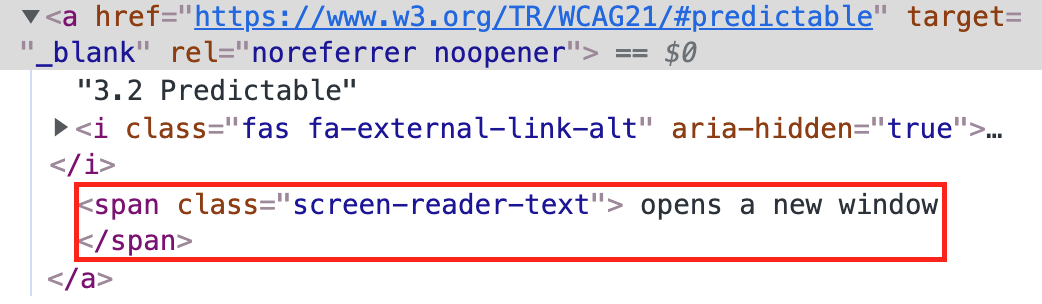
3. “Opens a new window” screen reader text that will be read out to blind or visually impaired people using screen readers immediately following the link anchor text.
Please note: new window warnings will be added to links and links that have been styled to look like buttons, including social media sharing and link icons. Depending upon what third party plugins are adding links to your site that open in new windows, some CSS styling may be required.
In addition to adding warnings for your users, this plugin integrates with the Accessibility Checker plugin; when Accessibility New Window Warnings is activated, it will automatically clear all “Link Opens New Window or Tab” warnings in Accessibility Checker scans of your website. Installing and activating this plugin is a great way to quickly remediate and remove a lot of open issues across you entire website.
The Accessibility New Window Warnings plugin is inspired by Techniques for WCAG 2.0 G201: Giving users advanced warning when opening a new window.
Localization
The Accessibility New Window Warnings plugin is ready for localization. We have added a Spanish translation and are open to more translations!
If you would like to contribute a translation to this plugin, please contact us or fork the repository on GitHub.
Installation
Getting started with Accessibility New Window Warnings is as easy as installing and activating the plugin. There are no settings to configure, it just works!
Installing Accessibility New Window Warnings Within WordPress
- Visit the plugins page within your dashboard and select ‘Add New’.
- Search for ‘Accessibility New Window Warnings’;
- On the Accessibility New Window Warnings plugin, click or activate the ‘Install’ button.
- Activate Accessibility New Window Warnings from your Plugins page.
Installing Accessibility New Window Warnings Manually
1.Upload the unzipped ‘accessibility-new-window-warnings’ folder to the /wp-content/plugins/ directory on your website via FTP.
2. Activate Accessibility New Window Warnings from your Plugins page.
Journal de modifications
1.3.1
- Added – re-run new window warning processing when BoardScribe re-renders its table (e.g. on pagination)
- Added – re-run new window warning processing when Gravity Forms re-renders a form via AJAX (multi-page navigation, validation errors)
- Fixed – accessible name calculation for links that combine an image and text, synced from the Accessibility Checker plugin
- Updated – tested up to version 7.1
1.3.0
- Added – support for modifier classes to prevent the icon or the tooltip showing
- Added – translation support for the strings in the plugin
- Fixed – potential overspill in tooltip when different languages are used
- Updated – tested up to version 7.0
- Refactored – synced the code from the Accessibility Checker fix for the same plugin into this plugin.
1.2.0
- Added – improved placement of external link icons for Elementor button links
- Updated – CSS to vertically align external link icons within Elementor button links for better visual appearance
1.1.0
- Fixed – tooltips can now be dismissed using the Escape key, ensuring better accessibility
- Fixed – tooltip content is now hoverable, preventing accidental dismissal
- Refactored – code for better performance and maintainability using modern JavaScript practices
1.0.10
- Added – detection and processing of window.open() links with consistent tooltip/ARIA label handling for both target=”_blank” and window.open()
1.0.9
- Updated – tested up to version
Captures d'écran




Pour les développeurs
Est-ce votre plugin ? Montrez les chiffres.
Ajoutez un badge en direct à votre site, docs ou github readme. Il se met à jour par lui-même - aucun compte n'est nécessaire.
Best Accessibility New Window Warn… alternatives
All a11y plugins →


FAQ
Accessibility New Window Warnings: quick answers
Réponses directes, extraites des données en direct WordPress.org.
Source : WordPress.org
Is Accessibility New Window Warnin… free?
Yes. Accessibility New Window Warnin… is free to download and use from the official WordPress.org plugin directory.
Is Accessibility New Window Warnin… safe to use in 2026?
Accessibility New Window Warnin… is a solid plugin choice in 2026, with a few things worth checking first. It runs on 1K+ sites, is rated 4.8/5 and was last updated 3 months ago, and scores 77/100 on our health check.
How many websites use Accessibility New Window Warnin…?
Accessibility New Window Warnin… is active on 1K+ WordPress websites and has been downloaded 28,069 times since it launched in August 2021. It was downloaded 1,025 times in the last 30 days.
Does Accessibility New Window Warnin… work with WordPress 7.1?
Yes. The developer has tested Accessibility New Window Warnin… up to WordPress 7.1.5, the latest release. It requires WordPress 6.7.0 or newer.
When was Accessibility New Window Warnin… last updated?
The latest version, 1.3.1, was released on September 1, 2026 (3 months ago).
Who makes Accessibility New Window Warnin…?
Accessibility New Window Warnin… is developed and maintained by Equalize Digital.
What are the best alternatives to Accessibility New Window Warnin…?
The most popular alternatives to Accessibility New Window Warnin… are Web Accessibility (formally… (500K+ installs), WP Accessibility (60K+ installs) and AccessibleWP (10K+ installs).
Propulsé par PageForge
Un modèle et une feuille de calcul. Une vraie page pour chaque recherche.
PageForge transforme chaque ligne d'un CSV en une page WordPress avec son propre titre, URL, SEO et schéma, construit sur la mise en page que vous Déjà conçu. Gratuit sur WordPress.org.
- CSV et XLSX, plus Google Sheets sur les professionnels et les entreprises
- Son propre titre, URL, SEO champs et schéma pour chaque page
- Fonctionne avec l'éditeur de blocs, Elementor, Divi et Avada
- Gratuit sur WordPress.org, pas de carte de crédit