


Accessibility Tool Kit: WP Accessibility checker plugin for WCAG, Section 508, ADA, EAA Compliance
Powerful WordPress accessibility checker plugin to detect and fix common accessibility issues, and support WCAG, ADA, EAA, and Section 508 compliance.

Choix
Yes — Accessibility Tool Kit: WP Acce… is a safe, well-maintained plugin to use in 2026. It runs on 1K+ sites, is rated 4.8/5 and was last updated 3 weeks ago, and scores 85/100 on our health check.
- Développé activement — Dernière mise à jour il y a 3 semaines
- Testé avec le dernier WordPress (7.1)
- Momentum — downloads up 167.8% vs the previous 30 days
Comment s'accumule-t-il ?
Côte à côte sur les installations, les mises à jour, les évaluations et le support



Téléchargements quotidiens
Les pics de téléchargement suivent généralement une nouvelle version - chaque site qui met à jour automatiquement compte comme un téléchargement.
Classements
Where Accessibility Tool Kit: WP… stands todayWordPress.org Classements de recherche
Position en direct dans la recherche de plugins, Top 100| Mot-clé | Position |
|---|---|
| a11y | #11 |
| accessibilité | #9 |
| ada | #6 |
| EAA | #4 |
| wcag | #5 |
Adoption de version
Part de sites actifs par version.
Répartition des notes
★★★★★★★★★★ 4.8 from 5 reviews
About Accessibility Tool Kit: WP Accessibilit…
From the official readme · v2.2.2Description
Accessibility Tool kit is a powerful WordPress accessibility plugin that helps make your entire WordPress site compliant with a11y standards, including WCAG 2.1 level A and AA, Section 508, and ARIA guidelines.
The built-in accessibility checker scans your WordPress website and detects common accessibility issues, from missing labels to improper heading structure and keyboard navigation traps. The plugin also provides fixes for the most common issues, helping you resolve them quickly without needing to edit code manually.
Accessibility Toolkit is ideal for site administrators, developers, and agencies seeking to create more inclusive and user-friendly websites.
See our detailed guide to set up the WordPress Accessibility tool.
Disclaimer: Accessibility Toolkit helps identify and address many common accessibility issues. However, it does not guarantee complete compliance with WCAG, ADA, or other accessibility laws and regulations. Additionally, some requirements, such as writing accurate image alt text, ensuring link purpose clarity, and maintaining proper heading/content hierarchy, still require manual review and human judgment.
For full legal compliance, we recommend conducting a comprehensive accessibility audit and remediation process.
Watch this video to learn how the plugin works
More than an Accessibility Widget or an Overlay Widget
Accessibility Tool Kit is not an accessibility widget or an overlay. The plugin aims to remediate accessibility issues and fix barriers at the code level without compromising the performance of the website.
The plugin does not add JavaScript to modify how people with disabilities and users of assistive technologies interact with your website. Instead, this web accessibility WordPress plugin helps you:
- Improve WordPress accessibility compliance without needing to code
- Strengthen screen reader accessibility with better markup and ARIA attributes
- Ensure more accessible links and forms sitewide
- Make your site usable for keyboard-only navigation
- Provide mobile zoom and readability enhancements for on-the-go visitors
- Show commitment to inclusivity, build user trust, and support legal compliance with an accessibility statement.
- Test website accessibility and give more control to users on how they choose to view the website with Accessibility Toolbar.
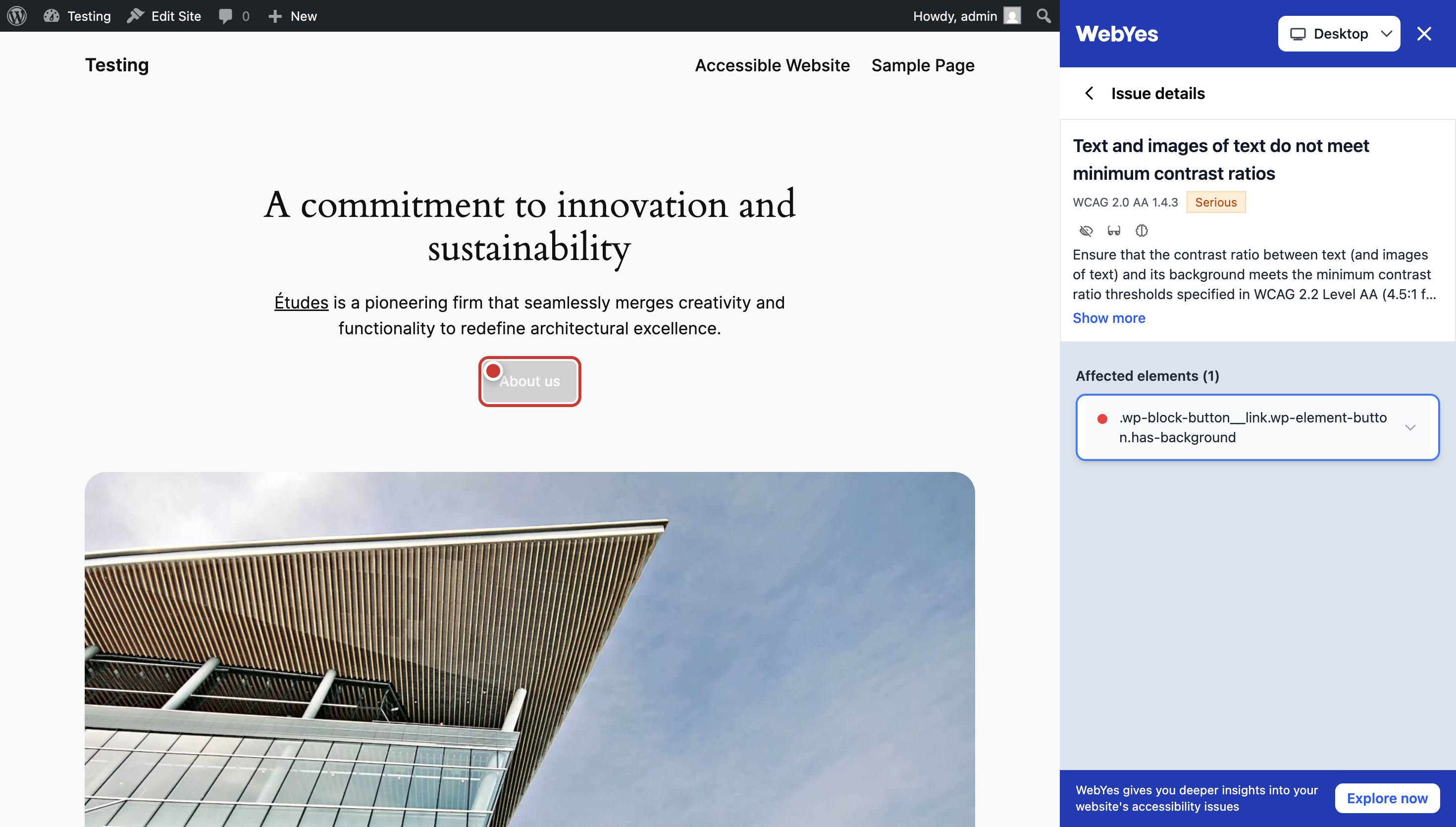
Accessibility Tool Kit, coupled with accessibility tester and validator tools like WebYes, can help identify accessibility issues and provide guidance on how to fix them.
Accessibility Tool Kit Features for your WordPress Web Accessibility Goals
Website accessibility is crucial because around 15% of the world’s population, approximately 1 billion people, live with some form of disability. Ensuring your website is accessible and compliant with standards like WCAG (Web Content Accessibility Guidelines) level A, AA, and AAA, and legal frameworks such as the ADA (Americans with Disabilities Act), Section 508 of the Rehabilitation Act, and the EAA (European Accessibility Act) creates an inclusive experience for people with diverse needs.
Below are the core features of the plugin that will help you reach your WordPress website accessibility goals:
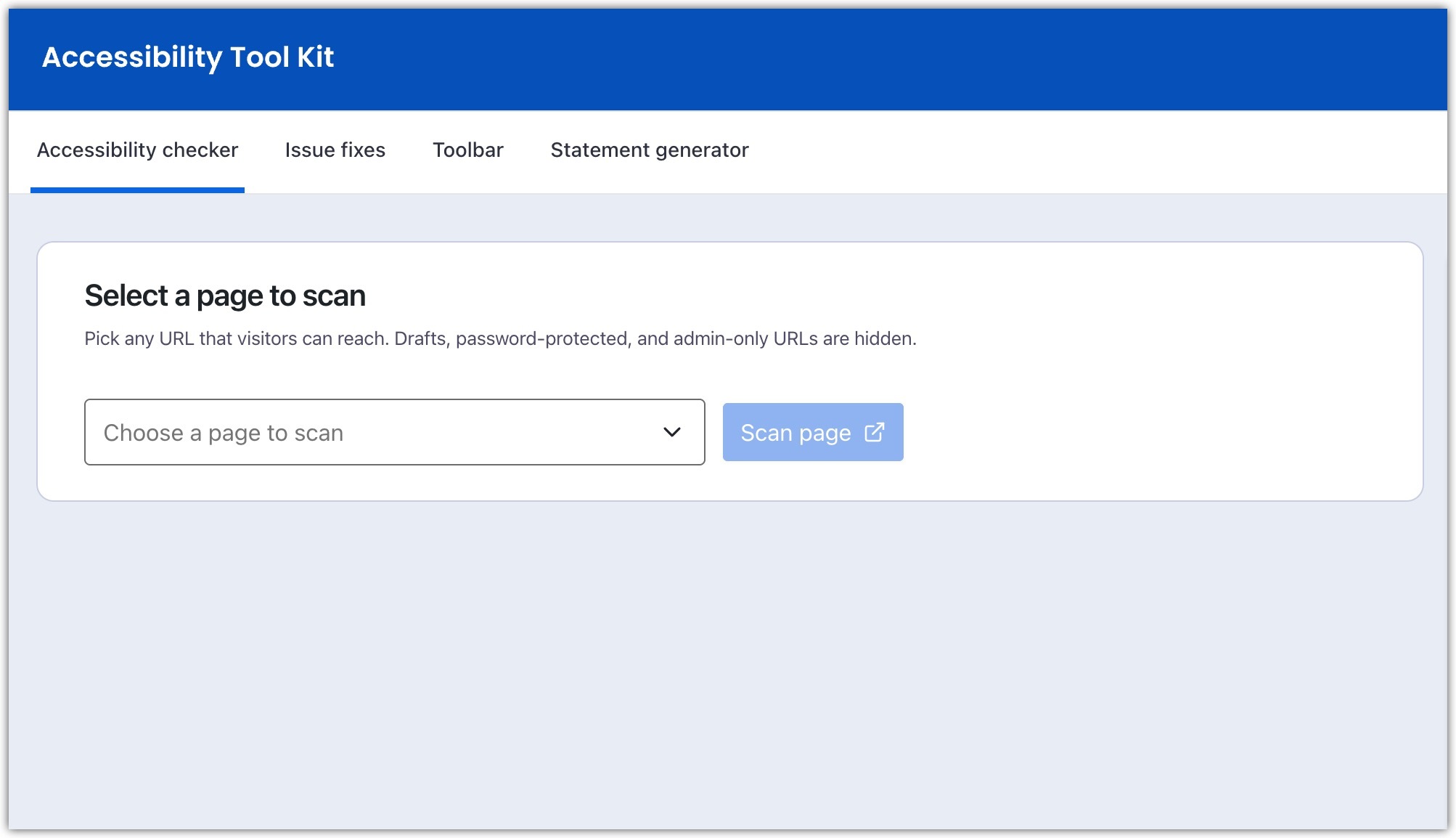
- Accessibility Checker – launches an admin-only, backend-initiated audit, allowing you to select any public page or URL and scan it from the dashboard.
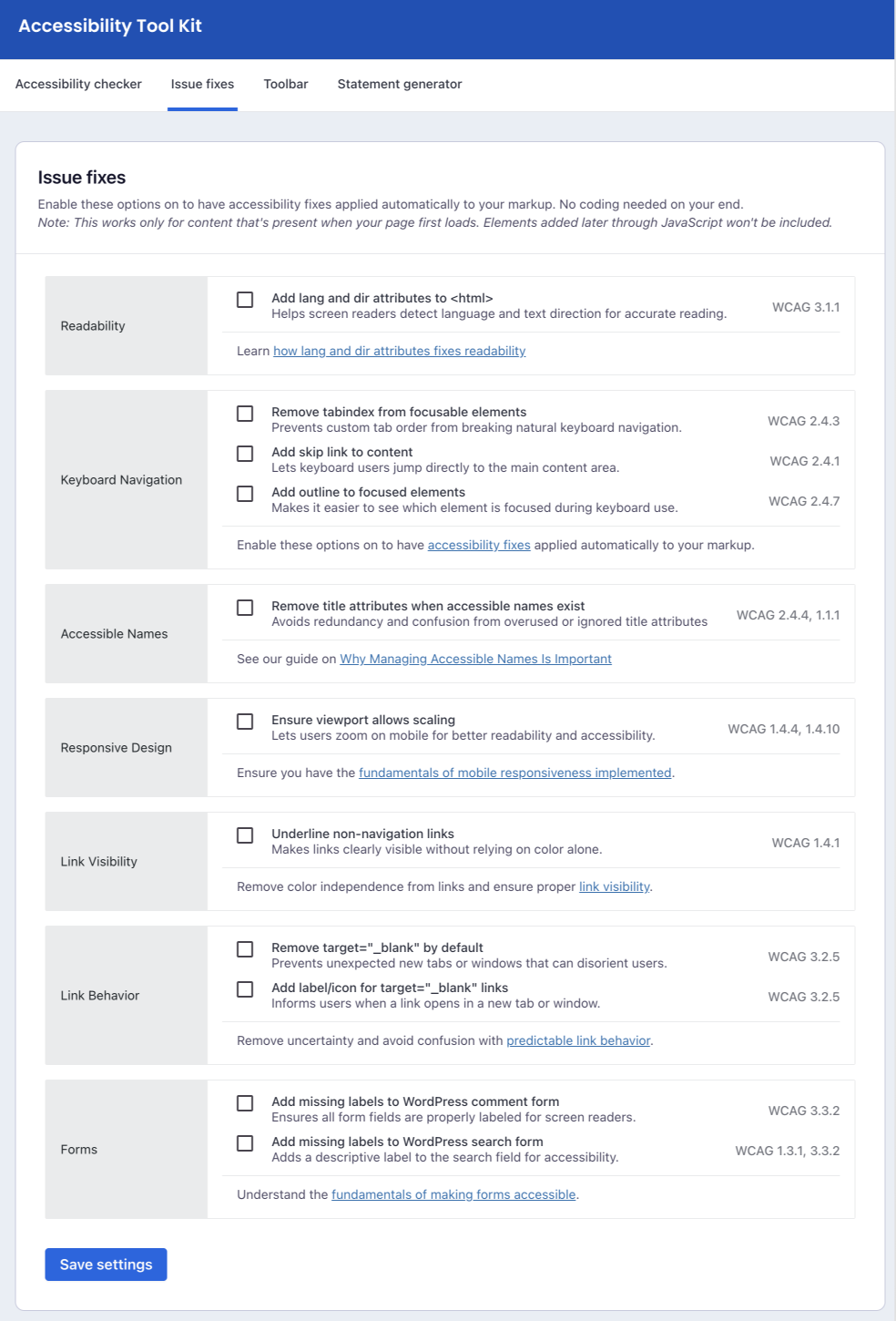
- Issue Fixes – dynamically add code-level fixes to your website.
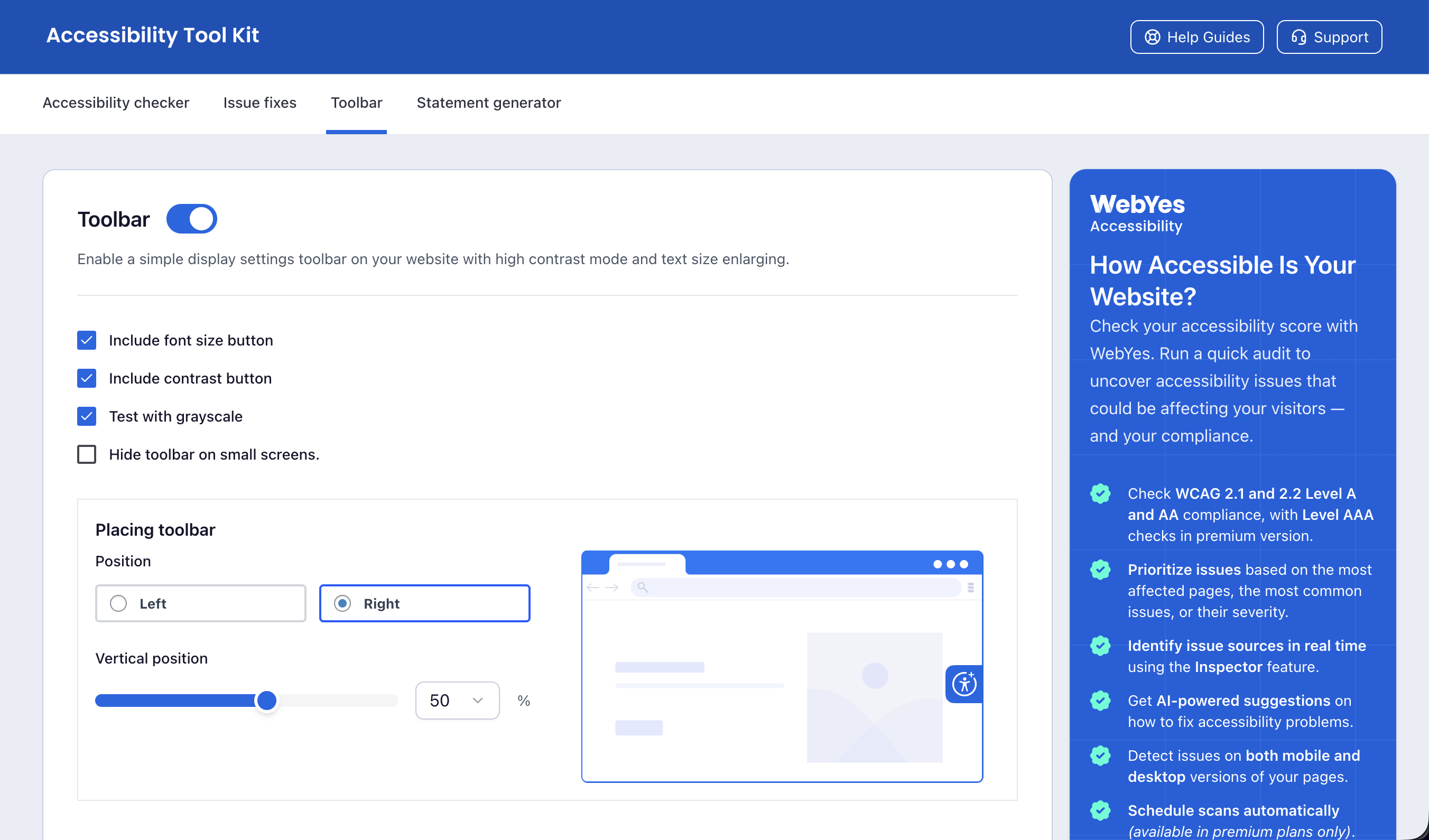
- Accessibility toolbar – to help users with disability make necessary adjustments on your website to meet their unique accessibility needs.
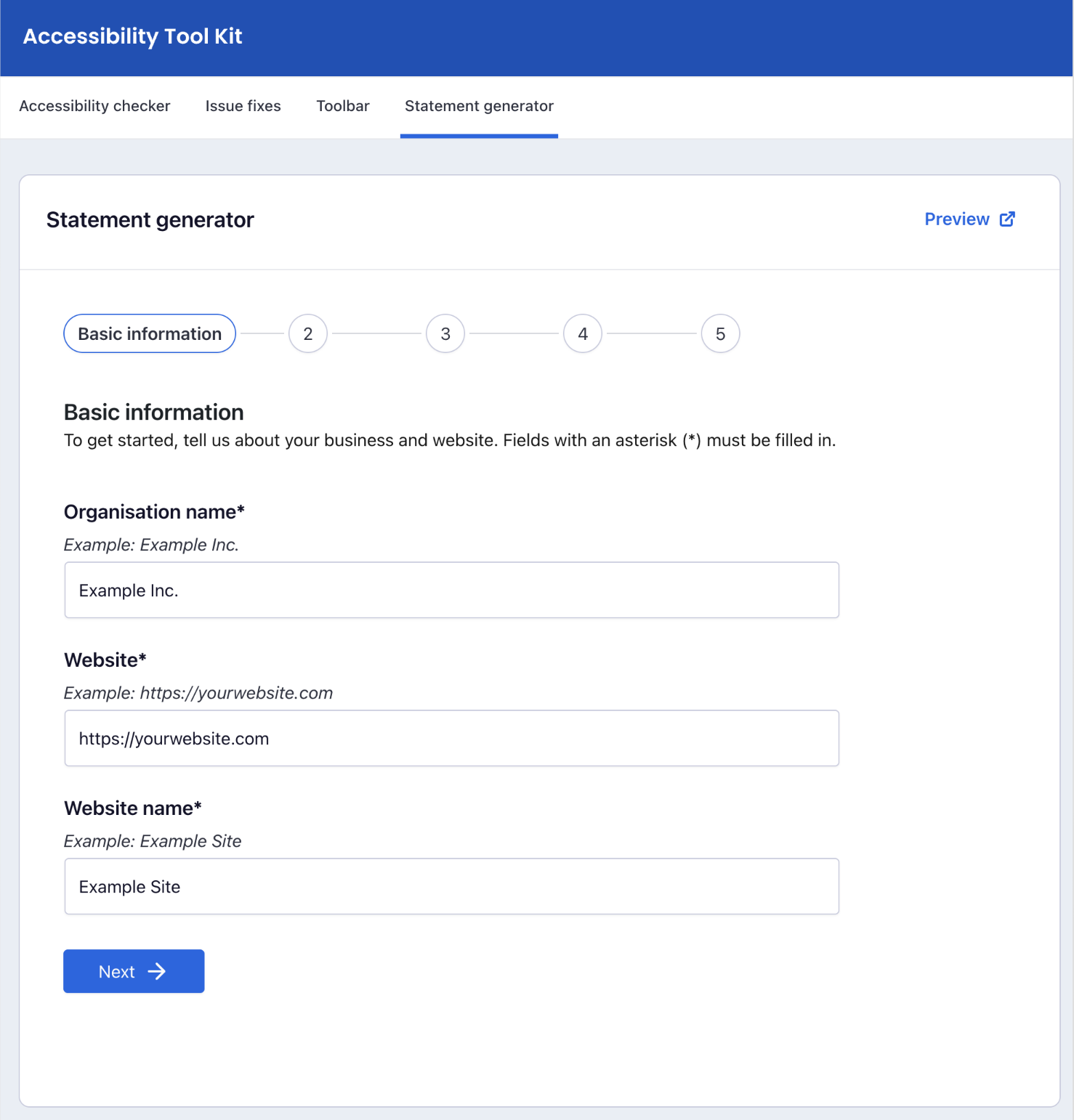
- Accessibility Statement Generator – easily generate and add an accessibility statement to your website per various laws, like the European Accessibility Act (EAA) or the Americans with Disabilities Act (ADA).
Accessibility Checker for WordPress
The Accessibility Checker feature lets WordPress administrators scan any live page for accessibility issues directly from the dashboard. It evaluates the page in both desktop and mobile viewports and surfaces clear, actionable guidance to help remediate the detected issues.
Key Highlights:
- Launches directly from the admin dashboard. Administrators select a page and run the scan from there.
- Detects WCAG violations such as missing alt text, low color contrast, improper heading hierarchy, and unlabeled form fields.
- Provides clear findings and recommendations so you can understand where improvements are needed.
- Displays a summary of detected issues in an easy-to-read panel for quick reference.
- Loads scanner assets only on demand for admins, so the front-end remains lightweight for all visitors.
Dynamic Issue Fixes
This includes the following features that guide you towards the first steps in accessibility remediation.
- Improved readability – ensures screen readers interpret text and language correctly.
- Logical keyboard navigation – maintains natural tab flow and focus throughout the page.
- Skip to content – lets users jump straight to the main content using the keyboard.
- Visible focus indicators– highlight the active element clearly during keyboard use.
- Clear and meaningful labels – adds helpful names to elements for better screen reader support.
- Mobile-friendly zoom – allows users to zoom on mobile without breaking the layout.
- Accessible links – make links stand out clearly and visibly without relying on color.
- Predictable link behaviour – avoids unexpected new tabs or windows.
- Link opening notices – alerts users when a link opens in a new tab or window.
- Labelled form fields – ensures every input field has a proper label for accessibility.
- Accessible search fields – adds clear labels to search bars for easier use.
Accessibility Toolbar
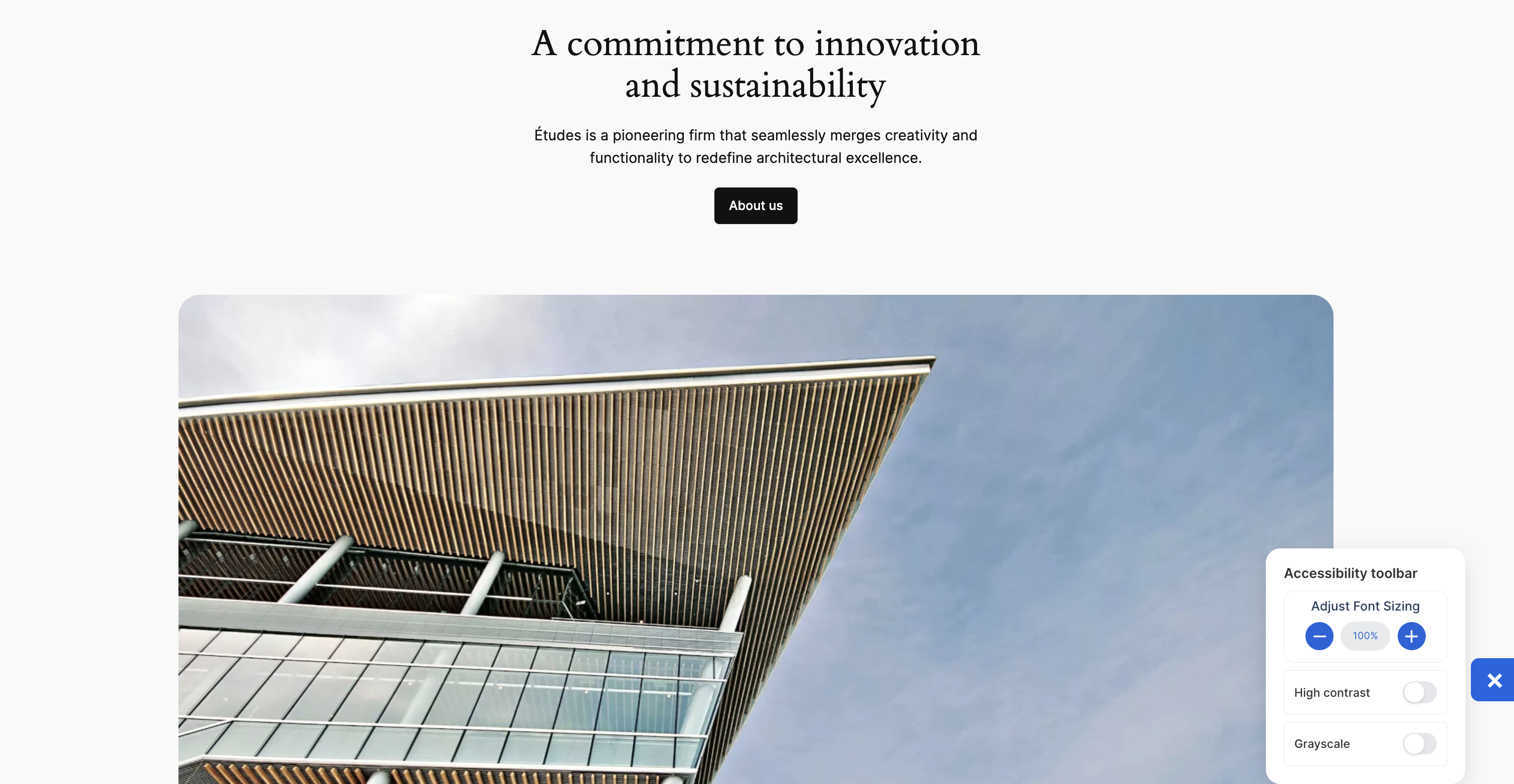
Accessibility Toolbar is an interactive widget designed to make your site more inclusive and user-friendly.
With this toolbar, website admins can give visitors more control over their browsing experience. The toolbar appears as a small, customizable widget on the front end of your website and offers several helpful tools:
- Adjustable Font Size: Users can increase or decrease text size across your site for better readability.
- Color Contrast Options: Switch between different color contrast modes to improve visibility and accessibility. This will also help you quickly test how the site performs under different visual conditions, particularly for users with low vision or color blindness.
- Greyscale Mode: View your website in greyscale to test visual contrast and ensure elements are color independent.
Admins can use this feature to let visitors personalize how they view content on their website.
Accessibility Statement Generator
An accessibility statement is a public declaration of your website’s commitment to accessibility. It informs visitors about the steps you have taken to make your content accessible and what measures are in place to support users with disabilities.
With this feature, you can:
- Quickly create and publish an accessibility statement on your site
- Demonstrate transparency and inclusivity to your audience
- Show compliance with legal frameworks like the ADA, Section 508, and the European Accessibility Act (EAA)
- Build trust with users by clearly communicating your accessibility efforts
Publishing an accessibility statement not only improves user confidence but also helps reduce the risk of legal complaints by showing that you are actively working toward compliance.
Accessibility Is a Right, Not a Bonus
Accessibility helps ensure your website is welcoming and usable for everyone, including people with disabilities. This WP accessibility toolkit helps you improve accessibility with practical tools, while supporting the ongoing work of review, testing, and refinement.
Installation
Steps to install the accessibility plugin
Step 1: Log in to your WordPress dashboard.
Step 2: Navigate to Plugins and select Add New.
Step 3: In the search bar, type “Accessibility Tool Kit” and click Search Plugins.
Step 4: Once you find the Accessibility Toolkit plugin by WebToffee, click on “Install Now”.
Step 5: After installation, click “Activate” to activate the plugin.
Step 6: On activation, you can find the Accessibility Toolkit plugin menu on the WordPress admin sidebar.
Step 7: Configure the plugin settings according to your website’s requirements.
Journal de modifications
[Compatibility] – Tested OK with WordPress version 7.1.4. [Fix] - PHP 8.1+ deprecation notice when generating the accessibility statement preview link.
2.2.2
[Compatibility] – Tested OK with WordPress version 7.1.4.
[Fix] – PHP 8.1+ deprecation notice when generating the accessibility statement preview link.
2.2.1
[Enhancement] – Improvements in the audit script.
2.2.0
[Add] – Backend-initiated accessibility scanner. Pick any auditable URL from the new “Accessibility Checker” tab and launch the scanner against that page.
[Remove] – Removed the front-end floating scanner icon. Scans can be initiated from the admin panel.
2.1.1
[Enhancement] – Updated accessibility scanner with additional audit checks for improved result coverage.
2.1.0
[Add] – Add Best practices to accessibility audit result.
[Fix] – Audit performance and loading issues
2.0.9
[Fix] – Fixed coding standards and security issues flagged by WordPress Plugin Check.
Captures d'écran
Pour les développeurs
Est-ce votre plugin ? Montrez les chiffres.
Ajoutez un badge en direct à votre site, docs ou github readme. Il se met à jour par lui-même - aucun compte n'est nécessaire.
Best Accessibility Tool Kit: WP Ac… alternatives
All a11y plugins →



FAQ
Accessibility Tool Kit: WP Accessib…: quick answers
Réponses directes, extraites des données en direct WordPress.org.
Source : WordPress.org
Is Accessibility Tool Kit: WP Acce… free?
Yes. Accessibility Tool Kit: WP Acce… is free to download and use from the official WordPress.org plugin directory.
Is Accessibility Tool Kit: WP Acce… safe to use in 2026?
Yes — Accessibility Tool Kit: WP Acce… is a safe, well-maintained plugin to use in 2026. It runs on 1K+ sites, is rated 4.8/5 and was last updated 3 weeks ago, and scores 85/100 on our health check.
How many websites use Accessibility Tool Kit: WP Acce…?
Accessibility Tool Kit: WP Acce… is active on 1K+ WordPress websites and has been downloaded 26,553 times since it launched in January 2023. It was downloaded 1,837 times in the last 30 days.
Does Accessibility Tool Kit: WP Acce… work with WordPress 7.1?
Yes. The developer has tested Accessibility Tool Kit: WP Acce… up to WordPress 7.1.5, the latest release. It requires WordPress 5.0 or newer.
What PHP version does Accessibility Tool Kit: WP Acce… need?
Accessibility Tool Kit: WP Acce… requires PHP 5.6 or higher. Most hosts run PHP 8.x today, so it works on any modern WordPress hosting.
When was Accessibility Tool Kit: WP Acce… last updated?
The latest version, 2.2.2, was released on October 30, 2026 (3 weeks ago).
Who makes Accessibility Tool Kit: WP Acce…?
Accessibility Tool Kit: WP Acce… is developed and maintained by WebToffee.
What are the best alternatives to Accessibility Tool Kit: WP Acce…?
The most popular alternatives to Accessibility Tool Kit: WP Acce… are Web Accessibility (formally… (500K+ installs), WP Accessibility (60K+ installs) and AccessibleWP (10K+ installs).
Propulsé par PageForge
Un modèle et une feuille de calcul. Une vraie page pour chaque recherche.
PageForge transforme chaque ligne d'un CSV en une page WordPress avec son propre titre, URL, SEO et schéma, construit sur la mise en page que vous Déjà conçu. Gratuit sur WordPress.org.
- CSV et XLSX, plus Google Sheets sur les professionnels et les entreprises
- Son propre titre, URL, SEO champs et schéma pour chaque page
- Fonctionne avec l'éditeur de blocs, Elementor, Divi et Avada
- Gratuit sur WordPress.org, pas de carte de crédit