


Text To Speech TTS Accessibility
Free text to speech with browser voices + premium AI voices from Google, OpenAI & ElevenLabs. Add an audio player to any WordPress post.

Choix
Yes — Text To Speech TTS Accessibility is a safe, well-maintained plugin to use in 2026. It runs on 4K+ sites, is rated 4.8/5 and was last updated 4 hours ago, and scores 92/100 on our health check.
- Loved by users — 4.8/5 from 93 reviews
- Développé activement — Dernière mise à jour il y a 4 heures
- Testé avec le dernier WordPress (7.1)
Comment s'accumule-t-il ?
Côte à côte sur les installations, les mises à jour, les évaluations et le support


Téléchargements quotidiens
Les pics de téléchargement suivent généralement une nouvelle version - chaque site qui met à jour automatiquement compte comme un téléchargement.
Classements
Where Text To Speech TTS Accessib… stands todayWordPress.org Classements de recherche
Position en direct dans la recherche de plugins, Top 100| Mot-clé | Position |
|---|---|
| accessibilité | #19 |
| speech | #3 |
| text to audio | #1 |
| text to speech | #1 |
| tts | #1 |
Adoption de version
Part de sites actifs par version.
Répartition des notes
★★★★★★★★★★ 4.8 from 93 reviews
About Text To Speech TTS Accessibility
From the official readme · v2.3.27Description
AtlasVoice — Text To Speech TTS Accessibility is the most user-friendly text to speech plugin for WordPress and WooCommerce, and the simplest way to add a text to audio player to your site. Convert any post, page, or product description into natural-sounding audio with one click. The free version uses the browser’s built-in speechSynthesis engine with 20–300+ voices across all major browsers. Upgrade to Pro for AtlasVoice’s own AI voice engine (included with Pro — no extra API costs), or connect premium third-party providers like Google Cloud TTS, OpenAI (ChatGPT) TTS, and ElevenLabs TTS.
No Registration, No Account, No API required for the free version. Simply install and let your visitors listen.
Whether you run a blog, news site, online store, or educational platform, AtlasVoice, the free WordPress TTS plugin, makes your content accessible to everyone — including users with visual impairments, reading difficulties, or those who simply prefer listening. Support 81+ languages, 300+ AI voices, and reach a truly global audience.
How It Works — 3 Simple Steps
- Install & Activate — Install the plugin from the WordPress repository. The audio player appears automatically on your selected post types.
- Choose Your Voice — Pick a free browser voice, use AtlasVoice’s own AI engine (included with Pro), or connect a third-party AI provider (Google Cloud, OpenAI, or ElevenLabs) from the Integration menu.
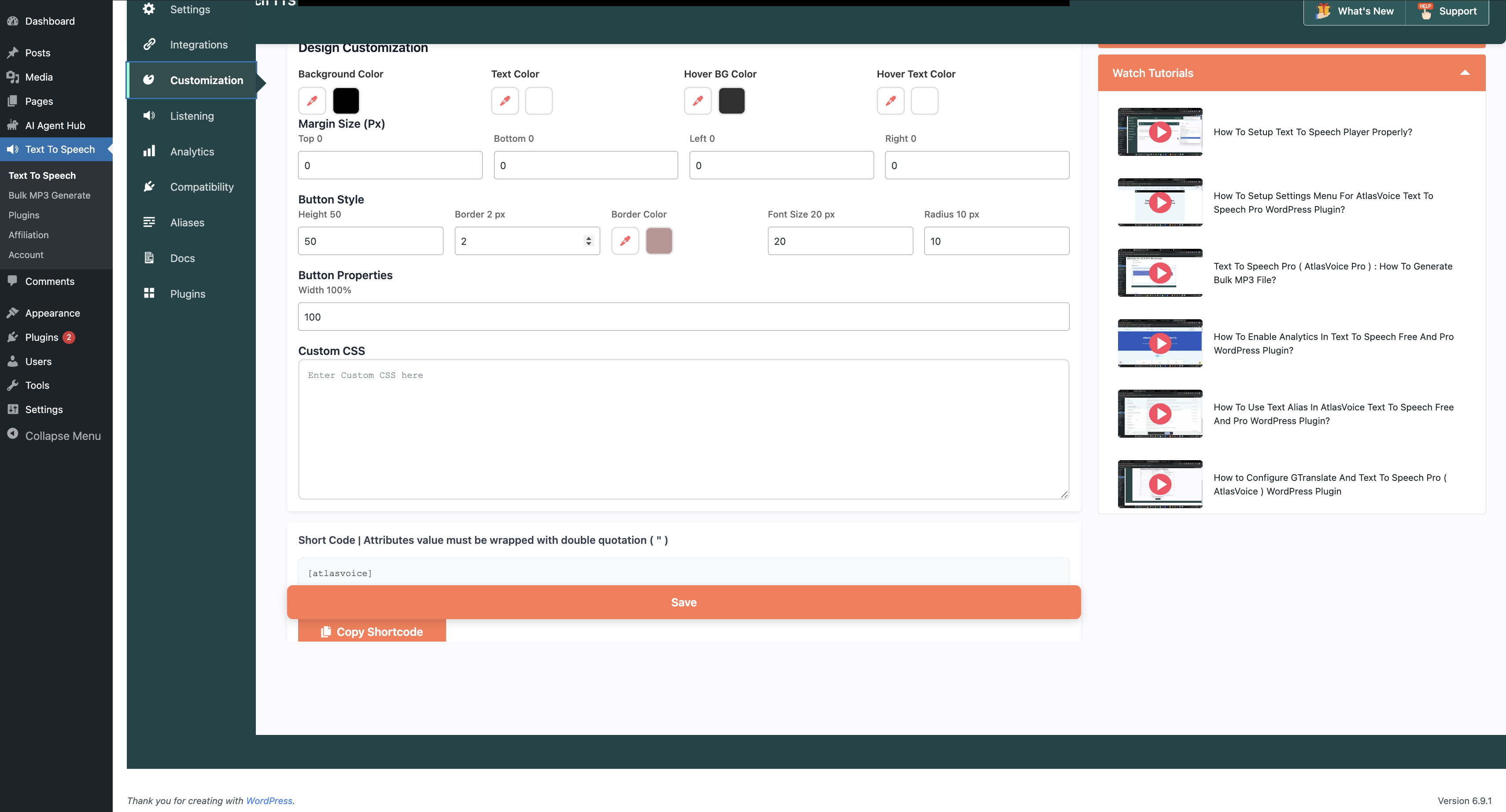
- Customize & Publish — Select your player style from the Customization menu, choose your preferred voice and language from the Listening menu, and you’re live.
SOME USEFUL LINKS:
SUPPORT AND HAVE QUESTIONS?
- Contact Us — We usually reply within 1 hour.
Who Is This For?
- Bloggers, News & Media Sites — Let readers listen to articles while multitasking. Increase time-on-page and reduce bounce rate.
- WooCommerce & E-Learning Sites — Make product descriptions and course materials listenable for shoppers and auditory learners.
- Multilingual & Accessibility-First Websites — Serve a global audience in 81+ languages and meet WCAG 2.1 / ADA compliance.
Why Choose AtlasVoice, the WordPress Text To Speech Plugin?
-
Accessibility & WCAG Compliance: Help your site meet WCAG 2.1 and ADA requirements with audio alternatives for users with visual impairments, dyslexia, or reading difficulties.
-
Boost SEO & Engagement: Audio increases dwell time and reduces bounce rate. Pro generates Audio Schema markup (JSON-LD) for rich results in Google Search.
-
Works Everywhere: All major browsers and mobile devices, plus the page builders, caching and multilingual plugins listed under Compatibility below.
Text To Speech Plugin Free Version Features
-
Zero Configuration Required: No account, no API key, no registration. Install and the audio player starts working immediately on your selected post types using your browser’s built-in speech synthesis engine.
-
Easy Shortcode Integration: Add the
[atlasvoice]shortcode to any post, page, or widget to place an audio player exactly where you want it. -
20–300+ Browser Voices: Depending on the browser and operating system, access a wide range of voices. Microsoft Edge supports all available system voices; Chrome offers 20+ voices; Firefox supports core languages.
-
Analytics Dashboard: See play counts, pauses and engagement in the built-in analytics dashboard.
-
Text Alias: Replace abbreviations, acronyms, or complex words with their spoken equivalents using the Text Alias feature.
-
Unlimited Text-to-Speech: No character limits and no monthly quotas.
-
Full Customization: Customize button color, width, border radius, hover effects, and text labels. Preview all changes in real-time from the dashboard.
-
Button Position & Floating Player: Place the Listen button before or after your content, or anywhere with the
[atlasvoice]shortcode. On long posts it follows readers, docking to the edge once they scroll past. Choose bottom full width, bottom right, bottom left or sticky top — or turn docking off. -
Language & Voice Selection: Choose the default language and voice from the Listening menu. Adjust speed, pitch, and volume for browser-native players.
-
Read-Along Highlighting & Listen to Selection: The player highlights text as it is read — sentence by sentence, and word by word with supported voices — in your own colors, with optional focus-dimming and auto-scroll. Visitors can also select any passage to hear just that part, or click a word to start from there. Off by default; enable it in the Highlight tab.
-
Custom CSS Support: Apply custom styles to the audio player using your own CSS for pixel-perfect integration with your theme.
-
Custom Post Type Support: Extend text-to-speech to any custom post type — WooCommerce products, portfolios, testimonials, and more. Compatible with Advanced Custom Fields (ACF), Custom Post Type UI, and Toolset Types.
-
Clean Audio Output: Automatically removes special characters, URLs, shortcodes, and HTML tags from content before speaking, ensuring clean, professional audio.
-
Gutenberg Block: Add and customize the AtlasVoice player directly from the Gutenberg block editor — adjust colors, size, and styles visually.
Upgrade to AtlasVoice Pro for Advanced Features:
AtlasVoice Pro is an add-on that extends the free plugin:
AI Voice Providers (Pro):
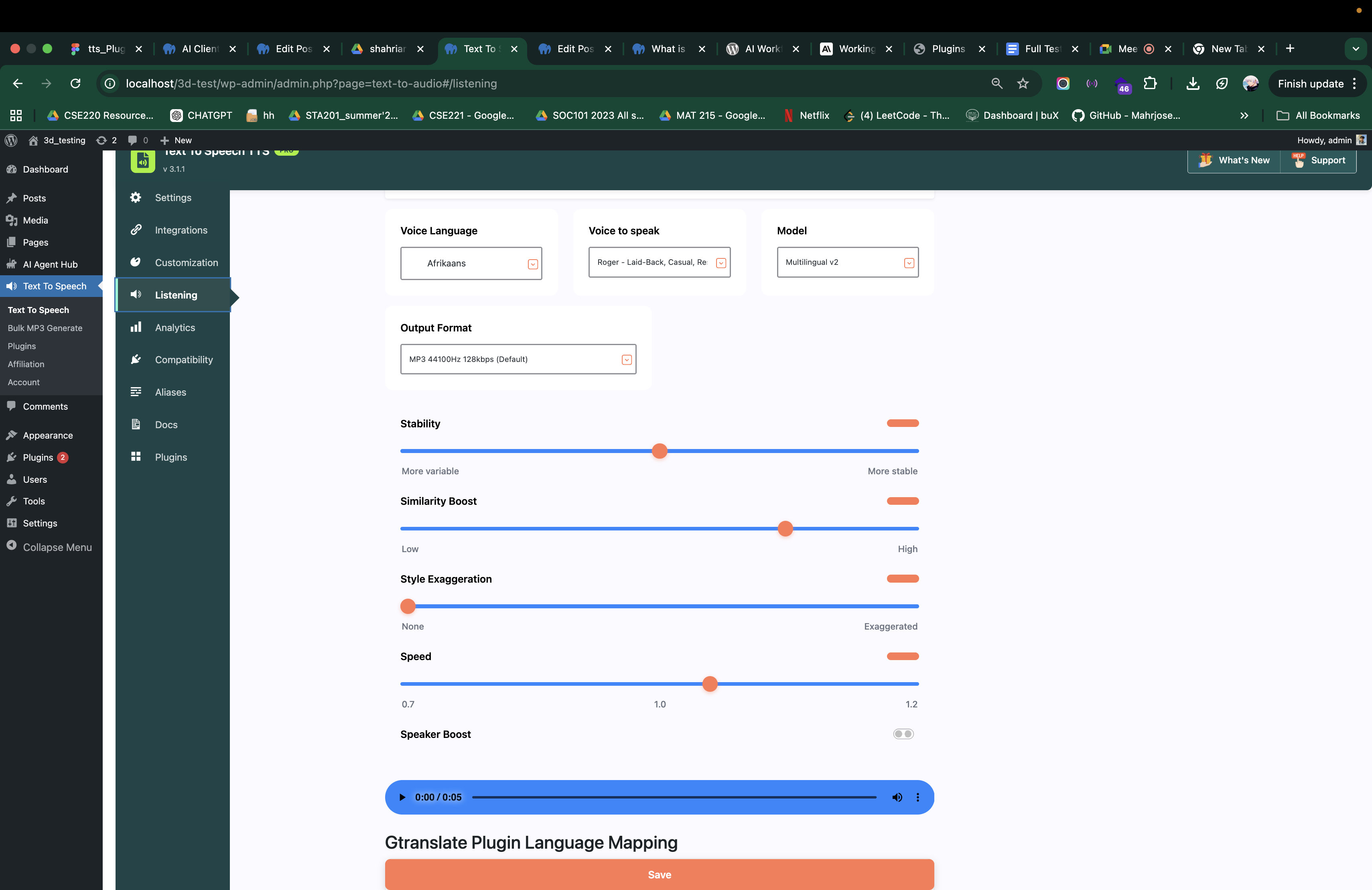
For each provider: select its player from the Customization menu, then choose voice and language from the Listening menu.
-
AtlasVoice TTS Pro (Included with Pro): AtlasVoice’s own AI voice engine — included with your Pro license at no extra API cost. 81 languages, natural-sounding voices and no third-party account needed.
-
Google Cloud Text To Speech: Integrate with Google Cloud Text To Speech for enterprise-grade voices. 300+ voices across 90+ languages including Neural2, WaveNet, and Standard voice types. Paid service — billed by Google based on usage. Learn more
-
ChatGPT Text To Speech (OpenAI): Integrate with OpenAI Text To Speech for natural-sounding audio. 6 voices — Alloy, Echo, Fable, Nova, Onyx, Shimmer — with Standard (tts-1) and HD (tts-1-hd) models. Paid service — billed by OpenAI based on usage. Learn more
-
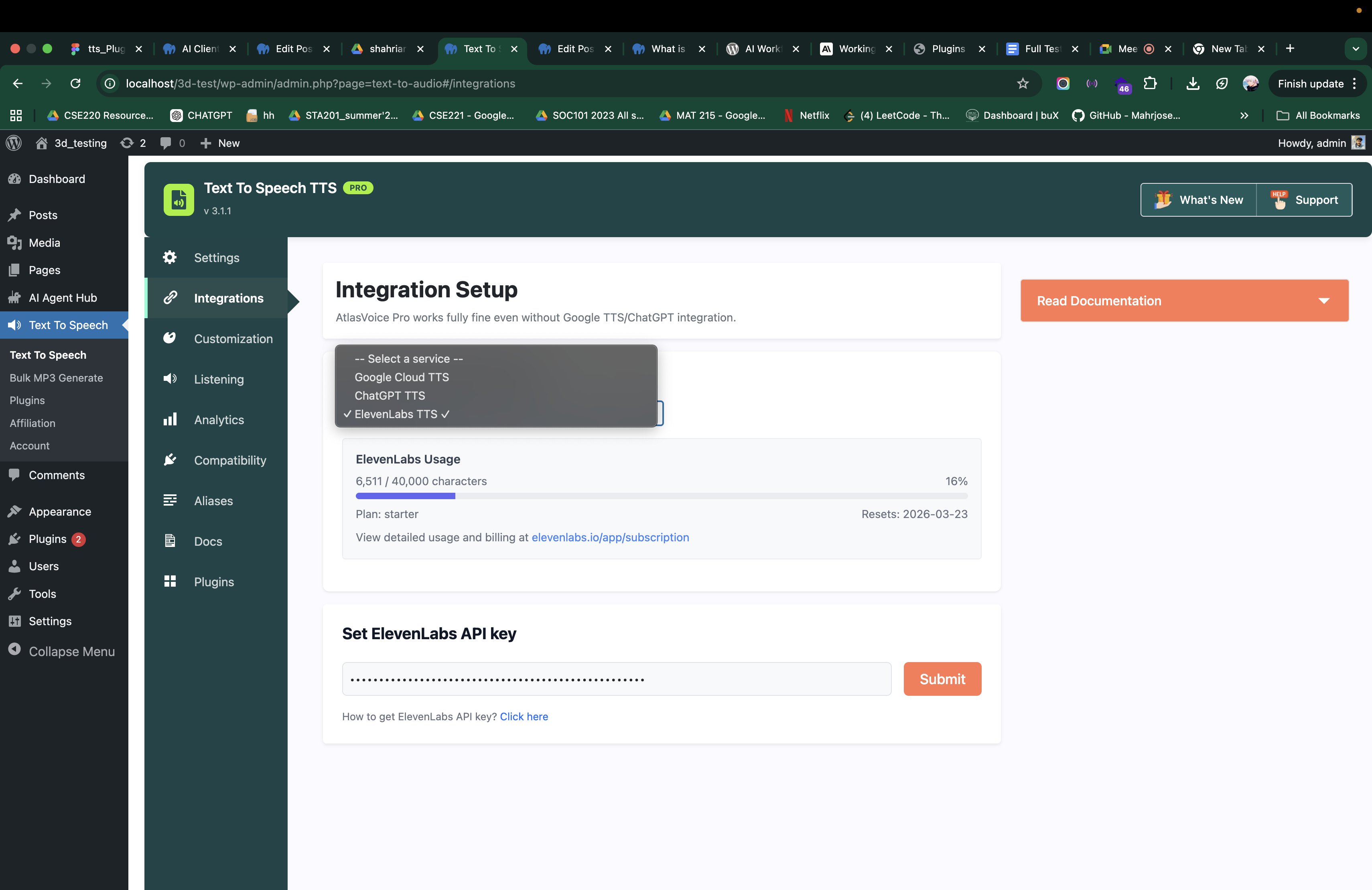
ElevenLabs Text To Speech: Integrate with ElevenLabs for ultra-realistic AI voices. 100+ premium voices with accent labels, plus stability, similarity boost, style, and speed controls. Real-time character usage tracking in your dashboard. Paid service — billed by ElevenLabs based on usage.
Cloud Storage & Backup (Pro):
- Google Cloud Storage Backup: Back up generated MP3 files to Google Cloud Storage, whichever TTS provider created them. Set it up from the Integration menu.
Content & Playback Control (Pro):
-
Word-Perfect Read-Along Highlighting: With Google Cloud and ElevenLabs voices, every word lights up exactly as it is spoken — sentence-level for AtlasVoice TTS Pro and ChatGPT.
-
Bulk MP3 File Generation: Generate MP3 files for hundreds of posts at once using the bulk action from the WordPress posts list. Select your posts, choose “AtlasVoice Generate MP3 File”, and the plugin processes each post automatically. Watch tutorial.
-
Downloadable MP3 Audio: Allow visitors to download MP3 files for offline listening. Unlimited downloads. Also upload your own pre-recorded MP3 files for any post.
-
Read Content from DOM: Capture dynamically rendered content by reading directly from the page DOM instead of the database.
-
Audio Schema Markup (SEO): Generates JSON-LD structured data for audio content, enabling rich audio results in Google Search.
-
Content Splitting: Long articles are automatically split into chunks, then seamlessly combined into a single MP3 file.
-
Content Controls: Add text before/after content for intros and outros. Include or exclude post title and excerpt from the audio output.
Content Filtering (Pro):
-
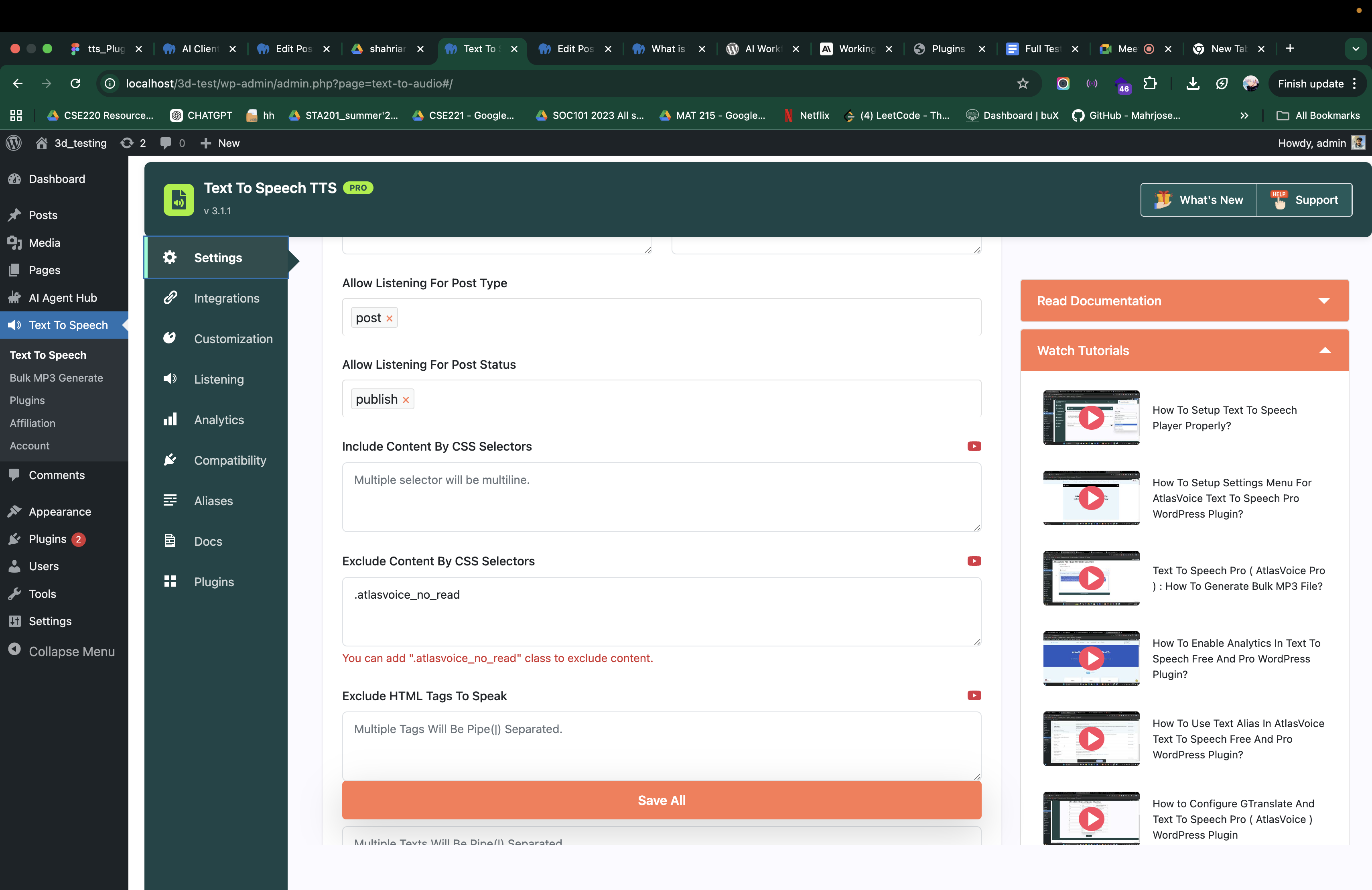
Add CSS Selector: Target specific elements within your content to include in the text-to-speech playback using CSS selectors. Read content from sidebars, footers, or any DOM element.
-
Exclude Texts To Speak: Exclude specific words, phrases, or sentences from being vocalized. Separate multiple entries with the pipe symbol (|).
-
Exclude Tag’s Content: Skip content inside specific HTML tags (e.g.,
code,blockquote,figcaption). Separate multiple tags with the pipe symbol (|). -
Exclude by Post ID, Category, or Tag: Precisely control which content gets audio by excluding specific posts, categories, or WordPress tags.
-
Unlimited Text Alias: Replace unlimited abbreviations, acronyms, or domain-specific terms with their spoken equivalents using the Text Alias system.
Analytics & Insights (Pro):
-
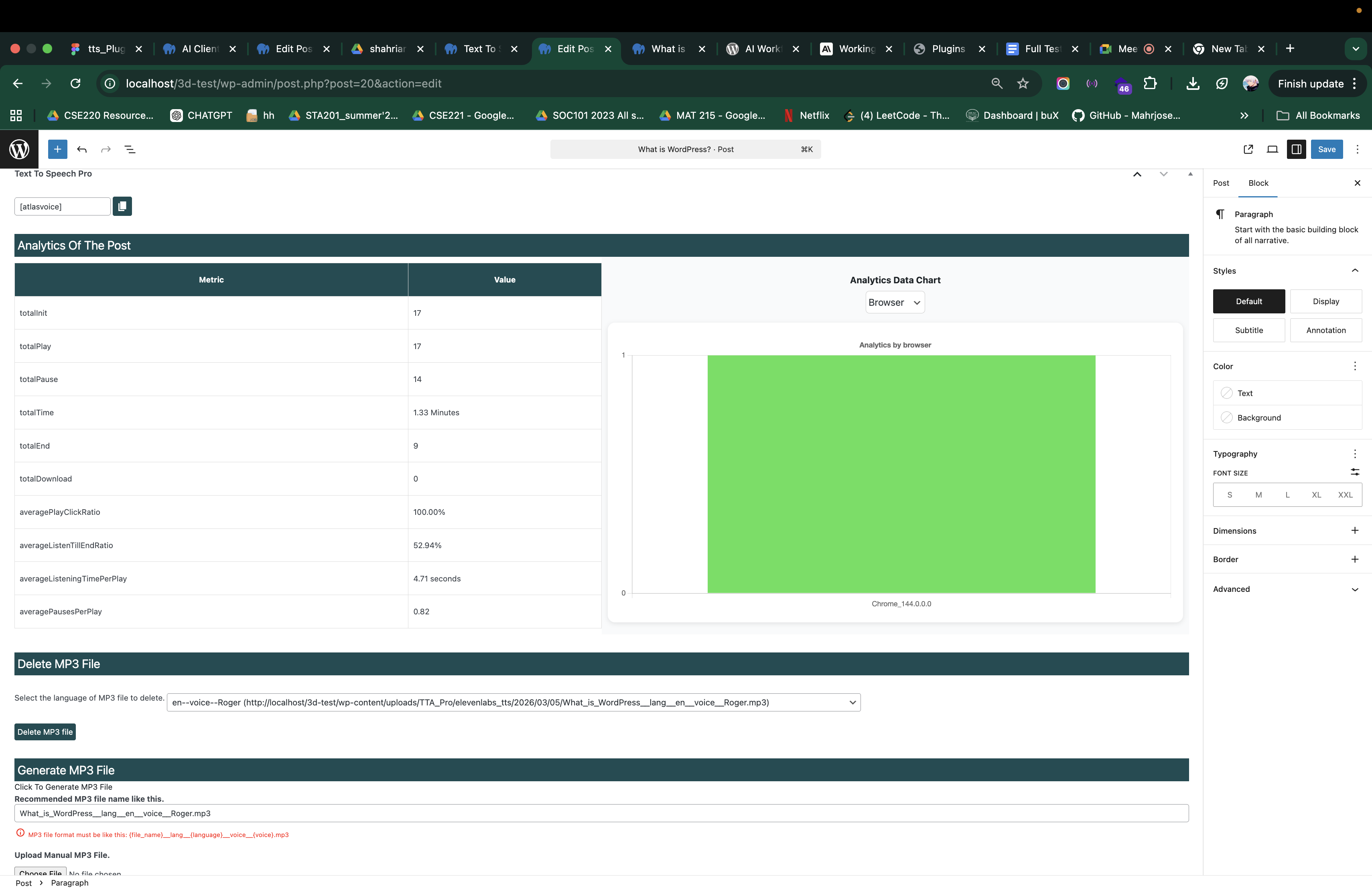
Advanced Analytics Dashboard: Comprehensive analytics with engagement funnels, browser breakdown, device type analysis, OS distribution, location tracking, popular posts ranking, peak hours heatmap, listening trends, and listener segments. Watch demo.
-
Usage Tracking: See ElevenLabs character usage in your dashboard, and open the Google Cloud and OpenAI usage pages with one click.
-
Search by Post ID & Date Range: Filter analytics data by specific posts or custom date ranges to measure content performance.
Player & Customization (Pro):
-
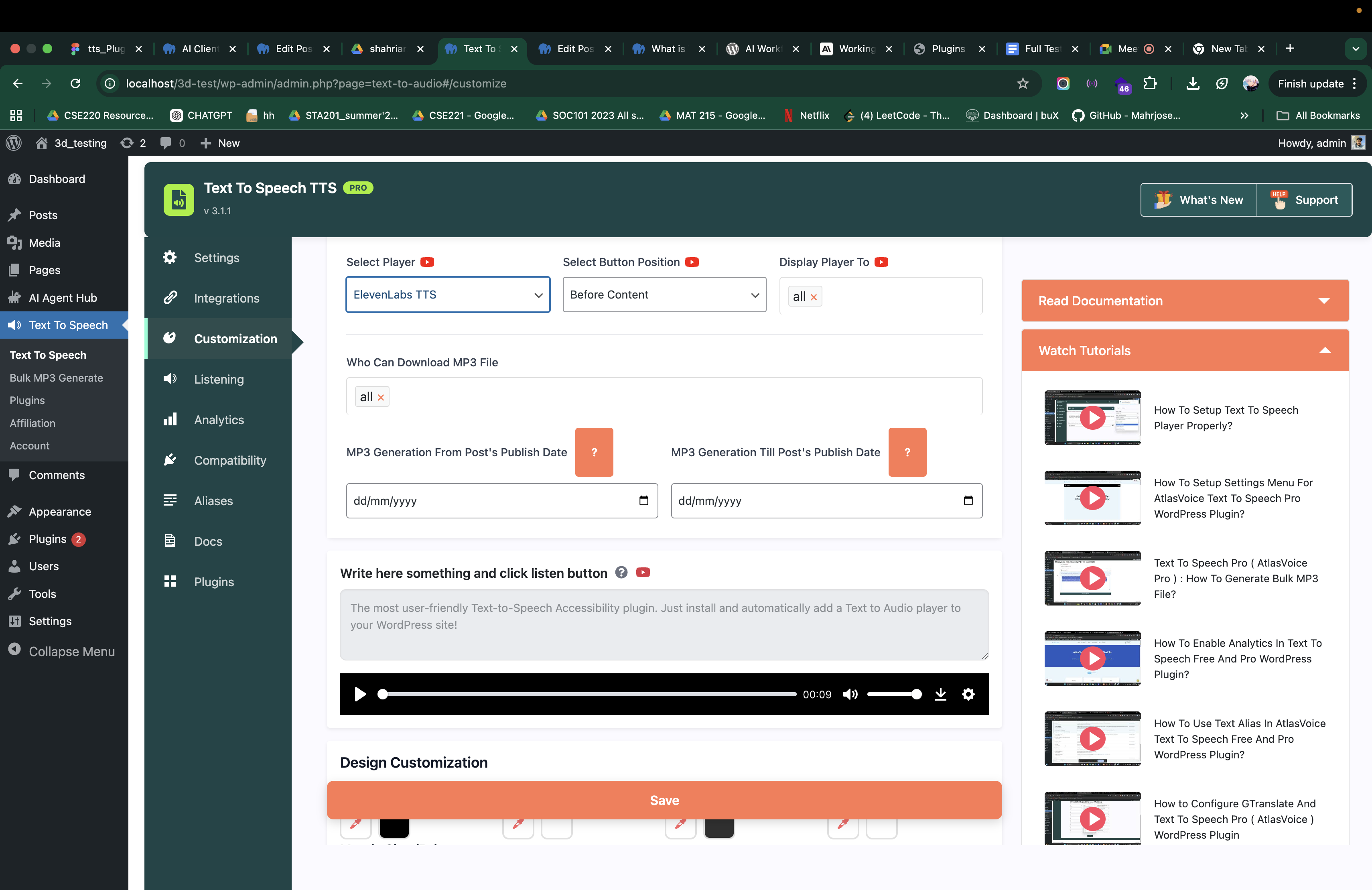
6 Player Styles: Default (free browser voices), Default Pro, AtlasVoice TTS Pro (own AI engine), Google Cloud TTS, ChatGPT TTS, and ElevenLabs TTS. Pro players use a modern, responsive HTML5 audio player with progress bar, volume, speed, and download button.
-
Display Controls: Display the player by date range, control margins, and apply full CSS customization.
Translation & Multilingual (Pro):
- 81+ Languages with WPML, GTranslate, TranslatePress & Polylang: Full multilingual support. The player automatically detects language changes and adjusts the voice accordingly.
Developer-Friendly (Pro):
- 50+ Filters & Hooks, REST API: Extensive WordPress filter/action API and full REST API (
tta_pro/v1) for programmatic audio generation. Priority live support within 1 hour.
Try AtlasVoice Pro today and transform your content into audio.
AtlasVoice: Text To Speech Pro Review by Experts
Video Tutorials
Text To Speech Pro Supported Languages:
AtlasVoice Pro supports 81+ languages with premium AI voices:
Afrikaans, Albanian, Arabic, Armenian, Bengali, Bulgarian, Catalan, Chinese (Mandarin/China), Chinese (Mandarin/Taiwan), Chinese (Cantonese), Croatian, Czech, Danish, Dutch, English, English (Australia), English (United Kingdom), English (United States), Esperanto, Finnish, French, German, Greek, Haitian Creole, Hebrew, Hindi, Hungarian, Icelandic, Indonesian, Italian, Japanese, Korean, Latin, Latvian, Macedonian, Norwegian, Polish, Portuguese, Portuguese (Brazil), Portuguese (Portugal), Romanian, Russian, Serbian, Slovak, Spanish, Spanish (Spain), Spanish (United States), Swahili, Swedish, Tamil, Thai, Turkish, Urdu, Vietnamese, Welsh
Google Cloud TTS supports 90+ languages. ElevenLabs supports 29+ languages with multilingual models. Exact availability varies by provider.
Text To Speech TTS Free Supported Languages:
Free voices come from the visitor’s browser and operating system:
-
Chrome Desktop: 18+ languages — English (UK/US), Spanish (Spain/US), French, German, Italian, Russian, Dutch, Japanese, Korean, Chinese, Hindi, Indonesian, Polish, Brazilian Portuguese.
-
Chrome & Firefox Mobile: 7 languages — English (US/UK), German, Italian, Russian, French, Spanish.
-
Microsoft Edge (Desktop & Mobile): All available system voices — the widest selection of any browser.
-
Firefox Desktop: English (US/UK) — additional voices with OS speech packs installed.
Tip: Microsoft Edge offers the most free voices. For the same high-quality voices on every browser and device, use AtlasVoice Pro.
Compatibilité
Multilingual: WPML, GTranslate, TranslatePress, Polylang — auto-detects language and adjusts voice.
Page Builders & Themes: Elementor, Avada, WPBakery, Divi
Caching: WP-Optimize, LiteSpeed Cache, Autoptimize, W3 Total Cache, Speed Optimizer
Custom Post Types: ACF, Custom Post Type UI, Toolset Types
Other: Yoast Duplicate Post, Duplicate Post, Duplicate Page, Easy Table of Contents
USAGE:
Use the [atlasvoice] shortcode to add the audio player anywhere:
[atlasvoice] — Basic player.
[atlasvoice listen_text="Listen" pause_text="Pause" resume_text="Resume" replay_text="Replay"] — Custom button text.
[atlasvoice text_to_read="Welcome to our website."] — Custom text to read.
[atlasvoice class="my-custom-player"] — Add CSS class.
[atlasvoice lang="en-GB" voice="Google UK English"] — Change language and voice.
[atlasvoice id="42"] — Read a specific post by ID.
[atlasvoice]This content will be read aloud.[/atlasvoice] — Container tag.
Try AtlasVoice Pro for premium AI voices, bulk MP3 generation, cloud storage backup, advanced analytics, and priority support.
Code source
Unminified GPLv3 source, tagged per release: https://github.com/azizulhasan/text-to-audio
Services externes
Third-party services that may be contacted:
AtlasAiDev Tracker (track.atlasaidev.com)
Opt-in, off by default (stored in option text-to-audio_allow_tracking; revocable anytime). When enabled, sends usage telemetry — plugin/WordPress/PHP versions, site language, enabled features, site name and URL, admin email, and the site’s outbound public IP (resolved via icanhazip.com) — so AtlasAiDev can prioritise improvements. No visitor/listener data is sent.
Provided by AtlasAiDev — Terms: https://atlasaidev.com/terms-and-conditions/ Privacy: https://atlasaidev.com/privacy-policy/
AtlasAiDev plugin catalog (raw.githubusercontent.com)
Fetches https://raw.githubusercontent.com/atlasaidev/plugins/main/plugins.json only when an admin opens the “Other AtlasAiDev Plugins” screen (cached 24h). No site or user data is sent beyond standard HTTP headers.
AtlasAiDev promotions (raw.githubusercontent.com)
Fetches https://raw.githubusercontent.com/atlasaidev/plugins/main/text-to-audio-promotions.json in the admin to show occasional plugin notices (cached 12h). No site or user data is sent beyond standard HTTP headers.
Translation downloads (raw.githubusercontent.com, api.github.com)
Translations are not bundled; only the .pot template ships, so a site downloads just the language it uses, from https://github.com/azizulhasan/atlasaidev-translations.
Once after the plugin updates, manifest.json is fetched from raw.githubusercontent.com to see which languages are available; it downloads no translation files and sends no site or user data beyond standard HTTP headers. The language files are fetched only when an administrator clicks “Download translation”; only the WordPress locale code (e.g. es_ES) is sent. Nothing is downloaded automatically. api.github.com is a fallback for older manifests.
GitHub, Inc. (catalog, promotions + translations) — Terms: https://docs.github.com/en/site-policy/github-terms/github-terms-of-service Privacy: https://docs.github.com/en/site-policy/privacy-policies/github-general-privacy-statement
Geolocation lookups (ip-api.com, ipinfo.io, icanhazip.com)
Opt-in, off by default (AtlasVoice → Analytics → “Show listener location in analytics”; requires Analytics on). When enabled, resolves a listener’s public IP to country/region/city via icanhazip.com (site’s outbound IP), ip-api.com (primary), and ipinfo.io (fallback). Only the listener’s IP is sent.
– ip-api.com — Terms: https://ip-api.com/docs/legal, Privacy: https://members.ip-api.com/privacy-policy
– ipinfo.io — Terms: https://ipinfo.io/terms-of-service, Privacy: https://ipinfo.io/privacy-policy
– icanhazip.com — https://major.io/p/a-new-future-for-icanhazip/
CHECK OUT OUR OTHER PLUGINS:
More free plugins from AtlasAiDev: AtlasMCP – MCP Server for WordPress, Smart Local AI, and 3D Viewer – Augmented Reality & Virtual Try-On | AtlasAR.
Installation
- From your WordPress admin, go to Plugins > Add New. Search for “Text To Speech TTS Accessibility”. Click Install Now and then Activate.
- Alternatively, download the plugin from the WordPress Plugin Repository, go to Plugins > Add New > Upload Plugin, upload the zip file, and activate it.
- Go to the AtlasVoice menu in your admin sidebar and configure your settings.
- The audio player will appear automatically on your selected post types.
For Pro version:
- Purchase AtlasVoice Pro and install it as an add-on alongside the free version.
- Go to Integration menu to connect your preferred AI voice provider (Google Cloud TTS, OpenAI, or ElevenLabs).
- Go to Customization menu to select your preferred player style.
- Go to Listening menu to choose your voice, language, speed, and pitch settings.
Journal de modifications
A small maintenance release that improves the plugin description and FAQ. Nothing changes in how the plugin works. Safe to update.
TRANSLATION REQUEST
We are looking for people to help translate this plugin. If you can help, we would love to hear from you.
Help us and the WordPress community translate the plugin. Contact us and we’ll guide you through the process.
2.3.27 ( 20 Nov 2026 )
Changed : Clearer, more accurate plugin description and FAQ wording. Nothing changes in how the plugin works.
2.3.26 ( 14 Nov 2026 )
Fixed : On iPhone and iPad, the browser voice player now reads the whole article instead of stopping after the first sentence.
Fixed : Resume now continues from where the reading stopped, instead of jumping to the end of the article.
Fixed : With read-along highlighting and an MP3 player, the highlight now follows every spoken word again, instead of staying on the first word of each sentence.
2.3.25 ( 9 Nov 2026 )
Changed : Behind-the-scenes tidy-up: removed old, unused code notes. Nothing changes in how the plugin works.
2.3.24 ( 31 Oct 2026 )
Fixed : The AtlasVoice dashboard no longer stays on “Loading…” on sites that use plain permalinks.
Fixed : The dashboard now works on https sites whose WordPress address is saved with http.
Fixed : Polylang Pro is now recognised, so you can choose a language and voice for each Polylang language.
Improved : The Settings page now shows a message if it cannot load, instead of loading for ever.
2.3.23 ( 29 Oct 2026 )
Fixed : On a page with audio players for more than one post, each player now tells AtlasVoice Pro which post it belongs to.
Changed : Behind-the-scenes tidy-up of the code documentation.
2.3.22 ( 23 Oct 2026 )
Fixed : On iPhone the player keeps reading the whole post instead of stopping after the first paragraph.
Fixed : On phones that don’t have the voice chosen in your settings, the player now reads with the phone’s own voice instead of staying silent.
Fixed : The listen button no longer stays empty inside app browsers (for example Facebook or Instagram) or when a speed plugin loads it late. It now says when listening isn’t available.
New : While AtlasVoice is in Staging, admins see a note under the player with Go live and a “Test on your phone” QR code that opens the post on a phone without logging in.
New : Staging or Live, with the Go live button, is now shown in the top bar of the AtlasVoice dashboard.
Improved : The dashboard side panel opens with its help sections closed and shows short cards about the 2.4 beta and our free AtlasMCP plugin.
Captures d'écran


Pour les développeurs
Est-ce votre plugin ? Montrez les chiffres.
Ajoutez un badge en direct à votre site, docs ou github readme. Il se met à jour par lui-même - aucun compte n'est nécessaire.
Best Text To Speech TTS Accessibil… alternatives
Tous les plugins d'accessibilité →





FAQ
Text To Speech TTS Accessibility: quick answers
Réponses directes, extraites des données en direct WordPress.org.
Source : WordPress.org
Is Text To Speech TTS Accessibility free?
Yes. Text To Speech TTS Accessibility is free to download and use from the official WordPress.org plugin directory. The developer also sells premium add-ons or a Pro version with extra features.
Is Text To Speech TTS Accessibility safe to use in 2026?
Yes — Text To Speech TTS Accessibility is a safe, well-maintained plugin to use in 2026. It runs on 4K+ sites, is rated 4.8/5 and was last updated 4 hours ago, and scores 92/100 on our health check.
How many websites use Text To Speech TTS Accessibility?
Text To Speech TTS Accessibility is active on 4K+ WordPress websites and has been downloaded 422,542 times since it launched in May 2022. It was downloaded 15,389 times in the last 30 days.
Does Text To Speech TTS Accessibility work with WordPress 7.1?
Yes. The developer has tested Text To Speech TTS Accessibility up to WordPress 7.1.5, the latest release. It requires WordPress 5.6 or newer.
What PHP version does Text To Speech TTS Accessibility need?
Text To Speech TTS Accessibility requires PHP 7.4 or higher. Most hosts run PHP 8.x today, so it works on any modern WordPress hosting.
When was Text To Speech TTS Accessibility last updated?
The latest version, 2.3.27, was released on November 20, 2026 (4 hours ago).
Who makes Text To Speech TTS Accessibility?
Text To Speech TTS Accessibility is developed and maintained by Azizul Hasan.
What are the best alternatives to Text To Speech TTS Accessibility?
The most popular alternatives to Text To Speech TTS Accessibility are Web Accessibility (formally… (500K+ installs), Auto Image Attributes From… (100K+ installs) and Accessibility by UserWay (80K+ installs).
Propulsé par PageForge
Un modèle et une feuille de calcul. Une vraie page pour chaque recherche.
PageForge transforme chaque ligne d'un CSV en une page WordPress avec son propre titre, URL, SEO et schéma, construit sur la mise en page que vous Déjà conçu. Gratuit sur WordPress.org.
- CSV et XLSX, plus Google Sheets sur les professionnels et les entreprises
- Son propre titre, URL, SEO champs et schéma pour chaque page
- Fonctionne avec l'éditeur de blocs, Elementor, Divi et Avada
- Gratuit sur WordPress.org, pas de carte de crédit