


Accessibility by AllAccessible
Agentic AI accessibility tools for WordPress: auto-fix alt text, ARIA & HTML for WCAG/ADA. Per-page & site scores, TTS, disability profiles.

Choix
Yes — Accessibility by AllAccessible is a safe, well-maintained plugin to use in 2026. It runs on 2K+ sites, is rated 5/5 and was last updated 2 weeks ago, and scores 83/100 on our health check.
- Développé activement — Dernière mise à jour il y a 2 semaines
- Testé avec le dernier WordPress (7.1)
- Momentum — downloads up 129.1% vs the previous 30 days
Comment s'accumule-t-il ?
Côte à côte sur les installations, les mises à jour, les évaluations et le support


Téléchargements quotidiens
Les pics de téléchargement suivent généralement une nouvelle version - chaque site qui met à jour automatiquement compte comme un téléchargement.
Classements
Where Accessibility by AllAccessi… stands todayWordPress.org Classements de recherche
Position en direct dans la recherche de plugins, Top 100| Mot-clé | Position |
|---|---|
| accessibilité | #17 |
| accessibility widget | #24 |
| ada | #20 |
| EAA | #7 |
| wcag | #37 |
Adoption de version
Part de sites actifs par version.
Répartition des notes
★★★★★★★★★★ 5 from 15 reviews
About Accessibility by AllAccessible
À partir du Lisezmoi officiel · v2.2.1Description
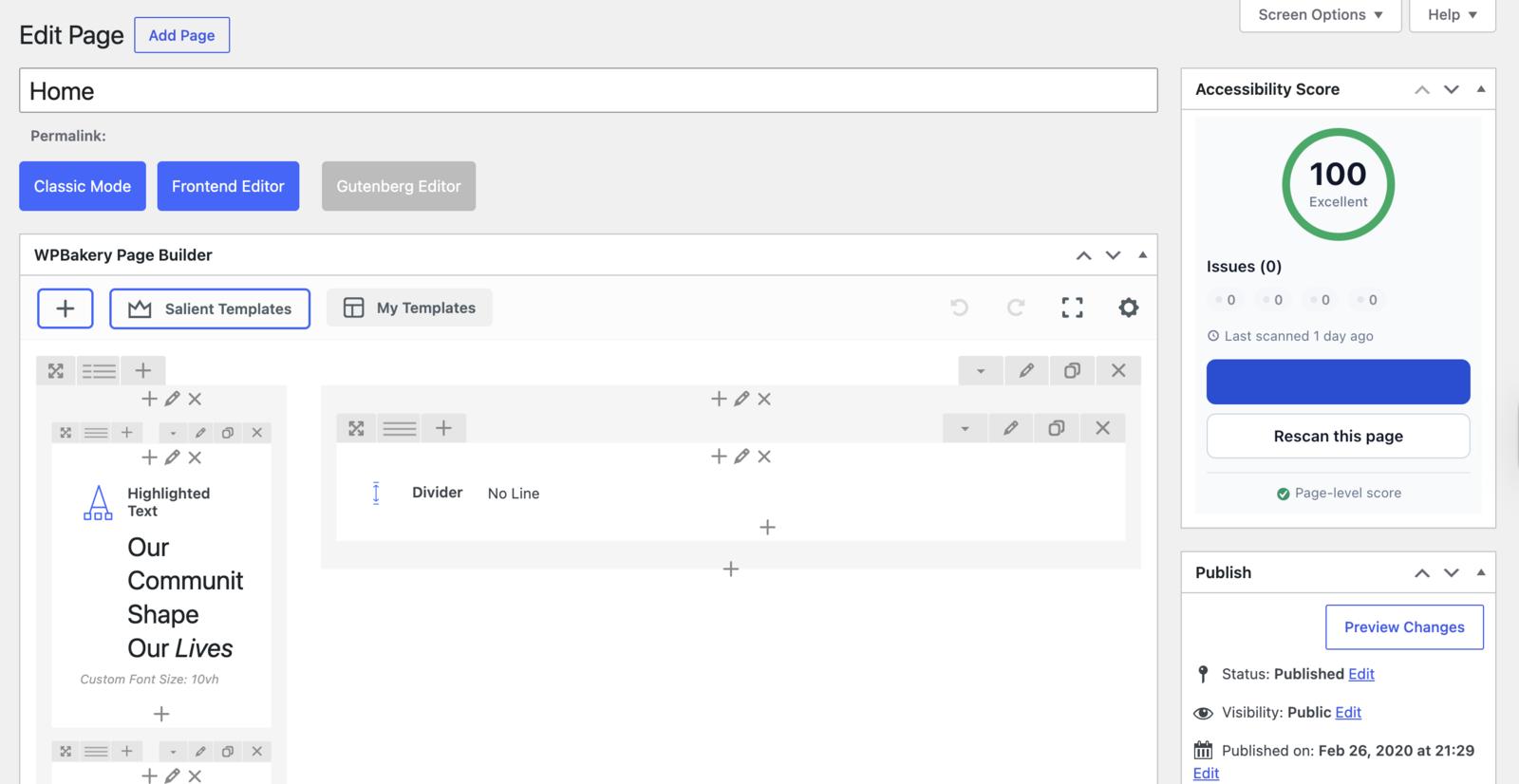
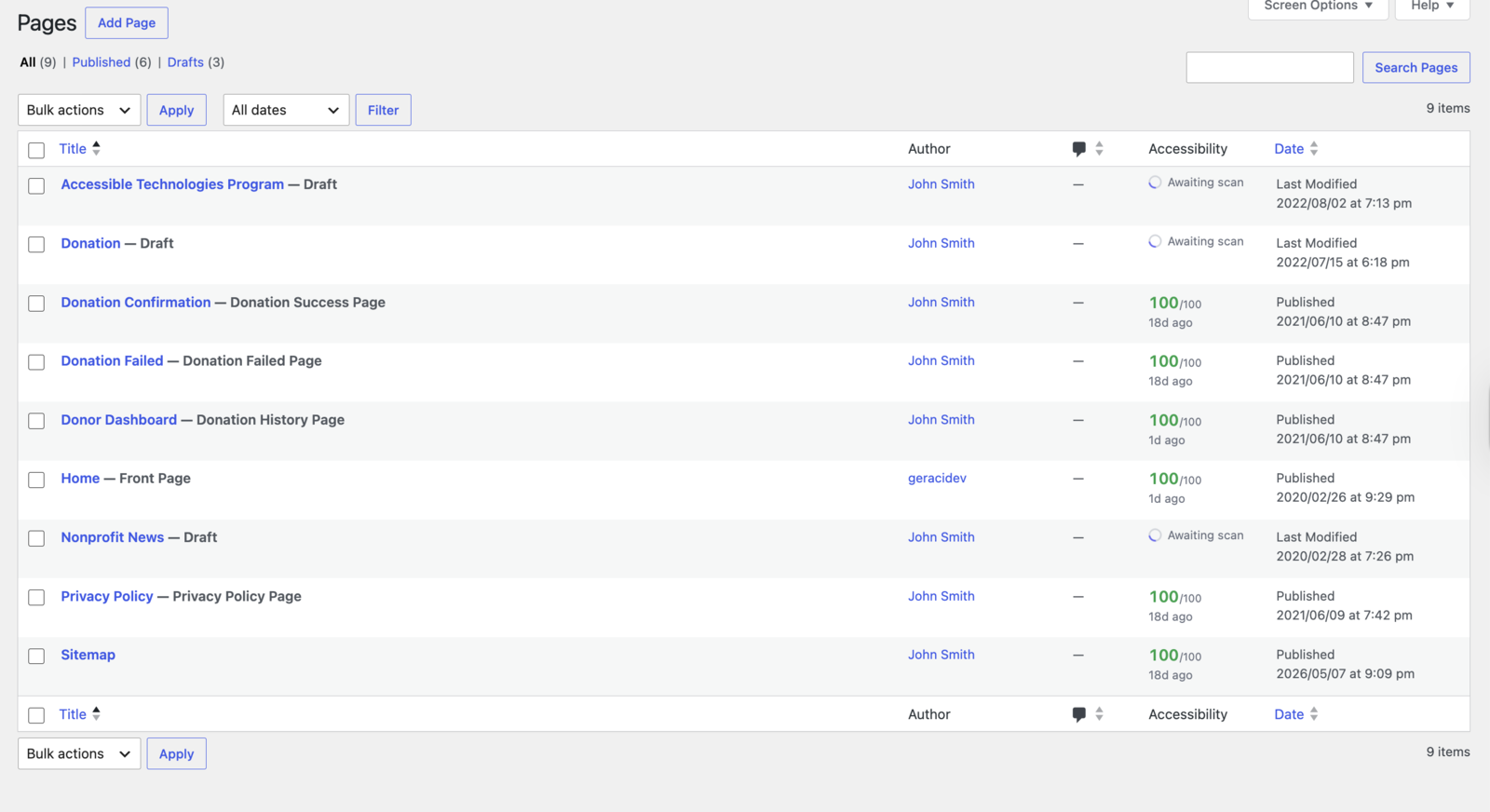
AllAccessible is the WordPress-native accessibility plugin. Unlike overlay-only widgets, AllAccessible brings accessibility right into your WordPress workflow: a per-page accessibility score in the post editor, an accessibility column on your Posts and Pages lists, unlimited AI-written alt text and agentic AI fixes on every paid plan, and human-in-the-loop approval before anything goes live.
Built over 5+ years on WordPress and rated 5.0 on WordPress.org, AllAccessible pairs a visitor widget with scans, scores and approved fixes inside wp-admin.
The free version installs in seconds and adds a fully customizable accessibility widget — letting every visitor control content, color, orientation, and design. Premium plans unlock AllAccessible AI: human-in-the-loop agentic remediation that checks your pages against WCAG success criteria, drafts suggested fixes, and applies them only after your approval. No black-box overlay. You stay in control.
Why AllAccessible is different
- Native WordPress UI — accessibility scores in the editor, in your page list, and in the admin bar. Not just a frontend widget.
- Agentic AI remediation, human-approved — AI suggests fixes; your team approves. Nothing changes your site without sign-off.
- Unlimited AI interactions — descriptive alt text and agentic fix proposals for every image and accessibility issue on paid plans. Free plans include a 10 alt-text + 5 fix preview so you can feel the value before upgrading.
- Real audits, real scores — per-page and site-wide scoring against WCAG success criteria, not a badge with nothing behind it.
- Scan any page on demand — trigger a fresh accessibility check from the editor or admin bar.
Built for WordPress
- 5+ years building accessibility tooling for the web
- Native wp-admin experience: scores in the editor, a column on your Posts list, scans from the admin bar
- Approve before anything ships: every agentic fix is reviewed by you and can be reverted in one click
Boost your website’s accessibility with AllAccessible’s extensive features:
Accessibility Standards
AllAccessible helps you work toward the accessibility guidelines referenced by major standards, including:
• ADA (Americans with Disabilities Act)
• WCAG 2.0, 2.1, & 2.2 (Level AA/AAA)
• Section 508 (U.S. Federal Standard)
• European Accessibility Act (EAA EN 301 549)
• Ontario AODA & Canada ACA
• UK Equality Act
• Australian DDA
• California Unruh Act
AllAccessible improves and monitors your site’s accessibility against these guidelines. How fully any standard applies depends on your content, so AllAccessible is a tool to help you get there — not a guarantee of legal outcomes.
♿ Accessibility Widget ♿
Empower all visitors to personalize their browsing experience on your website, with our dynamic Accessibility Widget that includes:
Content Control Features
Design Control Features
Orientation Control Features
AllAccessible Premium: Unlock a New Dimension in Accessibility
The AllAccessible Premium subscription unleashes a plethora of additional features to optimize your website for individuals with disabilities, such as visual impairment, hearing loss, or mobility difficulties. AllAccessible’s checks follow WCAG, Section 508, and ADA guidelines and accessibility best practices. With AllAccessible Premium, you amplify your website’s accessibility, enhance your brand image, extend your outreach, and foster innovation.
Benefit from a user-friendly interface that allows swift plugin configuration to meet your unique needs.
Experience AllAccessible Premium with a risk-free 7-day trial, no credit card required. Our service is available at just $10/mo. Non-Profit organizations are eligible to apply for a free license here: https://www.allaccessible.org/get-allaccessible-for-free/
Unveil enhanced capabilities with AllAccessible Premium:
♿ Enhanced Accessibility Widget ♿
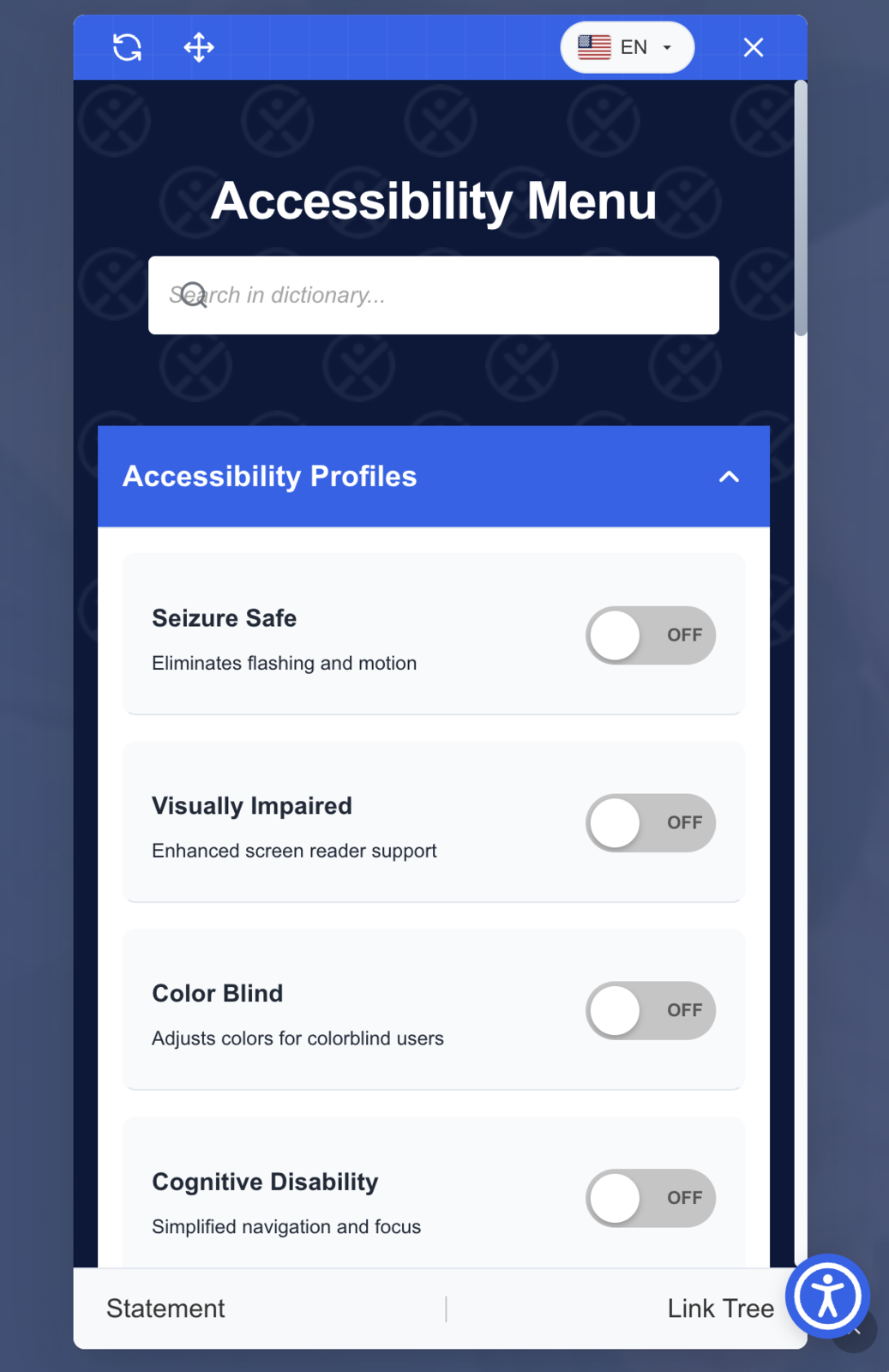
- Online Dictionary
- Preset User Profiles
- Text to Speech
- Accessibility Statement
- Page Link Tree
- Accessibility Accommodation Requests
✦ Agentic AI Remediation ✦
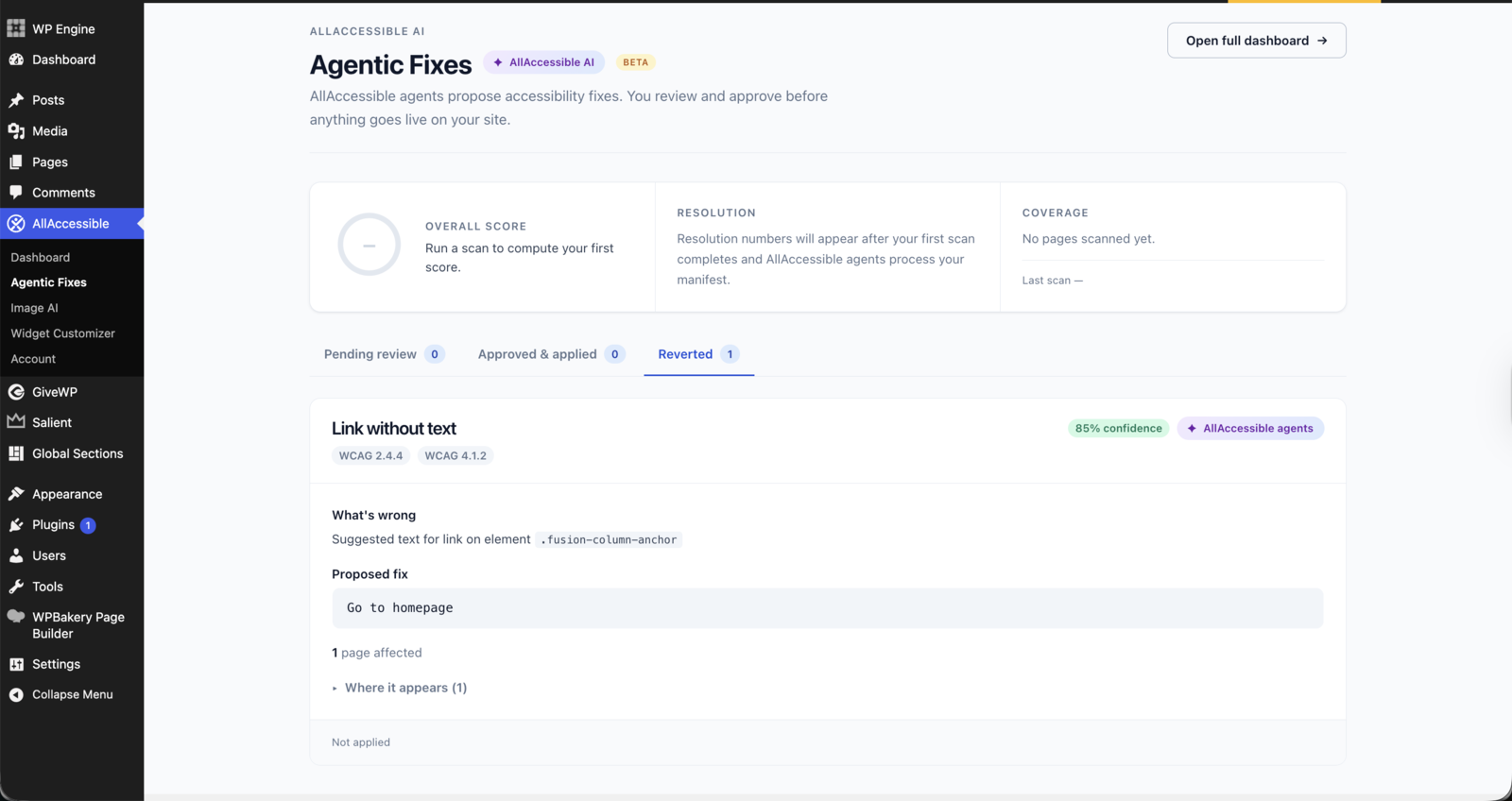
AllAccessible Premium includes AllAccessible AI — agentic AI that continuously scans your website for accessibility gaps and auto-suggests non-invasive fixes. Your team reviews and approves each suggestion through a remediation manifest. Human-in-the-loop, every step.
AllAccessible agents handle the heavy lifting:
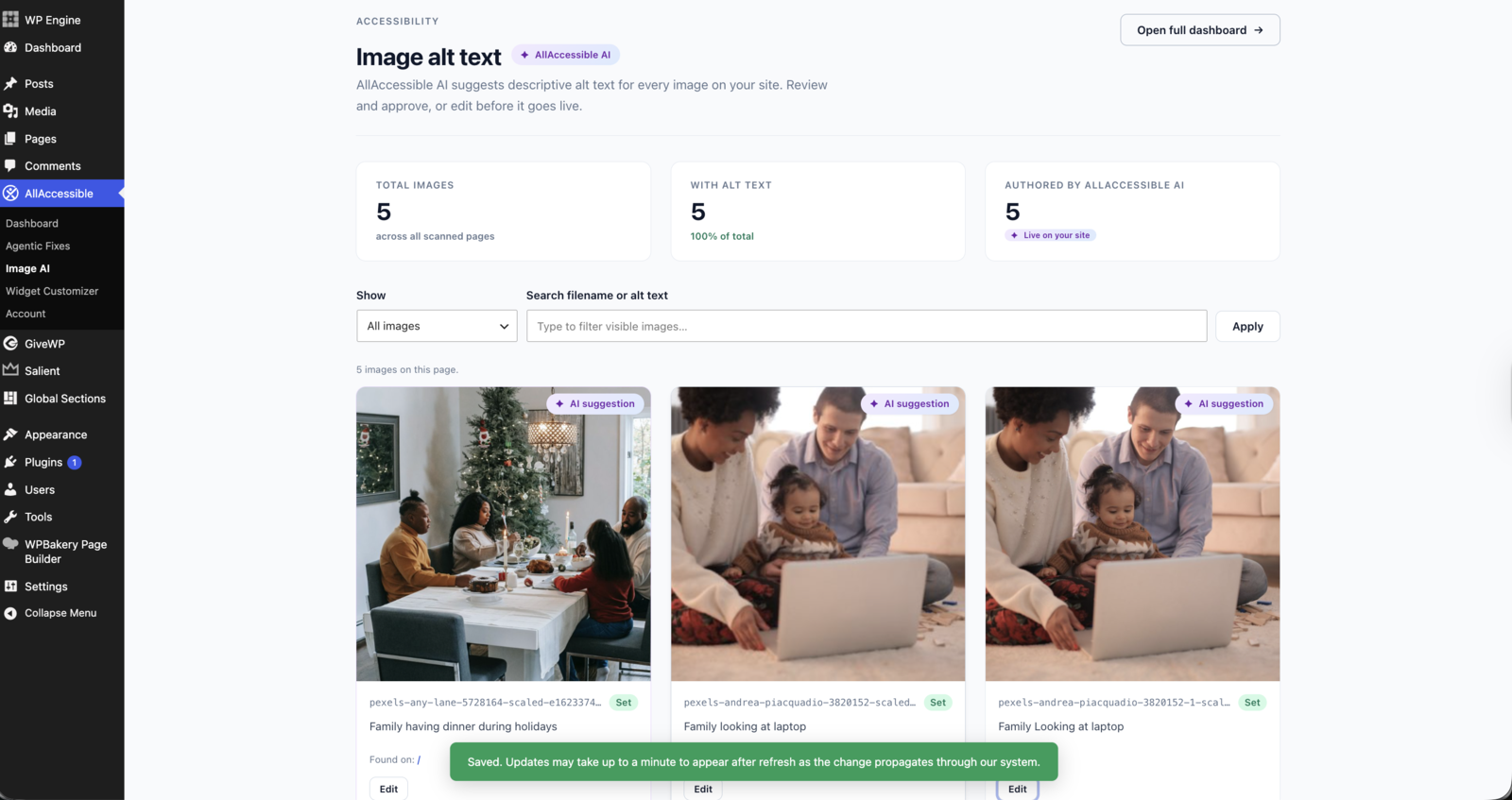
- Auto-suggest missing image alt text descriptions (unlimited on every paid plan)
- Validate Page Structure and Role definitions
- Validate and correct Link Names
- Generate ARIA Labels for screen reader optimization
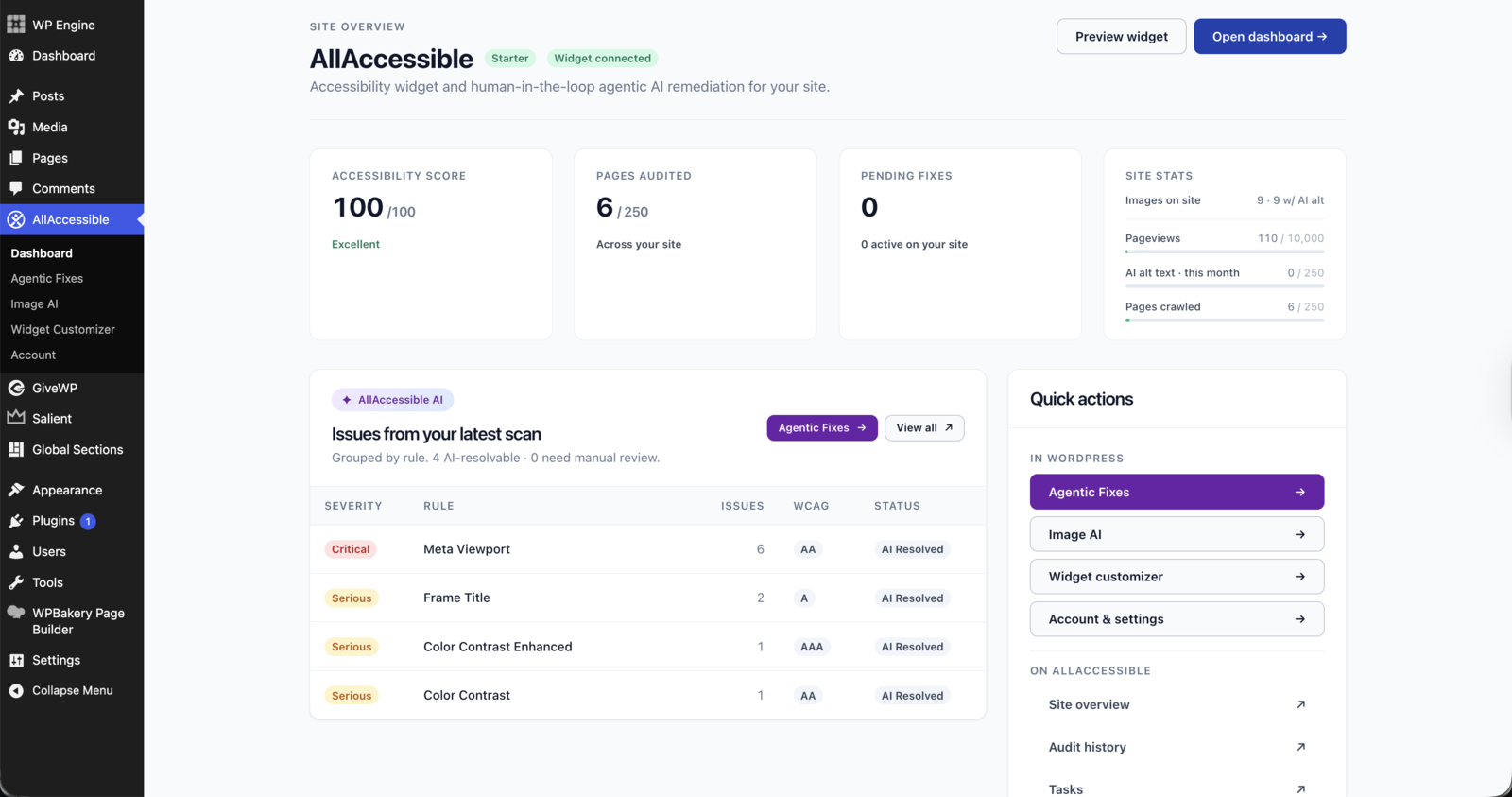
- Surface a prioritized fix list right inside your WordPress dashboard
✅ Accessibility Scans and Reports ✅
Run unlimited accessibility scans and receive a corresponding report. AllAccessible Premium’s Accessibility reports provide comprehensive and categorized details including:
- A Summary of the issues and highlighting the code where any issues occurred
- The severity of any issues, including best practices
- The Mapping of Accessibility Issues to WCAG, Section 508, ADA, and ACT rules
📊 Remediation and Administrative Dashboards 📊
Our user-friendly dashboard interfaces allow you to make quick and easy adjustments to agent-generated content, and user requests, no coding required!
The Administrative dashboards give you complete control over your site allowing you to add users, add sites and subdomains, address accommodation requests, and adjust your application settings.
ℹ️ Knowledge Base ℹ️
Complete product documentation, instructional videos are available to all users.
- For product documentation visit our Knowledge Base
- For informational videos and tutorials, visit our YouTube Channel
🆘 Dedicated Support 🆘
AllAccessible provides dedicated support, to help answer any questions you may have.
🤝 Partner Program 🤝
AllAccessible offers a profitable, flexible, and simple partner program to help digital agencies build their own branded solutions powered by AllAccessible. These solutions provide your clients with competitive accessibility solutions while generating new sources of revenue for you!
Partners can leverage AllAccessible’s technology to create differentiated services across a wide range of website accessibility use cases such as:
- White Label and Resell
- Implementation & Configuration
- Accommodation as a Service
- Remediation Services
- And More!
Partners receive additional benefits including:
- A free AllAccessible License for their website
- Discounted Licensing Costs
- A listing on our partner directory
- Access to our partner portal with free resources such as SOWs and marketing material to help drive revenue
Soutien
For Plugin Support, visit the AllAccessible Support Page
AllAccessible Terms and Conditions
AllAccessible Would Love Your Feedback
Our goal is to simplify content management between both platforms. Please share any feedback using the AllAccessible Feedback Form.
Privacy & External Services
AllAccessible is a connected service plugin. To deliver accessibility scanning, agentic AI remediation, and the accessibility widget, the plugin communicates with AllAccessible’s servers. This section discloses what data is sent and where, per WordPress.org guidelines.
What the plugin connects to
- AllAccessible API (app.allaccessible.org) — validates your license, retrieves widget settings, serves accessibility audit scores, and accepts manual edits (alt text, fix approvals). Requests are authenticated and only made when you use the plugin’s admin screens or when the widget loads on your site.
Data sent
- License & account identification — your AllAccessible account ID and site URL, so the service knows which account a request belongs to.
- Accessibility audit data — when the widget scans a page, detected accessibility issues are sent so the service can compute scores and generate remediation suggestions.
- Error & diagnostic information — if the plugin encounters an error, anonymized diagnostic details (error message, plugin version, WordPress/PHP version, your account ID) are sent to our error-monitoring service (Sentry) so we can detect and fix problems. This is disclosed in our Privacy Policy and can be disabled under Account → Advanced → “Disable error reporting to AllAccessible.”
No data is sent without an account
The free accessibility widget runs entirely in the visitor’s browser and adjusts their viewing experience only. License-bound features (AI remediation, scanning, image descriptions) require an AllAccessible account; creating one means agreeing to our Terms and Privacy Policy, which govern all data handling.
Juridique
- Terms & Conditions: https://www.allaccessible.org/terms-conditions
- Privacy Policy: https://www.allaccessible.org/privacy-policy
- GDPR: https://www.allaccessible.org/gdpr
- Trust Center: https://www.allaccessible.org/trust-center
Installation
-
In the Plugins admin area, click add new and search for AllAccessible OR Download and upload the entire
allaccessiblefolder to the/wp-content/plugins/directory. -
Activate the plugin through the ‘Plugins’ menu in WordPress. Verify the free version plugin is working on the homepage of the website.
-
To enable AllAccessible premium, click the AllAccessible menu item in the WordPress Admin to get to the settings page. The settings page make an API call to our service to retrieve plugin settings. The API call is only made when visiting the settings page.
-
Under the AllAccessible Account Authorization area you’ll have two options: If you have an existing account with AllAccessible, please add the account id in the field. If you do not have an account, simply verify your email address and click create account.
-
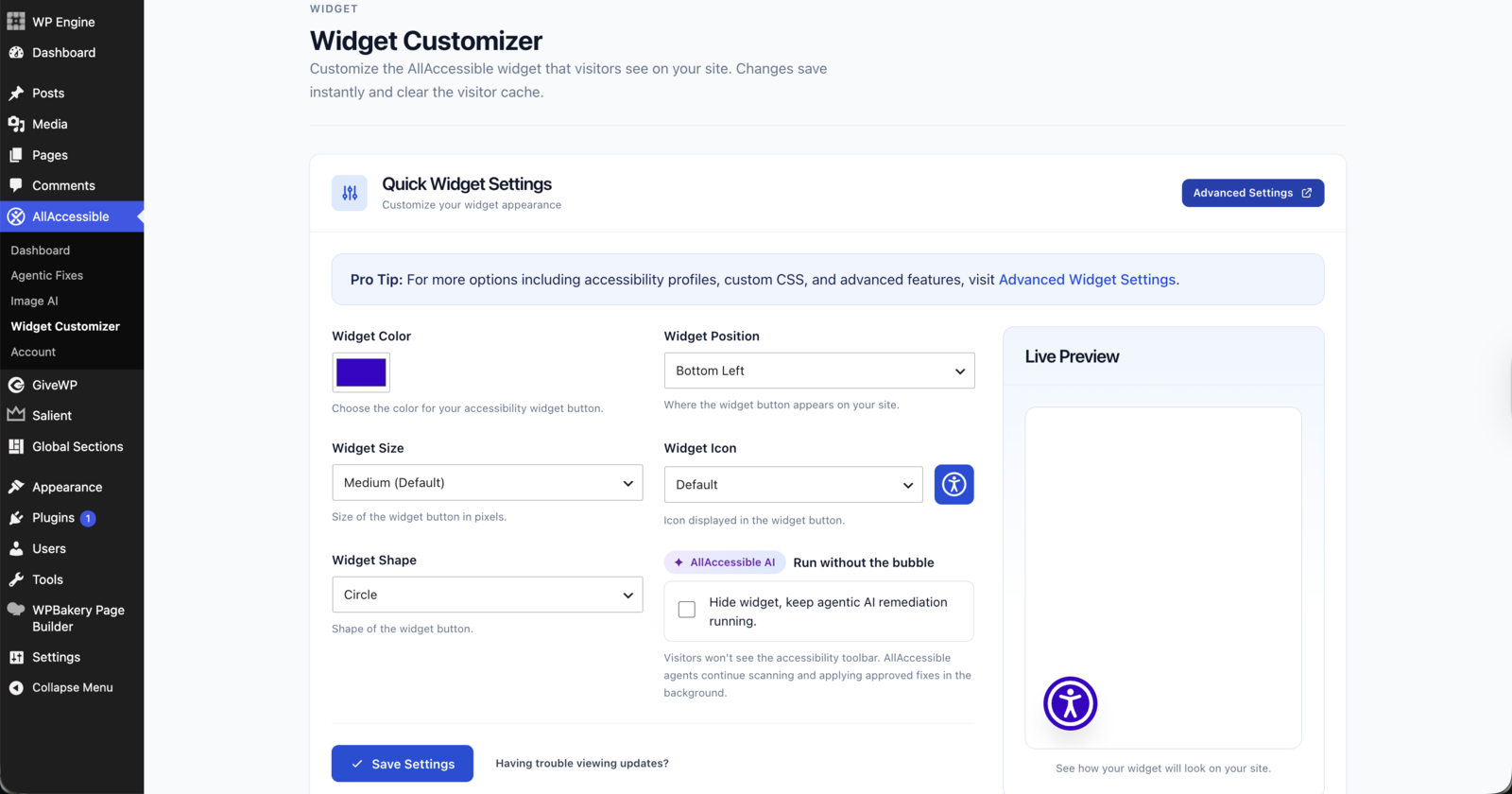
Make adjusts to the widget position, size, icon, color, and other options on the settings screen. Settings are automatically saved.
-
Verify the plugin is working on the homepage of the website.
Journal de modifications
2.2.1
- What’s new in 2.2, in the plugin. After an update, a short release-notes dialog on the AllAccessible overview walks you through what changed, starting with your accessibility statement page. Reopen it any time from the “What’s new” button in the page header.
- The accessibility statement reminder now appears right away on AllAccessible pages and your WordPress Dashboard when no statement page is linked yet, instead of waiting a week. One click creates the page; “Not now” hides the reminder for good, and it disappears on its own once the page is linked.
- Removed a needless background retry after the site credential is set up successfully.
- Refresh from AllAccessible. When your statement wording changes in the dashboard, one button on the statement card replaces the page text with the current wording, keeps your contact details, and leaves the previous version in the page’s revisions.
- All 17 languages are complete again. The 2.2.0 dashboard text had shipped in English only for non-English admins; every string is now translated.
2.2.0
- Stronger site connection. Each WordPress site now holds its own private credential for AllAccessible, set up automatically on update. Approving or editing fixes and image descriptions from WordPress requires this version. Thanks to kta1kri for responsibly reporting.
- Redesigned plugin dashboard. One health card now answers “is my site OK?” in plain words, tells you when the score only covers part of your site or the last scan is stale, and carries one clear next action.
- Scan from the dashboard. When a scan is due, the scan runs right from the overview with live progress, no trip to another page.
- When a scan can’t start, the plugin now says why (one already running, or your plan’s scan window) instead of reporting it as started. The dashboard’s last-scan and next-scan dates now match the page freshness note.
- At-a-glance tiles replace the old stat strip: fixes live on your site, items waiting for a person, images with alt text, and pageviews, each with a plain-language status.
- Agentic Fixes and Image AI pages use the same status-first layout, and the free preview is labeled clearly.
- Getting Started is now a numbered checklist with the next step’s action inline, including creating your Accessibility Statement page without leaving the card.
- Accessibility Statement guide: if a statement page already exists we ask whether to use it before creating anything, and creating a new one lets you choose draft or publish.
- Accessibility Statement guide. Create your statement from the plugin, publish it as a page, and link it to AllAccessible so the widget footer points your visitors to it. The setup wizard includes this step too.
- A gentle reminder appears after a week if your statement isn’t published yet. Dismiss it once and it stays gone.
- Links from the plugin into your AllAccessible dashboard now open the right site every time, including from the Agentic Fixes and Image AI pages.
- Improved color contrast on secondary text, and admin notices from WordPress or other plugins no longer land inside the page header.
- Works properly at phone width: headers stack, wide tables scroll, buttons go full width.
2.1.8
- Your widget keeps working as the free widget if the plugin’s account link ever goes stale, instead of disappearing. Reconnect from Account at any time.
- Editor panel: pages that have never been scanned now offer “Scan this page now”; a service hiccup says so plainly and offers Try again.
- Widget Customizer: new “Hide the widget button on phones” option, and the icon picker shows every icon as a tile.
- Setup wizard shows a proper page title and refreshed copy.
- Agentic fixes: the dashboard and plugin now show whether approved fixes have reached your site, and approving a fix takes you straight to the Approved tab with confirmation.
- Removed an unused editor script.
2.1.7
- The Agentic Fixes summary on your WordPress dashboard no longer stalls page loads when our service is slow to respond. The plugin shows the last known numbers and retries in the background.
- New Widget Language card in Widget Customizer: choose the language the widget opens in for your visitors, or leave it on Auto to follow each visitor’s browser. Available on every plan. One click applies your WordPress site language.
2.1.6
- Testé avec WordPress 7.1.
- The accessibility widget no longer loads where it shouldn’t: 404 pages, feeds, previews, and page-builder editing sessions (Elementor, Divi, WPBakery, Beaver Builder, Bricks, Oxygen, and others). Your builder canvas stays clean.
- Redirected URLs are no longer counted as monitored pages, so your page list and scores reflect real content only.
- More reliable connection to your AllAccessible account: brief network interruptions are retried automatically instead of failing the request.
- Site owners can now exclude the widget from specific requests with the
allaccessible_skip_widgetfilter. - Fixed a rare conflict that could occur when a duplicate copy of the plugin was present on a site.
2.1.5
- Fixed: the settings page could fail to load on sites where the AllAccessible account wasn’t connected — it now loads reliably and points you to reconnect.
- Fixed: the Agentic Fixes page could fail to load when our service was briefly unreachable — it now degrades gracefully instead of erroring.
Captures d'écran
Pour les développeurs
Est-ce votre plugin ? Montrez les chiffres.
Ajoutez un badge en direct à votre site, docs ou github readme. Il se met à jour par lui-même - aucun compte n'est nécessaire.
Best Accessibility by AllAccessible alternatives
Tous les plugins d'accessibilité →




FAQ
Accessibility by AllAccessible: quick answers
Réponses directes, extraites des données en direct WordPress.org.
Source : WordPress.org
Is Accessibility by AllAccessible free?
Yes. Accessibility by AllAccessible is free to download and use from the official WordPress.org plugin directory.
Is Accessibility by AllAccessible safe to use in 2026?
Yes — Accessibility by AllAccessible is a safe, well-maintained plugin to use in 2026. It runs on 2K+ sites, is rated 5/5 and was last updated 2 weeks ago, and scores 83/100 on our health check.
How many websites use Accessibility by AllAccessible?
Accessibility by AllAccessible is active on 2K+ WordPress websites and has been downloaded 46,767 times since it launched in January 2022. It was downloaded 4,971 times in the last 30 days.
Does Accessibility by AllAccessible work with WordPress 7.1?
Yes. The developer has tested Accessibility by AllAccessible up to WordPress 7.1.5, the latest release. It requires WordPress 5.5 or newer.
What PHP version does Accessibility by AllAccessible need?
Accessibility by AllAccessible requires PHP 7.4 or higher. Most hosts run PHP 8.x today, so it works on any modern WordPress hosting.
When was Accessibility by AllAccessible last updated?
The latest version, 2.2.1, was released on November 7, 2026 (2 weeks ago).
Who makes Accessibility by AllAccessible?
Accessibility by AllAccessible is developed and maintained by AllAccessible.
What are the best alternatives to Accessibility by AllAccessible?
The most popular alternatives to Accessibility by AllAccessible are Web Accessibility (formally… (500K+ installs), Auto Image Attributes From… (100K+ installs) and Accessibility by UserWay (80K+ installs).
Propulsé par PageForge
Un modèle et une feuille de calcul. Une vraie page pour chaque recherche.
PageForge transforme chaque ligne d'un CSV en une page WordPress avec son propre titre, URL, SEO et schéma, construit sur la mise en page que vous Déjà conçu. Gratuit sur WordPress.org.
- CSV et XLSX, plus Google Sheets sur les professionnels et les entreprises
- Son propre titre, URL, SEO champs et schéma pour chaque page
- Fonctionne avec l'éditeur de blocs, Elementor, Divi et Avada
- Gratuit sur WordPress.org, pas de carte de crédit