


VS Knowledge Base
With this lightweight plugin you can create a knowledge base that contains your categories and posts.

Sichere Auswahl
Yes — VS Knowledge Base is a safe, well-maintained plugin to use in 2026. It runs on 300+ sites, is rated 4.8/5 and was last updated 2 weeks ago, and scores 80/100 on our health check.
- Aktiv entwickelt — letztes Update vor 2 Wochen
- Getestet mit dem neuesten WordPress (7.1)
- Momentum — downloads up 117.6% vs the previous 30 days
- Kleine Benutzerbasis (300+ aktive Installationen)
Wie stapelt es sich?
Side-by-side bei Installationen, Updates, Bewertungen und Support



Tägliche Downloads
Download-Spitzen folgen normalerweise einer neuen Version - jede Website, die automatisch aktualisiert wird, gilt als Download.
Ranglisten
Where VS Knowledge Base stands todayWordPress.org Ranglisten suchen
Live-Position in der Plugin-Suche, Top 100| Stichwort | Position |
|---|---|
| ClassicPress | #27 |
| faq | >100 |
| frequently asked questions | #10 |
| knowledge base | #5 |
| wiki | #37 |
Versionsübernahme
Anteil aktiver Sites pro Release.
Bewertungsaufschlüsselung
★★★★★★★★★★ 4.8 from 17 reviews
About VS Knowledge Base
From the official readme · v8.8Beschreibung
Über
With this lightweight plugin you can create a knowledge base that contains your categories and posts.
Main features of the plugin:
- Free and lightweight
- Support for Block Editor and Classic Editor
- Display your knowledge base with block, shortcode or widget
- Custom post types are supported (such as WooCommerce product categories and products)
- Customize your knowledge base with attributes
- Documentation at WP plugin page
- Active support from developer at WP forum
With this plugin you can also create a FAQ or wiki in the same way as a knowledge base.
Wie man benutzt
After installation make sure you already have some categories and posts.
Go to the editor and add the VS Knowledge Base block or the shortcode [knowledgebase] to a page. This will display your knowledge base.
Or go to Appearance > Widgets and use the VS Knowledge Base widget.
Default settings categories:
- 4 columns when using block or shortode
- 1 column when using widget
- 2 columns in small screens
- Order by name
- Ascending order (A-Z)
- Empty categories are hidden
- Parent and subcategories are displayed separately
Default settings posts:
- Order by date
- Descending order (new to old)
- All posts are displayed
Customize your knowledge base with attributes.
Attribute
You can customize your knowledge base by adding attributes to the block, shortcode or widget.
- Add custom CSS class to knowledge base:
class="your-class-name" - Change the number of columns:
columns="3" - Disable the columns:
columns="0" - Include certain categories:
include="1,3,5" - Exclude certain categories:
exclude="8,10,12" - Display empty categories too:
hide_empty="0" - Change the number of posts per category:
posts_per_category="5" - Reverse the order of posts:
order="ASC" - Display posts by title:
orderby="title" - Display posts in random order:
orderby="rand" - Disable category link:
category_link="false" - Display category description:
category_description="true" - Display post counter:
post_count="true" - Display post meta (date and author):
post_meta="true" - Display View All link:
view_all_link="true" - Change label of View All link:
view_all_link_label="your label" - Change label of post without title:
no_post_title_label="your label" - Change the “no categories are found” text:
no_categories_text="your text"
Beispiel: [knowledgebase include="1,3,5" hide_empty="0" post_meta="true"]
When using the block or the widget, don’t add the main shortcode tag or the brackets.
Beispiel: include="1,3,5" hide_empty="0" post_meta="true"
With the columns attribute you can set the number of columns between 1 and 4.
In small screens max 2 colums.
You can disable the columns in favour of your own styling.
The columns attribute will be ignored when using the block or widget. Because you can set the columns via the block or widget settings.
Post-Tags
Besides displaying posts by category you can also display posts by tag: taxonomy="post_tag"
Custom post types
It’s also possible to display categories and posts from a custom post type (such as WooCommerce product categories and products).
To display these categories and posts you should add 2 attributes: “taxonomy” and “post_type”
WooCommerce:
- Product categories and products:
taxonomy="product_cat" post_type="product" - Include product category image:
taxonomy="product_cat" post_type="product" woo_image="true" - Display by tag instead of category:
taxonomy="product_tag" post_type="product"
Have a question?
Please take a look at the FAQ section.
Translation
Translations are not included, but the plugin supports WordPress language packs.
More translations are very welcome!
The translation folder inside this plugin is redundant, but kept for reference.
Credits
Without help and support from the WordPress community I was not able to develop this plugin, so thank you!
Änderungsprotokoll
Version 8.8
- Updated condition to detect ClassicPress
Version 8.7
- Minor changes in code
Version 8.6
- Added support for ClassicPress
- The block will only load in WP 6.3 and higher
- Reverted the “Requires at least” version to 6.0
Version 8.5
- New: attribute to disable the category linking to its category page
- Minor changes in code
Version 8.4
- Full rewrite of the block
- It now supports the Block API version 3
- Bumped the “Requires at least” version to 6.3
Version 8.3
- Fixed errors flagged by PCP
- Output escaping for widget
- Minor changes in code
Screenshots
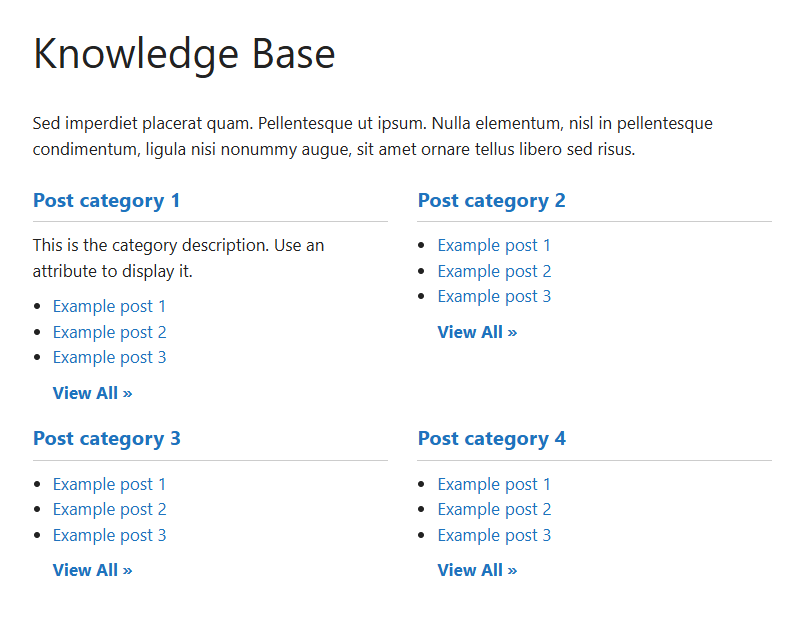
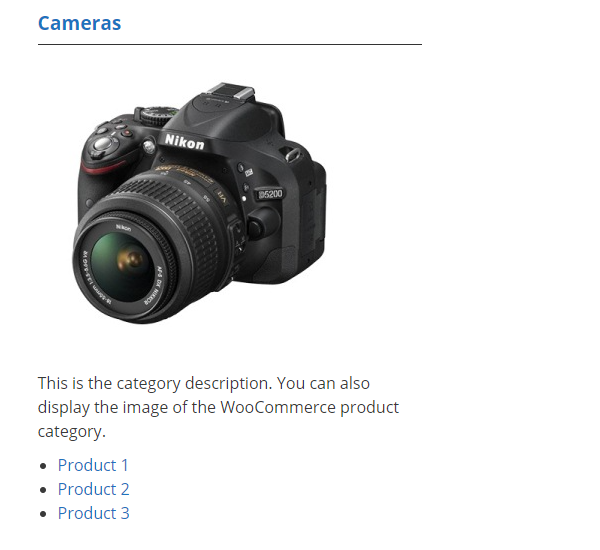


Für Entwickler
Ist das dein Plugin? Zeigen Sie die Zahlen.
Fügen Sie Ihrer Website, Docs oder GitHub Readme ein Live-Badge hinzu. Es wird von selbst aktualisiert - kein Konto erforderlich.
Best VS Knowledge Base alternatives
All ClassicPress plugins →





Fragen und Antworten
VS Knowledge Base: quick answers
Gerade Antworten, gezogen von Live WordPress.org Daten.
Quelle: WordPress.org
Is VS Knowledge Base free?
Yes. VS Knowledge Base is free to download and use from the official WordPress.org plugin directory.
Is VS Knowledge Base safe to use in 2026?
Yes — VS Knowledge Base is a safe, well-maintained plugin to use in 2026. It runs on 300+ sites, is rated 4.8/5 and was last updated 2 weeks ago, and scores 80/100 on our health check.
How many websites use VS Knowledge Base?
VS Knowledge Base is active on 300+ WordPress websites and has been downloaded 45,944 times since it launched in August 2014. It was downloaded 666 times in the last 30 days.
Does VS Knowledge Base work with WordPress 7.1?
Yes. The developer has tested VS Knowledge Base up to WordPress 7.1.5, the latest release. It requires WordPress 6.0 or newer.
What PHP version does VS Knowledge Base need?
VS Knowledge Base requires PHP 7.4 or higher. Most hosts run PHP 8.x today, so it works on any modern WordPress hosting.
When was VS Knowledge Base last updated?
The latest version, 8.8, was released on November 18, 2026 (2 weeks ago).
Who makes VS Knowledge Base?
VS Knowledge Base is developed and maintained by Guido.
What are the best alternatives to VS Knowledge Base?
The most popular alternatives to VS Knowledge Base are VS Event List (8K+ installs), VS Contact Form (6K+ installs) and VS Meta Description (3K+ installs).
Angetrieben von PageForge
Eine Vorlage und eine Tabelle. Eine echte Seite für jede Suche.
PageForge Verwandelt jede Zeile eines CSV in eine WordPress-Seite mit eigenem Titel, URL, SEO Felder und Schema entworfen. Kostenlos auf WordPress.org.
- CSV und XLSX, plus Google Sheets auf Beruf und Unternehmen
- seinen eigenen Titel, URL, SEO Felder und Schema für jede Seite
- Arbeitet mit dem Blockeditor, Elementor, Divi und Avada
- Kostenlos auf WordPress.org, keine Kreditkarte