


VS Knowledge Base
With this lightweight plugin you can create a knowledge base that contains your categories and posts.

Escolha segura
Yes — VS Knowledge Base is a safe, well-maintained plugin to use in 2026. It runs on 300+ sites, is rated 4.8/5 and was last updated 2 weeks ago, and scores 80/100 on our health check.
- Desenvolvido ativamente — última atualização 2 semanas atrás
- Testado com as últimas WordPress (7.1)
- Momentum — downloads up 117.6% vs the previous 30 days
- Base de usuários pequenas (mais de 300 instalações ativas)
Como ele se acumula?
Lado a lado em instalações, atualizações, avaliações e suporte



Downloads diários
Os picos de download geralmente seguem uma nova versão — cada site que atualiza automaticamente é um download.
Rankings
Where VS Knowledge Base stands todayWordPress.org Classificações de pesquisa
Posição ao vivo na pesquisa de plugins, top 100| Palavra chave | Posição |
|---|---|
| ClassicPress | #27 |
| faq | >100 |
| frequently asked questions | #10 |
| knowledge base | #5 |
| wiki | #37 |
Adoção da versão
Compartilhamento de sites ativos por lançamento.
Divisão de classificação
★★★★★★★★★★ 4.8 from 17 reviews
About VS Knowledge Base
From the official readme · v8.8Descrição
Sobre
With this lightweight plugin you can create a knowledge base that contains your categories and posts.
Main features of the plugin:
- Free and lightweight
- Support for Block Editor and Classic Editor
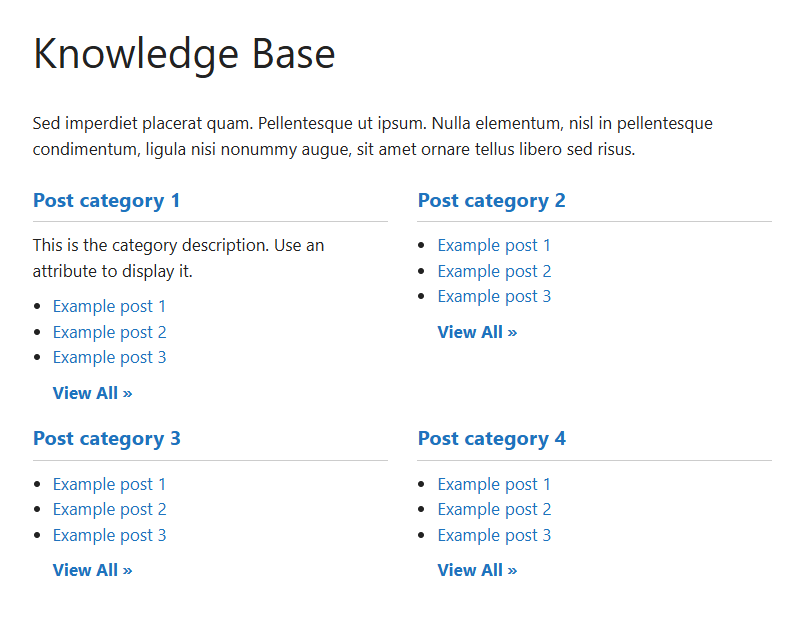
- Display your knowledge base with block, shortcode or widget
- Custom post types are supported (such as WooCommerce product categories and products)
- Customize your knowledge base with attributes
- Documentation at WP plugin page
- Active support from developer at WP forum
With this plugin you can also create a FAQ or wiki in the same way as a knowledge base.
Como usar
After installation make sure you already have some categories and posts.
Go to the editor and add the VS Knowledge Base block or the shortcode [knowledgebase] to a page. This will display your knowledge base.
Or go to Appearance > Widgets and use the VS Knowledge Base widget.
Default settings categories:
- 4 columns when using block or shortode
- 1 column when using widget
- 2 columns in small screens
- Order by name
- Ascending order (A-Z)
- Empty categories are hidden
- Parent and subcategories are displayed separately
Default settings posts:
- Order by date
- Descending order (new to old)
- All posts are displayed
Customize your knowledge base with attributes.
Attributes
You can customize your knowledge base by adding attributes to the block, shortcode or widget.
- Add custom CSS class to knowledge base:
class="your-class-name" - Change the number of columns:
columns="3" - Disable the columns:
columns="0" - Include certain categories:
include="1,3,5" - Exclude certain categories:
exclude="8,10,12" - Display empty categories too:
hide_empty="0" - Change the number of posts per category:
posts_per_category="5" - Reverse the order of posts:
order="ASC" - Display posts by title:
orderby="title" - Display posts in random order:
orderby="rand" - Disable category link:
category_link="false" - Display category description:
category_description="true" - Display post counter:
post_count="true" - Display post meta (date and author):
post_meta="true" - Display View All link:
view_all_link="true" - Change label of View All link:
view_all_link_label="your label" - Change label of post without title:
no_post_title_label="your label" - Change the “no categories are found” text:
no_categories_text="your text"
Exemplo: [knowledgebase include="1,3,5" hide_empty="0" post_meta="true"]
When using the block or the widget, don’t add the main shortcode tag or the brackets.
Exemplo: include="1,3,5" hide_empty="0" post_meta="true"
With the columns attribute you can set the number of columns between 1 and 4.
In small screens max 2 colums.
You can disable the columns in favour of your own styling.
The columns attribute will be ignored when using the block or widget. Because you can set the columns via the block or widget settings.
Poste tags
Besides displaying posts by category you can also display posts by tag: taxonomy="post_tag"
Tipos de postagem personalizados
It’s also possible to display categories and posts from a custom post type (such as WooCommerce product categories and products).
To display these categories and posts you should add 2 attributes: “taxonomy” and “post_type”
WooCommerce:
- Product categories and products:
taxonomy="product_cat" post_type="product" - Include product category image:
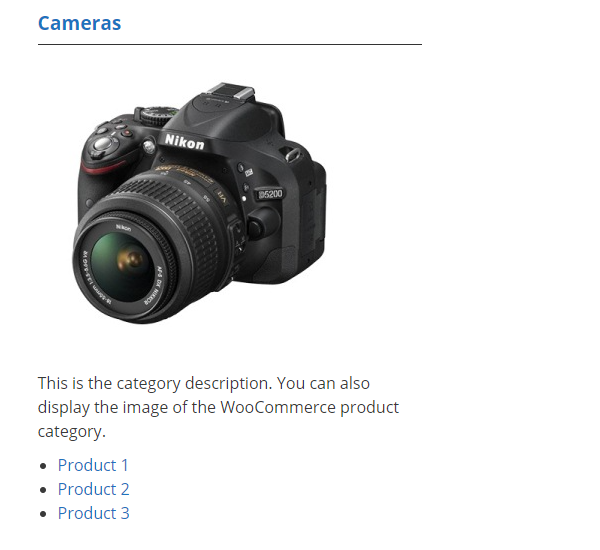
taxonomy="product_cat" post_type="product" woo_image="true" - Display by tag instead of category:
taxonomy="product_tag" post_type="product"
Have a question?
Please take a look at the FAQ section.
Translation
Translations are not included, but the plugin supports WordPress language packs.
More translations are very welcome!
The translation folder inside this plugin is redundant, but kept for reference.
Créditos
Without help and support from the WordPress community I was not able to develop this plugin, so thank you!
Log de Changes
Version 8.8
- Updated condition to detect ClassicPress
Version 8.7
- Minor changes in code
Version 8.6
- Added support for ClassicPress
- The block will only load in WP 6.3 and higher
- Reverted the “Requires at least” version to 6.0
Version 8.5
- New: attribute to disable the category linking to its category page
- Minor changes in code
Version 8.4
- Full rewrite of the block
- It now supports the Block API version 3
- Bumped the “Requires at least” version to 6.3
Version 8.3
- Fixed errors flagged by PCP
- Output escaping for widget
- Minor changes in code
Capturas de tela


Para desenvolvedores
Este é o seu plugin? Mostre os números.
Adicione um crachá ao vivo ao seu site, Documentos ou Readme do GitHub. Ele é atualizado por conta própria - nenhuma conta necessária.
Best VS Knowledge Base alternatives
All ClassicPress plugins →





FAQ
VS Knowledge Base: quick answers
Respostas diretas, extraídas de dados ao vivo WordPress.org.
Fonte: WordPress.org
Is VS Knowledge Base free?
Yes. VS Knowledge Base is free to download and use from the official WordPress.org plugin directory.
Is VS Knowledge Base safe to use in 2026?
Yes — VS Knowledge Base is a safe, well-maintained plugin to use in 2026. It runs on 300+ sites, is rated 4.8/5 and was last updated 2 weeks ago, and scores 80/100 on our health check.
How many websites use VS Knowledge Base?
VS Knowledge Base is active on 300+ WordPress websites and has been downloaded 45,944 times since it launched in August 2014. It was downloaded 666 times in the last 30 days.
Does VS Knowledge Base work with WordPress 7.1?
Yes. The developer has tested VS Knowledge Base up to WordPress 7.1.5, the latest release. It requires WordPress 6.0 or newer.
What PHP version does VS Knowledge Base need?
VS Knowledge Base requires PHP 7.4 or higher. Most hosts run PHP 8.x today, so it works on any modern WordPress hosting.
When was VS Knowledge Base last updated?
The latest version, 8.8, was released on November 18, 2026 (2 weeks ago).
Who makes VS Knowledge Base?
VS Knowledge Base is developed and maintained by Guido.
What are the best alternatives to VS Knowledge Base?
The most popular alternatives to VS Knowledge Base are VS Event List (8K+ installs), VS Contact Form (6K+ installs) and VS Meta Description (3K+ installs).
Alimentado por PageForge
Um modelo e uma planilha. Uma página real para cada pesquisa.
PageForge Transforma cada linha de um CSV em uma página WordPress com seu próprio título, URL, SEO campos e esquema, construído no layout que você já desenhou. Gratuito em WordPress.org.
- CSV e XLSX, mais Google Sheets em Profissional e Empresarial
- Seu próprio título, URL, SEO campos e esquema para cada página
- Funciona com o editor de blocos, Elementor, Divi e Avada
- Gratuito em WordPress.org, sem cartão de crédito