


Medienbibliotheks-Organizer – Ordner, Datei-Manager und Medienkategorien
Create unlimited Media Library folders and subfolders to organize your files. Export Media Library folders, set default attributes & more.

Sichere Auswahl
Yes — Media Library Organizer is a safe, well-maintained plugin to use in 2026. It runs on 20K+ sites, is rated 4.7/5 and was last updated 4 days ago, and scores 93/100 on our health check.
- Bewährt auf 20.000 aktiven Standorten
- Loved by users — 4.7/5 from 150 reviews
- Actively developed — last update 4 days ago
- Getestet mit dem neuesten WordPress (7.1)
- Momentum — downloads up 30.9% vs the previous 30 days
Wie stapelt es sich?
Side-by-side bei Installationen, Updates, Bewertungen und Support



Tägliche Downloads
Download-Spitzen folgen normalerweise einer neuen Version - jede Website, die automatisch aktualisiert wird, gilt als Download.
Ranglisten
Where Media Library Organizer stands todayWordPress.org Ranglisten suchen
Live-Position in der Plugin-Suche, Top 100| Stichwort | Position |
|---|---|
| file manager | #12 |
| media categories | #1 |
| media folders | #3 |
| organize files | #3 |
| taxonomy | #74 |
Versionsübernahme
Anteil aktiver Sites pro Release.
Bewertungsaufschlüsselung
★★★★★★★★★★ 4.7 from 150 reviews
About Media Library Organizer
From the official readme · v2.1.8Beschreibung
Managing WordPress media files shouldn’t be a daily struggle. Media Library Organizer lets you create unlimited media library folders and subfolders to organize WordPress media library content with ease. Use the intuitive drag & drop editor to arrange your files into folders, ZIP and export Media Library folders, set default attributes by filetype, and so much more.
Why Use Media Library Organizer
Scale with Unlimited Organization – Whether you’re managing 100 or 100,000 media files, with unlimited Media Library folders and subfolders you can organize at any scale. No more scrolling through thousands of unorganized uploads.
Find Files Instantly – Stop wasting time hunting through endless media files. Create organized folder structures that make sense to you and find any file in seconds.
Work More Professionally – Set default metadata for consistent SEO, customize the Media Library interface, and export Media Library folders for backup.
Media Library Organizer Features
Everything you need to organize, manage, and optimize your WordPress Media Library workflow.
🗂️ Core Organization
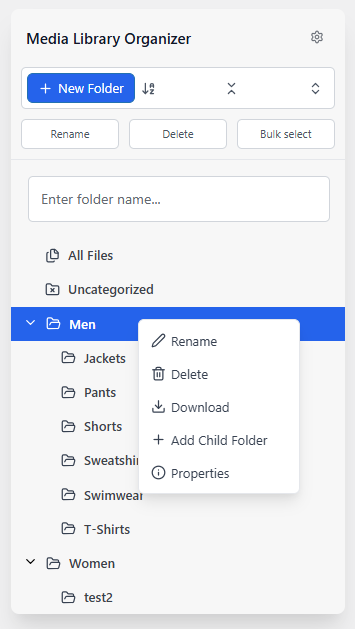
- Create unlimited folders and subfolders – Build the folder structure that works for you. No restrictions.
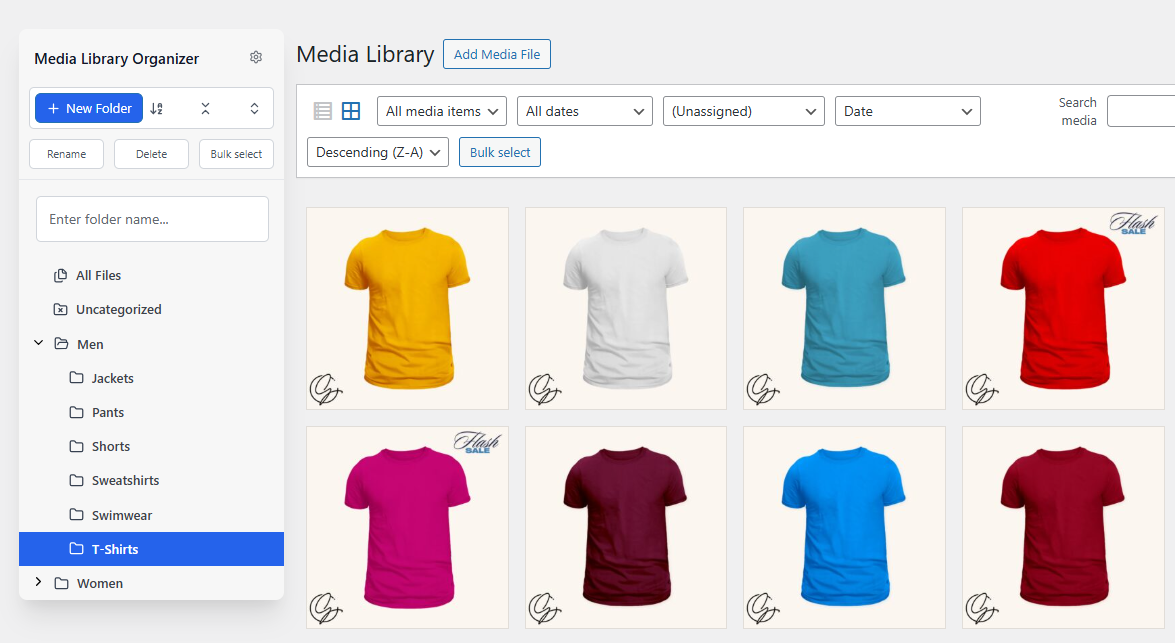
- Drag and drop files – Individually or bulk select images and media files, and drag them to any folder
- Advanced sorting options – Sort your files by upload date, modified date, ID, author, and more
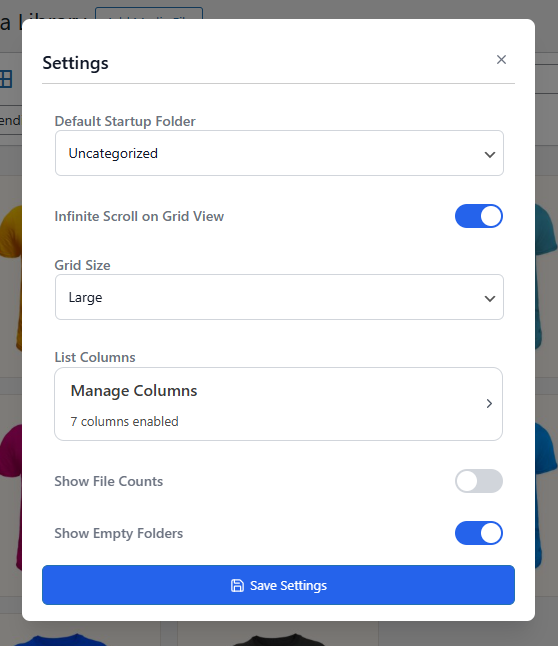
- Default folder – Set the default folder for your uploads
🔧 Smart File Management
- Export Media Library – Export individual folders or all your Media Library files by downloading them in a ZIP file
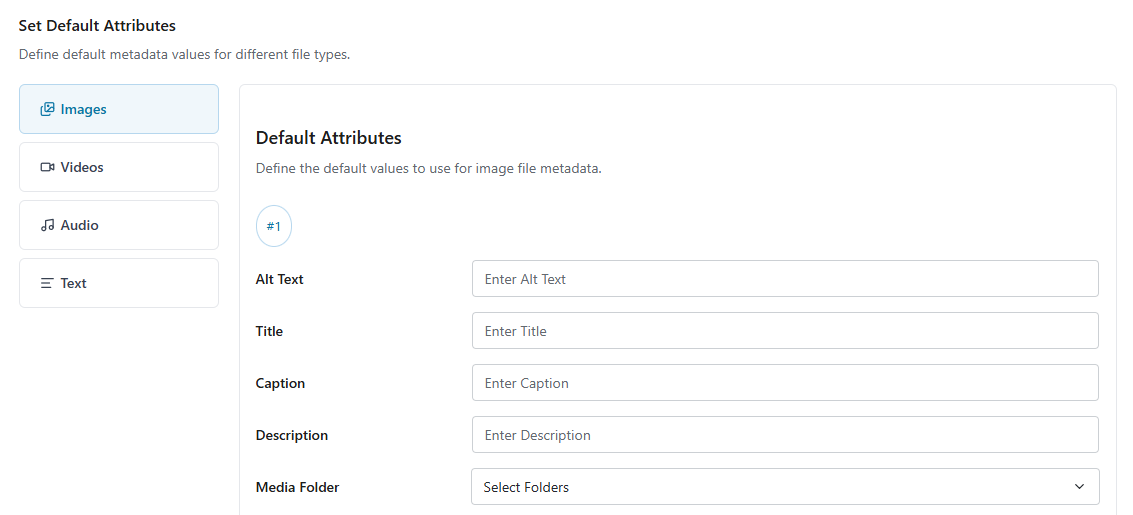
- Set default attributes by file type – Set default image metadata such as alt text, caption, and description. Configurable for each file type separately with support for dynamic tags.
- Set display defaults – Set defaults for how your uploads appear on your website (link to, size, alignment)
🎨 Interface & Experience
- Customize the Media Library interface – Edit grid size, number of columns, and customize what is shown in the folder tree
- Works with all Media Library views – Search and filter attachments by folders in all views, including Featured Image, Media Library List, Grid, Page Builders, ACF, and more
🔄 Migration & Compatibility
- Import from other plugins – Easily migrate from other WordPress Media Library plugins
- Compatible with all your favorite tools – Works with the most popular page builders, themes, and WordPress plugins
Pro Features & Advanced Tools
Save hours every week with intelligent automation, powerful search tools, and professional media management features designed for serious WordPress users. See Pro Features & Pricing →
🔍 Advanced Search & Discovery
- Advanced search – Search by alt text, filename, caption, or description with match type options
- Multi-select filters – Use multiple filters at the same time to narrow down results
🔧 Advanced File Management
- AI image categorization – Automatically categorize your images using AI-powered visual recognition
- Smart upload workflow – Show folder selection and metadata editing fields when uploading media files
- Default attribute rules – Create rules for applying default attributes automatically
- Duplicate files – Duplicate any file with just one click
⚙️ Advanced File Operations
- Upload entire folders – Create folders based on the folder structure inside ZIP files
- Auto-extract ZIP files – Automatically extract and organize ZIP file contents
- ZIP multiple files – Create archives from selected media files
🎯 Professional Media Management
- EXIF and IPTC editing – Enable editing of professional image metadata
- Custom taxonomies – Create additional taxonomies for media files beyond folders
- Create dynamic galleries – Extend WordPress’ [gallery] shortcode to build advanced dynamic galleries
🖼️ Image Optimization
- Image optimization – Enable compression and set custom quality levels
- WebP conversion – Automatically convert uploaded images to WebP format for better compression
Why Use Media Library Organizer
From small blogs to enterprise sites, everyone benefits from better media organization. Here’s how different types of websites stay organized:
🛒 E-commerce Stores – Organize product images by category, brand, or collection.
📰 News & Magazine Sites – Sort photo uploads by date, topic, or photographer.
🏠 Real Estate Websites – Organize property photos by listing, location, or status.
📸 Photography & Design Portfolios – Structure galleries by project, client, or shoot date.
📚 Online Course Creators – Separate videos, PDFs, and images by course or module.
🏢 Corporate Websites – Manage marketing materials, documents, and assets by department, campaign, or date.
Support & Documentation
We’re here to help. Feel free to open a new thread on the Support Forum.
Need help getting started? Check out our documentation for guides on every feature.
Useful Resources
- If you like Media Library Organizer, you’re sure to love our other plugins as well.
- Learn more about WordPress on our blog.
- Get the most out of your WordPress website with our helpful YouTube Tutorials.
Installation
Getting started with Media Library Organizer takes less than a minute. The easiest way to install Media Library Organizer is directly from your WordPress admin:
- Navigate to Plugins → Add New in your WordPress dashboard
- Search for “Media Library Organizer”
- Click Install Now on the Media Library Organizer plugin by Themeisle
- Once installed, click Activate to enable the plugin
- You’ll find the new Media Library Organizer menu item in your WordPress admin sidebar
Änderungsprotokoll
Version 2.1.8 (2026-11-16)
- Fixed the folder sidebar disappearing when a rename failed
- Enhanced security
- Updated dependencies
Version 2.1.7 (2026-11-11)
- Fixed dragging files by title into folders on WordPress 7.1.
- Fixed redirecting new users to the Media Library after activation.
- Updated dependencies
Version 2.1.6 (2026-10-22)
- Fixed warning messages when no admin screen is available.
- Fixed media modal images hiding under the filter toolbar.
- Updated dependencies
Version 2.1.5 (2026-09-30)
- Fixed admin pages crashing with older Pro versions.
- Added AI agent support: let AI assistants read and change your Media Library Organizer folders and settings.
Version 2.1.4 (2026-09-24)
- Fixed folder downloads when the PHP ZIP extension is unavailable.
- Fixed sidebar settings reverting after you saved changes.
- Fixed frontend pages that failed while preparing attachment data.
- Updated dependencies
- Enhanced Security. Thank you Jashid Sany for responsible disclosure.
Version 2.1.3 (2026-09-07)
- Fixed third-party media-folder imports timing out or stopping partway through by processing large migrations in resumable background batches with progress reporting.
- Fixed stale image copies after you replace media files.
- Fixed blank Camera filters in the Media Library list view.
- Fixed blank Media Categories filters in the Media Library list view.
Version 2.1.2 (2026-07-23)
- Fixed the plugins filters not displaying correctly in the media modal on WordPress 7.0 and newer.
- Fixed an issue where Editor users could not manage media folders because administrator-level permissions were required.
- Updated dependencies
Version 2.1.1 (2026-05-15)
- Updated dependencies
Version 2.1.0 (2026-03-23)
New Features
- Added MLO Gallery block for displaying dynamic image galleries from media categories and folders, with grid, masonry, carousel, and justified layouts.
- Added Replace Media functionality to swap files while preserving all metadata, categories, and references across your site.
- Added drag-and-drop folder reordering to arrange folders in any custom order.
- Added double-click to rename folders directly in the sidebar.
- Added media upload status panel showing real-time progress, success, and error states during file uploads.
- Added import support for Media Library Assistant, Mediamatic, and WP Real Media Library.
Enhancements
- Redesigned the sidebar UI to match your WordPress color scheme for a more native look and feel.
- Added Move option to the folder context menu for easier folder reorganization.
- Improved drag-and-drop with better hierarchy validation, cross-parent moves, and root-level drop zone.
- Improved error messages and UI strings across the plugin for clarity and consistency.
Bug Fixes
- Fixed folders not being created under the selected parent folder.
- Fixed drag issue when reordering items in grid mode.
- Fixed media upload panel stacking order (z-index) to prevent overlap with other elements.
- Fixed compatibility with custom columns in the media library list view.
- Fixed handling of empty columns during output module installation.
- Fixed undefined array key warnings.
- Fixed error with EXIF and IPTC fields not saving data.
Version 2.0.4 (2025-12-17)
- Fixed issue with creating new Media Category from “Attachment details” modal
- Improved loading in grid view with lazy load
- Fixing styling issues with banner and notice
Version 2.0.3 (2025-12-03)
- Fixed file upload inside category
- Fixed category state in media grid view
- Fixed compatibility with some plugins that was caused by a class name
- Added NPS survey
Version 2.0.2 (2025-10-20)
- Fixed search for subfolders
Version 2.0.1 (2025-10-13)
- Fix build by adding missing js files
Version 2.0.0 (2025-10-13)
New Features
- Added the ability to download Media Library folders.
- Introduced an option to set a default startup folder in the Media Library.
- Added Show file count and Show empty folder options for better folder management.
- [PRO] Introduced sortable Media Categories within folders, making media organization faster and more intuitive.
Enhancements
- Simplified the Plugin Settings UI for a cleaner, more user-friendly experience.
- Introduced a modern, redesigned sidebar for media categories, featuring new management options.
- Defaults and Output module options are now accessible in the free version.
- Optimized dynamic tag generation for better linking between fields and documentation references.
- Improved performance and load times for downloading and managing large media folders.
Bug Fixes
- Fixed Load Textdomain translation errors in both free and pro versions.
- Resolved several UI layout inconsistencies across screens.
- Fixed PHP 8.3 compatibility issues to ensure smooth operation on newer server environments.
- Resolved pagination display issues in the Dynamic Gallery shortcode.
- Fixed an issue where Media Category items did not update correctly in Quick Edit mode.
- Corrected category assignment errors when uploading images through the page editor.
- Fixed auto-categorization upload errors triggered during media uploads.
Version 1.6.5 (2024-08-03)
- Fixed the issue that was not allowing to active license key for the PRO plugin
Version 1.6.4 (2024-07-01)
- Improve translation compatibility
Version 1.6.3 (2024-06-29)
- Fix broken version tag
1.6.2 (2023-06-28)
- Harden security
- Improve translation compatibility
1.6.1 (2023-06-26)
- Fix the uninstall bug happening on certain environments.
1.6.0 (2023-03-08)
- Updated: Change plugin ownership to Optimole
1.5.1 (2022-12-08)
- Fix: Removed duplicate
show_uiparameter when registering Categories - Fix: Settings: Removed unused functions
Screenshots
Für Entwickler
Ist das dein Plugin? Zeigen Sie die Zahlen.
Fügen Sie Ihrer Website, Docs oder GitHub Readme ein Live-Badge hinzu. Es wird von selbst aktualisiert - kein Konto erforderlich.
Best Media Library Organizer alternatives
All file manager plugins →





Fragen und Antworten
Media Library Organizer: quick answers
Gerade Antworten, gezogen von Live WordPress.org Daten.
Quelle: WordPress.org
Is Media Library Organizer free?
Yes. Media Library Organizer is free to download and use from the official WordPress.org plugin directory.
Is Media Library Organizer safe to use in 2026?
Yes — Media Library Organizer is a safe, well-maintained plugin to use in 2026. It runs on 20K+ sites, is rated 4.7/5 and was last updated 4 days ago, and scores 93/100 on our health check.
How many websites use Media Library Organizer?
Media Library Organizer is active on 20K+ WordPress websites and has been downloaded 468,179 times since it launched in August 2017. It was downloaded 35,359 times in the last 30 days.
Does Media Library Organizer work with WordPress 7.1?
Yes. The developer has tested Media Library Organizer up to WordPress 7.1.5, the latest release. It requires WordPress 5.0 or newer.
What PHP version does Media Library Organizer need?
Media Library Organizer requires PHP 5.6 or higher. Most hosts run PHP 8.x today, so it works on any modern WordPress hosting.
When was Media Library Organizer last updated?
The latest version, 2.1.8, was released on November 16, 2026 (4 days ago).
Who makes Media Library Organizer?
Media Library Organizer is developed and maintained by Themeisle.
What are the best alternatives to Media Library Organizer?
The most popular alternatives to Media Library Organizer are File Manager (1M+ installs), FileBird (200K+ installs) and FileOrganizer (200K+ installs).
Angetrieben von PageForge
Eine Vorlage und eine Tabelle. Eine echte Seite für jede Suche.
PageForge Verwandelt jede Zeile eines CSV in eine WordPress-Seite mit eigenem Titel, URL, SEO Felder und Schema entworfen. Kostenlos auf WordPress.org.
- CSV und XLSX, plus Google Sheets auf Beruf und Unternehmen
- seinen eigenen Titel, URL, SEO Felder und Schema für jede Seite
- Arbeitet mit dem Blockeditor, Elementor, Divi und Avada
- Kostenlos auf WordPress.org, keine Kreditkarte