


File Manager Pro – Filester
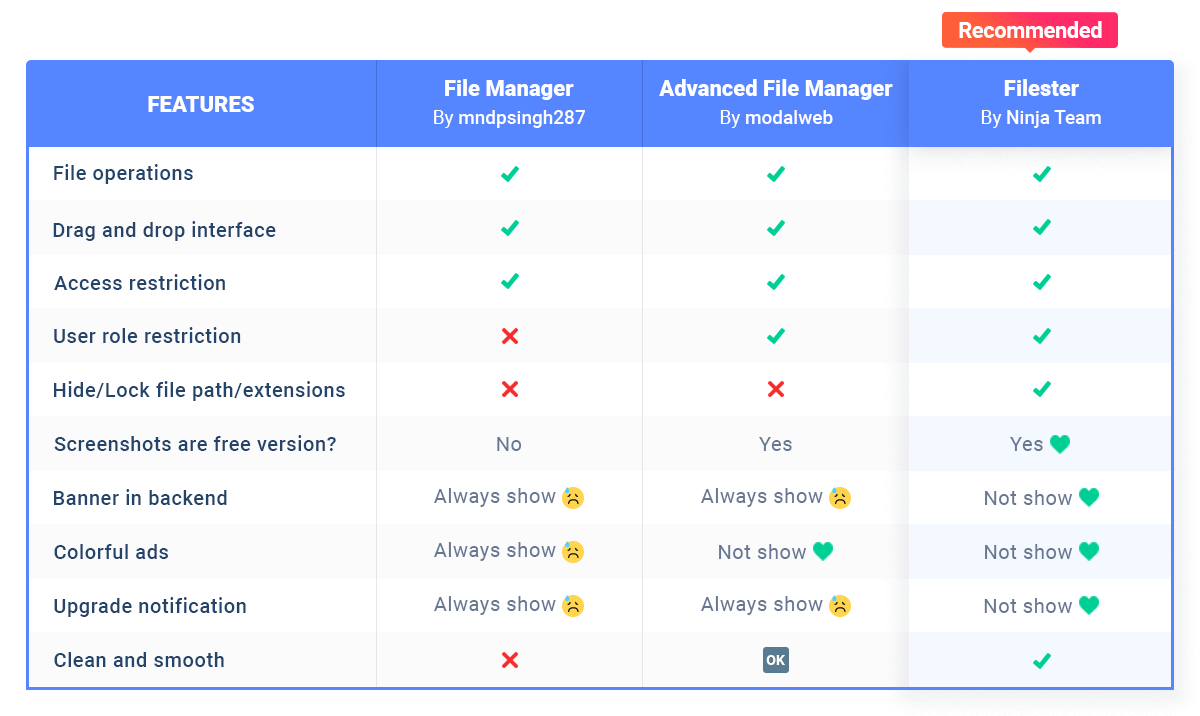
Filester is a WP File Manager Pro plugin, but you can download and use it completely for free. It comes with all the premium features of other WordPress advanced file manager plugins out there.

Sichere Auswahl
Yes — File Manager Pro – Filester is a safe, well-maintained plugin to use in 2026. It runs on 100K+ sites, is rated 4.9/5 and was last updated 4 weeks ago, and scores 96/100 on our health check.
- Bewährt im Maßstab auf 100k+ aktiven Standorten
- Loved by users — 4.9/5 from 155 reviews
- Aktiv entwickelt — letztes Update vor 4 Wochen
- Getestet mit dem neuesten WordPress (7.1)
- Momentum — downloads up 47.3% vs the previous 30 days
Wie stapelt es sich?
Side-by-side bei Installationen, Updates, Bewertungen und Support


Tägliche Downloads
Download-Spitzen folgen normalerweise einer neuen Version - jede Website, die automatisch aktualisiert wird, gilt als Download.
Ranglisten
Where File Manager Pro – Filester stands todayWordPress.org Ranglisten suchen
Live-Position in der Plugin-Suche, Top 100| Stichwort | Position |
|---|---|
| Download Plugin | #36 |
| file manager | #6 |
| ftp | #11 |
| wordpress file manager | #8 |
| wp file manager | #9 |
Versionsübernahme
Anteil aktiver Sites pro Release.
Bewertungsaufschlüsselung
★★★★★★★★★★ 4.9 from 155 reviews
About File Manager Pro – Filester
From the official readme · v2.1.5Beschreibung
Filester is a WP File Manager Pro plugin, but you can download and use it completely for free. It comes with all the premium features of other WordPress advanced file manager plugins out there.
Filester helps you manage WordPress file directory and edit your website’s base configuration details, while FileBird allows you to manage/upload/download media library folders.
With this File Manager Pro, you can copy, paste, create an archive, download, upload, edit, delete, preview, duplicate, and get info of the WordPress configuration and directory files without FTP access.
This file manager plugin is dedicated to boosting your productivity in managing WordPress. All necessary file operations are fully provided and tested on a variety of servers and browsers.
Another thing you will appreciate about it is the clean and compact UI/UX, which makes editing and transferring directory files and folders extra fast.
Did you know?
More than 700,000 WordPress websites were attacked during September 2020.
Malicious bots are looking to exploit vulnerable versions of WP file manager plugins.
Fortunately, Filester comes with this vulnerability fixed!
Filester poses no risk to you, so rest assured! 🤗
⚡️ FEATURES
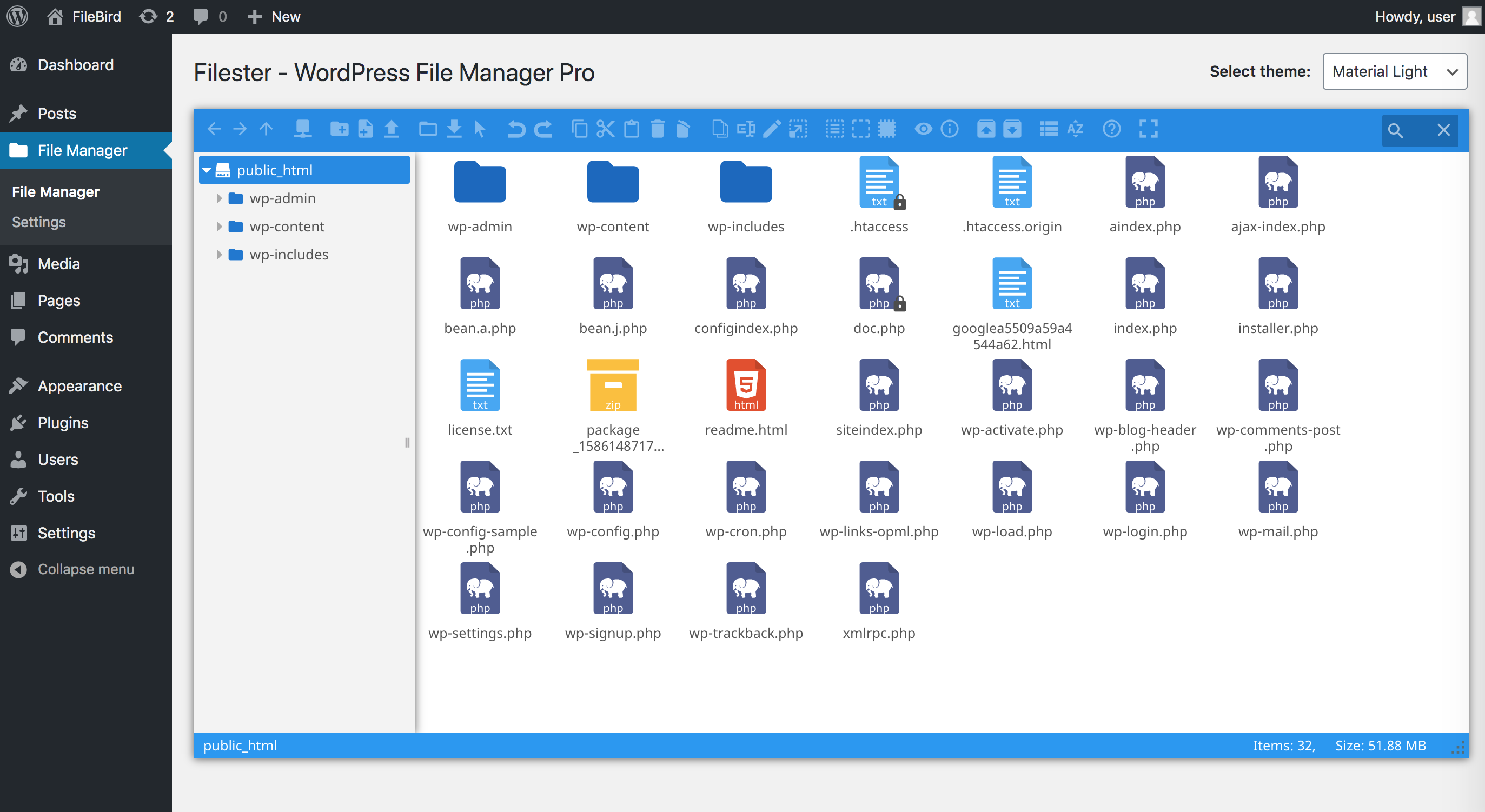
- Drag & drop interface: Easily move and arrange files
- Smart context menu: Right-click on any files to make operations
- Manage files and folders: Copy, move, upload, create folder/file, rename, duplicate, etc.
- Built-in advanced code editor: Integrated development environment ACE Editor, CodeMirror, CKEditor, TinyMCE, and others
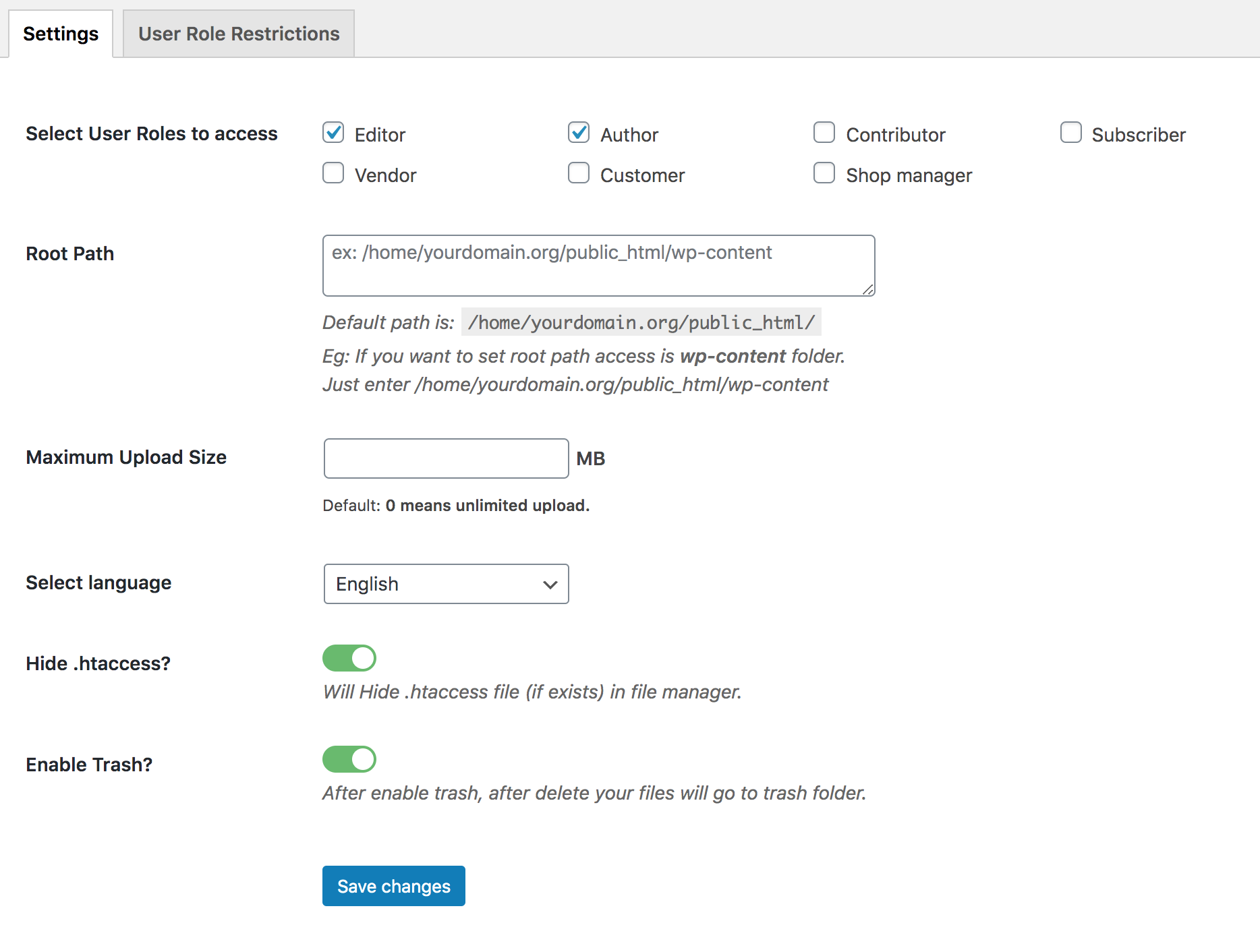
- Flexible configuration: Access rights, uploadable file types/extensions, maximum file size limit, and more
- Create/extract archives: .zip, .rar, .xz, .tar, .gzip
- Great UI/UX design: Clean, high-quality & productivity-driven
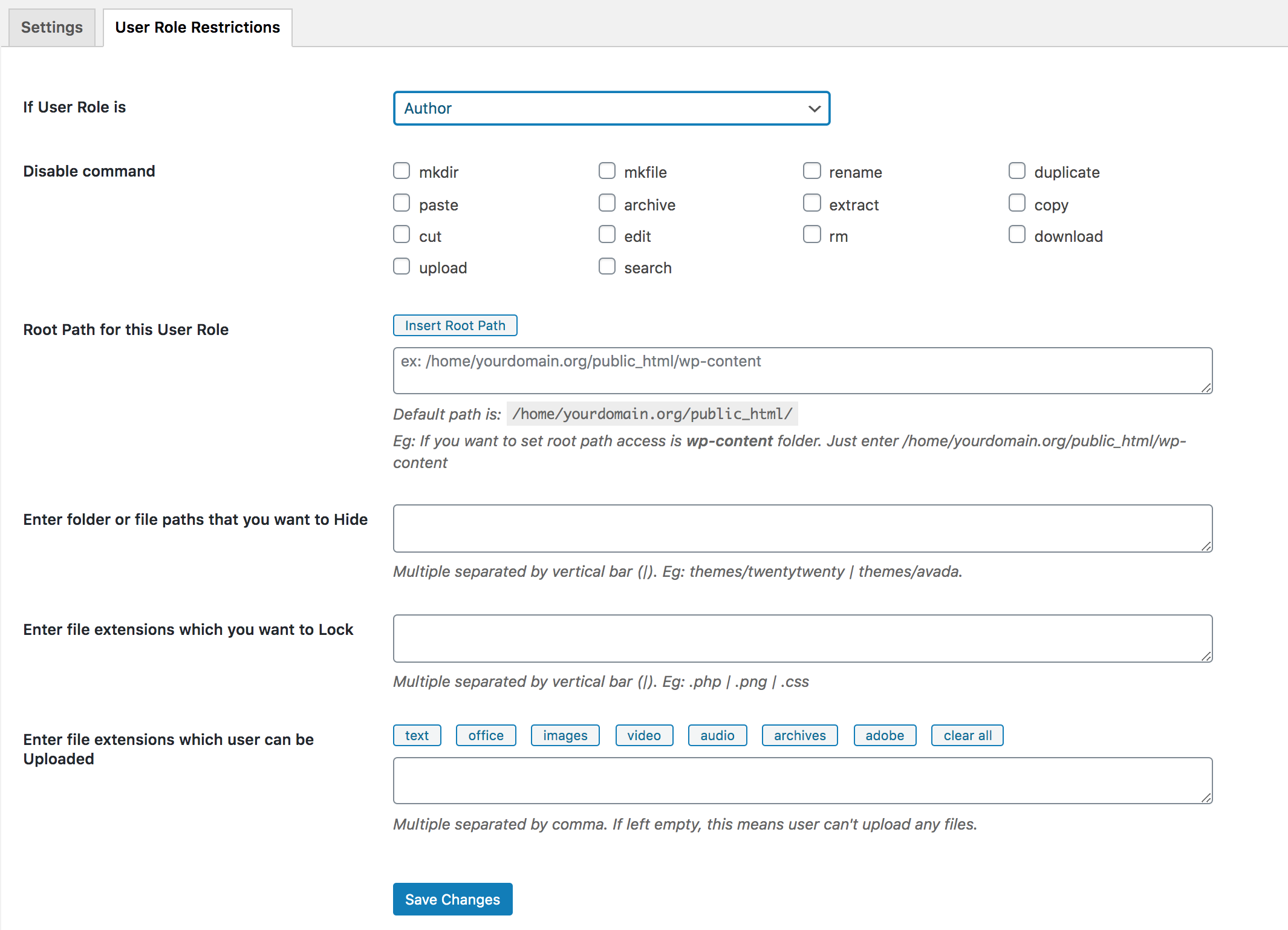
- User authority settings: File extensions to be locked, file visibility, root path access, .htaccess file
- Edit media files: Using Photopea & TUI Image Editor
- Multiple languages supported: English, German, Spanish, Italian, French, Japanese, etc.
- RTL supported: Hebrew, Arabic, Persian, Kurdish, etc.
🙌 OTHER FEATURES
- Local file system
- Simple client-server API based on JSON
- List and icon view
- Multi-root support
- Hidden files/folders options
- Set hidden files for other users
- Root path for each user role
- Easy to navigate
- 6 themes for your preferred interface
🔑 HOW IT WORKS
Filester plugin helps you easily manage WordPress files so that you don’t have to access directories via FTP or cPanel.
This plugin creates a new menu File Manager in your WordPress dashboard. From then on, you can view all server files, configuration, and media files on your current WordPress website.
You can edit, copy, upload/download files/folders to your server from File Manager section. This toolbar is similar to the settings in an FTP client. It allows you to preview, edit, upload, download, duplicate and delete files or folders.
With Filester, it’s easy to modify the auto-update mechanism with each new version of WordPress. You can quickly search for specific text or code within your WordPress files and replace it efficiently.
With built-in code editors, you can edit code files with syntax highlighting and code completion features for themes, plugins, and custom code snippets. It takes one click to download a plugin’s ZIP file to your local storage. It helps track changes made to files and revert to previous versions if needed.
All webmasters can also download WordPress media library using Filester download options as well. Yet the media files are organized in month- and year-based folders.
🎏 COMPATIBILITY
Filester works seamlessly with all major WordPress themes, page builders, and website builders.
💙 Like Filester? Write us a review here ✨
👉 Explore recommended plugins and themes:
- Brandy – WooCommerce theme, sales-first design.
- Shadcn – Minimal. Clean code. Beautiful blocks. Zero clutter.
- YaySMTP – Clean & lightweight WordPress SMTP plugin.
CREDIT
Big thanks to elFinder – Open-source file manager for web.
Installation
Manual installation is easy and takes less than one minute.
- Download the plugin from wordpress.org, unpack it and upload the [Filester] folder to your wp-content/plugins/ directory.
- Activate the plugin through the ‘Plugins‘ menu in WordPress.
- Go to your main WordPress menu > File Manager to use.
You’re done. Enjoy.
Änderungsprotokoll
Oct 26, 2026 – Version 2.1.5
– Fixed: A Multisite privilege escalation where a subsite Administrator could allow unsafe file types and run PHP files on the site. Reported by Michael Kim (seslo82).
– Fixed: Hardened file path checks in the bundled elFinder file browser.
– Fixed: Centered the loading spinner on the “Save Changes” buttons.
Sep 16, 2026 – Version 2.1.4
- Improved: Recommendations layout
Sep 7, 2026 – Version 2.1.3
- Fixed: Issue with origin check bypass in the file browser
Jul 15, 2026 – Version 2.1.2
- Fixed: Private-folder fail-open issue.
May 23, 2026 – Version 2.1.1
- Fixed: OS command injection issue
Apr 20, 2026 – Version 2.1.0
- Added: Recommended plugins
- Improved: Error logs
Screenshots
Für Entwickler
Ist das dein Plugin? Zeigen Sie die Zahlen.
Fügen Sie Ihrer Website, Docs oder GitHub Readme ein Live-Badge hinzu. Es wird von selbst aktualisiert - kein Konto erforderlich.
Best File Manager Pro – Filester alternatives
All Download Plugin plugins →


Fragen und Antworten
File Manager Pro – Filester: quick answers
Gerade Antworten, gezogen von Live WordPress.org Daten.
Quelle: WordPress.org
Is File Manager Pro – Filester free?
Yes. File Manager Pro – Filester is free to download and use from the official WordPress.org plugin directory.
Is File Manager Pro – Filester safe to use in 2026?
Yes — File Manager Pro – Filester is a safe, well-maintained plugin to use in 2026. It runs on 100K+ sites, is rated 4.9/5 and was last updated 4 weeks ago, and scores 96/100 on our health check.
How many websites use File Manager Pro – Filester?
File Manager Pro – Filester is active on 100K+ WordPress websites and has been downloaded 1,863,455 times since it launched in May 2020. It was downloaded 75,032 times in the last 30 days.
Does File Manager Pro – Filester work with WordPress 7.1?
Yes. The developer has tested File Manager Pro – Filester up to WordPress 7.1.5, the latest release. It requires WordPress 3.0 or newer.
When was File Manager Pro – Filester last updated?
The latest version, 2.1.5, was released on October 26, 2026 (4 weeks ago).
Who makes File Manager Pro – Filester?
File Manager Pro – Filester is developed and maintained by Ninja Team.
What are the best alternatives to File Manager Pro – Filester?
The most popular alternatives to File Manager Pro – Filester are Download Plugin (60K+ installs), Download Plugins and Themes… (30K+ installs) and WP Anything Downloader (3K+ installs).
Angetrieben von PageForge
Eine Vorlage und eine Tabelle. Eine echte Seite für jede Suche.
PageForge Verwandelt jede Zeile eines CSV in eine WordPress-Seite mit eigenem Titel, URL, SEO Felder und Schema entworfen. Kostenlos auf WordPress.org.
- CSV und XLSX, plus Google Sheets auf Beruf und Unternehmen
- seinen eigenen Titel, URL, SEO Felder und Schema für jede Seite
- Arbeitet mit dem Blockeditor, Elementor, Divi und Avada
- Kostenlos auf WordPress.org, keine Kreditkarte