


Kirki – Freeform Page Builder, Website Builder & Customizer
Freeform page builder & website builder for WordPress. Infinite canvas for complex, interactive websites. Built-in forms, animations & Customizer.

Sichere Auswahl
Yes — Kirki is a safe, well-maintained plugin to use in 2026. It runs on 400K+ sites, is rated 4.4/5 and was last updated 1 week ago, and scores 84/100 on our health check.
- Bewährt auf 400k+ aktiven Standorten
- Aktiv entwickelt — letztes Update vor 1 Woche
- Getestet mit dem neuesten WordPress (7.1)
- Slow support — only 33% of recent threads resolved
Wie stapelt es sich?
Side-by-side bei Installationen, Updates, Bewertungen und Support



Tägliche Downloads
Download-Spitzen folgen normalerweise einer neuen Version - jede Website, die automatisch aktualisiert wird, gilt als Download.
Ranglisten
Where Kirki stands todayWordPress.org Ranglisten suchen
Live-Position in der Plugin-Suche, Top 100| Stichwort | Position |
|---|---|
| drag-and-drop | #17 |
| form builder | #28 |
| freeform canvas | #1 |
| page builder | #7 |
| website builder | #4 |
Versionsübernahme
Anteil aktiver Sites pro Release.
Bewertungsaufschlüsselung
★★★★★★★★★★ 4.4 from 83 reviews
About Kirki
From the official readme · v6.4.2Beschreibung
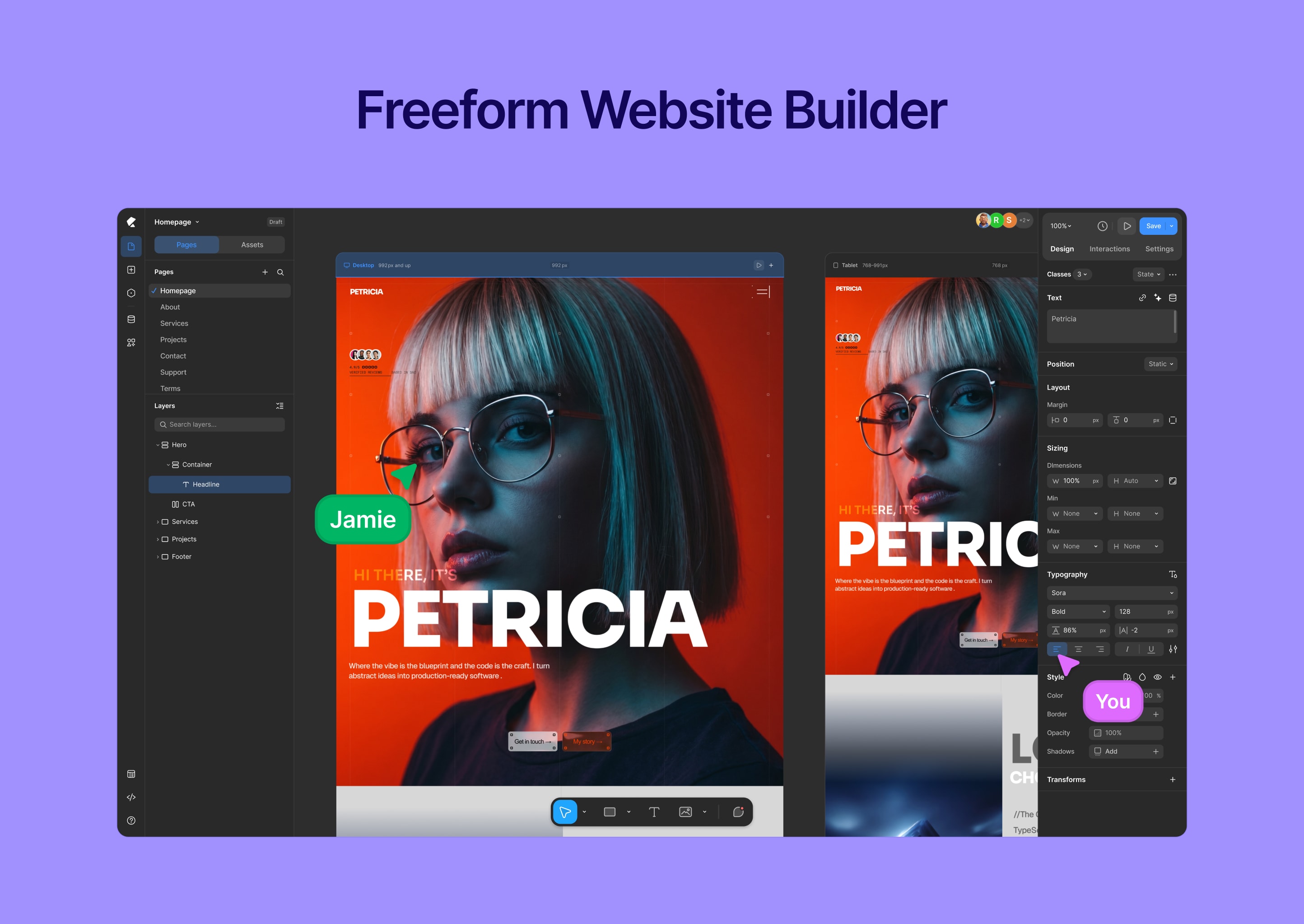
Kirki is a freeform visual builder for WordPress and an advanced theme customizer that lets you design and build complete websites visually — without coding.
Unlike traditional page builders, Kirki uses an infinite freeform canvas, giving you full creative freedom without rigid grids or layout restrictions.
Build landing pages, business websites, blogs, and full websites with responsive controls, dynamic content, and powerful design tools — all inside WordPress.
Watch Kirki in action:
🔥 Why Choose Kirki?
Kirki combines a modern visual builder with WordPress’s powerful customization system — so you can design freely without sacrificing flexibility.
✔ Freeform canvas — no rigid layouts or constraints
✔ Drag-and-drop visual editor with precise control
✔ Responsive editing for desktop, tablet, and mobile
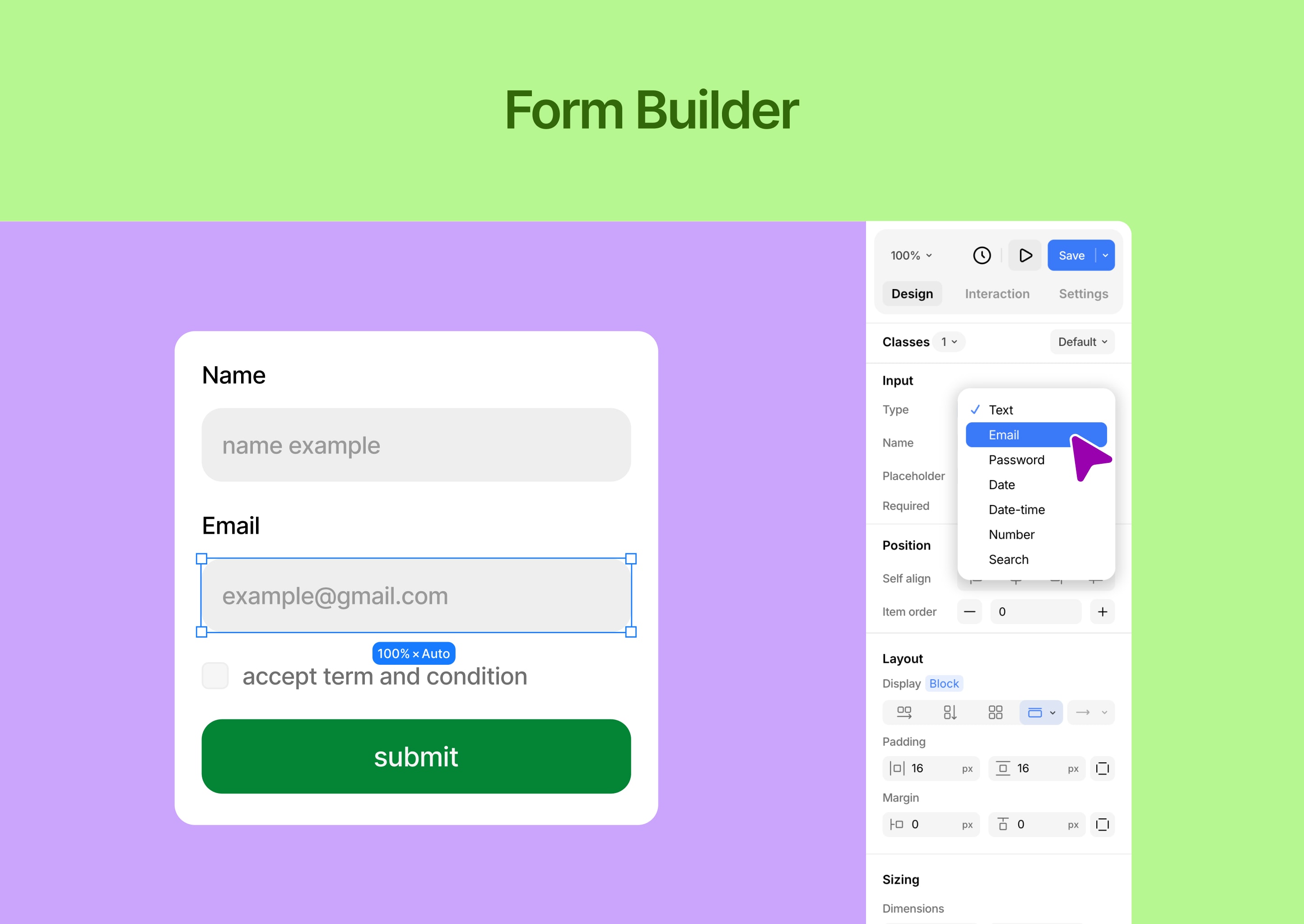
✔ Built-in tools (forms, popups, dynamic content)
✔ Clean, performance-focused output
✔ Works with any WordPress theme
✔ Built for designers, developers, and teams
🧱 Core Features
Visual Website Builder
Design your website visually with full control.
- Freeform drag-and-drop editor
- Infinite canvas — no grid or column restrictions
- Real-time responsive editing (desktop, tablet, mobile)
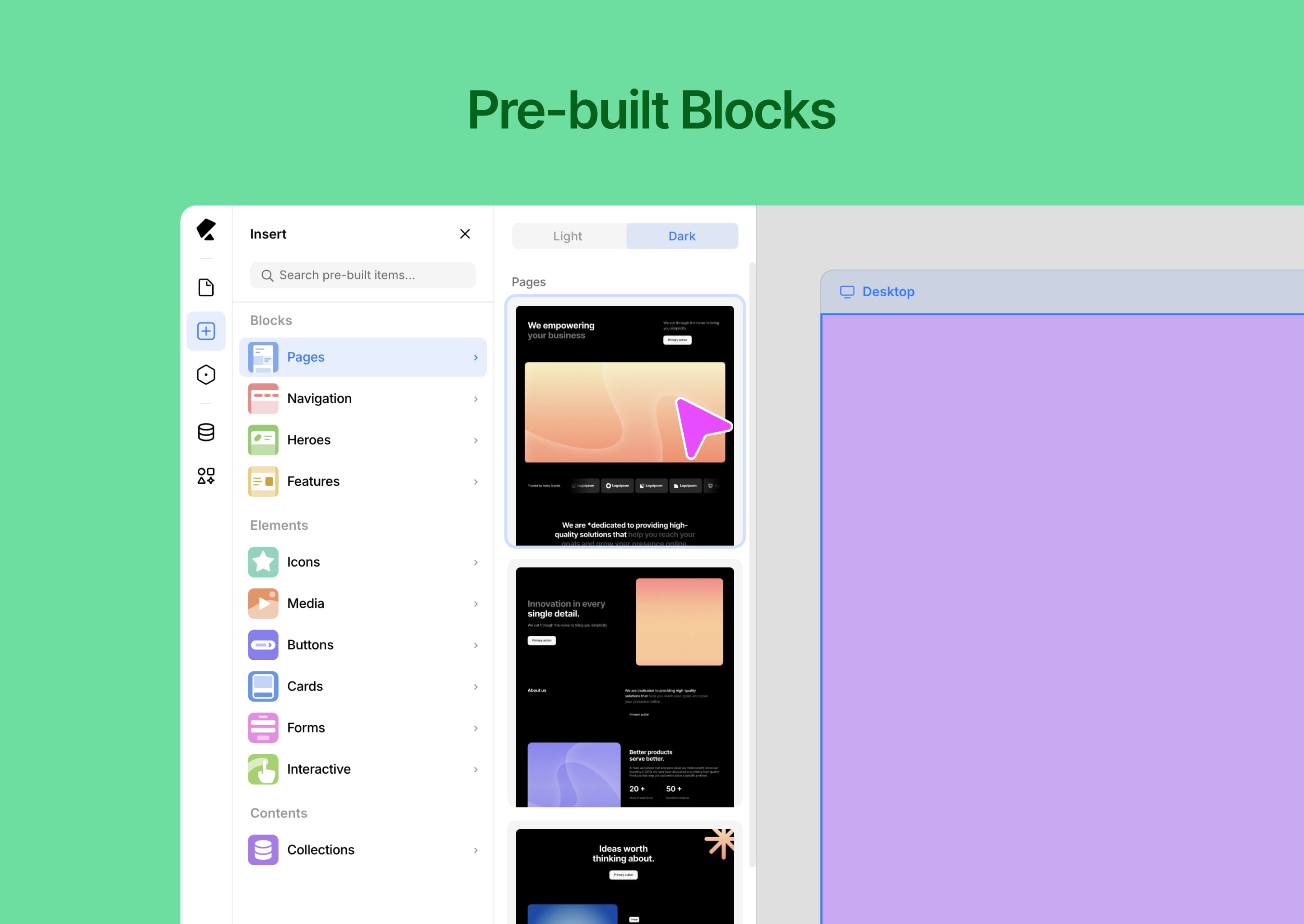
- Pre-built components and layout blocks
- Global styles (colors, fonts, spacing)
- Version history and rollback
- Media manager for assets
- Light & dark mode interface
⚡ Dynamic Content & Smart Features
Build scalable, data-driven websites.
- Dynamic content system (collections & templates)
- Conditional visibility controls
- Custom attributes for advanced control
- Developer-friendly extensibility
- Reusable design systems and components
🎨 Templates & Design Assets
Start fast and customize everything.
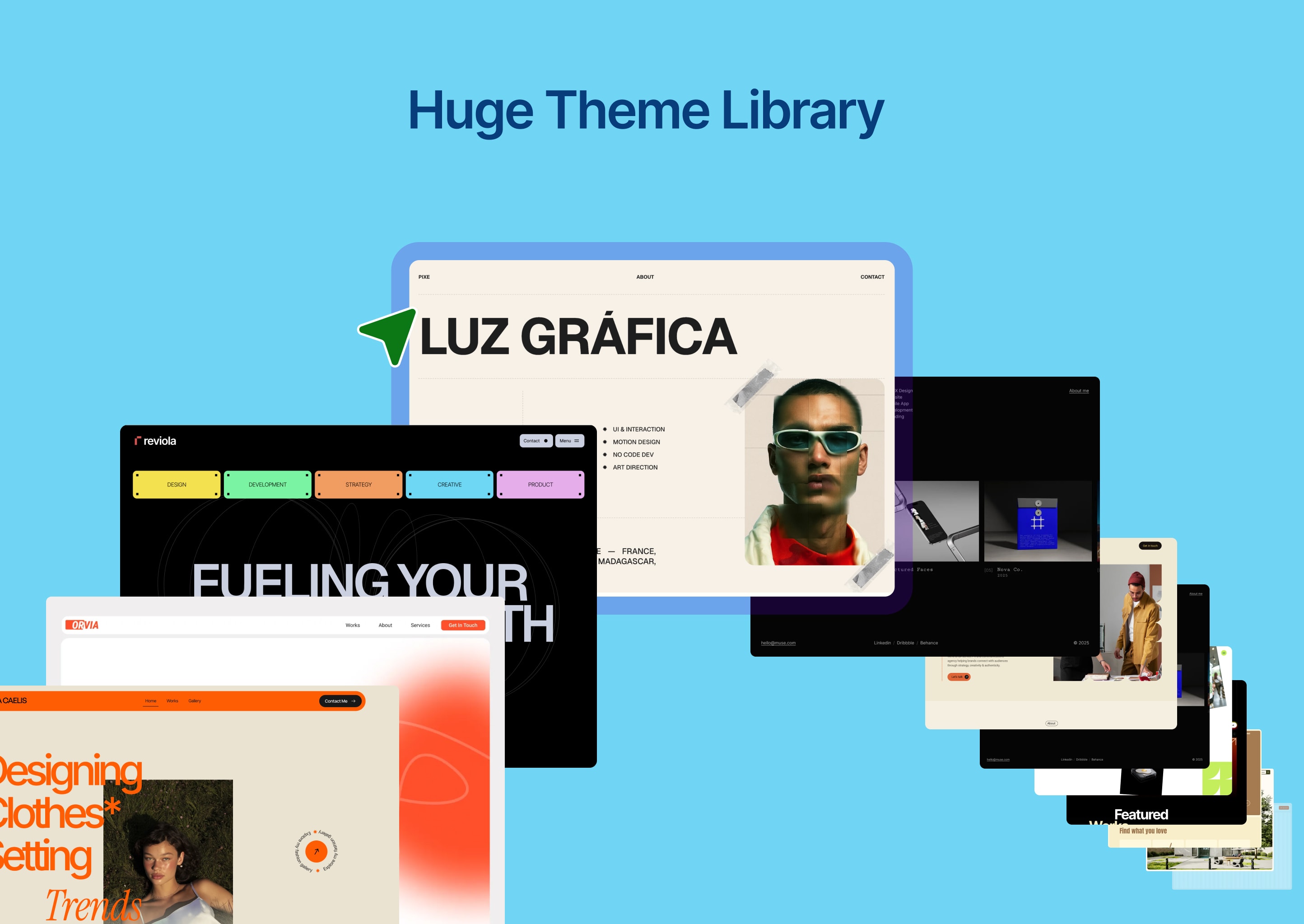
- Ready-made website templates
- Pre-built sections and layout blocks
- Reusable design assets
- Import / export projects easily
🧩 Built-in Tools
Everything you need — without extra plugins.
- Form builder with submission management
- Popup builder with visual controls
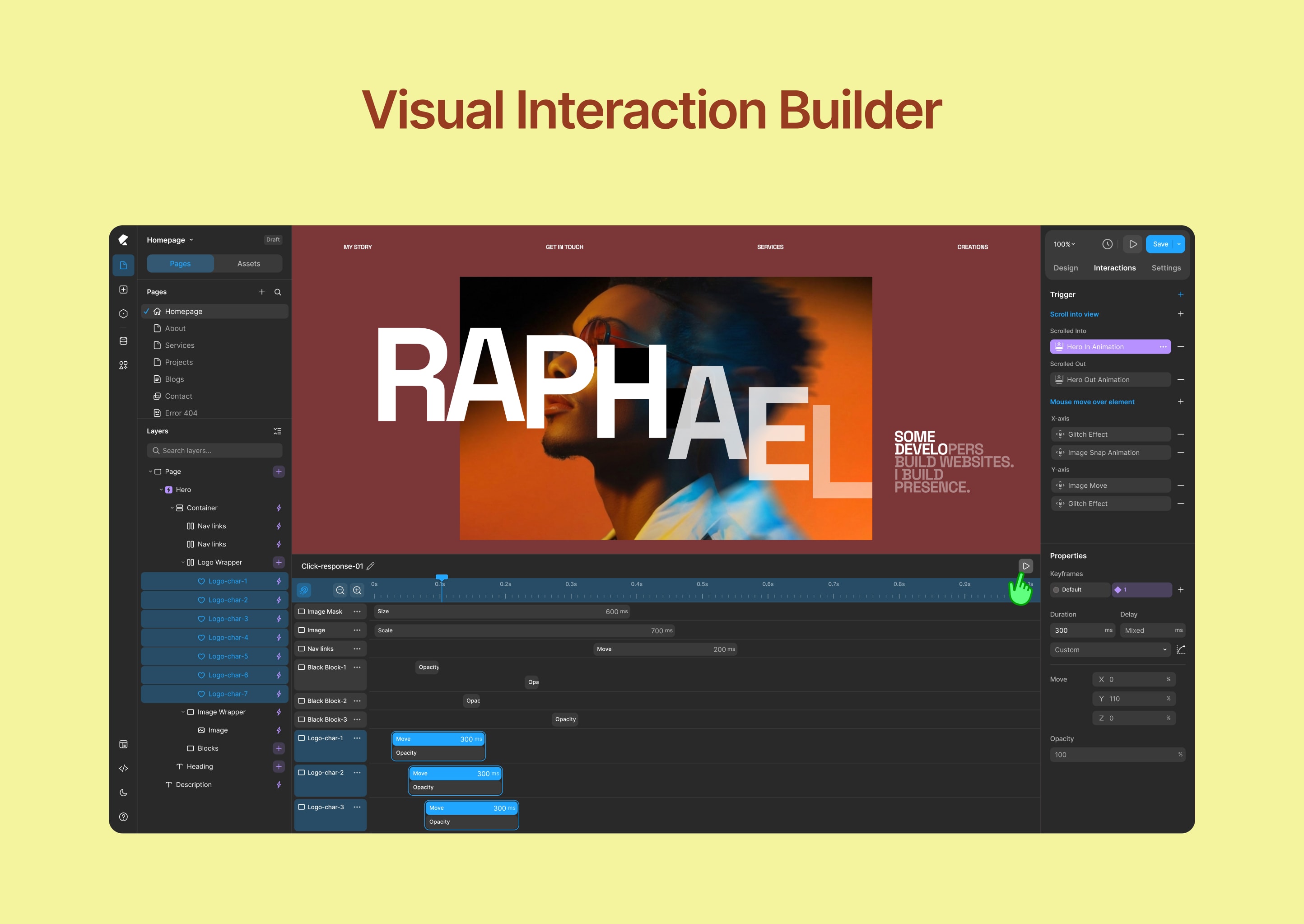
- Interaction and animation builder
- Icon library and media tools
🎬 Interactions & Animations
Create engaging, modern experiences.
- Visual animation builder
- Interaction timeline editor
- Custom transitions and effects
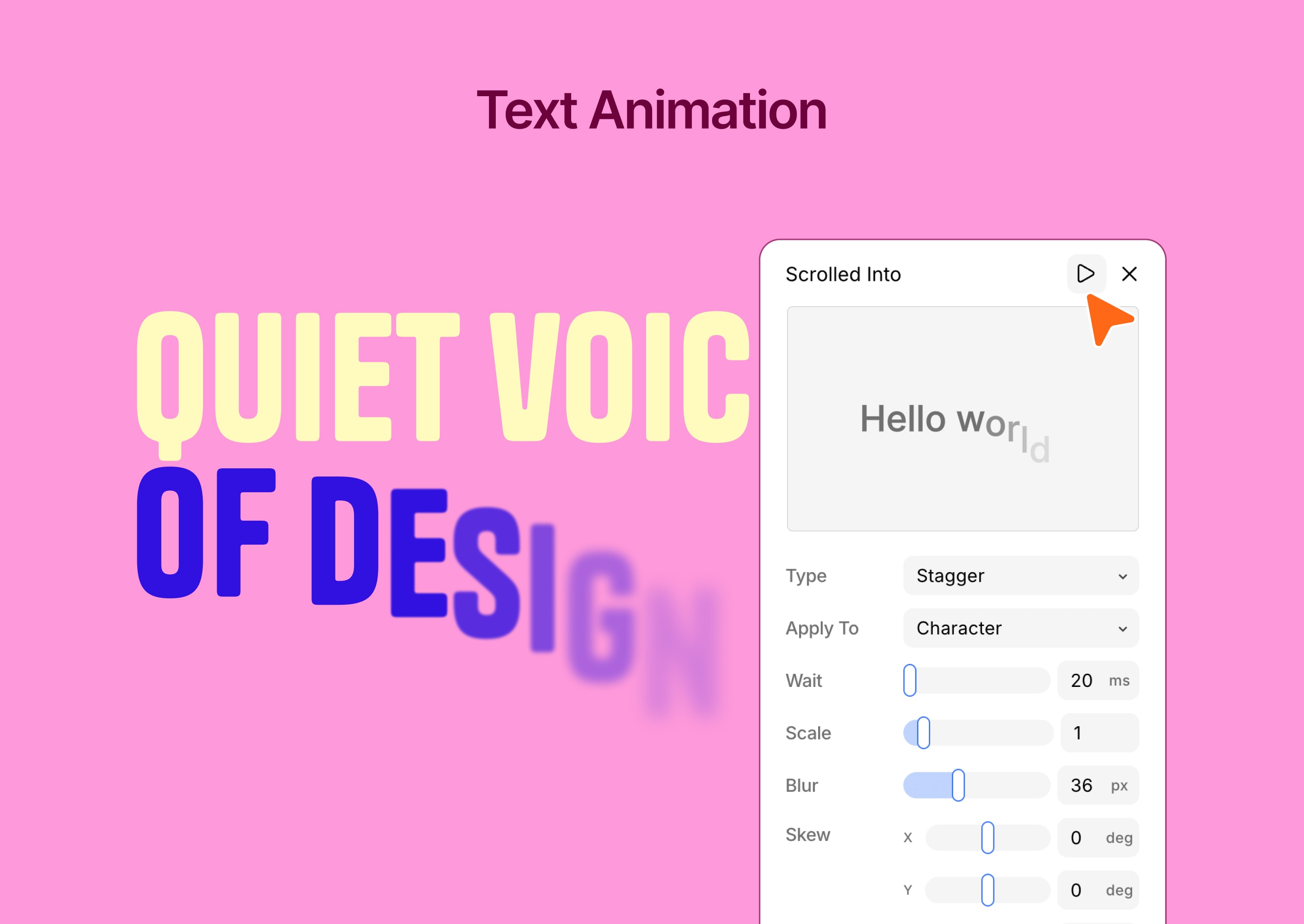
- Text animation tools
⚙️ Advanced WordPress Customizer
Extend WordPress customization with powerful controls.
- 35+ customizer controls
- Real-time preview
- Automatic CSS generation
- Conditional logic support
- Developer-friendly API
- Performance optimized
👥 Who Is Kirki For?
- Designers who want full creative freedom
- Freelancers building client websites
- Agencies managing multiple projects
- Developers extending WordPress functionality
- Anyone looking for a no-code visual builder for WordPress
🚀 What Makes Kirki Different?
Kirki is not just another page builder.
Instead of forcing layouts into rows and columns, Kirki gives you a freeform design experience — similar to modern design tools — while keeping the full power of WordPress.
Design freely. Build with WordPress.
Unterstützen
- Community support: https://facebook.com/groups/kirkicommunity
- Documentation: https://kirki.com/docs
- Website: https://kirki.com
Installation
- Go to Plugins → Add New
- Search for Kirki
- Click Install Now and Activate
Or manually:
- Upload the plugin to
/wp-content/plugins/kirki/ - Activate via WordPress dashboard
- Open Kirki and start building
Änderungsprotokoll
Kirki 6.0.0 is a major release — the builder has been fully rebuilt as a freeform visual canvas and rebranded from Droip to Kirki. All existing Customizer controls are fully preserved — no changes to your current setup. We strongly recommend backing up your site before updating.
6.4.2
- Update: Default breakpoints can now be removed, except Desktop. Removed breakpoints appear as options when you add a breakpoint.
- Update: Default breakpoints are now Desktop, Tablet, and Phone, with updated sizes to narrow the gap between Desktop and Tablet.
- Update: Improved the Freeform Canvas performance.
- Update: Enhanced the Vector Drawing tool.
- Update: Added a confirmation dialog before replacing mixed interactions.
- Update: Moved the light/dark theme toggle from the Island to the Left Sidebar.
- Update: Enabled the Typography panel for submit buttons.
- Fix: Fixed duplicate page titles appearing after deleting a page.
- Fix: Fixed the display of “Mixed” text and interaction replacement for custom interactions.
- Fix: Resolved a private data leak involving preview tokens.
- Fix: Fixed custom attribute escaping when rendering legacy comments.
- Fix: Secured remote template imports against malicious ZIP archives.
- Fix: Sanitized form values used in notification email headers.
6.4.1
- Update: Disabled keyboard shortcuts while popups, such as Content Manager and Variable, are open.
- Update: Improved CSS generation for gap, row-gap, and column-gap properties.
- Update: Enhanced vector drawing functionality, including keyboard shortcuts, vertex selection in the vertex controller, and other usability improvements.
- Update: Clicking a vertex without holding the Shift key now selects only that vertex.
- Fix: Fixed an issue where mouse movement handling stopped near the left and right sidebars.
- Fix: Fixed an issue where collection items did not inherit global classes in the preview.
- Fix: Resolved a system crash caused by references to non-existent element IDs.
- Fix: Fixed the text direction issue in Dynamic Text Box.
- Fix: Fixed security vulnerabilities that allow author roles to access other user’s posts and update content without proper authorization.
- Fix: Resolved the undo issue when deleting multiple nested elements.
- Fix: Fixed the background-repeat reset issue when multiple elements are selected.
6.4.0
- New: Added a new SVG Drawing Tool to the canvas.
- New: Added list style options to the Advanced Typography settings.
- Update: Improved the page staging data store mechanism.
- Update: Enhanced the Navigation element’s default styles and functionality.
- Update: Updated the Wrap element to use Fill for width and Hug for height by default.
- Update: Improved the Follow Cursor auto-reset position functionality.
- Fix: Fixed an issue with submitting forms containing empty values.
- Fix: Fixed layout shifting during text animations.
- Fix: Fixed ticker animation sizing issues when elements are transformed or cloned.
6.3.2
- New: Added an accessibility contrast ratio option to the color picker.
- New: Added multiselect interaction support.
- Update: Remember the last selected font family and use it as the default font for newly dropped text elements on the canvas.
- Update: Reset width and height to auto when changing position with ratio lock enabled.
- Update: Implemented symbol root transition handling for wrapping and unwrapping elements.
- Update: Adjusted range input thumb styles for improved consistency.
- Update: Removed the Role Manager from the Settings panel and updated the API so that Role Manager functionality now depends on WordPress capabilities.
- Update: Remove the Street View option from the OpenStreetMap map element and remove the deprecated styles from the map settings.
- Fix: Fixed an issue where form data input values of 0 were not rendered.
- Fix: Fixed nested symbol export/import issues.
- Fix: Fixed preview scripts not running for cloned elements when infinite slider mode is enabled.
- Fix: Resolved multiselect context menu open issue from canvas.
- Fix: Addressed security issues related to comments and Lookback IP handling.
- Fix: Resolved collaboration mouse tracker hide issue while dragging an element.
- Fix: Fixed flex-reverse drag-and-drop line issues on the canvas.
- Fix: Addressed security issues related to shortcodes and sensitive metadata.
6.3.1
- New: Added dynamic content support to ComponentInstanceFields.
- New: Added SVG selection color preview for updating SVG fill and stroke colors.
- New: Pusher broadcasting configuration for faster, real-time updates.
- Update: Variable search now supports searching by value.
- Update: Pasting copied strings or elements is now supported across multiple selected elements.
- Update: Improved drag-and-drop snapping by adjusting coordinates when the closest vertical and horizontal snap points are detected.
- Update: Resizing elements while holding Shift now maintains the aspect ratio in all drag directions.
- Update: Added blend mode support for multiple selected elements.
- Update: Preserved the component edit canvas size across create and save actions.
- Update: The component editing canvas now automatically adapts to the content size.
- Fix: Fixed a viewport-wise CSS inheritance issue affecting text styles.
- Fix: Resolved an issue with form data export.
- Fix: Fixed an issue where transparent or PNG images could get a black background when pasted.
6.3.0
- New: Master Components, nested component support, and Custom Component Fields.
- New: Freeform Positioning across breakpoints for absolutely and fixed-positioned elements.
- Update: Copy/paste interactions now understand the element structure and hierarchy, enabling more accurate operations.
- Update: Media selection experience improved for background image, cms, and other media fields.
- Update: Optimizing canvas drag and drop element outline indicators.
- Fix: Fixed the bulk update functionality to change the post_status of Content Manager items to Draft.
- Fix: Keyboard shortcuts now work seamlessly with French and other international keyboard layouts.
- Fix: Resolved collection rendering issue with view-only tokens.
- Fix: Addressed all known security vulnerabilities.
Screenshots
Für Entwickler
Ist das dein Plugin? Zeigen Sie die Zahlen.
Fügen Sie Ihrer Website, Docs oder GitHub Readme ein Live-Badge hinzu. Es wird von selbst aktualisiert - kein Konto erforderlich.
Best Kirki alternatives
All drag-and-drop plugins →





Fragen und Antworten
Kirki: quick answers
Gerade Antworten, gezogen von Live WordPress.org Daten.
Quelle: WordPress.org
Is Kirki free?
Yes. Kirki is free to download and use from the official WordPress.org plugin directory.
Is Kirki safe to use in 2026?
Yes — Kirki is a safe, well-maintained plugin to use in 2026. It runs on 400K+ sites, is rated 4.4/5 and was last updated 1 week ago, and scores 84/100 on our health check.
How many websites use Kirki?
Kirki is active on 400K+ WordPress websites and has been downloaded 16,341,110 times since it launched in May 2014. It was downloaded 343,659 times in the last 30 days.
Does Kirki work with WordPress 7.1?
Yes. The developer has tested Kirki up to WordPress 7.1.5, the latest release. It requires WordPress 5.9 or newer.
What PHP version does Kirki need?
Kirki requires PHP 7.4 or higher. Most hosts run PHP 8.x today, so it works on any modern WordPress hosting.
When was Kirki last updated?
The latest version, 6.4.2, was released on November 10, 2026 (1 week ago).
Who makes Kirki?
Kirki is developed and maintained by Themeum.
What are the best alternatives to Kirki?
The most popular alternatives to Kirki are Elementor Agent Ready Websi… (10M+ installs), Page Builder by SiteOrigin (400K+ installs) and Page Builder: Pagelayer (400K+ installs).
Angetrieben von PageForge
Eine Vorlage und eine Tabelle. Eine echte Seite für jede Suche.
PageForge Verwandelt jede Zeile eines CSV in eine WordPress-Seite mit eigenem Titel, URL, SEO Felder und Schema entworfen. Kostenlos auf WordPress.org.
- CSV und XLSX, plus Google Sheets auf Beruf und Unternehmen
- seinen eigenen Titel, URL, SEO Felder und Schema für jede Seite
- Arbeitet mit dem Blockeditor, Elementor, Divi und Avada
- Kostenlos auf WordPress.org, keine Kreditkarte