


YayMail – WooCommerce E-Mail-Customizer
Customize WooCommerce email templates with an advanced drag-and-drop email builder. Works great with 80+ WooCommerce Email Customizer Addons.

Sichere Auswahl
Yes — YayMail is a safe, well-maintained plugin to use in 2026. It runs on 50K+ sites, is rated 4.8/5 and was last updated 3 weeks ago, and scores 94/100 on our health check.
- Bewährt im Maßstab auf 50k + aktiven Standorten
- Loved by users — 4.8/5 from 292 reviews
- Aktiv entwickelt – letztes Update vor 3 Wochen
- Getestet mit dem neuesten WordPress (7.1)
Wie stapelt es sich?
Side-by-side bei Installationen, Updates, Bewertungen und Support



Tägliche Downloads
Download-Spitzen folgen normalerweise einer neuen Version - jede Website, die automatisch aktualisiert wird, gilt als Download.
Ranglisten
Where YayMail stands todayWordPress.org Ranglisten suchen
Live-Position in der Plugin-Suche, Top 100| Stichwort | Position |
|---|---|
| drag-and-drop | #43 |
| E-Mail-Builder | #21 |
| email templates | #15 |
| E-Mail-Customizer für WooCommerce | #1 |
| woocommerce emails | #19 |
Versionsübernahme
Anteil aktiver Sites pro Release.
Bewertungsaufschlüsselung
★★★★★★★★★★ 4.8 from 292 reviews
About YayMail – WooCommerce Email Customizer
From the official readme · v4.4.8Beschreibung
Your brand deserves emails that shine. ✨
YayMail is the #1 Free drag-and-drop email template customizer that lets you design stunning, branded emails effortlessly. No coding required.
Plus, expand your design possibilities with premade blocks and extensive plugin compatibility.
QUICK ADMIN DEMO | YAYMAIL PRO 💎
👋 Works with Any WooCommerce Themes
- Brandy
- Kadenz
- OceanWP
- GenerierenPress
- Astra
- Storefront
- Firn
- Kubio
- Yith wunder
NEW RELEASES
Here’s how YayMail makes email customization easy:
- 30+ elements are built-in
- Real-time visual editing with instant preview
- Duplicate elements or sections in one click
- You can select an order to check the email with the actual data
- Personalize each email with tons of shortcodes
- Custom logo, brand colors, and typography controls
- Import/export templates quickly
- One-click to send a test email
- Premade patterns and blocks
When combined with YayMail Premium Addons, you will unlock the visual email designer integration to go with 80+ third-party WooCommerce plugins.
With YayMail, you can drag and drop elements to the email templates. Each element makes a block in the WooCommerce visual email editor. It is very easy to edit content and design email layouts, just like you do with the Gutenberg editor or Elementor page builder.
Exclusively, you can also send personalized email templates using shortcodes, placeholders, and WooCommerce conditional logic.
⚡️ FEATURES
The YayMail free version allows you to add unlimited elements to create html email template:
Custom WooCommerce Email Templates
Unlike Kadence Woo Commerce email designer, this email customizer allows you to create extra blocks to add to your email templates, creating a unique and memorable brand identity for your store.
Drag and Drop Interface
Easy to navigate between the element sidebar and the editing area to customise email block elements.
Alles bearbeiten
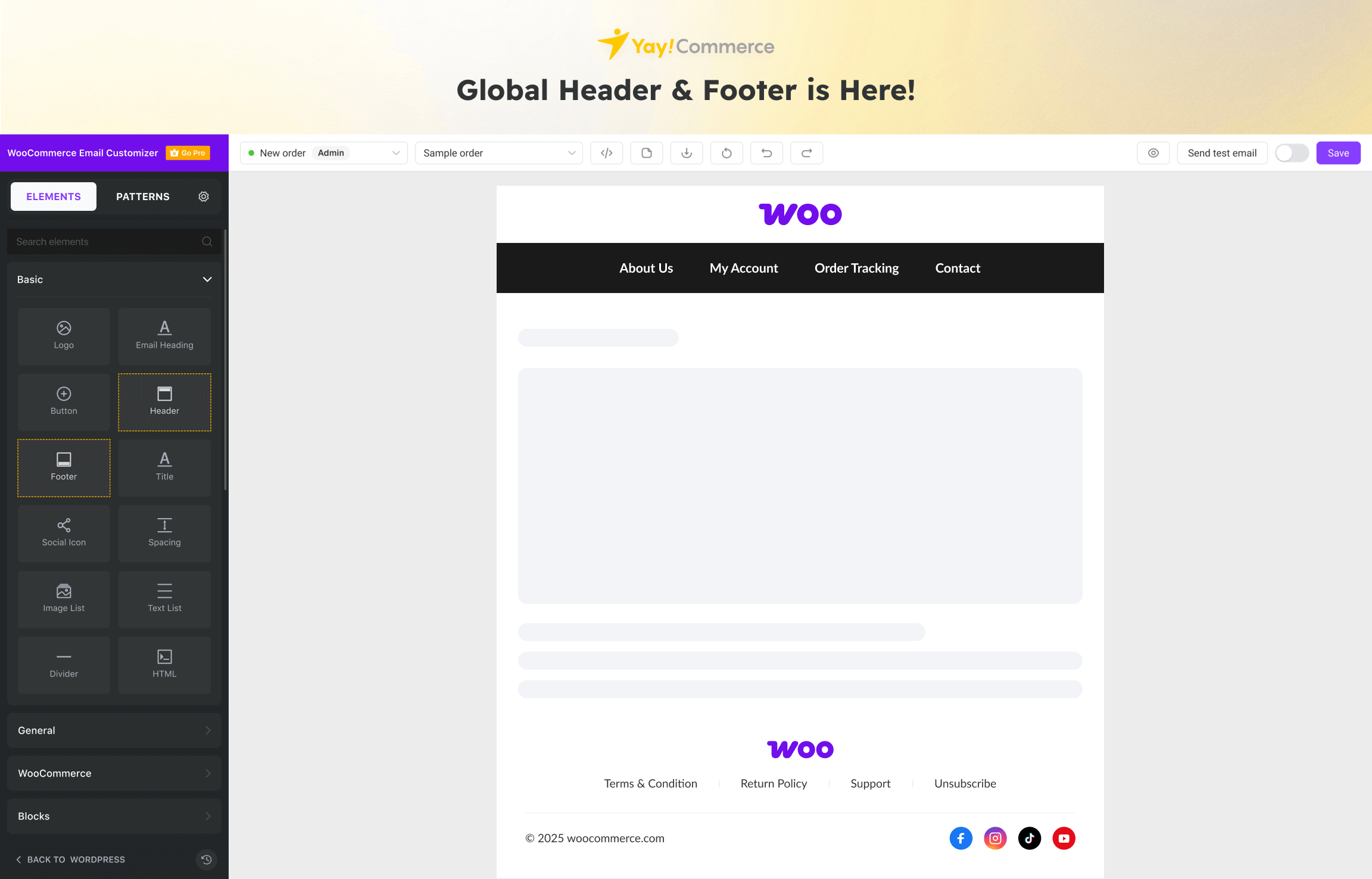
Sie können Inhalte, Layout und Design von E-Mail-Kopfzeile, E-Mail-Körper, visueller Fußzeile, Signatur, sozialem Follow-Modul und mehr bearbeiten. Dies bedeutet, dass Ihre gesamte Kommunikation mit Ihren Kunden endlich mit dem Rest Ihres Brandings übereinstimmt.
Stylish Social Icons
It comes with predesigned icons for your chosen social media platforms, including Facebook, Twitter/X, Instagram, Threads, TikTok, YouTube, Pinterest, website, and more!
Visual Email Editor
Design HTML email and live preview on the same screen. Apart from the full window view, you can take a look on desktop and mobile view.
WooCommerce Preview Email
The built-in previewer allows you to view a mockup order email, and also pick an existing order placed in your store to view its actual email.
Powerful Shortcodes
You have a variety of placeholders for order details, customer details, billing info, shipping, payment, new user info, additional order metadata, etc. Literally, everything you need to establish a strong brand impression!
Send Test Email
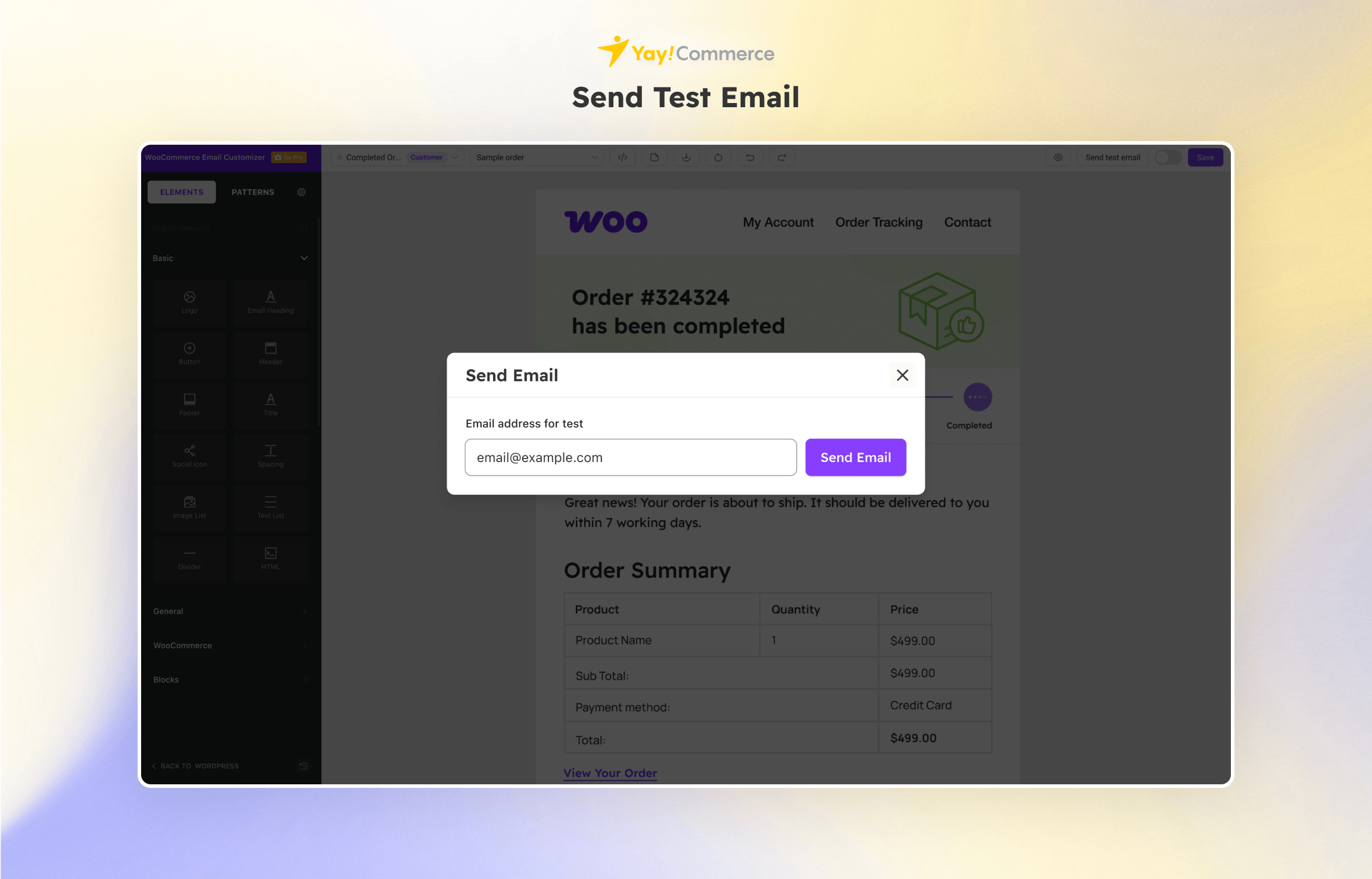
One-click to send a test email template to make sure it looks good on different email clients & devices.
Export/Import Email Templates
YayMail allows you to export and import full sets of email templates. This can be useful if you want to back up your customized email templates, move them to another website, or share them with other sub-sites. In case you want to reuse a winning email template in a Black Friday campaign, you can also generate a .json file containing an individual email and import it as needed.
Passen Sie 11 WooCommerce E-Mail-Vorlage vollständig an
- E-Mail für neue Bestellung
- Bestellung stornierte E-Mail
- Bestellung fehlgeschlagen E-Mail
- E-Mail bestellen: Erste Bestellungsstatus oder Zahlung an den Kunden gesendet
- Auftragsverarbeitungs-E-Mail: Bestellbestätigung E-Mail-Vorlage an den Kunden
- Bestellende E-Mail: Bestellen Sie den Status mit Interaktionen nach dem Kauf
- Bestellung erstattete E-Mail: Benachrichtigen Sie den Kunden über die Rückerstattungsanfrage
- Kundenrechnungs-E-Mail: Senden Sie eine personalisierte Rechnung manuell an den Kunden
- Kundennotiz-E-Mail: Senden Sie manuell benutzerdefinierte Notizen und zusätzliche Informationen an den Kunden
- Kundenneues Konto E-Mail: Willkommens-E-Mail-Vorlage für Neukunden
- Kundenkennwort E-Mail: Anweisungen zum Zurücksetzen des Passworts und nützliche Ressourcen, die an den Kunden gesendet werden
BLOCK ELEMENTS TO ENHANCE YOUR EMAIL DESIGN:
You can fine-tune the design of WooCommerce email templates globally or individually with custom CSS. Looking for ways to add extra content? Here are a few ideas:
- Order details, order table items, woocommerce order tracking
- Smart coupon, personalized coupons, active discount campaigns, gift messages
- Shipping quotes, client quotes, request a quote
- Social interactions, social rewards, rewards and points
- Checkout fields, custom checkout field editor
- Order confirmation page
- Checkout phone, shipping module
- Member info, membership page
- Payment plans, b2b payments, partial payment
- Order signature, mail signature, delivery note
- Shop’s color palette, banners, animation, and other media assets
- Brand voice, imagery, iconography, shop locations, etc.
- Add WooCommerce hooks in email template
💥 YAYMAIL PRO
While YayMail Free provides full customizability for 11 default WooCommerce email templates, YayMail Pro supports many other plugins. It helps you show hooks, tables, custom fields, attributes, email meta fields, and other variables in your outgoing transactional emails.
This WooCommerce email designer’s third-party integrations include but are not limited to:
- Shipment Tracking by WooCommerce
- Checkout Field Editor by WooCommerce
- Order Status Manager by SkyVerge
- Admin Custom Order Fields by SkyVerge
- Advanced Shipment Tracking by Zorem
- YITH WooCommerce Order Tracking
- Flexible Checkout Fields by WPDesk
- Custom Order Status by TycheSoftwares
- Checkout Field Editor by ThemeHigh
- WooCommerce Show Attributes
- Back In Stock Notifier | WooCommerce Waitlist Pro by codewoogeek
- Pagar.me for WooCommerce
- WPML | WooCommerce Multilingual
- Polylang, TranslatePress, Loco Translate, Weglot, GTranslate, and more!
🧠 CONDITIONAL LOGIC (Premium Only)
For more flexibility and personalization, YayMail Conditional Logic allows you to quickly add extra email blocks based on your conditions.
- Related products
- Recommended products
- Customer loyalty rewards for specific buyers
- WooCommerce custom email per product
➡️ View Demo
🦄 YAYMAIL ADDONS
YayMail Addons are separate plugins and must be used along with either YayMail Free or Pro version.
With YayMail Addons, you have a huge amount of flexibility to what can be put in your order notifier. Then, the customized emails/notes to admin, vendors, members, subscribers, and customers can carry your brand info and content.
That said, if you’re using one of the extensions below, you have to buy its YayMail Addon to design those extra email templates:
- WooCommerce Subscriptions & Enhancer for WooCommerce Subscriptions (Get Addon)
- WooCommerce Bookings (Get Addon)
- AutomateWoo (Get Addon)
- WooCommerce Pre-Orders (Get Addon)
- Germanized (Get Addon)
- German Market (Get Addon)
- YITH Gift Cards (Get Addon)
- YITH Membership (Get Addon)
- WooCommerce Stripe Payment Gateway (Get Addon)
- B2BKing (Get Addon)
- WholesaleX – WooCommerce Wholesale Plugin (Get Addon)
- Dokan Multivendor Marketplace Solution (Get Addon)
Happy Customizing! 💛
Installation
- Download the plugin from wordpress.org.
- From your WordPress admin dashboard, go to Plugins > Add New, and upload the yaymail.zip file.
- Install and activate it
- After activating, you don’t need to fill in any license, just go to WooCommerce > Email Customizer to start customizing WooCommerce email templates.
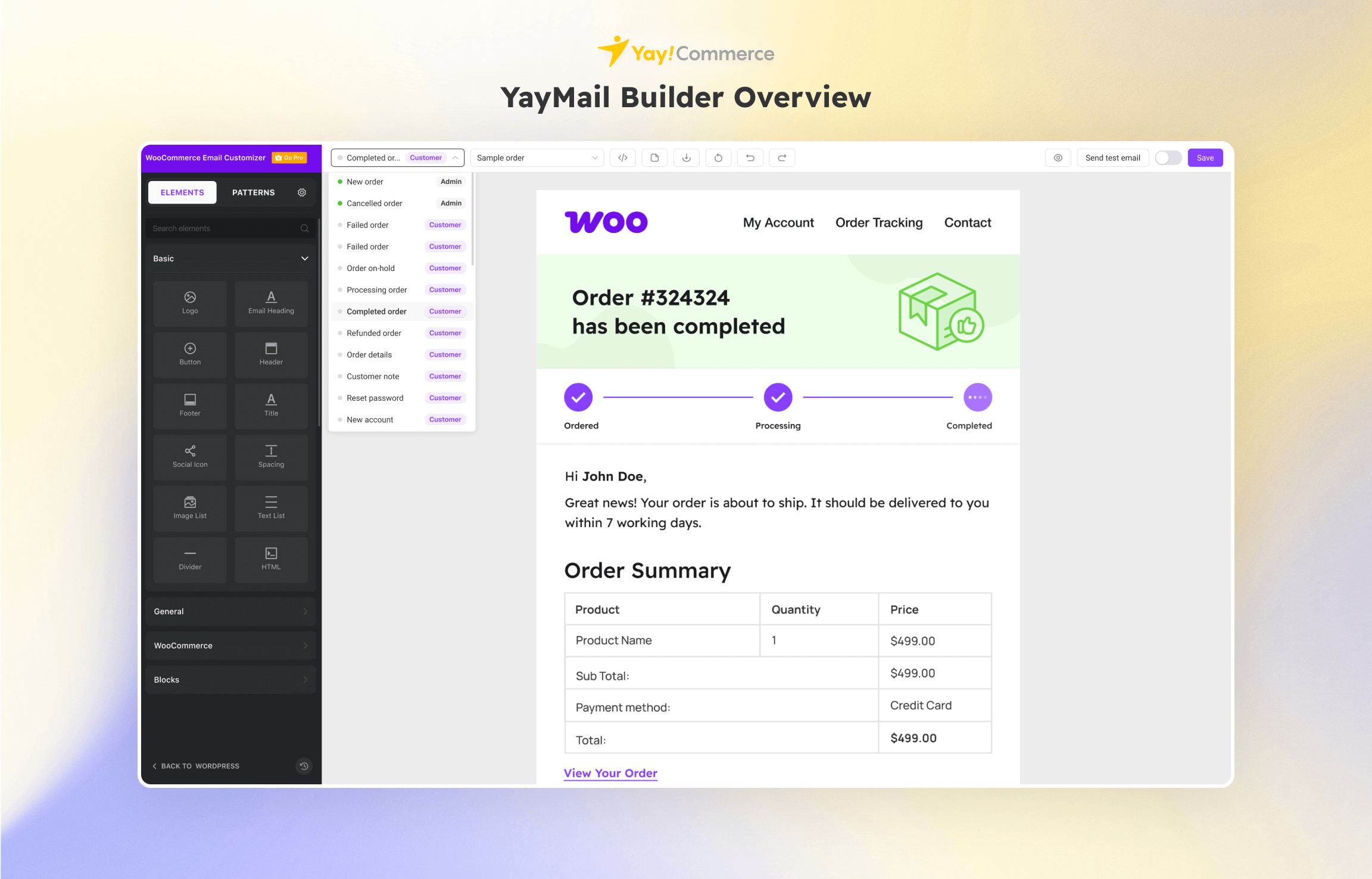
- Upper toolbar allows you to pick from the drop-down the email template you want to view and customize in the email designer.
- Powerful left sidebar lets you manage email body elements and multiple template settings in a single panel.
- Settings panel is collapsible and super smooth. You can configure the options just by switching ON/OFF.
- Preview section shows all email template blocks. For each block, you have the options to move up/down, duplicate, delete, or copy that element to another template.
Änderungsprotokoll
Oct 30, 2026 – Version 4.4.8
- Updated: Template variants UI/UX
- Fixed: Template variant and conditional logic issues
Oct 13, 2026 – Version 4.4.7
- Added: Support for WooCommerce 11.2 email templates: Customer Fulfillment, Customer Review Request, Customer Order Withdrawal Request and Customer Verify Email Address.
- Fixed: Prevent PHP object injection when importing a backup. Serialized objects other than stdClass are rejected.
- Fixed: Patterns getting stuck while loading on some hosting environments. (Pro)
Sep 26, 2026 – Version 4.4.6
- Fixed: Unable to dismiss the addon suggestion banner.
Sep 24, 2026 – Version 4.4.5
- Added: Support for email template variants: one email can have several alternative designs, and the Conditional Logic addon picks which one is sent.
- Fixed: Dragging a Text List element out of a Columns or Container element crashed the editor.
Aug 28, 2026 – Version 4.4.4
- Fixed: Critical fatal error that crashed frontend page builders and the checkout page.
Aug 23, 2026 – Version 4.4.3
- Added: Element content inline edit
- Added: Posts block
- Added: New Processing pre-built templates
- Added: Custom colors for Socials element
- Updated: Admin UI/UX
- Fixed: Fix delete color in global color
- Fixed: Minor bugs
Screenshots



Für Entwickler
Ist das dein Plugin? Zeigen Sie die Zahlen.
Fügen Sie Ihrer Website, Docs oder GitHub Readme ein Live-Badge hinzu. Es wird von selbst aktualisiert - kein Konto erforderlich.
Best YayMail alternatives
All drag-and-drop plugins →




Fragen und Antworten
YayMail: quick answers
Gerade Antworten, gezogen von Live WordPress.org Daten.
Quelle: WordPress.org
Is YayMail free?
Yes. YayMail is free to download and use from the official WordPress.org plugin directory.
Is YayMail safe to use in 2026?
Yes — YayMail is a safe, well-maintained plugin to use in 2026. It runs on 50K+ sites, is rated 4.8/5 and was last updated 3 weeks ago, and scores 94/100 on our health check.
How many websites use YayMail?
YayMail is active on 50K+ WordPress websites and has been downloaded 1,576,942 times since it launched in November 2020. It was downloaded 32,274 times in the last 30 days.
Does YayMail work with WordPress 7.1?
Yes. The developer has tested YayMail up to WordPress 7.1.5, the latest release. It requires WordPress 4.7 or newer.
What PHP version does YayMail need?
YayMail requires PHP 5.4 or higher. Most hosts run PHP 8.x today, so it works on any modern WordPress hosting.
When was YayMail last updated?
The latest version, 4.4.8, was released on October 30, 2026 (3 weeks ago).
Who makes YayMail?
YayMail is developed and maintained by YayCommerce.
What are the best alternatives to YayMail?
The most popular alternatives to YayMail are Elementor Agent Ready Websi… (10M+ installs), Kirki (400K+ installs) and Page Builder by SiteOrigin (400K+ installs).
Angetrieben von PageForge
Eine Vorlage und eine Tabelle. Eine echte Seite für jede Suche.
PageForge Verwandelt jede Zeile eines CSV in eine WordPress-Seite mit eigenem Titel, URL, SEO Felder und Schema entworfen. Kostenlos auf WordPress.org.
- CSV und XLSX, plus Google Sheets auf Beruf und Unternehmen
- seinen eigenen Titel, URL, SEO Felder und Schema für jede Seite
- Arbeitet mit dem Blockeditor, Elementor, Divi und Avada
- Kostenlos auf WordPress.org, keine Kreditkarte