


Instant AI Image Generator – Create & Import Images
Instant AI Image Generator is the most powerful and complete image management plugin for WordPress. Stop wasting time searching for images across multiple websites, downloading them to your computer, and re-uploading to…

Solide Wahl
Instant AI Image Generator is a solid plugin choice in 2026, with a few things worth checking first. It runs on 800+ sites, is rated 3/5 and was last updated 3 weeks ago, and scores 71/100 on our health check.
- Aktiv entwickelt – letztes Update vor 3 Wochen
- Getestet mit dem neuesten WordPress (7.1)
- Small user base (800+ active installs)
- Bisher sehr wenige Bewertungen
Wie stapelt es sich?
Side-by-side bei Installationen, Updates, Bewertungen und Support



Tägliche Downloads
Download-Spitzen folgen normalerweise einer neuen Version - jede Website, die automatisch aktualisiert wird, gilt als Download.
Ranglisten
Where Instant AI Image Generator stands todayWordPress.org Ranglisten suchen
Live-Position in der Plugin-Suche, Top 100| Stichwort | Position |
|---|---|
| ai image generator | #9 |
| pexels | #11 |
| pixabay | #14 |
| stock photos | #15 |
| unsplash | #25 |
Versionsübernahme
Anteil aktiver Sites pro Release.
Bewertungsaufschlüsselung
★★★★★★★★★★ 3 from 2 reviews
About Instant AI Image Generator
Aus der offiziellen Readme · V2.2.3Beschreibung
Instant AI Image Generator is the most powerful and complete image management plugin for WordPress. Stop wasting time searching for images across multiple websites, downloading them to your computer, and re-uploading to WordPress. With Instant AI Image Generator, you can search, preview, and import millions of free images directly into your WordPress Media Library — all without ever leaving your dashboard.
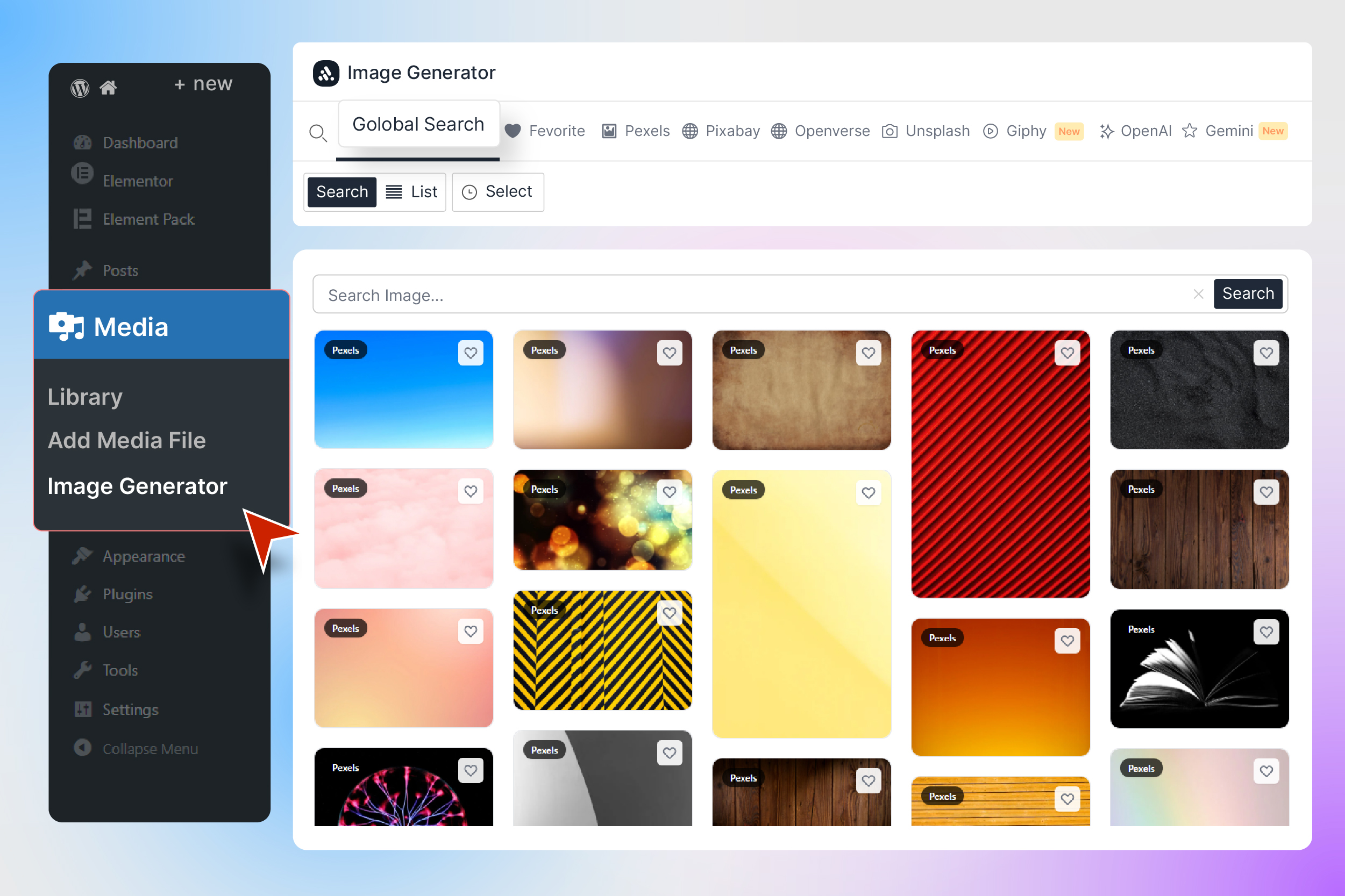
🔍 Search across 6+ image sources including Pixabay, Pexels, Wikimedia, Unsplash, Openverse, and Giphy — all from a single, unified search bar. Or use the AI-powered image generation with OpenAI GPT Image and Google Gemini Imagen to create completely unique images from text descriptions.
USEFUL LINKS 👇
🚀 Why Instant AI Image Generator?
Finding the right image for your blog post, page, or product shouldn’t be a chore. Traditional workflows require you to open a new tab, search a stock photo website, download the image, switch back to WordPress, upload it, and then insert it. That’s 6 steps for a single image.
With Instant AI Image Generator, it’s just 2 steps: Search → Import. Done.
Whether you’re a blogger crafting your next viral post, an agency building client websites, a WooCommerce store owner adding product images, or a content creator who needs fresh visuals daily — this plugin transforms your workflow and saves you hours every week.
Instant AI Image Generator integrates seamlessly into both the WordPress Media Library page and the WordPress Media Modal (the popup that appears when you click “Add Media” or set a Featured Image). This means you can access millions of images from anywhere in WordPress — while editing a post, creating a page, or managing your media.
✨ Key Features
🔍 Global Search — One Search, All Sources
Search across all enabled image providers simultaneously with the Global Search tab. Type your keyword once, and instantly see results from Pixabay, Pexels, Unsplash, Openverse, and Giphy combined in a beautiful masonry grid. No more switching between tabs — find the perfect image faster than ever.
📸 5+ Free Image Sources
Access millions of royalty-free, high-quality images from the world’s best stock photo libraries:
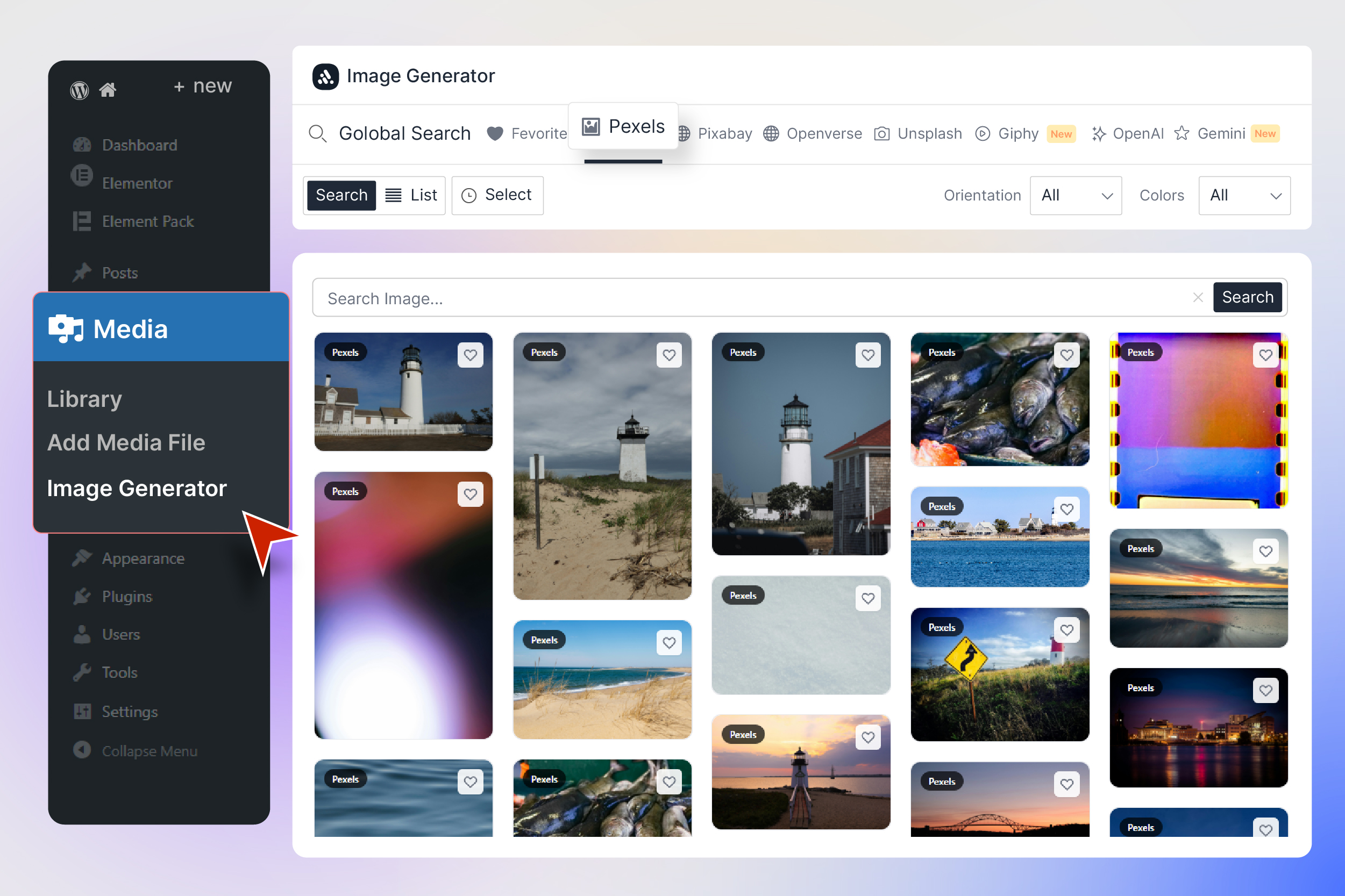
- 🟣 Pexels — Beautiful free stock photos curated by talented creators
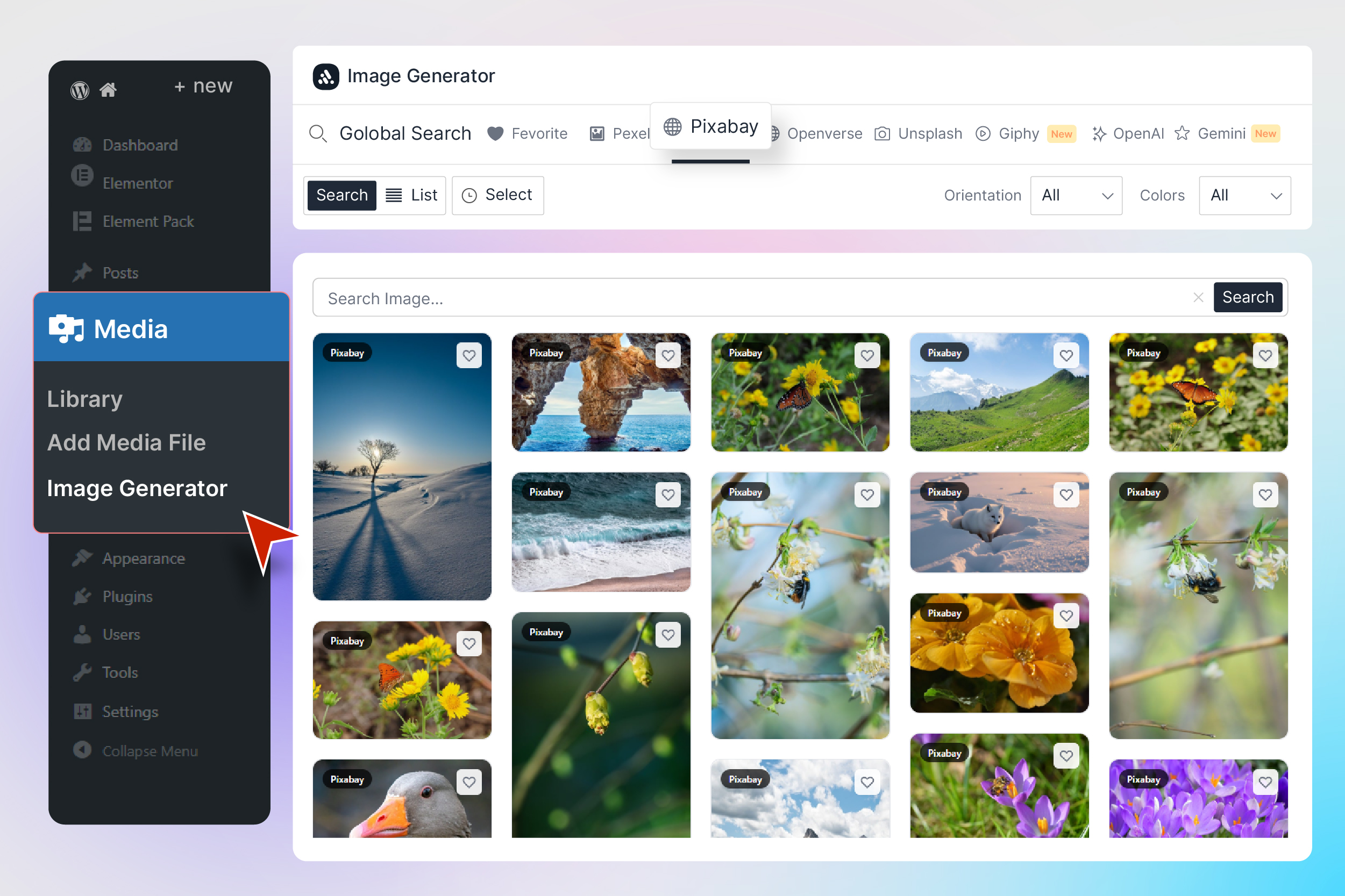
- 🟢 Pixabay — Over 4.2 million free stock photos, illustrations, and vectors
- ⬛ Unsplash — The internet’s source for freely-usable high-resolution photos
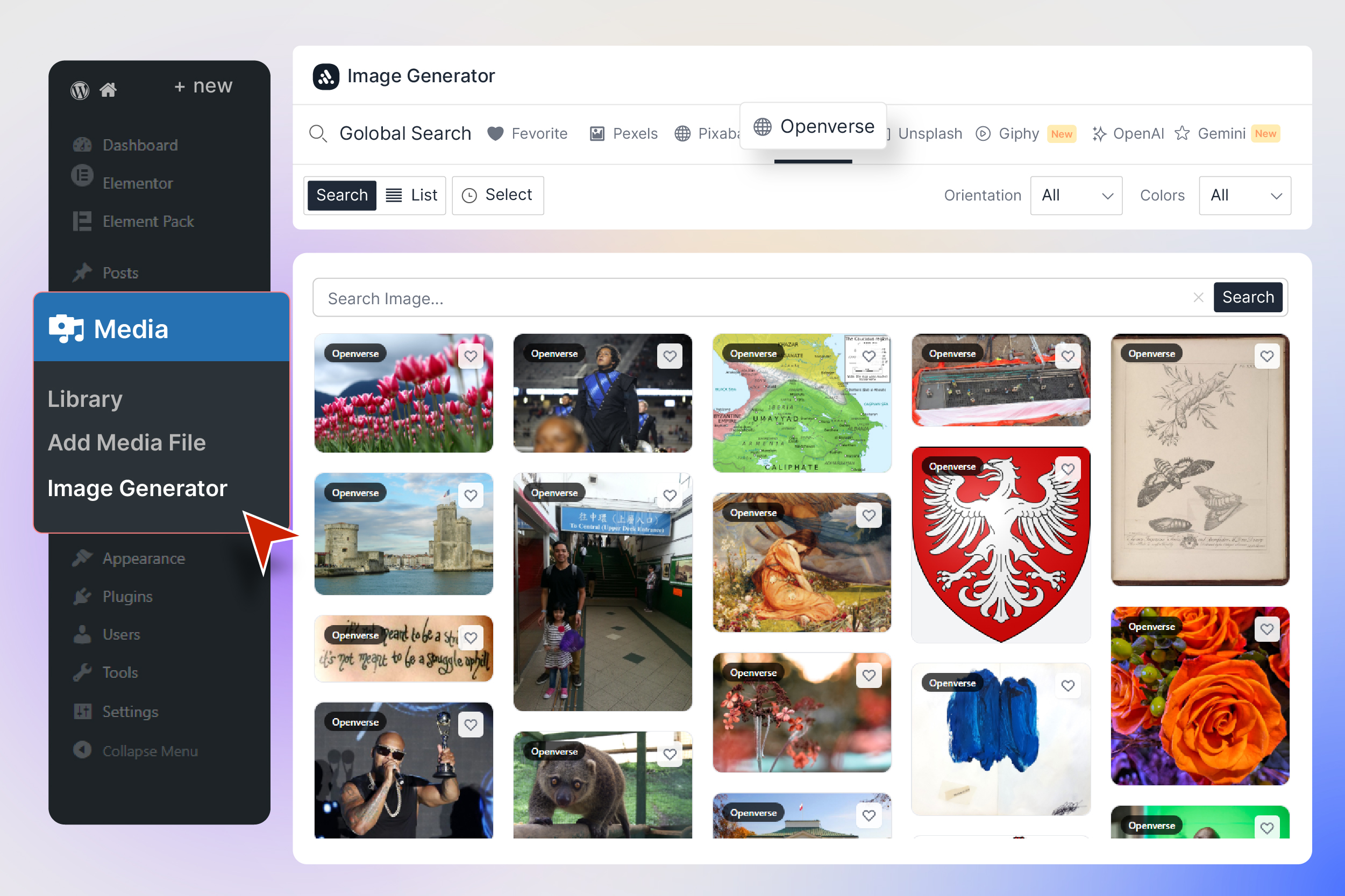
- 🟠 Openverse — Open-licensed images from WordPress, Flickr, NASA, Wikimedia, and 10+ more sources
- 🎬 Giphy — The world’s largest library of animated GIFs with smart animation control
🤖 AI Image Generation
Create completely unique, one-of-a-kind images using artificial intelligence:
- OpenAI GPT Image — Generate stunning AI images from text prompts using OpenAI’s latest image generation model
- Google Gemini Imagen 4.0 — Create photorealistic images with Google’s Imagen 4.0 model with customizable size (512px to 2048px) and batch generation (1-4 images)
⬇️ One-Click Import to Media Library
Import any image straight to your WordPress Media Library with a single click — no downloading, no re-uploading, no FTP.
🖼️ WordPress Media Modal Integration
An “Instant Images” tab appears in the WordPress media popup, right beside “Upload Files” and “Media Library”, so you can search and import while setting a Featured Image or adding media to a post.
🏷️ Smart Image Metadata
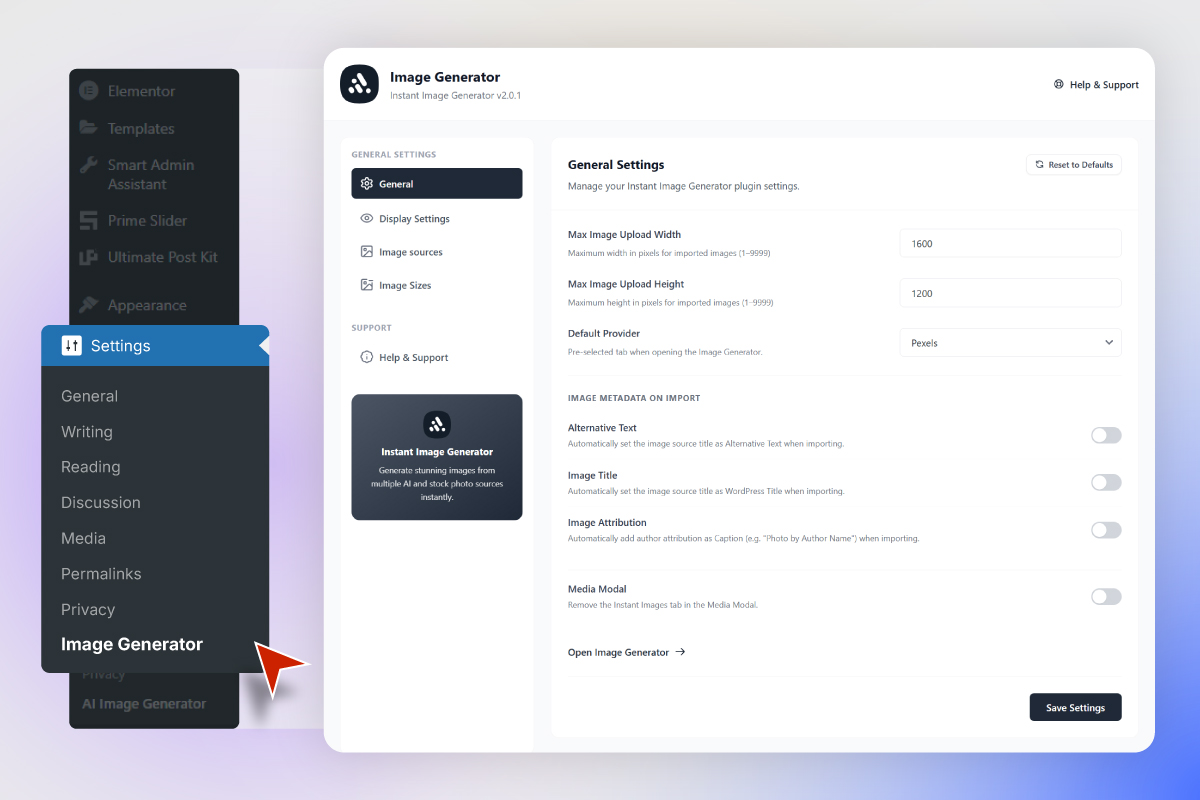
On import the plugin can set Alternative Text, Image Title, and a Caption with attribution (“Photo by [Author Name]”). Each field has its own toggle in General Settings.
🎛️ Advanced Filtering
Provider-specific filters: Pixabay (order, type, 20+ categories, 14 colors, orientation), Openverse (source, orientation), Unsplash (order), Pexels (curated collections), Wikimedia (media type, sort) and Giphy (trending).
🎬 GIF Animation Control
Giphy GIFs load as still thumbnails to save bandwidth and animate on hover. A “GIF” badge marks animated results; the preview modal always plays them full size.
📋 Batch Selection & Import
Select multiple images across any provider and import them all in one operation with a progress indicator.
❤️ Favorites & 🔍 Search History
Bookmark images to a dedicated Favorites tab, and re-run recent searches from keyboard-navigable suggestions in the search bar.
👁️ Full-Size Image Preview
Click any image for a large preview with author info, previous/next keyboard navigation, multiple import sizes, a Favorites button and a link to the original source.
⚙️ Comprehensive Dashboard Settings
- General — max upload width/height, default provider, Alt Text / Title / Attribution toggles, Media Modal visibility
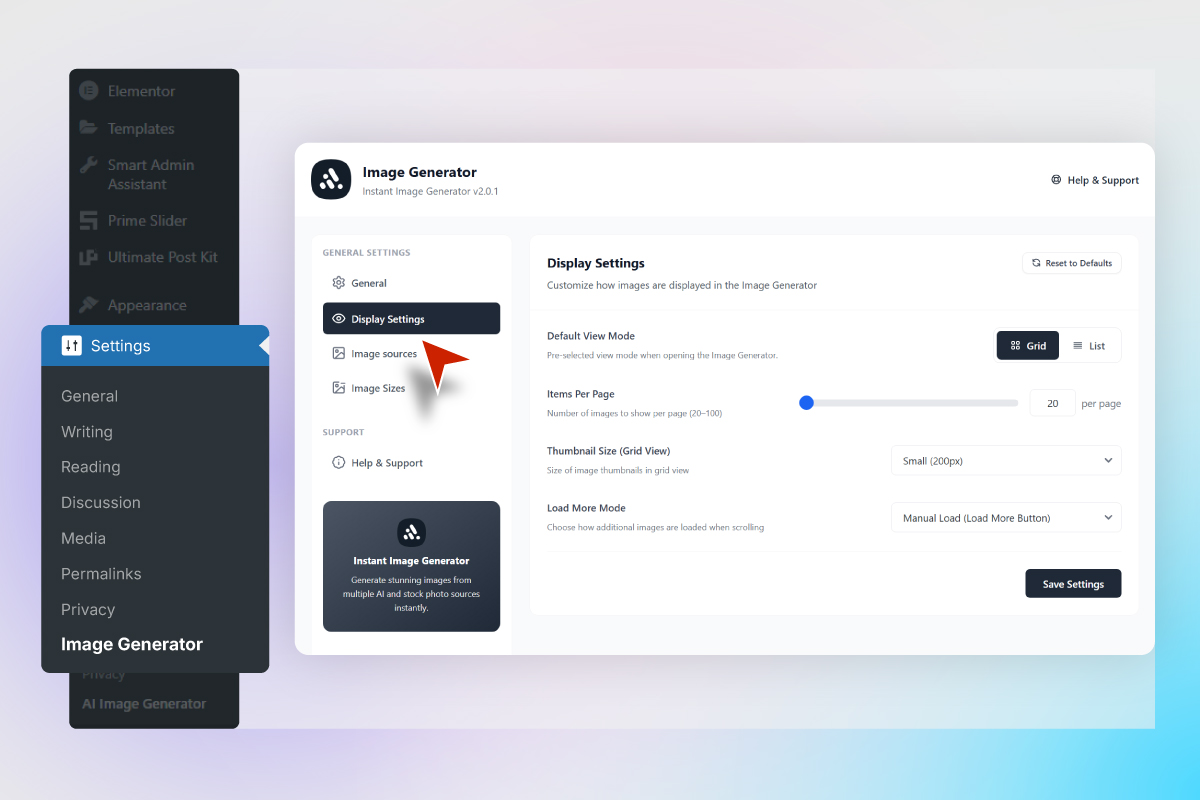
- Display — view mode, items per page (20-100), thumbnail size, auto-scroll or manual “Load More”
- Image Sources — enable/disable each provider, drag-and-drop ordering that carries over to the Image Generator tabs, Global Search toggle
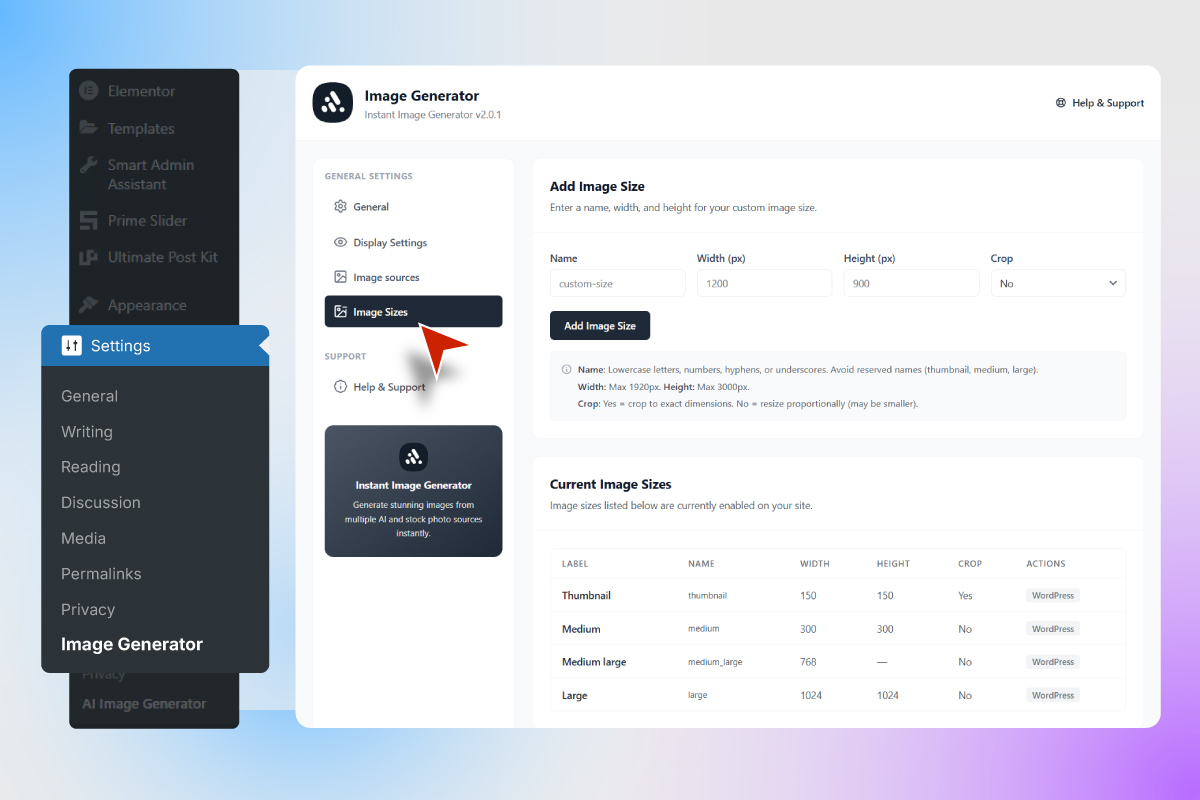
- Custom Image Sizes — review every registered WordPress size and add or delete your own (WordPress defaults are protected)
- Export & Import — back up or migrate your configuration as a JSON file
🎨 Modern UI, Lightweight Footprint
Built with React and Tailwind CSS: card-based layouts, color-coded provider tabs, masonry grids and skeleton loading states. API requests are nonce-protected, keys are stored in WordPress options, there is no tracking or analytics, and assets load only on the admin screens that need them — zero frontend code on your public site.
🏆 Perfect For
- 📝 Bloggers — Find the perfect header image in seconds
- 🏢 Agencies — Build client websites faster with instant image access
- 🛒 WooCommerce Stores — Add product images without leaving WordPress
- 📰 News & Magazine Sites — Source images for articles quickly
- 🎨 Designers — AI-generate unique visuals from text descriptions
- 📱 Social Media Managers — Find trending GIFs and images instantly
- 👨💻 Developers — Add placeholder images during development
Externe Dienste
This plugin is a client for third-party image services. It does not work without them: every image you search, generate or import is fetched from one of the services listed below. All of this happens inside wp-admin only — nothing is requested from your public-facing site, and no visitor data is collected or transmitted.
Requests are made only when you actively use a feature: typing a search term, opening a provider tab, running Global Search, generating an AI image, using the block toolbar “Generate Image” action, importing an image, or clicking “Test key” in the settings. Each request carries the search term or prompt you typed and the API key for that provider. No WordPress user data, post content, site URL, or personal information is sent.
Most providers are contacted by your own server through the WordPress HTTP API, so the provider sees your server’s IP address. Two are contacted directly by your browser instead, so the provider sees the IP address of the computer you are working on: Openverse search, and OpenAI image generation from the Image Generator page. Preview thumbnails are also loaded straight into your browser from each provider’s image CDN, as with any image on a web page.
Pexels, Pixabay, Unsplash and Giphy ship with a shared BdThemes API key so they work without configuration. That means the plugin can contact those four services before you enter any key of your own. Disable a provider in AI Image → Dashboard → Image Sources to stop the plugin from contacting it.
Pixabay
Used to search and import Pixabay stock photos, illustrations and vectors. Your search term, filter values (order, type, category, color, orientation), page number and the Pixabay API key are sent to https://pixabay.com/api/ each time you search the Pixabay tab or Global Search.
Terms of Service: https://pixabay.com/service/terms/ | Privacy Policy: https://pixabay.com/service/privacy/
Pexels
Used to search and import Pexels stock photos. Your search term, page number and the Pexels API key are sent to https://api.pexels.com/ each time you search the Pexels tab, Global Search, or use the block toolbar image action.
Terms of Service: https://www.pexels.com/terms-of-service/ | Privacy Policy: https://www.pexels.com/privacy-policy/
Unsplash
Used to search and import Unsplash photos. Your search term, page number and the Unsplash Access Key are sent to https://api.unsplash.com/ when you search the Unsplash tab or Global Search, and when you validate an Unsplash key in the dashboard.
Terms of Service: https://unsplash.com/terms | Privacy Policy: https://unsplash.com/privacy
Openverse (WordPress.org)
Used to search and import openly licensed images. Your search term, source/orientation filters and page number are sent to https://api.openverse.org/v1/ directly from your browser when you search the Openverse tab or Global Search, and to https://api.openverse.engineering/ from your server when you use the block toolbar “Generate Image” action. No API key is required.
Terms of Service: https://docs.openverse.org/terms_of_service.html | Privacy Policy: https://openverse.org/privacy
Wikimedia Commons
Used to search and import freely licensed media from Wikimedia Commons. Your search term, media type/sort filters and page number are sent to https://commons.wikimedia.org/w/api.php when you search the Wikimedia tab or Global Search. No API key is required.
Terms of Use: https://foundation.wikimedia.org/wiki/Policy:Terms_of_Use | Privacy Policy: https://foundation.wikimedia.org/wiki/Policy:Privacy_policy
GIPHY
Used to search, browse trending, and import animated GIFs. Your search term, page number and the GIPHY API key are sent to https://api.giphy.com/ when you search or open the Giphy tab, use Global Search, and when you validate a GIPHY key in the dashboard.
Terms of Service: https://support.giphy.com/hc/en-us/articles/360020027752-GIPHY-User-Terms-of-Service | Privacy Policy: https://support.giphy.com/hc/en-us/articles/360032872931-GIPHY-Privacy-Policy
OpenAI (GPT Image)
Used to generate AI images from text. The text prompt you type, the requested image size/quality and your own OpenAI API key are sent to https://api.openai.com/v1/images/generations when you press Generate on the OpenAI tab (sent directly from your browser) or use the block toolbar “Generate Image” action with OpenAI (sent from your server). Your API key is also sent to https://api.openai.com/v1/models when you click “Test key”. This service requires your own API key and is used only after you add one.
Terms of Use: https://openai.com/policies/terms-of-use/ | Privacy Policy: https://openai.com/policies/privacy-policy/
Google Gemini (Imagen)
Used to generate AI images from text. The text prompt you type, the image size and image count, and your own Google Gemini API key are sent to https://generativelanguage.googleapis.com/v1beta/models/imagen-4.0-generate-001:predict when you press Generate on the Gemini tab or use the block toolbar “Generate Image” action with Gemini. Your API key is also sent to https://generativelanguage.googleapis.com/v1beta/models when you click “Test key”. This service requires your own API key and is used only after you add one.
Terms of Service: https://ai.google.dev/gemini-api/terms | Privacy Policy: https://policies.google.com/privacy
That is the complete list. Fallback author avatars, shown when a provider returns a photographer without a profile picture, are drawn in your browser as a local SVG — no avatar service is contacted.
Source code
The plugin ships with a compiled React/Tailwind bundle in build/. The complete, uncompressed human-readable source for that bundle is included in this plugin under the src/ directory, along with the build configuration (package.json, gruntfile.js, tailwind.config.js, postcss.config.js).
The bundle is built with @wordpress/scripts (webpack + Babel), Tailwind CSS and Grunt. To rebuild it from source:
- Install Node.js 16 or later and npm.
- From the plugin directory, install dependencies:
npm install -
Produce the production bundle:
npm run buildnpm run build compiles
src/admin/index.jsand the Tailwind stylesheets intobuild/admin/index.jsandbuild/admin/index.css, copies static assets intoassets/, and regenerates the translation template. Usenpm startfor an unminified development build with file watching.
No other third-party library in this plugin is minified or obfuscated.
Checkout our other Plugins 👑
More free Elementor and Gutenberg addons from BdThemes: Element Pack (300+ Elementor widgets), Prime Slider (slider builder), Ultimate Post Kit (blogging layouts), Ultimate Store Kit (WooCommerce and EDD), Pixel Gallery (gallery widgets), ZoloBlocks (Gutenberg blocks), Augmented Reality Viewer, Dark Reader, Live Copy Paste, One Accessibility, QR Code Generator & Scanner, Smart Admin Assistant, Spin Wheel and Swift Checkout for WooCommerce.
Visit BdThemes for our services, products, blogs and documentation.
Installation
Installing Instant AI Image Generator is quick and easy:
From WordPress Dashboard
- Navigate to Plugins → Add New
- Search for “Instant AI Image Generator”
- Click Install Now and then Activate
- Go to AI Image → Dashboard to configure your settings
- Navigate to Media → Image Generator to start finding images!
Manuelle Installation
- Download the plugin ZIP file
- Upload the
ai-imagefolder to/wp-content/plugins/ - Activate the plugin through the Plugins menu in WordPress
- Configure your API keys in AI Image → Dashboard → Image Sources
API Key Setup (Optional)
- Unsplash — Get your free Access Key from Unsplash Developers
- Giphy — Get your free API Key from GIPHY Developers
- OpenAI — Get your API Key from OpenAI Platform
- Gemini — Get your free API Key from Google AI Studio
- Pexels — Get your free API Key from Pexels API
- Pixabay — Get your free API Key from Pixabay API
- Wikimedia Commons, Openverse — No API key required! Works out of the box.
Änderungsprotokoll
Major update! Complete rebuild with React UI, 5+ image sources, AI generation with OpenAI & Gemini, WordPress Media Modal integration, advanced filters, batch import, favorites, and much more. Backup recommended before upgrading.
2.2.3 [1st November 2026]
- Fixed: Download size menu closing before the pointer reached it
- Fixed: Download size menu not usable with a keyboard
- Fixed: Dialog close button overlapping the content
- Fixed: Image imported from the media modal not being selected
- Fixed: Test Key accepting a Gemini key without Imagen access
- Fixed: Image Generator tab in the media modal opening blank
- Changed: Redesigned import dialogs with a thumbnail, file name and wider Media URL field
- Changed: Error and batch dialogs use the same layout
- Changed: Batch results shown as a sentence
- Changed: Tested up to WordPress 7.1
- Performance: Batch import updates the progress dialog instead of rebuilding it
2.2.2 [20th October 2026]
- Added: BdThemes deals notice on the Dashboard, Plugins screen and plugin dashboard; “Don’t Show Again” hides it in every BdThemes plugin
2.2.1 [21st September 2026]
- Security: Improved API key protection, provider URL validation, and error handling.
- Fixed: Settings, image import, search, favourites, Gemini, provider filters, pagination, uninstall, and fatal-error issues.
- Fixed: Incorrect image generation prompts and upload limit validation.
- Fixed: Dashboard crashes and UI issues.
- Performance: Improved provider search caching and request handling.
- Performance: Added a 45-second limit for Block Editor image generation.
- Changed: Updated permissions for Image Generator and AI image generation.
- Changed: Improved dashboard accessibility and isolated plugin styles.
2.2.0 [16th August 2026]
- Added: External services section in the readme documenting every third-party service the plugin contacts, what data is sent and when, with links to each service’s terms and privacy policy — covers Pixabay, Pexels, Unsplash, Openverse, Wikimedia Commons, GIPHY, OpenAI, Google Gemini and UI Avatars, and states which calls come from the server and which from the browser
- Added: Source code section in the readme documenting the build tooling and rebuild steps for the compiled
build/bundle - Added: Uncompressed React/Tailwind source (
src/) and build configuration are now shipped with the plugin - Removed: BdThemes news feed dashboard widget and all of its remote requests to
bdthemes.comanddashboard.bdthemes.io - Removed: Dependency on the external
ui-avatars.comservice — fallback author avatars are now generated locally in the browser as an SVG, so no request leaves your site for them - Fixed:
Tested up tonow uses the major WordPress version (7.0) in both the readme and the plugin header - Fixed: Readme now states the correct Gemini model (Imagen 4.0) and which providers actually require your own API key
- Fixed: Readme Description trimmed under the 2500-word limit so the External services and Source code sections are no longer truncated off the plugin page
2.1.8 [10th August 2026]
- Updated: Admin API Biggopti removed
2.1.7 [8th August 2026]
- Fixed: Security issue where data returned by the promotions API could be injected as script into the WordPress admin area
- Fixed: Promotion links and images are now restricted to http(s) and mailto addresses
- Updated: Security improved
Screenshots

Für Entwickler
Ist das dein Plugin? Zeigen Sie die Zahlen.
Fügen Sie Ihrer Website, Docs oder GitHub Readme ein Live-Badge hinzu. Es wird von selbst aktualisiert - kein Konto erforderlich.
Best Instant AI Image Generator alternatives
All ai image generator plugins →



Fragen und Antworten
Instant AI Image Generator: quick answers
Gerade Antworten, gezogen von Live WordPress.org Daten.
Quelle: WordPress.org
Is Instant AI Image Generator free?
Yes. Instant AI Image Generator is free to download and use from the official WordPress.org plugin directory.
Is Instant AI Image Generator safe to use in 2026?
Instant AI Image Generator is a solid plugin choice in 2026, with a few things worth checking first. It runs on 800+ sites, is rated 3/5 and was last updated 3 weeks ago, and scores 71/100 on our health check.
How many websites use Instant AI Image Generator?
Instant AI Image Generator is active on 800+ WordPress websites and has been downloaded 22,513 times since it launched in September 2023. It was downloaded 1,776 times in the last 30 days.
Does Instant AI Image Generator work with WordPress 7.1?
Yes. The developer has tested Instant AI Image Generator up to WordPress 7.1.5, the latest release. It requires WordPress 5.0 or newer.
What PHP version does Instant AI Image Generator need?
Instant AI Image Generator requires PHP 7.0 or higher. Most hosts run PHP 8.x today, so it works on any modern WordPress hosting.
When was Instant AI Image Generator last updated?
The latest version, 2.2.3, was released on November 1, 2026 (3 weeks ago).
Who makes Instant AI Image Generator?
Instant AI Image Generator is developed and maintained by bdthemes.
What are the best alternatives to Instant AI Image Generator?
The most popular alternatives to Instant AI Image Generator are AutoWP (900+ installs), PixMagix (200+ installs) and AI Featured Image Generator (100+ installs).
Angetrieben von PageForge
Eine Vorlage und eine Tabelle. Eine echte Seite für jede Suche.
PageForge Verwandelt jede Zeile eines CSV in eine WordPress-Seite mit eigenem Titel, URL, SEO Felder und Schema entworfen. Kostenlos auf WordPress.org.
- CSV und XLSX, plus Google Sheets auf Beruf und Unternehmen
- seinen eigenen Titel, URL, SEO Felder und Schema für jede Seite
- Arbeitet mit dem Blockeditor, Elementor, Divi und Avada
- Kostenlos auf WordPress.org, keine Kreditkarte