


AI Featured Image Generator
AI featured images in one click, in bulk, or by asking Claude (MCP). Free with OpenAI, Stability AI and Grok. Pro adds WooCommerce product images.

Solide Wahl
AI Featured Image Generator is a solid plugin choice in 2026, with a few things worth checking first. It runs on 100+ sites, is rated 5/5 and was last updated 2 weeks ago, and scores 79/100 on our health check.
- Aktiv entwickelt — letztes Update vor 2 Wochen
- Getestet mit dem neuesten WordPress (7.1)
- Kleine Benutzerbasis (100+ aktive Installationen)
- Bisher sehr wenige Bewertungen
Wie stapelt es sich?
Side-by-side bei Installationen, Updates, Bewertungen und Support



Tägliche Downloads
Download-Spitzen folgen normalerweise einer neuen Version - jede Website, die automatisch aktualisiert wird, gilt als Download.
Ranglisten
Where AI Featured Image Generator stands todayWordPress.org Ranglisten suchen
Live-Position in der Plugin-Suche, Top 100| Stichwort | Position |
|---|---|
| ai image generator | #6 |
| auto featured image | #7 |
| featured image | #24 |
| MCP | >100 |
| product images | >100 |
Versionsübernahme
Anteil aktiver Sites pro Release.
Bewertungsaufschlüsselung
★★★★★★★★★★ 5 from 2 reviews
About AI Featured Image Generator
From the official readme · v2.2.1Beschreibung
AI Featured Image Generator creates AI-powered featured images right from the WordPress editor. Click “Generate Featured Image” on any post and the plugin builds a unique image from your post title, chosen style, and optional custom prompt, using OpenAI, Stability AI, or Grok/xAI on the free plan, or Google Gemini and Meta Muse on Pro.
Every image gets alt text automatically and an SEO-friendly filename based on your post title. Generate one at a time in the editor, in bulk, straight from the Posts list, inline in your content with the AI Image Generator block, or by asking an AI assistant such as Claude Desktop or Cursor through MCP. Everything is managed from one settings hub.
On Pro, the plugin also makes product images for WooCommerce: it turns each product’s real photo into studio, showroom, lifestyle or 3D store images, one product at a time or the whole shop in bulk.
Video Walkthrough
Kostenlose Funktionen
- 3 free AI providers: OpenAI, Stability AI, and Grok/xAI (Google Gemini and Meta Muse available on Pro)
- OpenAI models: GPT Image 2 (default): excels at text rendering in multiple languages, visual reasoning and multi-object scenes
- Stability AI: Stable Image Core with 16 native style presets (Photographic, Cinematic, Anime, Digital Art, Comic Book, Fantasy Art, and more)
- Grok/xAI: Grok Imagine Image: fast and affordable at $0.02 per image
- 21 style presets: Common (None, Realistic, Artistic, Cartoon, Minimalist), Creative (Sketch, Watercolor, 3D Render, Pixel Art, Cyberpunk, Fantasy, Anime, Technicolor), and Trending (Toy Figure, Miniature World, Claymation, Cinematic, Lo-Fi Cozy, Vintage Instant Photo, Magazine Collage, Paper Cut)
- Custom prompts: plus one-click Generate Prompt from Content, which crafts an AI-optimized prompt from your post title and body (OpenAI and Grok free; Gemini and Meta Muse on Pro)
- 7 image sizes with GPT Image 2 and 2.6: square, portrait, landscape, widescreen 16:9, vertical 9:16, ultra-wide 3:1, and tall banner 1:3
- All aspect ratios: 9 for Stability AI and 9 for Grok, plus 2K resolution on Grok
- Output control (OpenAI): WebP/PNG/JPEG format, compression slider (1–100), and Low/Medium/High generation quality (Extra High and Max on GPT Image 2.6, Pro)
- Text control: allow or block text, captions, and words in generated images
- Auto alt text: from the post title, the prompt, or a custom template with
{title},{prompt},{style}, and{site_name}placeholders. with an option to preserve manual edits on regeneration - Bulk Generate: unlimited images for Posts and Pages that have no featured image yet, as many at once as you like
- Generate from Post List: an “AI Featured Image” column on the Posts/Pages list with a one-click Generate/Regenerate link, so there is no need to open the editor
- Image Audit counts: see how many of your images have no alt text, are over 600 KB, are still JPG or PNG instead of WebP, or look blurry or cut off (fixing them is Pro)
- Inline images: the AI Image Generator block adds AI images anywhere in your Gutenberg content, with its own settings tab
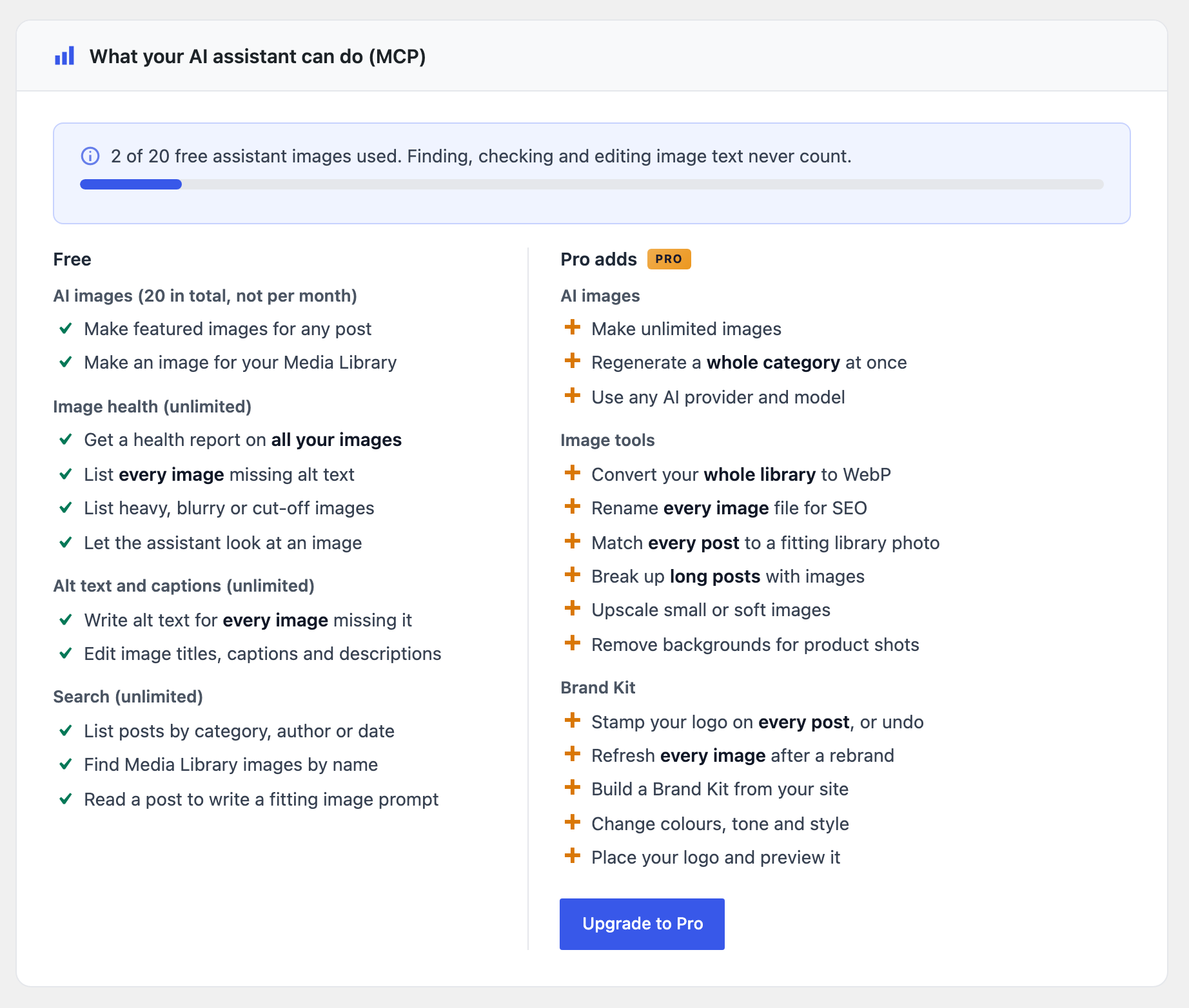
- AI assistants (MCP): connect Claude Desktop, Cursor, Claude Code or VS Code and ask them in plain words, starting with “On ,” to make featured images, make any image for the Media Library, find posts and images, audit your images (missing alt text, size, format, blur, cut-off edges) and fix alt text, titles and captions. A 3-step setup on the AI Assistants tab, 20 assistant images on the free plan
- Multisite compatible
Pro Features 🚀
- Product Images (WooCommerce): turn a product’s real photo into clean store images: Studio, Showroom, Lifestyle or 3D shots in the mood you pick, with a white, light grey, beige, custom colour or transparent background for studio shots. The product itself is kept exactly as it is. Make a main image plus gallery set in one click from the product page, or run the whole shop in bulk. Nothing changes on the product until you choose, and the original images can always be put back
- Match product photos to your style: in Bulk images on the Product Images tab, remake only the main and gallery photos whose background, shape, size or file type does not match your style, each from that same photo and in the same place. Photos that already match are left alone, and the originals are always kept
- Animated and vector images (GPT Image 2.6): make a featured or inline image as an animated GIF, generate inline images and your Brand Kit logo as SVG, and choose how much the model plans each picture with the new Planning Detail setting
- Listen to this post (audio): turn any post into a narrated recording with ElevenLabs, Grok or Google Gemini voices, play a sample of each voice first, and show a player above the content. Long posts are read in parts and joined into one file, and the editor tells you when the post changed since the recording
- Podcast feed: publish your recordings as a podcast. Submit the feed address once to Spotify, Apple Podcasts, YouTube Music, Amazon Music or any other podcast app, and each new recording appears there as an episode by itself
- Image Audit: list every image with missing alt text, a large file, a JPG or PNG format, blur or cut-off edges, then fill all missing alt text at once from your Alt Text settings, convert images to WebP, and edit alt text, titles and captions right in the list
- Auto-generate on publish: a post published without a featured image gets one automatically a few seconds later, made with your current settings and Brand Kit, with the option to write the prompt from the post content
- Google Gemini: Nano Banana 2.1 (Google’s newest, fast and about half the price of Nano Banana 2), Nano Banana Pro (Gemini 3 Pro) and Nano Banana 2 (Gemini 3.1 Flash, deprecated by Google but still available): up to 4K resolution and 10 aspect ratios
- Meta Muse (beta): Muse Image 1.0, Meta’s reasoning image model at $0.01 per image, with 9 aspect ratios and native WebP, PNG or JPEG output
- Unlimited AI assistant images (MCP): plus Pro tools for assistants: set a featured image from the Media Library, insert an image into a post, upscale, remove background, rename images, convert JPG or PNG to WebP, make a narrated recording of a post, make WooCommerce product images from the product’s photo and check them against your look, and manage the Brand Kit (read it, change colours, tone and logo placement, preview it, stamp the logo onto existing featured images and undo that, or set it up from what the site already says about itself)
- GPT Image 2.6 (OpenAI): GPT Image 2.6 Flare (fast, recommended) and GPT Image 2.6 Sunburst (best detail), with Extra High and Max generation quality and a one-click “Retry with Sunburst” button in the post editor
- Image upscaling (Stability AI): Conservative (faithful 4x), Creative (AI-enhanced 4K), or Fast (quick 4x), right from the post editor
- Background removal (Stability AI): one click isolates the subject and saves a transparent PNG as your featured image
- Advanced Stability AI models: Stable Image Ultra and SD 3.5 Large / Large Turbo / Medium / Flash
- Negative prompts (Stability AI): exclude unwanted elements, e.g. “blurry, watermark, text, low quality”
- Grok Imagine Image 2.0: higher quality at $0.04 per image
- Grok Imagine Image Quality: top tier at $0.05 per image
- More output formats: PNG/JPEG/WebP for Stability AI, and automatic WebP conversion for Gemini and Grok images
- More Bulk Generate: any post type, filters for date range and thumbnail status, overwrite existing images, and the Brand Kit
- Custom post types: enable generation for any public post type
- Custom styles: create named styles with your own prompt descriptions, available in every style dropdown
- Brand Kit: save your brand colors, a style description, tone, and avoid-rules, plus an optional reference image (used by Google Gemini) and a logo watermark (corners or centre, with size, opacity, margin and offset controls plus a live preview), applied automatically to every image you generate (animated GIF and SVG images skip the logo), with a per-image “Use Brand Kit” toggle to skip it
Want to unlock WooCommerce product images, Google Gemini, Meta Muse, post audio, image upscaling, background removal, the Brand Kit, unlimited AI assistant images and more? Upgrade to Pro here.
Bedarf
- WordPress 6.6 or higher
- PHP 7.4 oder höher
- For Product Images (Pro): WooCommerce
- An API key for at least one provider:
- OpenAI (free plan)
- Stability AI (free plan)
- Grok/xAI (free plan)
- Google Gemini (Pro only)
- Meta Muse (Pro only)
- For post audio (Pro): an ElevenLabs API key, or the Grok or Gemini key you already use
- For AI assistants (MCP): WordPress 6.9 or higher and the free MCP Adapter plugin, installed in one click from the AI Assistants tab
Externe Dienste
This plugin connects to your chosen AI provider’s API to generate images. For every provider:
- Your post title and content (or your custom prompt, and for Stability AI any negative prompt) are sent to the provider’s API when you generate an image
- Your API key for that provider authenticates each request
- Requests are sent when you generate: from the post editor, the Posts list, Bulk Generate, the AI Image Generator block, the AI Product Images box, Product Images bulk, the Brand Kit logo generator, or an AI assistant. With Auto-generate on publish (Pro) turned on, a request is also sent in the background when a post is published without a featured image
- Test Connection on the settings page sends your API key to that provider to check it
- “Generate Prompt from Content” sends your post title and body to the provider’s text API: gpt-6-luna (OpenAI), grok-4.7 (Grok), Gemini 3.6 Flash (Gemini, Pro), or Muse Spark 1.3 (Meta Muse, Pro)
- “Listen to this post” (Pro) sends your post title and text to the voice provider you chose on the Audio tab (ElevenLabs, Grok or Google Gemini) when you click Generate audio, play a voice sample, or ask an AI assistant for a recording
- Product Images (Pro) sends the product photo you start from and the style you chose to OpenAI (images/edits) or Google Gemini when you make a product image, run Bulk images, or ask an AI assistant. For a transparent background made with Gemini, the image is then sent to Stability AI to remove the background
- Vector (SVG) images (Pro) also send your prompt to the OpenAI text model gpt-6-luna, which writes the drawing
- With the Brand Kit on (Pro), the Brand Kit text and your reference image are sent to Google Gemini with each Gemini image request
OpenAI (Free & Pro): image generation and prompt generation.
Terms of Service | Privacy Policy | API Documentation
Stability AI (Free & Pro): image generation; for Pro users, upscaling and background removal also send your existing featured image file to Stability AI for processing, and Product Images sends a new product image there to make its background transparent.
Terms of Service | Privacy Policy | API Documentation
Grok / xAI (Free & Pro): image generation and prompt generation; for Pro users, post audio (text to speech), and the Grok voice list is read with your key.
Terms of Service | Privacy Policy | API Documentation
Google Gemini (Pro only): image generation, prompt generation and post audio (text to speech).
Terms of Service | Privacy Policy | API Documentation
Meta Muse (Pro only): image generation (Muse Image 1.0) and prompt generation (Muse Spark 1.3) through the Meta Model API.
Terms of Service | Acceptable Use Policy | Data Handling | API Documentation
ElevenLabs (Pro only): post audio (text to speech). Your post title and text, the voice you chose and your ElevenLabs API key are sent when you make a recording or play a voice sample. The voice list is read with the same key.
Terms of Service | Privacy Policy | API Documentation
AI assistants (MCP): your own assistant app (Claude Desktop, Cursor, Claude Code, VS Code) connects to your site with a WordPress Application Password and calls the same providers above with your keys. Images are only generated when you ask the assistant. The posts and image previews the assistant reads go to that assistant’s provider, under its own terms.
Freemius (Free & Pro): licensing, updates for Pro, and the optional opt-in. If you opt in, or when a Pro licence is activated or checked, your site address, WordPress and PHP versions, plugin version, admin name and email are sent to Freemius.
Terms of Service | Privacy Policy
Data usage: generated images are stored in your WordPress media library. No personal data is stored by the providers beyond what’s necessary for API processing. You are responsible for ensuring your content complies with the selected provider’s usage policies.
Installation
- Laden Sie den Ordner
ai-featured-image-generatorin das/wp-content/plugins/-Verzeichnis hoch - Aktivieren Sie das Plugin über das „Plugins“-Menü in WordPress
- Go to AI Images in the admin menu to configure your API key and other settings
- The AI Image Generator block is available in the Gutenberg block inserter for adding inline images
Änderungsprotokoll
The plugin is now listed as AI Featured Image Generator. Nothing changes in how it works.
2.2.1
- Plugin name: the plugin is now listed as AI Featured Image Generator, with an updated description, tags and banner. Nothing changes in how the plugin works.
2.2.0
- Product Images for WooCommerce (Pro): store images made from each product’s real photo: Studio, Showroom, Lifestyle or 3D shots in the mood you pick, on white, light grey, beige, your own colour or a transparent background. A main image plus gallery set in one click, bulk for the whole shop, and Restore originals. Products now have only the AI Product Images box.
- Match photos to your style (Pro): a choice in Bulk images that remakes every product photo that does not match your style, from that same photo, and puts it back in its place.
- GPT Image 2.6 (Pro): Flare and Sunburst now use GPT Image 2.6, at the same price. Sites switch automatically.
- Animated images (Pro): make a featured or inline image as an animated GIF with GPT Image 2.6.
- Vector images (Pro): generate inline images and your Brand Kit logo as SVG with GPT Image 2.6.
- Planning Detail (Pro): a new OpenAI setting for GPT Image 2.6.
- Generate a logo (Pro): make your Brand Kit logo as a transparent PNG, with an optional SVG copy.
- Transparent cutout fix: on Pro, GPT Image 2 switches to GPT Image 2.6 Flare for transparent images, because most OpenAI accounts cannot make them with GPT Image 2. On Free, when OpenAI refuses it, you get a clear message that explains why.
- New assistant tools (MCP, Pro): generate-product-image and audit-product-images.
- Listen to this post (Pro): turn any post into a narrated recording with ElevenLabs, Grok or Google Gemini voices. Choose and sample the voice on the new Audio tab, then click Generate audio in the post editor. A player appears above the content, long posts are read in parts and joined into one file, and the editor shows when the post changed since the recording.
- New assistant tool (MCP, Pro): generate-audio makes or refreshes a post’s recording from Claude, Cursor or any connected assistant.
- Grok Imagine Image Quality (Pro): xAI’s top image tier is now selectable at $0.05 per image. Grok Imagine Image 2.0 and the standard model are unchanged.
- Grok prompt model: Generate Prompt from Content now uses grok-4.7, xAI’s current recommended model.
- Stability models: the retired SD 3 Large, Large Turbo, Medium and SDXL 1.0 are removed, because Stability no longer accepts them. Sites using them switch to the matching SD 3.5 model automatically.
- Image Audit (Pro, counts on Free): a new tab that finds images with missing alt text, large files, JPG or PNG formats, blur or cut-off edges, and fixes them: fill all missing alt text from your Alt Text settings, convert to WebP, and edit alt text, titles and captions in the list.
- Auto-generate on publish (Pro): a post published without a featured image gets one in the background, made with your current settings, with an option to write the prompt from the content.
- Podcast feed (Pro): your recordings as a podcast feed with the Apple Podcasts tags, ready for Spotify, Apple Podcasts, YouTube Music and other apps.
- WordPress 6.6 or newer: the AI Image Generator block needs WordPress 6.6, so that is now the minimum version.
- Fixes: safer handling of post and image titles in the Bulk and Image Audit screens, settings that now save on multisite, API keys that are no longer shown in the settings page, a clean uninstall that removes the plugin’s settings and keys, steadier bulk runs that never lose a paid image, and many smaller fixes.
2.0.1
- Upgrade link fix: “Upgrade to Pro” now opens the hosted checkout when the in-admin pricing page is not available (for example before the opt-in screen is completed), instead of “Sorry, you are not allowed to access this page”. The link is shown to administrators only, since only they can activate a licence.
2.0.0
- AI assistants (MCP): connect Claude Desktop, Cursor, Claude Code or VS Code to your site and ask them to generate featured images. New AI Assistants tab with a 3-step setup, one-click MCP Adapter install, one-click key creation, ready-made configs and example requests. Free sites get 20 assistant images; Pro is unlimited.
- Assistant tools for everyone: find posts of any type by author, category, tag or date, find posts missing a featured image, read a post, and fix an image’s alt text, title, caption or description.
- Pro assistant tools: set a featured image from the Media Library, insert an image into a post, upscale, remove background, rename images and convert them to WebP.
- Brand management from your assistant (Pro): read and change the Brand Kit (colours, tone, description, avoid list, reference image), pick and place the logo, preview the kit, stamp the logo onto the featured images posts already have (no AI call) and undo it, find posts whose image predates the current kit, and set the kit up from the site name, tagline, theme colours and logo.
- Image audits from your assistant: count and list images by format, shape, pixel size, file size, upload date, missing alt text, blur or cut-off edges, across posts of any type or the whole Media Library; measure one image for sharpness and cut-off edges; and show the assistant a preview so it can judge the picture itself.
- Nano Banana 2.1 (Pro): Google’s new Gemini image model is the default for new Gemini setups, at about half the price of Nano Banana 2. Nano Banana 2 stays available and is marked deprecated by Google; saved choices are kept.
- OpenAI text model: Generate Prompt from Content now uses gpt-6-luna, since OpenAI retires gpt-4o-mini on January 14, 2027.
- Meta Muse (Pro, beta): new provider with Muse Image 1.0 at $0.01 per image, 9 aspect ratios, native WebP/PNG/JPEG output, and Muse Spark 1.3 for “Generate Prompt from Content”.
- Brand Kit logo placement (Pro): new Centre position plus horizontal and vertical offsets, sliders with number boxes, and a live preview you can drag. The logo always stays inside the image.
- More for the free plan: Bulk Generate has no image or batch limit and works on Posts and Pages, every aspect ratio of Stability AI and Grok is free, and so is Grok’s 2K resolution.
- Clearer costs: every Generate button (post editor, Posts list, block) now says which model it uses and, where the price is fixed, about how much each image costs, and shows progress while it works.
- Easier first setup: a 3-step guide on the General tab, Save right under your API key, and a “Make your first image” button once you are set.
- Posts list keeps your prompt: Generate in the Posts list now uses the custom prompt you saved in the editor instead of replacing it.
- Bulk Generate menu item: open Bulk Generate straight from the AI Images menu.
- What’s new notice: after updating from 1.x, administrators see a short one-time note of what changed, with a button to set up their AI assistant.
- Internal: one provider registry replaces the provider lists that were copied across the plugin.
- Fixes: various bug fixes and improvements.
1.9.10
- Updated Freemius SDK to the latest version
1.9.9
- Gemini models updated (Pro): Nano Banana 2 and Nano Banana Pro now use Google’s stable Gemini 3.1 Flash Image and Gemini 3 Pro Image models. Google is retiring the preview models and Gemini 2.5 Flash Image, so sites using them switch automatically.
- Grok Imagine Image 2.0 (Pro): Replaces Grok Imagine Image Pro, which xAI is retiring. Higher quality at $0.04 per image. Sites using the old model switch automatically.
- Updated prompt models: “Generate Prompt from Content” now uses Grok 4.3 and Gemini 3.6 Flash, replacing retired models.
Screenshots




Für Entwickler
Ist das dein Plugin? Zeigen Sie die Zahlen.
Fügen Sie Ihrer Website, Docs oder GitHub Readme ein Live-Badge hinzu. Es wird von selbst aktualisiert - kein Konto erforderlich.
Best AI Featured Image Generator alternatives
All ai image generator plugins →


Fragen und Antworten
AI Featured Image Generator: quick answers
Gerade Antworten, gezogen von Live WordPress.org Daten.
Quelle: WordPress.org
Is AI Featured Image Generator free?
Yes. AI Featured Image Generator is free to download and use from the official WordPress.org plugin directory.
Is AI Featured Image Generator safe to use in 2026?
AI Featured Image Generator is a solid plugin choice in 2026, with a few things worth checking first. It runs on 100+ sites, is rated 5/5 and was last updated 2 weeks ago, and scores 79/100 on our health check.
How many websites use AI Featured Image Generator?
AI Featured Image Generator is active on 100+ WordPress websites and has been downloaded 8,879 times since it launched in July 2025. It was downloaded 1,479 times in the last 30 days.
Does AI Featured Image Generator work with WordPress 7.1?
Yes. The developer has tested AI Featured Image Generator up to WordPress 7.1.5, the latest release. It requires WordPress 6.6 or newer.
What PHP version does AI Featured Image Generator need?
AI Featured Image Generator requires PHP 7.4 or higher. Most hosts run PHP 8.x today, so it works on any modern WordPress hosting.
When was AI Featured Image Generator last updated?
The latest version, 2.2.1, was released on November 10, 2026 (2 weeks ago).
Who makes AI Featured Image Generator?
AI Featured Image Generator is developed and maintained by Amr Issa.
What are the best alternatives to AI Featured Image Generator?
The most popular alternatives to AI Featured Image Generator are AutoWP (900+ installs), Instant AI Image Generator (800+ installs) and PixMagix (200+ installs).
Angetrieben von PageForge
Eine Vorlage und eine Tabelle. Eine echte Seite für jede Suche.
PageForge Verwandelt jede Zeile eines CSV in eine WordPress-Seite mit eigenem Titel, URL, SEO Felder und Schema entworfen. Kostenlos auf WordPress.org.
- CSV und XLSX, plus Google Sheets auf Beruf und Unternehmen
- seinen eigenen Titel, URL, SEO Felder und Schema für jede Seite
- Arbeitet mit dem Blockeditor, Elementor, Divi und Avada
- Kostenlos auf WordPress.org, keine Kreditkarte