


Acknowledgify
Put your name on every site you build. Credit your team and collaborators with humans.txt, meta tags and a footer link. Free, no tracking.

Solide Wahl
Acknowledgify is a solid plugin choice in 2026, with a few things worth checking first. It runs on 100+ sites and was last updated 1 month ago, and scores 68/100 on our health check.
- Actively developed — last update 1 month ago
- Getestet mit dem neuesten WordPress (7.1)
- Kleine Benutzerbasis (100+ aktive Installationen)
- Bisher sehr wenige Bewertungen
Wie stapelt es sich?
Side-by-side bei Installationen, Updates, Bewertungen und Support



Tägliche Downloads
Download-Spitzen folgen normalerweise einer neuen Version - jede Website, die automatisch aktualisiert wird, gilt als Download.
Ranglisten
Where Acknowledgify stands todayWordPress.org Ranglisten suchen
Live-Position in der Plugin-Suche, Top 100| Stichwort | Position |
|---|---|
| credits | >100 |
| footer links | >100 |
| humans.txt | #2 |
| Meta-Tags | >100 |
Versionsübernahme
Anteil aktiver Sites pro Release.
About Acknowledgify
Aus der offiziellen Readme · V1.2.0Beschreibung
Give credit where it’s due. You build the site, it launches, and a year later nobody at the client can remember who made it. Acknowledgify puts a clear, consistent credit on every site you build, for you, your team and everyone you brought in to help.
What it publishes
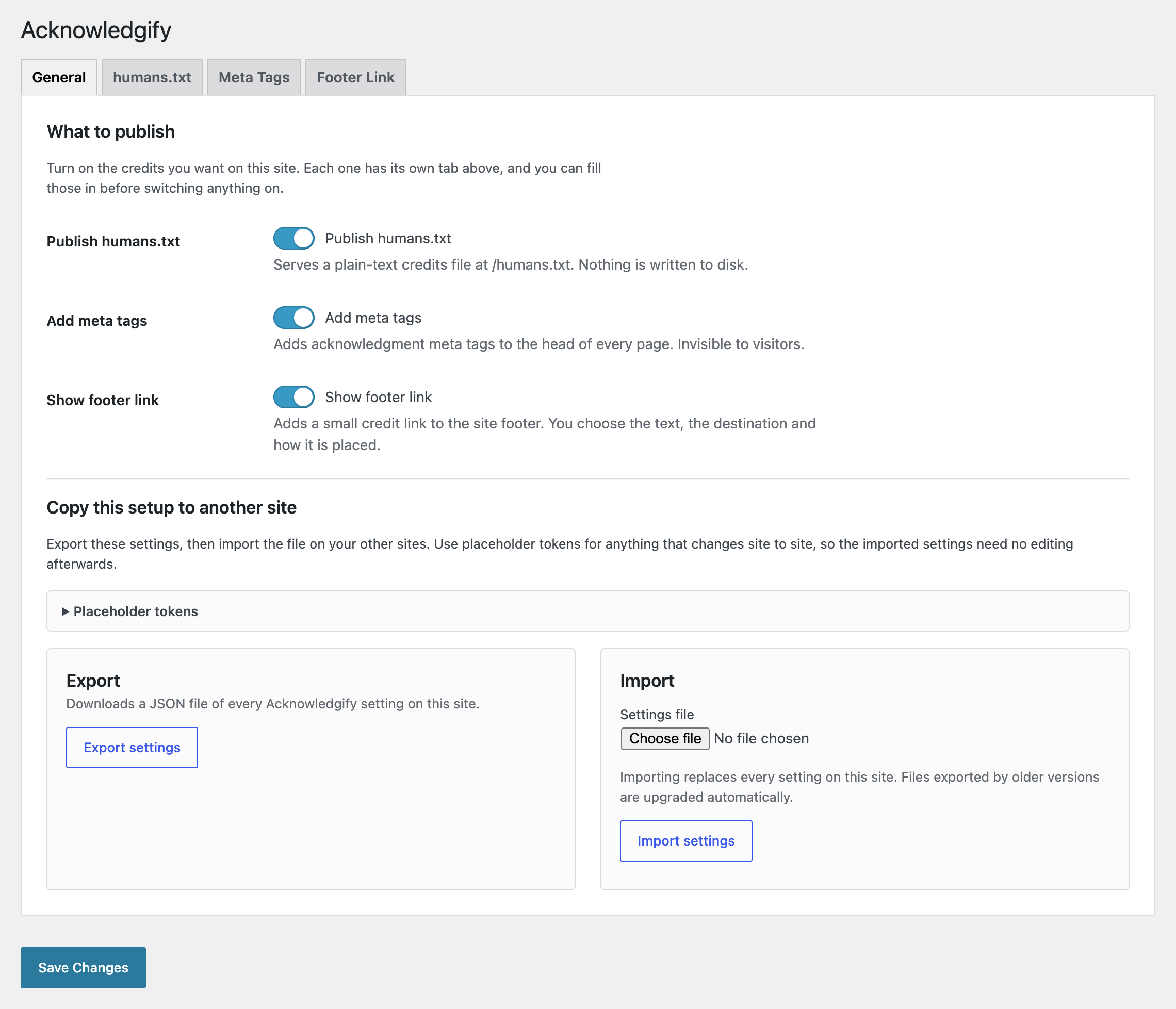
Three outputs, each switched on separately:
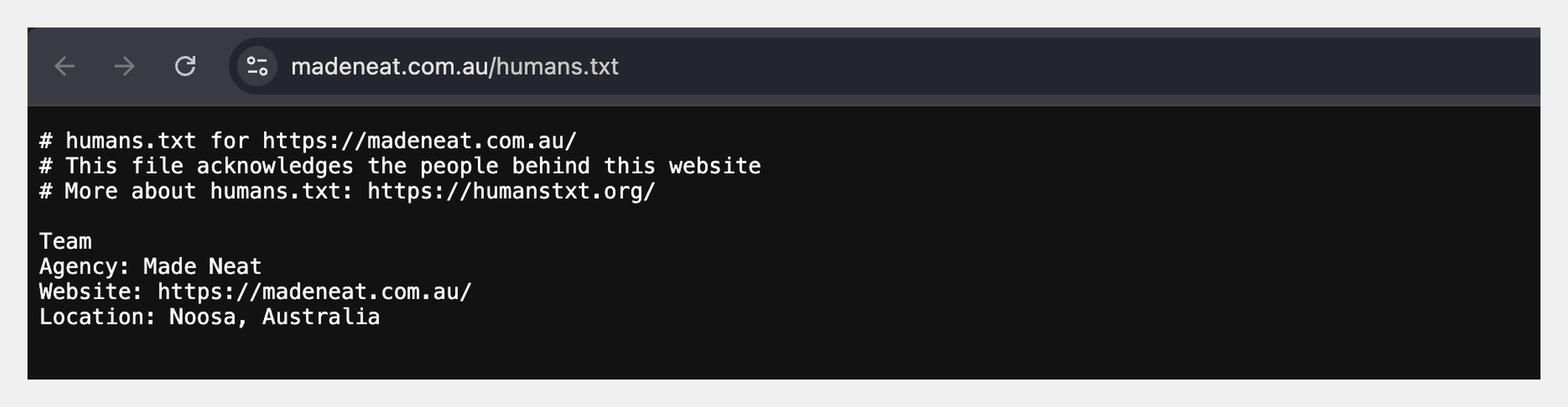
- A humans.txt file. A plain-text credits file at
/humans.txt, following the humanstxt.org convention. It is served from the database, so nothing is written to disk and nothing is left behind if you remove the plugin. - Acknowledgment meta tags.
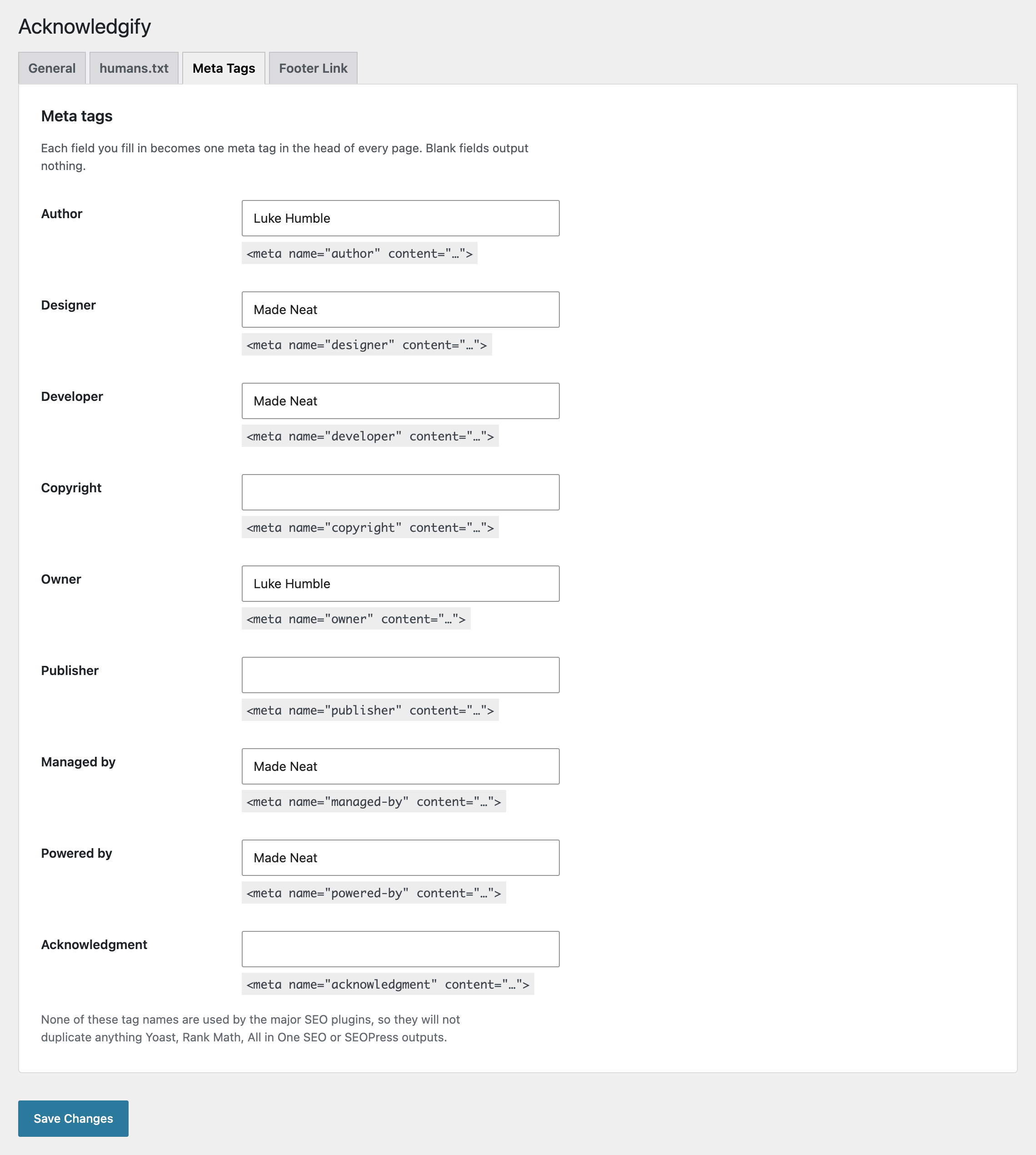
author,designer,developer,copyright,owner,publisher,managed-by,powered-byandacknowledgment, added to the head of every page. Invisible to visitors, there for anyone who views the source. - A footer credit link. One small link in the footer, with your words, your destination and your styling.
Why agencies and freelancers use it
- Your name travels with your work. Visitors who like a site look in the footer to see who built it. Developers, auditors and site audit tools look in humans.txt and the page source. Acknowledgify covers all three places.
- Show up where agencies are tracked. BuiltWith, the web technology profiler, lists web agencies alongside the sites they built, and identifies a number of them from homepage footer credits. A consistent footer credit across your portfolio gives it something to find.
- A clear record of who is responsible. Clients change staff, hire new marketing managers and forget who looks after the site. The
managed-bytag and humans.txt answer that question for whoever asks next, which makes handovers and support calls simpler. - Credit the people you work with. Photographers, videographers, copywriters, brand designers. Naming collaborators publicly costs you nothing and is good for the relationship.
- One setup across your whole portfolio. Configure one site, export the settings, import them everywhere else. Placeholder tokens fill in each site’s own details, so there is nothing to edit per site.
- Nothing to justify to the client. No tracking, no frontend scripts or stylesheets, and nofollow footer links by default. Uninstall removes the plugin settings. The client can see exactly what is published and where.
Credit everyone who worked on the site
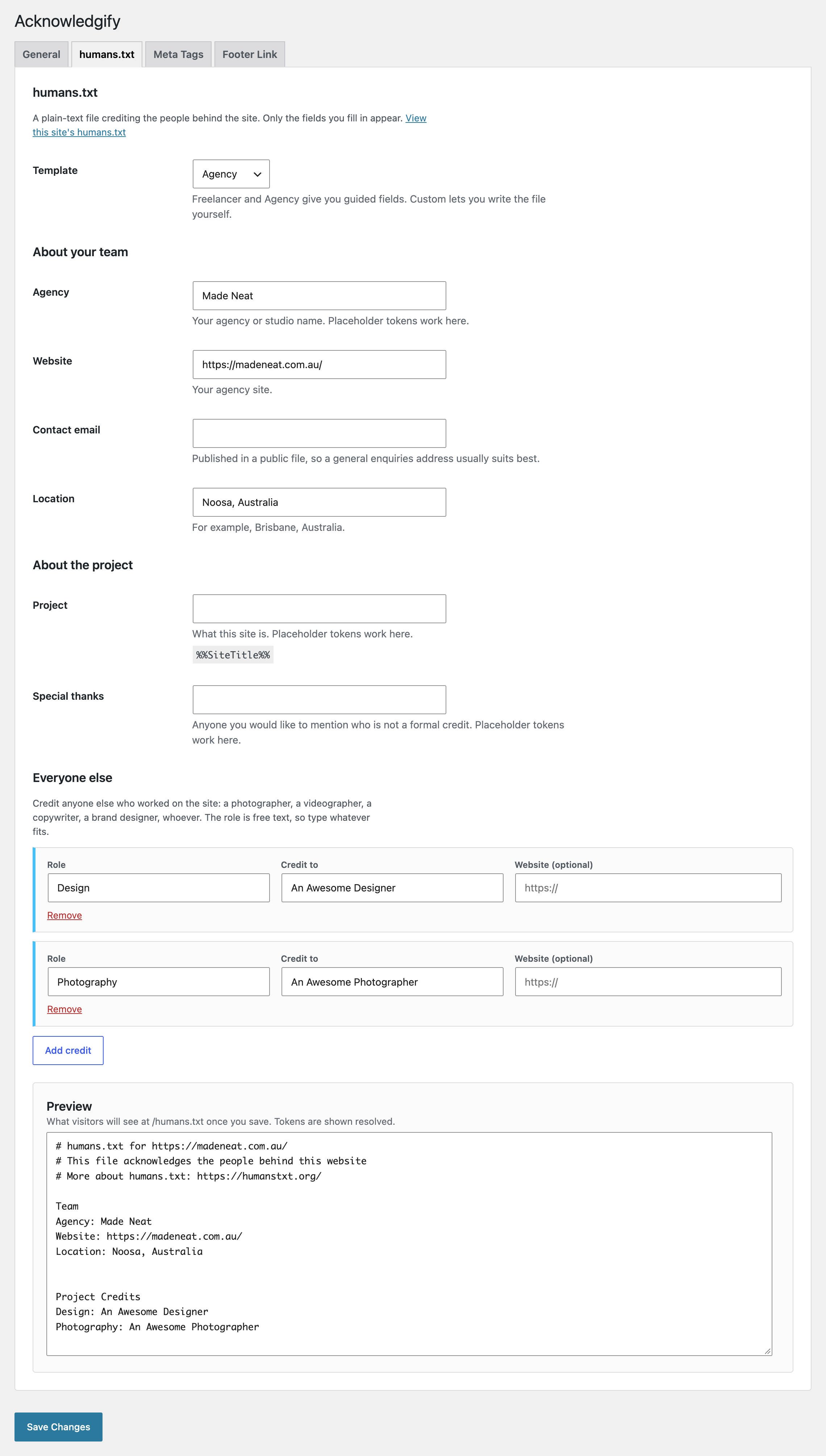
Most sites are a team effort. Alongside your own details, add a credit row for each person or business who contributed, up to 20 per template. Each row has three parts:
- Role. Free text, so type whatever fits, with suggestions to hand.
- Name of the person or business.
- Website, optional, if you want to link to them.
Suggested roles cover Design, Development, SEO & Performance, Hosting & Maintenance, Photography, Videography, Copywriting, Branding, Illustration, Content Strategy, Accessibility, Project Management, Translation and Analytics.
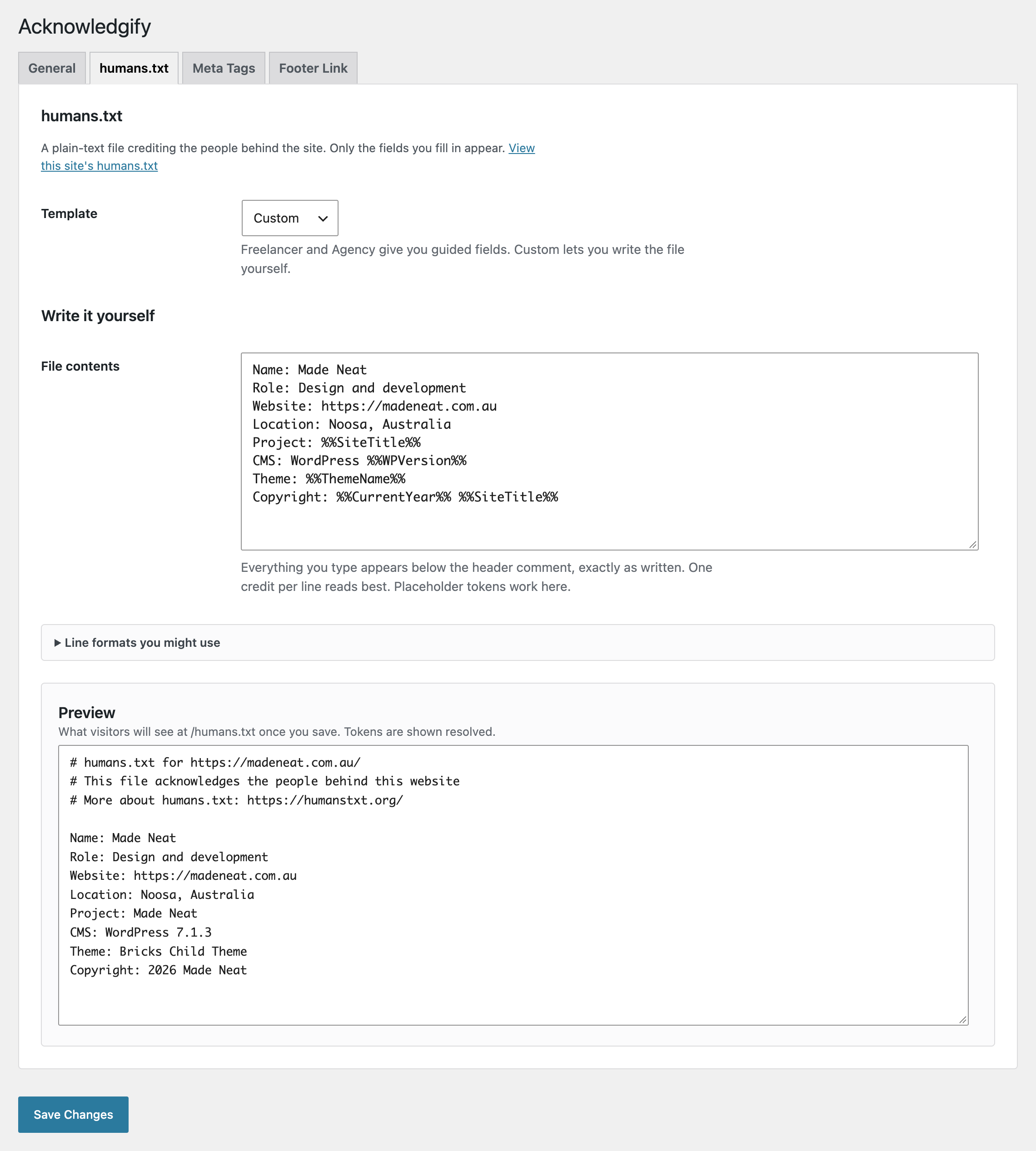
Each row becomes a line in the Project Credits section of humans.txt, and placeholder tokens work inside them. Freelancer and Agency each have their own saved credit rows. Switching templates preserves both lists without combining them. Use Copy credits to add entries from the other template deliberately. The Custom template lets you write every line yourself.
A footer credit that fits any design
The footer link has to sit comfortably on someone else’s design, so you decide how it looks and where it goes:
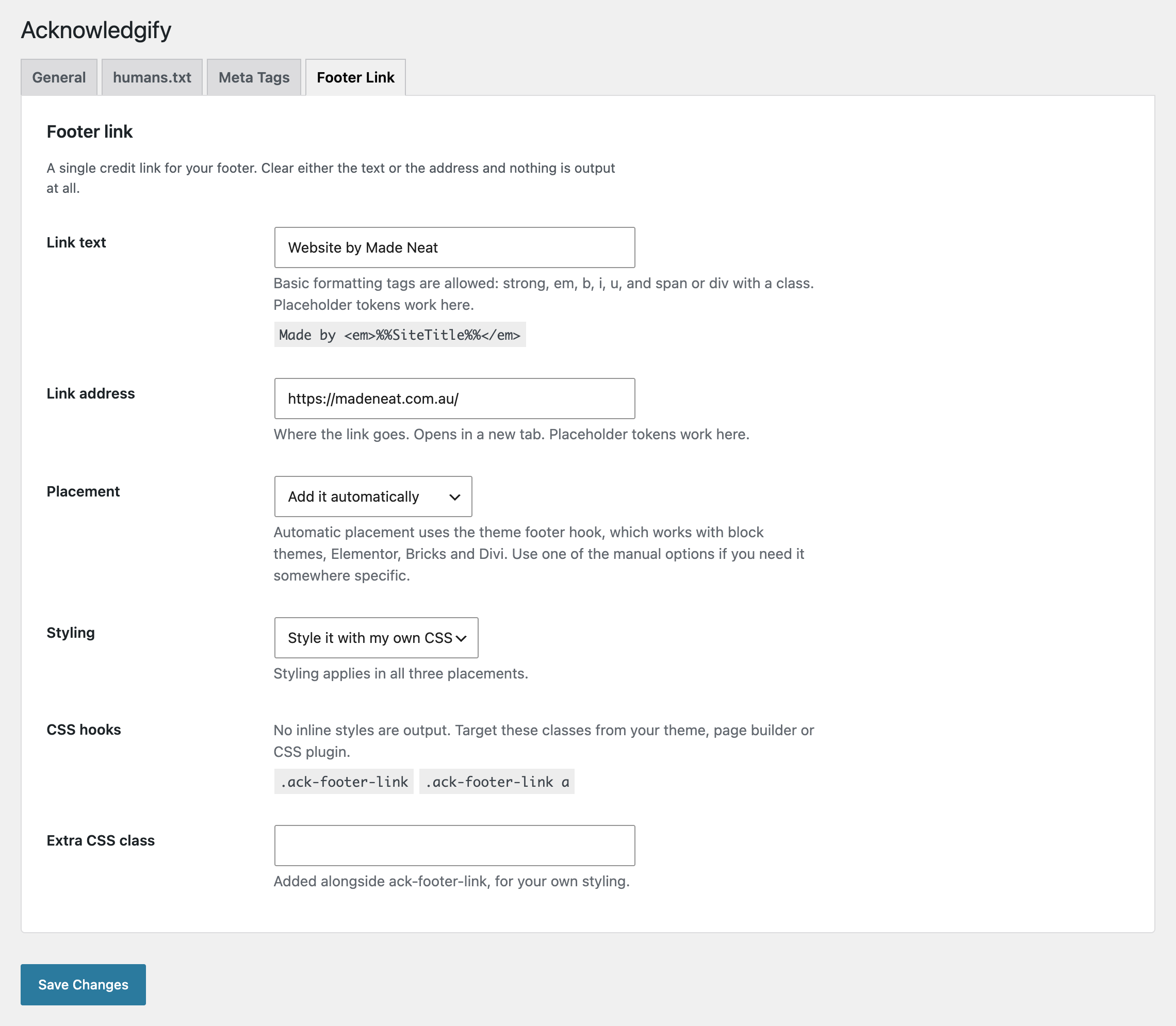
- Your words, your link. Basic formatting is allowed (bold, italics, underline, and spans or divs with a class), and placeholder tokens work in both the text and the address.
- Three ways to place it. Automatically in the site footer, with the
[acknowledgify_madeby_footer]shortcode anywhere you can add content, or with a PHP function in a child theme template. - Style it here, or with your own CSS. Set the text colour, background colour, alignment and font size in the plugin, or switch inline styling off and target
.ack-footer-linkfrom your theme or page builder. Add your own CSS class either way. - Qualified by default. The link includes
nofollow noopenerand opens in a new tab. This qualifies the credit link for search engines and protects the original page from access through the new window.
Set up once, roll out to every site
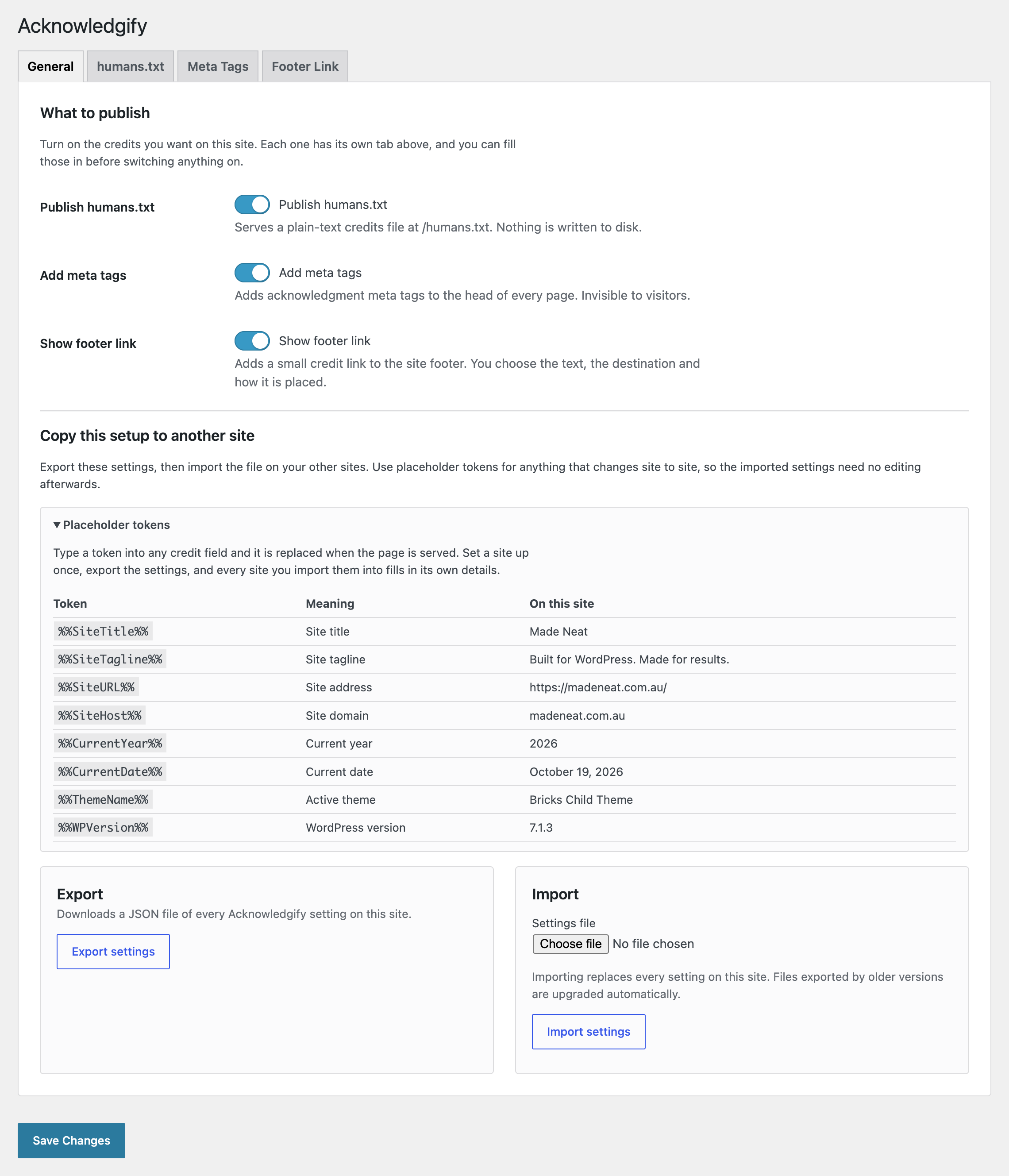
Anything that changes from site to site can be written as a placeholder token, resolved when the page is served:
Project: %%SiteTitle%%
Copyright: %%CurrentYear%% %%SiteTitle%%
Theme: %%ThemeName%%
The full set is %%SiteTitle%%, %%SiteTagline%%, %%SiteURL%%, %%SiteHost%%, %%CurrentYear%%, %%CurrentDate%%, %%ThemeName%% and %%WPVersion%%. The settings screen lists each one beside the value it has on the site you are looking at, so there is nothing to look up.
Export the settings from one site, import the file on the next, and every site credits its own name with no editing. For an agency looking after dozens or hundreds of sites, that turns a per-site job into a single file.
What it does and does not do for SEO and AI
Straight answers, because this is an area where a lot of plugins overclaim.
- humans.txt and the meta tags are not ranking factors. Search engines do not use them to rank pages, and no plugin that outputs them can honestly promise otherwise. They are for people and tools that want to know who built a site.
- The footer link is nofollow by default. Google’s link-spam policy includes widely distributed footer links among its examples. Acknowledgify qualifies credit links with nofollow by default. This does not guarantee search rankings or compliance for every deployment.
- AI tools. Your credits are published as plain, standard text that any crawler can read, including those that feed AI tools. Whether a given tool reads or cites them is up to that tool, so Acknowledgify makes no promise of AI visibility. The plugin itself uses no AI and sends nothing to any AI service.
- Page speed. The plugin loads no front-end scripts or stylesheets and uses WordPress APIs for settings and tokens. It still executes PHP; measure performance on your own site if needed.
Quick to set up
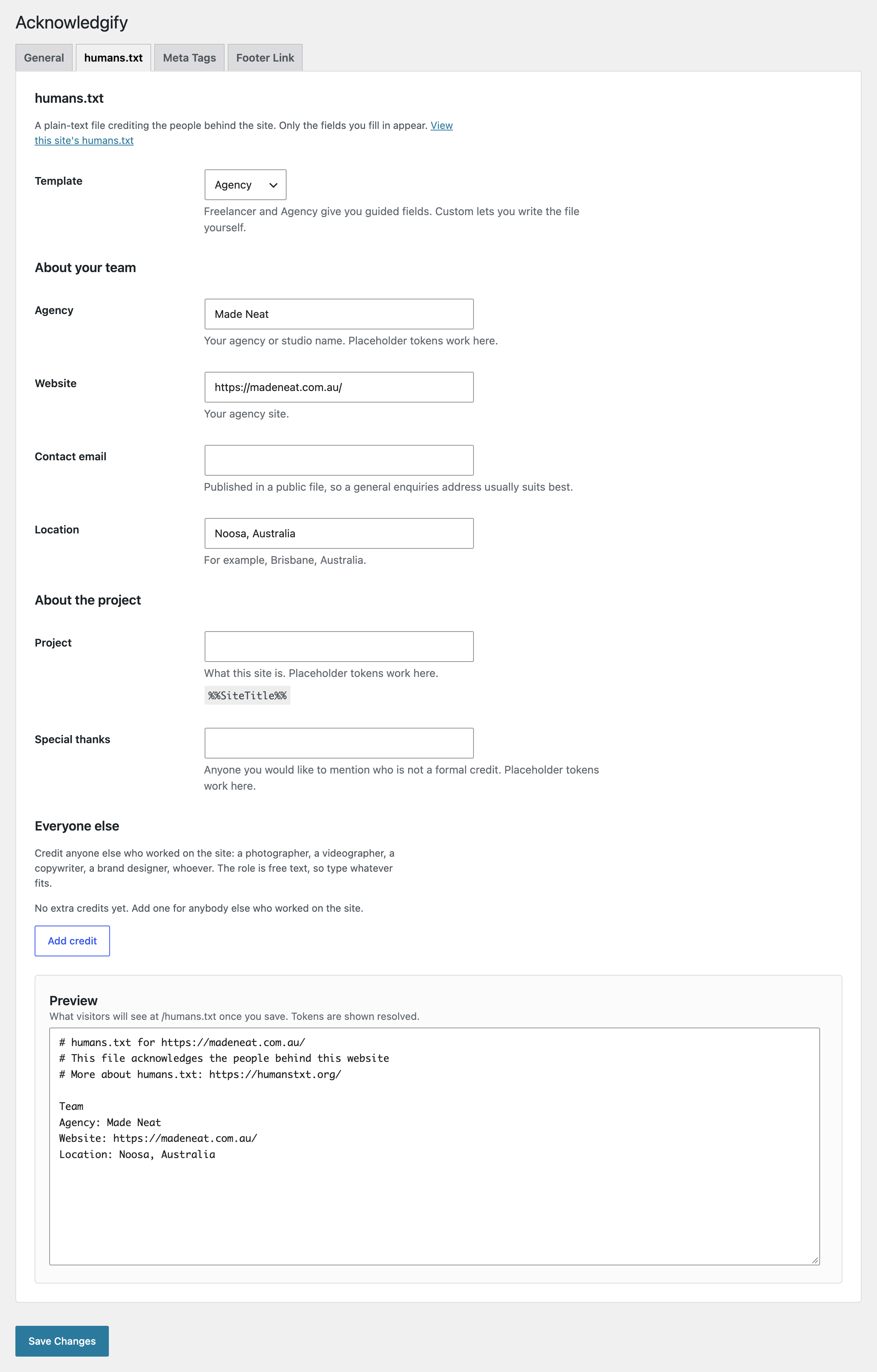
Fill in a couple of fields and a live preview shows the humans.txt file as visitors will see it, with tokens already resolved. Fields come with plain-language help, and nothing is hidden behind a save, so a site can be set up completely before you switch anything on.
Built to stay out of the way
- Free, with no catch. No paid tier, no licence keys, no locked features and no upsells in the admin. It is a give-back to the open source community.
- No phone-home. No telemetry, no tracking and no external requests of any kind. Your credit data never leaves your site.
- Lightweight. Settings are stored in one option and cached within the current blog context. Tokens use WordPress options and theme APIs; the plugin issues no direct SQL queries.
- Accessible admin. Keyboard operable, every field properly labelled, and colours that meet WCAG AA contrast.
- Works with your setup. Uses the standard WordPress footer hook, so it works with block themes, classic themes and page builders including Elementor, Bricks and Divi. Works on multisite. Does not interfere with WordPress sitemaps or with Yoast SEO, Rank Math, All in One SEO or SEOPress.
- Translation-ready. Every string is translatable, including the comment header inside humans.txt, and WordPress downloads any available translation automatically.
Golfplatz
Installation
- Install through Plugins > Add New, or upload the
acknowledgifyfolder to/wp-content/plugins/. - Aktivieren Sie das Plugin.
- Go to Settings > Acknowledgify, fill in your details and switch on the credits you want.
To roll the same setup out to more sites, export your settings from Settings > Acknowledgify > General and import the file on each new site.
Änderungsprotokoll
Adds independent Agency/Freelancer credits, placeholder tokens, an improved settings screen and nofollow footer links. Preserves existing Agency credits during upgrade. Back up your database and export settings before upgrading.
1.2.0
Credit anyone who worked on a site, reuse settings across your portfolio with placeholder tokens, and manage everything through an improved, accessible settings screen.
Neu
- Flexible credit rows. Add contributors with a free-text role, name and optional website. Suggested roles include photography, videography, copywriting, branding, illustration, content strategy, accessibility, project management, translation and analytics.
- Separate template credits. Agency and Freelancer each have their own saved credit list. Switching templates preserves both lists without combining them. Custom remains free-form content.
- Copy credits between templates. Copy entries from the other template without overwriting existing rows. Exact duplicates are skipped, and copies that would exceed the row limit are refused without partial changes. Save changes to keep the copied entries.
- Placeholder tokens. Supports
%%SiteTitle%%,%%SiteTagline%%,%%SiteURL%%,%%SiteHost%%,%%CurrentYear%%,%%CurrentDate%%,%%ThemeName%%and%%WPVersion%%. Values resolve when content is displayed, allowing exported settings to adapt to each site. - Responsive settings screen. Dedicated layouts make the plugin settings easier to use on mobile devices.
Changed
- Nofollow footer credits. Footer links now include
nofollowby default to qualify credit links for search engines. Developers can customize this throughacknowledgify_footer_link_rel;noopeneris always retained. This does not guarantee search rankings or universal policy compliance. - Agency role fields become credit rows. The four fixed Agency role fields migrate into the Agency credit list, preserving their values and order. They remain separate from Freelancer credits.
Improved
- All settings tabs are visible immediately, allowing features to be configured before they are enabled.
- Saving settings returns to the selected tab.
- Adds plain-language help and clearer field descriptions.
- The existing three-template humans.txt preview now supports credit rows, independent template lists and resolved tokens.
- The humans.txt comment header is now translatable.
- humans.txt responses can be cached for an hour instead of being marked uncacheable on every request. Developers can adjust this through
acknowledgify_humans_txt_max_age. - Rewrite rules are refreshed when the humans.txt feature is enabled or disabled.
- Settings are cached within the current request and blog context to reduce repeated calls to WordPress’s options API.
- The alternative
/?acknowledgify_humans_txt=1address no longer serves a duplicate copy by default. - Adds developer filters for tokens, meta tags, role suggestions, header lines, cache lifetime, the footer wrapper and footer link text, URL and rel attributes. Text and URL filters allow credits to vary by language.
- Uninstall removes settings across the entire multisite network, including networks with more than 100 sites.
- Refreshes translation strings and documentation, including clearer explanations of migration behavior, SEO expectations and performance.
Accessibility
- Adds explicit field labels and accessible names for the three feature switches.
- Implements ARIA tabs with arrow-key navigation and visible keyboard focus.
- Adjusts primary button and link colour pairs to meet WCAG AA normal-text contrast.
- Improves focus handling and announcements when adding or removing credit rows.
Fixed
- Inactive Agency credits appearing after upgrade. Upgrades and imports from 1.1.5 and earlier keep legacy Agency roles in the Agency list, even when Freelancer or Custom is selected.
- Repeated migration. Settings migrations are versioned so subsequent saves and page loads do not duplicate migrated rows.
- Blank footer fields. Deliberately empty footer text or URLs now remain empty after saving and suppress the footer credit. Legacy default backfilling applies only during legacy migration.
- URL-token handling. Footer URLs, credit websites and template website fields preserve unresolved tokens through saving and import, including a bare
%%SiteURL%%. Footer destinations remain escaped after token resolution. - Tab persistence. Removes the duplicate form return-URL field that could send users back to the wrong tab after saving.
- Multisite cache isolation. Clears settings and token caches when switching blogs and when restoring the original blog.
- Import confirmation. Verifies stored settings before reporting success, accepts unchanged imports and rejects exports requiring a newer settings schema.
- Settings feedback. Avoids duplicate save confirmations and keeps feature Off markers synchronized with their switches.
- PHP snippet instructions. Corrects references to breadcrumbs and
header.php, and provides an example matching the footer function. - Plugin metadata. Adds the missing
Requires at leastandRequires PHPheaders,LICENSE.txtand the SPDX licence identifierGPL-2.0-or-later.
If you are upgrading
Back up your database and export settings before upgrading. Existing Agency role fields are preserved as Agency credit rows, separate from Freelancer credits. Footer credit links now use nofollow by default.
1.1.5
- Fixed permalinks issue – canonical redirects are no longer disabled site-wide
- humans.txt now returns a proper 404 when the feature is disabled
- Removed redundant rewrite rules flush on every page load
- Fixed humans.txt escaping – names such as “Smith & Jones” and multi-line custom templates now appear exactly as entered
- Footer acknowledgment link now includes rel=”noopener”
- New “Link styling” option – Text Colour and Font Size now apply in all three placement modes, or can be switched off entirely so you can style .ack-footer-link with your own CSS. Existing sites keep their current appearance.
- acknowledgify_display_madeby_footer() now accepts true/false to echo or return, matching the documented behaviour
- Settings are now saved and sanitised correctly, and the Managed By meta tag no longer discards its value
- Import now reports accurate errors instead of always claiming success
1.1.4
- Security patches
1.1.3
- Added VDP disclaimer
1.1.2
- Permalink redirect issue fix
1.1.1
- Minor fixes for settings import/export feature
Screenshots

Für Entwickler
Ist das dein Plugin? Zeigen Sie die Zahlen.
Fügen Sie Ihrer Website, Docs oder GitHub Readme ein Live-Badge hinzu. Es wird von selbst aktualisiert - kein Konto erforderlich.
Best Acknowledgify alternatives
All credits plugins →





Fragen und Antworten
Acknowledgify: quick answers
Gerade Antworten, gezogen von Live WordPress.org Daten.
Quelle: WordPress.org
Is Acknowledgify free?
Yes. Acknowledgify is free to download and use from the official WordPress.org plugin directory.
Is Acknowledgify safe to use in 2026?
Acknowledgify is a solid plugin choice in 2026, with a few things worth checking first. It runs on 100+ sites and was last updated 1 month ago, and scores 68/100 on our health check.
How many websites use Acknowledgify?
Acknowledgify is active on 100+ WordPress websites and has been downloaded 2,670 times since it launched in March 2025. It was downloaded 471 times in the last 30 days.
Does Acknowledgify work with WordPress 7.1?
Yes. The developer has tested Acknowledgify up to WordPress 7.1.5, the latest release. It requires WordPress 6.4 or newer.
What PHP version does Acknowledgify need?
Acknowledgify requires PHP 8.0 or higher. Most hosts run PHP 8.x today, so it works on any modern WordPress hosting.
When was Acknowledgify last updated?
The latest version, 1.2.0, was released on October 21, 2026 (1 month ago).
Who makes Acknowledgify?
Acknowledgify is developed and maintained by Made Neat.
What are the best alternatives to Acknowledgify?
The most popular alternatives to Acknowledgify are FSM Custom Featured Image C… (5K+ installs), Image Source Control Lite (3K+ installs) and Footer Credits (1K+ installs).
Angetrieben von PageForge
Eine Vorlage und eine Tabelle. Eine echte Seite für jede Suche.
PageForge Verwandelt jede Zeile eines CSV in eine WordPress-Seite mit eigenem Titel, URL, SEO Felder und Schema entworfen. Kostenlos auf WordPress.org.
- CSV und XLSX, plus Google Sheets auf Beruf und Unternehmen
- seinen eigenen Titel, URL, SEO Felder und Schema für jede Seite
- Arbeitet mit dem Blockeditor, Elementor, Divi und Avada
- Kostenlos auf WordPress.org, keine Kreditkarte