


Post Duplicator
Creates functionality to duplicate any and all post types, including taxonomies & custom fields. Perfect for developers and content creators.

Escolha segura
Yes — Post Duplicator is a safe, well-maintained plugin to use in 2026. It runs on 200K+ sites, is rated 4.8/5 and was last updated 2 weeks ago, and scores 95/100 on our health check.
- Comprovado em escala em mais de 200 mil sites ativos
- Loved by users — 4.8/5 from 80 reviews
- Desenvolvido ativamente — última atualização 2 semanas atrás
- Testado com as últimas WordPress (7.1)
- Momentum — downloads up 360.9% vs the previous 30 days
Como ele se acumula?
Lado a lado em instalações, atualizações, avaliações e suporte



Downloads diários
Os picos de download geralmente seguem uma nova versão — cada site que atualiza automaticamente é um download.
Rankings
Where Post Duplicator stands todayWordPress.org Classificações de pesquisa
Posição ao vivo na pesquisa de plugins, top 100| Palavra chave | Posição |
|---|---|
| duplicate | #27 |
| duplication | #1 |
| post | #6 |
| posts | #29 |
Adoção da versão
Compartilhamento de sites ativos por lançamento.
Divisão de classificação
★★★★★★★★★★ 4.8 from 80 reviews
About Post Duplicator
From the official readme · v3.0.19Descrição
Save Time. Work Smarter. Duplicate Any Post Type with Ease.
Post Duplicator is the ultimate WordPress plugin for quickly creating exact duplicates of any post type in your WordPress site. Whether you’re working with standard posts, pages, or custom post types, this plugin makes it effortless to clone content while preserving all taxonomies, custom fields, and metadata.
Características principais:
- Universal Post Type Support – Works with every post type WordPress supports, including custom post types from your favorite plugins and themes
- Complete Data Preservation – Automatically copies all taxonomies, custom fields, metadata, and featured images
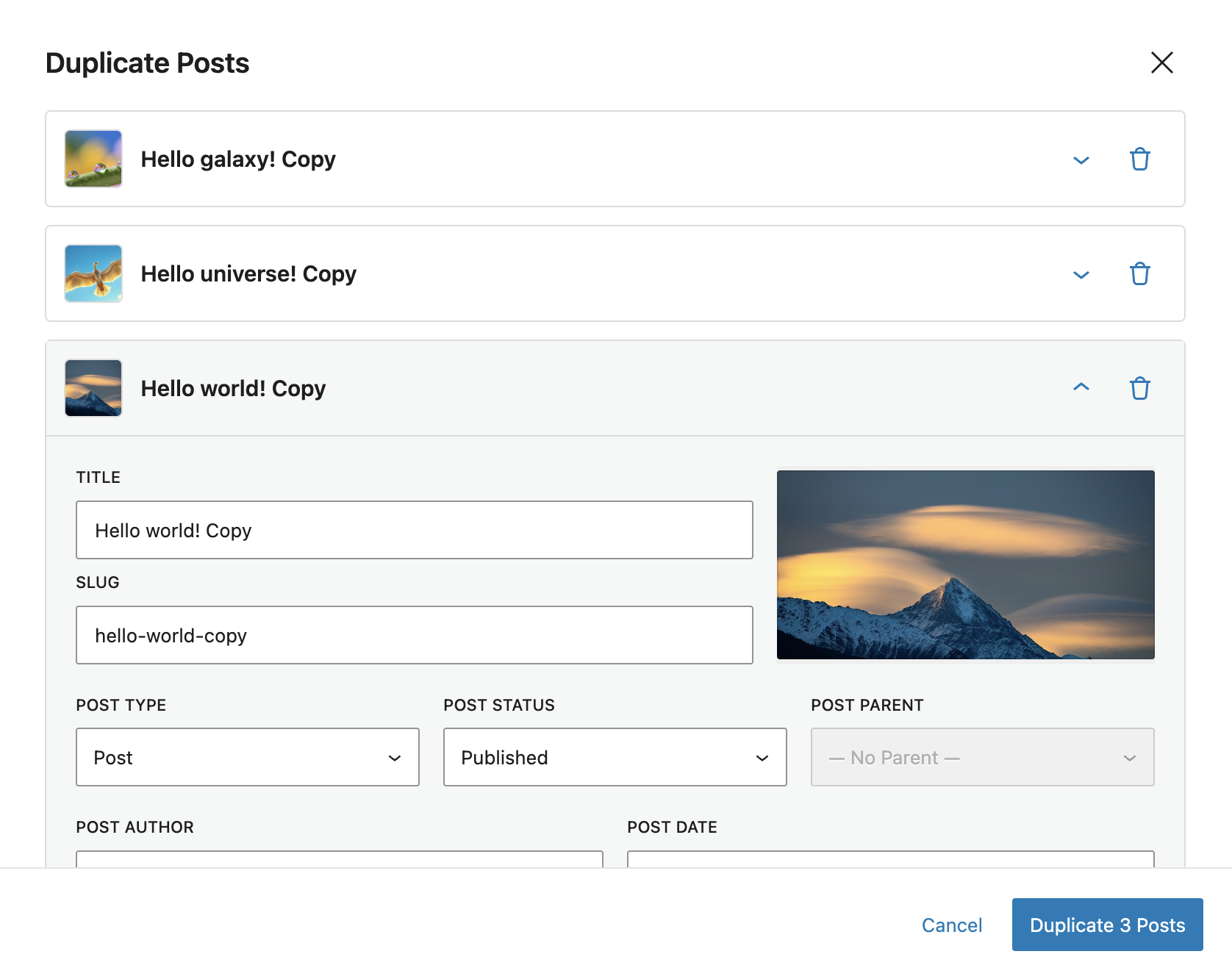
- Bulk Duplication – Select and duplicate multiple posts at once with individual settings per post
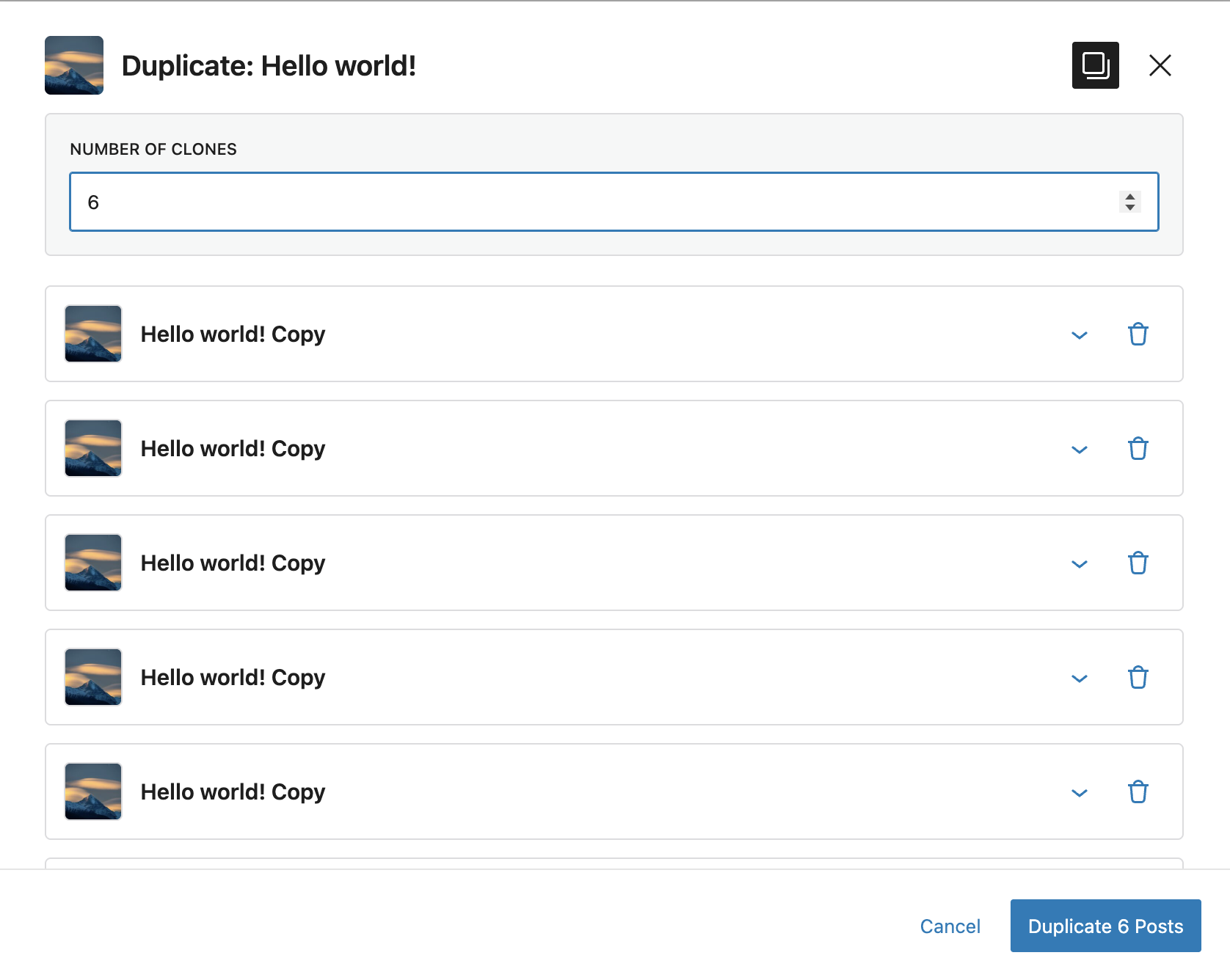
- Multiple Clones – Create multiple copies of a single post simultaneously (up to 50 clones)
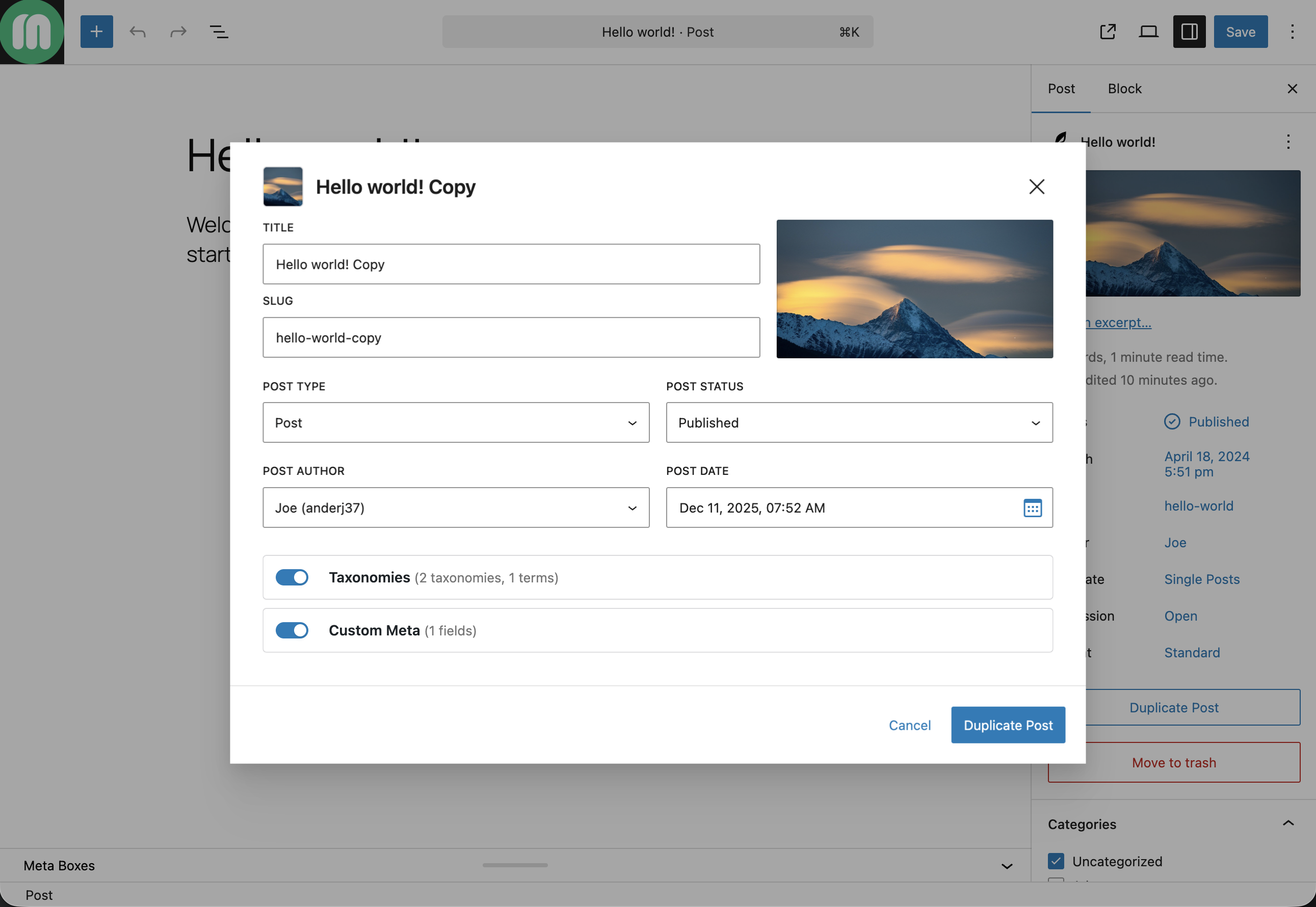
- Flexible Duplication Options – Customize title, slug, status, author, date, post type, and parent for each duplicate
- Featured Image Management – Set, replace, or remove featured images directly in the duplication modal
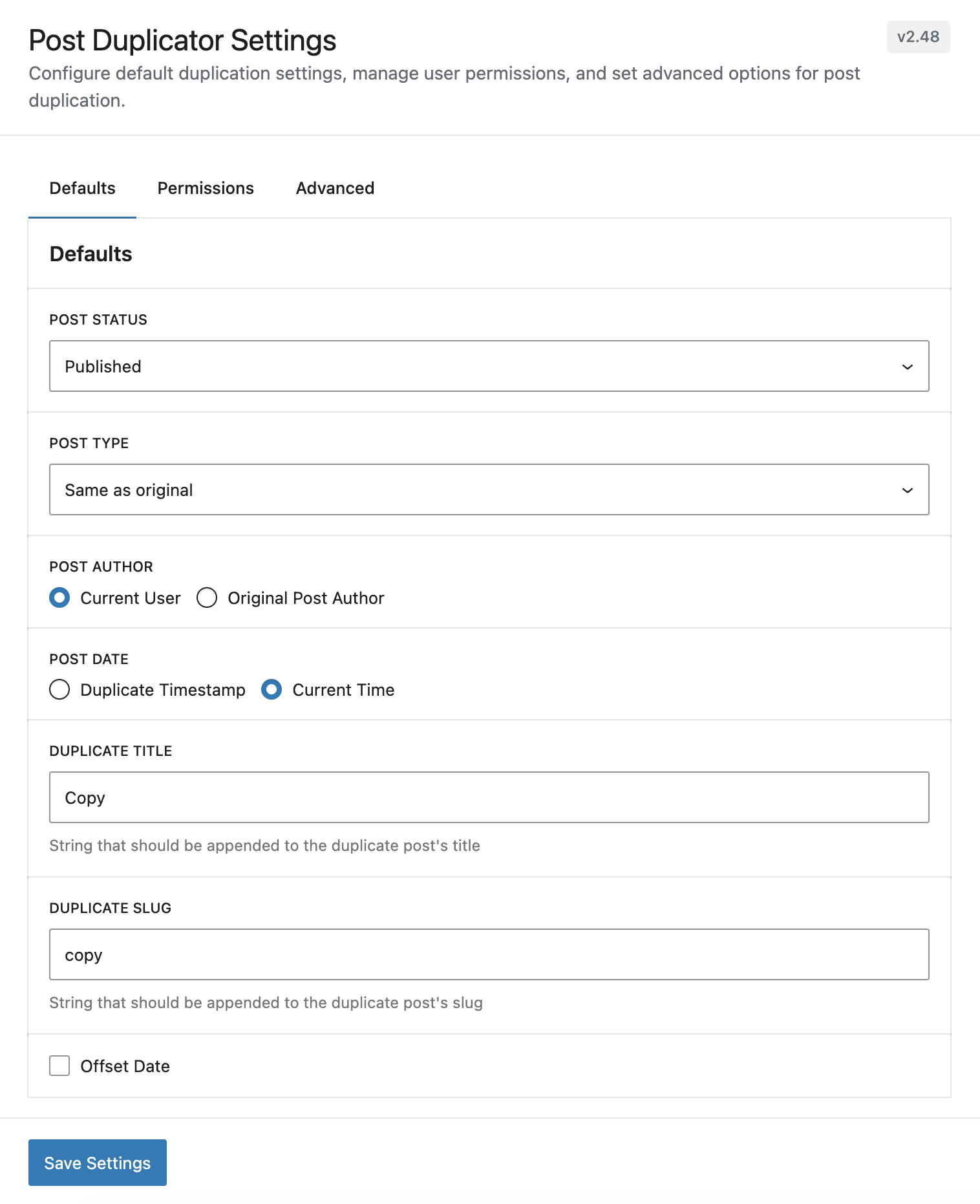
- Smart Defaults – Configure default settings that apply to all duplications (draft status, current user as author)
- Post Types Configuration – Control which post types can be duplicated and which appear in the “Post Type” dropdown menu
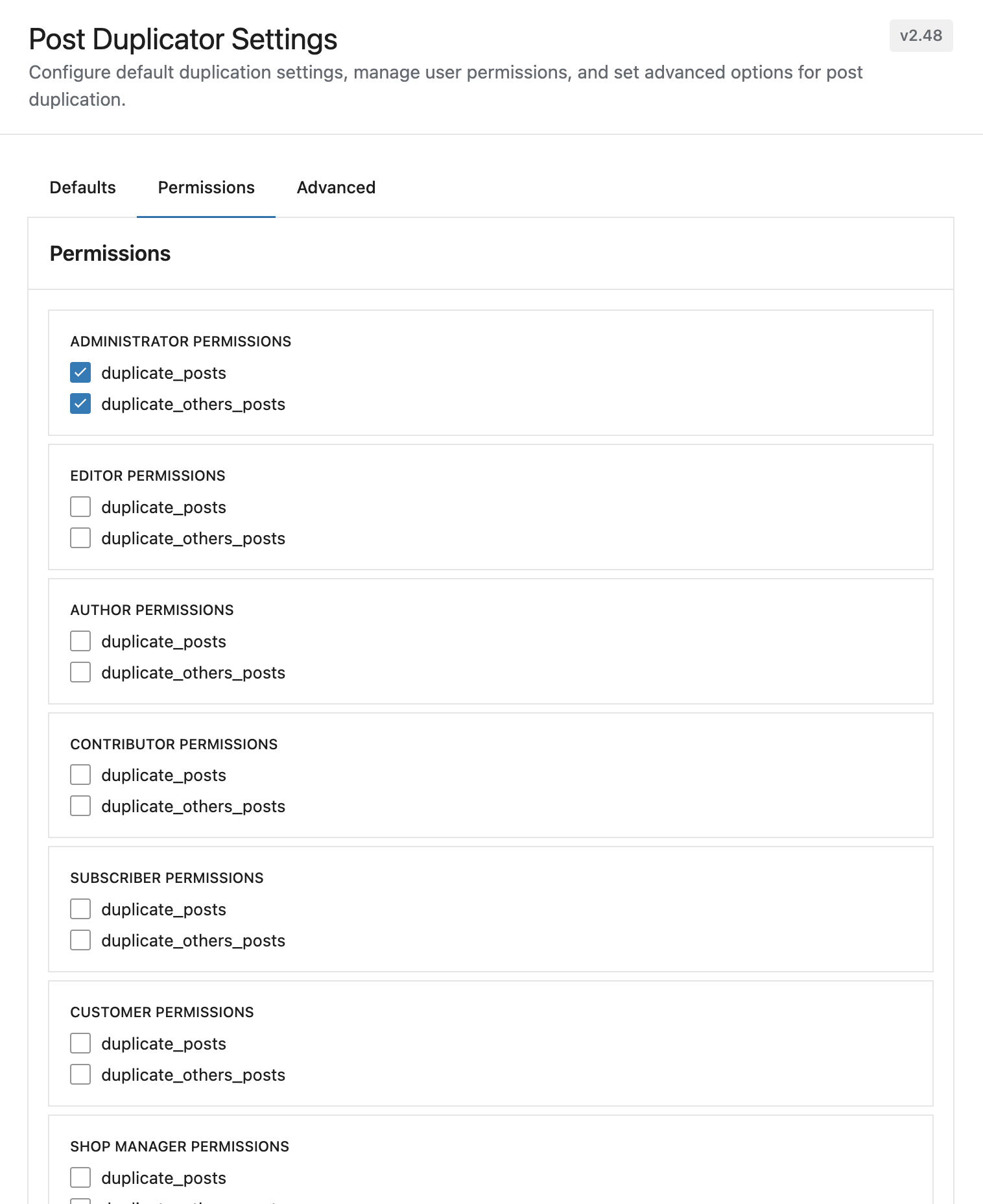
- Permission Control – Granular control over who can duplicate posts with role-based permissions
- Modern Interface – Beautiful modal interface with live editing and expandable settings
- Cross-Post Type Duplication – Convert posts to different post types during duplication
- Hierarchical Post Support – Set parent posts for pages and hierarchical custom post types
- One-Click Operation – Duplicate posts from the posts list, edit screen, or block editor toolbar
Perfect For:
- Developers – Quickly generate test content and dummy data for development using bulk or multiple clone features
- Content Managers – Create content templates and variations efficiently with one-click duplication
- Bloggers – Repurpose successful posts with different angles or formats using multiple clones
- E-commerce – Duplicate product variations and bulk duplicate similar listings across categories
- Content Marketers – Create A/B testing variations with the multiple clones feature
- Site Migrations – Bulk duplicate posts when restructuring or migrating content
- Multilingual Sites – Works seamlessly with WPML and Polylang for multilingual content
What Gets Duplicated:
- Post content and formatting
- Title and slug (with customizable suffixes or full editing)
- All custom fields and metadata
- Categories, tags, and custom taxonomies
- Featured images (with ability to change or remove)
- Post format and excerpt
- Comment and ping status
- Menu order
- Post parent (for hierarchical post types)
What Doesn’t Get Duplicated:
- Comments (by design – prevents duplicate comment threads)
- Post ID and GUID (new unique identifiers assigned)
How to Use:
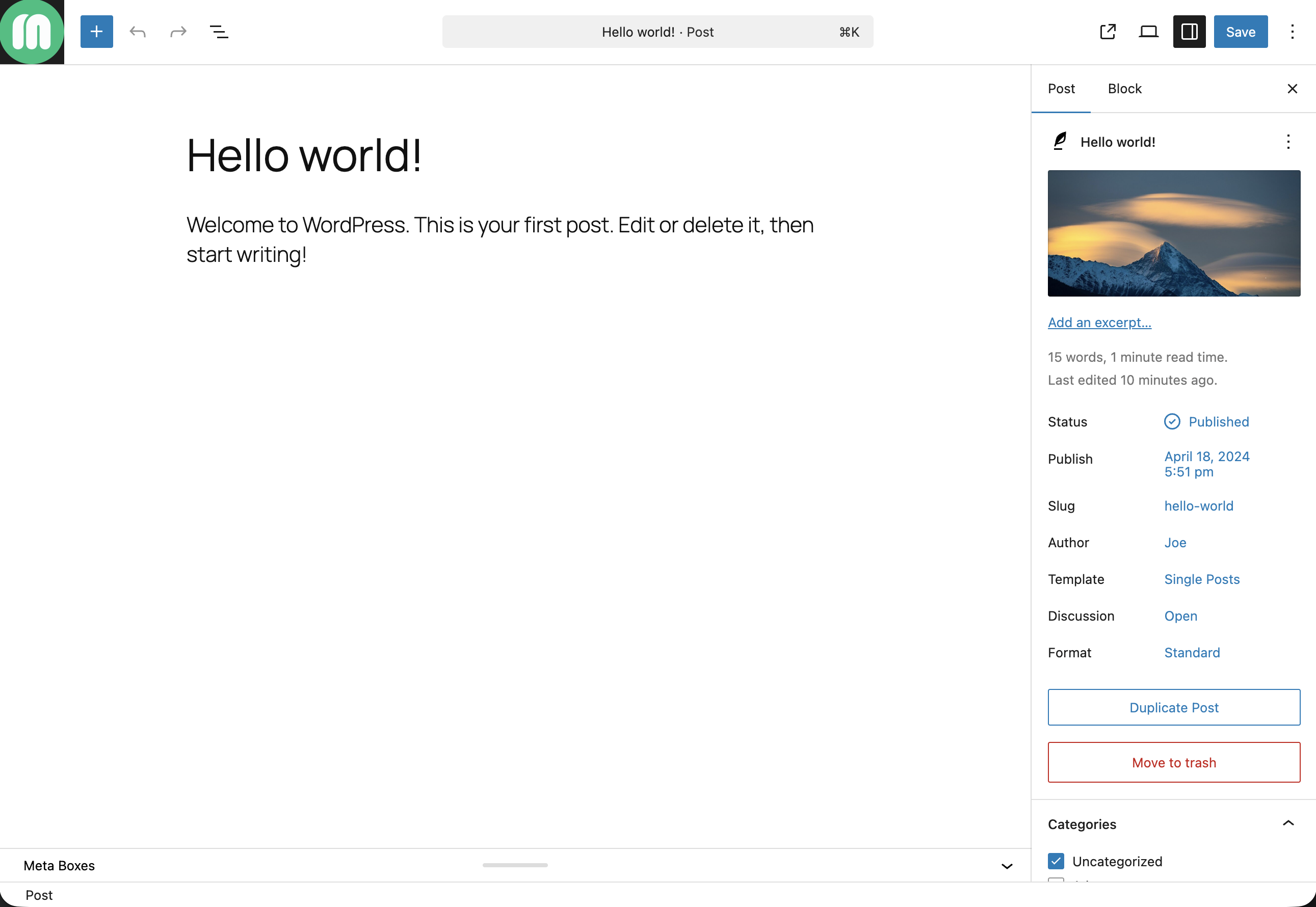
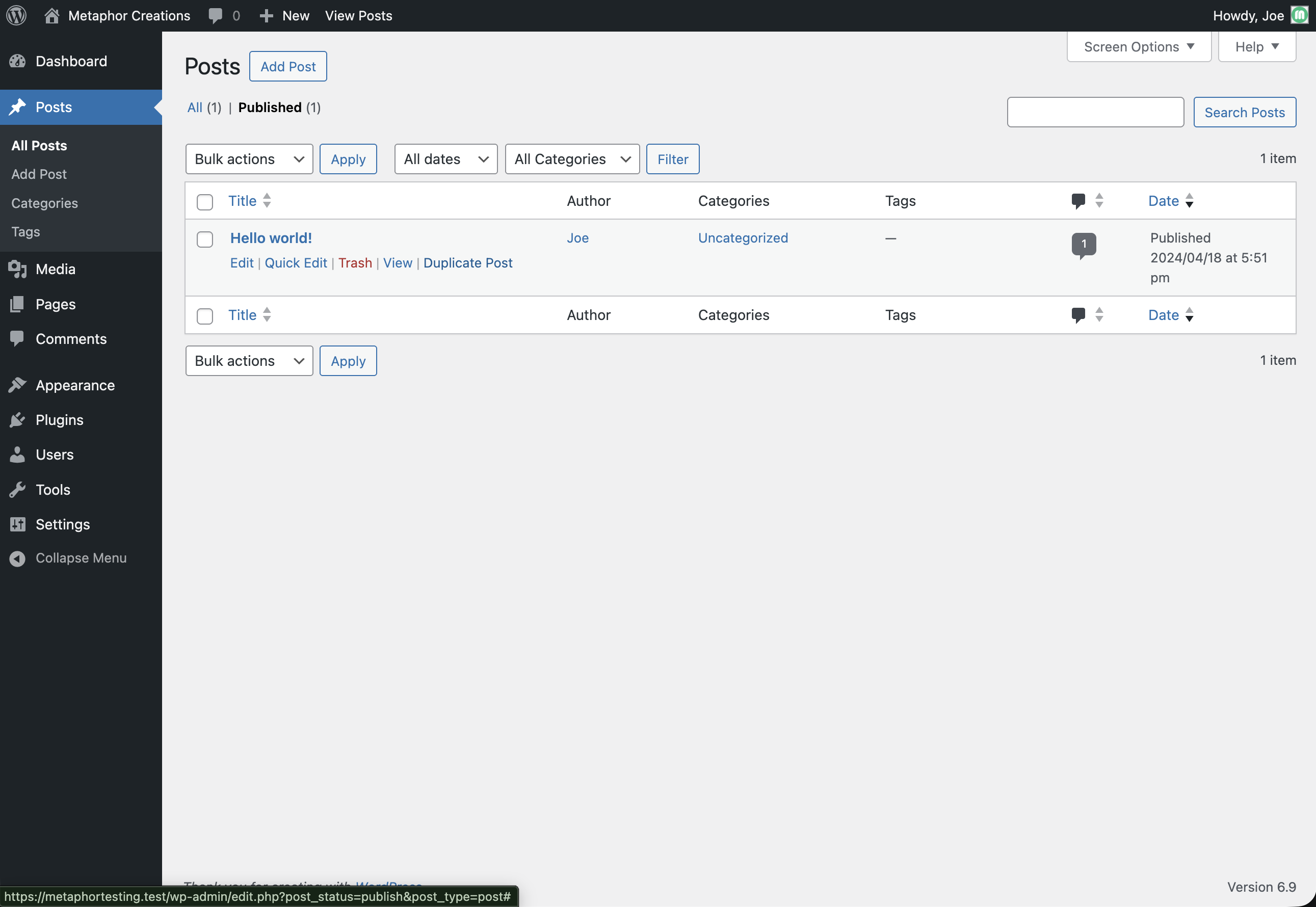
- Single Duplication: Hover over any post and click “Duplicate [Post Type]” in the row actions, or click the “Duplicate Post” button in the Gutenberg editor
- Multiple Clones: In the duplication modal, click the copy icon to create multiple copies of a single post (up to 50 clones)
- Bulk Duplication: Select multiple posts using checkboxes, choose “Duplicate” from the Bulk Actions dropdown, then configure each post individually
- Customize Settings: Edit title, slug, status, author, date, post type, featured image, and parent for each duplicate
- Configure Defaults: Go to Settings > Post Duplicator to set default status, author, date, and title/slug suffixes
- Configure Post Types: Go to Settings > Post Duplicator > Post Types to control which post types can be duplicated and which appear in the “Post Type” dropdown menu
Default Settings:
The plugin works immediately with sensible defaults:
* Duplicated posts are created as Drafts (prevents accidental publishing)
* Title suffix: “Copy”
* Slug suffix: “copy”
* Author: Current User
* Date: Current Time
All defaults can be customized in Settings > Post Duplicator.
Integration:
Post Duplicator works seamlessly with:
* WPML and Polylang (multilingual support)
* WooCommerce (excludes review counts automatically)
* ACF (Advanced Custom Fields) – preserves all field data
* WP Customer Area (special file duplication support)
* All custom post types and taxonomies
Security:
- Users without
publish_postscapability cannot publish duplicates (forced to Pending) - Non-authors cannot duplicate unpublished posts from other users
- Granular permission system controls who can duplicate posts
- All data is sanitized and validated before duplication
Developer-Friendly:
Includes hooks and filters for easy customization:
* mtphr_post_duplicator_created action
* mtphr_post_duplicator_meta_{$key}_enabled filter
* mtphr_post_duplicator_meta_value filter
Instalação
Method 1: WordPress Admin (Recommended)
- Log in to your WordPress admin dashboard
- Navigate to Plugins > Add New
- Click Upload Plugin at the top of the page
- Choose the
post-duplicator.zipfile - Click Install Now
- After installation, click Activate Plugin
Method 2: FTP/File Manager
- Extract the
post-duplicatorfolder from the zip file - Upload the entire
post-duplicatorfolder to/wp-content/plugins/on your server - Log in to your WordPress admin dashboard
- Navigate to Plugins
- Find “Post Duplicator” in the list and click Activate
After Activation:
The plugin is ready to use immediately with sensible defaults. You can start duplicating posts right away, or customize settings by going to Settings > Post Duplicator.
Requirements:
- WordPress 6.4 or higher
- PHP 7.4 or higher
Log de Changes
Code updates.
3.0.19 [2026-11-16]
- Security fix: publishing a duplicate now requires the destination post type’s publish capability, so an Author cannot publish a Page or custom type they are not allowed to publish. Props Neperio
3.0.18 [2026-11-04]
- Fixed duplication removing safe inline color styles, including transparent highlight backgrounds. Props Vitalii
- Security fix: Permissions settings only add or remove the duplicate_posts and duplicate_others_posts capabilities. Props Karthik Ramakrishnan
- Security fix: the settings save route only updates options registered by the plugin and rejects any other option name. Props Karthik Ramakrishnan
3.0.17 [2026-10-29]
- Security fix: the parent posts REST route now only returns posts the current user is allowed to read, preventing contributors from listing titles of other users’ draft and private posts. Props Luka Zimonjic (reported via WPScan)
- Security fix: the users REST route now only returns the current user unless they can edit others’ posts, so usernames are no longer exposed to contributors
3.0.16 [2026-08-22]
- Stop loading every taxonomy term when opening the duplication modal; search terms as needed instead
3.0.15 [2026-05-14]
- Security fix: store duplicated custom meta via
add_post_meta()so WordPress core’smaybe_serialize()neutralizes raw serialized payloads, mitigating PHP Object Injection (CWE-502)
3.0.14 [2026-04-02]
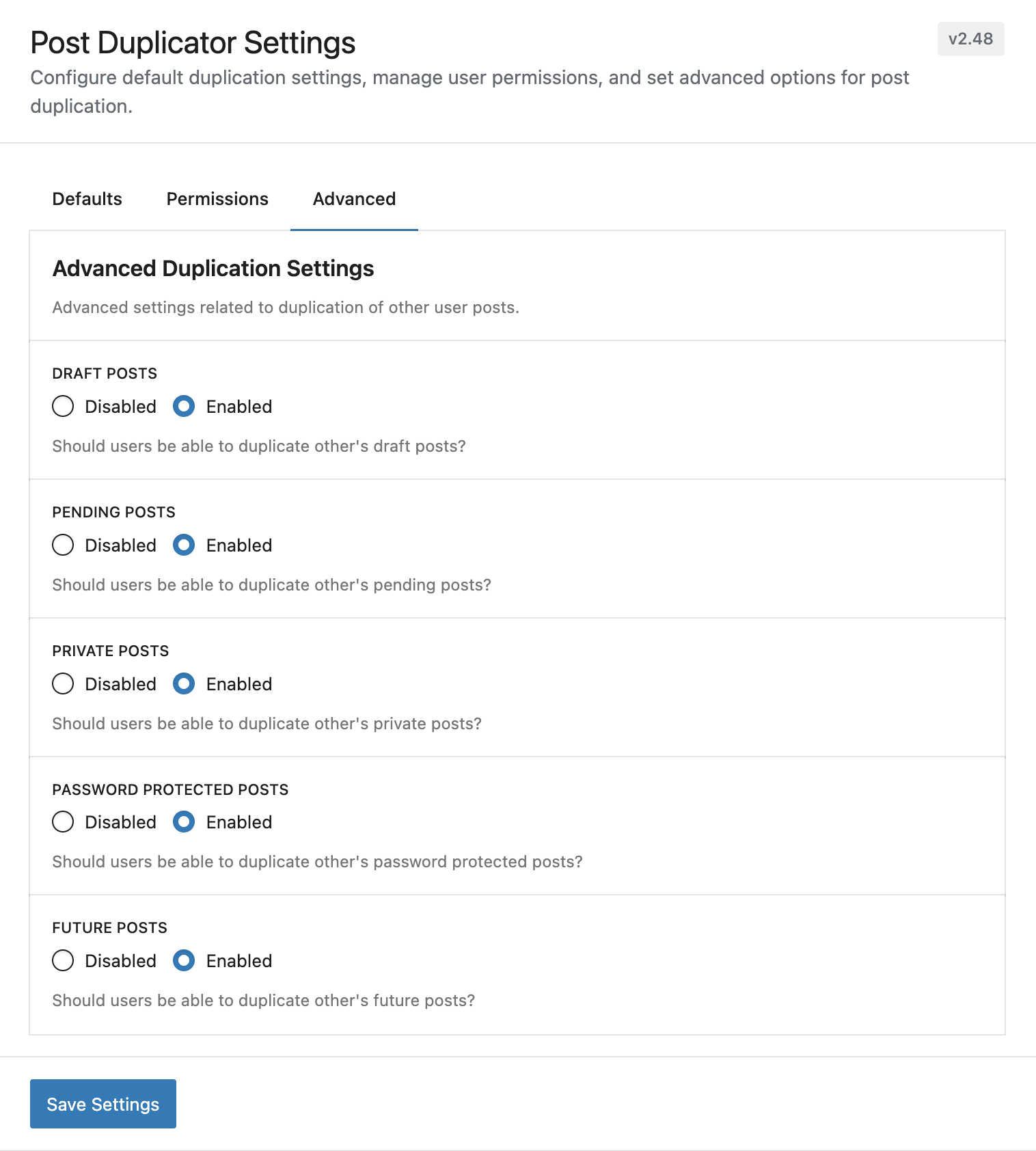
- Added “Excluded Meta Keys” setting on the Advanced tab to allow users to specify meta keys that should never be duplicated or shown in the duplication modal
- Moved
nestedpagesandwpca-listscreen slugs from settings default value to hardcoded filter inhooks.php - Cleared
additional_screensdefault value; slugs now shown as placeholder examples in the settings field - Fixed post guid being copied to duplicate for non-public post types
Capturas de tela

Para desenvolvedores
Este é o seu plugin? Mostre os números.
Adicione um crachá ao vivo ao seu site, Documentos ou Readme do GitHub. Ele é atualizado por conta própria - nenhuma conta necessária.
Best Post Duplicator alternatives
All duplicate plugins →





FAQ
Post Duplicator: quick answers
Respostas diretas, extraídas de dados ao vivo WordPress.org.
Fonte: WordPress.org
Is Post Duplicator free?
Yes. Post Duplicator is free to download and use from the official WordPress.org plugin directory.
Is Post Duplicator safe to use in 2026?
Yes — Post Duplicator is a safe, well-maintained plugin to use in 2026. It runs on 200K+ sites, is rated 4.8/5 and was last updated 2 weeks ago, and scores 95/100 on our health check.
How many websites use Post Duplicator?
Post Duplicator is active on 200K+ WordPress websites and has been downloaded 5,344,779 times since it launched in April 2012. It was downloaded 238,111 times in the last 30 days.
Does Post Duplicator work with WordPress 7.1?
Yes. The developer has tested Post Duplicator up to WordPress 7.1.5, the latest release. It requires WordPress 6.6 or newer.
What PHP version does Post Duplicator need?
Post Duplicator requires PHP 7.4 or higher. Most hosts run PHP 8.x today, so it works on any modern WordPress hosting.
When was Post Duplicator last updated?
The latest version, 3.0.19, was released on November 16, 2026 (2 weeks ago).
Who makes Post Duplicator?
Post Duplicator is developed and maintained by metaphorcreations.
What are the best alternatives to Post Duplicator?
The most popular alternatives to Post Duplicator are WPvivid (900K+ installs), Duplicate Menu (100K+ installs) and Custom Product Tabs for Woo… (70K+ installs).
Alimentado por PageForge
Um modelo e uma planilha. Uma página real para cada pesquisa.
PageForge Transforma cada linha de um CSV em uma página WordPress com seu próprio título, URL, SEO campos e esquema, construído no layout que você já desenhou. Gratuito em WordPress.org.
- CSV e XLSX, mais Google Sheets em Profissional e Empresarial
- Seu próprio título, URL, SEO campos e esquema para cada página
- Funciona com o editor de blocos, Elementor, Divi e Avada
- Gratuito em WordPress.org, sem cartão de crédito