


Duplicate Widget
A widget that can act as a duplicate of another widget (for synchronized use in another sidebar)

Considere uma alternativa
Duplicate Widget shows warning signs in 2026 — compare the alternatives below before installing. It runs on 1K+ sites, is rated 4.3/5 and was last updated 9 years ago, and scores 36/100 on our health check.
- Nenhuma atualização em 8 anos
- Testado apenas até WordPress 3.4 (mais recente é 7.1)
Como ele se acumula?
Lado a lado em instalações, atualizações, avaliações e suporte

Downloads diários
Os picos de download geralmente seguem uma nova versão — cada site que atualiza automaticamente é um download.
Rankings
Where Duplicate Widget stands todayWordPress.org Classificações de pesquisa
Posição ao vivo na pesquisa de plugins, top 100| Palavra chave | Posição |
|---|---|
| coffee2code | #59 |
| duplicate | >100 |
| sidebar | >100 |
| widget | >100 |
| widgets | >100 |
Adoção da versão
Compartilhamento de sites ativos por lançamento.
Divisão de classificação
★★★★★★★★★★ 4.3 from 12 reviews
About Duplicate Widget
Do Readme oficial · v1.0.2Descrição
A widget that can act as a duplicate of another widget (for synchronized use in another sidebar)
Define a widget once, use it in multiple sidebars. This saves you from having to manually configure each copy of the widget and later having to worry about keeping them in sync should you ever need to make any changes. Particularly useful for those who define logic in their themes to conditionally include different versions of a sidebar depending on what template is being shown. Depending on use, it is an alternative to plugins that introduce in-widget logic to determine when widgets should be visible (Widget Logic, Section Widget, Conditional Widgets, etc).
Quick overview of what this plugin does:
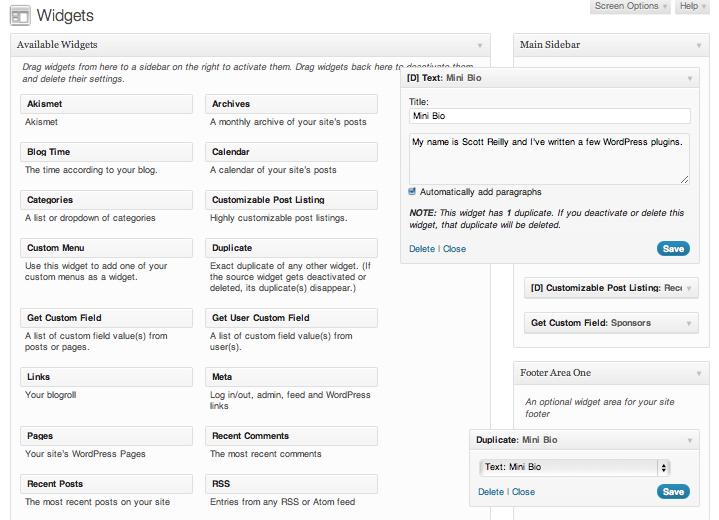
- Adds a widget called “Duplicate”. The widget’s only setting is a dropdown listing all active widgets. The selected widget will be the widget duplicated by the duplicate widget.
- A duplicate widget shows the same title and content as its source widget, even if those values later get changed in the source widget.
- A widget can be duplicated any number of times and can appear multiple times within the same page. (Yes, even within the same sidebar, though why would you do that?)
- A duplicate widget will abide by the configuration of the sidebar it is placed in, not the configuration of the sidebar containing the source widget. So it uses ‘before_widget’, ‘after_widget’, ‘before_title’, ‘after_title’ values of its own sidebar.
- Widgets that are duplicated will have “[D]” prepended to their name in the widget titlebar in the admin to denote they have duplicates. Also, at the bottom of the widget’s configuration form (when the widget is expanded), a short blurb also explains that the widget has duplicate(s) and a count of how many duplicates it has.
- If a widget is deactivated or deleted, if it has any duplicates, they get deleted as well.
- The widget id and widget type of the source widget are included as HTML classes in the duplicate widget’s markup.
Links: Plugin Homepage | Plugin Directory Page | Author Homepage
Filtros
The plugin exposes four actions for hooking. Typically, customizations utilizing these hooks would be put into your active theme’s functions.php file, or used by another plugin.
c2c_before_duplicate_widget (action)
The ‘c2c_before_duplicate_widget’ hook allows you to output text, or perform some sort of action, just before the output of the duplicate widget.
Arguments:
- $instance (array) : The settings for the widget instance (namely: title and widget_to_duplicate)
- $args (array) : The configuration for the widget and sidebar
Exemplo:
// Output an opening <div> before duplicate widget content
add_action( 'c2c_before_duplicate_widget', 'my_c2c_before_duplicate_widget', 10, 2 );
function my_c2c_before_duplicate_widget( $instance, $args ) {
    echo '<div class="a_duplicate_widget">;
}
c2c_after_duplicate_widget (action)
The ‘c2c_after_duplicate_widget’ hook allows you to output text, or perform some sort of action, just after the output of the duplicate widget.
Arguments:
- $instance (array) : The settings for the widget instance (namely: title and widget_to_duplicate)
- $args (array) : The configuration for the widget and sidebar
Exemplo:
// Output an closing </div> after duplicate widget content
add_action( 'c2c_after_duplicate_widget', 'my_c2c_after_duplicate_widget', 10, 2 );
function my_c2c_after_duplicate_widget( $instance, $args ) {
    echo '</div>;
}
c2c_before_duplicate_widget_form (action)
The ‘c2c_before_duplicate_widget_form’ hook allows you to output text, or perform some sort of action, just before the output of the duplicate widget’s configuration form (in the WP admin).
Arguments:
- $instance (array) : The settings for the widget instance (namely: title and widget_to_duplicate)
Exemplo:
// Display a message just before the duplicate widget settings form
add_action( 'c2c_before_duplicate_widget_form', 'my_c2c_before_duplicate_widget_form' );
function my_c2c_before_duplicate_widget_form( $instance ) {
    echo '<p>Note: this is a note above the widget settings form.</p>';
}
c2c_after_duplicate_widget_form (action)
The ‘c2c_after_duplicate_widget_form’ hook allows you to output text, or perform some sort of action, just after the output of the duplicate widget’s configuration form (in the WP admin).
Arguments:
- $instance (array) : The settings for the widget instance (namely: title and widget_to_duplicate)
Exemplo:
// Display a message just after the duplicate widget settings form
add_action( 'c2c_after_duplicate_widget_form', 'my_c2c_after_duplicate_widget_form' );
function my_c2c_after_duplicate_widget_form( $instance ) {
    echo '<p>Note: this is a note below the widget settings form.</p>';
}
Instalação
- Unzip
duplicate-widget.zipinside the/wp-content/plugins/directory for your site (or install via the built-in WordPress plugin installer) - Activate the plugin through the ‘Plugins’ admin menu in WordPress
- Use the ‘Duplicate’ widget to duplicate any other active widget
Log de Changes
Trivial update: noted compatibility through WP 3.4+; explicitly stated license
1.0.2
- Use string instead of variable to specify translation textdomain
- Re-license as GPLv2 or later (from X11)
- Add ‘License’ and ‘License URI’ header tags to readme.txt and plugin file
- Remove ending PHP close tag
- Note compatibility through WP 3.4+
1.0.1
- Minor bugfixes
- Add Upgrade Notice section to readme.txt
1.0
- Lançamento inicial
Capturas de tela
Para desenvolvedores
Este é o seu plugin? Mostre os números.
Adicione um crachá ao vivo ao seu site, Documentos ou Readme do GitHub. Ele é atualizado por conta própria - nenhuma conta necessária.
Best Duplicate Widget alternatives
All coffee2code plugins →




FAQ
Duplicate Widget: quick answers
Respostas diretas, extraídas de dados ao vivo WordPress.org.
Fonte: WordPress.org
Is Duplicate Widget free?
Yes. Duplicate Widget is free to download and use from the official WordPress.org plugin directory.
Is Duplicate Widget safe to use in 2026?
Duplicate Widget shows warning signs in 2026 — compare the alternatives below before installing. It runs on 1K+ sites, is rated 4.3/5 and was last updated 9 years ago, and scores 36/100 on our health check.
How many websites use Duplicate Widget?
Duplicate Widget is active on 1K+ WordPress websites and has been downloaded 29,265 times since it launched in December 2011. It was downloaded 337 times in the last 30 days.
Does Duplicate Widget work with WordPress 7.1?
Duplicate Widget is officially tested up to WordPress 3.4.2, while the latest release is 7.1.5. It may still work, but try it on a staging site first.
When was Duplicate Widget last updated?
The latest version, 1.0.2, was released on November 28, 2017 (9 years ago).
Who makes Duplicate Widget?
Duplicate Widget is developed and maintained by Scott Reilly.
What are the best alternatives to Duplicate Widget?
The most popular alternatives to Duplicate Widget are Disable Search (30K+ installs), Configure SMTP (6K+ installs) and One Click Close Comments (5K+ installs).
Alimentado por PageForge
Um modelo e uma planilha. Uma página real para cada pesquisa.
PageForge Transforma cada linha de um CSV em uma página WordPress com seu próprio título, URL, SEO campos e esquema, construído no layout que você já desenhou. Gratuito em WordPress.org.
- CSV e XLSX, mais Google Sheets em Profissional e Empresarial
- Seu próprio título, URL, SEO campos e esquema para cada página
- Funciona com o editor de blocos, Elementor, Divi e Avada
- Gratuito em WordPress.org, sem cartão de crédito