


Post Count Tracker
Track how many times each post is viewed and show the view count after the post content or anywhere with a shortcode.

Escolha sólida
Post Count Tracker is a solid plugin choice in 2026, with a few things worth checking first. It runs on 40+ sites, is rated 5/5 and was last updated 1 month ago, and scores 70/100 on our health check.
- Testado com as últimas WordPress (7.1)
- Base de usuários pequenas (mais de 40 instalações ativas)
- Muito poucos comentários até agora
Como ele se acumula?
Lado a lado em instalações, atualizações, avaliações e suporte



Downloads diários
Os picos de download geralmente seguem uma nova versão — cada site que atualiza automaticamente é um download.
Rankings
Where Post Count Tracker stands todayWordPress.org Classificações de pesquisa
Posição ao vivo na pesquisa de plugins, top 100| Palavra chave | Posição |
|---|---|
| Elementor | >100 |
| post count | #13 |
| post views | #95 |
| stats | >100 |
| Views Counter | #47 |
Adoção da versão
Compartilhamento de sites ativos por lançamento.
Divisão de classificação
★★★★★ ★★★★★ 5 de 2 comentários
About Post Count Tracker
From the official readme · v1.2.0Descrição
Post Count Tracker counts how many times each post is viewed and shows the count at the end of the post content. It helps admins and readers see which posts are getting attention, without changing your site’s design.
Recursos
- Automatic view counting on single posts.
- View count shown at the end of each post, or placed anywhere with the
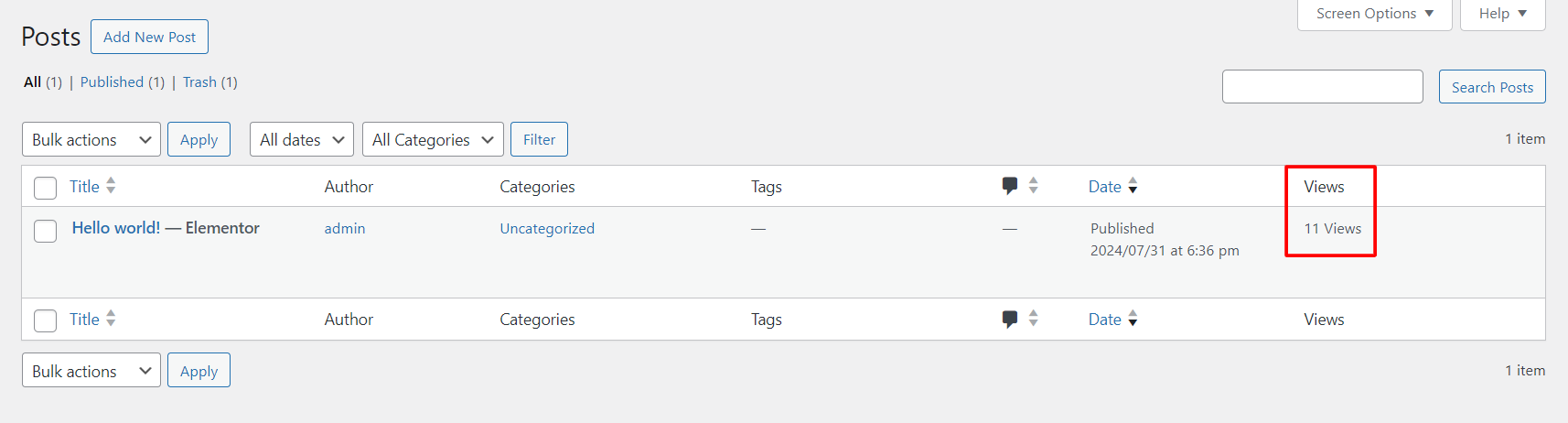
[pct_post_count]shortcode. - “Views” column on the Posts screen in the admin.
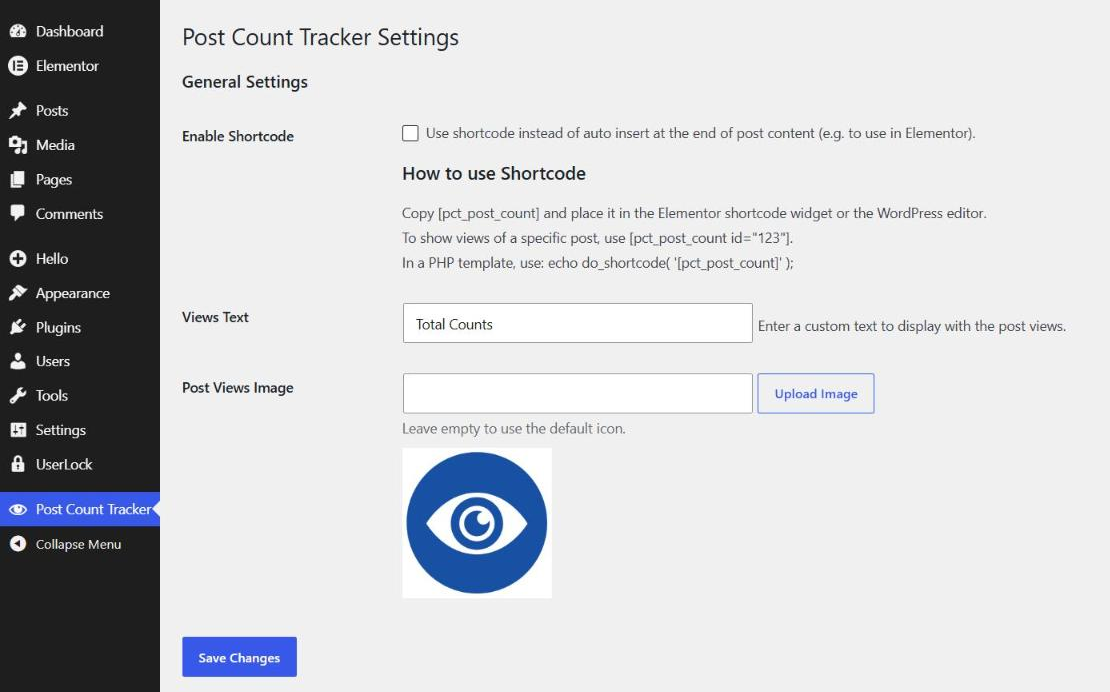
- Custom label text and custom icon from the settings page.
- Works with Elementor: add the shortcode to the Shortcode widget in your single post template.
- Lightweight: no extra JavaScript on the front end and admin assets load only on the plugin’s settings page.
Instalação
- Upload the
post-count-trackerfolder to the/wp-content/plugins/directory, or install it from Plugins > Add New. - Ative o plugin através do menu 'Plugins' em WordPress.
- Go to Post Count Tracker in the admin menu to change the text, icon, or switch to shortcode mode.
Log de Changes
Tested with WordPress 7.1.4 and requires PHP 8.0+. Includes a first-view counting fix, and performance improvements.
1.2.0
- Tested up to WordPress 7.1.4.
- Now requires PHP 8.0 or higher and WordPress 5.6 or higher.
- Fixed: the first view of a post is now counted (it previously showed 0).
- Fixed: the view count no longer appears inside widgets or secondary loops on single posts.
- Fixed: post previews are no longer counted as views.
- Added: settings are now sanitized, and a “Settings saved” message is shown.
- Added:
[pct_post_count id="123"]support documented on the settings page. - Added: plugin data is removed when the plugin is deleted.
- Improved: admin scripts and the media library load only on the plugin settings page.
- Improved: removed the empty front-end JavaScript file request.
- Improved: all admin text is translatable; numbers are formatted for the site language.
1.1.0
- Added settings page to control the shortcode, count view text and image.
1.0.0
- Lançamento inicial.
Capturas de tela

Para desenvolvedores
Este é o seu plugin? Mostre os números.
Adicione um crachá ao vivo ao seu site, Documentos ou Readme do GitHub. Ele é atualizado por conta própria - nenhuma conta necessária.
Best Post Count Tracker alternatives
All elementor plugins →





FAQ
Post Count Tracker: quick answers
Respostas diretas, extraídas de dados ao vivo WordPress.org.
Fonte: WordPress.org
Is Post Count Tracker free?
Yes. Post Count Tracker is free to download and use from the official WordPress.org plugin directory.
Is Post Count Tracker safe to use in 2026?
Post Count Tracker is a solid plugin choice in 2026, with a few things worth checking first. It runs on 40+ sites, is rated 5/5 and was last updated 1 month ago, and scores 70/100 on our health check.
How many websites use Post Count Tracker?
Post Count Tracker is active on 40+ WordPress websites and has been downloaded 2,272 times since it launched in August 2024. It was downloaded 202 times in the last 30 days.
Does Post Count Tracker work with WordPress 7.1?
Yes. The developer has tested Post Count Tracker up to WordPress 7.1.5, the latest release. It requires WordPress 5.6 or newer.
What PHP version does Post Count Tracker need?
Post Count Tracker requires PHP 8.0 or higher. Most hosts run PHP 8.x today, so it works on any modern WordPress hosting.
When was Post Count Tracker last updated?
The latest version, 1.2.0, was released on October 28, 2026 (1 month ago).
Who makes Post Count Tracker?
Post Count Tracker is developed and maintained by Amir Nafees.
What are the best alternatives to Post Count Tracker?
The most popular alternatives to Post Count Tracker are Ultimate Addons for Element… (2M+ installs), Essential Addons for Elemen… (1M+ installs) and Royal Addons for Elementor (600K+ installs).
Alimentado por PageForge
Um modelo e uma planilha. Uma página real para cada pesquisa.
PageForge Transforma cada linha de um CSV em uma página WordPress com seu próprio título, URL, SEO campos e esquema, construído no layout que você já desenhou. Gratuito em WordPress.org.
- CSV e XLSX, mais Google Sheets em Profissional e Empresarial
- Seu próprio título, URL, SEO campos e esquema para cada página
- Funciona com o editor de blocos, Elementor, Divi e Avada
- Gratuito em WordPress.org, sem cartão de crédito