


Multisite Matrix
See at a glance which plugins are active on which sites across your WordPress Multisite network.

Use com cautela
Multisite Matrix works, but test it on a staging site before relying on it in 2026. Was last updated 3 months ago, and scores 54/100 on our health check.
- Testado com as últimas WordPress (7.1)
- Base de usuários pequenas (<10 instalações ativas)
- Muito poucos comentários até agora
Como ele se acumula?
Lado a lado em instalações, atualizações, avaliações e suporte


Downloads diários
Os picos de download geralmente seguem uma nova versão — cada site que atualiza automaticamente é um download.
Rankings
Where Multisite Matrix stands todayWordPress.org Classificações de pesquisa
Posição ao vivo na pesquisa de plugins, top 100| Palavra chave | Posição |
|---|---|
| Multisite | >100 |
| network | >100 |
| network admin | >100 |
| plugin management | >100 |
| plugins | >100 |
About Multisite Matrix
From the official readme · v1.2.5Descrição
WordPress Multisite’s own Network Admin lets you see which plugins are network-activated, but it has no built-in way to see which plugins individual site admins have activated locally, one site at a time, across a whole network. Multisite Matrix closes that gap.
O que ele faz
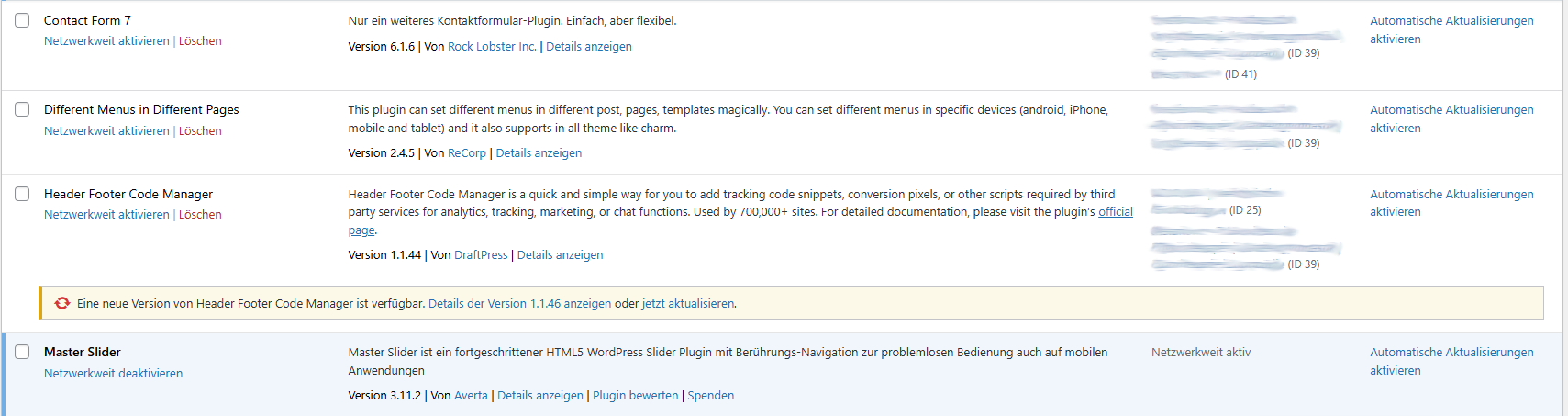
- Adds an “Active on Sites” column directly to the existing Network Admin > Plugins list, showing at a glance which sites have each plugin active locally.
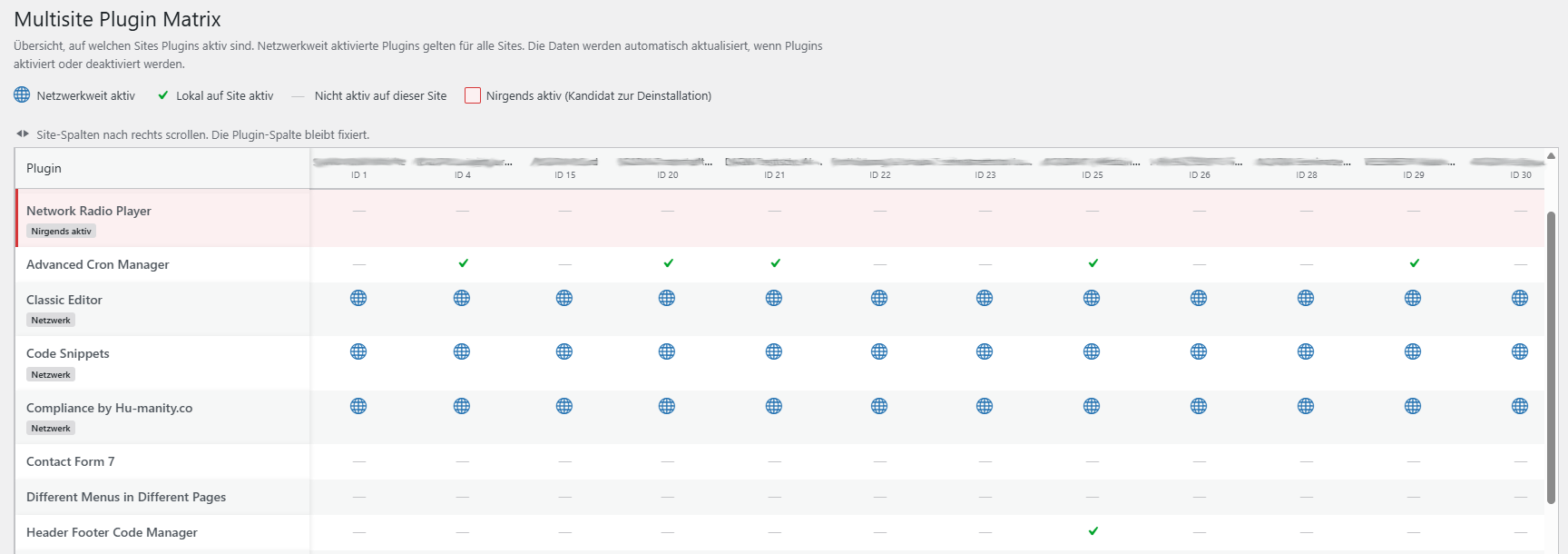
- Adds a dedicated Plugin Matrix page (Network Admin > Plugins > Multisite Matrix) with a full plugins-by-sites table: every installed plugin as a row, every site as a column, so you can scan the whole network’s plugin usage in one screen.
- Flags plugins that are installed but active nowhere in the network — a quick way to spot cleanup candidates before a security or performance audit.
- Distinguishes network-activated plugins (active for every site by definition) from plugins activated locally on individual sites.
- Links straight through to each site’s own Plugins screen from the matrix, so you can act on what you find without hunting for the right site first.
Porque
On a network with more than a handful of sites, “which of our 40 sites still has that old SEO plugin turned on” is a real, recurring question that WordPress core simply doesn’t answer without opening every single site’s plugin screen by hand. Multisite Matrix answers it in one page load.
Como funciona
Data is read directly from WordPress’s own site and network options — nothing is sent anywhere, no external requests are made, and the plugin makes no changes to which plugins are active. The plugin-to-site mapping is cached for an hour (via a site transient) and automatically refreshed whenever a plugin is activated, deactivated, or a site is added or removed, so the matrix never depends on a manual rebuild.
Requisitos
Multisite Matrix only does anything on a WordPress Multisite install — on a single-site install it stays completely inactive. It can only be network-activated (not activated on an individual site), and its screens are only visible to users with the manage_network_plugins capability (network administrators).
Instalação
- Upload the
multisite-matrixfolder to/wp-content/plugins/, or install it through the WordPress plugin screen directly. - Go to Network Admin > Plugins and network-activate Multisite Matrix. It cannot be activated on a single site — this is a Multisite-only plugin.
- Open Network Admin > Plugins > Multisite Matrix to see the full matrix, or just look at the new “Active on Sites” column on the regular Network Admin > Plugins screen.
Log de Changes
Fixes the plugin header Description field, which was still German; no functional changes.
1.2.5
- Fixed the plugin header Description field, which was still German — now matches the English source strings used everywhere else.
1.2.4
- Source strings switched from German to English (WordPress.org convention) so the plugin can be properly localized.
- Added translations for German, French, Spanish, Italian, Dutch, Portuguese (Brazil), Polish, Russian, Japanese, and Chinese (Simplified).
1.2.3
- Renamed internal function, class, and option/transient names to use a unique “MULTMA”/”multma” prefix, per WordPress.org plugin review feedback.
1.2.2
- First public release on WordPress.org.
Capturas de tela
Para desenvolvedores
Este é o seu plugin? Mostre os números.
Adicione um crachá ao vivo ao seu site, Documentos ou Readme do GitHub. Ele é atualizado por conta própria - nenhuma conta necessária.
Best Multisite Matrix alternatives
All multisite plugins →




FAQ
Multisite Matrix: quick answers
Respostas diretas, extraídas de dados ao vivo WordPress.org.
Fonte: WordPress.org
Is Multisite Matrix free?
Yes. Multisite Matrix is free to download and use from the official WordPress.org plugin directory.
Is Multisite Matrix safe to use in 2026?
Multisite Matrix works, but test it on a staging site before relying on it in 2026. Was last updated 3 months ago, and scores 54/100 on our health check.
How many websites use Multisite Matrix?
Multisite Matrix is active on <10 WordPress websites and has been downloaded 352 times since it launched in August 2026. It was downloaded 76 times in the last 30 days.
Does Multisite Matrix work with WordPress 7.1?
Yes. The developer has tested Multisite Matrix up to WordPress 7.1.5, the latest release. It requires WordPress 5.8 or newer.
What PHP version does Multisite Matrix need?
Multisite Matrix requires PHP 7.4 or higher. Most hosts run PHP 8.x today, so it works on any modern WordPress hosting.
When was Multisite Matrix last updated?
The latest version, 1.2.5, was released on August 28, 2026 (3 months ago).
Who makes Multisite Matrix?
Multisite Matrix is developed and maintained by aceArt.
What are the best alternatives to Multisite Matrix?
The most popular alternatives to Multisite Matrix are Code Snippets (1M+ installs), User Switching (200K+ installs) and Disable Comments (100K+ installs).
Alimentado por PageForge
Um modelo e uma planilha. Uma página real para cada pesquisa.
PageForge Transforma cada linha de um CSV em uma página WordPress com seu próprio título, URL, SEO campos e esquema, construído no layout que você já desenhou. Gratuito em WordPress.org.
- CSV e XLSX, mais Google Sheets em Profissional e Empresarial
- Seu próprio título, URL, SEO campos e esquema para cada página
- Funciona com o editor de blocos, Elementor, Divi e Avada
- Gratuito em WordPress.org, sem cartão de crédito