

Grids: Layout builder for WordPress
The most advanced page and layout builder for Gutenberg and the new Block Editor, with columns, rows and responsive controls.

Use com cautela
Grids: Layout builder for WordP… works, but test it on a staging site before relying on it in 2026. It runs on 2K+ sites, is rated 5/5 and was last updated 9 months ago, and scores 60/100 on our health check.
- Amado pelos usuários — 5/5 de 21 avaliações
- Momentum — downloads up 39.1% vs the previous 30 days
- Testado apenas até WordPress 6.9 (mais recente é 7.1)
Como ele se acumula?
Lado a lado em instalações, atualizações, avaliações e suporte



Downloads diários
Os picos de download geralmente seguem uma nova versão — cada site que atualiza automaticamente é um download.
Rankings
Where Grids: Layout builder for W… stands todayWordPress.org Classificações de pesquisa
Posição ao vivo na pesquisa de plugins, top 100| Palavra chave | Posição |
|---|---|
| Bloco-editor | >100 |
| blocos | >100 |
| Gutenberg | >100 |
| gutenberg blocks | >100 |
| Construtor de páginas | >100 |
Adoção da versão
Compartilhamento de sites ativos por lançamento.
Divisão de classificação
★★★★★ ★★★★★ 5 de 21 comentários
About Grids: Layout builder for WordPress
From the official readme · v1.3.12Descrição
👉 For more information about the plugin, visit the documentation website.
A layout builder is a tool that helps you creating visual structures in your page, from a simple layout made by adjacent columns, to more complex compositions. Grids is entirely based on the WordPress block editor, which means that you’ll be able to use it together with the myriad of content blocks that developers and designers from all around the World are creating.
With Grids, we’re bringing a visual structure to the content written with the WordPress Block Editor.
👉 Sections & areas
A Section is a portion of the page that aims at being visually distinct from the rest of the content. Sections are usually top-level blocks that you add one after the other; the sequence of sections is what makes your page layout.
Each Section that you create is composed by several different Areas. In their most basic form, you can think of Areas as columns, which are nothing else than containers for content blocks.
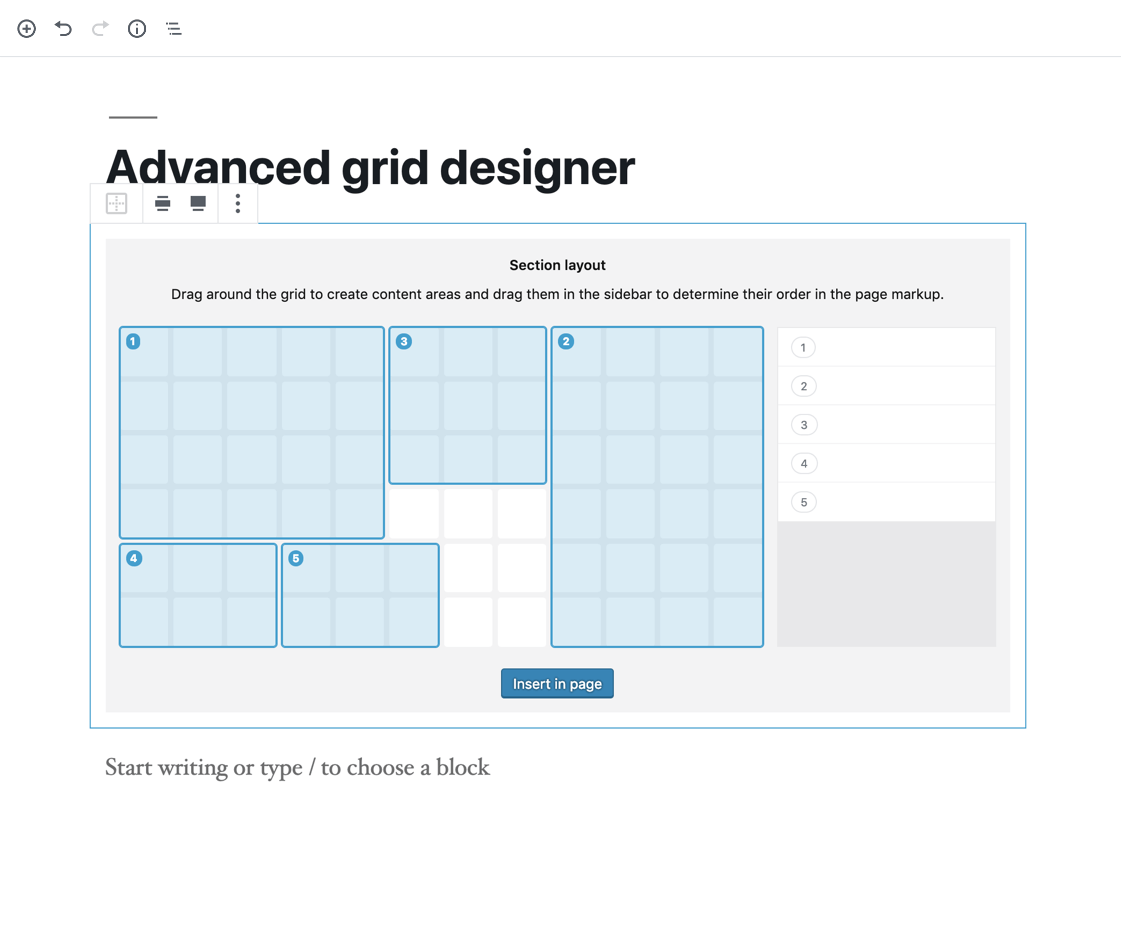
For more elaborated compositions, the Grid Designer allows you to create exactly the grid structure you want within the boundaries of a Section, by using CSS Grid.
👉 Want to know more? Read the plugin documentation! 👉 https://justevolve.it/grids/documentation/
👉 Still struggling? That may depend on one of the known issues 👉 https://justevolve.it/grids/documentation/known-issues/
👉 1.3.12
- FIX: Prevented admin assets from being enqueued on the frontend.
👉 1.3.11
- FIX: Message regarding translations being loaded too early
- FIX: Styles and scripts correctly load in the editor iframe
- FIX: Compatibility with WordPress 6.9
👉 1.3.10
- FIX: Compatibility issues with WordPress 6.4
👉 1.3.9
- FIX: Security fix.
👉 1.3.8
- FIX: Fixed display settings functionality for sections and areas.
👉 1.3.7
- FIX: Fixed a fallback variable issue for Sections and Areas background.
👉 1.3.6
- FIX: Fixed an issue with the margins, paddings association on different media queries.
- FIX: Fixed background repeat and position default behavior on frontend.
👉 1.3.4 & 1.3.5
- FIX: Synced row dimension logic on frontend/backend: empty rows will collapse also on the Block Editor screen.
👉 1.3.3
- FIX: Fixed 500 error that occurred when using wide-aligned sections.
👉 1.3.2
- FIX: Changed the grid column declaration to minmax(0,1fr) in order to prevent grid blowout.
- FIX: Fixed nested sections issues.
👉 1.3.1
- FIX: Reverted row dimension logic: in Sections created with the advanced editor, empty rows will collapse.
👉 1.3.0
- ENHANCEMENT: Added compatibility with the Full Site Editor.
- ENHANCEMENT: Enhanced compatibility with single page application websites.
- FIX: Fixed style being applied to nested sections.
- Updated compatibility to WordPress 5.9.
POSSIBLY BREAKING CHANGES:
- In this version, we have removed the global page setting that allowed for the editor area to be wider when editing a page with the Block Editor. We feel that this should be better handled by the theme itself, especially if it supports the Full Site Editing mode.
- We have also removed the global page setting that determined the horizontal gutter between areas. This is now handled individually by Section blocks (look for Gap settings). As before, both horizontal and vertical gaps are subject to media queries.
- We have removed the
grids-s-$section_idandgrids-a-$area_idclasses from their respective elements, since they were no longer needed to generate the element’s style. If you need to specifically identify a section or area, you can use their custom class/anchor controls provided by the Block Editor.
👉 1.2.28
- ENHANCEMENT: Added the ability to specify the types of blocks allowed in content areas of a section through the grids/area filter.
- ENHANCEMENT: Added the ability to specify the size units used in Grids, as well as the default size unit suggested by the editor, through the grids/general filter.
- FIX: Removed unwanted log to console.
- Updated compatibility to WordPress 5.7.
👉 1.2.27
- FIX: Fixed an issue that occurred when editing custom-created sections and affected previously created areas.
- FIX: Fixed an issue that prevented post meta to be saved when using Grids with a Custom Post Type.
👉 1.2.26
- FIX: Added compatibility with WordPress 5.6 and the latest version of the Gutenberg plugin.
👉 1.2.25
- FIX: Minor backend UI fix.
- FIX: Fixed the dimensioning of blocks in content areas on frontend.
👉 1.2.24
- Enhanced support for AJAX-powered content pages.
👉 1.2.23
- FIX: Fixed React warnings and errors that occurred when the SCRIPT_DEBUG constant was set to true.
- FIX: Fixed section styling when in preview mode.
- FIX: Removed double scrollbar when dragging areas.
👉 1.2.22
- FIX: Increased compatibility with WordPress 5.4.
👉 1.2.21
- FIX: Fixed a bug that caused section IDs not to be rendered in the page markup.
👉 1.2.20
- FIX: Fixed compatibility with Gutenberg 7.3.
👉 1.2.19
- FIX: Fixed blocks toolbar issue.
👉 1.2.18
- FIX: Fixed reusable block functionality on Sections.
- FIX: Various minor UI tweaks.
- FIX: Minor bugs.
👉 1.2.17
- FIX: Fixed compatibility with Gutenberg 7.2.
- FIX: Minor UI tweaks.
👉 1.2.16
- FIX: Fixed grid display issues on Internet Explorer 11. Thanks to @amddtim for providing the fixes.
👉 1.2.15
- Improved the visualization of units in spacing controls.
- Added an option to expand the editor width.
👉 1.2.14
- FIX: Fixed compatibility with WordPress 5.3.
👉 1.2.13
- FIX: Fixed a z-index issue for the area selection highlight.
- FIX: Fixed an issue that prevented the correct display of duplicated sections.
👉 1.2.12
- FIX: Improved the editing of blocks in two vertical adjacent areas in an advanced grid.
- FIX: Fixed an area width display issue in the block preview.
👉 1.2.11
- Added visual feedback to elements when using dimension controls.
- FIX: Fixed a regression that prevented the correct use of vertical align in Areas.
👉 1.2.10
- FIX: Fixed a bug that prevented Sections to be saved correctly when they have an anchor specified.
- FIX: Minor UI tweaks.
👉 1.2.9
- Added anchor support to Sections: you can now add IDs to Section elements on frontend.
- Various UI tweaks to highlight the grid structure and rendering.
- Removed the Section block from the Grids section, and made available in the Layout blocks section.
- Changed the Section and Area block icons to match the plugin brand.
- FIX: First block selection after inserting a Section in page.
- FIX: Minor bugs.
👉 1.2.8
- FIX: Style alignment for areas when duplicating sections in the Block Editor.
👉 1.2.7
- FIX: Restore block insertion mode for newly created areas when using the Gutenberg plugin.
- FIX: Compatibility fixes with Gutenberg 5.9.0.
👉 1.2.6
- FIX: Behavior of content areas when adding lateral spacing.
👉 1.2.5
- Added a new “Stretch” option for backgrounds on sections with “wide” alignment.
- FIX: Minor bugs.
👉 1.2.4
- Submitted Grids to the Blocks directory on WordPress.org.
- Include JS and SCSS source files.
👉 1.2.3
- FIX: Fixed an issue that prevented to properly visualize the Block Inserter when the
z-indexof an area had been tweaked. - FIX: Fixed an issue that could cause multiple areas to be added to a section, without using the Grid Designer component.
- FIX: Minor bug fixes.
👉 1.2.2
- FIX: Fixed an issue that prevented custom accent colors to work as intended on the Twenty Nineteen default theme.
👉 1.2.1
- FIX: Minor visual tweaks.
- FIX: Editing of sections composed with the Grid Designer.
👉 1.2
- NEW FEATURE: Added page-wide gutter control.
- ENHANCEMENT: Grid Designer is now available when editing a section, and areas can be rearranged.
- FIX: CSS style for grids not displaying in loops.
- FIX: Sections can now be used as reusable blocks.
- FIX: Minor bugs.
👉 1.1.1
- FIX: Translation support.
- FIX: Issue with blocks toolbar.
👉 1.1.0
- NEW FEATURE: Grid Designer.
- FIX: Translation support.
- FIX: Minor bugs.
👉 1.0.0
- Lançamento público inicial.
Instalação
- Carregue os arquivos do plugin no diretório
/wp-content/plugins/gridsou instale o plugin por meio da tela de plugins WordPress diretamente. - Ative o plugin através da tela 'Plugins' em WordPress
Capturas de tela


Para desenvolvedores
Este é o seu plugin? Mostre os números.
Adicione um crachá ao vivo ao seu site, Documentos ou Readme do GitHub. Ele é atualizado por conta própria - nenhuma conta necessária.
Best Grids: Layout builder for Wor… alternatives
Todos os plugins do editor de blocos →




FAQ
Grids: Layout builder for WordPress: quick answers
Respostas diretas, extraídas de dados ao vivo WordPress.org.
Fonte: WordPress.org
Is Grids: Layout builder for WordP… free?
Yes. Grids: Layout builder for WordP… is free to download and use from the official WordPress.org plugin directory.
Is Grids: Layout builder for WordP… safe to use in 2026?
Grids: Layout builder for WordP… works, but test it on a staging site before relying on it in 2026. It runs on 2K+ sites, is rated 5/5 and was last updated 9 months ago, and scores 60/100 on our health check.
How many websites use Grids: Layout builder for WordP…?
Grids: Layout builder for WordP… is active on 2K+ WordPress websites and has been downloaded 73,089 times since it launched in February 2019. It was downloaded 683 times in the last 30 days.
Does Grids: Layout builder for WordP… work with WordPress 7.1?
Grids: Layout builder for WordP… is officially tested up to WordPress 6.9.0, while the latest release is 7.1.5. It may still work, but try it on a staging site first.
What PHP version does Grids: Layout builder for WordP… need?
Grids: Layout builder for WordP… requires PHP 5.6 or higher. Most hosts run PHP 8.x today, so it works on any modern WordPress hosting.
When was Grids: Layout builder for WordP… last updated?
The latest version, 1.3.12, was released on February 27, 2026 (9 months ago).
Who makes Grids: Layout builder for WordP…?
Grids: Layout builder for WordP… is developed and maintained by Evolve.
What are the best alternatives to Grids: Layout builder for WordP…?
The most popular alternatives to Grids: Layout builder for WordP… are Classic Editor (8M+ installs), Advanced Editor Tools (1M+ installs) and Disable Gutenberg (500K+ installs).
Alimentado por PageForge
Um modelo e uma planilha. Uma página real para cada pesquisa.
PageForge Transforma cada linha de um CSV em uma página WordPress com seu próprio título, URL, SEO campos e esquema, construído no layout que você já desenhou. Gratuito em WordPress.org.
- CSV e XLSX, mais Google Sheets em Profissional e Empresarial
- Seu próprio título, URL, SEO campos e esquema para cada página
- Funciona com o editor de blocos, Elementor, Divi e Avada
- Gratuito em WordPress.org, sem cartão de crédito