


Desativar Gutenberg
Disable Gutenberg Block Editor and restore the Classic Editor and original Edit Post screen (TinyMCE, meta boxes, etc.).

Escolha segura
Yes — Disable Gutenberg is a safe, well-maintained plugin to use in 2026. It runs on 500K+ sites, is rated 5/5 and was last updated 2 weeks ago, and scores 97/100 on our health check.
- Comprovado em escala em mais de 500 mil sites ativos
- Loved by users — 5/5 from 735 reviews
- Desenvolvido ativamente — última atualização 2 semanas atrás
- Testado com as últimas WordPress (7.1)
- Momentum — downloads up 456% vs the previous 30 days
Como ele se acumula?
Lado a lado em instalações, atualizações, avaliações e suporte



Downloads diários
Os picos de download geralmente seguem uma nova versão — cada site que atualiza automaticamente é um download.
Rankings
Where Disable Gutenberg stands todayWordPress.org Classificações de pesquisa
Posição ao vivo na pesquisa de plugins, top 100| Palavra chave | Posição |
|---|---|
| Bloco-editor | #46 |
| classic editor | #14 |
| editor | #48 |
| Gutenberg | #3 |
Adoção da versão
Compartilhamento de sites ativos por lançamento.
Divisão de classificação
★★★★★★★★★★ 5 from 735 reviews
About Disable Gutenberg
From the official readme · v3.4Descrição
This plugin disables the new Gutenberg Editor (aka Block Editor) and replaces it with the Classic Editor. You can disable Gutenberg completely, or selectively disable for posts, pages, roles, post types, and theme templates. Plus you can hide the Gutenberg nag, menu item, and more!
♠ The all-in-one, COMPLETE solution for handling Gutenberg
♠ Hide ALL traces of Gutenberg and replace with Classic Editor
♠ Restores original Edit Post screen (TinyMCE, meta boxes, etc.)
The Disable Gutenberg plugin restores the classic (original) WordPress editor and the “Edit Post” screen. So you can continue using plugins and theme functions that extend the Classic Editor. Supports awesome features like Meta Boxes, Quicktags, Custom Fields, and everything else the Classic Editor can do.
Easy to Use
Just activate and done! The default plugin settings are configured to hide all traces of the Gutenberg Block Editor, and fully restore the original Classic Editor. Further options for customizing when/where Gutenberg is enabled are available in the plugin settings.
♠ Disable Block Widgets and restore Classic Widgets 🙂
Opções
- Disable Gutenberg completely (all post types)
- Disable Gutenberg for any post type
- Disable Gutenberg for any user role
- Disable Gutenberg for any theme template
- Disable Gutenberg for any post/page IDs
- Disable Gutenberg admin notice (nag)
- Option to restore Classic Widgets
- Option to hide the plugin menu item
- Option to hide the Gutenberg plugin menu item (settings link)
- Adds “Classic Editor” link to each post on the Posts screen
- Adds item to the WP sidebar menu: “Add New (Classic)”
- Option to enable Custom Fields Meta Box for ACF
- Choose which editor to use for each post
- Whitelist any post title, slug, or ID
- Option to enable/disable frontend Gutenberg stylesheet
♠ Works same as Classic Editor plugin, but can do a LOT more!
♠ Lightweight and super fast, built with WP APIs 🙂
Fully configurable, enable or disable Gutenberg and restore the Classic Editor wherever is necessary.
Automatically replaces Gutenberg with the Classic Editor.
Recursos
- Super simple
- Clean, secure code
- Built with the WordPress API
- Lightweight, fast and flexible
- Regularly updated and “future proof”
- Works great with other WordPress plugins
- Plugin options configurable via settings screen
- Focused on flexibility, performance, and security
- One-click restore plugin default options
- Tradução pronta
♠ Works great with Google AMP and the WordPress AMP plugin
Disable Gutenberg is developed and maintained by Jeff Starr, 15-year WordPress developer and book author.
Super light & fast plugin, super easy on server resources!
Why?
Gutenberg is a useful editor but sometimes you want to disable it for specific posts, pages, user roles, post types, and/or theme templates. This plugin enables you to disable Gutenberg and replace it with the Classic Editor wherever you want. For example, lots of WordPress users already enjoy robust page-building functionality via one of the many great plugins like Composer or Elementor. So many options, no need to feel “locked in” to using Gutenberg!
If you like Disable Gutenberg, please give it a 5-star rating, thank you!
Privacidade
This plugin does not collect or store any user data. It does not set any cookies, and it does not connect to any third-party locations. Thus, this plugin does not affect user privacy in any way.
Support development
I develop and maintain this free plugin with love for the WordPress community. To show support, you can make a donation or purchase one of my books:
- The Tao of WordPress
- Digging into WordPress
- .htaccess made easy
- WordPress Themes In Depth
- Wizard’s SQL Recipes for WordPress
And/or purchase one of my premium WordPress plugins:
- BBQ Pro – Blazing fast WordPress firewall
- Blackhole Pro – Automatically block bad bots
- Banhammer Pro – Monitor traffic and ban the bad guys
- GA Google Analytics Pro – Connect WordPress to Google Analytics
- Head Meta Pro – Ultimate Meta Tags for WordPress
- REST Pro Tools – Awesome tools for managing the WP REST API
- Simple Ajax Chat Pro – Unlimited chat rooms
- USP Pro – Unlimited front-end forms
Links, tweets and likes also appreciated. Thanks! 🙂
Instalação
Installing the plugin
- Upload the plugin to your blog and activate
- Configure the plugin settings as desired
- Enable theme switcher via settings or shortcode
More info on installing WP plugins
Definições
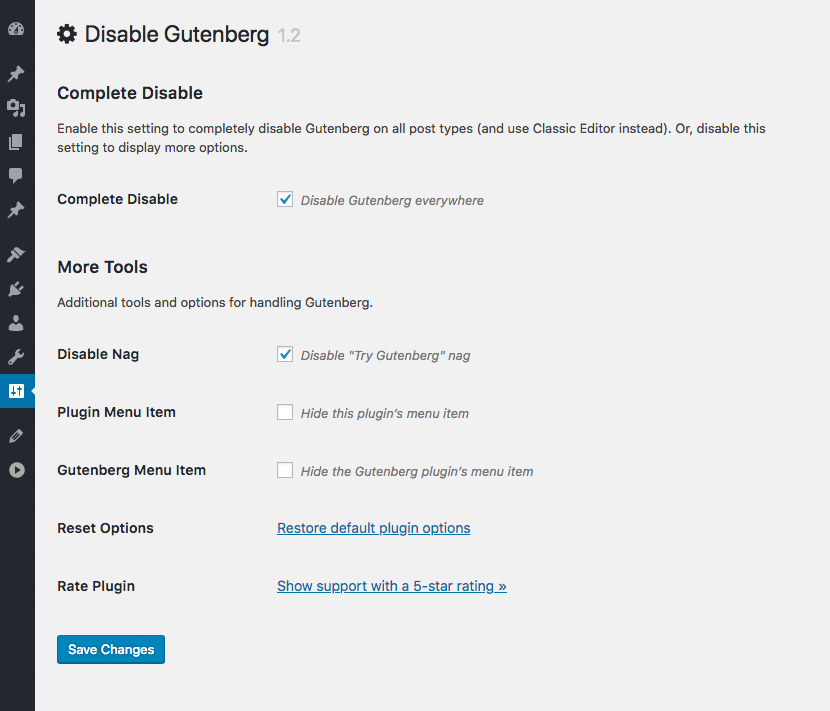
Out of the box, Disable Gutenberg makes your WordPress 100% Gutenberg-free. If you visit the settings page, you will see that the “Complete Disable” option is enabled, and so is the “Disable Nag” option. This is all that is required to disable Gutenberg (and the nag) sitewide.
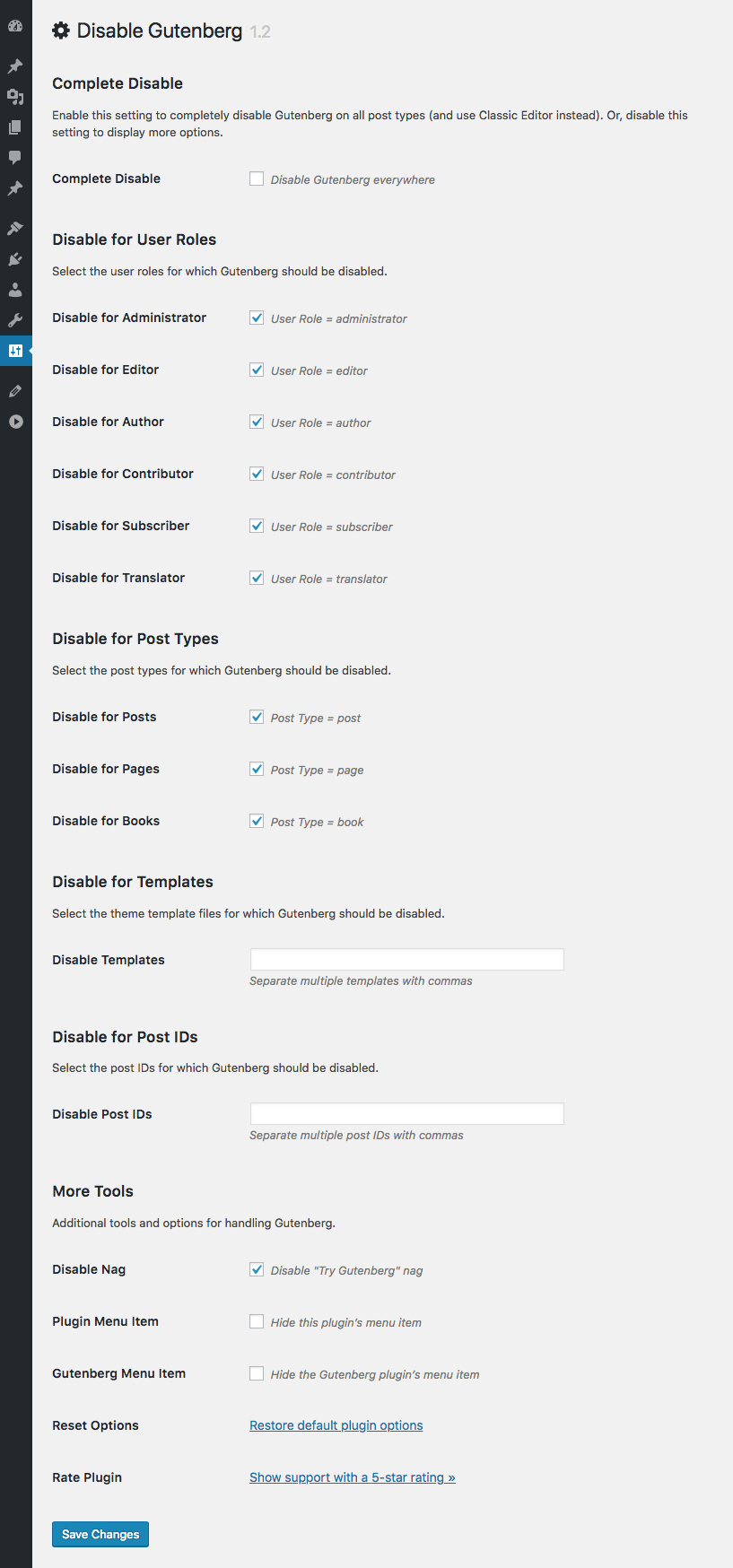
Now, if you want to customize things and, say, only disable Gutenberg on specific post types, you can uncheck that first “Complete Disable” option. When you uncheck the box, more options will be displayed. So you can choose exactly where Gutenberg should be disabled.
Whitelist
In some cases, you may want to disable Gutenberg everywhere, but enable only on certain posts. To do this, set the “Complete Disable” option to enabled. Then visit the “Whitelist” settings to specify which posts always should open in the Block Editor.
Importante
Do not use Disable Gutenberg with other plugins (like the Classic Editor plugin) that also disable or replace Gutenberg. Why? Because it may cause loading of redundant scripts, which may in turn lead to unexpected/untested results.
Hide Menu Option
Disable Gutenberg provides a setting to disable the plugin’s menu item. This is useful if you don’t want your clients to get curious and start fiddling around.
If you enable the option to hide the plugin’s menu item, you will need to access the plugin settings page directly. It is located at:
/wp-admin/options-general.php?page=disable-gutenberg
So if WordPress is installed at this URL:
https://example.com/
..then you would access the plugin settings at:
https://example.com/wp-admin/options-general.php?page=disable-gutenberg
Or, if WordPress is installed in a subdirectory, for example:
https://example.com/wordpress/
..then you would access the plugin settings at:
https://example.com/wordpress/wp-admin/options-general.php?page=disable-gutenberg
So if you hide the plugin’s menu item, you always can access the settings directly.
More Tools
The settings include a “More Tools” link. Clicking it toggles open some advanced options:
- Classic Widgets – Restores Classic Widgets
- Disable Nag – Disables “Try Gutenberg” nag
- Enable Frontend – Enables frontend block stylesheet
- Whitelist Options – Displays the whitelist settings
- Plugin Menu Item – Hides the Disable Gutenberg menu item
- Gutenberg Menu Item – Hides the Gutenberg plugin menu item (for WP less than 5.0)
- Display Edit Links – Displays “Add New (Classic)” menu links and Classic/Block edit links
- ACF Support – Enables the Custom Fields Meta Box (ACF plugin disables by default)
- Reset Options – Restores the default plugin options
If there are any questions about these items or anything else, feel free to contact me directly or post in the WP Support Forums.
Uninstalling
This plugin cleans up after itself. All plugin settings will be removed from the WordPress database when the plugin is deleted via the WP Plugins screen.
Going Further
For developers wanting to customize further, check out:
Show Support
I strive to make this free plugin the very best possible. To show support, please take a moment to leave a 5-star review at WordPress.org. Your generous feedback helps to further growth and development of Disable Gutenberg. Thank you!
Log de Changes
Visit the WordPress Plugins screen, locate the plugin, and click "Update" :) Note: Deleting this plugin via the WordPress Plugins screen will remove all of its settings from the WordPress database.
Thank you to everyone for using Disable Gutenberg and for all the awesome 5-star reviews!
If you have any feedback or suggestions to make this plugin the absolute best it can be, and/or would like to help with development, please reach me via the contact form at Plugin Planet.
3.4 (2026/11/06)
- Checks plugin with Plugin Check
- Improves security of core functions
- Improves security of plugin settings
- Improves sanitization of JavaScript output
- Improves security of internal redirects
- Improves security of plugin files
- Updates plugin settings page
- Tests on WordPress 7.2
Full changelog @ https://plugin-planet.com/wp/changelog/disable-gutenberg.txt
Capturas de tela
Para desenvolvedores
Este é o seu plugin? Mostre os números.
Adicione um crachá ao vivo ao seu site, Documentos ou Readme do GitHub. Ele é atualizado por conta própria - nenhuma conta necessária.
Best Disable Gutenberg alternatives
Todos os plugins do editor de blocos →





FAQ
Disable Gutenberg: quick answers
Respostas diretas, extraídas de dados ao vivo WordPress.org.
Fonte: WordPress.org
Is Disable Gutenberg free?
Yes. Disable Gutenberg is free to download and use from the official WordPress.org plugin directory.
Is Disable Gutenberg safe to use in 2026?
Yes — Disable Gutenberg is a safe, well-maintained plugin to use in 2026. It runs on 500K+ sites, is rated 5/5 and was last updated 2 weeks ago, and scores 97/100 on our health check.
How many websites use Disable Gutenberg?
Disable Gutenberg is active on 500K+ WordPress websites and has been downloaded 11,779,622 times since it launched in April 2018. It was downloaded 265,383 times in the last 30 days.
Does Disable Gutenberg work with WordPress 7.1?
Yes. The developer has tested Disable Gutenberg up to WordPress 7.2, the latest release. It requires WordPress 4.9 or newer.
What PHP version does Disable Gutenberg need?
Disable Gutenberg requires PHP 5.6.20 or higher. Most hosts run PHP 8.x today, so it works on any modern WordPress hosting.
When was Disable Gutenberg last updated?
The latest version, 3.4, was released on November 6, 2026 (2 weeks ago).
Who makes Disable Gutenberg?
Disable Gutenberg is developed and maintained by Jeff Starr.
What are the best alternatives to Disable Gutenberg?
The most popular alternatives to Disable Gutenberg are Classic Editor (8M+ installs), Advanced Editor Tools (1M+ installs) and Shortcodes Ultimate (400K+ installs).
Alimentado por PageForge
Um modelo e uma planilha. Uma página real para cada pesquisa.
PageForge Transforma cada linha de um CSV em uma página WordPress com seu próprio título, URL, SEO campos e esquema, construído no layout que você já desenhou. Gratuito em WordPress.org.
- CSV e XLSX, mais Google Sheets em Profissional e Empresarial
- Seu próprio título, URL, SEO campos e esquema para cada página
- Funciona com o editor de blocos, Elementor, Divi e Avada
- Gratuito em WordPress.org, sem cartão de crédito