


Gerador de mapas de sites XML para Google
Generate multiple types of sitemaps to improve SEO and get your website indexed quickly.

Escolha sólida
XML Sitemap Generator for Google is a solid plugin choice in 2026, with a few things worth checking first. It runs on 1M+ sites, is rated 4.8/5 and was last updated 2 months ago, and scores 78/100 on our health check.
- Um dos plugins mais usados na web: 1M+ sites ativos
- Loved by users — 4.8/5 from 2,233 reviews
- Testado com as últimas WordPress (7.1)
Como ele se acumula?
Lado a lado em instalações, atualizações, avaliações e suporte



Downloads diários
Os picos de download geralmente seguem uma nova versão — cada site que atualiza automaticamente é um download.
Rankings
Where XML Sitemap Generator for G… stands todayWordPress.org Classificações de pesquisa
Posição ao vivo na pesquisa de plugins, top 100| Palavra chave | Posição |
|---|---|
| html sitemap | #3 |
| news sitemap | #2 |
| SEO | >100 |
| video sitemap | #2 |
| xml sitemap | #3 |
Adoção da versão
Compartilhamento de sites ativos por lançamento.
Divisão de classificação
★★★★★★★★★★ 4.8 from 2,233 reviews
About XML Sitemap Generator for Google
From the official readme · v4.1.25Descrição
Generate XML and HTML sitemaps for your website with ease using the XML Sitemap Generator for Google. This plugin enables you to improve your SEO rankings by creating page, image, news, video, HTML, and RSS sitemaps. It also supports custom post types and taxonomies, allowing you to ensure that all of your content is being indexed by search engines. With a user-friendly interface, you can easily configure the plugin to suit your needs and generate sitemaps in just a few clicks. Keep your website up-to-date and make sure that search engines are aware of all of your content by using the XML Sitemap Generator for Google.
The plugin supports all kinds of WordPress generated pages as well as custom URLs. Additionally it notifies all major search engines every time you create a post about the new content.
Supported for more than a decade and rated among the best, it will do exactly what it’s supposed to do – providing a complete XML sitemap for search engines!
If you like the plugin, feel free to rate it! 🙂
Related Links:
License
Good news, this plugin is free for everyone! Since it’s released under the GPL, you can use it free of charge on your personal or commercial site.
Traduções
The plugin comes with various translations, please refer to the WordPress Codex for more information about activating the translation. If you want to help to translate the plugin to your language, please have a look at the sitemap.pot file which contains all definitions and may be used with a gettext editor like Poedit (Windows).
Instalação
- Deactivate or disable other sitemap generators.
- Install the plugin like you always install plugins, either by uploading it via FTP or by using the “Add Plugin” function of WordPress.
- Activate the plugin on the plugin administration page
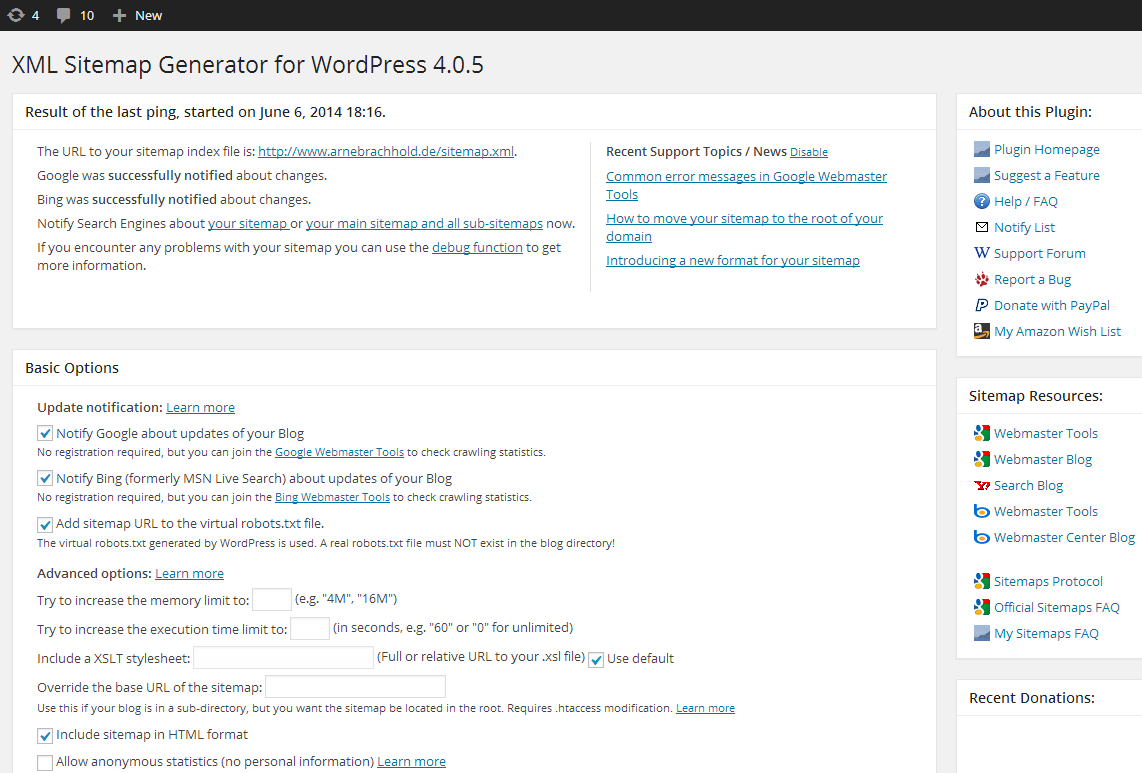
- If you want: Open the plugin configuration page, which is located under Settings -> XML-Sitemap and customize settings like priorities and change frequencies.
- The plugin will automatically update your sitemap if you publish new content, so there is nothing more to do 🙂
Log de Changes
Fixes XML parsing errors on sitemap.xml, stops the plugin from overwriting robots.txt rules added by WordPress and other plugins, allows fewer than 1000 links per sitemap file, and prevents future dates appearing as lastmod.
4.1.25 (2026-09-18)
- Fixed “XML parsing error: XML or text declaration not at the beginning of the entity” on sitemap.xml. If a theme or another plugin printed anything before the sitemap started — a blank line after a closing PHP tag, a UTF-8 BOM, a debug notice — it landed in front of the XML declaration and the whole document failed to parse. That output is now discarded before the sitemap is sent. This works where the stray output is still held in a PHP output buffer, which is the usual case; if your server runs with output_buffering disabled the output has already left for the browser before the plugin can act, and the offending blank line or BOM has to be removed from the file that emits it.
- Fixed the plugin overwriting robots.txt rules added by WordPress and other plugins. The robots.txt filter replaced the whole file body, so WooCommerce’s Disallow lines (wc-logs, woocommerce_uploads, add-to-cart) and any custom rules were silently dropped, and sites with “Discourage search engines” enabled were left with a bare “Disallow: /”. Rules are now additive: existing directives are preserved, and the redundant non-standard “Disallow: /” and “Disallow: /?” lines are gone. With “Discourage search engines” on, the “Disallow: /” is added to every user-agent group in the file rather than only to the “User-agent: *” one — a crawler that your robots.txt names specifically follows its own group and ignores the wildcard, so fencing only the wildcard would have left those crawlers free. If your robots.txt has no “User-agent: *” group at all, one is added, so crawlers your file never mentions are covered too. An “Allow:” covering the whole site is removed from the “User-agent: *” group, and from any other group at the point a block is added to it, because robots.txt resolves an exact-length tie in favour of the more permissive rule and that one line would otherwise cancel the block outright. A group where you have written both “Disallow: /” and “Allow: /” yourself is left alone — that pair is yours, and removing half of it would change what you asked for rather than enforce it. A group naming a specific crawler is left exactly as you wrote it — nothing added, nothing removed — when it grants that crawler the whole site and restricts nothing, so a deliberate exception, written either as “Allow: /” or as the bare “Disallow:” that Google’s own AdSense example uses, still works. A group that carries rules of its own is not an exception and is blocked like any other, so a group some other plugin wrote for Googlebot — “Disallow: /wp-admin/”, say — does not quietly exempt Googlebot from the setting. Path-specific “Allow:” rules, such as the one WordPress adds for admin-ajax.php, are never touched and still take precedence for their own path. Nor is “Allow: /$”, which grants only your homepage rather than the whole site. If you deliberately keep “Allow: /” in your “User-agent: *” group so that crawlers can still fetch pages and see the noindex meta tag WordPress emits — which since WordPress 5.3 is how core itself prefers to keep a site out of results — then this setting is working against you, and the line will be removed while it is on. Turn “Discourage search engines” off, or turn off the option below, if that is your strategy. All of this applies only while “Add sitemap URL to the virtual robots.txt file” is enabled, which is what lets the plugin touch robots.txt at all; with it off the plugin leaves the file alone entirely, as it did before. And robots.txt is a crawl hint, not access control: a staging site that must stay out of search needs HTTP authentication or a noindex header.
- Fixed “Links per sitemap file” refusing any value below 1000. The field advertised a minimum of 1000, and a separate repair that ran on every admin page load reset anything smaller, so a value you saved appeared not to stick. The minimum is now 100, that repair is gone, and the range is enforced in one place when the sitemap is built — so the number shown in settings is the number actually used.
- Fixed a future date appearing as for categories, tags, product terms and custom post type archives. The dates were read from the site-local database columns while WordPress runs PHP in UTC, so on any timezone ahead of UTC every entry was dated hours into the future — and the most recently updated categories looked the furthest ahead. Those dates are now read from the UTC columns. The category query was also picking up scheduled and draft posts when deciding how recently a category changed; it now only considers published ones. Where a date would still be genuinely in the future, that entry’s lastmod is left out rather than replaced with the current time, which would otherwise make the entry report a brand-new modification date on every fetch and teach search engines to ignore the field.
- Fixed the “Join the Beta Program” and “Enable Auto-Updates” banner buttons rendering with unreadable link-coloured, underlined text on WordPress 7.0 and later. Core 7.0 started colouring every link inside an admin notice, and its rule outranked the plugin’s button styles.
- Compatibility: marked as tested with WordPress 7.1.
4.1.24 (2026-05-22)
- Security: mitigated CVE-2026-42945 (NGINX Rift, CVSS 9.2) in the dashboard’s suggested Nginx rewrite rules. The rules now use named PCRE captures (?<slug>…) instead of unnamed $1/$2, which avoids the heap-overflow trigger in ngx_http_rewrite_module. If you previously copied the Nginx rules from Settings → XML-Sitemap into your nginx config, please re-copy the updated block.
- Compatibility: marked as tested with WordPress 7.0.
4.1.23 (2026-02-09)
- Improved security further for unauthenticated users from modifying plugin settings by enforcing proper permission and security‑token checks. CVE-2025-64632
4.1.22 (2025-12-23)
- Fixed preventing unauthenticated users from modifying plugin settings by enforcing proper permission and security‑token checks.
4.1.21 (2024-04-21)
- Fixed a regression with saving post/page exclusions.
- Fixed an issue with post/tag priority settings.
4.1.20 (2024-04-14)
- Fixed empty ping error
- Fixed response code issue with index sitemap
- Fixed interoperability with existing robots.txt file
- Fixed URL for guest authors
- Fixed uninstalled plugin error
- Fixed sitemap indexation
- Fixed “Trying to access array offset on value of type bool…” warning
- Fixed setting of custom taxonomy change frequency and priority
- Fixed missing custom taxonomies issue
- Fixed issue with hierarchical taxonomies
- Fixed missing categories issue
- Fixed sort order of URLs (changed from descending to ascending)
- Improved WooCommerce support (added products sitemap)
- Improved multisite support
- Improved SEO plugin interoperability
- Improved Nginx configuration
- Improved sitemap generation performance for large sites
- Added filter support for behavior/settings customization
- Added latest Microsoft Bing API Key to settings page
Capturas de tela
Para desenvolvedores
Este é o seu plugin? Mostre os números.
Adicione um crachá ao vivo ao seu site, Documentos ou Readme do GitHub. Ele é atualizado por conta própria - nenhuma conta necessária.
Best XML Sitemap Generator for Goo… alternatives
All html sitemap plugins →





FAQ
XML Sitemap Generator for Google: quick answers
Respostas diretas, extraídas de dados ao vivo WordPress.org.
Fonte: WordPress.org
Is XML Sitemap Generator for Google free?
Yes. XML Sitemap Generator for Google is free to download and use from the official WordPress.org plugin directory. The developer also sells premium add-ons or a Pro version with extra features.
Is XML Sitemap Generator for Google safe to use in 2026?
XML Sitemap Generator for Google is a solid plugin choice in 2026, with a few things worth checking first. It runs on 1M+ sites, is rated 4.8/5 and was last updated 2 months ago, and scores 78/100 on our health check.
How many websites use XML Sitemap Generator for Google?
XML Sitemap Generator for Google is active on 1M+ WordPress websites and has been downloaded 44,508,337 times since it launched in June 2005. It was downloaded 119,103 times in the last 30 days.
Does XML Sitemap Generator for Google work with WordPress 7.1?
Yes. The developer has tested XML Sitemap Generator for Google up to WordPress 7.1.5, the latest release. It requires WordPress 4.6 or newer.
What PHP version does XML Sitemap Generator for Google need?
XML Sitemap Generator for Google requires PHP 5.0 or higher. Most hosts run PHP 8.x today, so it works on any modern WordPress hosting.
When was XML Sitemap Generator for Google last updated?
The latest version, 4.1.25, was released on September 18, 2026 (2 months ago).
Who makes XML Sitemap Generator for Google?
XML Sitemap Generator for Google is developed and maintained by Auctollo.
What are the best alternatives to XML Sitemap Generator for Google?
The most popular alternatives to XML Sitemap Generator for Google are WP Sitemap Page (200K+ installs), Simple Sitemap (60K+ installs) and HTML Page Sitemap (Block an… (10K+ installs).
Alimentado por PageForge
Um modelo e uma planilha. Uma página real para cada pesquisa.
PageForge Transforma cada linha de um CSV em uma página WordPress com seu próprio título, URL, SEO campos e esquema, construído no layout que você já desenhou. Gratuito em WordPress.org.
- CSV e XLSX, mais Google Sheets em Profissional e Empresarial
- Seu próprio título, URL, SEO campos e esquema para cada página
- Funciona com o editor de blocos, Elementor, Divi e Avada
- Gratuito em WordPress.org, sem cartão de crédito