


Hierarchical HTML Sitemap
A lightweight HTML sitemap that groups posts by hierarchical categories and can optionally list pages.

Escolha segura
Yes — Hierarchical HTML Sitemap is a safe, well-maintained plugin to use in 2026. It runs on 4K+ sites, is rated 5/5 and was last updated 3 months ago, and scores 80/100 on our health check.
- Testado com as últimas WordPress (7.1)
Downloads diários
Os picos de download geralmente seguem uma nova versão — cada site que atualiza automaticamente é um download.
Rankings
Where Hierarchical HTML Sitemap stands todayWordPress.org Classificações de pesquisa
Posição ao vivo na pesquisa de plugins, top 100| Palavra chave | Posição |
|---|---|
| hierarchical sitemap | #1 |
| html sitemap | #5 |
| posts | >100 |
| SEO | >100 |
| sitemap | #12 |
Adoção da versão
Compartilhamento de sites ativos por lançamento.
Divisão de classificação
★★★★★★★★★★ 5 from 13 reviews
About Hierarchical HTML Sitemap
Do Readme oficial · v1.4.0Descrição
Hierarchical HTML Sitemap offers visitors an easy and intuitive way to navigate your blog.
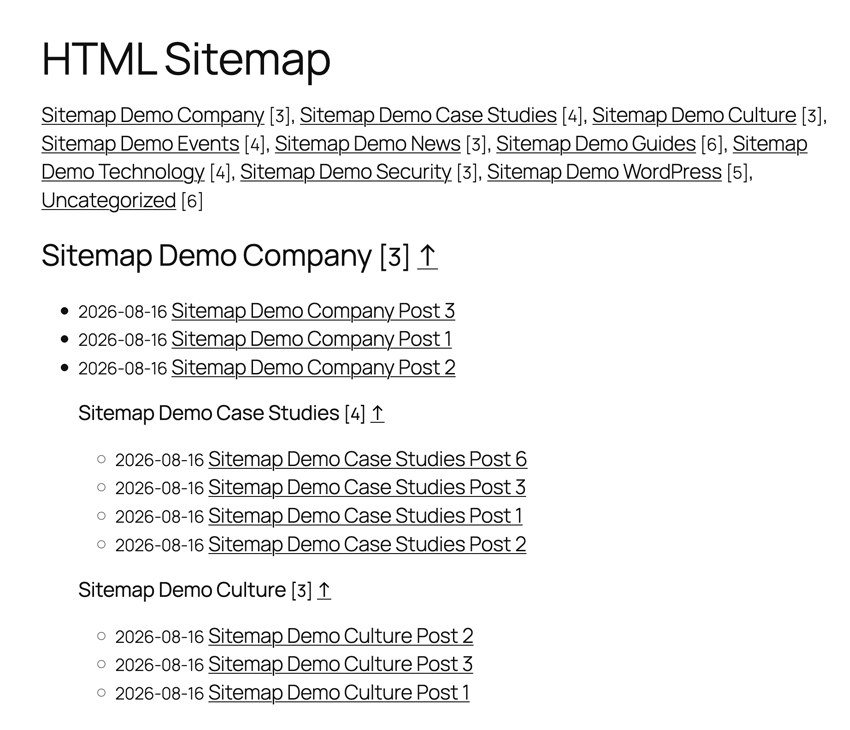
This plugin generates an HTML sitemap of your WordPress blog. It displays a list of posts grouped by hierarchically sorted categories. By using a shortcode, you can display it on a page or anywhere else that supports shortcodes, such as a widget.
The output does not include CSS or JavaScript files. It is pure HTML, ready to inherit or receive your theme’s styles.
Recursos
- Short and easy shortcode:
[htmlmap]. - Categories sorted hierarchically.
- Displays posts and/or pages.
- Can exclude specified posts, pages, or categories.
- Displays category navigation above the posts list.
- Displays post publication dates.
- Clean HTML without scripts.
- Does not enqueue unnecessary JavaScript or CSS files.
- No ads or author links in the output.
Usage and options
The [htmlmap] shortcode accepts these optional attributes:
exclude: post or page IDs to omit, for example[htmlmap exclude="445,446"].exclude_cat: category IDs to omit, for example[htmlmap exclude_cat="1,34"].showpages: display the list of pages, for example[htmlmap showpages].hidecloud: hide category navigation, for example[htmlmap hidecloud].showdescription: display category descriptions, for example[htmlmap showdescription].hidedate: hide post publication dates, for example[htmlmap hidedate].hidecount: hide post counts in category headings, for example[htmlmap hidecount].
You can combine attributes, for example:
[htmlmap exclude="3546,7398" exclude_cat="1,34" showpages hidecloud]
HTML structure and CSS classes
The shortcode preserves existing category heading IDs (cat_<term-id>), the
category navigation class (cat), and the empty-category class (null).
Additional classes are available for theme customisation:
htmlmap-post-list: each category’s post list.htmlmap-post: each post list item.htmlmap-children: the list item containing child categories.htmlmap-empty-category: added alongside the legacynullclass.htmlmap-category-description: a displayed category description.htmlmap-page-list: the optional pages list.htmlmap-page: each page list item.
Child categories are rendered after their parent category’s posts inside a
dedicated list item, rather than inside the final post item.
Extra
- GitHub repository for issues and contributions.
Instalação
Instalação automática
- Log in to your WordPress admin interface.
- Go to Plugins → Add New.
- Search for Hierarchical HTML Sitemap.
- Select Install Now, then activate the plugin.
Instalação manual
- Download the plugin ZIP and unzip it.
- Upload the
hierarchical-sitemapfolder to/wp-content/plugins/. - In WordPress admin, go to Plugins → Installed Plugins.
- Activate Hierarchical HTML Sitemap.
Uso
Editor clássico
- Create or edit a page named, for example, “Sitemap”.
- Add
[htmlmap]to the page content. - Publish or update the page, then view it to see your sitemap.
Editor de blocos
- Create or edit a page named, for example, “Sitemap”.
- Add a Shortcode block.
- Enter
[htmlmap]in the block. - Publish or update the page, then view it to see your sitemap.
Log de Changes
1.4.0
- feat: add CSS classes for post, child-category, and page list elements.
- feat: add the
hierarchicalsitemap_shortcode_htmlfilter for the complete shortcode output. - fix: sanitize shortcode ID lists and escape generated titles, descriptions, and URLs.
- fix: correct invalid nested list markup when rendering child categories.
- fix: handle empty shortcode attributes and empty category results safely.
- chore: test plugin syntax with PHP 8.3.
- chore: test plugin integration against WordPress 7.1.
- chore: update documentation and metadata.
1.3
- chore: test up to WordPress 4.6.9.
- feature: add the
hidecountoption that disables post counts in category names. - feature: add filter hooks:
hierarchicalsitemap_category_title_htmlhierarchicalsitemap_posts_list_htmlhierarchicalsitemap_pages_list_html
1.2
- chore: test up to WordPress 4.7.
1.1
- fix: display empty categories that have non-empty child categories.
- feature: add
showdescription, which displays category descriptions. - feature: add
hidedate, which hides post publication dates.
1.0
- feature: initial release.
Capturas de tela
Para desenvolvedores
Este é o seu plugin? Mostre os números.
Adicione um crachá ao vivo ao seu site, Documentos ou Readme do GitHub. Ele é atualizado por conta própria - nenhuma conta necessária.
FAQ
Hierarchical HTML Sitemap: quick answers
Respostas diretas, extraídas de dados ao vivo WordPress.org.
Fonte: WordPress.org
Is Hierarchical HTML Sitemap free?
Yes. Hierarchical HTML Sitemap is free to download and use from the official WordPress.org plugin directory.
Is Hierarchical HTML Sitemap safe to use in 2026?
Yes — Hierarchical HTML Sitemap is a safe, well-maintained plugin to use in 2026. It runs on 4K+ sites, is rated 5/5 and was last updated 3 months ago, and scores 80/100 on our health check.
How many websites use Hierarchical HTML Sitemap?
Hierarchical HTML Sitemap is active on 4K+ WordPress websites and has been downloaded 47,727 times since it launched in December 2014. It was downloaded 980 times in the last 30 days.
Does Hierarchical HTML Sitemap work with WordPress 7.1?
Yes. The developer has tested Hierarchical HTML Sitemap up to WordPress 7.1.5, the latest release. It requires WordPress 5.8 or newer.
What PHP version does Hierarchical HTML Sitemap need?
Hierarchical HTML Sitemap requires PHP 7.4 or higher. Most hosts run PHP 8.x today, so it works on any modern WordPress hosting.
When was Hierarchical HTML Sitemap last updated?
The latest version, 1.4.0, was released on August 30, 2026 (3 months ago).
Who makes Hierarchical HTML Sitemap?
Hierarchical HTML Sitemap is developed and maintained by Alexis Vovk.
Alimentado por PageForge
Um modelo e uma planilha. Uma página real para cada pesquisa.
PageForge Transforma cada linha de um CSV em uma página WordPress com seu próprio título, URL, SEO campos e esquema, construído no layout que você já desenhou. Gratuito em WordPress.org.
- CSV e XLSX, mais Google Sheets em Profissional e Empresarial
- Seu próprio título, URL, SEO campos e esquema para cada página
- Funciona com o editor de blocos, Elementor, Divi e Avada
- Gratuito em WordPress.org, sem cartão de crédito