


Blocos personalizados do Genesis
Blocos personalizados para WordPress facilitados.

Escolha sólida
Genesis Custom Blocks is a solid plugin choice in 2026, with a few things worth checking first. It runs on 10K+ sites, is rated 4.5/5 and was last updated 1 month ago, and scores 73/100 on our health check.
- Comprovado em escala em sites ativos de mais de 10 mil
- Loved by users — 4.5/5 from 21 reviews
- Testado com as últimas WordPress (7.1)
Como ele se acumula?
Lado a lado em instalações, atualizações, avaliações e suporte



Downloads diários
Os picos de download geralmente seguem uma nova versão — cada site que atualiza automaticamente é um download.
Rankings
Where Genesis Custom Blocks stands todayWordPress.org Classificações de pesquisa
Posição ao vivo na pesquisa de plugins, top 100| Palavra chave | Posição |
|---|---|
| Bloco-editor | >100 |
| blocos | #29 |
| fields | >100 |
| Gutenberg | >100 |
| template | >100 |
Adoção da versão
Compartilhamento de sites ativos por lançamento.
Divisão de classificação
★★★★★★★★★★ 4.5 from 21 reviews
About Genesis Custom Blocks
From the official readme · v1.7.4Descrição
Genesis Custom Blocks provides WordPress developers with the tools they need to take control of the block-first reality of modern WordPress.
The WordPress block editor (AKA Gutenberg) opens up a whole new world for the way we build pages, posts, and websites with WordPress. Genesis Custom Blocks makes it easy to harness this and build custom blocks the way you want them to be built. Whether you want to implement a custom design, deliver unique functionality, or even remove your dependence on other plugins, Genesis Custom Blocks equips you with the tools you need to hit “Publish” sooner.
Take control of design – Implement beautiful, custom designs with fine-tuned front-end templating control.
Build unique functionality – Build blocks that function and behave exactly as you need.
Extend & Integrate – Easily extend your custom blocks to integrate with third-party apps and plugins.
Recursos
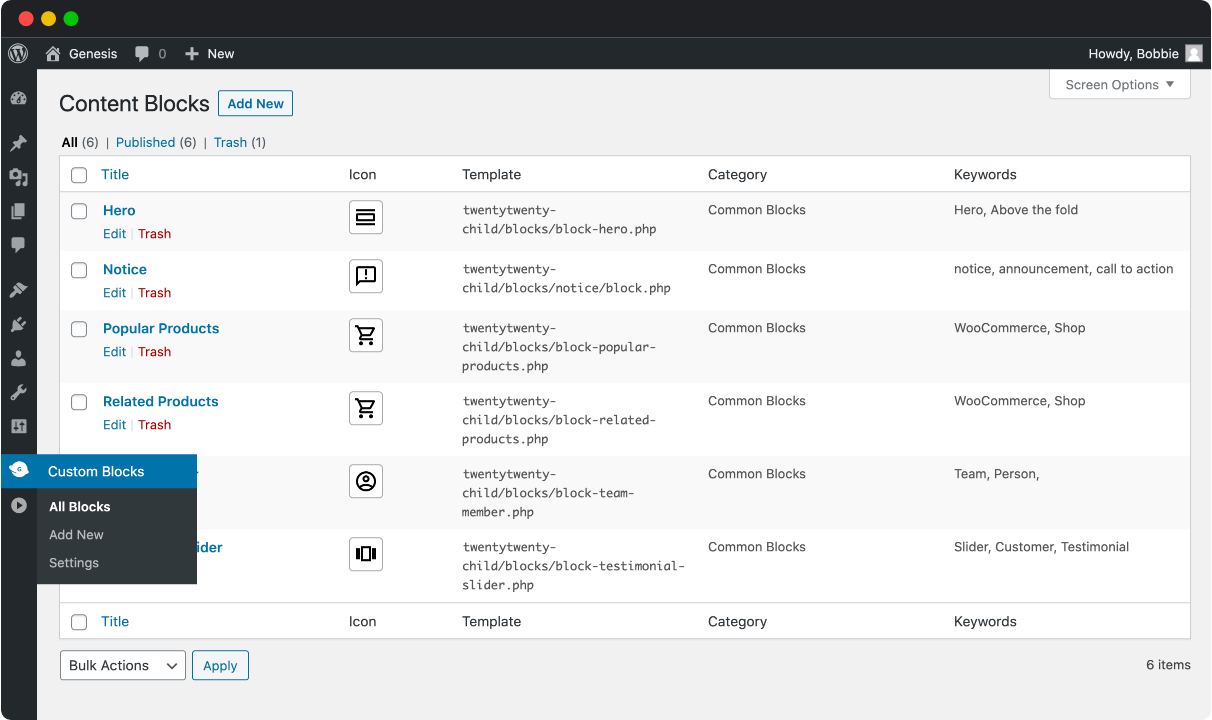
A Familiar Experience
Work within the WordPress admin with an interface you already know.
Block Fields
Add from a growing list of available fields to your custom blocks.
Simple Templating
Let the plugin do the heavy lifting so you can use the built-in editor, or familiar WordPress development practices to build block templates.
Developer Friendly Functions
As an alternative to the built-in editor, there are simple functions, ready to render and work with the data stored through your custom block fields.
Currently available block fields
- Inner Blocks Field
- File Field
- Text Field
- Image Field
- URL Field
- Toggle Field
- Textarea Field
- Select Field
- Range Field
- Radio Field
- Number Field
- Multi-select Field
- Email Field
- Color Field
- Checkbox Field
Do more with Genesis Pro
For those wanting to level-up with Genesis Custom Blocks, a Genesis Pro subscription brings some serious power-user features:
Genesis Custom Blocks Pro Features
- Repeater Field
- Taxonomy Field
- Post Field
- User Field
- Rich Text Field
- Classic Text Field
- Block Level Import/Export
- 24/7 Support
Genesis Pro includes even more value for modern WordPress content creators, marketers, and developers. Learn more about Genesis Pro here.
Developer docs you can rely on.
Developer tools are only as good as their docs. That’s why we take them seriously. Here are a few links to get you started:
Links
Instalação
This plugin can be installed directly from your site.
1. Log in and navigate to Plugins → Add New.
2. Type “Genesis Custom Blocks” into the Search and hit Enter.
3. Locate the Genesis Custom Blocks plugin in the list of search results and click Install Now.
4. Once installed, click the Activate link.
It can also be installed manually.
1. Download the Genesis Custom Blocks plugin from WordPress.org.
2. Unzip the package and move to your plugins directory.
3. Log into WordPress and navigate to the Plugins screen.
4. Locate Genesis Custom Blocks in the list and click the Activate link.
Capturas de tela


Para desenvolvedores
Este é o seu plugin? Mostre os números.
Adicione um crachá ao vivo ao seu site, Documentos ou Readme do GitHub. Ele é atualizado por conta própria - nenhuma conta necessária.
Best Genesis Custom Blocks alternatives
Todos os plugins do editor de blocos →





FAQ
Genesis Custom Blocks: quick answers
Respostas diretas, extraídas de dados ao vivo WordPress.org.
Fonte: WordPress.org
Is Genesis Custom Blocks free?
Yes. Genesis Custom Blocks is free to download and use from the official WordPress.org plugin directory.
Is Genesis Custom Blocks safe to use in 2026?
Genesis Custom Blocks is a solid plugin choice in 2026, with a few things worth checking first. It runs on 10K+ sites, is rated 4.5/5 and was last updated 1 month ago, and scores 73/100 on our health check.
How many websites use Genesis Custom Blocks?
Genesis Custom Blocks is active on 10K+ WordPress websites and has been downloaded 203,482 times since it launched in September 2020. It was downloaded 5,262 times in the last 30 days.
Does Genesis Custom Blocks work with WordPress 7.1?
Yes. The developer has tested Genesis Custom Blocks up to WordPress 7.1.5, the latest release. It requires WordPress 6.0 or newer.
What PHP version does Genesis Custom Blocks need?
Genesis Custom Blocks requires PHP 7.0 or higher. Most hosts run PHP 8.x today, so it works on any modern WordPress hosting.
When was Genesis Custom Blocks last updated?
The latest version, 1.7.4, was released on October 19, 2026 (1 month ago).
Who makes Genesis Custom Blocks?
Genesis Custom Blocks is developed and maintained by StudioPress.
What are the best alternatives to Genesis Custom Blocks?
The most popular alternatives to Genesis Custom Blocks are Classic Editor (8M+ installs), Advanced Editor Tools (1M+ installs) and Disable Gutenberg (500K+ installs).
Alimentado por PageForge
Um modelo e uma planilha. Uma página real para cada pesquisa.
PageForge Transforma cada linha de um CSV em uma página WordPress com seu próprio título, URL, SEO campos e esquema, construído no layout que você já desenhou. Gratuito em WordPress.org.
- CSV e XLSX, mais Google Sheets em Profissional e Empresarial
- Seu próprio título, URL, SEO campos e esquema para cada página
- Funciona com o editor de blocos, Elementor, Divi e Avada
- Gratuito em WordPress.org, sem cartão de crédito