


Brain 2FA
Add two-factor authentication and passwordless passkey sign-in to WordPress accounts.

Use com cautela
Brain 2FA works, but test it on a staging site before relying on it in 2026. Was last updated 1 month ago, and scores 60/100 on our health check.
- Testado com as últimas WordPress (7.1)
- Base de usuários pequenas (<10 instalações ativas)
- Muito poucos comentários até agora
- Precisa de PHP 8.1 ou mais recente
Como ele se acumula?
Lado a lado em instalações, atualizações, avaliações e suporte



Downloads diários
Os picos de download geralmente seguem uma nova versão — cada site que atualiza automaticamente é um download.
Rankings
Where Brain 2FA stands todayWordPress.org Classificações de pesquisa
Posição ao vivo na pesquisa de plugins, top 100| Palavra chave | Posição |
|---|---|
| 2FA | >100 |
| Authenticator | >100 |
| segurança | >100 |
| totp | #84 |
| two factor authentication | >100 |
About Brain 2FA
Do Readme oficial · v1.3.0Descrição
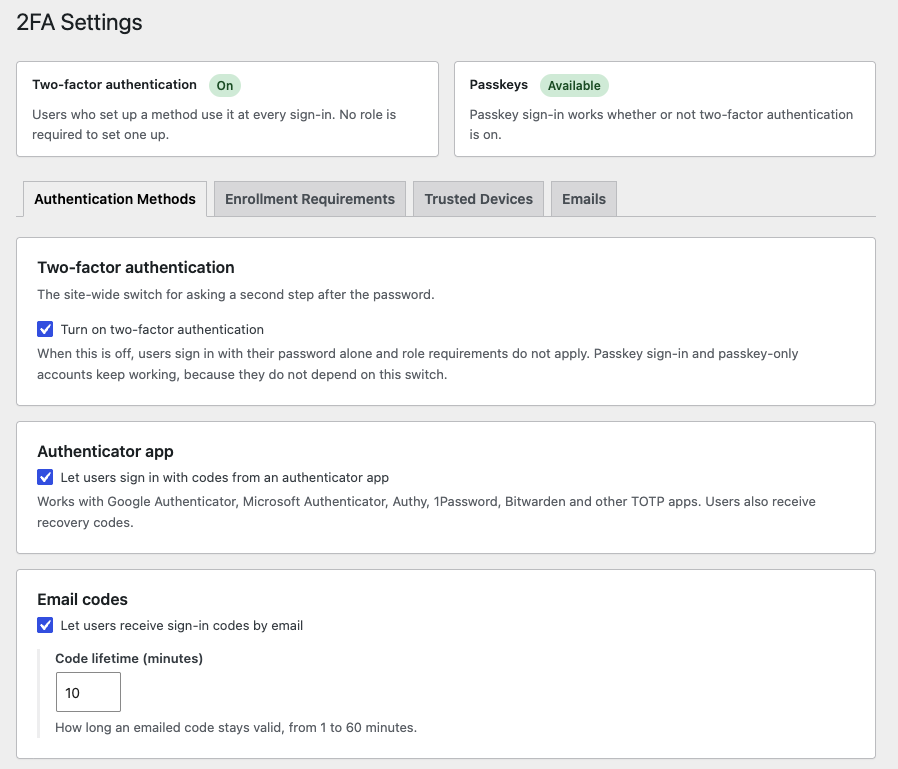
Brain 2FA protects WordPress accounts with a second authentication factor. After entering their password, users confirm their identity with a six-digit code from an authenticator app or from their email inbox. Users can also sign in without a password using a passkey.
Codes are generated and passkeys are verified on your own server. Brain 2FA does not send any data to third-party services.
Recursos
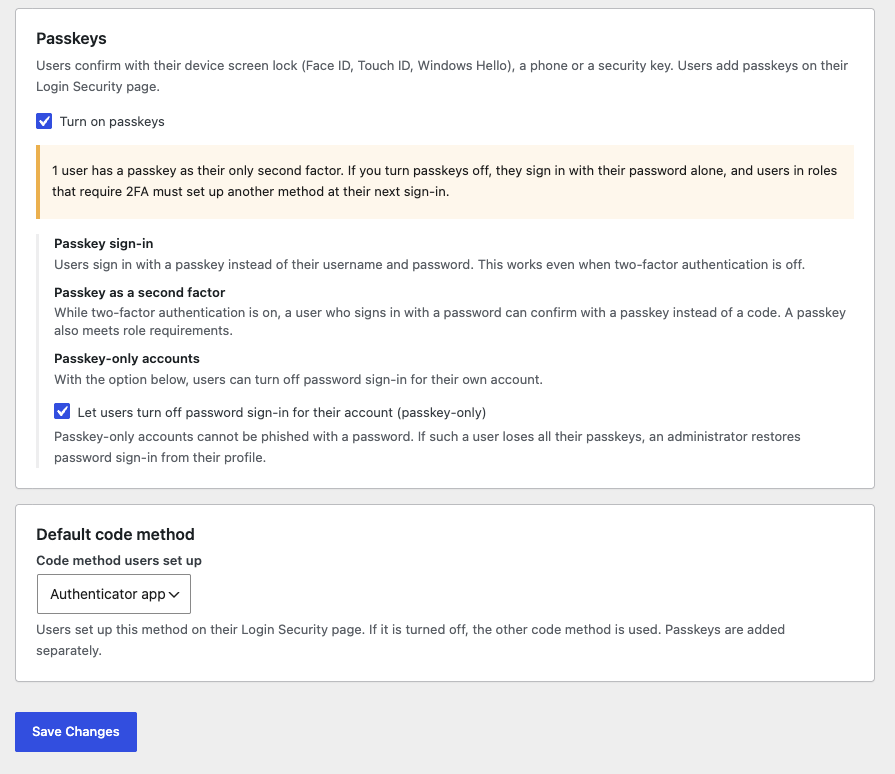
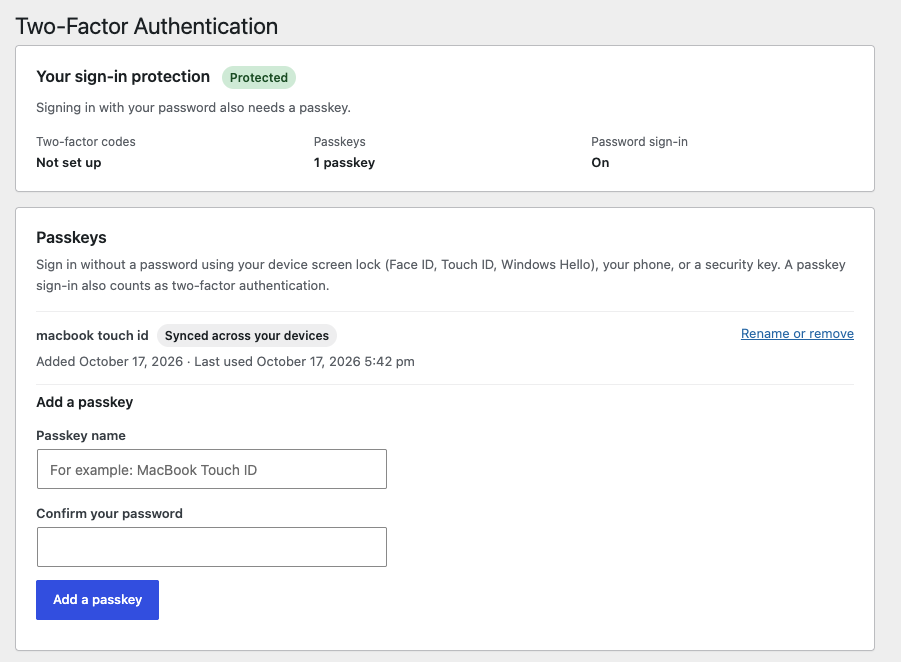
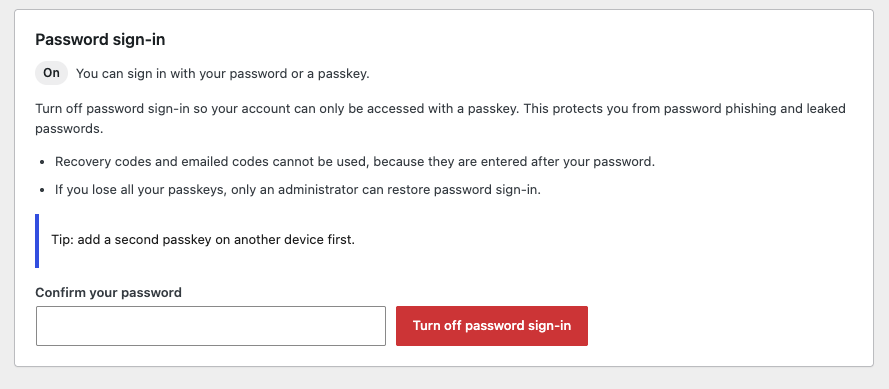
- Passkeys: Sign in without a password using Face ID, Touch ID, Windows Hello, a phone or a security key. Passkeys are offered right in the username field, and a passkey sign-in counts as two-factor authentication. A passkey can also be the second step after a password, counts toward required two-factor setup, and users can optionally turn off password sign-in entirely. Requires HTTPS; turn it on under Brain 2FA > Settings.
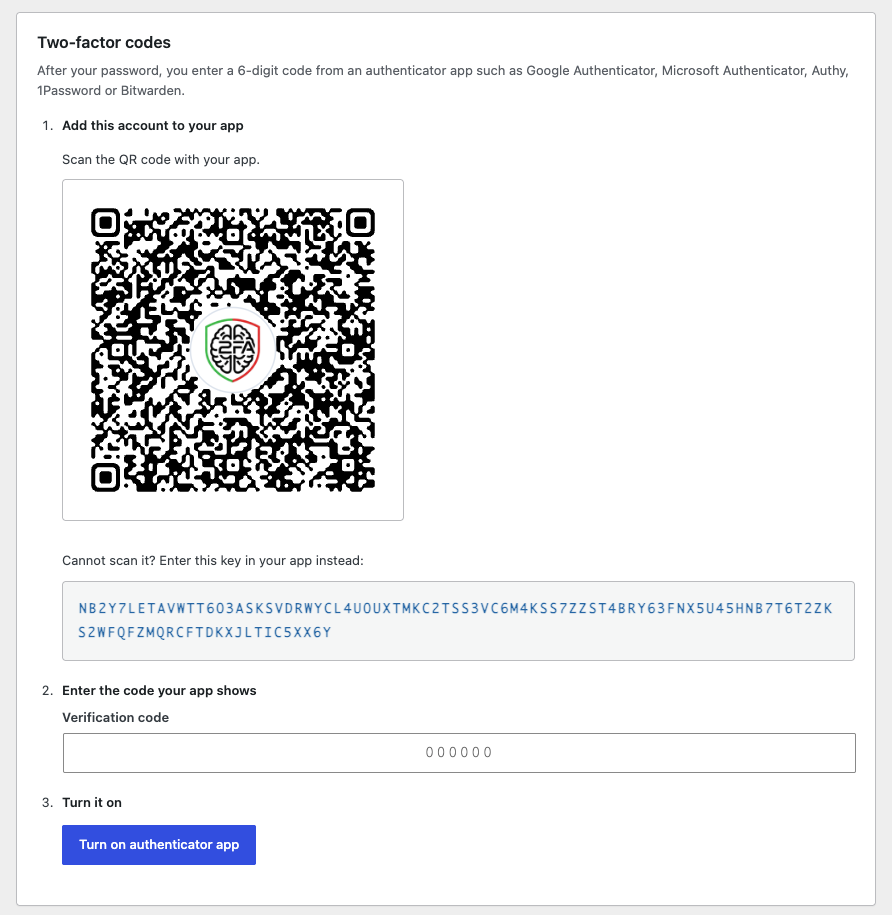
- Authenticator apps (TOTP): Works with Google Authenticator, Microsoft Authenticator, Authy, 1Password, Bitwarden and any other TOTP-compatible app. Users set it up by scanning a QR code or entering the secret key manually. One-time recovery codes cover a lost phone, and users are warned in WordPress and on their WooCommerce account dashboard when only a few are left.
- Email verification codes: Sends a one-time code to the account email address, with a configurable expiry time.
- Recovery codes: TOTP users receive one-time recovery codes they can download and regenerate in case they lose their phone.
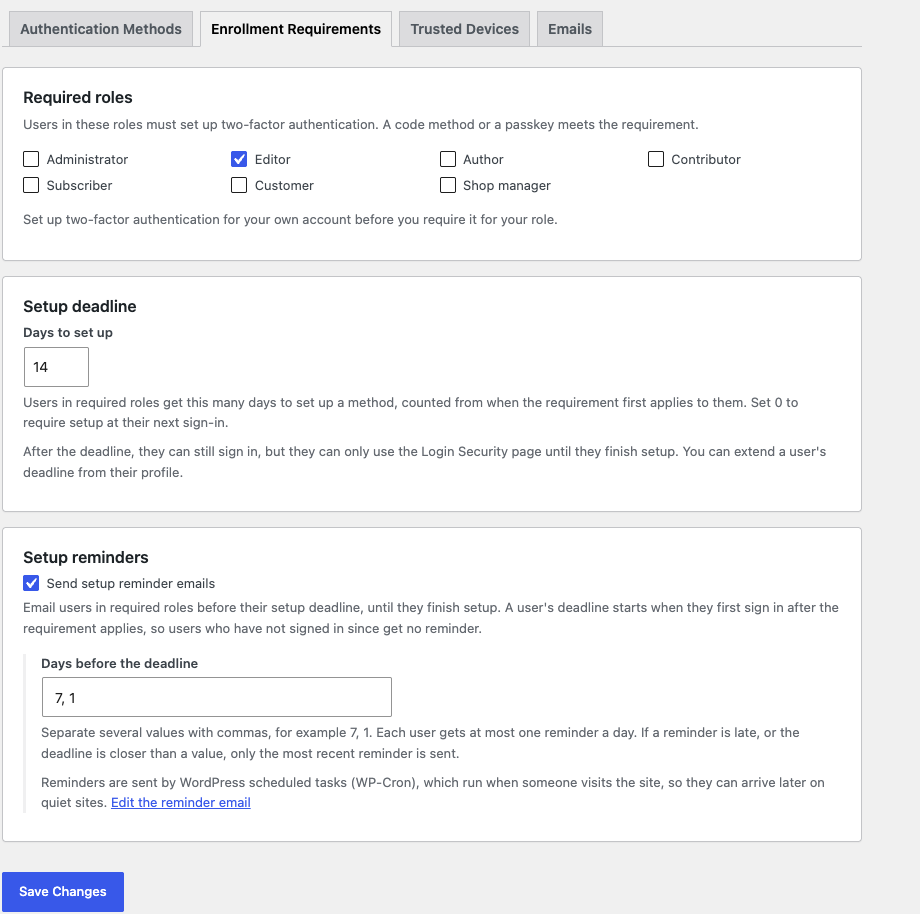
- Role-based enforcement: Require two-factor authentication for selected user roles, such as Administrator, Editor or Shop manager.
- Setup grace period: Give users in required roles a set number of days to enable 2FA. After the deadline, they can sign in but only reach the setup page until 2FA is enabled. Administrators can see deadlines in the Users list and extend them from a user’s profile.
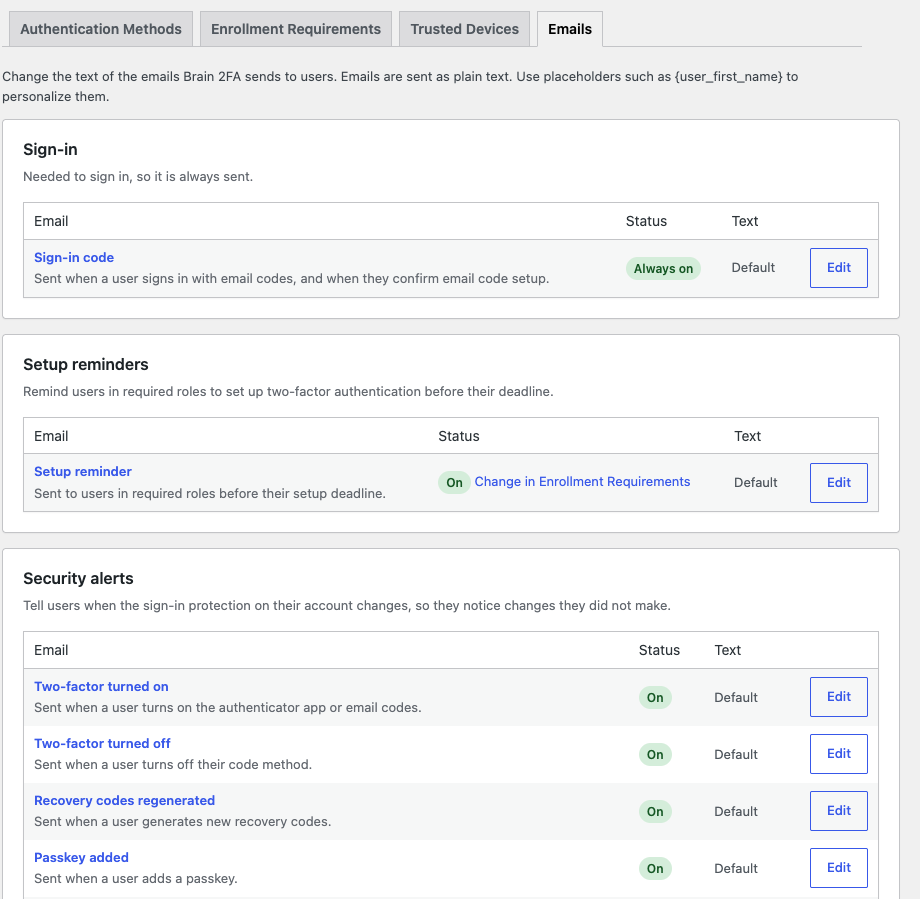
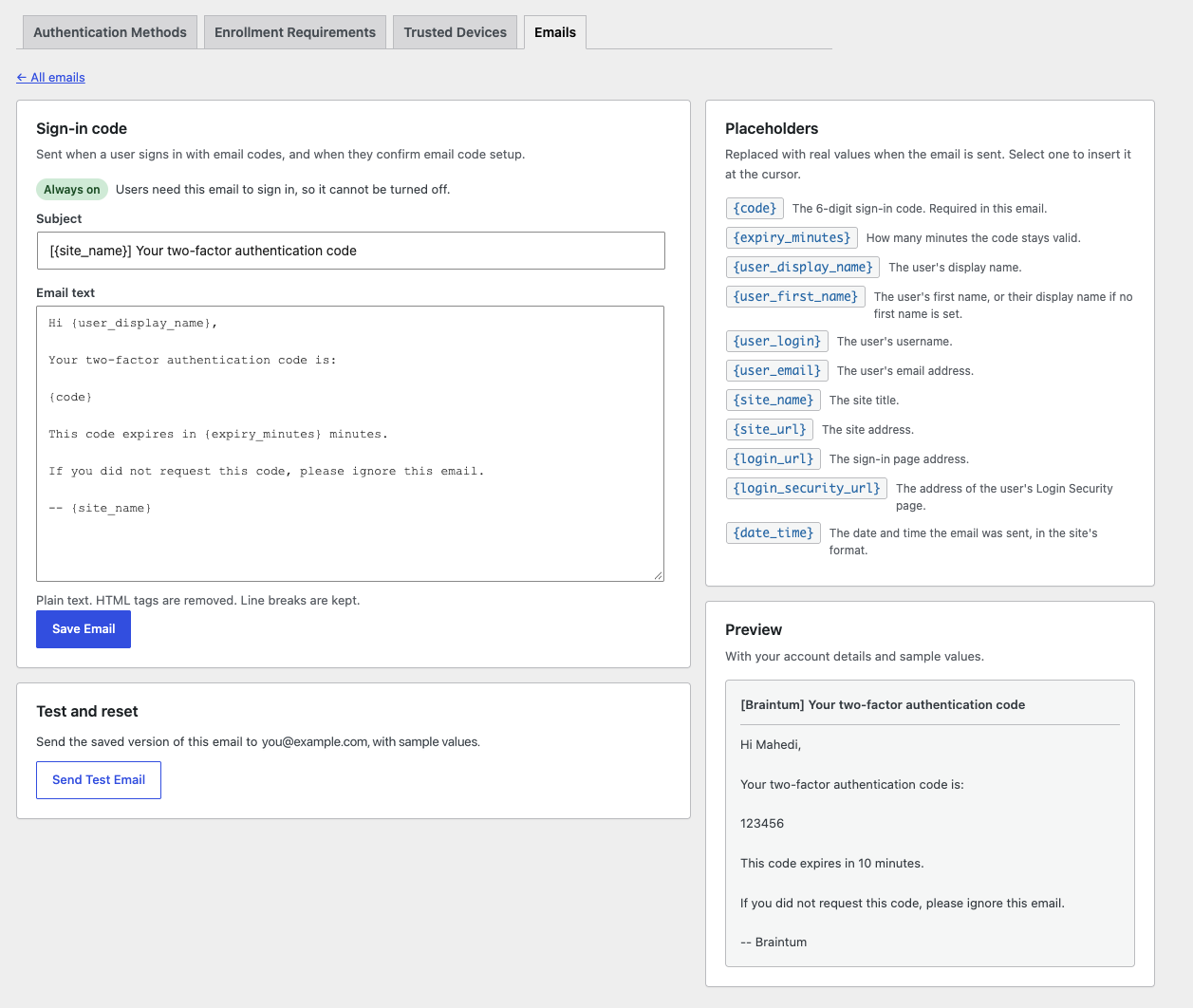
- Editable emails: Change the subject and text of every email the plugin sends, from the sign-in code to setup reminders and security alerts, under Brain 2FA > Settings > Emails. Personalize them with placeholders such as
{user_display_name},{site_name}and{date_time}, preview them as you type, send yourself a test, and reset any email to its default. You can also turn off individual alerts and set the sender name and address. - Setup reminders: Optionally email users in required roles before their setup deadline, 7 and 1 days ahead by default. Each user gets at most one reminder a day, and late reminders never pile up.
- Enrollment overview: See at a glance how many users are protected, still have to set up two-factor authentication, or missed their deadline, for all roles or one role. Every number opens the matching filtered Users list, and the Users list can be filtered by 2FA status.
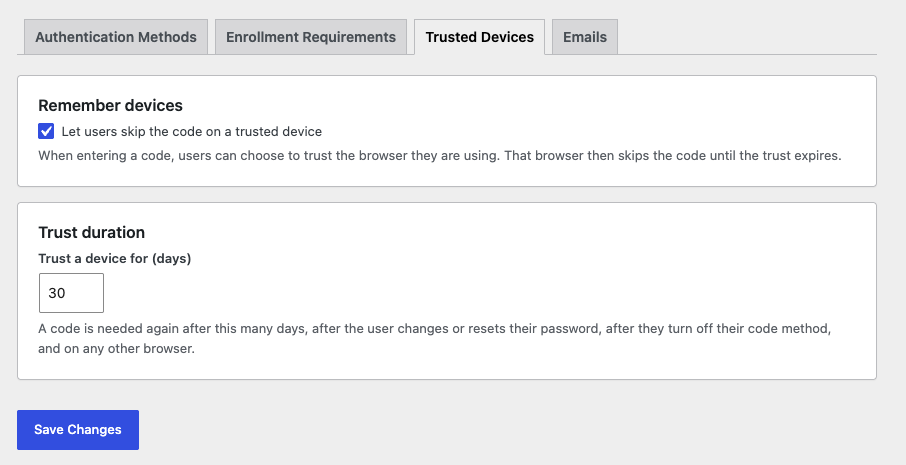
- Trusted devices: Users can optionally skip the code on devices they trust, using expiring, password-hashed tokens. They see each trusted browser, when it was last used and when it expires on their Login Security page, and can forget one or all of them.
- Consistent enforcement: The 2FA policy applies to every sign-in, including direct submissions of the login form, not only the JavaScript-assisted flow. The credential check before the code step is rate limited per IP address.
- WooCommerce support: Works with the default WordPress login form and the WooCommerce My Account login form. Customers manage all their sign-in protection in a Login Security tab in My Account (passkeys, authenticator app or email codes, recovery codes, trusted devices and password sign-in), without visiting the WordPress dashboard.
- Works without JavaScript: If the login script cannot run, a verification code field is shown on the login form instead.
- Translation ready: All user-facing text can be translated.
Apoio
Need help? Visit Braintum Support.
Development
The development source code and build tools for Brain 2FA are publicly available at:
https://github.com/Braintum/brain-2fa
The JavaScript files in assets/js/ are generated from the source files in src/js/.
Instalação
- Upload the
brain-2fafolder to the/wp-content/plugins/directory, or install the plugin through the WordPress Plugins screen. - Activate the plugin through the Plugins screen in WordPress.
- Open Brain 2FA > Settings and enable two-factor authentication.
- Configure authentication methods and role requirements as needed.
Log de Changes
Adds a Login Security tab to WooCommerce My Account so customers manage their sign-in protection in the store, and warns authenticator app users when they are running out of recovery codes.
1.3.0
- New: WooCommerce customers get a Login Security tab in My Account with everything from the dashboard Login Security page: their protection summary, passkeys, authenticator app or email code setup, recovery codes, trusted devices and password sign-in. Customers are sent there for setup, in restricted setup mode, from email links and from the old dashboard address. Staff keep the dashboard page. Developers can change the tab’s URL slug with
brain2fa_account_security_tab_slug, turn it off withbrain2fa_account_security_tab, or choose who uses it withbrain2fa_use_account_security_tab. - New: Brain 2FA now warns you in WordPress and on your WooCommerce account dashboard when you have only a few recovery codes left (2 or fewer), with a direct link to generate a fresh set. Developers can change the threshold with the
brain2fa_recovery_codes_warning_thresholdfilter.
1.2.0
- New: Users see their trusted devices on the Login Security page: the browser and system, when it was trusted and last used, and when the trust expires. They can forget one device or all of them; the browser they are using is marked.
- New: Brain 2FA > Overview shows how your users are protected: how many have a method, still have a setup deadline, missed it or have not started, and which methods they use, for all roles or one role. Every number opens the matching filtered Users list.
- New: The Users list can be filtered by 2FA status.
- New: Optional setup reminder emails before a user’s setup deadline (7 and 1 days ahead by default), turned on under Enrollment Requirements and editable under Emails. Each user gets at most one reminder a day, and a late reminder never comes with a backlog. Off by default.
- Security: An authenticator code or recovery code submitted several times at once is now accepted only once.
- Security: Email sign-in codes are stored only as a keyed hash. A code emailed before the update no longer works; users simply request a new one.
- Improvement: Viewing the Users list, the Overview or another user’s profile no longer starts that user’s setup deadline. It starts when they next sign in, and the Users list shows them as “Required, not started” until then.
- Improvement: The verification step on the WooCommerce My Account login form now matches the WooCommerce login fields.
- Improvement: Developers can react to passkey changes with the
brain2fa_passkeys_changedaction.
1.1.0
- New: Passkeys for passwordless sign-in (Face ID, Touch ID, Windows Hello, phones and security keys). Passkeys are offered in the username field’s autofill and through a “Sign in with a passkey” button on the WordPress and WooCommerce login forms. Off by default; requires HTTPS.
- New: Users add, rename and remove passkeys on their Login Security page. Adding or removing a passkey requires the account password, and users are emailed about each change.
- New: Administrators can remove all of a user’s passkeys from the user’s profile.
- New: A passkey can be the second step after a password, as an alternative to a code or as the only second factor.
- New: Passkeys count toward required two-factor setup: users in required roles can enroll with a passkey alone.
- New: Optional passkey-only accounts. When allowed under Brain 2FA > Settings, users can turn off password sign-in; administrators can turn it back on from the user’s profile.
- New: Every email the plugin sends is editable under Brain 2FA > Settings > Emails: the sign-in code email and nine security alerts. Personalize them with placeholders (user name, site name, sign-in links, date and time, passkey name and more), preview changes as you type, send a test to yourself and reset to the default at any time.
- New: Security alerts can be turned off individually, and the sender name and address can be set for plugin emails.
- New: Developers can add placeholders with the
brain2fa_email_placeholdersfilter and change any email before it is sent withbrain2fa_email_content. - Security: A passkey sign-in requires the device’s biometric or PIN check and counts as two-factor authentication. A passkey that appears to have been copied is blocked, and the owner is notified.
- Improvement: Brain 2FA > Settings is organized into tabs: Authentication Methods, Enrollment Requirements, Trusted Devices and Emails. Each tab saves on its own without changing the others, and a summary at the top shows whether two-factor authentication and passkeys are in effect.
- Improvement: Passkey alerts now name the passkey that was added, removed or blocked.
- Improvement: The settings page warns before you turn off the authenticator app or email codes while users rely on them, with the number of users who could no longer sign in with their password.
- Improvement: The Login Security page starts with a summary of your sign-in protection, followed by separate sections for passkeys, two-factor codes, recovery codes and password sign-in. Errors appear next to the form that caused them.
- Improvement: Deleting the plugin now removes all of its data (settings, email templates, user two-factor data and the passkeys table). Deactivating keeps everything; define
BRAIN2FA_KEEP_DATA_ON_UNINSTALLto keep data on deletion. - Improvement: Compatibility with the next major version of the TOTP library (no more deprecation notice).
- Improvement: A refreshed authenticator app QR code with rounded modules and the logo in a round badge. It stays sharp on high-resolution screens and no longer needs the GD extension.
- Fix: Entering a wrong code while setting up an authenticator app no longer replaces the QR code you already scanned.
1.0.4
- New: Users who miss their setup deadline are no longer locked out. They can sign in, but only reach the setup page until two-factor authentication is enabled. A grace period of 0 now works as described: setup is required at the first sign-in.
- New: WooCommerce customers can set up and manage two-factor authentication from a link on their My Account dashboard.
- New: A verification code field is shown on login forms when JavaScript is unavailable.
- Improvement: Email authentication is turned on only after you enter a code sent to your address, so broken site email cannot lock you out.
- Improvement: Users whose role requires two-factor authentication must set up a new method right after deactivating, instead of getting a new grace period.
- Security: Sessions started before a setup deadline are also restricted to the setup page once it passes. XML-RPC and REST logins stay blocked until setup is complete.
1.0.3
- Security: Limit failed verification attempts. After 5 failed codes, an account is locked out of verification for 15 minutes; repeated failures from one IP address are also limited.
- Security: Turning off two-factor authentication and regenerating recovery codes now require your account password.
- Security: A new authentication method can no longer be set up over an active one.
- Security: Users receive an email when two-factor authentication is turned on or off, or recovery codes are regenerated.
- Security: Trusted devices are revoked when a password is changed or reset.
- Security: Email verification codes can only be used once, even with simultaneous requests.
- Fix: The email code expiry setting is limited to 1–60 minutes.
- Fix: The QR code area is hidden when the QR code cannot be generated; the secret key is still shown.
1.0.2
- Security: TOTP codes can no longer be reused within their validity window.
- Fix: Clock-drift tolerance now correctly accepts the previous and next 30-second authenticator codes.
Capturas de tela
Para desenvolvedores
Este é o seu plugin? Mostre os números.
Adicione um crachá ao vivo ao seu site, Documentos ou Readme do GitHub. Ele é atualizado por conta própria - nenhuma conta necessária.
Best Brain 2FA alternatives
All 2FA plugins →





FAQ
Brain 2FA: quick answers
Respostas diretas, extraídas de dados ao vivo WordPress.org.
Fonte: WordPress.org
Is Brain 2FA free?
Yes. Brain 2FA is free to download and use from the official WordPress.org plugin directory.
Is Brain 2FA safe to use in 2026?
Brain 2FA works, but test it on a staging site before relying on it in 2026. Was last updated 1 month ago, and scores 60/100 on our health check.
How many websites use Brain 2FA?
Brain 2FA is active on <10 WordPress websites and has been downloaded 445 times since it launched in October 2026. It was downloaded 173 times in the last 30 days.
Does Brain 2FA work with WordPress 7.1?
Yes. The developer has tested Brain 2FA up to WordPress 7.1.5, the latest release. It requires WordPress 6.4 or newer.
What PHP version does Brain 2FA need?
Brain 2FA requires PHP 8.1 or higher. Most hosts run PHP 8.x today, so it works on any modern WordPress hosting.
When was Brain 2FA last updated?
The latest version, 1.3.0, was released on October 29, 2026 (1 month ago).
Who makes Brain 2FA?
Brain 2FA is developed and maintained by Braintum.
What are the best alternatives to Brain 2FA?
The most popular alternatives to Brain 2FA are Wordfence Security (5M+ installs), Really Simple Security (3M+ installs) and Limit Login Attempts Securi… (1M+ installs).
Alimentado por PageForge
Um modelo e uma planilha. Uma página real para cada pesquisa.
PageForge Transforma cada linha de um CSV em uma página WordPress com seu próprio título, URL, SEO campos e esquema, construído no layout que você já desenhou. Gratuito em WordPress.org.
- CSV e XLSX, mais Google Sheets em Profissional e Empresarial
- Seu próprio título, URL, SEO campos e esquema para cada página
- Funciona com o editor de blocos, Elementor, Divi e Avada
- Gratuito em WordPress.org, sem cartão de crédito