


Two Factor Authentication
Secure WordPress login with Two Factor Authentication - supports WP, Woo + other login forms, HOTP, TOTP (Google Authenticator, Authy, etc.)

Escolha segura
Yes — Two Factor Authentication is a safe, well-maintained plugin to use in 2026. It runs on 20K+ sites, is rated 4.4/5 and was last updated 2 days ago, and scores 87/100 on our health check.
- Comprovado em escala em mais de 20 mil sites ativos
- Desenvolvido ativamente — última atualização 2 dias atrás
- Testado com as últimas WordPress (7.1)
- Momentum — downloads up 597.6% vs the previous 30 days
Como ele se acumula?
Lado a lado em instalações, atualizações, avaliações e suporte



Downloads diários
Os picos de download geralmente seguem uma nova versão — cada site que atualiza automaticamente é um download.
Rankings
Where Two Factor Authentication stands todayWordPress.org Classificações de pesquisa
Posição ao vivo na pesquisa de plugins, top 100| Palavra chave | Posição |
|---|---|
| 2FA | #33 |
| google authenticator | #12 |
| TFA | #2 |
| two factor | #5 |
| two factor auth | #3 |
Adoção da versão
Compartilhamento de sites ativos por lançamento.
Divisão de classificação
★★★★★★★★★★ 4.4 from 77 reviews
About Two Factor Authentication
From the official readme · v1.17.0Descrição
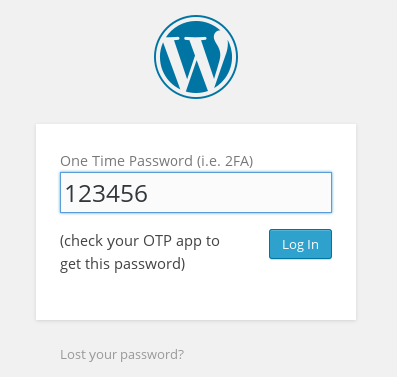
Secure WordPress login with this two factor authentication (TFA / 2FA) plugin. Users for whom it is enabled will require a one-time code in order to log in. From the authors of UpdraftPlus – WP’s #1 backup/restore plugin, with over two million active installs.
Are you completely new to TFA? If so, please see our FAQ.
Features (please see the “Screenshots” for more information):
- Supports standard TOTP + HOTP protocols (and so supports Google Authenticator, Authy, and many others).
- Displays graphical QR codes for easy scanning into apps on your phone/tablet
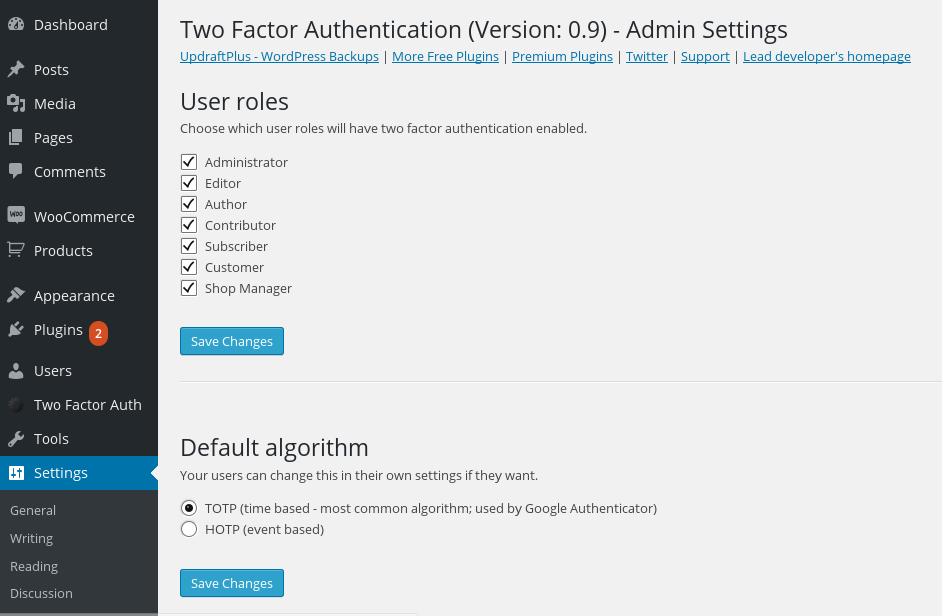
- TFA can be made available on a per-role basis (e.g. available for admins, but not for subscribers)
- TFA can be turned on or off by each user
- TFA can be required for specified user levels, after a defined time period (e.g. require all admins to have TFA, once their accounts are a week old) (Premium version), including forcing them to immediately set up (by redirecting them to the page to do so)
- Supports front-end editing of settings, via [twofactor_user_settings] shortcode (i.e. users don’t need access to the WP dashboard). (The Premium version allows custom designing of any layout you wish).
- Site owners can allow “trusted devices” on which TFA codes are only asked for a chosen number of days (instead of every login); e.g. 30 days (Premium version)
- Encrypt the TFA-generating secret keys using an on-disk encryption key, so that an attacker would need to break into both your WordPress database and your files in order to break TFA codes (as well as breaking a user’s password in order to use them)
- Works together with “Theme My Login” (both forms and widgets)
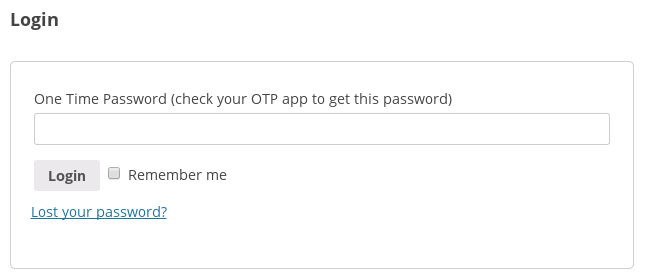
- Includes support for the WooCommerce and Affiliates-WP login forms
- Includes support for Ultimate Membership Pro
- Includes support for CozmosLabs Profile Builder
- Includes support for Ultimate Member login forms (Premium version)
- Includes support for Elementor Pro login forms (Premium version)
- Includes support for bbPress login forms (Premium version)
- Includes support for Easy Digital Downloads login forms (Premium version)
- Includes support for RegistrationMagic login forms (Premium version)
- Includes support for login forms from the Gravity Forms User Registration add-on (Premium version)
- Includes support for login forms (shortcode forms only) from Paid Memberships Pro (Premium version)
- Includes support for any and every third-party login form (Premium version) without any further coding needed via appending your TFA code to the end of your password
- Does not mention or request second factor until the user has been identified as one with TFA enabled (i.e. nothing is shown to users who do not have it enabled)
- WP Multisite compatible (plugin should be network activated)
- Simplified user interface and code base for ease of use and performance
- Added a number of extra security checks to the original forked code
- Alert users if someone appears to have found out their password, as indicated by successfully entering a password but repeatedly entering an incorrect TFA code.
- Emergency codes for when you lose your phone/tablet (Premium version)
- When using the front-end shortcode (Premium version), require the user to enter the current TFA code correctly to be able to activate TFA
- Works together with “WP Members” (shortcode form)
- Administrators can access other users’ codes, and turn them on/off when needed (Premium version)
Why use TFA / 2FA ?
Read this! https://www.wired.com/2012/08/apple-amazon-mat-honan-hacking/
How Does TFA / 2FA Work?
This plugin uses the industry standard TFA / 2FA algorithm TOTP or HOTP for creating One Time Passwords. These are used by Google Authenticator, Authy, and many other OTP applications that you can deploy on your phone etc.
A TOTP code is valid for a certain time. Whatever program you use (i.e. Google Authenticator, etc.) will show a different code every so often.
Plugin Notes
This plugin began life in early 2015 as a friendly fork and enhancement of Oscar Hane’s “two factor auth” plugin.
Instalação
This plugin requires PHP version 5.3 or higher and support for either php-openssl or PHP mcrypt. The vast majority of PHP setups will have one of these. If not, ask your hosting company.
- Search for ‘Two Factor Authentication’ in the ‘Plugins’ menu in WordPress.
- Click the ‘Install’ button. (Make sure you picks the right one)
- Ative o plugin através do menu 'Plugins' em WordPress
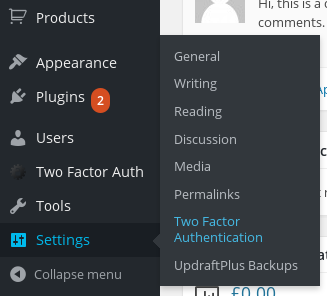
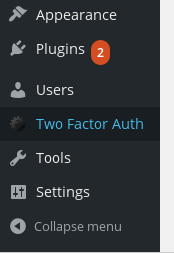
- Find site-wide settings in Settings -> Two Factor Authentication ; find your own user settings in the top-level menu entry “Two Factor Auth”.
If you want to add a section to the front-end of your site where users can configure their two-factor authentication settings, use this shortcode: [twofactor_user_settings] . (If you set the attribute show_algorithm_selector to “yes” then it will include an ‘advanced’ settings section allowing the HOTP algorithm to be chosen and not only the default TOTP algorithm, but few people will want this).
Log de Changes
1.17.0 : Fixes two security issues (more details in the changelog). Improved compatibility and reliability with fixes for PHP warnings/deprecations, TFA settings, QR code display, user settings, and several minor issues and tweaks.
1.17.0 – 23/Oct/2026
- SECURITY: Do not allow WooCommerce to auto-login a user who has TFA active when they perform a password reset. i.e. On previous versions, if using WooCommerce’s “Lost password” facility, someone with access to the email account to which the password reset link was sent could login without providing a TFA code.
- SECURITY: On a site where users with lower privilege levels (e.g. subscriber) existed, a lower-privileged user could forge a request and thereby have his own TFA code accepted for someone else’s account. To complete login he would also need to know the password of the account he was logging into. Thanks to Karol Czubernat for the responsible disclosure, via WPScan.
- FIX: Error log entry for Beginning attempt to port private key encryption over to openssl when unnecessary.
- FIX: Fixed warning “username” in notify_incorrect_tfa_code_attempts()
- FIX: If TFA is compulsory for user roles (Premium), it remains required even after downgrading to the free version.
- FIX: Resolve a PHP E_STRICT deprecation notice
- FIX: QR code overflow on some resolutions
- FIX: Two factor user settings block not appearing on new post creation.
- FIX: Typo in Emergency Code Usage Email Notification Text.
- TWEAK: Added PHPCS naming convention ignores for bundled Two Factor Authentication compatibility hooks to maintain upstream and backward compatibility.
- TWEAK: Fixed typo in filter name to simbatfa_template_file from simatfa_template_file
- TWEAK: Replace htmlspecialchars() with WordPress escaping functions where appropriate.
- TWEAK: Require WordPress version 5.3.
- TWEAK: Update ‘twofactor/user-settings’ block to use API v3
1.16.0 – 09/Dec/2025
- FEATURE: Add support for Easy Digital Downloads(EDD) login form
- TWEAK: Resolve a typo in the emergency code usage email notification text
1.15.5 – 28/Jun/2025
- FIX: Function WP_Block_Type_Registry::register was called incorrectly
- FIX: Fix regression in 1.15.1 which could result in displaying settings incorrectly, with checkboxes hidden
- FEATURE: Add support for RegistrationMagic login forms
1.15.2 – 25/Apr/2025
- TWEAK: Fix regression in 1.15.1 in parsing of multisite capabilities
1.15.1 – 12/Apr/2025
- TWEAK: Replace use of maybe_unserialize()
- TWEAK: Add support for shortcode-based login forms from Paid Memberships Pro (Premium version)
1.15.0 – 13/Dec/2024
- TWEAK: The ‘twofactor_user_settings’ shortcode will now not include the “advanced” settings section (with a selector for the TOTP or HOTP algorithm) in the settings output. You can revert to the previous behaviour by adding the attribute show_algorithm_selector=”yes” to the shortcode (e.g. [twofactor_user_settings show_algorithm_selector=”yes”] ).
Capturas de tela




Para desenvolvedores
Este é o seu plugin? Mostre os números.
Adicione um crachá ao vivo ao seu site, Documentos ou Readme do GitHub. Ele é atualizado por conta própria - nenhuma conta necessária.
Best Two Factor Authentication alternatives
All 2FA plugins →





FAQ
Two Factor Authentication: quick answers
Respostas diretas, extraídas de dados ao vivo WordPress.org.
Fonte: WordPress.org
Is Two Factor Authentication free?
Yes. Two Factor Authentication is free to download and use from the official WordPress.org plugin directory.
Is Two Factor Authentication safe to use in 2026?
Yes — Two Factor Authentication is a safe, well-maintained plugin to use in 2026. It runs on 20K+ sites, is rated 4.4/5 and was last updated 2 days ago, and scores 87/100 on our health check.
How many websites use Two Factor Authentication?
Two Factor Authentication is active on 20K+ WordPress websites and has been downloaded 917,317 times since it launched in March 2015. It was downloaded 19,156 times in the last 30 days.
Does Two Factor Authentication work with WordPress 7.1?
Yes. The developer has tested Two Factor Authentication up to WordPress 7.2, the latest release. It requires WordPress 5.3 or newer.
What PHP version does Two Factor Authentication need?
Two Factor Authentication requires PHP 5.6 or higher. Most hosts run PHP 8.x today, so it works on any modern WordPress hosting.
When was Two Factor Authentication last updated?
The latest version, 1.17.0, was released on November 18, 2026 (2 days ago).
Who makes Two Factor Authentication?
Two Factor Authentication is developed and maintained by David Anderson / Team Updraft.
What are the best alternatives to Two Factor Authentication?
The most popular alternatives to Two Factor Authentication are Wordfence Security (5M+ installs), Really Simple Security (3M+ installs) and Limit Login Attempts Securi… (1M+ installs).
Alimentado por PageForge
Um modelo e uma planilha. Uma página real para cada pesquisa.
PageForge Transforma cada linha de um CSV em uma página WordPress com seu próprio título, URL, SEO campos e esquema, construído no layout que você já desenhou. Gratuito em WordPress.org.
- CSV e XLSX, mais Google Sheets em Profissional e Empresarial
- Seu próprio título, URL, SEO campos e esquema para cada página
- Funciona com o editor de blocos, Elementor, Divi e Avada
- Gratuito em WordPress.org, sem cartão de crédito