


BetterShield – Security Audit, Hardening, 2FA & Passkeys
Free WordPress security audit with 30 hardening fixes you can undo, 2FA, passkeys, login protection, an activity log and file integrity checks.

Escolha sólida
BetterShield is a solid plugin choice in 2026, with a few things worth checking first. It runs on 1K+ sites, is rated 5/5 and was last updated 1 day ago, and scores 77/100 on our health check.
- Desenvolvido ativamente — última atualização 1 dia atrás
- Testado com as últimas WordPress (7.1)
- Momentum — downloads up 1556.5% vs the previous 30 days
- Muito poucos comentários até agora
Como ele se acumula?
Lado a lado em instalações, atualizações, avaliações e suporte


Downloads diários
Os picos de download geralmente seguem uma nova versão — cada site que atualiza automaticamente é um download.
Rankings
Where BetterShield stands todayWordPress.org Classificações de pesquisa
Posição ao vivo na pesquisa de plugins, top 100| Palavra chave | Posição |
|---|---|
| 2FA | #50 |
| Activity Log | >100 |
| hardening | #13 |
| passkeys | #14 |
| two factor authentication | #85 |
Adoção da versão
Compartilhamento de sites ativos por lançamento.
Divisão de classificação
★★★★★ ★★★★★ 5 de 1 comentários
About BetterShield
From the official readme · v1.1.10Descrição
BetterShield is a WordPress security plugin that checks your site, explains what it found in plain language, and fixes what it can in one click once you say yes. Change your mind months later and you can still undo it.
It is made by WPDeveloper, whose WordPress products are used on more than 6 million sites. BetterShield has no firewall and no malware scanner, and it works alongside a plugin that does.
O que você recebe
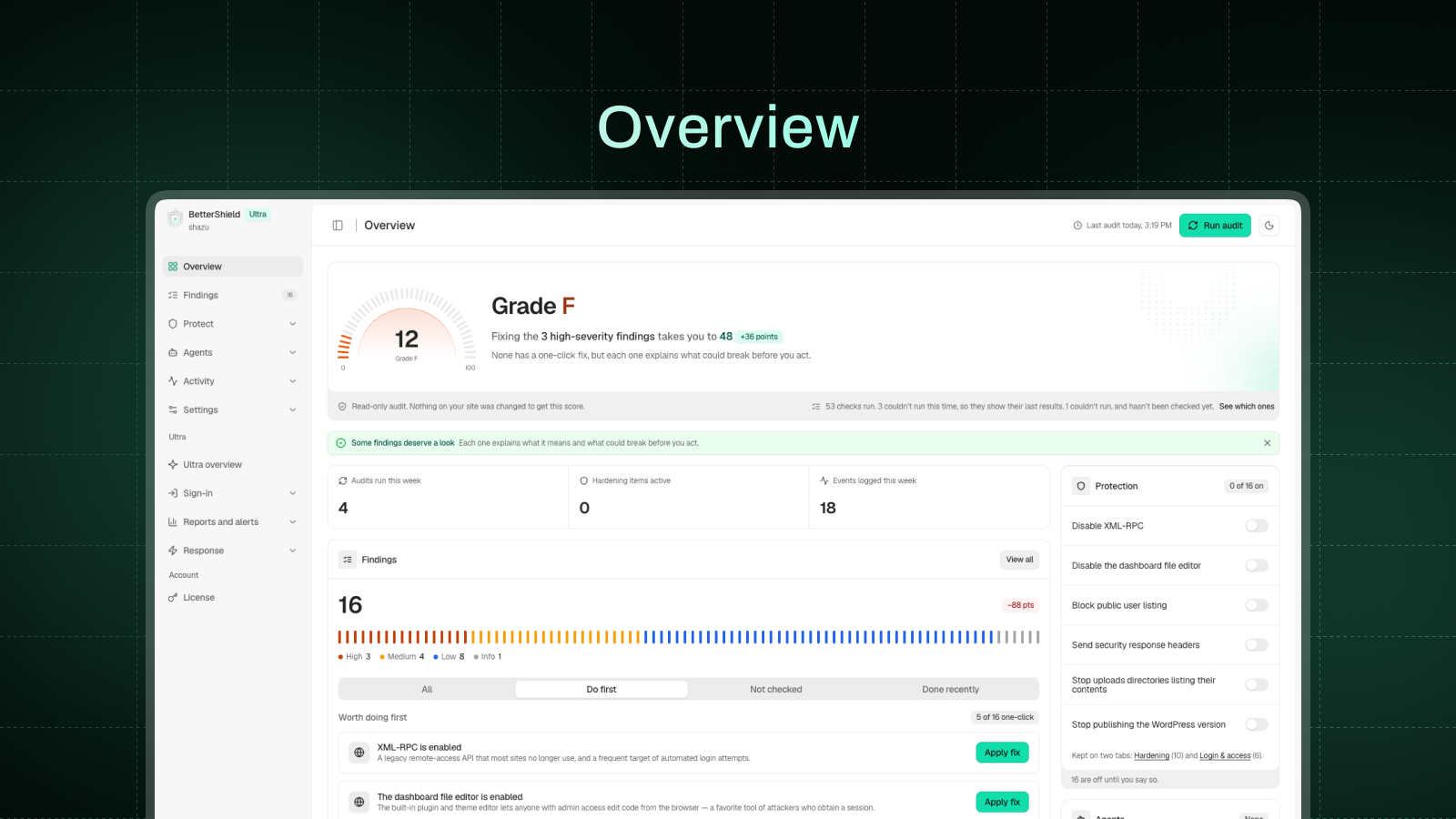
- A security audit and fixes you can undo. A 76-check audit scores your site, and thirty one-click fixes close the gaps. All but one wait for your go-ahead.
- Two-factor authentication and passkeys. Any authenticator app plus ten backup codes, or a passkey unlocked with a fingerprint, face or device PIN. Require either by role.
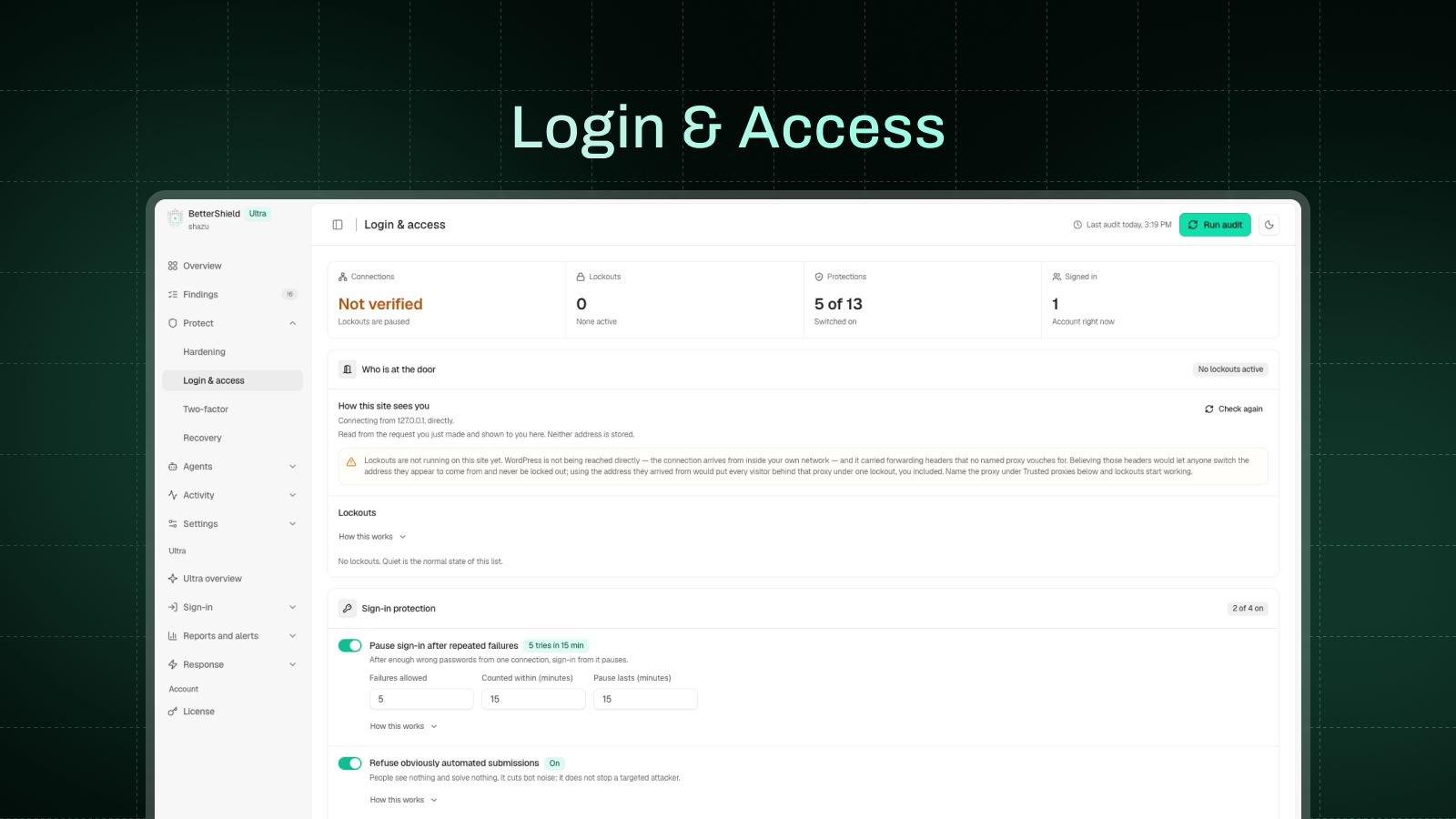
- Login protection. Limit login attempts, a hidden bot check on the sign-in, registration and comment forms, and an allowlist that is never locked out.
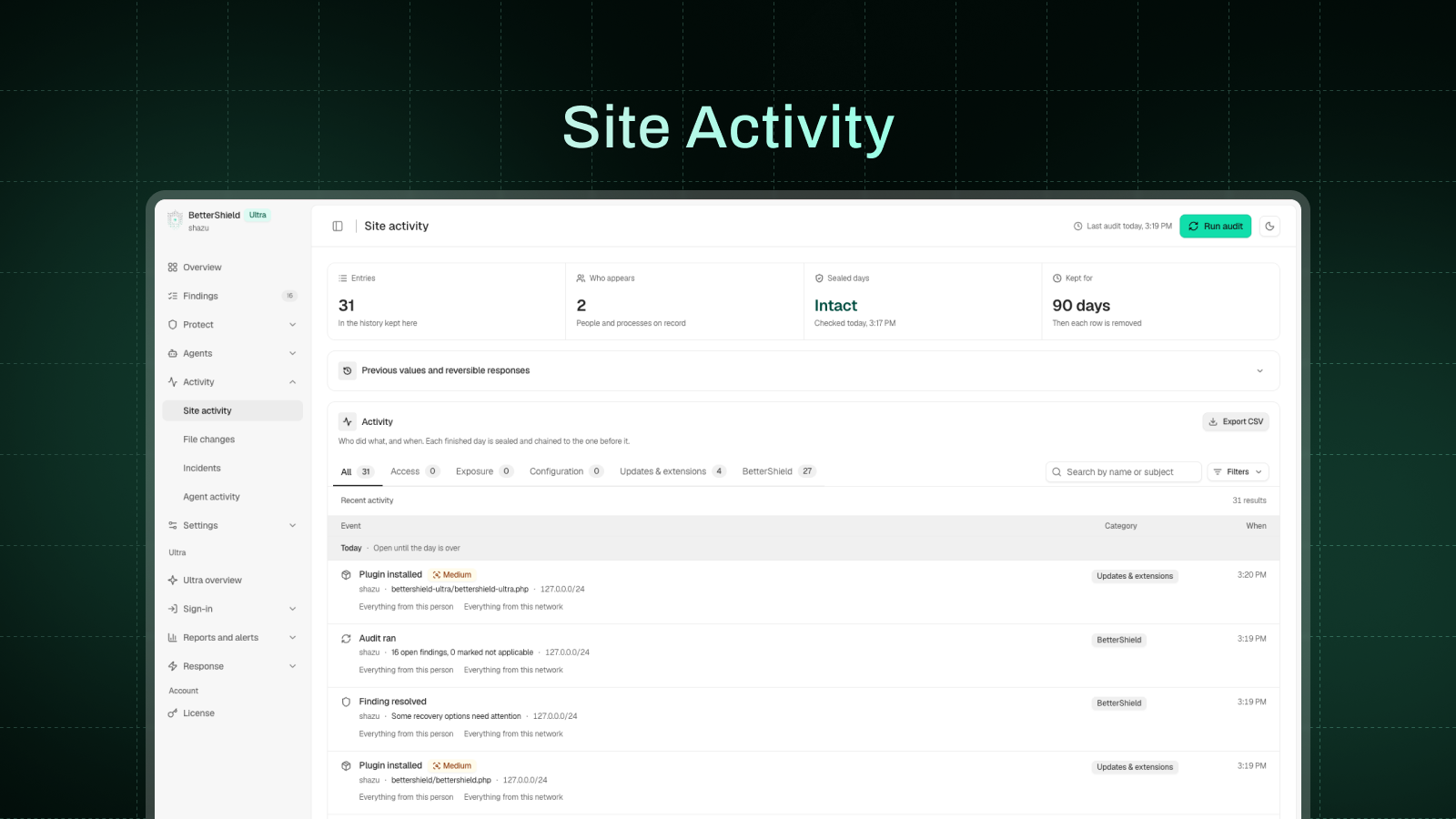
- An activity log and a file check. Who did what and when, with a CSV export, and core and plugin files compared with WordPress.org’s copies.
- Ask your AI assistant what needs fixing. Claude, ChatGPT, Cursor and others can read your site’s security through the built-in MCP server, once you switch it on.
- Outside connections. Out of the box, the only outside services contacted are WordPress.org’s own and, when checking our Pro plugins or Ultra, WPDeveloper’s checksum servers (checksums.wpdeveloper.com and bettershield.ai). Usage sharing, vulnerability checks, the leaked-password check, your AI provider and BetterShield Hub stay off until you turn them on.
- Skipped checks. A file it never compared, or a check that couldn’t run, is never reported as clean.
- Performance. The Overview shows the queries and milliseconds BetterShield added to real page views.
- What’s free. The full audit, all 30 fixes with undo, 2FA, passkeys, the activity log, the file integrity check and alerts.
Quick Setup
A short Quick Setup Wizard opens once after activation. It offers 5 hardening fixes that cannot lock anyone out, gives you a way back in (an emailed single-use recovery link plus printable recovery codes), and lets you choose which plugin handles which job if you run another security plugin.
Every step can be skipped, and run again from Settings > General.
WordPress Security Audit: 76 checks, explained in plain language
Seventy-six read-only checks cover access, exposure, updates, extensions, server settings and configuration, including:
- Idle “Admin” accounts nobody has used in over six months
- User enumeration, XML-RPC, the file editor and the WordPress version on every page
- Missing security headers, an outdated PHP version and weak security keys
- Plugins closed on WordPress.org, or with no update for years
- Installer or database tools left in the web root after a migration
- A domain without SPF, DMARC or CAA records
- Core and plugin files that no longer match the official copies
- Plugins, themes and core with published vulnerabilities, once you turn on vulnerability checks
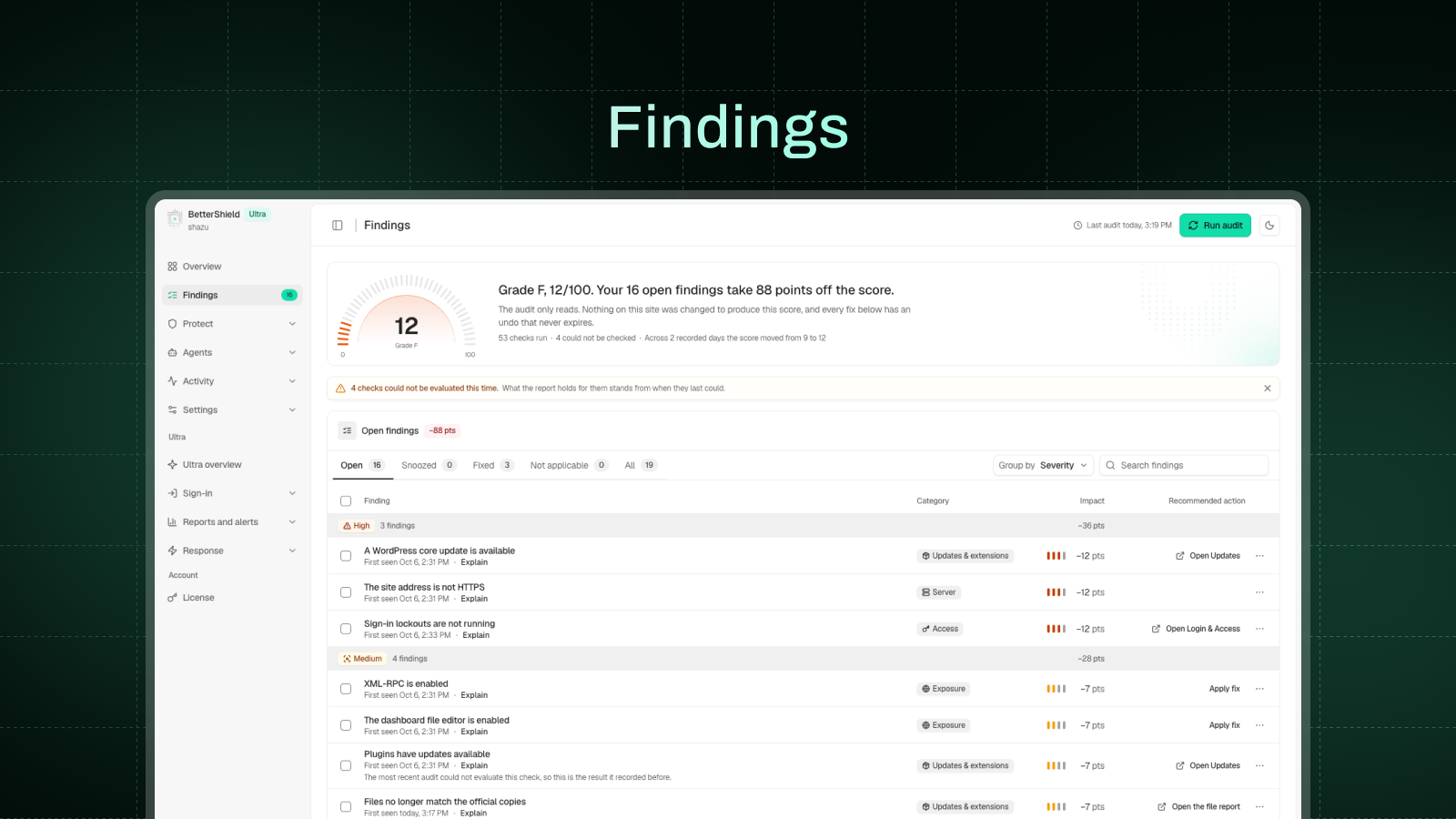
Each finding explains what it is, why it matters and what acting on it could break. You can snooze a finding for 7 or 30 days.
One-click hardening: 30 fixes, each with a permanent undo
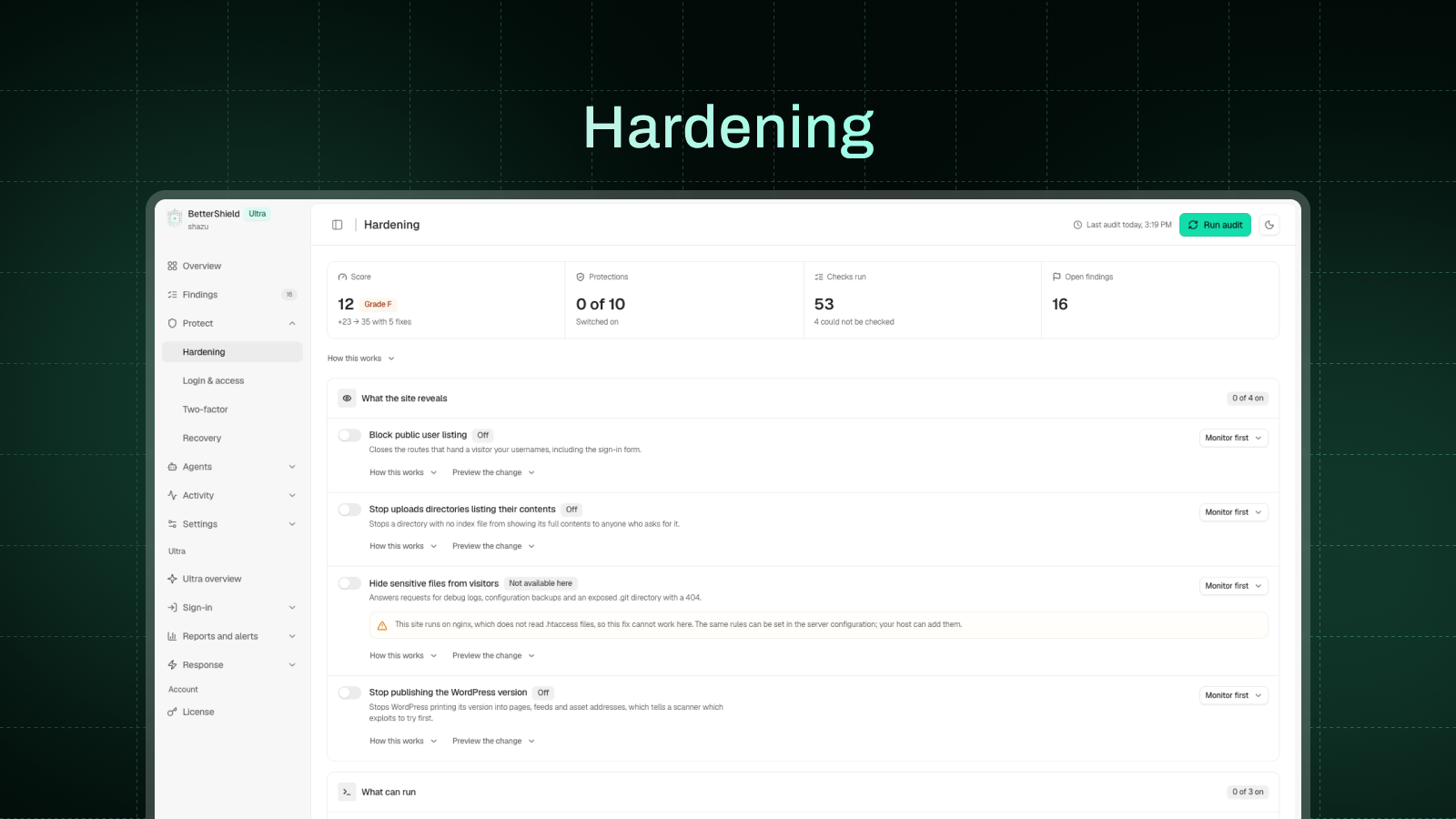
Each fix shows what it will change and stays off until you apply it, except the cloud-metadata block. A fix that cannot work on your site, such as .htaccess rules off Apache or HSTS without HTTPS, stays off and says why.
The thirty one-click fixes:
- Sign-in: custom sign-in address, app password block, leaked password check, short reset links and email change confirmation for admins and editors, sign-in page cache protection, sign everyone out on demand.
- What your site reveals: usernames, the WordPress version, error messages, folder listings, the dashboard.
- Files and uploads: file editor lock, uploads code block, private file protection, admin-only script, file, SVG and code uploads, and admin-only plugin actions.
- Roles and settings: dashboard lock for customers and subscribers, subscriber role for new sign-ups, admin-only key settings.
- HTTPS and headers: HTTPS site address with a 5-minute way back, HTTPS redirect, strict HTTPS (HSTS), content security policy in test mode, cross-site data protection, browser security headers.
- Requests and updates: XML-RPC off or just pingbacks, refusing requests to cloud-metadata addresses, BetterShield’s own auto-updates.
Two-factor authentication (2FA) and passkeys
Login security for yourself, the roles you choose or your WooCommerce customers:
- Two-factor with any authenticator app and ten single-use backup codes, never enforced until the app is proven to work.
- Require two-factor by role, with a 14-day grace period by default.
- Passkeys: sign in with a fingerprint, face or device PIN. A passkey is a WebAuthn credential, and only the public half of the key is stored on your site.
- Passkey-only, passwordless sign-in by role, once a working recovery option is in place.
Login security and brute force protection
- Limit login attempts: by default, 5 failed sign-ins in 15 minutes lock that connection out for 15 minutes, doubling with each repeat within a day.
- A hidden bot check on the login, registration, WooCommerce account and comment forms.
- Limits on public forms: comment bursts wait in moderation, and repeated password resets or sign-ups are paused.
- Strong password rules, an optional leaked-password check, an IP and username blocklist, and an allowlist that is never locked out.
Lockout recovery
If you get locked out, you can get back in without FTP or a call to your host. A single-use recovery link, emailed when you activate BetterShield, pauses its sign-in protections for one hour. Printed recovery codes are a second way in.
Security activity log
Sign-ins, account and role changes, password resets, and plugin, theme and core changes, with who and when. Filter, search and export to CSV, with 30 days of history. Each finished day is sealed, so an edit or deletion opens a high-severity finding.
Incident response
Related access and file changes are joined into one incident, flagging signs of account takeover. You review the response plan before anything changes, and BetterShield checks again afterward.
Security alerts
Get a weekly summary, even on quiet weeks, a security report on demand, and an email when something high or critical happens. Off until you turn them on, in Quick Setup or Settings. Alerts never carry an upgrade prompt.
File integrity check against WordPress.org
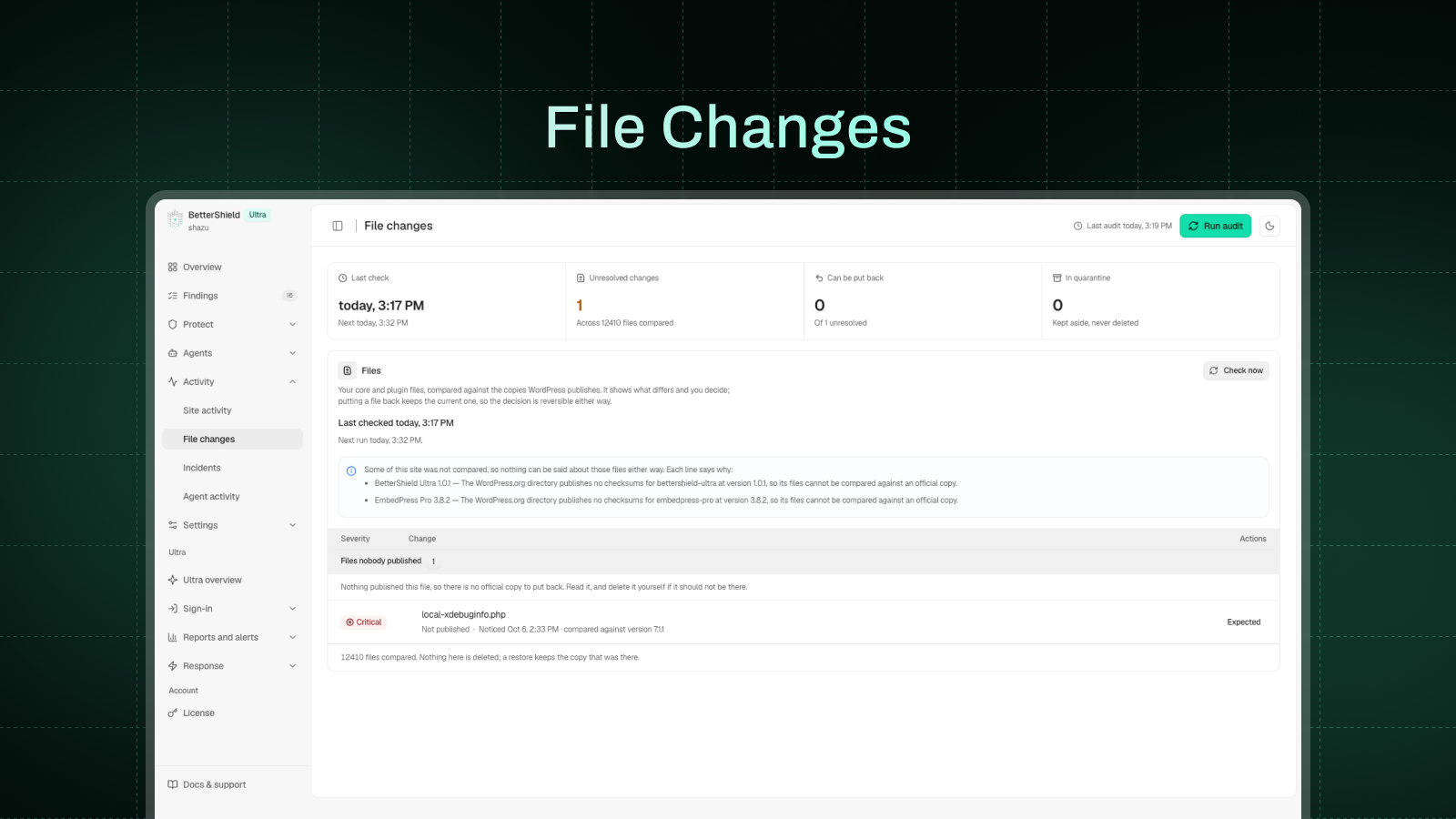
WordPress core and directory plugins are compared with WordPress.org’s official copies, showing exactly which lines changed. One click puts the official file back; the replaced file is kept, never deleted. Your theme, drop-ins, wp-config.php, .htaccess and other unpublished code are watched for changes.
AI explanations and AI assistants (MCP)
- With an AI provider connected under Settings > Connectors (WordPress 7.0 or newer), get any finding explained in plain language, up to 20 an hour for each account, or ask Explain My Audit for a summary.
- The MCP server lets assistants read your site’s security through twenty-eight bounded, read-only abilities. It is off until you turn it on under Agents > Connect.
- A second switch, off by default, lets an assistant apply and undo fixes and put a changed file back. Undoing, restoring and anything with no undo, such as ending sessions, wait for your approval, and every change is logged.
- Never possible through a connection: creating accounts or credentials, changing recovery, two-factor or alert settings, lifting lockouts, or deleting log rows.
Switching from another security plugin
BetterShield can bring over your old plugin’s settings, with a preview first and an undo.
For agencies: BetterShield Hub, WP-CLI and multisite
An optional dashboard for people who look after more than one site. Connect sites from BetterShield Hub to see every score and finding, apply or undo fixes across sites, with sign-in changes and undos waiting for your agreement, get downtime and grade-drop alerts, and invite your team.
- WP-CLI commands for audits, findings, hardening, activity, recovery, file checks, settings, alerts, lockouts, blocklist, reports and accounts
- Settings export and import, with preview and undo
- Multisite: every site’s score in one table, and two-factor and passkey rules set once for the network
BetterShield Ultra
BetterShield Ultra gives you full control of your site’s security. It needs this plugin active and adds:
- Two-factor setup at sign-in for the roles you choose, plus trusted devices
- Passkey reminders by role and a date for passkey-only sign-in
- A sign-in report by role, and your branding on the two-factor screens
- Alerts in Slack, Microsoft Teams, Google Chat, Discord, a JSON webhook or syslog; on WordPress 7.0 or newer, incidents in PagerDuty or Opsgenie and events in Splunk, Datadog or Elastic
- Scheduled client reports
- Temporary access that ends on its own
- Hourly check of key site files
- Cloudflare controls (WordPress 7.0 or newer, with a Cloudflare token)
- No hourly limit on explanations
- 90 days of activity history, up from 30
Plans and prices: https://bettershield.ai/ultra/
Who makes BetterShield
BetterShield is made by WPDeveloper. For help, use the support forum here on WordPress.org or https://bettershield.ai/support/. If it has been useful, a review here helps other site owners find it. Translations are welcome at https://translate.wordpress.org/projects/wp-plugins/bettershield/.
Serviços externos
BetterShield contacts nine outside addresses. It contacts four addresses operated by WordPress.org to verify and restore official files. It contacts your own AI provider only if you have connected one; Pwned Passwords and usage reporting each require opt-in.
api.wordpress.org: the published checksums for your WordPress version, when the file check runs on its schedule or when you start one; the request carries your WordPress version and language.
Once a day it also asks whether the directory still lists a few of the plugins you installed from it; that request carries the plugin’s slug only. Installs and updates started from BetterShield go through WordPress’s installer, from here and downloads.wordpress.org.
downloads.wordpress.org: checksums for a directory plugin at your version, during that check and whenever a plugin is installed or updated, including automatic updates, and once per version your directory theme’s package. For WPDeveloper’s Pro plugins and Ultra, it then asks checksums.wpdeveloper.com, and for Ultra bettershield.ai if that has no record. Each carries a slug and version.
core.svn.wordpress.org and plugins.svn.wordpress.org: the official copy of one file, fetched when you press Restore on a changed file or open its difference. The request carries the version and the file’s path, and the copy is checked against the published checksum before anything is written.
api.pwnedpasswords.com: the Pwned Passwords service by Have I Been Pwned, only if you switch on “Leaked password check”, and only when someone signed in to your site sets or changes a password.
The password is hashed on your server and only the first five characters of the hash are sent; the comparison happens on your server. No password, account name, email, site address or identifier is sent. Documentation: https://haveibeenpwned.com/API/v3#PwnedPasswords, terms of use: https://haveibeenpwned.com/TermsOfUse, privacy policy: https://haveibeenpwned.com/Privacy
send.wpinsight.com: WPDeveloper’s usage service, only if you choose to share usage data (Allow & Continue on the first Quick Setup step; Skip sends nothing).
At most once a day, and once when you deactivate BetterShield, it sends your site address and title, administrator email, WordPress, PHP and web server versions, language settings, whether the site is multisite, the installed and active plugins, your theme and its version, BetterShield’s version and folder name, and the report reference.
If you choose to answer the question its Deactivate link asks, the report sent on deactivation also carries your reason and the few words you typed. It sends nothing else about your visitors, users, sign-ins or findings.
Turn it off under Settings > General. Terms and conditions: https://wpdeveloper.com/terms-and-conditions, privacy policy: https://wpdeveloper.com/privacy-policy
BetterShield Hub (hub.bettershield.ai, or the address a developer sets in wp-config.php), only if you connect the site and approve it on this site’s own consent page. Pressing Connect sends your browser to the hub with this site’s address, a return address, the access you chose and a single-use ticket.
Once connected, it reads the score, findings, tools and the activity log, which names the account behind each change and its truncated networks, and checks the front page every few minutes.
With the Hub link on, this site sends it security events every five minutes, accounts as digests and networks truncated, and a heartbeat of versions, digests and, when it changes, the list of installed plugins and themes, signed with a key kept here.
Turning the link off stops it; Disconnect ends both. Terms of service: https://bettershield.ai/terms, privacy policy: https://bettershield.ai/privacy
Your own AI provider, only if you have connected one to WordPress and only when you ask for an explanation: of one finding, of your open findings with Explain My Audit, or of an incident.
WordPress sends the request through your connector under Settings > Connectors; BetterShield never asks for, stores or sends the key, though Agents > Agent surface shows administrators its last four characters.
For one finding it sends that finding’s title, severity, description and recorded evidence. Explain my audit sends the titles, severities and recorded evidence of up to twelve open findings in one request. An incident’s explanation sends what was recorded about it, with accounts and files named only as placeholders such as “account-1”.
Web and email addresses are stripped, and file contents, usernames, keys and your site’s address are never sent.
None of the WordPress.org requests carries anything about your site: no site address, email, username, keys, file contents or identifier. The exception is WordPress’s own installer, which names your site address in its user agent, as every WordPress update does.
These requests happen on a schedule, when you press a button, or when a plugin is installed or updated, never while a visitor loads a page. If a service cannot be reached, the check says it could not run rather than reporting a file as unchanged.
The four WordPress.org addresses are provided by the WordPress Foundation. Privacy policy: https://wordpress.org/about/privacy/, cookie policy: https://wordpress.org/about/privacy/cookies/
Published vulnerability advisories (hub.bettershield.ai), only with vulnerability checks on under Settings: the slugs and versions of WordPress, plugins (must-use ones included) and themes, when enabled, daily, on request and after updates or removals. Nothing else; the server sees the connection’s IP address. Terms · Privacy.
What it keeps about people
Everything BetterShield keeps about a person is stored on your own server, with IP addresses truncated to a network first. If you connect BetterShield Hub, some of it leaves as described above. The FAQ describes each record, and Tools > Site Health > Info lists every record, why it is kept and for how long.
Source code
Everything that runs is readable in the plugin folder. The PHP in src/ is not generated, compiled or minified. The admin interface is compiled into assets/build/ from the sources in assets/js/ and assets/css/, which ship next to it. To rebuild, run npm install and then npm run build, which uses @wordpress/scripts from the included package.json.
Instalação
- In your dashboard, go to Plugins > Add Plugin, search for “BetterShield”, then install and activate it. Or upload the folder to
/wp-content/plugins/bettershield. - On activation, a read-only security audit runs and your recovery link is emailed to the site’s admin address. If you pressed Activate on the Plugins screen, the Quick Setup opens.
- Open BetterShield in the admin menu to see your score and findings.
Apart from refusing requests to cloud-metadata addresses, no hardening fix, required two-factor or passkey-only sign-in is switched on until you choose it. A few protections start at activation, and each can be switched off:
- Refusing other plugins’ requests to cloud-metadata addresses
- Login attempt limits
- A hidden bot check on the login, registration, WooCommerce account and comment forms
- Limits on the comment, password reset and sign-up forms
- Minimum password lengths
Log de Changes
Two-factor and passkey sign-in now work beside other sign-in plugins, and the audit says when PHP is missing a security fix. Using BetterShield Ultra? Update it to 1.0.11 too. Recommended for all sites.
1.1.10 – 19/11/2026
- Added: Audit | A new finding says when the server’s PHP is missing a security fix that a newer release of the same version already has, and names the release to ask your host for
- Added: File Integrity | The active theme and its parent, when WordPress.org lists them at your version, are compared once with the copy it published, so a file changed before BetterShield was installed is found too
- Added: Login & Access | The bot check now covers the lost-password form and popular contact forms, and a comment, form or reset sent without its hidden fields is caught. Failed sign-ins are counted even when another plugin redirects right after them
- Improved: Other Security Plugins | One more plugin’s own two-factor is recognized for the roles it covers, and an account another plugin already asks a code of is left to it rather than asked for two
- Fixed: Two-Factor | A bot check on the sign-in form no longer refuses the sign-in after the right code, a refusal after the code says so with Sign In Again, the code screen opens from a sign-in page another plugin draws, and two-factor brought over from another plugin keeps its unused backup codes and only ever adds to who must use it
- Fixed: Passkeys | A passkey signs in on a sign-in page with a bot check, and an account another plugin has blocked is refused with a passkey as with a password
- Fixed: Hardening | Browser protections no longer sends its headers twice on a server that already adds them
1.1.9 – 16/11/2026
- Added: Activity | An administrator session that opens without the sign-in form is now recorded. Each restore of a changed setting, role, account or plugin names what it put back, an undone restore is recorded too, and a session row names the plugin that opened it
- Improved: Findings | Apply Fix shows on a known security issue only when an update can install, Put Back in Activity opens the fixes it points to, and Done recently says the undo once with a link to more undos
- Improved: Login & Access | Each number is checked as you type and Save waits until it is in range, and a locked connection sees one notice on the sign-in page with the unlock link
- Improved: Two-Factor | The Sign-in Security page picker marks the pages that show the panel and lists them first, a page that holds it through a synced pattern counts, and the code field says it takes a backup code too
- Improved: Agents | The copied configuration carries the new key in full, another plugin’s AI connection is checked by asking it, and a connection stays paired when a refresh answer is lost on the way
- Improved: Settings | An import lists what it will change first, folds the rows that already match, and Save Policy confirms it saved
- Improved: Other Security Plugins | One more security plugin’s sign-in jobs are recognized, and they count only while it is doing them
- Fixed: File Integrity | A missing file that comes back closes its row, and undoing that puts it back
- Fixed: Audit | The check of the site’s REST routes no longer moves a theme’s widgets to Inactive
1.1.8 – 12/11/2026
- Added: Findings | On a WooCommerce store, a new finding names any script that does what card-stealing code does, says where it is, and lets you accept one you added. Themes the WordPress.org directory removed or stopped updating are named too
- Added: File Integrity | An added PHP file that decodes code and runs it, or hides behind a name starting with a dot, is marked worth a look, with the line
- Added: Email Alerts | Book planned maintenance ahead. It starts by itself, everyone you alert hears about the booking at once, and it ends at the booked time
- Added: WP-CLI | See and change one person’s sign-in methods and sessions with wp bettershield account, settle a finding from the terminal, and make wp bettershield audit –strict fail when a check could not run
- Added: Agents | An assistant shows a plan before each direct finding fix, Connect warns before the Hub’s reads are turned off, and Test Connection shows it ran
- Improved: Vulnerabilities | Each known security issue says whether it can be reached on this site, and the Hub’s results can come from either of its sources
- Improved: Passkeys | A saved passkey is offered in the username field, and one removed here stops being offered by the browser
- Improved: Screens | The light logo keeps its lower dots visible on light backgrounds
1.1.7 – 09/11/2026
- Added: Findings | I Manage This Myself on the Overview and Findings. The finding stops counting, stays marked after new scans and can be put back, and the score says how many you marked. A new low finding flags an administrator’s application password with no limits
- Added: Two-Factor | A Sign-in Security page for members kept out of wp-admin, background sign-in forms carry on to the code screen, recovery codes come over in the import, the My Account tab can be hidden on a store, a sign-in another plugin creates without the code is recorded, and undoing a brought-over authenticator app tells each account what is true
- Added: Hardening | Hide /wp-admin/ in the same save as the sign-in address and choose where signed-out visitors go. The address accepts underscores, one character and up to 200 characters, signed-in visitors go to the dashboard, the old address shows the theme’s 404 page, and developers get new hooks. What your host already enforces shows as on, locked and named, the address works beside another plugin using the same one, and it stays out of more signed-out pages
- Fixed: File Integrity | A plugin that loses its checksums is still compared, folders with a capital or a dot are checked, updates are recorded only for what landed, and a network checks shared code once with one alert
- Fixed: Passkeys | A prompt hidden on the sign-in page can now end, and Stop Waiting says nothing was changed
1.1.6 – 05/11/2026
- Changed: Sign-in | On every site, a lockout emails the account only when it has used that network before, or when its right password was used. Anyone else can ask for an unlock link on the sign-in screen. An account that hasn’t signed in within the last 30 days has no usual network on record yet, so its owner uses Email Me an Unlock Link
- Added: Two-Factor | When you switch another two-factor plugin off, accounts keep their authenticator app where it can move, and anyone who must set up again is named first. The Activity Log has an Undo
- Added: Overview | Migrate for a plugin still sharing sign-in limits or two-factor with BetterShield
- Added: Agents | Each assistant shows its own logo on Connect
- Improved: Screens | Times follow the site’s clock, as the emails do, and clearer wording across Findings, Hardening, Agents, Activity, Settings, the Overview, profile, sign-in and emails
- Fixed: File Integrity | Fewer false alerts from cache plugins, BetterShield’s own writes, paid plugin updates and updates run across a network. Tampering in wp-config.php stays critical
- Fixed: Email Alerts | One email for an event that opens an incident, a changed file counted once, and a moved sign-in address kept out of alert emails
- Fixed: Sign-in | A right password refused by another plugin no longer counts as a failed attempt, and a valid recovery code keeps working past the shared guessing limit
- Fixed: Two-Factor | Another plugin’s two-factor counts only for the accounts that use it, and a wrong code also points to backup codes
- Fixed: Passkeys | A prompt hidden behind another app no longer waits forever, a failed save says why, and a device with no passkey is told what to do
- Fixed: Multisite | A site’s lockdown signs out only the accounts within your reach, and the screen says who stays signed in
- Fixed: Findings | A finding still open no longer reads as fixed, and each check that could not run says what stopped it
- Fixed: Hardening | XML-RPC shows as in force when the host blocks it, and the sign-in address and HTTPS redirect are refused beside a plugin that already does them
- Fixed: Screens | A busy button keeps the normal cursor and a busy refresh icon turns on every screen
1.1.5 – 01/11/2026
- Changed: Email Alerts | On a new install, instant alerts and the weekly summary stay off until you turn them on in Quick Setup or Settings. Sites already running keep their alerts as they are
- Added: Findings | Fix five more findings in one press from the row or in bulk, with Undo: file permissions, folders anyone can write to, plugin updates, inactive plugins and themes, and dormant accounts
- Added: File Integrity | Check WPDeveloper’s paid plugins against their published checksums
- Added: File Integrity | Accept a paid plugin’s changes for one version at a time, on File Changes or from WP-CLI
- Added: Email Alerts | A host can take the routine alerts with wp bettershield alerts host-managed on. Only a new administrator, a role raised to administrator, the trap password or a changed code file emails at once, and the rest wait for the weekly summary
- Added: WP-CLI | Manage who gets alerts and the mute with wp bettershield alerts, record an update made outside WordPress’s updater with integrity record-update, and record a file your host wrote with integrity expect-file
- Improved: File Integrity | When a plugin’s version moved without WordPress’s updater, its changed files are rated high instead of critical. A hidden code file stays critical
- Improved: BetterShield Hub | A plugin or theme change reaches the Hub in about a minute instead of up to ten, and Connect opens in a new tab
- Improved: Hardening | Each protection is named for what it does, not as an action
- Improved: Screens | Clearer wording and layout on Alerts, Incidents, Agents, Site Activity, File Changes, Two-Factor and Findings, and score labels read correctly in right-to-left languages
- Fixed: Vulnerabilities | Records marked informational no longer count, so WordPress is not told to update to the version it already runs
- Fixed: Vulnerabilities | An advisory whose versions can’t be compared no longer hides the fix, so plugins such as Jetpack and Post SMTP name it again, and nightly WordPress builds can be checked
- Fixed: Security Audit | The upload check asks as each role, so plugins that change allowed file types, such as Bricks, are read correctly
- Fixed: Security Audit | The cached sign-in page check follows a custom login address instead of saying it could not be tested
- Fixed: Recovery | You can now confirm the recovery email arrived, and the Overview stays in step
- Fixed: Findings | Apply Fix carries on past an item it can’t change, the links rewrite keeps its Undo after its finding closes, and XML-RPC with only pingbacks blocked no longer reads as broken
- Fixed: Multisite | Subsite sign-in no longer runs out of memory, and site admins can read changes to shared code but not act on them
- Fixed: File Integrity | Every changed file now reaches the Activity Log, even when one scan finds hundreds
Capturas de tela
Para desenvolvedores
Este é o seu plugin? Mostre os números.
Adicione um crachá ao vivo ao seu site, Documentos ou Readme do GitHub. Ele é atualizado por conta própria - nenhuma conta necessária.
Best BetterShield alternatives
All 2FA plugins →





FAQ
BetterShield: quick answers
Respostas diretas, extraídas de dados ao vivo WordPress.org.
Fonte: WordPress.org
Is BetterShield free?
Yes. BetterShield is free to download and use from the official WordPress.org plugin directory.
Is BetterShield safe to use in 2026?
BetterShield is a solid plugin choice in 2026, with a few things worth checking first. It runs on 1K+ sites, is rated 5/5 and was last updated 1 day ago, and scores 77/100 on our health check.
How many websites use BetterShield?
BetterShield is active on 1K+ WordPress websites and has been downloaded 7,986 times since it launched in September 2026. It was downloaded 6,858 times in the last 30 days.
Does BetterShield work with WordPress 7.1?
Yes. The developer has tested BetterShield up to WordPress 7.1.5, the latest release. It requires WordPress 6.7 or newer.
What PHP version does BetterShield need?
BetterShield requires PHP 8.0 or higher. Most hosts run PHP 8.x today, so it works on any modern WordPress hosting.
When was BetterShield last updated?
The latest version, 1.1.10, was released on November 19, 2026 (1 day ago).
Who makes BetterShield?
BetterShield is developed and maintained by WPDeveloper.
What are the best alternatives to BetterShield?
The most popular alternatives to BetterShield are Wordfence Security (5M+ installs), Really Simple Security (3M+ installs) and Limit Login Attempts Securi… (1M+ installs).
Alimentado por PageForge
Um modelo e uma planilha. Uma página real para cada pesquisa.
PageForge Transforma cada linha de um CSV em uma página WordPress com seu próprio título, URL, SEO campos e esquema, construído no layout que você já desenhou. Gratuito em WordPress.org.
- CSV e XLSX, mais Google Sheets em Profissional e Empresarial
- Seu próprio título, URL, SEO campos e esquema para cada página
- Funciona com o editor de blocos, Elementor, Divi e Avada
- Gratuito em WordPress.org, sem cartão de crédito