


Admin Commenters Comments Count
Next to all appearances of each commenter’s name in the admin, this plugin shows a comments bubble identical to the one shown for posts in the admin listing of posts. The comments bubble shows the number of approved…

Considere uma alternativa
Admin Commenters Comments Count shows warning signs in 2026 — compare the alternatives below before installing. It runs on 100+ sites, is rated 5/5 and was last updated 6 years ago, and scores 37/100 on our health check.
- Base de usuários pequenas (mais de 100 instalações ativas)
- Nenhuma atualização em 5 anos
- Testado apenas até WordPress 5.7 (mais recente é 7.1)
Como ele se acumula?
Lado a lado em instalações, atualizações, avaliações e suporte


Downloads diários
Os picos de download geralmente seguem uma nova versão — cada site que atualiza automaticamente é um download.
Rankings
Where Admin Commenters Comments C… stands todayWordPress.org Classificações de pesquisa
Posição ao vivo na pesquisa de plugins, top 100| Palavra chave | Posição |
|---|---|
| comentário | >100 |
| comment author | >100 |
| comment count | >100 |
| commenters | >100 |
| COMENTÁRIOS | >100 |
Adoção da versão
Compartilhamento de sites ativos por lançamento.
Divisão de classificação
★★★★★ ★★★★★ 5 de 8 comentários
About Admin Commenters Comments Count
From the official readme · v1.9.6Descrição
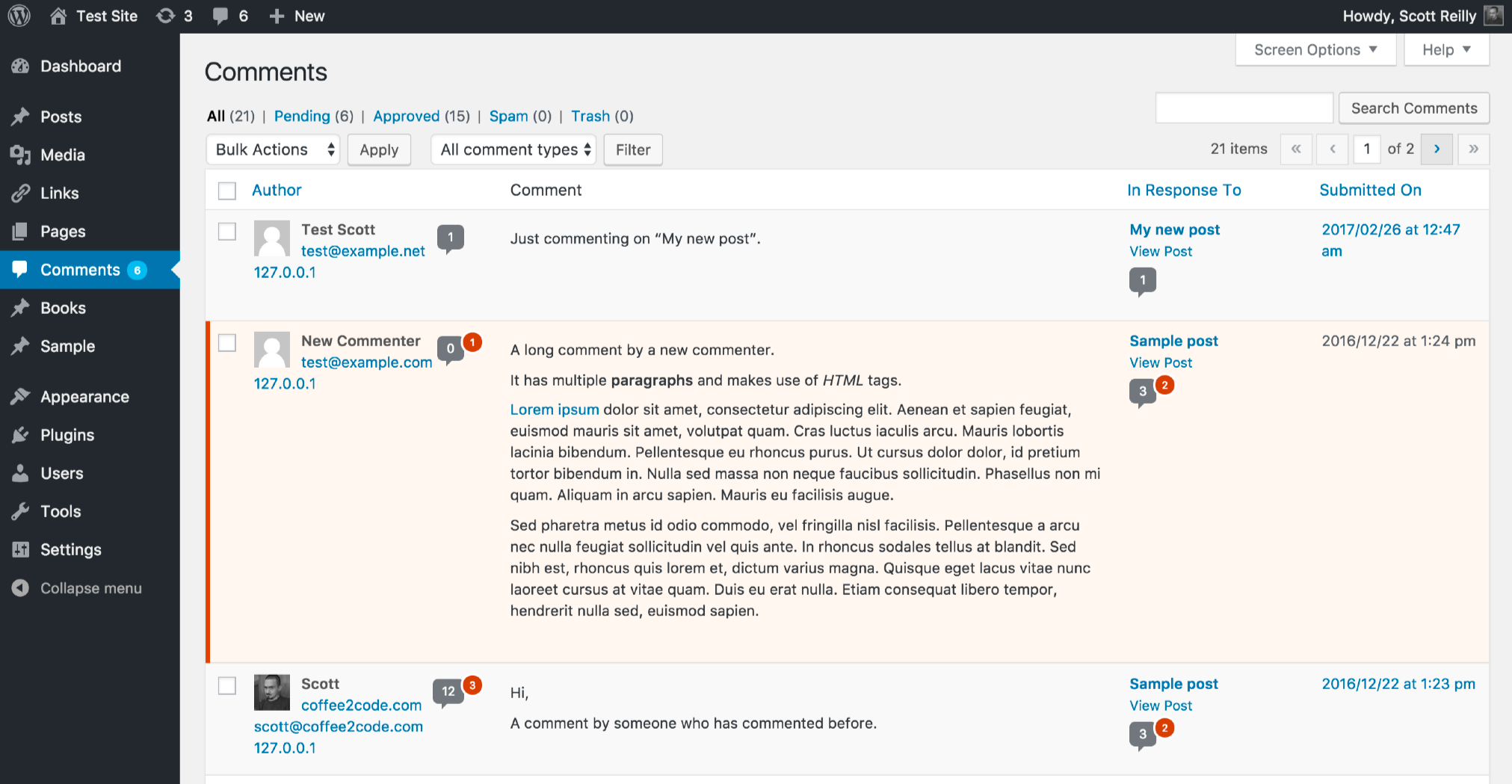
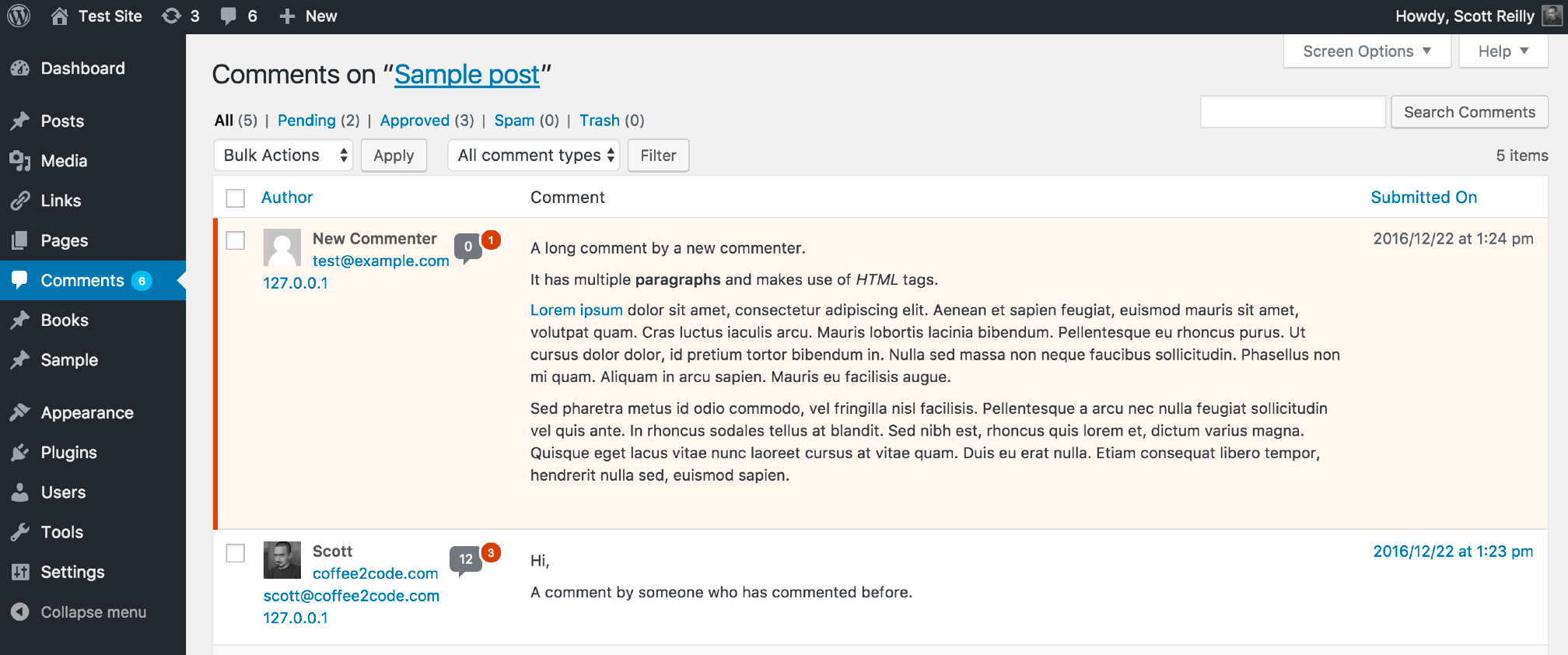
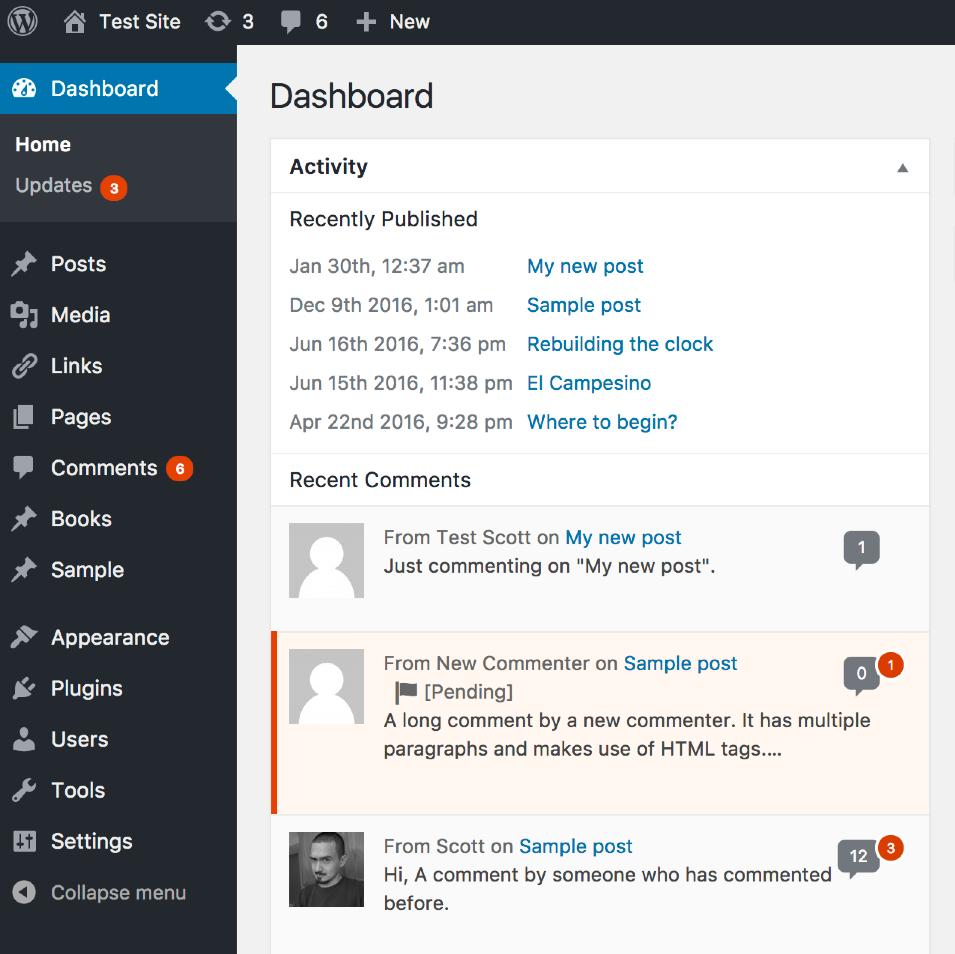
Next to all appearances of each commenter’s name in the admin, this plugin shows a comments bubble identical to the one shown for posts in the admin listing of posts. The comments bubble shows the number of approved comments for that person and potentially a red superscript circle indicating the number of pending comments for the person (assuming they have any). The comment counts are linked to listings of comments associated solely with that particular commenter.
By default in WordPress, it is not possible to tell via a single glance whether a particular commenter has commented before or how many times the’ve commented.
This plugin adds this handy capability to the WordPress admin pages that allows you to:
- Quickly identify a first-time commenter
- Quickly identify unfamiliar commenters that have in fact commented before
- Quickly see how many total comments a particular commenter has made, and how many comments are pending
- Easily navigate to a listing of all approved comments and all moderated comments by a commenter, in order to see what post and when they last commented (or first commented), get a feel for the nature of their comments, or find something they’ve said in the past
Specifically, the linked comment count appears next to commenters in:
- The “Comments” listing of comments (including comment search results)
- The “Comments for ‘POST_TITLE'” listing of post-specific comments
- The “Discussion” box of the “Edit Post” page for a post with comments
- The “Recent Comments” admin dashboard widget
- The “Users” listing of users (as the column “Comments”)
Commenters are identified by the email address they provided when commenting. If your site does not require that commenters submit their email address when commenting, this plugin will use the commenter’s name as the identifier, though since this is a publicly viewable piece of data it’s possible that multiple people could be posting under the same “name”, so this method has the potential to be not as accurate.
Links: Plugin Homepage | Plugin Directory Page | GitHub | Author Homepage
Instalação
- Install via the built-in WordPress plugin installer. Or download and unzip
admin-commenters-comments-count.zipinside the plugins directory for your site (typicallywp-content/plugins/) - Activate the plugin through the ‘Plugins’ admin menu in WordPress
Log de Changes
Bugfix update: prevented PHP warnings when running under PHP 8.
1.9.6 (2021-05-01)
- Fix: Change
__wakeup()method visibility fromprivatetopublicto avoid warnings under PHP8 - Fix: Throw an error when attempting to unserialize an instance of the class to actually prevent it from happening
1.9.5 (2021-04-22)
- Change: Note compatibility through WP 5.7+
- Change: Update copyright date (2021)
- New: Add a few more possible TODO items
1.9.4 (2020-09-13)
- Change: Convert to use of strict equality checks
- Change: Restructure unit test file structure
- New: Create new subdirectory
phpunit/to house all files related to unit testing - Change: Move
bin/tophpunit/bin/ - Change: Move
tests/bootstrap.phptophpunit/ - Change: Move
tests/tophpunit/tests/ - Change: Rename
phpunit.xmltophpunit.xml.distper best practices
- New: Create new subdirectory
- Change: Note compatibility through WP 5.5+
- Change: Tweak inline function documentation
- Change: Update list of TODO items to add some considerations to an existing item, fix a type, change sublist syntax
- Unit tests:
- New: Add tests for
add_user_column(),enqueue_admin_css(),handle_column_data()
- New: Add tests for
Full changelog is available in CHANGELOG.md.
Capturas de tela


Para desenvolvedores
Este é o seu plugin? Mostre os números.
Adicione um crachá ao vivo ao seu site, Documentos ou Readme do GitHub. Ele é atualizado por conta própria - nenhuma conta necessária.
Best Admin Commenters Comments Cou… alternatives
Todos os plugins de comentários →





FAQ
Admin Commenters Comments Count: quick answers
Respostas diretas, extraídas de dados ao vivo WordPress.org.
Fonte: WordPress.org
Is Admin Commenters Comments Count free?
Yes. Admin Commenters Comments Count is free to download and use from the official WordPress.org plugin directory.
Is Admin Commenters Comments Count safe to use in 2026?
Admin Commenters Comments Count shows warning signs in 2026 — compare the alternatives below before installing. It runs on 100+ sites, is rated 5/5 and was last updated 6 years ago, and scores 37/100 on our health check.
How many websites use Admin Commenters Comments Count?
Admin Commenters Comments Count is active on 100+ WordPress websites and has been downloaded 19,741 times since it launched in June 2009. It was downloaded 160 times in the last 30 days.
Does Admin Commenters Comments Count work with WordPress 7.1?
Admin Commenters Comments Count is officially tested up to WordPress 5.7.22, while the latest release is 7.1.5. It may still work, but try it on a staging site first.
When was Admin Commenters Comments Count last updated?
The latest version, 1.9.6, was released on May 2, 2021 (6 years ago).
Who makes Admin Commenters Comments Count?
Admin Commenters Comments Count is developed and maintained by Scott Reilly.
What are the best alternatives to Admin Commenters Comments Count?
The most popular alternatives to Admin Commenters Comments Count are Bulk Delete Comments (5K+ installs), DCO Comment Attachment (5K+ installs) and One Click Close Comments (5K+ installs).
Alimentado por PageForge
Um modelo e uma planilha. Uma página real para cada pesquisa.
PageForge Transforma cada linha de um CSV em uma página WordPress com seu próprio título, URL, SEO campos e esquema, construído no layout que você já desenhou. Gratuito em WordPress.org.
- CSV e XLSX, mais Google Sheets em Profissional e Empresarial
- Seu próprio título, URL, SEO campos e esquema para cada página
- Funciona com o editor de blocos, Elementor, Divi e Avada
- Gratuito em WordPress.org, sem cartão de crédito