


Lightweight Subscribe To Comments
Easiest and most lightweight plugin to let visitors subscribe to comments and get email notifications.

Use com cautela
Lightweight Subscribe To Commen… works, but test it on a staging site before relying on it in 2026. It runs on 1K+ sites, is rated 4.9/5 and was last updated 2 years ago, and scores 44/100 on our health check.
- Loved by users — 4.9/5 from 25 reviews
- Nenhuma atualização em 2 anos
- Only tested up to WordPress 6.6 (latest is 7.1)
Como ele se acumula?
Lado a lado em instalações, atualizações, avaliações e suporte

Downloads diários
Os picos de download geralmente seguem uma nova versão — cada site que atualiza automaticamente é um download.
Rankings
Where Lightweight Subscribe To Co… stands todayWordPress.org Classificações de pesquisa
Posição ao vivo na pesquisa de plugins, top 100| Palavra chave | Posição |
|---|---|
| comment | >100 |
| COMENTÁRIOS | >100 |
| follow comments | >100 |
| Notifications | >100 |
| subscribe to comments | #37 |
Adoção da versão
Compartilhamento de sites ativos por lançamento.
Divisão de classificação
★★★★★★★★★★ 4.9 from 25 reviews
About Lightweight Subscribe To Comments
From the official readme · v1.5.8Descrição
This simply adds a subscription checkbox to your WordPress comments form to let your visitors subscribe to comments. They will then be notified by email when others comment on the same post. Works automatically upon activation, no settings required.
This plugin focuses on a lightweight footprint and fastest pagespeed. No scripts are added. It simply just works upon activation. All settings are optional.
Easily Switch From Other Comments Subscription Plugins
Your subscribers will be imported for an easy switch from the following listed plugins. This is done automatically upon activation. Your comment subscribers will be migrated from these plugins:
- “Subscribe To Comments” plugin
- “Subscribe To Comments Reloaded” plugin
- “Comment Notifier” plugin
Optional Settings include:
- You can unsubscribe people, if you wish.
- You can customize the notification emails.
- Set a custom “Unsubscribe Page” URL or unsubscribe message.
- Send a “Thank You” message for first time commentators.
- Send a copy of EACH notification to emails of your choice.
Special Condition For “Comment Notifier” Plugin Users:
“Lightweight Subscribe to Comments” fixes a major problem with the “Comment Notifier” plugin:
In particular, “Lightweight Subscribe to Comments” fixes this problem.
Lightweight Subscribe to Comments will not subscribe spammers while their comment is pending moderation. Only approved comments will be subscribed. Comments authors in moderation will only be subscribed if, and when, you approve their comment.
The problem is that “Comment Notifier” plugin subscribes the email address as soon as the submitted comment goes into moderation. This means that spammers get added to the list of subscribers, immediately. Later, when you delete the spam comments, the spammer’s email remains in the list of subscribers.
You could have hundreds, even thousands, of spammer email addresses in that list. Then, when you approve a legit comment, your server sends out emails to all of the post subscribers (including spammers), which can cause server overload, among other problems.
This plugin fixes that by ignoring comments in moderation until they are approved by you. This means less load on your server.
Bonus Clean Up For “Comment Notifier” Plugin Users:
This plugin removes spammers from your “Comment Notifier” list.
Upon activation, this plugin will clean up your “comment_notifier” list (database table) by removing all spammer emails (emails of people that do NOT have an approved comment). (This only applies to you if you were using the “Comment Notifier” plugin.) It will also empty your Comments “Trash” and “Spam”. This clean up is only done once, upon plugin activation.
Languages
This plugin is translation-ready and includes a .pot file to make it easy to translate.
See the Installation Guide.
Instalação
Step 1: Install The Plugin
In your WordPress dashboard -> Plugins -> Add New, search for “Lightweight Subscribe To Comments”. Click “Install Now”, then click “Activate Plugin”.
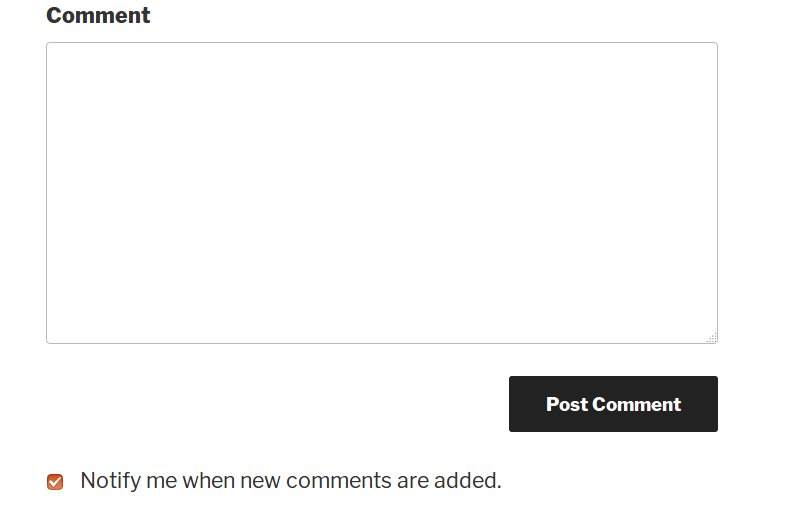
Upon activation, the plugin automatically works. There will be a checkbox underneath your comment form so that visitors can subscribe to comments as they make a comment.
To troubleshoot a problem, see the Troubleshooting section on the full documentation page.
(Optional) Step 2: Maybe Add CSS Styles
Most themes do not need this step. If your theme uses common WP standards to load its stylesheet, your checkbox style will be just fine. However, if you notice that your checkbox is not aligned properly underneath your comment reply form, then see the documentation for a quick way to add the proper CSS style to align your checkbox.
(Optional) Step 3: Customize The Settings
If you want to customize any settings, then go to “Settings –> Lightweight Subscribe To Comments”. See the full documentation (link above).
(Optional) Step 4 – Only For Those That Were Using “Comment Notifier” Plugin
If you were using “Comment Notifier” plugin, then deactivate it right away to avoid having it add new spammers to your comment_notifier list. Only once, upon activation, this plugin will clean up your “comment_notifier” list (database table) by removing all spammer emails that were subscribed by the “Comment Notifier” plugin. It will also empty your Comments “Trash” and “Spam”. This is done automatically upon activation. Your existing approved comments, and legit subscribers, will remain intact.
Log de Changes
Added new Theme Compatibility option. Fixed non-Latin characters display, including Cyrillic, Arabic, and Hebrew.
1.5.8
- Fix – Deleting comments from the Trash caused PHP errors.
- Build – Removed deprecated functions and options.
1.5.7
- New – Added new Theme Compatibility option to “Show Checkbox After The Comment Form.” If the checkbox is not appearing on your comment form, enable this option. Enabling this option will make the checkbox work on a larger variety of independent themes (themes that do not use standard WordPress comment form filters). This will add the checkbox below the comment form submit button.
- Fix – Added compatibility for languages with non-Latin characters such as Cyrillic, Arabic, and Hebrew. Previously, names with non-Latin characters were displayed incorrectly in the notification emails. Note that this update fixes this issue, but it may be an hour or more, after you update, before the fix first takes effect. If you have a large database with thousands of posts it may take as much as several hours before the fix is complete.
1.5.6
- New – Added option to delete all plugin data on uninstall. Enabling this option will delete the subscriber list and their subscriptions when the plugin is deleted.
- Tweak – Added compatibility with more themes. Use comment_form_after_fields hook instead of comment_form_submit_field hook to show the checkbox.
1.5.5
- Fix – If comment moderation was NOT enabled, subscribers were not properly subscribed in version 1.5.4. The problem was due to trying out the new $commentdata argument, which was added in WP 4.5. This issue has been fixed by reverting the use of the $commentdata arg.
- Fix – Removed 2nd argument from comment_form_submit_field filter.
1.5.4
- New – Moved the subscription checkbox above the submit button.
- API – Use the $commentdata arg, which was added in WP 4.5, on comment_post hook.
- API – Use $wpdb->prefix instead of constructing the prefix from base_prefix.
1.5.3
- New – New option to disable the inline CSS styles.
- Fix – Don’t import invalid subscribers from other plugins. Version 1.5.2 had a bug which would import subscribers from “Subscribe to Comments Reloaded” and “Subscribe to Comments” plugins, as is. Now, only subscribers with valid emails will be imported from those plugins. (This bug did not apply to you if you had never used either of those 2 plugins.) In addition, upon updating to version 1.5.3, any invalid spammy subscribers that were erroneously imported from other plugins will be removed from our subscriber list. However, note that we do NOT remove any data that was inserted and attached to the posts by those 2 plugins. This means that if you had spammy, invalid subscribers with invalid emails attached to your posts, they still remain there because this plugin doesn’t modify any postmeta. Those 2 plugins attach the subscribers to the actual post as “postmeta” and that data will remain there unless those plugins have a way to remove its data. (I will soon release an extra utility plugin that you can use to clean that data from those plugins.)
- Tweak – Add scrollbars to the message preview in the settings page.
- Tweak – Simplify settings names.
Capturas de tela
Para desenvolvedores
Este é o seu plugin? Mostre os números.
Adicione um crachá ao vivo ao seu site, Documentos ou Readme do GitHub. Ele é atualizado por conta própria - nenhuma conta necessária.
Best Lightweight Subscribe To Comm… alternatives
All comment plugins →





FAQ
Lightweight Subscribe To Comments: quick answers
Respostas diretas, extraídas de dados ao vivo WordPress.org.
Fonte: WordPress.org
Is Lightweight Subscribe To Commen… free?
Yes. Lightweight Subscribe To Commen… is free to download and use from the official WordPress.org plugin directory.
Is Lightweight Subscribe To Commen… safe to use in 2026?
Lightweight Subscribe To Commen… works, but test it on a staging site before relying on it in 2026. It runs on 1K+ sites, is rated 4.9/5 and was last updated 2 years ago, and scores 44/100 on our health check.
How many websites use Lightweight Subscribe To Commen…?
Lightweight Subscribe To Commen… is active on 1K+ WordPress websites and has been downloaded 18,814 times since it launched in May 2014. It was downloaded 431 times in the last 30 days.
Does Lightweight Subscribe To Commen… work with WordPress 7.1?
Lightweight Subscribe To Commen… is officially tested up to WordPress 6.6.12, while the latest release is 7.1.5. It may still work, but try it on a staging site first.
When was Lightweight Subscribe To Commen… last updated?
The latest version, 1.5.8, was released on August 30, 2024 (2 years ago).
Who makes Lightweight Subscribe To Commen…?
Lightweight Subscribe To Commen… is developed and maintained by isabel104.
What are the best alternatives to Lightweight Subscribe To Commen…?
The most popular alternatives to Lightweight Subscribe To Commen… are Bulk Delete Comments (5K+ installs), DCO Comment Attachment (5K+ installs) and One Click Close Comments (5K+ installs).
Alimentado por PageForge
Um modelo e uma planilha. Uma página real para cada pesquisa.
PageForge Transforma cada linha de um CSV em uma página WordPress com seu próprio título, URL, SEO campos e esquema, construído no layout que você já desenhou. Gratuito em WordPress.org.
- CSV e XLSX, mais Google Sheets em Profissional e Empresarial
- Seu próprio título, URL, SEO campos e esquema para cada página
- Funciona com o editor de blocos, Elementor, Divi e Avada
- Gratuito em WordPress.org, sem cartão de crédito