


Super List Block
Nest multiple blocks inside lists of any kind of list (ordered, unordered, no marker, etc), or do away with list markers and use it like a repeater!

Utiliser avec prudence
Super List Block works, but test it on a staging site before relying on it in 2026. It runs on 700+ sites, is rated 5/5 and was last updated 1 year ago, and scores 48/100 on our health check.
- Petite base d'utilisateurs (plus de 700 installations actives)
- Pas de mise à jour depuis plus d'un an
- Uniquement testé jusqu'à WordPress 6,9 (le dernier est de 7,1)
Comment s'accumule-t-il ?
Côte à côte sur les installations, les mises à jour, les évaluations et le support



Téléchargements quotidiens
Les pics de téléchargement suivent généralement une nouvelle version - chaque site qui met à jour automatiquement compte comme un téléchargement.
Classements
Where Super List Block stands todayWordPress.org Classements de recherche
Position en direct dans la recherche de plugins, Top 100| Mot-clé | Position |
|---|---|
| bloc | >100 |
| list | >100 |
| nesting | #12 |
| répétiteur | >100 |
| superlist | #1 |
Adoption de version
Part de sites actifs par version.
Répartition des notes
★★★★★ ★★★★★ 5 sur 6 avis
About Super List Block
From the official readme · v0.1.4Description
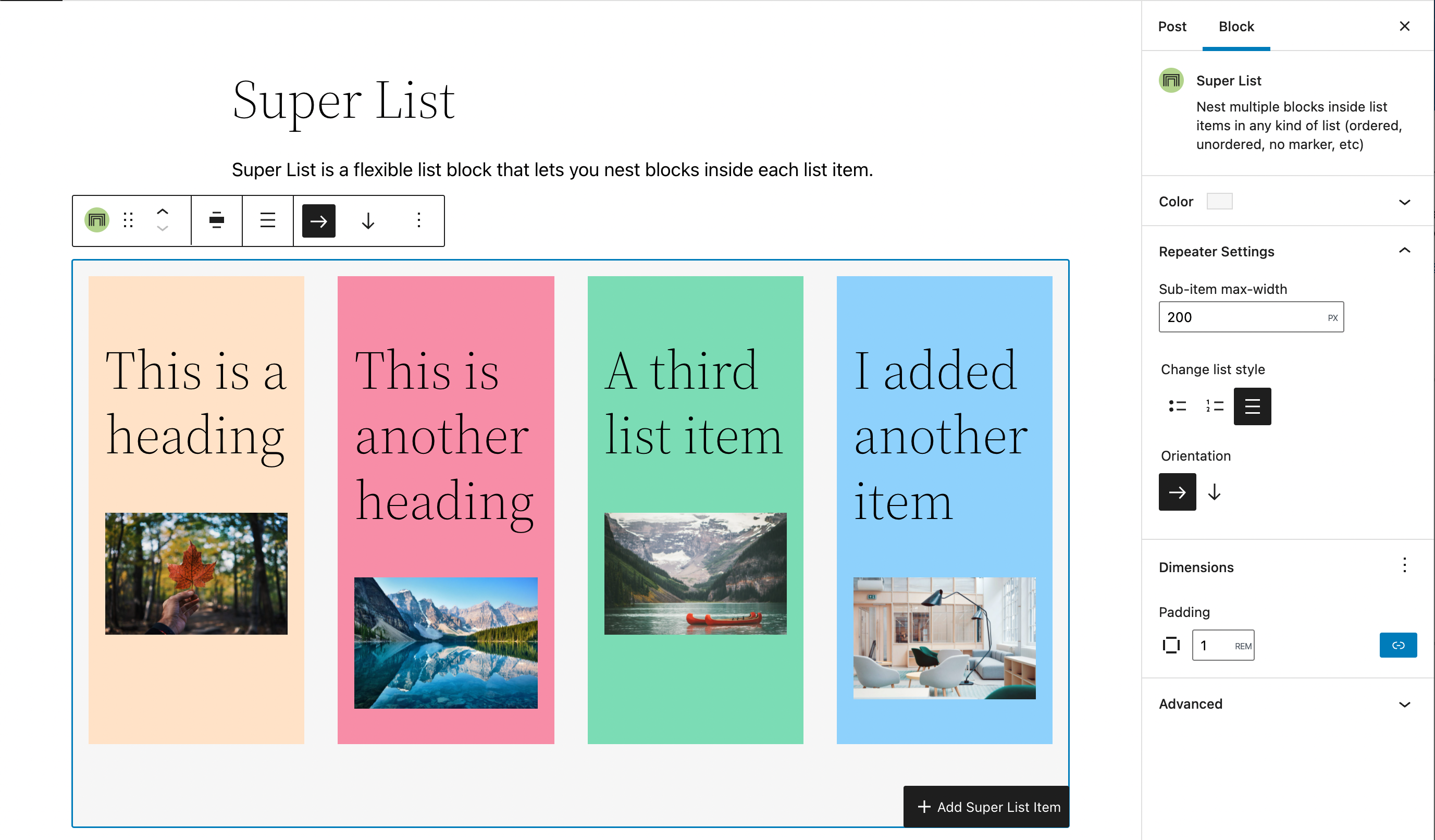
A handy little block that can be used in a variety of ways. Use it to nest other blocks inside list items, to create simple grid layouts ( like a properly responsive pricing table, or a wrapping icon list), or however you please.
This block is very light on styles (and avoids unnecessary div soup!). It aims to provide you with as much flexibility as possible, so you can harness it to create the content structure and layout you like.
If you enjoy the block, please leave a review! ⭐
If you have a feature request, please create an issue in the GitHub repository. ➕
If you need support, please use the support forum to reach out. 🆘
Principales caractéristiques
A video tutorial to guide you through the features
- Nest blocks inside ordered and unordered lists.
- Nest blocks inside lists without any markers.
- Let’s you create single column content or grid like content with the horizontal orientation setting.
- Supports native color, padding, and margin settings. 🎉
- Has a handy
addbutton in the toolbar of list items to easily add more items while you’re in the flow. - Exposes the inner inserter with a clear text label for easy insertion.
- Built entirely native WordPress Block Editor components
- There is a pro version coming with even more features!
Stay Connected
Installation
- Upload the plugin files to the
/wp-content/plugins/directory, install the plugin through the WordPress plugins screen directly, or search forSuper List Blockin the Block Library. - Activate the plugin through the ‘Plugins’ screen in WordPress if installed manually or through the WordPress plugins screen.
- Use the
Super Listblock in the Block Editor
Journal de modifications
0.1.4
- Fix issue where you can’t add new list items
- When adding a new Super List, only one list item is added by default
- List items no longer auto-add a paragraph block, matching the behavior of the Core better
- Fix issue where the Super List level block appender wasn’t showing the text label
- Added a blueprint for the plugin repository.
0.1.3
- Fix semantic output for lists without markers
- Mark plugin as tested with WordPress 6.7.2
0.1.1
- Fix registration bug that was causing the block to not install correctly
- Clarify Panel and List Item Max Width labels
- Allow indentation for super lists nested inside a list item
- Add typography support to both blocks
- Add transform from core/list block (by @cr0ybot)
- Add fix to ensure Super List is installable from the Block Library search
- Update language .pot file
- Add Anchor Block Support and Vertical Alignment capability
- Add theme.json support
0.1.0
- Release
Captures d'écran


Pour les développeurs
Est-ce votre plugin ? Montrez les chiffres.
Ajoutez un badge en direct à votre site, docs ou github readme. Il se met à jour par lui-même - aucun compte n'est nécessaire.
Best Super List Block alternatives
Tous les plugins de blocs →





FAQ
Super List Block: quick answers
Réponses directes, extraites des données en direct WordPress.org.
Source : WordPress.org
Is Super List Block free?
Yes. Super List Block is free to download and use from the official WordPress.org plugin directory.
Is Super List Block safe to use in 2026?
Super List Block works, but test it on a staging site before relying on it in 2026. It runs on 700+ sites, is rated 5/5 and was last updated 1 year ago, and scores 48/100 on our health check.
How many websites use Super List Block?
Super List Block is active on 700+ WordPress websites and has been downloaded 21,813 times since it launched in January 2022. It was downloaded 482 times in the last 30 days.
Does Super List Block work with WordPress 7.1?
Super List Block is officially tested up to WordPress 6.9.12, while the latest release is 7.1.5. It may still work, but try it on a staging site first.
What PHP version does Super List Block need?
Super List Block requires PHP 7.0 or higher. Most hosts run PHP 8.x today, so it works on any modern WordPress hosting.
When was Super List Block last updated?
The latest version, 0.1.4, was released on June 4, 2025 (1 year ago).
Who makes Super List Block?
Super List Block is developed and maintained by Aurooba Ahmed.
What are the best alternatives to Super List Block?
The most popular alternatives to Super List Block are Spectra Legacy (1M+ installs), Breadcrumb NavXT (700K+ installs) and PDF Embedder (300K+ installs).
Propulsé par PageForge
Un modèle et une feuille de calcul. Une vraie page pour chaque recherche.
PageForge transforme chaque ligne d'un CSV en une page WordPress avec son propre titre, URL, SEO et schéma, construit sur la mise en page que vous Déjà conçu. Gratuit sur WordPress.org.
- CSV et XLSX, plus Google Sheets sur les professionnels et les entreprises
- Son propre titre, URL, SEO champs et schéma pour chaque page
- Fonctionne avec l'éditeur de blocs, Elementor, Divi et Avada
- Gratuit sur WordPress.org, pas de carte de crédit