


WebSamurai SuperDate
Advanced date management with repeating dates, date ranges, and cancelled dates for WordPress custom post types.

Utiliser avec prudence
WebSamurai SuperDate works, but test it on a staging site before relying on it in 2026. Was last updated 4 months ago, and scores 49/100 on our health check.
- Petite base d'utilisateurs (<10 installations actives)
- Très peu de critiques jusqu'à présent
Comment s'accumule-t-il ?
Côte à côte sur les installations, les mises à jour, les évaluations et le support



Téléchargements quotidiens
Les pics de téléchargement suivent généralement une nouvelle version - chaque site qui met à jour automatiquement compte comme un téléchargement.
Classements
Where WebSamurai SuperDate stands todayWordPress.org Classements de recherche
Position en direct dans la recherche de plugins, Top 100| Mot-clé | Position |
|---|---|
| calendrier | >100 |
| dates | >100 |
| événements | >100 |
| récurrent | >100 |
| planning | >100 |
About WebSamurai SuperDate
À partir du Lisez-moi officiel · v1.0.0Description
WebSamurai SuperDate allows you to add sophisticated date scheduling functionality to any WordPress post type (posts, pages, or custom post types). Perfect for events, appointments, schedules, or any content that needs recurring date management.
Traits
- Post Type Selection – Choose which post types should have WebSamurai SuperDate functionality through an easy-to-use settings page.
- Repeating Dates – Support for multiple repeat patterns:
- Daily (every X days)
- Weekly (every X weeks on selected days)
- Monthly (every X months on a specific day)
- Yearly (every X years)
- Custom dates (add specific dates manually)
- Date Range – Set start and end dates for your content.
- Cancelled Dates – Maintain a list of dates to exclude from the schedule.
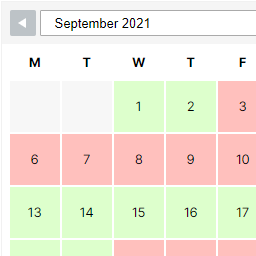
- Gutenberg Block – Display dates in beautiful day, week, or month calendar views.
- WordPress Standards – Built following WordPress coding standards and best practices.
Obligations
- WordPress 5,0 ou plus
- PHP 7.0 or higher
Soutien
For bug reports and feature requests, please contact the plugin author.
Usage
Settings Page
Navigate to Settings > WebSamurai SuperDate in your WordPress admin to select which post types should have WebSamurai SuperDate functionality.
Meta Boxes
When editing a post of a selected type, you’ll see three new meta boxes:
1. Repeating Dates
Choose how your dates should repeat:
- No Repeat – Single occurrence
- Daily – Repeat every X days
- Weekly – Repeat every X weeks on selected days of the week
- Monthly – Repeat every X months on a specific day of the month
- Yearly – Repeat every X years
- Custom Dates – Manually add multiple specific dates
2. Date Range
Set the start and end dates for when the content should be active or scheduled.
3. Cancelled Dates
Add specific dates that should be excluded from the schedule. Useful for holidays, exceptions, or one-off cancellations.
WebSamurai SuperDate Calendar Block
Insert the WebSamurai SuperDate Calendar block anywhere in your site – posts, pages, widget areas, or templates – to display dates in a visual calendar format.
Block settings:
- Show All Posts – Toggle to display dates from multiple posts instead of a single post.
- When disabled: Select a specific post to display.
- When enabled: Display dates from all posts with optional filters.
- Filter by Post Type – (Show All mode only) Select which post types to include.
- Filter by Category – (Show All mode only) Filter posts by categories.
- Filter by Tag – (Show All mode only) Filter posts by tags.
- View Type – Choose between Day, Week, or Month view.
- Current Date – Select which date to display (useful for previewing different time periods).
Display features:
- Day View – Shows all events for a single day with details and excerpts.
- Week View – Displays a 7-day grid with events for each day.
- Month View – Full calendar month grid with event indicators.
Single Post Mode: The block displays dates from one selected post, automatically calculating all dates based on the post’s WebSamurai SuperDate meta box settings, including repeating patterns and excluding cancelled dates.
Show All Mode: Display dates from multiple posts simultaneously. Use the filter options to narrow down which posts to include:
- Filter by one or more post types (posts, pages, custom post types)
- Filter by categories (for applicable post types)
- Filter by tags (for applicable post types)
- Combine filters for precise control
Each date in Show All mode displays all posts scheduled for that date, with clickable links to view the full post.
Notes de développeur
Meta Data Reference
The plugin stores the following post meta fields:
_superdate_repeat_type– The type of repeat (daily, weekly, monthly, yearly, custom)_superdate_repeat_interval– The interval for repeating (e.g., every 2 days, every 3 weeks)_superdate_repeat_days– Array of days of the week for weekly repeats_superdate_repeat_day_month– Day of month for monthly repeats_superdate_repeat_dates– Array of custom dates_superdate_start_date– Start date for the date range_superdate_end_date– End date for the date range_superdate_cancelled_dates– Array of cancelled dates
Accessing Meta Data
You can access the WebSamurai SuperDate meta data in your theme or plugin:
// Get repeat type
$repeat_type = get_post_meta( $post_id, '_superdate_repeat_type', true );

// Get start date
$start_date = get_post_meta( $post_id, '_superdate_start_date', true );

// Get cancelled dates
$cancelled_dates = get_post_meta( $post_id, '_superdate_cancelled_dates', true );
Building the Block Assets
npm install        # one-time
npm run build      # compile src/ -> build/
npm run start      # watch mode
Linting
npm run lint:php:setup   # one-time - composer install
npm run lint:php         # check PHP against WordPress Coding Standards
npm run lint:php:fix     # auto-fix what phpcbf can
npm run lint:js          # check JavaScript
npm run lint:css         # check SCSS/CSS
See docs/coding-standards.md for details.
Installation
- Téléchargez le dossier
superdatedans le répertoire/wp-content/plugins/. - Activez le plugin via le menu "plugins" dans WordPress.
- Go to Settings > WebSamurai SuperDate to configure which post types should use the plugin.
- Edit any post of the selected type to see the new meta boxes.
Journal de modifications
Version initiale.
1.0.0
- Communiqué initial
- Post type selection settings page
- Repeating dates functionality (daily, weekly, monthly, yearly, custom)
- Date range meta box
- Cancelled dates meta box
- WebSamurai SuperDate Calendar Gutenberg block with single post mode and Show All mode, day/week/month views, filtering by post type, category, and tag, multiple posts per date, and clickable post links in Show All mode
- Date calculation helper class
- Full WordPress coding standards compliance
Pour les développeurs
Est-ce votre plugin ? Montrez les chiffres.
Ajoutez un badge en direct à votre site, docs ou github readme. Il se met à jour par lui-même - aucun compte n'est nécessaire.
Best WebSamurai SuperDate alternatives
All calendar plugins →




FAQ
WebSamurai SuperDate: quick answers
Réponses directes, extraites des données en direct WordPress.org.
Source : WordPress.org
Is WebSamurai SuperDate free?
Yes. WebSamurai SuperDate is free to download and use from the official WordPress.org plugin directory.
Is WebSamurai SuperDate safe to use in 2026?
WebSamurai SuperDate works, but test it on a staging site before relying on it in 2026. Was last updated 4 months ago, and scores 49/100 on our health check.
How many websites use WebSamurai SuperDate?
WebSamurai SuperDate is active on <10 WordPress websites and has been downloaded 255 times since it launched in August 2026. It was downloaded 58 times in the last 30 days.
Does WebSamurai SuperDate work with WordPress 7.1?
WebSamurai SuperDate is officially tested up to WordPress 7.0.9, while the latest release is 7.1.5. It may still work, but try it on a staging site first.
What PHP version does WebSamurai SuperDate need?
WebSamurai SuperDate requires PHP 7.0 or higher. Most hosts run PHP 8.x today, so it works on any modern WordPress hosting.
When was WebSamurai SuperDate last updated?
The latest version, 1.0.0, was released on August 12, 2026 (4 months ago).
Who makes WebSamurai SuperDate?
WebSamurai SuperDate is developed and maintained by Kiera Howe.
What are the best alternatives to WebSamurai SuperDate?
The most popular alternatives to WebSamurai SuperDate are The Events Calendar (600K+ installs), Events Manager (60K+ installs) and SimplyBook.me (30K+ installs).
Propulsé par PageForge
Un modèle et une feuille de calcul. Une vraie page pour chaque recherche.
PageForge transforme chaque ligne d'un CSV en une page WordPress avec son propre titre, URL, SEO et schéma, construit sur la mise en page que vous Déjà conçu. Gratuit sur WordPress.org.
- CSV et XLSX, plus Google Sheets sur les professionnels et les entreprises
- Son propre titre, URL, SEO champs et schéma pour chaque page
- Fonctionne avec l'éditeur de blocs, Elementor, Divi et Avada
- Gratuit sur WordPress.org, pas de carte de crédit