


Timetable and Event Schedule by MotoPress
Smart event organizer and time-management tool with a clean minimalist design for featuring your timetables and upcoming events.

Choix solide
Timetable and Event Schedule by… is a solid plugin choice in 2026, with a few things worth checking first. It runs on 30K+ sites, is rated 4.3/5 and was last updated 3 months ago, and scores 73/100 on our health check.
- Prouvé à grande échelle sur plus de 30 000 sites actifs
- Testé avec le dernier WordPress (7.1)
Comment s'accumule-t-il ?
Côte à côte sur les installations, les mises à jour, les évaluations et le support



Téléchargements quotidiens
Les pics de téléchargement suivent généralement une nouvelle version - chaque site qui met à jour automatiquement compte comme un téléchargement.
Classements
Where Timetable and Event Schedul… stands todayWordPress.org Classements de recherche
Position en direct dans la recherche de plugins, Top 100| Mot-clé | Position |
|---|---|
| calendrier | >100 |
| Event | #38 |
| events calendar | #46 |
| planning | #11 |
| timetable | #1 |
Adoption de version
Part de sites actifs par version.
Répartition des notes
★★★★★★★★★★ 4.3 from 69 reviews
About Timetable and Event Schedule by MotoPre…
From the official readme · v2.4.19Description
MotoPress Timetable and Event Schedule is an all-around organizer plugin developed to help you create and manage online schedules for a single or multiple events, customize the appearance of each event, add date, time, description and display all the needed items in a carefully-crafted timetable. It also comes with Upcoming events widget.
- Plugin Demo
- Documentation
- Thème gratuit
- Events Calendar – an extended version of the Timetable plugin: a detailed comparison.
Caractéristiques principales
- Several column types.
- Ability to choose columns and events to be displayed in the schedule.
- Ability to add event tags and categories.
- Ability to display the events by the appropriate categories.
- Hour measure to be displayed in the left timetable column to show more accurate duration of each activity (event).
- Filter styles: drop-down list and tabs.
- Option to display/hide ‘All Events’ view mode, hours column and empty rows.
- Customizable event parameters (title, time, subtitle, etc.) and the ability to display only preferable ones in the timetable.
- Featured images for individual events in the calendar.
- Opportunity to set event URL to link it any external website.
- Text align options for event blocks.
- Unique IDs for multiple timetables on a single page.
- Color settings for background, background hover, text, and text hover.
- Export and import of your data.
- RTL ready.
The event calendar plugin can be used for timetabling different types of events like various lessons, gym classes, festivals, conferences, ceremonies, case-studies, formal parties, concerts, and much more. It’s handy in terms of backend event schedule management and maximum easy for your audience to use.
Key advantages
Responsive design
The event calender is optimized to be viewed perfectly on different devices. Manually adjust the way to show your timetable on mobile devices and desktops.
Event filtering
The visitors can filter the timetable to display the only events they are interested in.
Color controls
Highlight important activities by presenting them in different colors. Various color markers can become helpful in making the event calendar more colorful or in customizing it to fit your website color scheme.
Visual time frames
Hourly time frames are generally large enough for showing the events, but you still can increase them by setting the timetable to show up to 15 minutes accurate time in the left ‘time’ column.
Timetable Gutenberg block
The calendar events plugin provides Timetable block for Gutenberg. Timetable can be added to any other builder via shortcode.
Timetable Elementor widget
Plugin provides Timetable widget for Elementor. Choose the layout and style for your events, show or hide the event description, customize the table look, choose the mobile behavior and more.
Events Calendar
To address some of the limitations of the MotoPress Timetable plugin and simplify the event management process even further, we developed an absolutely fresh product, the next-gen WordPress events calendar plugin. While sharing some features and goals with the free Timetable plugin, the Events Calendar is designed for easier event creation in visual mode, with many more features:
- Add and display recurring events easily.
- Create hourly, multi-day, and all-day events.
- Create multiple calendars.
- Use month, week, day, and list views for events.
- Create an event that starts on one day and ends on another.
- Add multiple events to the same time slot.
- Dedicated WordPress block to edit the look of your calendar.
- Shortcode settings.
Compare Timetable vs Events Calendar
Appointment Booking
Want to take automatic online appointment reservations through your website for events, classes, and any other type of services? Hourly Appointment Booking is our custom-crafted plugin optimized for easy appointment scheduling and quick online reservations.
Developed by MotoPress – a trusted WordPress company with over a decade of expertise in crafting booking solutions, including our renowned WordPress Booking Plugins and the extensive Gutenberg block collection – Getwid WordPress Blocks.
Droits d'auteurs
Timetable and Event Schedule plugin, Copyright (C) 2016, MotoPress https://motopress.com/
Timetable and Event Schedule plugin is distributed under the terms of the GNU GPL.
Crédits
Plugin bundles the following third-party resources:
- GUMP, Copyright (c) 2015 wixelhq.com, MIT License
- jQuery UI, Copyright (c) 2013 jQuery Foundation and other contributors Licensed MIT
- Spectrum Colorpicker, by Brian Grinstead, MIT License
- jBox, by Stephan Wagner, MIT License
- jQuery UI Timepicker, Copyright 2010-2013, Francois Gelinas, Dual licensed under the MIT or GPL Version 2 licenses.
Installation
- Upload the plugin files to the /wp-content/plugins/ directory
- Activate the plugin through the ‘Plugins’ menu in WordPress. You’ll find ‘Timetable’ on your main WordPress dashboard.
Journal de modifications
2.4.19, Aug 28 2026
- Improved compatibility with WordPress 7.1.
2.4.18, Jun 23 2026
- Added an Events Calendar promo to Timetable admin pages.
2.4.17, May 25 2026
- Security – enhanced permission validation when reading events.
2.4.16, Nov 10 2025
- Security – enhanced permission validation when duplicating events.
2.4.15, Jun 24 2025
- Security – improved export process validation.
2.4.14, Aug 5 2024
- Minor bugfixes and improvements.
Captures d'écran

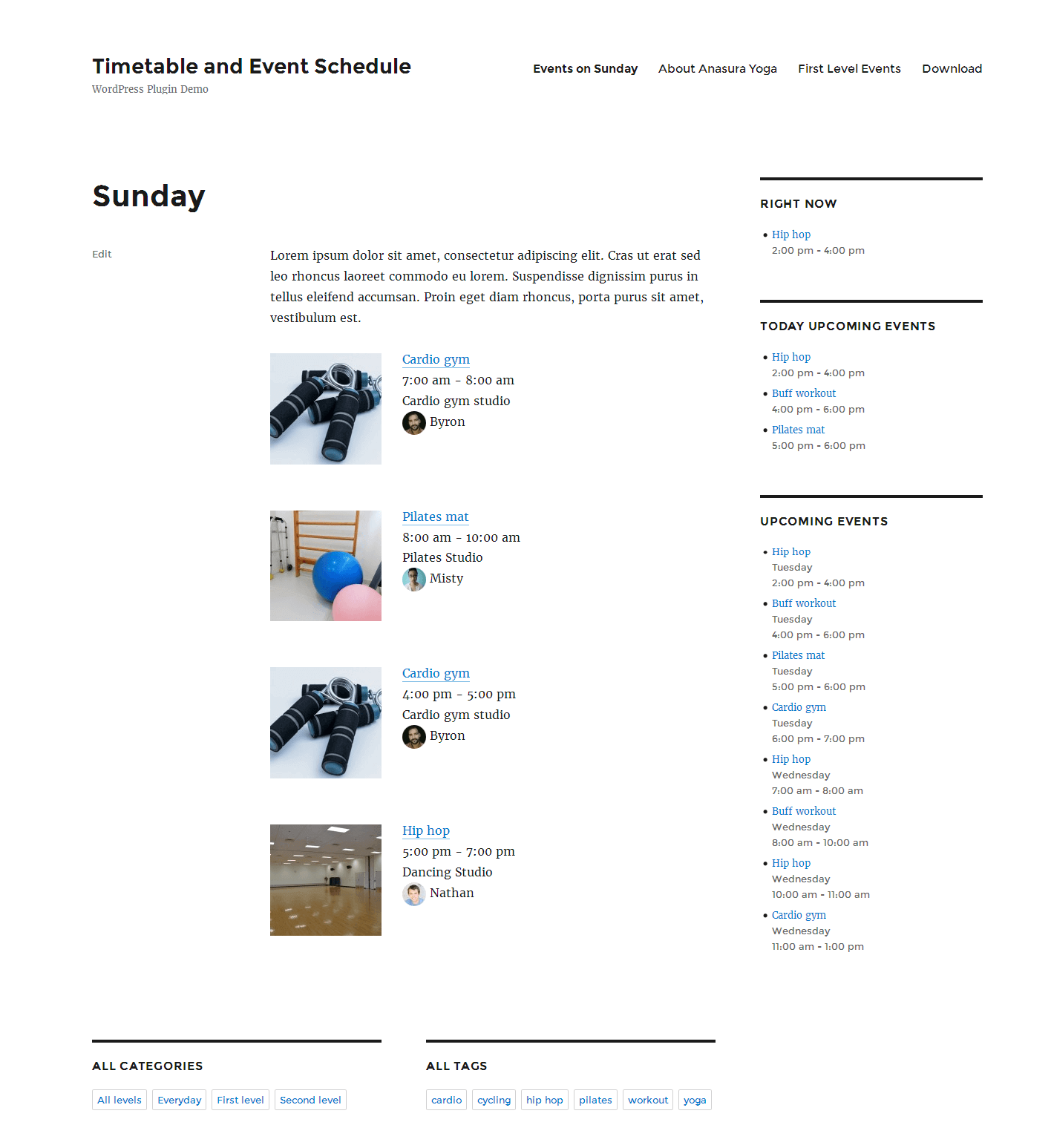

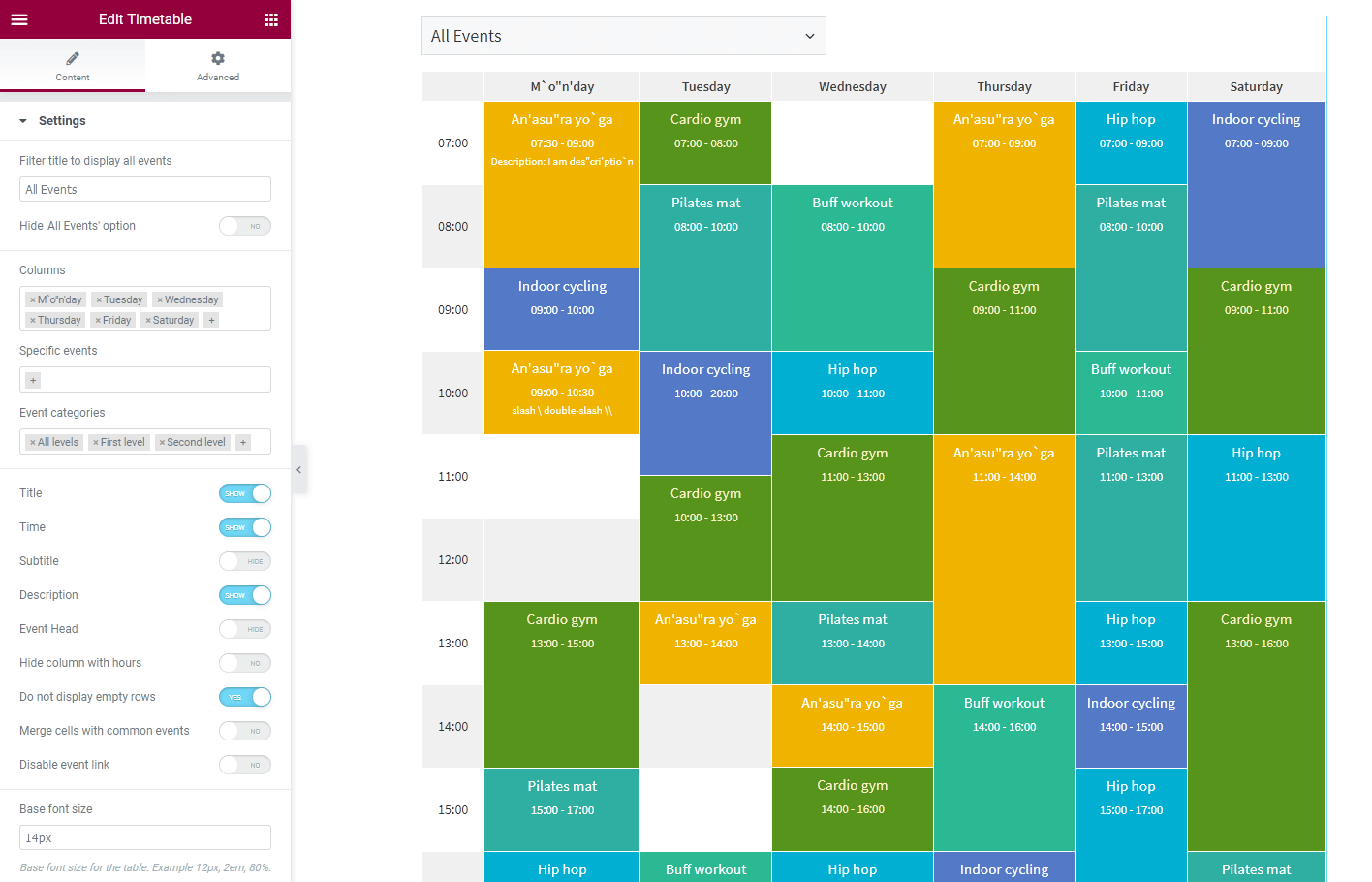
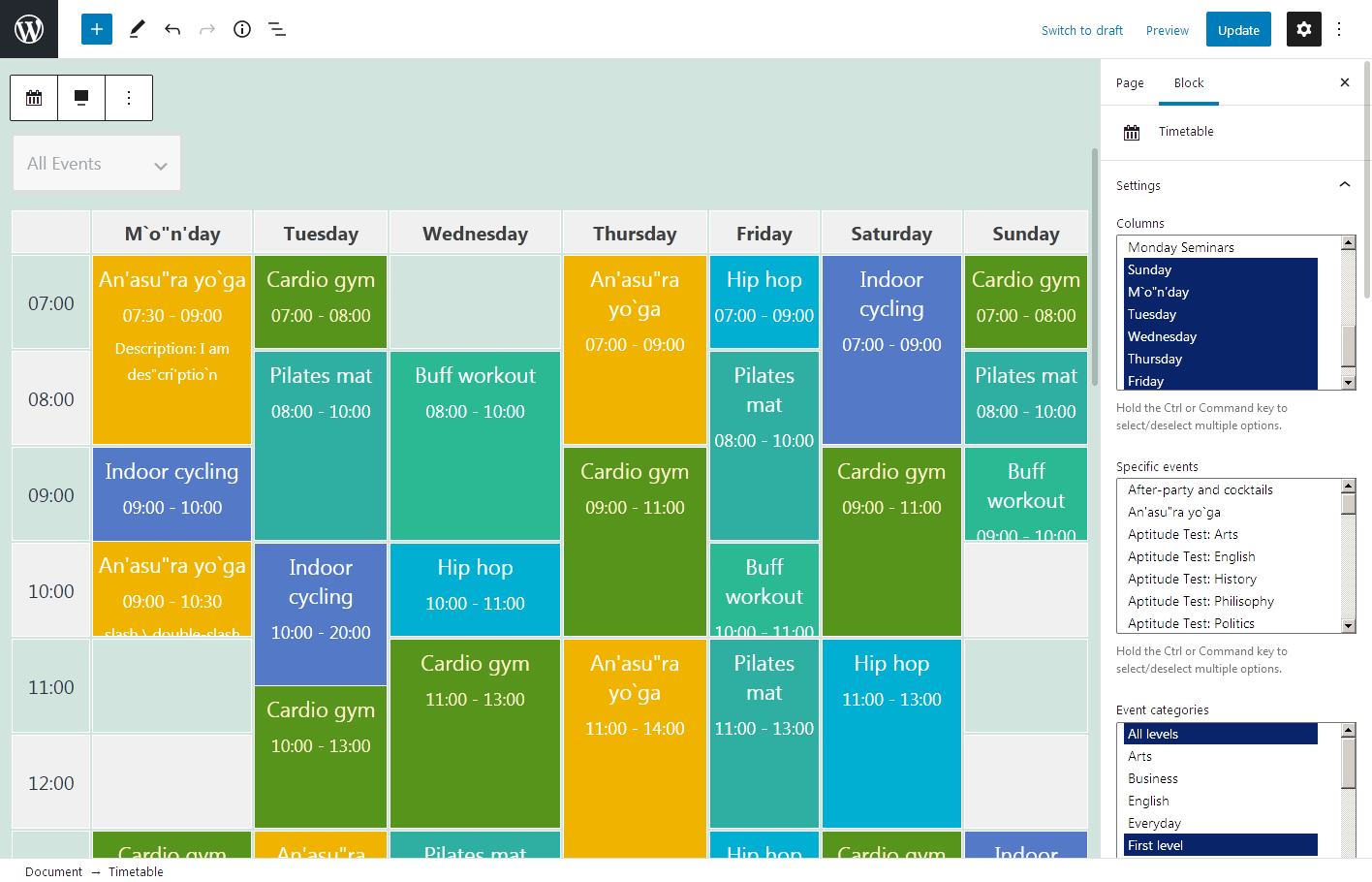
Pour les développeurs
Est-ce votre plugin ? Montrez les chiffres.
Ajoutez un badge en direct à votre site, docs ou github readme. Il se met à jour par lui-même - aucun compte n'est nécessaire.
Best Timetable and Event Schedule… alternatives
All calendar plugins →



FAQ
Timetable and Event Schedule by Mot…: quick answers
Réponses directes, extraites des données en direct WordPress.org.
Source : WordPress.org
Is Timetable and Event Schedule by… free?
Yes. Timetable and Event Schedule by… is free to download and use from the official WordPress.org plugin directory.
Is Timetable and Event Schedule by… safe to use in 2026?
Timetable and Event Schedule by… is a solid plugin choice in 2026, with a few things worth checking first. It runs on 30K+ sites, is rated 4.3/5 and was last updated 3 months ago, and scores 73/100 on our health check.
How many websites use Timetable and Event Schedule by…?
Timetable and Event Schedule by… is active on 30K+ WordPress websites and has been downloaded 960,687 times since it launched in April 2016. It was downloaded 5,096 times in the last 30 days.
Does Timetable and Event Schedule by… work with WordPress 7.1?
Yes. The developer has tested Timetable and Event Schedule by… up to WordPress 7.1.5, the latest release. It requires WordPress 4.6 or newer.
When was Timetable and Event Schedule by… last updated?
The latest version, 2.4.19, was released on August 28, 2026 (3 months ago).
Who makes Timetable and Event Schedule by…?
Timetable and Event Schedule by… is developed and maintained by jetmonsters.
What are the best alternatives to Timetable and Event Schedule by…?
The most popular alternatives to Timetable and Event Schedule by… are The Events Calendar (600K+ installs), Events Manager (60K+ installs) and SimplyBook.me (30K+ installs).
Propulsé par PageForge
Un modèle et une feuille de calcul. Une vraie page pour chaque recherche.
PageForge transforme chaque ligne d'un CSV en une page WordPress avec son propre titre, URL, SEO et schéma, construit sur la mise en page que vous Déjà conçu. Gratuit sur WordPress.org.
- CSV et XLSX, plus Google Sheets sur les professionnels et les entreprises
- Son propre titre, URL, SEO champs et schéma pour chaque page
- Fonctionne avec l'éditeur de blocs, Elementor, Divi et Avada
- Gratuit sur WordPress.org, pas de carte de crédit