


Calendrier du sucre – Calendrier des événements, billets pour les événements et plateforme de gestion des événements
Easily manage events and sell tickets on your WordPress site. Sugar Calendar is easy-to-use, reliable, and exceptionally powerful. See for yourself.

Choix
Yes — Sugar Calendar is a safe, well-maintained plugin to use in 2026. It runs on 10K+ sites, is rated 4.5/5 and was last updated 6 days ago, and scores 92/100 on our health check.
- Prouvé à grande échelle sur plus de 10 000 sites actifs
- Aimé par les utilisateurs — 4,5/5 sur 24 avis
- Développé activement — Dernière mise à jour il y a 6 jours
- Testé avec le dernier WordPress (7.1)
- Momentum — downloads up 26.9% vs the previous 30 days
Comment s'accumule-t-il ?
Côte à côte sur les installations, les mises à jour, les évaluations et le support



Téléchargements quotidiens
Les pics de téléchargement suivent généralement une nouvelle version - chaque site qui met à jour automatiquement compte comme un téléchargement.
Classements
Where Sugar Calendar stands todayWordPress.org Classements de recherche
Position en direct dans la recherche de plugins, Top 100| Mot-clé | Position |
|---|---|
| calendrier | #7 |
| Calendrier des événements | #12 |
| Gestion d'événements | #7 |
| Event Tickets | #11 |
| événements | #21 |
Adoption de version
Part de sites actifs par version.
Répartition des notes
★★★★★★★★★★ 4.5 from 24 reviews
About Sugar Calendar
From the official readme · v3.18.0Description
We believe event management should be simple! Sugar Calendar is a powerful yet lightweight events management plugin for WordPress that makes it easy to create event calendars, manage event registrations, and sell tickets, without the bloat.
With Sugar Calendar, you get just the features you need for handling events of all types without a complicated setup or slow interface. You can easily manage in-person, virtual, one-time, and recurring events with just a few clicks.
Want recurring events, venues, RSVPs, community events, and more? Get Sugar Calendar Pro Today →
Key Features at a Glance
The free version of Sugar Calendar covers the essentials: publish an event calendar, take event registrations, and sell tickets right away.
Simple Event Creation & Management
New to event management? Our step-by-step guide walks you through creating your first event, from the event name and description to the duration, recurrence, and venue.
Create events within your WordPress dashboard using our clean, clutter-free interface. Define event details like dates and times (including all-day or multi-day options), and manage your events calendar entries just like standard posts.
Calendar and List View Displays
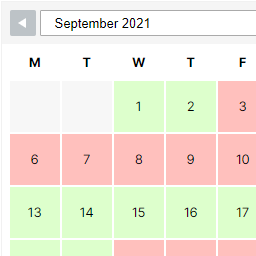
Show your events as a monthly event calendar or an upcoming events list. Visitors can switch between month, week, and day views, and both layouts are responsive, with an optional dark mode.
Sell Tickets with Stripe
Monetize your events without needing extra extensions! Sugar Calendar integrates directly with Stripe, enabling secure credit card payments for paid event registration.
Sugar Calendar is a verified Stripe partner.
Running a free event? Turn on ticketing without connecting a payment provider and let visitors claim free tickets. You still get a full attendee list for every event.
Registration Forms for Attendee Details
Collect more than a name and email during ticket checkout. Build a registration form and ask each attendee for a meal choice, t-shirt size, company name, or anything else your event needs. Answers are saved with each attendee, so the details are there when you need them.
Email Notifications for Event Attendees
When plans change, send an email to every ticket holder of an event straight from your WordPress dashboard. Handy for schedule changes, venue updates, and last-minute reminders.
Online Events with Zoom and Google Meet
Connect your Zoom or Google account once, then add a Zoom meeting or a Google Meet link to any event right from the event editor. Sugar Calendar creates the meeting and shows the join details on the event page. With Pro, a recurring event’s Zoom meeting uses one join link for the whole series.
Google Calendar Sync
Connect your Google account, pick a calendar, and choose which way events sync. Events you create in Sugar Calendar show up in Google Calendar, and changes made in Google come back to your site, so both calendars stay up to date. Lite brings a recurring Google event in as one event on its first date; Pro syncs the whole series both ways.
Multiple Calendars (Event Categories)
Structure your events by organizing them into distinct calendars or categories. Create unique calendars for different event types, departments, or topics, and let visitors filter the events calendar to the ones they care about.
Migrating from The Events Calendar?
Moving away from The Events Calendar plugin? One click migrates your events, calendars, and other details from The Events Calendar to Sugar Calendar.
Calendar Feeds and Add to Calendar Buttons
Sugar Calendar Pro provides archive calendar feeds, calendar subscriptions, provider controls, and Add to Calendar controls on event pages. Visitors can use Google Calendar, Microsoft Outlook, Apple Calendar, or a direct .ics download.
Google Maps Integration
Display a Google Map for your event venue/location on the event details page. Just enter the event address, and Sugar Calendar will show an interactive map, helping attendees easily find your event.
Event Tags for Filtering
Organize and categorize your events using customizable tags, similar to WordPress post tags. Assign relevant tags to events, allowing visitors to easily filter the events calendar on the frontend to find exactly what they’re looking for.
Attendee Management & Export
Keep track of attendees and ticket orders in your WordPress dashboard. For each event, you can view the list of attendees/ticket holders and their details. Need to share or analyze data? Export attendees or event lists to CSV with one click.
Customizable Event Emails
Make ticket, receipt, and RSVP emails match your site. Pick the Modern template, add a header image and your colors, and preview any email before it goes out. Smart Tags fill in names, dates, and event details for you. Modern ticket and RSVP confirmations also include an Add to Calendar button and an .ics file, so attendees can save the date in one click.
Import/Export Events
Migrate or back up your event data easily. Export your events as a JSON file, or as a CSV file ready for Excel and Google Sheets, and pick a custom date range so you only export what you need. You can also import events from a JSON export file.
AI Assistants & Automation
Sugar Calendar supports the WordPress Abilities API, so AI assistants and automation tools can work with your events. The AI tab under Tools installs the WPVibe.ai plugin in one click and shows you what AI assistants can do with your event calendar.
Custom Date and Time Formats
Customize how event dates and times are displayed to match your locale or preference. Choose from common date/time formats or use your own format – perfect for international sites.
Dashboard Events Widget
See your upcoming events right on the WordPress dashboard. With Pro, the widget also shows venues, speakers, and quick links to recurring events and attendee lists.
Gutenberg Blocks & Elementor Widgets
Add your event calendar or events list to any page, post, or sidebar with a Gutenberg block or an Elementor widget. Shortcodes cover every other editor.
Modern, Lightweight Design
Sugar Calendar is optimized for speed, so it won’t slow down your site. The admin interface is clean and intuitive, and your frontend event calendar inherits your theme’s styles, with dark mode support included. Developers can override any template in the theme.
Traduction prêt
Fully localized and ready for translation. Sugar Calendar has already been translated into 10+ languages and can be easily translated into your language, so your events calendar can serve audiences worldwide.
Sugar Calendar Pro Features
Want to unlock more advanced event management capabilities? Sugar Calendar Pro (available with a premium license) includes all the free features plus many powerful enhancements to help you stay organized and grow your events:
Advanced Event Registration & RSVP Management
Take control of your guest lists with the RSVP system, included with Sugar Calendar Pro via the RSVP Addon. It adds an RSVP tab to the Sugar Calendar menu where you can track who is “Going” or “Not Going” to each event, with every attendee’s details in one screen.
Recurring Events
Schedule events to repeat automatically on a daily, weekly, monthly, or custom schedule. Save time by creating recurring events (including complex recurrence patterns like the first Monday of the month or every other Thursday) instead of manually duplicating events in your events calendar.
Event Venues & Locations
Create and manage reusable venue profiles. Store addresses, maps, contact details, and website links for each location.
Assign venues to events to display rich location information (and a Google Map) easily, perfect for recurring events at the same place and enhancing your overall events management.
Speakers Management
Easily add speaker or performer profiles to your events. Include names, titles, bios, photos, and social links to highlight who will be featured, enhancing your event listings.
Community Events
Accept event submissions from your community or team without giving them backend access. Sugar Calendar Pro works with the form plugin you already use (WPForms, Gravity Forms, Formidable Forms) for the submission form.
Visitors submit events through a form on your site, and each one can wait for your review or go live right away. Moving from The Events Calendar? This is what it calls Community Events, and submitted events come across when you migrate.
Event Duplication
Clone any event with one click and use it as a template. Duplicate an event with all its details and settings, make a couple of edits, and publish, instead of recreating similar events from scratch.
Import Events from Google, Apple, Outlook, and other 3rd party Calendars
Import events from any calendar with an ICS URL, including Apple, Google, and Outlook. Pro can re-sync your ICS URLs on a schedule you choose and keeps a history of past runs, so imported calendars stay current on their own.
Event Link (Custom Event URLs)
Need to send an event to an external page or ticketing site? Pro lets you set a custom URL for each event, used instead of the default event page.
Priority Support
Get access to our top-notch support team with prioritized email support for Pro users. Need help or have questions? Pro license holders receive fast, dedicated support from the Sugar Calendar team via email
Take Your Events to the Next Level! Get recurring events, event venues, speakers, community events, and automatic calendar imports with Sugar Calendar Pro. Get Sugar Calendar Pro Today →
Sugar Calendar Pro Addons
Sugar Calendar also offers official addons to extend functionality even further. These addons integrate Sugar Calendar with other platforms and tools. If you purchase a Plus, Pro, or Elite license to Sugar Calendar, you get access to all current and future addons.
-
RSVP – Collect and track RSVPs directly in your WordPress dashboard. See who responded “Going” or “Not Going”, keep guest details in one place, and collect extra attendee information with registration forms.
-
Event Ticketing – Connects your events calendar to WooCommerce so you can sell tickets as WooCommerce products, with WooCommerce’s payment gateways (PayPal, credit cards, and more), cart, and email receipts. Using Event Ticketing also removes the 3% Stripe fee in the lite version.
-
Zapier – Connect your events and tickets to 8,000+ apps through Zapier, with triggers for New Event, New Ticket Order, and New Attendee. Add attendees to a Google Sheet or send a Mailchimp email when someone registers.
Cas d'utilisation
Sugar Calendar handles event calendars and event registration for all kinds of sites. It works well for:
-
Event Organizers & Planners – Manage conferences, concerts, workshops, meetups, or fundraisers with ease. Easily handle event registration, sell tickets, and display comprehensive event details on a clean events calendar.
-
Businesses & Non-Profits – Promote your upcoming events, classes, or fundraisers on a public event calendar. Easy enough for non-technical staff to add events, and convenient for visitors to find events by category or date.
-
Educational Institutions & Tutors – Schedule courses, webinars, and training sessions. Handle recurring classes or multi-day seminars, and manage enrollment through event registration, RSVPs, or ticket sales.
-
Community Groups & Clubs – Allow members to submit their own events (with approval) and maintain a community calendar. Great for clubs, sports leagues, open mic sessions, or local groups needing collaborative event management.
-
Musicians & Venues – List upcoming shows and tours on a dedicated events calendar. Use the Google Maps integration to show where you’re playing with the exact location and details. Sell tickets directly from your site.
-
Bloggers & Content Creators – Plan and show an editorial calendar or live stream schedule to your audience. Keep readers in the loop about what’s coming up.
Additional Advantages
A few more reasons users pick Sugar Calendar:
-
Excellent Documentation – We provide extensive documentation and tutorials for every feature. New to event plugins? The step-by-step Getting Started guide will have you publishing events in minutes, and the developer docs cover hooks, functions, and sample code.
-
Active Development & Support – Sugar Calendar is built by the team behind WPForms, WP Mail SMTP, and AIOSEO. We’re active in the support forums, and we build the event management features users ask for.
-
Internal Linking & SEO – The plugin outputs JSON-LD structured data for your events, including online events, so Google can show dates, venues, and event details in search results. Pretty URLs for event archives and category pages give search engines a clean structure to crawl.
Quelle est la suite
If you like our Sugar Calendar plugin, then consider checking out our other projects:
- WP Mail SMTP – The most popular WordPress SMTP and Email Log plugin (trusted by over 3 million sites).
- WPForms – #1 drag & drop online form builder for WordPress (trusted by over 5 million sites).
- OptinMonster – Get more email subscribers with the most popular conversion optimization plugin for WordPress.
- AIOSEO – The original WordPress SEO plugin to help you rank higher in search results (trusted by over 3 million sites).
- MonsterInsights – See the stats that matter and grow your business with confidence. Best Google Analytics plugin for WordPress.
- SeedProd – Create beautiful landing pages with our powerful drag & drop landing page builder.
- Smash Balloon – #1 social feeds plugin for WordPress – display social media content in WordPress without code.
- WPCode – must have WordPress code snippet management plugin to help you future-proof website customization (trusted by 1.5 million sites).
- Duplicator – popular WordPress backup and migration plugin used by over 1 million websites.
- WP Simple Pay – #1 Stripe payments plugin for WordPress. Start accepting one-time or recurring payments without a shopping cart.
- PushEngage – Connect with visitors after they leave your website with the leading web push notification plugin.
- RafflePress – Best WordPress giveaway and contest plugin to grow traffic and social followers.
- TrustPulse – Add real-time social proof notifications to boost your store conversions by up to 15%.
- SearchWP – The most advanced custom WordPress search plugin to improve WordPress search quality.
- AffiliateWP – #1 affiliate management plugin for WordPress. Add a referral program to your online store.
- Easy Digital Downloads – The best WordPress eCommerce plugin to sell digital products (eBooks, software, music, and more).
- WPCharitable – Top-rated WordPress donation and fundraising plugin for WordPress.
Visit WPBeginner to learn from our WordPress Tutorials and about the best WordPress plugins.
Installation
- Install Sugar Calendar Lite either via the WordPress.org plugin repository or by uploading the files to your server. (See instructions on how to install a WordPress plugin)
- Activate Sugar Calendar Lite.
- Navigate to the Sugar Calendar area in the WordPress admin and start creating events.
- Need more help? Get priority support with a premium Sugar Calendar license.
Journal de modifications
3.18.0 – 2026-11-19
- Added: NEW Dashboard: a one-page overview of your events, with upcoming events, ticket sales, new attendees and setup progress all in one place.
- Fixed: Migrating from The Events Calendar now keeps time zones, all-day events, tickets, orders and RSVPs.
- Fixed: Tools » Migrate can be run again to bring over events added in The Events Calendar since the last migration.
- Fixed: Polylang: the all-events ICS feed showed each event once per language, and calendar translations Polylang created on its own had no color.
3.17.0 – 2026-11-04
- Added: Polylang support: translate events, calendars and tags with the Polylang plugin.
- Fixed: Timed events set to a different time zone than the calendar were missing from the admin Week and Day views.
- Fixed: Gia AI can add tickets to events and report ticket sales without the Event Ticketing add-on.
3.16.0 – 2026-10-15
- Added: NEW Google Calendar integration: sync events to and from your Google calendar.
- Added: NEW Google Meet integration: add a Google Meet link to any online event with a click of a button.
- Fixed: The Setup Checklist no longer queries database tables before they are created.
3.15.0 – 2026-10-08
- Added: NEW Gia AI assistant: describe your event in a chat and Gia creates it for you. Gia can also update your existing events and answer questions about them, like registrations or ticket sales.
- Added: Setup Checklist: a new Sugar Calendar → Setup Checklist page lists the steps to get your calendar running, like creating your first event, adding a calendar to a page and connecting Stripe. Each step is ticked off when you complete it.
- Fixed: Events with the same start time could be skipped or shown twice in paginated event lists.
- Fixed: The Event List block’s Days of the Week and Time of Day filters missed matching events on later pages.
3.14.0 – 2026-09-16
- Added: NEW Modern email template: choose a header image and colors, preview every email, and receive it styled to match your site.
- Added: NEW Featured Events: star any event to highlight it in the admin and in the Month, Week and Day views, and filter the Events list by featured.
- Added: Redesigned Ticket Receipt and Ticket Details pages, with new controls under Settings → Event Ticketing → Pages to pick the pages and what they show.
- Added: Admin notification emails for ticket sales and RSVPs, per-attendee ticket emails, and an on/off switch for every email.
- Added: Smart Tags in the email editors: insert dynamic values like the event title, date or order total from a searchable dropdown.
- Added: Nine new Abilities for AI agents: create and update events, create calendars and tags, list tags, and get registration stats. Every ability now publishes its output schema.
- Fixed: Calendar and single-event ICS feed URLs returned the wrong events or none at all.
- Fixed: WPBakery event content was missing from event excerpts.
- Fixed: Security improvements.
3.13.0 – 2026-08-19
- Added: Native Event Ticketing checkout now automatically emails each attendee their individual ticket after purchase. Turn “Ticket Email To Attendee” off under Settings → Emails to stop automatic delivery; manual Send Email actions remain available.
- Added: NEW Admin notification emails: get an email when a ticket is sold, and when someone RSVPs. Edit the subject and message for each under Sugar Calendar → Settings → Emails, or switch any of them off there.
- Added: Turn any email on or off individually under Sugar Calendar → Settings → Emails.
- Added: Smart Tags in the email editors: pick dynamic values like the event title, date or order total from a searchable dropdown and insert them where your cursor is.
- Added: NEW Registration Form: collect extra details from attendees during ticket checkout or RSVP registration, like meal choice, t-shirt size, or a company name.
- Added: Export your events as a CSV file, ready to open in Excel or Google Sheets.
- Added: Free events with tickets: turn on ticketing and let visitors claim free tickets without setting up a payment provider.
- Added: Zoom meetings can now be added to recurring events, with one join link that works for every occurrence.
- Added: New AI tab under Tools: install the WPVibe.ai plugin in one click and see what AI assistants can do with your events.
- Added: Pick a date range when exporting, so you only export the events you need.
- Changed: The new admin notification emails are turned ON after updating. If you would rather not receive them, switch them off under Sugar Calendar → Settings → Emails.
- Changed: The Emails settings screen is now split into two groups, emails to attendees and emails to the site admin, so it is clearer who receives what.
- Changed: Clearer names for the ticketing emails: “Order Receipt Email To Purchaser” and “Ticket Email To Attendee”.
- Changed: Setup Wizard improvements, including a new welcome screen in your WordPress admin.
- Fixed: The subject and message for admin notification emails now save correctly.
- Fixed: The Notify Attendees panel did not open when using the Block editor.
- Fixed: Notify Attendees emailed only the person who paid instead of every ticket holder.
- Fixed: Event Ticketing emails now show the correct event end time and use “All-day” for all-day event times.
- Fixed: Dropdowns in the event editor did not work when using the Block editor.
- Fixed: The Event List block could hide all events from visitors who were not logged in when filtering by tag.
- Fixed: Security improvements.
Captures d'écran


Pour les développeurs
Est-ce votre plugin ? Montrez les chiffres.
Ajoutez un badge en direct à votre site, docs ou github readme. Il se met à jour par lui-même - aucun compte n'est nécessaire.
Best Sugar Calendar alternatives
All calendar plugins →



FAQ
Sugar Calendar: quick answers
Réponses directes, extraites des données en direct WordPress.org.
Source : WordPress.org
Is Sugar Calendar free?
Yes. Sugar Calendar is free to download and use from the official WordPress.org plugin directory.
Is Sugar Calendar safe to use in 2026?
Yes — Sugar Calendar is a safe, well-maintained plugin to use in 2026. It runs on 10K+ sites, is rated 4.5/5 and was last updated 6 days ago, and scores 92/100 on our health check.
How many websites use Sugar Calendar?
Sugar Calendar is active on 10K+ WordPress websites and has been downloaded 301,035 times since it launched in October 2012. It was downloaded 30,231 times in the last 30 days.
Does Sugar Calendar work with WordPress 7.1?
Yes. The developer has tested Sugar Calendar up to WordPress 7.1.5, the latest release. It requires WordPress 6.2 or newer.
What PHP version does Sugar Calendar need?
Sugar Calendar requires PHP 7.4 or higher. Most hosts run PHP 8.x today, so it works on any modern WordPress hosting.
When was Sugar Calendar last updated?
The latest version, 3.18.0, was released on November 19, 2026 (6 days ago).
Who makes Sugar Calendar?
Sugar Calendar is developed and maintained by Syed Balkhi.
What are the best alternatives to Sugar Calendar?
The most popular alternatives to Sugar Calendar are The Events Calendar (600K+ installs), Events Manager (60K+ installs) and SimplyBook.me (30K+ installs).
Propulsé par PageForge
Un modèle et une feuille de calcul. Une vraie page pour chaque recherche.
PageForge transforme chaque ligne d'un CSV en une page WordPress avec son propre titre, URL, SEO et schéma, construit sur la mise en page que vous Déjà conçu. Gratuit sur WordPress.org.
- CSV et XLSX, plus Google Sheets sur les professionnels et les entreprises
- Son propre titre, URL, SEO champs et schéma pour chaque page
- Fonctionne avec l'éditeur de blocs, Elementor, Divi et Avada
- Gratuit sur WordPress.org, pas de carte de crédit