


Membership Plugin – Kadence Memberships
Kadence Memberships is a powerful WordPress membership plugin that allows you to monetize content access. As a content restriction plugin, Kadence Memberships gives you full control over who can and cannot view content…

Choix solide
Membership Plugin is a solid plugin choice in 2026, with a few things worth checking first. It runs on 8K+ sites, is rated 3.1/5 and was last updated 5 days ago, and scores 69/100 on our health check.
- Développé activement — Dernière mise à jour il y a 5 jours
- Testé avec le dernier WordPress (7.1)
- Momentum — downloads up 57.1% vs the previous 30 days
- Mixed reviews — 3.1/5 from 100 ratings
Comment s'accumule-t-il ?
Côte à côte sur les installations, les mises à jour, les évaluations et le support



Téléchargements quotidiens
Les pics de téléchargement suivent généralement une nouvelle version - chaque site qui met à jour automatiquement compte comme un téléchargement.
Classements
Where Membership Plugin stands todayWordPress.org Classements de recherche
Position en direct dans la recherche de plugins, Top 100| Mot-clé | Position |
|---|---|
| membership | #17 |
| registration form | >100 |
| Restrict access | #19 |
| restrict pages | #7 |
| restrict posts | #6 |
Adoption de version
Part de sites actifs par version.
Répartition des notes
★★★★★★★★★★ 3.1 from 100 reviews
About Membership Plugin – Kadence Memberships
From the official readme · v4.0.7Description
Kadence Memberships is a powerful WordPress membership plugin that allows you to monetize content access. As a content restriction plugin, Kadence Memberships gives you full control over who can and cannot view content on your WordPress site. As a design tool, Kadence Memberships helps you create pages that dynamically display content based on user role or membership level.
Kadence Memberships can power a full-fledged membership or subscription website with multiple membership levels, or just hide a page or post. Kadence Memberships makes it simple to limit access to posts, pages, media, custom post types, and even API requests. This gives you full control over who can and who cannot view content on your WordPress site.
Kadence Memberships is completely customizable with features built for developers and extensible with a library of Pro add-ons.
💪 As Powerful as a WordPress Membership Plugin … or as Simple as a Content Restriction Plugin
Use Kadence Memberships as a WordPress membership plugin to:
- Create unlimited membership levels or subscription packages. Easily create free, trial, and premium memberships or subscriptions. Each plan can be used to set a user’s access to specific content on your site.
- Sell memberships and collect payments on your WordPress site. You can even collect payments with Stripe in the free version!
- Control content access for your members. Decide who can access specific pages, posts, archives, and even WordPress blocks based on a member’s plan, status, and more.
- Manage your members or subscribers. Kadence Memberships lets you easily keep track of your memberships through an intuitive admin interface. Quickly view active, expired, cancelled, and pending memberships. Memberships can be added manually, modified in bulk, and easily searched for when you need to locate a specific record. Each membership can also be manually modified at any time.
- Allow members to manage their account with self-service account management. Members can easily view their account status, renewal or expiration date, and options to upgrade or cancel their account. They can also access a complete history of payments made to their account, including PDF invoices for each payment. Finally, members are able update their account name, email, and password through an included profile editor.
- Offer prorated memberships. Customers can also upgrade and downgrade between membership levels at any time. These upgrades and downgrades are prorated based on how much the customer has already paid and how much time is left in their current membership.
- Auto-renew membership payments. Select whether membership payments should always auto renew or let the customer decide.
Use Kadence Memberships as a WordPress content restriction plugin to:
- Restrict access to your WordPress site based user role. Limit access to full content via a simple interface on the post, page, and custom post type editing screens.
- Control user access to content based on WordPress user role, access level(s), or membership level(s).
- Protect sensitive content.
- Clearly separate public content from private content
- Restrict access to entire pages or specific sections
- Let users register and login from the frontend of your site
“Most plugins that restrict content are heavy and need 3rd party commerce solutions like WooCommerce to work. Kadence Memberships Pro has EVERYTHING built-in: memberships, payment gateways and plenty of add-ons – a true, one-stop solution for membership websites!”
David Attard, CollectiveRay
✨ Features
Our feature-rich plugin comes with everything you need to restrict content and sell memberships from your WordPress site.
- 👥 Membership Levels – Set access level, duration (in days, months, years), number of renewals, price, signup fee, status, assign WordPress user role. Set any price (including free) or optionally set a sign up fee. Set the frequency and period, and specify a user role that will be assigned to members when they register.
- 🖥 Auto-Created Member Pages – Pages generated by the plugin include: Registration, Success, Account, Edit Profile, Update Billing Card
- 🔁 Auto Renewals – Select to let customer choose whether to auto renew, always auto renew, or never auto renew.
💳 Payment Gateways – Stripe and Manual Payments, PayPal (Pro), Authorize.net (Pro), Braintree (Pro), Custom (Pro). - ↕️ Upgrade/Downgrade Membership – Allow members to change their subscription level at any time.
- ✉️ Member Emails – Paid membership activation email, free membership activation email, cancelled membership email, expired membership email, payment received email, renewal payment failed email.
- 📄 Payment Invoices – The payment invoice has a clean design and is printable. Customize with your logo, company name, address, email, header text, notes, and footer text
- 🪄 Prorated memberships – Allow members to pay the price difference when they upgrade.
🙌 Even More Features
✔️ Redirect Default Login URL – Force the default login URL to a custom URL.
✔️ Content Excerpts – Choose whether or not to show content excerpts to members without access to the content.
✔️ Import/Export Data – Whether you prefer to maintain your own records of your memberships database, you wish to run your own analysis, or you simply need to import membership records into another service or application such as MailChimp or Excel, Kadence Memberships allows you to export all membership records to a CSV at anytime.
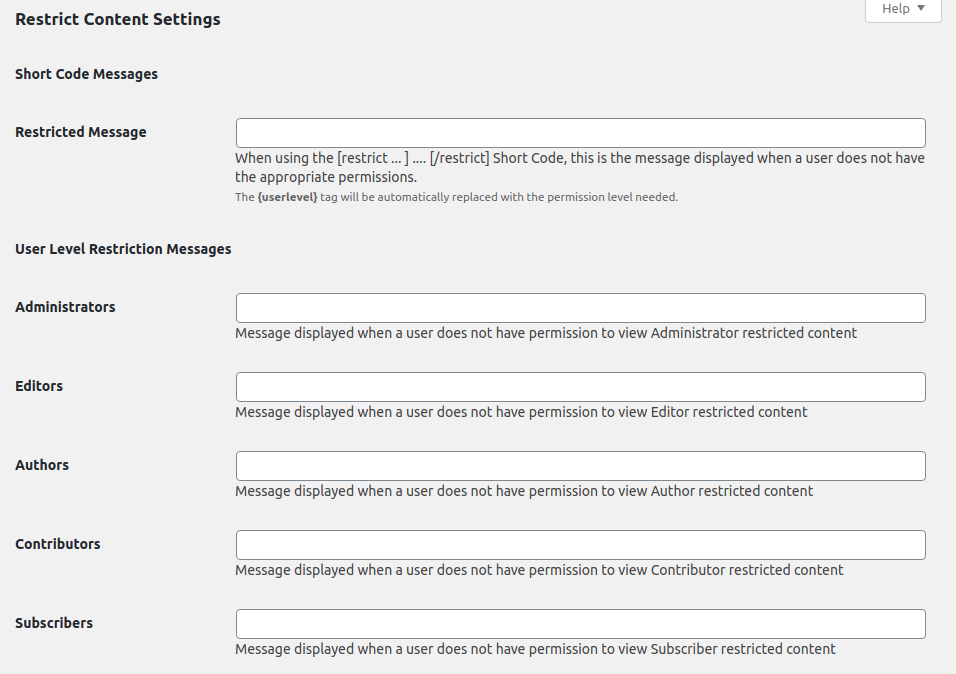
✔️ Restricted Content Message – Customize the message shown to users who do not have permission to view the content.
✔️ Restrict access to WooCommerce products.
🏋️♀️ More Power with Pro Features
- 🏷 Discount code support – Discount codes allow you to provide your customers with special promotional codes that give them a discount on the purchase of a membership. Kadence Memberships Pro supports various kinds of discount codes and site administrators can easily create any number of discounts from the admin interface. Discount codes can be set up to provide a percentage discount or a flat rate discount. Each discount code is created with a name, description, unique code, maximum uses, and optional expiration dates.
- 📈 Detailed reporting – Kadence Memberships Pro provides a complete reports section where you can view the earnings of your membership website. You can view total earnings for any given period or drill down to specific membership levels.
- 🕵️♀️ Free trials – Allow prospective members to try a membership before they buy. Send emails to free trial users when their free trial is about to end.
- ✉️ Member Email Customization – Add a personal touch to all of your member emails with Kadence Memberships Pro.
- 🔒 Google reCAPTCHA – Protect your member login form from bots with Google reCAPTCHA.
- 🚀 34 Powerful Add-ons – All Kadence Memberships Pro plans come with all Kadence Memberships Pro add-ons to add more integrations and functionality to your site.
Upgrade to Kadence Memberships Pro now
🛠 Developer Features
Kadence Memberships Pro has been built with developers in mind. That means it is flexible, easy to extend, and chocked full of action hooks and filters, making it easy to modify and tweak to your specific needs. With clean and simple display options, Kadence Memberships Pro is designed to integrate perfectly with every theme without any custom CSS being necessary.
Extensive and easy to modify template files are included with Kadence Memberships Pro. If you have built a theme, for clients or general distribution, you can easily customize the display of registration forms, profile editor, account pages, and more through custom template files added directly to your theme’s folder.
Because of the huge number of action hooks and filters, Kadence Memberships Pro can be easily integrated with other plugins to help provide a more seamless experience for customers. This also makes it possible to build add-on plugins for Kadence Memberships Pro that extend its functionality.
✔️ Theme Integration – Designed to work with any theme.
✔️ Action Hooks & filters galore – Kadence Memberships contains a bunch of action hooks and filters, allowing you to easily customize the plugin to your specific needs. Check out our extensive developer docs for actions, filters, classes, constants, and functions.
✔️ Easy to Modify Template files – Making changes to Kadence Memberships Pro template files is a cinch. Make a copy of any plugin template file and drop it in your theme to override the plugin’s file with your own custom markup.
✔️ So Many Integrations – Kadence Memberships plays nice with a bunch of plugins and third-party services, including e-commerce systems like WooCommerce, lots of Pro payment gateways, email newsletter services, and much more!
✔️ REST API – Kadence Memberships Pro includes a complete REST API, allowing you to extend the plugin and its functionality beyond WordPress and into your web application. The possibilities for what you can do are nearly limitless!
✔️ WP-CLI Integration – Kadence Memberships Pro integrates with WP-CLI. Several commands are supported in order to speed up your workflow with batch processing jobs, creating memberships, and viewing customer information.
✔️ Debug mode for developers – Turn on error logging to help identify issues. Logs are kept in Restrict > Tools.
💳 Stripe payment processing support
It’s no secret that we believe Stripe is the best payment processor. Stripe currently supports 14 languages, over 35 countries and 135+ currencies. Check support for your country.
Hands down, Stripe has the simplest setup process and highest reliability we know of – and support for Stripe is included in Kadence Memberships. Stripe has a per-transaction charge which varies by country. See Stripe’s pricing page for more information. However, if you prefer a different payment gateway or your country does not support Stripe, we’ve got you covered…
Besides Stripe, we have several payment gateways available to Kadence Memberships Pro. Visit the following links to get more details for the payment gateway of your choice.
🧰 Shortcodes
- Limit access to content with a shortcode. Example:
[restrict]This content is limited to logged in users.[/restrict] - Limit access to content based on user role. Example:
[restrict userlevel="editor"]Only editors and higher can see this content.[/restrict] - Display a registration form for new accounts on any page of your website with
[register_form]. - Display a login form for existing users on any page of your website with
[login_form].
🛒 WooCommerce integration
Kadence Memberships allows you to easily control who can view and/or purchase products in WooCommerce, the most popular eCommerce plugin for WordPress.
💬 Get reliable help
Kadence Memberships is backed by top-notch technical support from our full-time support team. We also have extensive documentation site available. If you’re looking for faster support via email, we encourage you to purchase a Kadence Memberships Pro license.
We check in on the The Kadence Memberships forum here on WordPress.org about once a week to help users with basic troubleshooting and identifying bugs. If you’re looking for premium, personalized support, consider upgrading to Kadence Memberships Pro.
📃 Documentation
All of our documentation can be found in the iThemes Help Docs.
🤔 Who is Kadence Memberships Pro for?
No matter what kind of membership site or plans you offer, Kadence Memberships Pro can be adapted to suit your business needs – and set up in many different ways, based on how you want to allow members to access your site’s content.
Here are a few examples:
- Member Blogs
- Group Accounts
- Club Memberships
- Co-operatives
- Job Boards
- Magazine Subscriptions
- Maintenance Contracts
- Private Communities
- Support Agreements
“RCP is always at the top of my list when helping clients choose a membership platform. In addition to being a great plugin today, the pace of improvement is impressive. RCP gets better and better all the time.”
Travis Northcutt, Member Up
💌 Email marketing service provider add-ons
With a Professional or higher license, you can connect Kadence Memberships Pro to any of the following email marketing service providers. This allows you to add members to your mailing lists for different membership levels as well as synchronize account details.
🔌 Other add-ons in Kadence Memberships Pro
- Group Accounts – Sell multi-member group memberships.
- Drip Content – Release content to members on a schedule.
- Custom Redirects – Specify where members are redirected on a per-membership-level basis.
- WooCommerce Member Discounts – Give members automatic discounts on purchases in your WooCommerce store.
- Site Creation – Allow paid members to purchase sites in a WordPress multisite.
- Restriction Timelock – Keep content unrestricted until a specified date in the future.
- Restriction Timeouts – Specify a date and time when restricted content will have its restrictions removed, making it available to everyone.
- Restrict Past Content – Restrict content published prior to a member’s join date.
- Hard-set Expiration Dates – Allows for a specific expiration date to be assigned to membership levels.
- Help Scout – Display customer’s membership information from Kadence Memberships Pro inside of Help Scout when viewing tickets.
- Math Verification – Add a math verification field to registration forms.
- IP Restriction – Allow specific IP addresses to bypass content restrictions and ban other IP addresses from signing up for a membership plan.
- Enforce Strong Passwords – Enforce strong passwords during registration.
👋 Meet the team
Kadence Memberships is built by iThemes. We also make popular WordPress plugins like iThemes Security Pro and BackupBuddy used by hundreds of thousands of people just like you.
✏️ From our blog
Check out some of our popular posts for actionable advice for running membership sites.
- The top 8 benefits of running a membership site
- Which membership model is best for your business?
- How to start a membership site on a budget
- Should you be offering tiered memberships?
Subscribe to our newsletter to get posts like these in your inbox as soon as they’re published.
Install Kadence Memberships Manually
- From the dashboard of your site, navigate to Plugins –> Add New.
- Select the Upload option and hit “Choose File.”
- When the popup appears select the restrict-content-x.x.zip file from your desktop. (The ‘x.x’ will change depending on the current version number).
- Suivez les instructions à l'écran et attendez la fin du téléchargement.
- When it’s finished, activate the plugin via the prompt. A message will show confirming activation was successful.
That’s it! Just configure your settings as you see fit, and you’re on your way to restricting content. Need help getting things started? Check out our getting started guide for help with settings and features.
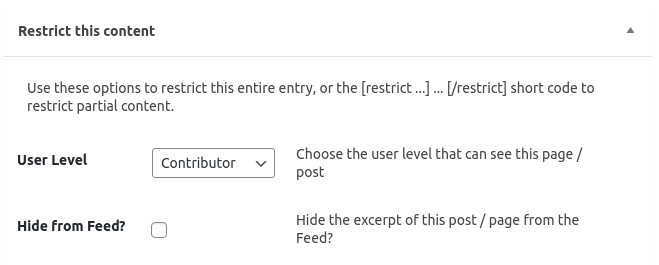
To restrict an entire post or page, simply select the user level or membership level you’d like to restrict the post or page to from the drop down menu added just below the post/page editor.
There is also a short code for showing content only to users that are not logged in.
[not_logged_in]This content is only shown to non-logged-in users.[/not_logged_in]
Installation
- Visit the plugins page within your dashboard and select ‘Add New’
- Search for “Kadence Memberships”
- Activate Kadence Memberships from your Plugins page
- Vous avez terminé !
Journal de modifications
Removed hard-coded red color from restriction message and deactivate plugin when pro version is activated.
4.0.7
- Fix: Restored the recording of Stripe subscription renewals on accounts set to Stripe API version 2025-06-30.basil or newer, where paid members were expiring on their old date.
- Fix: Prevented Stripe subscription renewals from being recorded as new payments when a leftover pending payment was linked to the membership, so paid renewals extend the expiration date once instead of letting the membership expire.
- Fix: Kept a member’s user role when one of their memberships expired or was disabled while another active membership still granted that role.
- Tweak: Added an admin notice for paid Stripe payments that cannot be matched to a membership, which were only written to the log before.
4.0.6
- Security: Strengthened permission checks when saving a new Stripe billing card.
- Security: Hardened admin database maintenance actions.
- Security: Tightened checks on membership renewals and registration payments.
4.0.5
- Fix: Saving a post with “Members of specific membership levels” and no level selected no longer causes a fatal error or discards the restriction settings.
- Fix: Updating the Stripe billing card no longer continues running after the redirect, which could return an HTTP 500 after the card was saved.
4.0.4
- Fix: Further reduced database load from the Hide Restricted Posts filtering on REST API and query requests.
- Fix: Activation and test emails no longer fail to send when an email template field was left blank.
- Fix: Prevented gateway labels from being translated before the plugin’s translations were ready, which could trigger a PHP notice.
4.0.3
- Fix: Stripe subscription renewals now record a renewal payment and extend the membership expiration.
- Fix: Stripe payments in a currency with a different number of decimals than the store currency were recorded with the wrong amount.
- Fix: Free trials on paid membership levels were processed as free memberships, so no Stripe subscription was created and access ended with the trial.
- Fix: A declined card no longer leaves a duplicate pending membership behind on the next attempt.
- Fix: Stripe card declines were rejected by their own security check, so failed registrations were never recorded as failed.
- Fix: Resolved PHP warnings that could occur when another plugin using Composer was active on the same site.
4.0.2
- New: Added Chinese Yuan (元) to the list of available currencies.
Captures d'écran

Pour les développeurs
Est-ce votre plugin ? Montrez les chiffres.
Ajoutez un badge en direct à votre site, docs ou github readme. Il se met à jour par lui-même - aucun compte n'est nécessaire.
Best Membership Plugin alternatives
All membership plugins →





FAQ
Membership Plugin: quick answers
Réponses directes, extraites des données en direct WordPress.org.
Source : WordPress.org
Is Membership Plugin free?
Yes. Membership Plugin is free to download and use from the official WordPress.org plugin directory.
Is Membership Plugin safe to use in 2026?
Membership Plugin is a solid plugin choice in 2026, with a few things worth checking first. It runs on 8K+ sites, is rated 3.1/5 and was last updated 5 days ago, and scores 69/100 on our health check.
How many websites use Membership Plugin?
Membership Plugin is active on 8K+ WordPress websites and has been downloaded 715,419 times since it launched in July 2010. It was downloaded 14,948 times in the last 30 days.
Does Membership Plugin work with WordPress 7.1?
Yes. The developer has tested Membership Plugin up to WordPress 7.1.5, the latest release. It requires WordPress 6.0 or newer.
What PHP version does Membership Plugin need?
Membership Plugin requires PHP 7.4 or higher. Most hosts run PHP 8.x today, so it works on any modern WordPress hosting.
When was Membership Plugin last updated?
The latest version, 4.0.7, was released on November 24, 2026 (5 days ago).
Who makes Membership Plugin?
Membership Plugin is developed and maintained by Nexcess.
What are the best alternatives to Membership Plugin?
The most popular alternatives to Membership Plugin are Ultimate Member (200K+ installs), ProfilePress (100K+ installs) and User Registration & Members… (50K+ installs).
Propulsé par PageForge
Un modèle et une feuille de calcul. Une vraie page pour chaque recherche.
PageForge transforme chaque ligne d'un CSV en une page WordPress avec son propre titre, URL, SEO et schéma, construit sur la mise en page que vous Déjà conçu. Gratuit sur WordPress.org.
- CSV et XLSX, plus Google Sheets sur les professionnels et les entreprises
- Son propre titre, URL, SEO champs et schéma pour chaque page
- Fonctionne avec l'éditeur de blocs, Elementor, Divi et Avada
- Gratuit sur WordPress.org, pas de carte de crédit