


User Frontend – Membership, User Registration, User Profile, User Directory & Content Restriction with Frontend Post Submission
Create an AI-powered frontend post form, user registration form, user profile page, membership site, user directory, and content restriction.

Choix
Yes — User Frontend is a safe, well-maintained plugin to use in 2026. It runs on 20K+ sites, is rated 4.1/5 and was last updated 3 days ago, and scores 83/100 on our health check.
- Prouvé à grande échelle sur plus de 20 000 sites actifs
- Actively developed — last update 3 days ago
- Testé avec le dernier WordPress (7.1)
Comment s'accumule-t-il ?
Côte à côte sur les installations, les mises à jour, les évaluations et le support



Téléchargements quotidiens
Les pics de téléchargement suivent généralement une nouvelle version - chaque site qui met à jour automatiquement compte comme un téléchargement.
Classements
Where User Frontend stands todayWordPress.org Classements de recherche
Position en direct dans la recherche de plugins, Top 100| Mot-clé | Position |
|---|---|
| frontend post | #1 |
| membership | #19 |
| user directory | #2 |
| user profile | #6 |
| User Registration | #4 |
Adoption de version
Part de sites actifs par version.
Répartition des notes
★★★★★★★★★★ 4.1 from 537 reviews
About User Frontend
From the official readme · v4.3.15Description
#1 Plugin to Build Complete Frontend Experiences for WordPress
User Frontend is an all-in-one frontend post submission, user registration, profile builder, membership, and user directory plugin for WordPress.
Instead of sending users to the WordPress dashboard, User Frontend lets them register, submit posts, edit content, manage their user profile, purchase subscriptions, and interact with your website directly from the frontend.
Whether you’re building a guest posting website, directory website, membership platform, WooCommerce marketplace, community website, or event submission portal, User Frontend gives you everything you need in one plugin.
From drag-and-drop form building and AI-powered form generation to frontend editing, payment collection, subscriptions, and content restriction, User Frontend helps you create professional user experiences without writing code.
Why Choose User Frontend
Most WordPress form plugins focus on collecting data. User Frontend goes much further.
It transforms WordPress into a complete frontend content management system where users can perform nearly every action without ever accessing the WordPress admin dashboard.
With User Frontend, you can:
- Create unlimited frontend post submission forms
- Build custom user registration forms
- Design beautiful frontend user profile pages
- Allow users to edit their own posts
- Accept guest post submissions
- Create a searchable user directory
- Sell membership plans and subscriptions
- Restrict premium content
- Charge users for post submissions
- Build WooCommerce product submission forms
- Connect with Elementor, ACF, n8n, Mailchimp, Stripe, PayPal and more
Everything works together inside a single plugin designed specifically for frontend content management.
Perfect for Building
User Frontend is ideal for creating almost any website where users need to interact with content from the frontend.
Popular use cases include:
- Guest Blogging Websites
- User Generated Content Platforms
- Member Directories
- Community Websites
- Membership Websites
- Real Estate Listings
- Event Submission Portals
- Vendor User Registration Systems
- WooCommerce Product Submission
- Multi-author Blogs
- Online Magazines
- Educational Communities
- Course Portals
- Freelancer Platforms
- Nonprofit Communities
- Startup Directories
- Employee Portals, and more.
Instead of building these features with multiple plugins, User Frontend combines them into one flexible solution.
FREE FEATURES
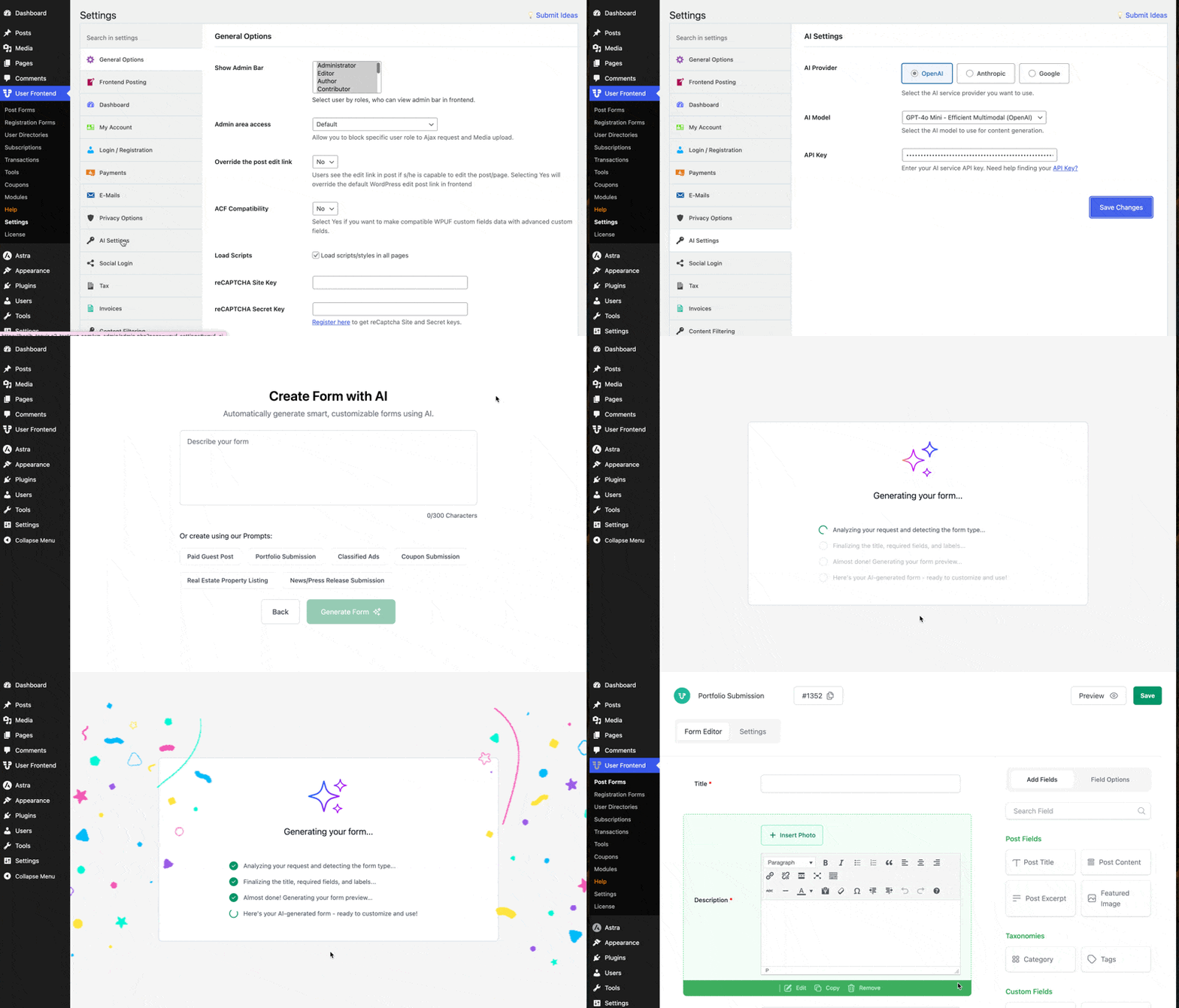
AI Post Form Builder
Describe the type of form you want, and the AI generates a complete post submission form with smart fields, labels, and structure, saving you time and setup effort.
n8n Integration to Automate Post Form Data
Send every post submission straight to n8n in real time. Use the captured data instantly to trigger actions, run workflows, and sync information across your tools without any manual steps.
One Time Payments
Offer simple one-off payment options so users can pay once for posting or upgrades, remove recurring fees, and complete purchases with more confidence.
Frontend Post Form Templates
Pick from ready-made form templates for jobs, products, events, listings and more, letting you launch fully designed post forms in minutes.
Unlimited Post-Type Form Creation
The forms let users create new posts and edit their profile from the site frontend, with no need to access admin panel or backend.
Update Profile from the Frontend
This WordPress Profile Builder Plugin allows registered users to edit their profile using default fields from frontend. (Unlimited fields can be added using PRO)
Flexibility for Admins
Admins can manage users both from frontend and backend to control who can access the dashboard.
Featured Image & Image Upload
Users can upload images and featured image for a post using the Image Upload option on the post content area.
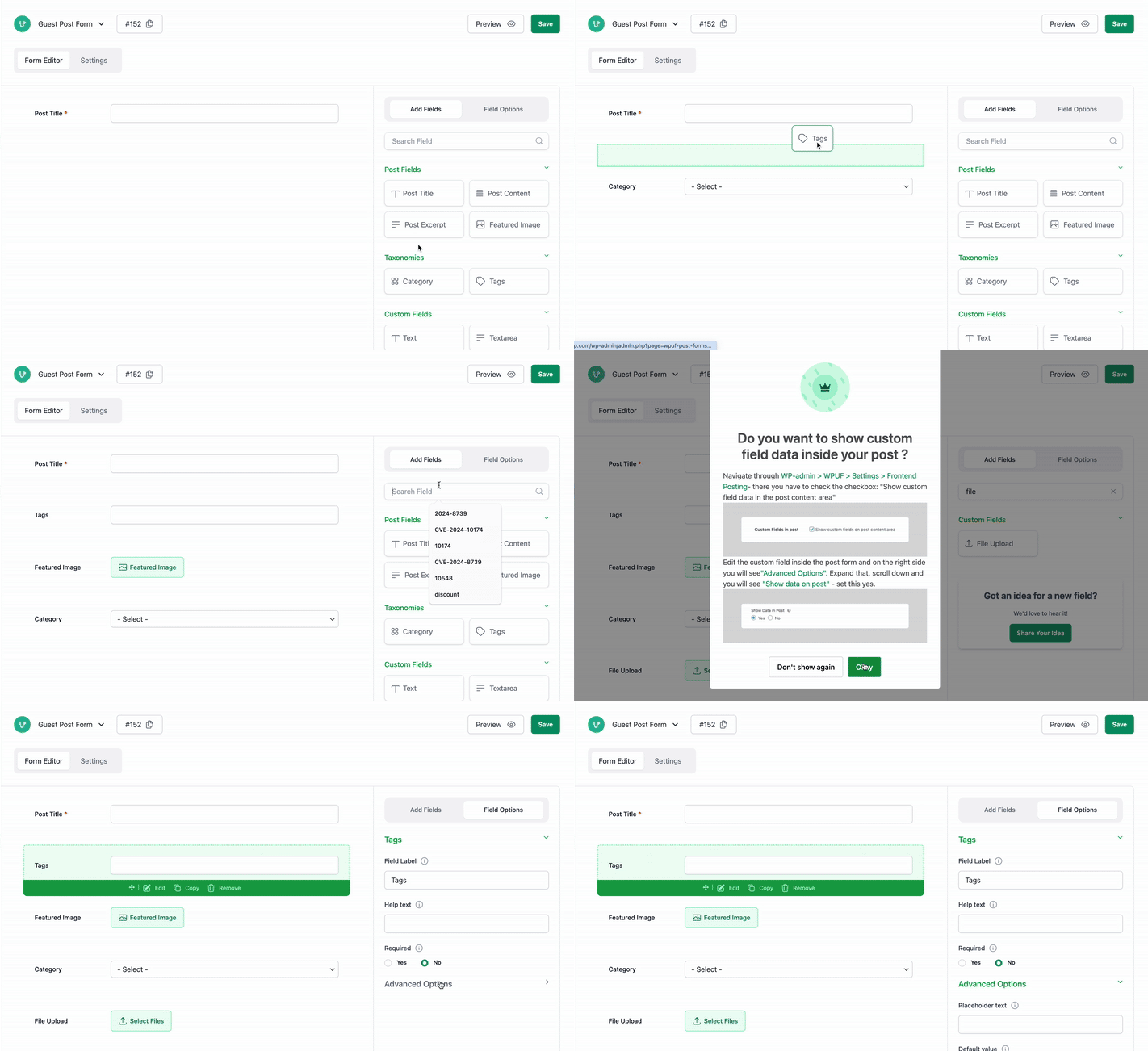
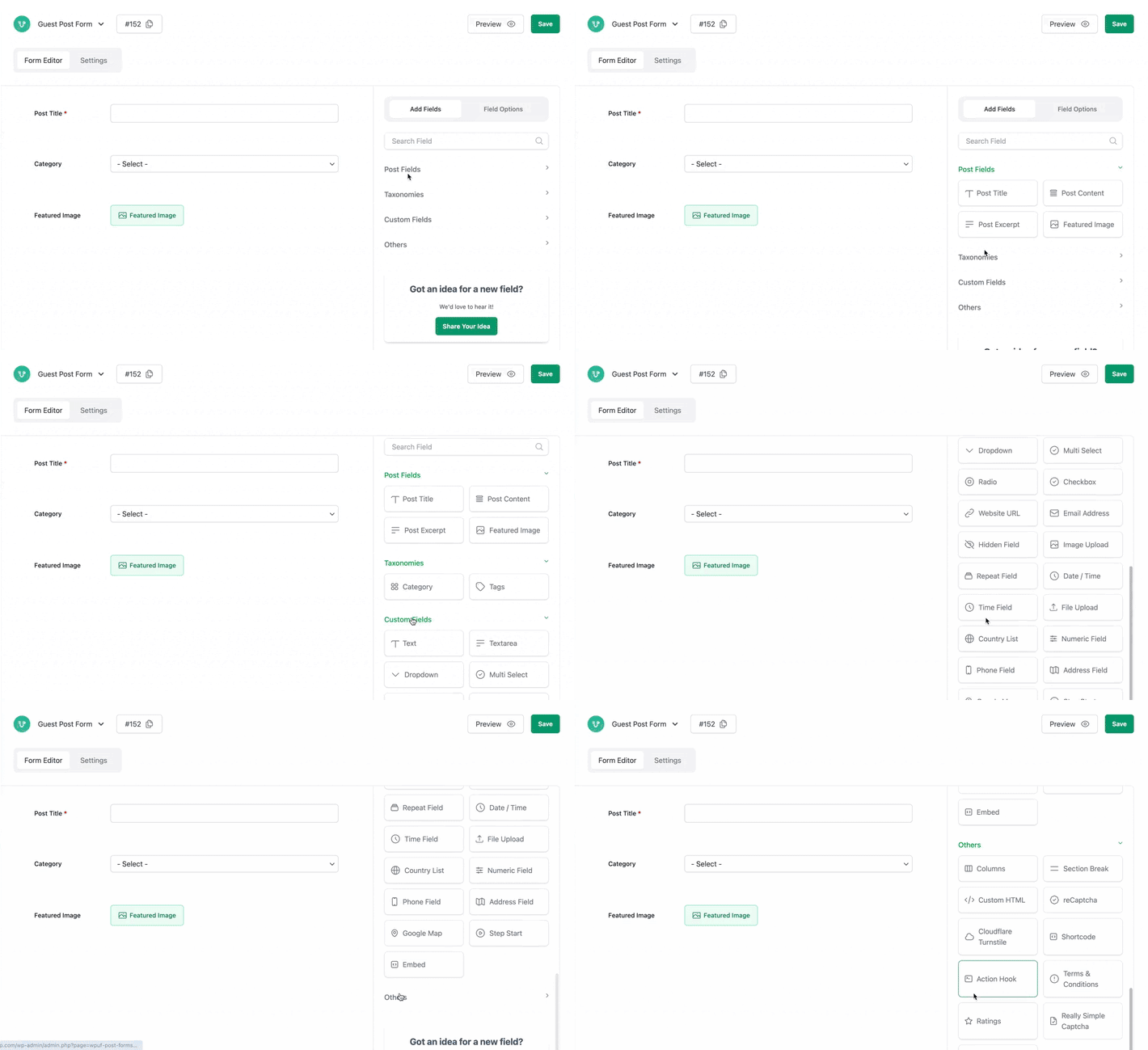
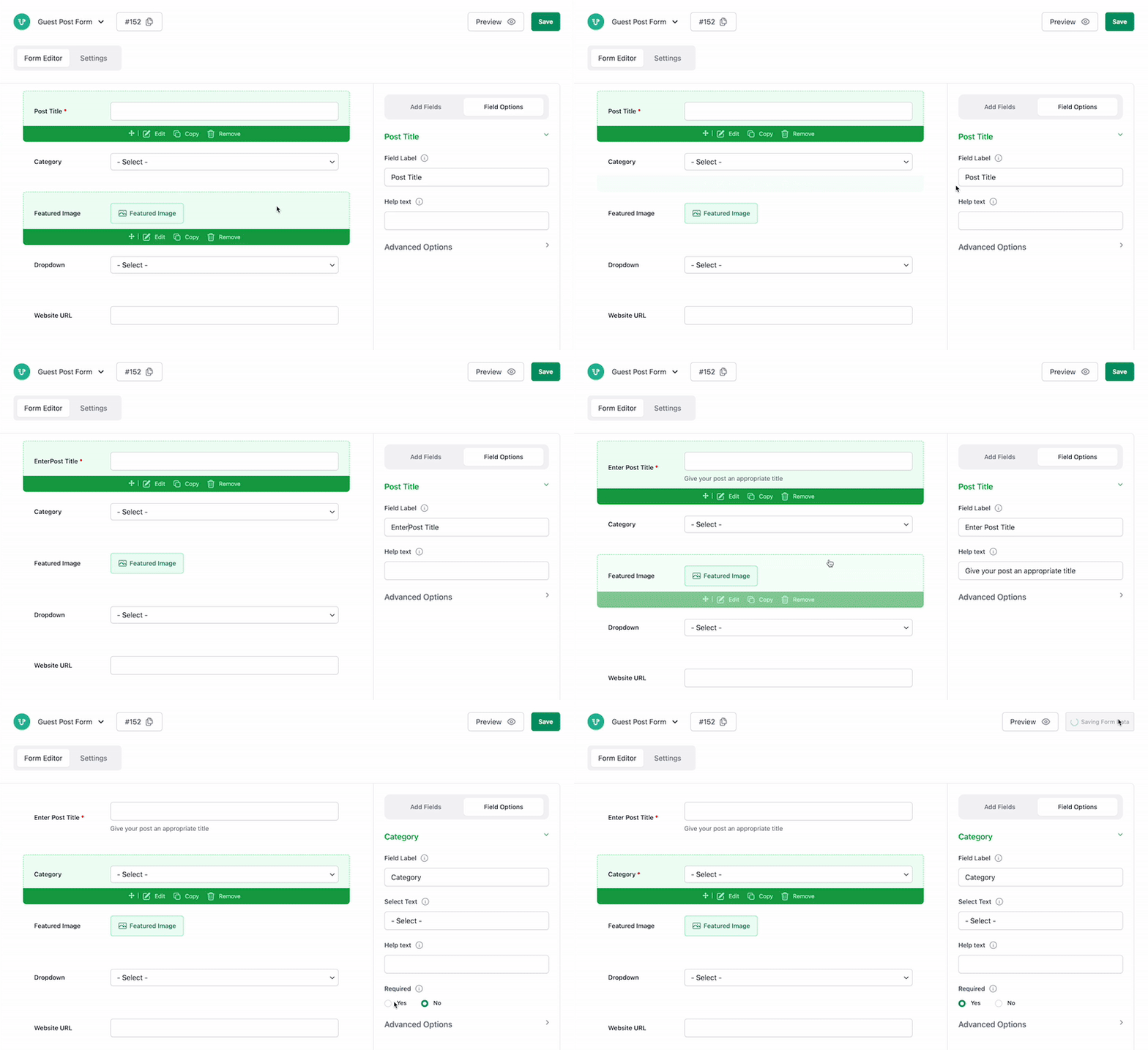
Drag-and-drop Form Builder
Quickly build your form with necessary fields using drag-and-drops and real-time preview that updates as you make changes.
Publish Your WPUF Forms Using Gutenberg
Easily add your published forms in the Gutenberg editor with the WPUF block. Simply select it from the drop-down included in the dedicated WPUF block for Gutenberg. The entire form automatically renders within the editor as well as on the page.
Use Forms Anywhere Easily with Shortcodes
All of the forms get a unique shortcode which you can paste on any page and the form will generate without breaking the style of your theme.
WordPress Guest Post Submission
Enable guests to post from your site frontend without registering with User Frontend, the WordPress User Registration plugin. Choose to require a name and email address to register automatically and allow them to comment on the posts. Allow email verification for guests.
Role Based Access Control
Enable certain user roles to make posts, while restricting others. Create the unauthorized message you want to show to restricted users.
Submit and Update Anything from Frontend
Users can upload images, fill out forms, even enter data with multiple-choice menus. Allow users to update their posts from the front end.
Build Customized Forms with Custom Post Types
Taking advantage of custom post types will allow you to work on any platform. User Frontend is WooCommerce-supported, so you can also create products for your WooCommerce site using our forms.
Set Post Status, Post Message, Update Post Button text
Assign separate default statuses for new posts or edited posts. Set the message you want to show users after form submission and change the text of the submit buttons as you like.
Custom Redirection After Login and Submission
Redirect users to another page after logging in, form submission, or editing form submission.
Earn with Subscription Based Posting
Create subscription packs to earn through “Pay Per Post” payments. Submissions posted via these subscriptions have duration and posting limits.
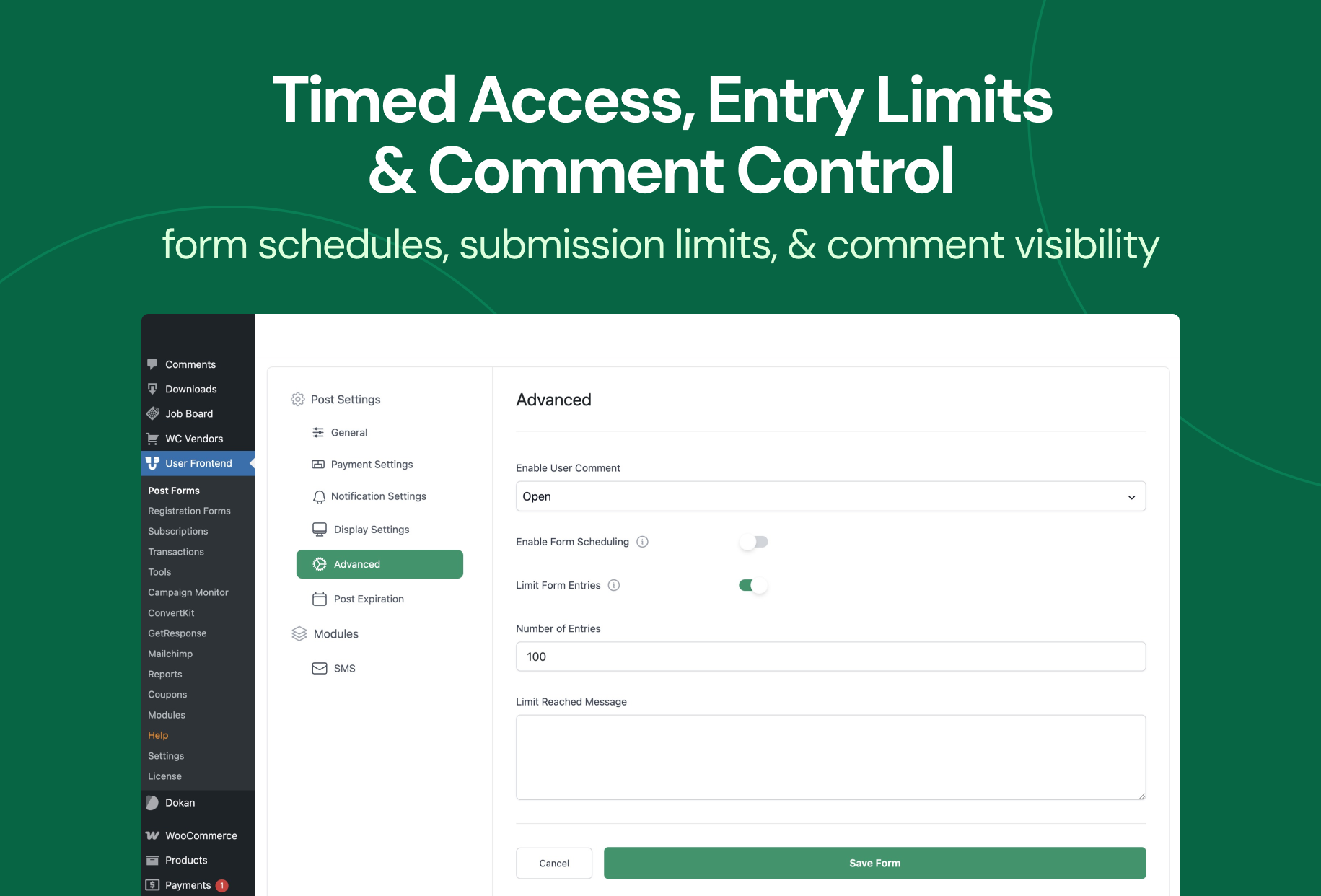
Schedule Forms & Restrict Entries
Choose to keep your form active for certain dates. Set a message when the form expires. And limit entries to as many as required. The PRO version also allows setting up post-expiration.
Get Reminded with Emails
Trigger emails on multiple events like new form submissions, guest posts, publish notifications, and new subscriptions. More email notifications can be set up with the PRO version.
Integrate with Advanced Custom Fields (ACF)
Connect form fields with ACF fields to view user submissions in ACF format from your dashboard. Allow users to edit fields from the front end.
Create Subscription Packs, Pay-per-posts, & Receive Payments from Users
Create and subscribe users to membership packs, allow pay per post, force subscription package purchase, and set fallback pay per post charges with this WordPress Membership Plugin.
Membership Features
Turn your site into a membership platform without leaving WordPress. Create membership tiers, control access by subscription level, and manage the entire member lifecycle from the frontend.
- Membership Tiers – Build multiple membership levels with different pricing, posting limits, and access rules for each plan.
- Paid Memberships Pro Integration – Connect User Frontend with PMPro to sync membership levels and unlock advanced membership site workflows. (PRO)
- Content Restriction by Membership Level – Restrict pages, posts, or custom content so only members on the right plan can view it.
- Membership Management Dashboard – Approve, pause, or cancel membership requests and view transaction history from a single screen.
Manage Transactions and Membership
Approve or keep membership requests pending – you’re in complete control. View all details from a single screen.
Restrict Frontend Posting by Membership
Control who can submit content based on their membership plan. Create exclusive posting experiences for premium members with ease.
Build Frontend Post Submission Forms
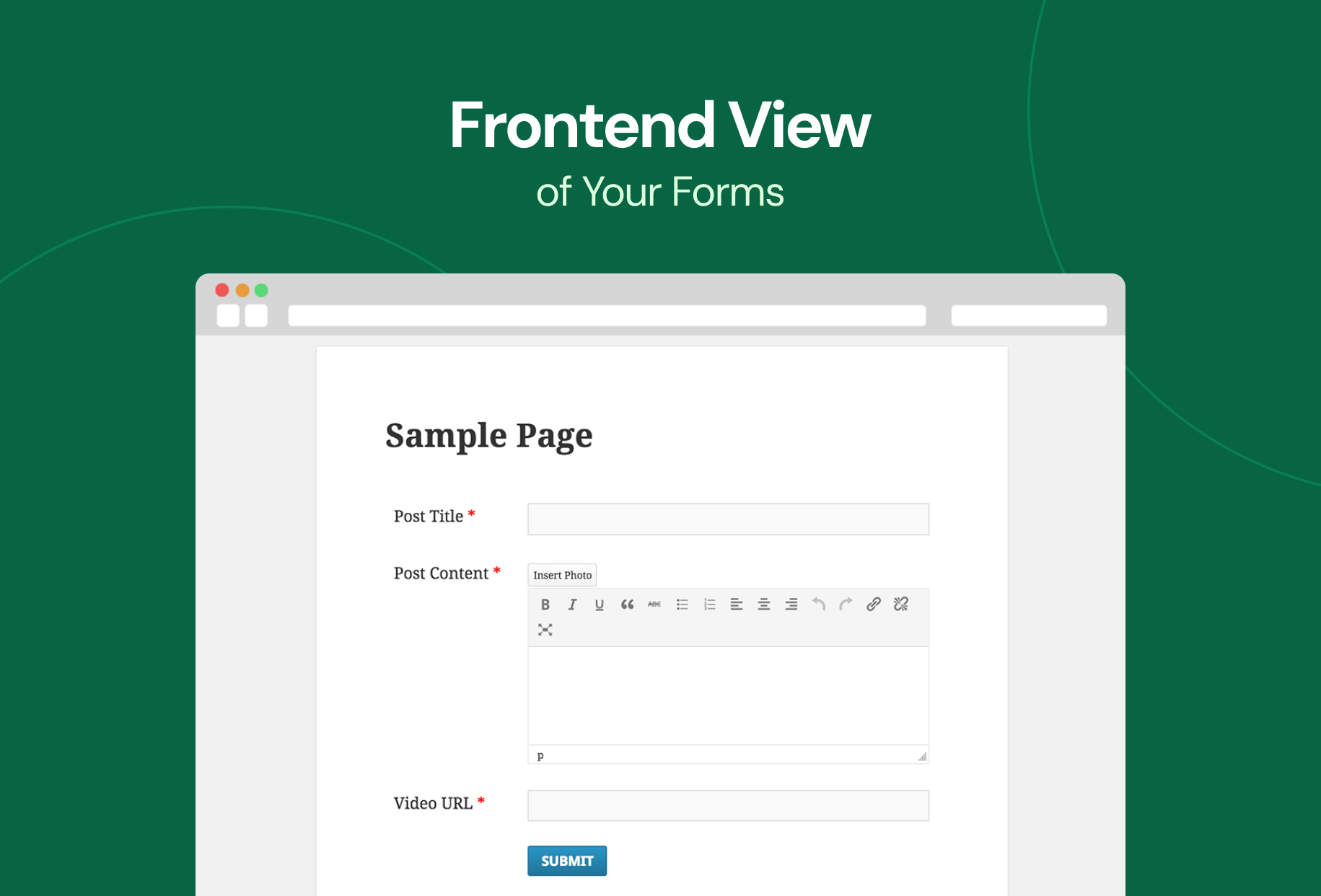
Create and manage frontend post submission forms with ease. Let users submit, edit, and update content without accessing the WordPress dashboard.
Create a User Directory
Build a basic searchable user directory for free. Help visitors find members quickly with built-in search. Showcase your WordPress member directory with modern layouts.
Manage and Import/Export Forms Easily
Install required WPUF pages in a click; delete post forms, user registration forms, or subscriptions in one go. Import forms from other places and export forms as JSON.
Custom Login & User Registration Form
This WordPress Registration Form Plugin also allows you to build user registration forms using default templates. More fields can be added with PRO.
Display Custom Fields Data in Post
Custom field data is viewable to visitors on the frontend on single post pages. Admins can also disable this if they don’t want to display custom fields to everyone.
Elementor Compatibility
User Frontend is now fully compatible with Elementor, the popular WordPress page builder. You can build and design frontend forms, user dashboards, and subscription pages in Elementor without using shortcodes.
This integration combines the power of User Frontend (frontend content management) with Elementor (visual page builder) for a faster and smoother workflow.
Available Elementor Widgets
- Account Widget – Customize the user account dashboard layout and appearance
- Subscription Widget – Display and organize user subscription plans clearly
- Post Form Widget – Design frontend submission forms visually using Elementor
These widgets help you turn your site into a frontend content management system without backend access.
How Elementor Integration Works
- Drag and drop User Frontend widgets into Elementor
- Customize layout, spacing, and design visually
- Publish pages and display them on the frontend
User Frontend handles form logic, user roles, and permissions, while Elementor controls design and layout.
How to download and install WPUF FREE
Checkout all User Frontend resources:
Try an Online Demo of the FREE & PRO version.
Translation
- Italian translation by Gabriele Lamberti
- Persian translation by Abolfazl Esmailinejad
- Turkish translation by mugurcagdas
User Frontend PRO – Premium Features
WP User Frontend Pro gives you everything you need to manage content from the frontend of your WordPress site. Let users register, submit and edit posts, manage their profiles, and access membership features without ever entering the WordPress dashboard.
- 20+ Modules – BuddyPress, Paid Memberships Pro, Social Login, User Directory, Stripe, Mailchimp, Private Messaging, Reports, Analytics, and more.
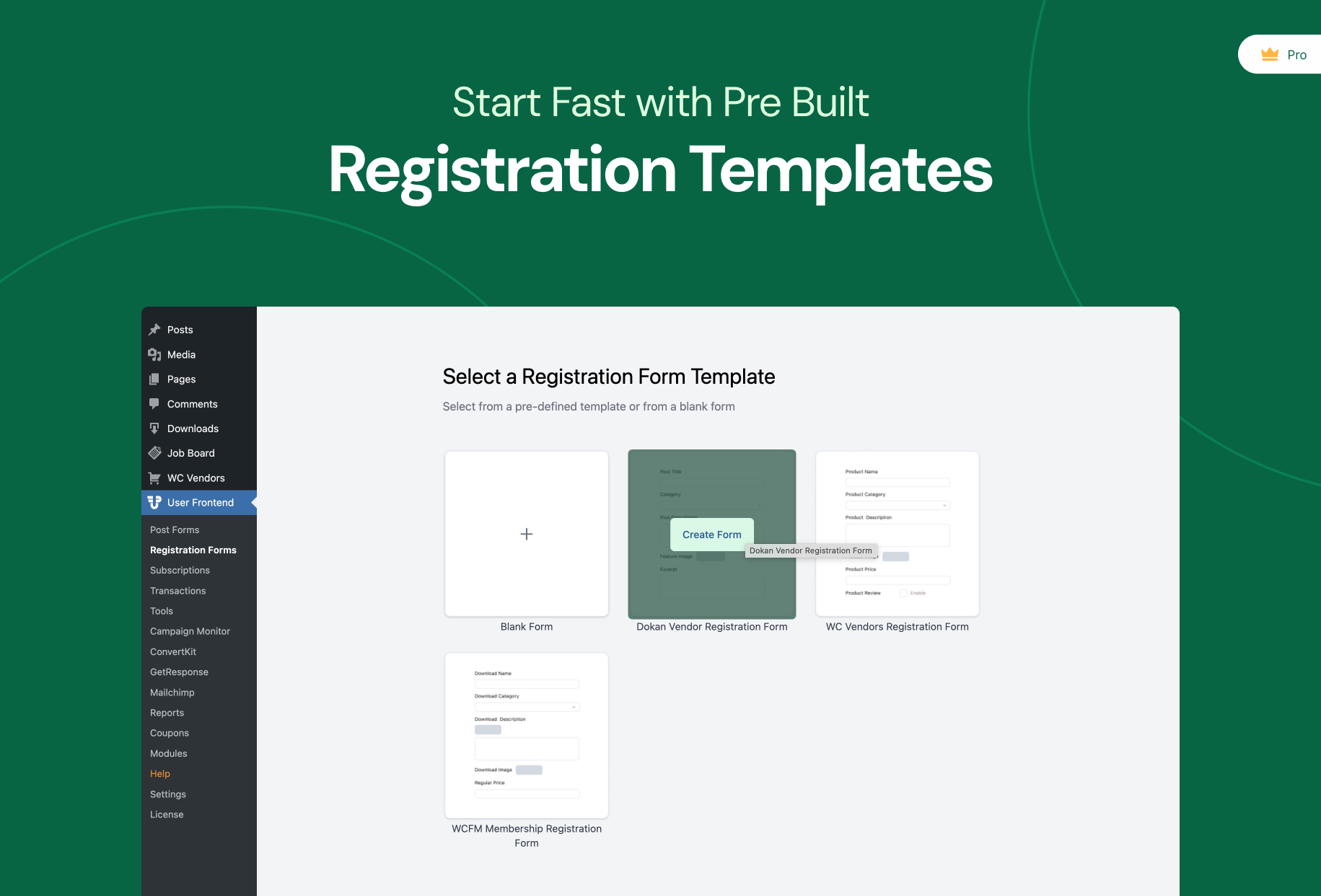
- AI Registration Form Builder – Generate complete user registration forms from a prompt.
- 20+ Form Templates – Ready-made templates for vendors, memberships, events, directories, and more.
- Flexible Pricing Fields – Add dynamic pricing, fees, and add-ons to forms.
- Social Fields – Let users add social profile links to their profiles.
- Social Login – Facebook, X, LinkedIn, and GitHub login support.
- Subscription View & Post Control – Restrict posting and viewing by subscription.
- Repeat Fields – Add repeatable groups for links, skills, galleries, and more.
- User Directory – Create searchable, filterable, and customizable user directories.
- Gutenberg Blocks for User Directory – Display user directories and profiles with blocks.
- SEO Module – Add SEO metadata to user-submitted content.
- Content Restriction – Restrict pages, posts, or content by role or subscription.
- Menu Restriction – Show or hide menus based on roles or subscriptions.
- Post Expiration – Automatically expire posts by form or subscription.
- Conditional Logic – Show or hide fields based on user input.
- Profile Builder – Build fully customized frontend profile forms.
- 20+ Custom Fields – Text, Phone, Maps, Hidden, Repeat, Time, Multi Select, and more.
- Custom Taxonomies – Support custom taxonomies and WooCommerce attributes.
- Post Update Notifications – Email notifications when posts are updated.
- Multistep Forms – Split long forms into multiple steps.
- Payment Invoices – Automatically generate and email invoices.
- Coupons – Create and manage discount coupons.
- Personalized Forms – Create different forms for different user roles.
- Backend Profile Sync – Display custom profile fields in WordPress admin.
- Taxonomy Restrictions – Limit categories or taxonomies by subscription.
- Advanced Form Layouts – Build forms from templates with drag-and-drop customization.
- WooCommerce Support – Frontend product submission and management.
- Registration Form Builder – Build unlimited custom user registration forms.
- Role Assignment – Assign user roles based on registration forms.
- CAPTCHA Protection – Protect forms with reCAPTCHA or Really Simple CAPTCHA.
- Frontend Profile Editing – Let users use an advanced profile builder to manage profiles without wp-admin.
- File & Media Uploads – Upload files, images, audio, and video.
- Avatar Uploads – Support Gravatar and local profile pictures.
- Frontend Customizer – Customize frontend labels and colors.
- Advanced Email Notifications – Send custom notifications for key events.
- Tax Support – Apply country and state-based taxes to payments.
Premium Modules
- User Directory
- Social Login & Registration
- BuddyPress Profile
- Campaign Monitor
- Comments Manager
- ConvertKit
- GetResponse
- HTML Email Templates
- Chimpanzé
- Mailpoète
- MailPoet 3
- Paid Memberships Pro
- Private Messaging
- QR Code Generator
- Reports
- SMS Notification
- Stripe Payment
- User Analytics
- User Activity
- Zapier
Check out the full feature list and pricing plans of the Pro version.
You can always explore every update, fix and improvement in the full changelog here: https://headwayapp.co/user-frontend-changelog
Checkout Our Other Products
- Dokan: The multivendor marketplace solution for WordPress that lets you build a store like Amazon or Etsy in minutes.
- weDocs: A simple documentation and knowledge base plugin for organizing and managing docs on your site.
- weMail: A WordPress email marketing tool for newsletters, opt in forms, and audience growth.
- wePOS: A fast WooCommerce point of sale solution for in store sales and real time inventory sync.
- Project Manager: Task management and team collaboration made easy with boards, milestones, and Gantt charts.
- Happy Addons for Elementor: Elementor enhancements with 500 plus templates, advanced widgets, Theme Builder, and Mega Menu.
- ERP: HR, CRM, and Accounting in one place for managing people, finances, and business operations inside WordPress.
External Services
User Frontend uses the following third-party services to enhance frontend content management features. All data shared with these services is necessary for the plugin functionality and handled securely.
-
OpenAI API – Used to power AI-assisted form creation and content generation in WP User Frontend. Form prompts, field descriptions, and user instructions may be sent to OpenAI to generate forms and related content.
– Terms of Service and Privacy Policy -
Google Generative Language API – Enables AI-powered form generation and content suggestions. Form prompts, field descriptions, and related inputs may be sent to Google’s AI models for processing.
– Terms of Service and Privacy Policy -
Anthropic API – Provides AI-assisted form generation and content suggestions. Form prompts, field descriptions, and related inputs may be sent to Anthropic’s AI models to generate forms and improve content.
– Terms of Service and Privacy Policy
Terms and Conditions
Privacy Policy
User Frontend uses the Appsero SDK to collect optional telemetry data only with your consent. No data is collected by default. Telemetry starts only after you opt in through the admin notice, helping us improve the plugin and troubleshoot issues faster.
Installation
After having installed the plugin:
- Click “Install WPUF Pages” after installation for automatic settings installation.
- Create a form from the form builder. Get the shortcode for a form. Copy and paste that shortcode to a page.
- Create a new Page “Edit” for editing posts and insert shortcode
[wpuf_edit] - Create a new Page “Profile” for editing profile and insert shortcode
[wpuf_editprofile] - To add Login feature, use the shortcode:
[wpuf-login] - To enable a registration form in the frontend, use the shortcode:
[wpuf-registration] - Create a new Page “Dashboard” and insert shortcode
[wpuf_dashboard]
To list custom post type event, use[wpuf_dashboard post_type="event"] - Set the Edit Page option from Others tab on settings page.
- To show the subscription info, insert the shortcode
[wpuf_sub_info] - To show the subscription packs, insert the shortcode
[wpuf_sub_pack] - For subscription payment page, set the Payment Page from Payments tab on settings page.
Video
Journal de modifications
It's a massive update and change from the previous version 1.3.2. Please do test in your site and maintain compatibility.
4.3.15 (16 November, 2026)
- Security – Fixed an issue where a crafted page on another site could register an account and log the visitor’s browser into it, ending their own session (reported by Yaswanth Reddy Sunkara, CVE-2026-17564).
- Security – Fixed an issue where a crafted page on another site could sign a visitor’s browser into an account of its choosing through the login form or the login widget, ending their own session (reported by Yaswanth Reddy Sunkara, CVE-2026-17564).
- Security – Fixed an issue where a logged-in member could still place the registration form shortcode in a post, including through other form fields or a saved draft, and use it to create accounts with a higher role (reported by cazy and Wordfence, CVE-2026-119634).
- Security – Fixed an issue where a guest could submit a post title that ran a script when an administrator later opened the form builder (reported by UKO – Korea univ., CVE-2026-124072).
- Security – Fixed an issue where a visitor could get an unpublished subscription pack assigned to their new account at registration (reported by Jonathan Mendiola via Patchstack).
- Security – AJAX actions meant only for logged-in users are no longer also registered for logged-out visitors, and the AJAX logout now only runs for logged-in users.
- Tweak – New filter
wpuf_same_origin_hostslets a site that serves its login or registration form from another domain it owns allow that host for sign-in. - Fix – Post forms saved by older versions no longer log undefined key warnings (for example guest_details) or null deprecation notices on PHP 7.4 to 8.5 when posts are submitted, edited, saved as drafts or posted by guests.
4.3.14 (28 October, 2026)
- Security – Fixed an issue where a crafted link could run a script in a visitor’s browser through the category field of a frontend form (reported by Wordfence, CVE-2026-103962).
- Security – Fixed an issue where a guest could submit a category name that ran a script when an administrator later opened that form in the builder (reported by Wordfence, CVE-2026-109214).
- Security – Fixed an issue where a visitor could attach uploads to a form that has no upload field (reported by Sangho Lee).
- Security – Fixed an issue where a logged-in member could place the registration shortcode in a submission and hand themselves a higher role (reported by Wordfence).
- Security – Fixed an issue where a visitor could run the setup wizard and overwrite the payment, posting and profile settings, including the saved PayPal details (reported by Patchstack).
- Security – Fixed an issue where a logged-in member could activate a paid subscription pack without paying for it (reported by Patchstack).
- Fix – Form settings are no longer lost when a form is saved after new fields are added, so the submit button keeps its label and no PHP warning appears.
4.3.13 (1 October, 2026)
- Security – Fixed an issue where a logged-in member could save a script through the checkout payment method and have it run when an admin opened the pending transactions list (reported by Wordfence, CVE-2026-96574).
- Fix – The AI form builder saves generated forms again: Edit with Builder no longer fails with an HTTP 400 error.
- Fix – Each prompt on the Create Form with AI screen now shows once instead of twice when WP User Frontend Pro is active.
4.3.12 (21 September, 2026)
- Security – Fixed an issue where someone could sign up with a higher role than the site allows, or register while registration was switched off (reported by WPScan).
- Security – Fixed an issue where a submission could skip the membership requirement by being saved as a draft first (CVE-2026-17563).
- Security – Fixed an issue where the user registration form could be used to take over a visitor’s session (CVE-2026-17564).
- Security – Registration and user profile forms can no longer be used to hand out an administrator role (CVE-2026-75823).
- Security – Fixed an issue where a logged-in member could delete or take over media files belonging to someone else through a frontend post form (reported by Patchstack).
- Security – Fixed an issue where a guest could publish a paid submission without paying, by reusing the link from the confirmation email (reported by Patchstack).
- Security – Fixed an issue where a membership pack could be activated from an unpaid PayPal subscription, kept an unlimited post count, and stayed active after the subscription expired or was suspended (reported by Patchstack).
- Security – Fixed an issue where a custom field value or label could run scripts on the page when a submission was viewed.
- Security – Values entered in a repeatable field are now cleaned before they are saved.
- Security – Importing a form file can no longer create content of an unexpected type or status.
- Security – The scheduled post expiration cleanup now requires the right permission to run.
- Security – The user directory no longer shows a member’s email address to logged-out visitors; signed-in visitors and sites that opt in still see it.
- Fix – Guest post email verification works again: the link in the confirmation email publishes the post instead of showing an error.
- Fix – A recurring membership pack now activates with the correct post limit and expiry date, including packs that start with a free trial, and comes back after a paused subscription is reactivated.
- Fix – Posts no longer expire when post expiration is switched off on the membership pack, or when the expiration time is left empty or invalid.
- Fix – A site whose plugin files were installed without their dependencies now shows a clear admin notice instead of a fatal error, whether or not WP User Frontend Pro is also installed.
- Fix – Updating the plugin’s dependencies no longer breaks the site with a missing-trait fatal error.
- Enhance – Frontend form scripts and styles now load only on pages that actually use a WP User Frontend form, including pages built with Elementor, so the rest of the site stays lighter.
4.3.11 (25 August, 2026)
- Security – Blocked PHP object injection when the frontend post edit form reads submitted meta (reported by WPScan).
- Security – Enforced the membership subscription gate in the AJAX handler to stop unauthenticated post creation through a subscription-gated frontend post form (reported by Charles Vosburgh).
- Security – User registration now fails closed when the nonce is missing or invalid and redirects to a safe URL, preventing CSRF-based login session fixation (reported by Yaswanth Reddy Sunkara).
- Enhance – Redesigned the Modules page with a responsive card grid and modern layout.
- Enhance – Added native support for uploading .jfif images through frontend post and user profile forms.
- Compatibility – Tested with WordPress 7.1.
4.3.10 (06 August, 2026)
- Enhance – Redesigned all five frontend post form templates with a modern, consistent UI/UX.
- Enhance – Improved the user registration multistep experience with progress bar colors that automatically match your form settings.
- Enhance – Improved readability of form titles, descriptions, help text, and field labels across dark templates.
- Enhance – Modernized the file and image upload progress UI for frontend post submissions.
- Enhance – Improved styling consistency across frontend post forms, user registration forms, user profile forms, membership forms, and user directory templates.
- Fix – Dropdown/multiselect chevrons and the Field Size setting now render consistently across all templates.
- Fix – Multistep next/previous button spacing no longer overlaps the field focus border.
- Fix – Improved form label color contrast on Template 4 for better accessibility.
- Fix – “Use Theme CSS” now correctly disables the plugin’s Template 1 styling so your theme’s CSS takes over.
- Fix – Multistep step labels and the progress header are now readable on dark templates (Template 2 and 5).
- Fix – Checkboxes are now visually distinct from radio buttons on Template 1.
- Fix – PayPal webhooks now fire reliably so membership subscription and content pack transactions are recorded.
- Dev – The default form skin moved from the generic
.wpuf-styleclass to the template-scoped.wpuf-form-layout1; update any custom CSS that targeted.wpuf-style.
Captures d'écran


Pour les développeurs
Est-ce votre plugin ? Montrez les chiffres.
Ajoutez un badge en direct à votre site, docs ou github readme. Il se met à jour par lui-même - aucun compte n'est nécessaire.
Best User Frontend alternatives
All frontend post plugins →




FAQ
User Frontend: quick answers
Réponses directes, extraites des données en direct WordPress.org.
Source : WordPress.org
Is User Frontend free?
Yes. User Frontend is free to download and use from the official WordPress.org plugin directory.
Is User Frontend safe to use in 2026?
Yes — User Frontend is a safe, well-maintained plugin to use in 2026. It runs on 20K+ sites, is rated 4.1/5 and was last updated 3 days ago, and scores 83/100 on our health check.
How many websites use User Frontend?
User Frontend is active on 20K+ WordPress websites and has been downloaded 2,032,583 times since it launched in January 2011. It was downloaded 26,369 times in the last 30 days.
Does User Frontend work with WordPress 7.1?
Yes. The developer has tested User Frontend up to WordPress 7.1.5, the latest release. It requires WordPress 5.0 or newer.
What PHP version does User Frontend need?
User Frontend requires PHP 7.4 or higher. Most hosts run PHP 8.x today, so it works on any modern WordPress hosting.
When was User Frontend last updated?
The latest version, 4.3.15, was released on November 16, 2026 (3 days ago).
Who makes User Frontend?
User Frontend is developed and maintained by weDevs.
What are the best alternatives to User Frontend?
The most popular alternatives to User Frontend are User Submitted Posts (10K+ installs), Easy Post Submission (4K+ installs) and Frontend Post Submission Ma… (1K+ installs).
Propulsé par PageForge
Un modèle et une feuille de calcul. Une vraie page pour chaque recherche.
PageForge transforme chaque ligne d'un CSV en une page WordPress avec son propre titre, URL, SEO et schéma, construit sur la mise en page que vous Déjà conçu. Gratuit sur WordPress.org.
- CSV et XLSX, plus Google Sheets sur les professionnels et les entreprises
- Son propre titre, URL, SEO champs et schéma pour chaque page
- Fonctionne avec l'éditeur de blocs, Elementor, Divi et Avada
- Gratuit sur WordPress.org, pas de carte de crédit