


WP-Members Membership Plugin
The original WordPress membership plugin with content restriction, user login, custom registration fields, user profiles, and more.

Choix
Yes — WP-Members Membership Plugin is a safe, well-maintained plugin to use in 2026. It runs on 50K+ sites, is rated 4.6/5 and was last updated 3 weeks ago, and scores 83/100 on our health check.
- Prouvé à grande échelle sur plus de 50 000 sites actifs
- Loved by users — 4.6/5 from 272 reviews
- Développé activement — Dernière mise à jour il y a 3 semaines
- Testé avec le dernier WordPress (7.1)
- Momentum — downloads up 109.7% vs the previous 30 days
- Slow support — only 33% of recent threads resolved
Comment s'accumule-t-il ?
Côte à côte sur les installations, les mises à jour, les évaluations et le support



Téléchargements quotidiens
Les pics de téléchargement suivent généralement une nouvelle version - chaque site qui met à jour automatiquement compte comme un téléchargement.
Classements
Where WP-Members Membership Plugin stands todayWordPress.org Classements de recherche
Position en direct dans la recherche de plugins, Top 100| Mot-clé | Position |
|---|---|
| authentication | #34 |
| login | >100 |
| membership | #7 |
| registration | #57 |
| Restriction | #24 |
Adoption de version
Part de sites actifs par version.
Répartition des notes
★★★★★★★★★★ 4.6 from 272 reviews
About WP-Members Membership Plugin
From the official readme · v3.5.8.3Description
The original WordPress membership plugin with content restriction, user login, custom registration fields, user profiles, and more.
Membership Sites. Simplified.
You need a membership site, but you want to focus on your business, not mastering a plugin. WP-Members is simple to use, easy to set up, yet flexible in every way imaginable.
Simple to install and configure – yet customizable and scalable!
Caractéristiques :
- Restrict or hide posts, pages, and custom post types
- Limit menu items to logged in users
- User login, registration, and profile integrated into your theme
- Create custom registration and profile fields
- Integrate custom fields into WooCommerce checkout and registration (only supported by shortcode pages, not block editor version)
- Create custom memberships and content restriction
- Notify admin of new user registrations
- Hold new registrations for admin approval
- Create post excerpt teaser content automatically
- Shortcodes for login, registration, content restriction, and more
- Create powerful customizations with more than 120 action and filter hooks
- A library of API functions for extensibility
WP-Members allows you to restrict content as restricted or hidden, limiting access to registered users.
A full Users Guide is available here. The guide outlines the installation process, and also documents how to use all of the settings.
Soutien
There is freely available documentation on the plugin’s support site. Your question may be answered there. If you need assistance configuring the plugin or have questions on how to implement or customize features, premium support is available.
You can get priority support along with all of the plugin’s premium extensions in one cost saving Pro Bundle!
Premium Support
Premium support subscribers have access to priority email support, examples, tutorials, and code snippets that will help you extend and customize the base plugin using the plugin’s framework. Visit the site for more info.
Free Extensions
- Stop Spam Registrations – Uses stopforumspam.com’s API to block spam registrations.
- Send Test Emails – A utility to send test versions of the plugin’s emails.
Premium Extensions
The plugin has several premium extensions for additional functionality. You can purchase any of them individually, or get them all for a significant discount in the Pro Bundle.
- Advanced Options – adds additional settings to WP-Members for redirecting core WP created URLs, redirecting restricted content, hiding the WP toolbar, and more! Also includes integrations with popular plugins like WooCommerce, BuddyPress, bbPress, ADF, Easy Digital Downloads, and The Events Calendar.
- Download Protect – Allows you to restrict access to specific files, requiring the user to be logged in to access.
- Invite Codes – set up invitation codes to restrict registration to only those with a valide invite code.
- MailChimp Integration – add MailChimp list subscription to your registation form.
- Memberships for WooCommerce – Sell memberships through WooCommerce.
- PayPal Subscriptions – Sell restricted content access through PayPal.
- Security – adds a number of security features to the plugin such as preventing concurrent logins, registration form honey pot (spam blocker), require passwords be changed on first use, require passwords to be changed after defined period of time, require strong passwords, block registration by IP and email, restrict specified usernames from being registered.
- Text Editor – Adds an editor to the WP-Members admin panel to easily customize all user facing strings in the plugin.
- User List – Display lists of users on your site. Great for creating user directories with detailed and customizable profiles.
- User Tracking – Track what pages logged in users are visting and when.
- WordPass Pro – Change your random password generator from gibberish to word-based passwords (can be used with or without WP-Members).
Get support along with all of the plugin’s premium extensions in one cost saving Pro Bundle!
Installation
WP-Members is designed to run “out-of-the-box” with no modifications to your WP installation necessary. Please follow the installation instructions below. Most of the support issues that arise are a result of improper installation or simply not reading/following directions.
Basic Install:
The best way to begin is to review the Initial Setup Video. There is also a complete Users Guide available that covers all of the plugin’s features in depth.
- Upload the
/wp-members/directory and its contents to the/wp-content/plugins/directory - Activate the plugin through the ‘Plugins’ menu in WordPress®
You are ready to begin using WP-Members. Now follow the instructions titled “Locking down your site” below.
Locking down your site:
- To restrict posts, you will need to use the
<!--more-->link in your posts. Content above to the “more” split will display on summary pages (home, archive, category) but the user will be required to login to view the entire post. You may also use the plugin’s auto excerpt setting to create post excerpts automatically. If you do not use the “more” tag or the auto excerpt setting, full post content is going to show on archive templates, unless the post is marked as hidden. - To begin restricting pages, change the plugin default setting for pages to be blocked. Unlike posts, the
<!--more-->link is not necessary in the blocking of pages, but must be used if you have the “show excerpts” setting turned on for pages. - To protect comments, we recommend setting “Users must be registered and logged in to comment” under Settings > Discussion.
- On the Settings > General page, it is recommended that you uncheck “Anyone can register”. While not required, this will prevent WP’s native registration from colliding with WP-Members, especially if you are using any of the WP-Members additional registration fields.
- Under Settings > Reading, “For each article in a feed, show” is recommended to be set to “Summary.” WordPress installs with full feed settings by default. If you don’t change this, your feeds will show full content.
Additional Setup Information
There are also some special pages that can be created with simple shortcodes:
- A User Profile page where registered members can edit their information and change/reset their password: [wpmem_profile]
- A Registration page available for those that need a specific URL for registrations (such as email marketing or banner ad landing pages). Note: this is strictly optional as a registration form can also be included by default on blocked content pages: [wpmem_form register]
- A Login page. This is also an optional page as the login form is included by default on blocked content. But if you need a specific login page, this can be created with a simple shortcode: [wpmem_form login]
- And more shortcodes are available!
Powerful cusotmizations can be constructed with over 120 action and filter hooks, as well as user accessible functions.
Journal de modifications
WP-Members 3.5.8.1 is a bug fix release. WP-Members 3.5.8 and 3.5.7 are security releases. WP-Members 3.5.0 is a major update. See changelog for a list of updates. Minimum WP version is 4.0.
3.5.8.3
- Retag to resolve SVN conflict, no changes
3.5.8.2
- Fixes a minor bug in WP_Members_Forms::wp_newuser_form() that results in a PHP deprected notice.
- Adds excluded terms that cannot be used for user meta.
3.5.8.1
- Removes the login cookie check from 3.5.8. This was believed to have tested out OK, but introduced errors into some installations. It will be reviewed for future consideration but is being rolled back for now.
3.5.8
- Security update to rktgk_sanitize_array().
- Security update to wpmem_update_user_role().
- Update the profile update function to disallow certain settings unless the user has the required capability, regardless of the screen display tag.
- Add error message on login if cookies are not enabled (mimics wp-login.php check, but with less wp-centric message).
3.5.7
- Minor update to default css and admin js.
- Security update for the default TOS link.
- The default TOS dialog and link will be deprecated in 3.6.0 in favor of simply using a link in the field label text.
3.5.6
- Security update to [wpmem_user_membership_posts] shortcode. Limits the “order” and “order by” options in the shortcode.
- Bug fix for checking expiration memberships that require a specific role. The bug from 3.5.5 causes a user with the role to be viewed as having access even if they are expireed.
- Improves file path update in 3.5.5 to equalize https/http when checking if a file to be moved exists. This allows it to check url paths in the attachment meta data that may have been improperly set or were set in http and not updated if the site was changed to https.
Captures d'écran


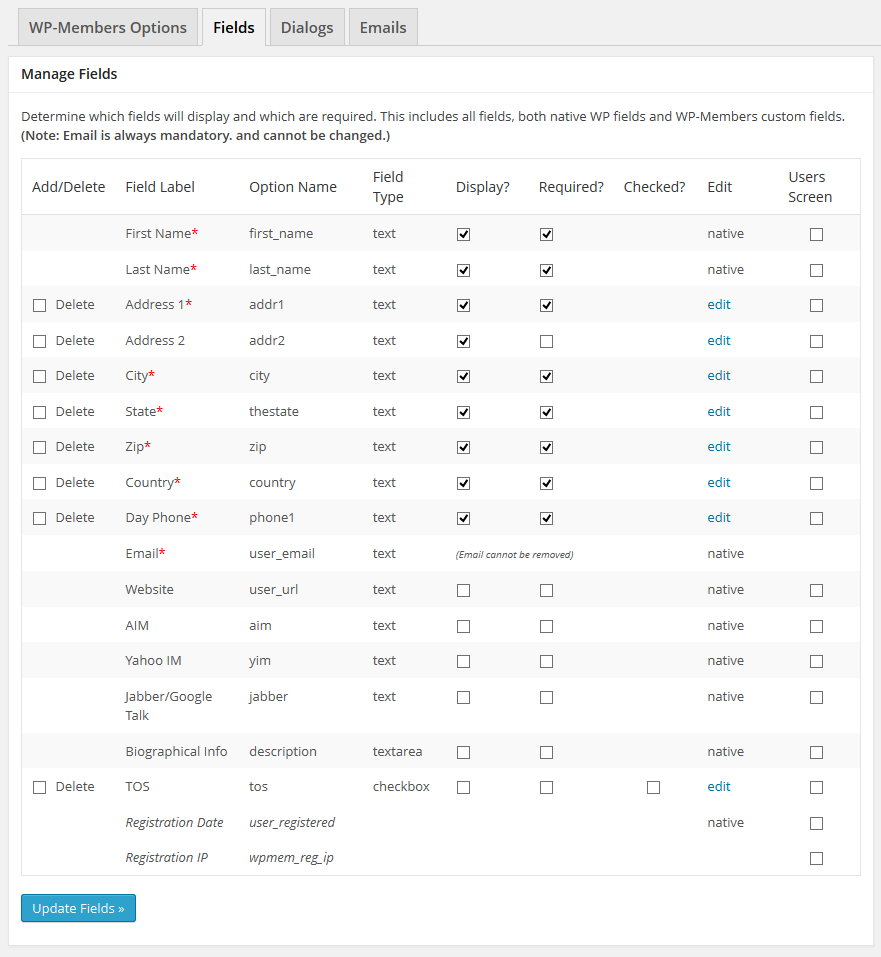
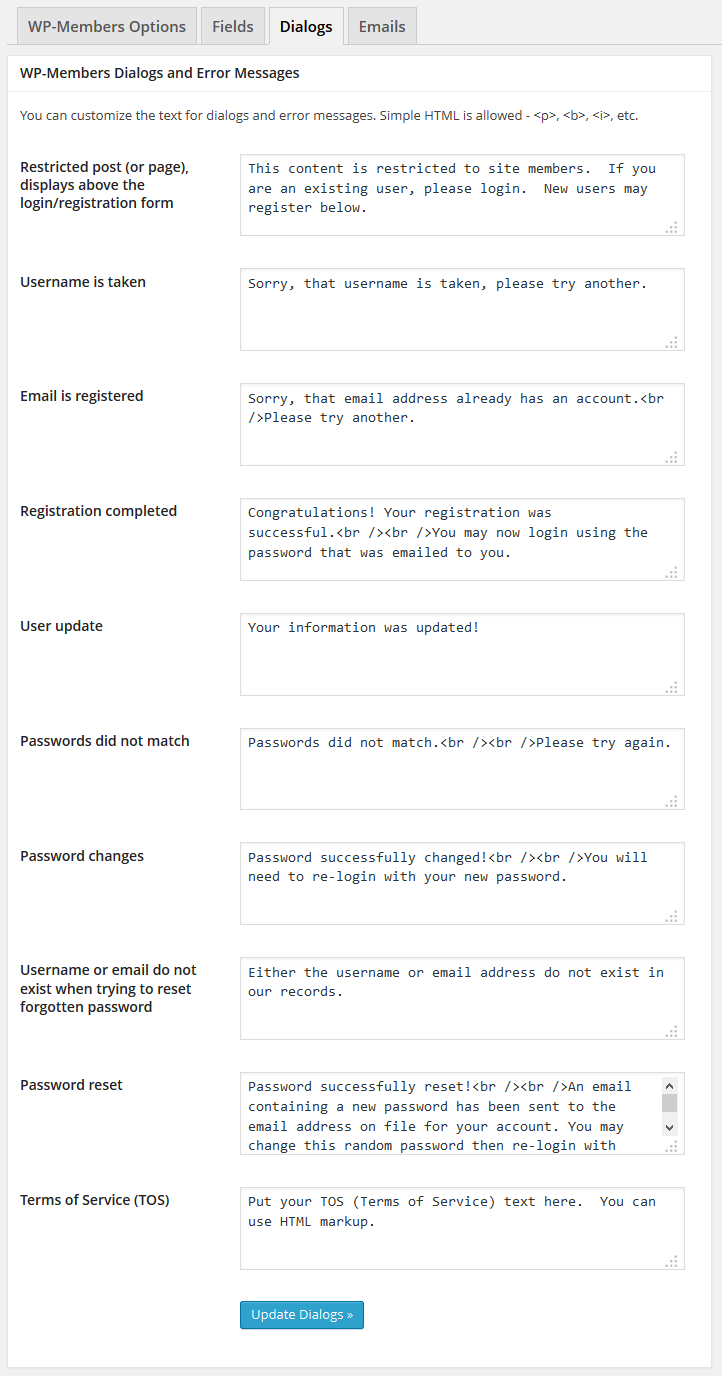


Pour les développeurs
Est-ce votre plugin ? Montrez les chiffres.
Ajoutez un badge en direct à votre site, docs ou github readme. Il se met à jour par lui-même - aucun compte n'est nécessaire.
Best WP-Members Membership Plugin alternatives
All authentication plugins →



FAQ
WP-Members Membership Plugin: quick answers
Réponses directes, extraites des données en direct WordPress.org.
Source : WordPress.org
Is WP-Members Membership Plugin free?
Yes. WP-Members Membership Plugin is free to download and use from the official WordPress.org plugin directory.
Is WP-Members Membership Plugin safe to use in 2026?
Yes — WP-Members Membership Plugin is a safe, well-maintained plugin to use in 2026. It runs on 50K+ sites, is rated 4.6/5 and was last updated 3 weeks ago, and scores 83/100 on our health check.
How many websites use WP-Members Membership Plugin?
WP-Members Membership Plugin is active on 50K+ WordPress websites and has been downloaded 4,129,963 times since it launched in September 2009. It was downloaded 58,226 times in the last 30 days.
Does WP-Members Membership Plugin work with WordPress 7.1?
Yes. The developer has tested WP-Members Membership Plugin up to WordPress 7.1.5, the latest release. It requires WordPress 5.9 or newer.
When was WP-Members Membership Plugin last updated?
The latest version, 3.5.8.3, was released on October 27, 2026 (3 weeks ago).
Who makes WP-Members Membership Plugin?
WP-Members Membership Plugin is developed and maintained by Chad Butler.
What are the best alternatives to WP-Members Membership Plugin?
The most popular alternatives to WP-Members Membership Plugin are Limit Login Attempts (200K+ installs), Two Factor (100K+ installs) and WPS Limit Login (100K+ installs).
Propulsé par PageForge
Un modèle et une feuille de calcul. Une vraie page pour chaque recherche.
PageForge transforme chaque ligne d'un CSV en une page WordPress avec son propre titre, URL, SEO et schéma, construit sur la mise en page que vous Déjà conçu. Gratuit sur WordPress.org.
- CSV et XLSX, plus Google Sheets sur les professionnels et les entreprises
- Son propre titre, URL, SEO champs et schéma pour chaque page
- Fonctionne avec l'éditeur de blocs, Elementor, Divi et Avada
- Gratuit sur WordPress.org, pas de carte de crédit