


NIBWP – Self-Hosted MCP Server – Connect Claude, ChatGPT, Cursor & Any AI Agent via MCP
Self-hosted WordPress MCP server. Connect Claude, ChatGPT, Cursor & any AI agent over MCP. Built on the core Abilities API - no relay, no account.

Choix solide
NIBWP is a solid plugin choice in 2026, with a few things worth checking first. It runs on 300+ sites, is rated 5/5 and was last updated 2 months ago, and scores 72/100 on our health check.
- Testé avec le dernier WordPress (7.1)
- Petite base d'utilisateurs (plus de 300 installations actives)
- Très peu de critiques jusqu'à présent
Comment s'accumule-t-il ?
Côte à côte sur les installations, les mises à jour, les évaluations et le support



Téléchargements quotidiens
Les pics de téléchargement suivent généralement une nouvelle version - chaque site qui met à jour automatiquement compte comme un téléchargement.
Classements
Where NIBWP stands todayWordPress.org Classements de recherche
Position en direct dans la recherche de plugins, Top 100| Mot-clé | Position |
|---|---|
| ai assistant | >100 |
| ChatGPT | #50 |
| Claude | #34 |
| mcp | #39 |
Adoption de version
Part de sites actifs par version.
Répartition des notes
★★★★★ ★★★★★ 5 sur 3 avis
About NIBWP
From the official readme · v1.2.11Description
NIBWP is the self-hosted WordPress MCP server. It turns your WordPress site into a Model Context Protocol (MCP) server so AI assistants like Claude, Claude Code, ChatGPT, Google Gemini and Cursor can read and manage your content over MCP through one standard, authenticated MCP endpoint – no copy-pasting, no scraping, and no external MCP relay touching your data. Every WordPress action is exposed as an MCP tool your MCP client calls directly.
Every MCP request runs inside your own WordPress install: there is no cloud MCP proxy, no account and no separate API key. NIBWP authenticates each MCP call with WordPress core Application Passwords and is built directly on the WordPress 6.9 Abilities API and the official wordpress/mcp-adapter, which maps your site’s abilities to MCP tools – so the MCP server stays lightweight and aligned with WordPress core instead of shipping a proprietary protocol layer.
A true MCP server for WordPress
NIBWP is a native MCP server: it speaks the Model Context Protocol directly, so any MCP client connects to the same MCP endpoint and calls the same MCP tools. Because the MCP server runs on your own host, every MCP request and MCP response stays on your infrastructure – no third-party MCP gateway, no MCP relay, and no data leaving your WordPress site. Point your MCP client at the WordPress MCP endpoint, authenticate with an Application Password, and start issuing MCP calls. Whether you run one WordPress MCP server or many, each site is an independent MCP endpoint you fully control.
Why NIBWP
- Self-hosted – your data never leaves your server. No cloud relay, no proxy. Every MCP call is a direct, authenticated REST request to your own site.
- Standard, revocable auth. Uses core Application Passwords – generate one per AI client, revoke it any time from the Connect screen. No separate API key, no account, no subscription.
- Permissioned by design. Every ability runs through WordPress capability checks and per-object checks (per-post, per-term, per-user), so an AI agent can only do what the connected account is allowed to do.
- Safe options & meta. Option reading/writing is restricted to a non-sensitive allowlist; passwords, secrets, API keys, auth salts and capability/session meta are filtered out and can never leak.
- Master switch. A single toggle turns the whole MCP tool set on or off – enable or disable the MCP server for the entire site in one click.
- One-paste setup. The Connect screen generates a ready-made MCP connection prompt you paste into your AI – it adds the MCP server itself.
What your AI can do over MCP (free plugin)
Once your MCP client is connected, NIBWP exposes these WordPress capabilities as MCP tools:
- Read and write posts, pages and custom post types (create, update, delete, search).
- Manage categories, tags and custom taxonomy terms.
- Work with media, comments, navigation menus and users.
- Read and write post, term and user meta – including custom fields (ACF, Meta Box, Pods, JetEngine), since they are stored as standard meta.
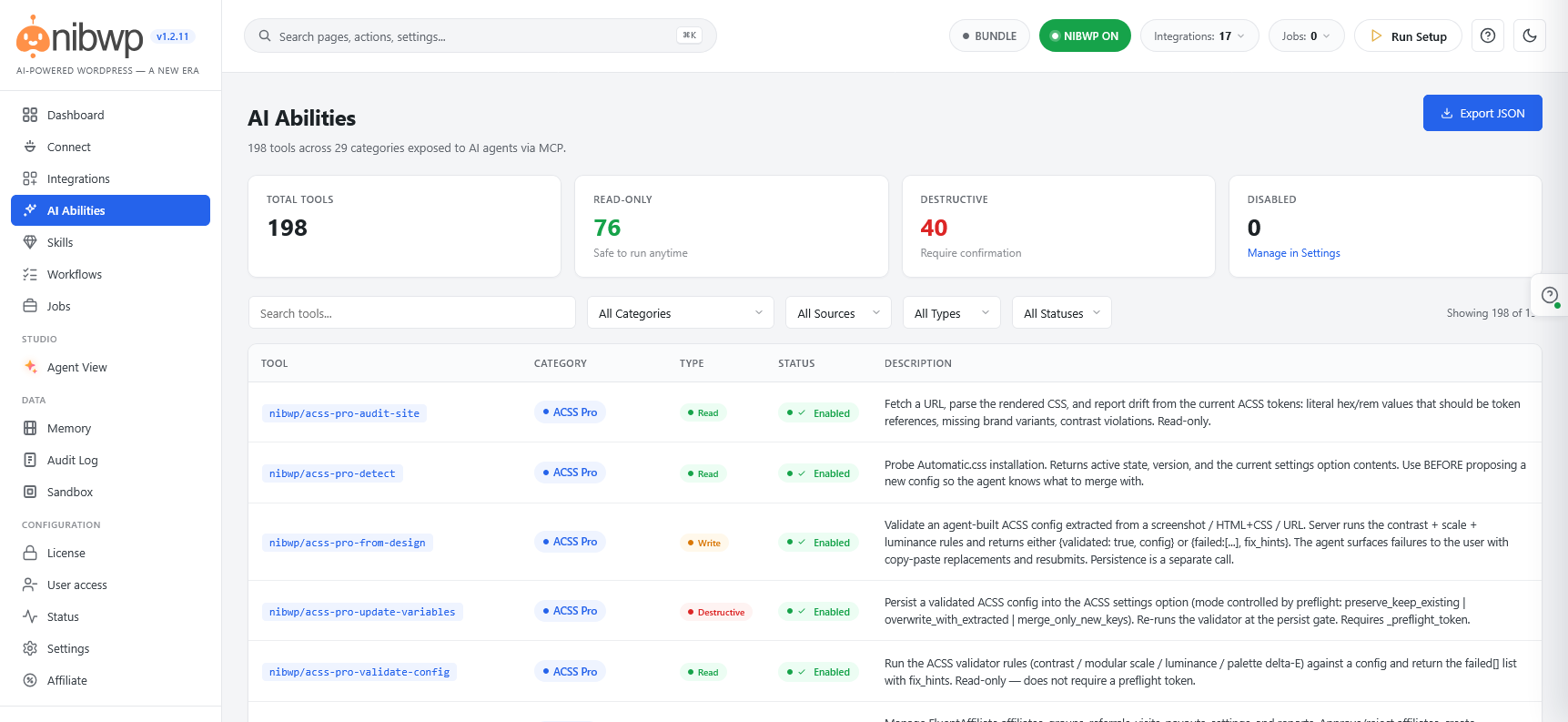
- Read site info and statistics and allow-listed WordPress options.
- Use a per-site key/value memory store so the assistant can remember context across calls.
- Perform allow-listed, read-only filesystem and directory lookups scoped to your WordPress install.
Also included free
- Agent View – a live window onto your own site: watch each page your assistant opens and each change it makes, with a running list of what was done. Anything that changes something stops for your approval.
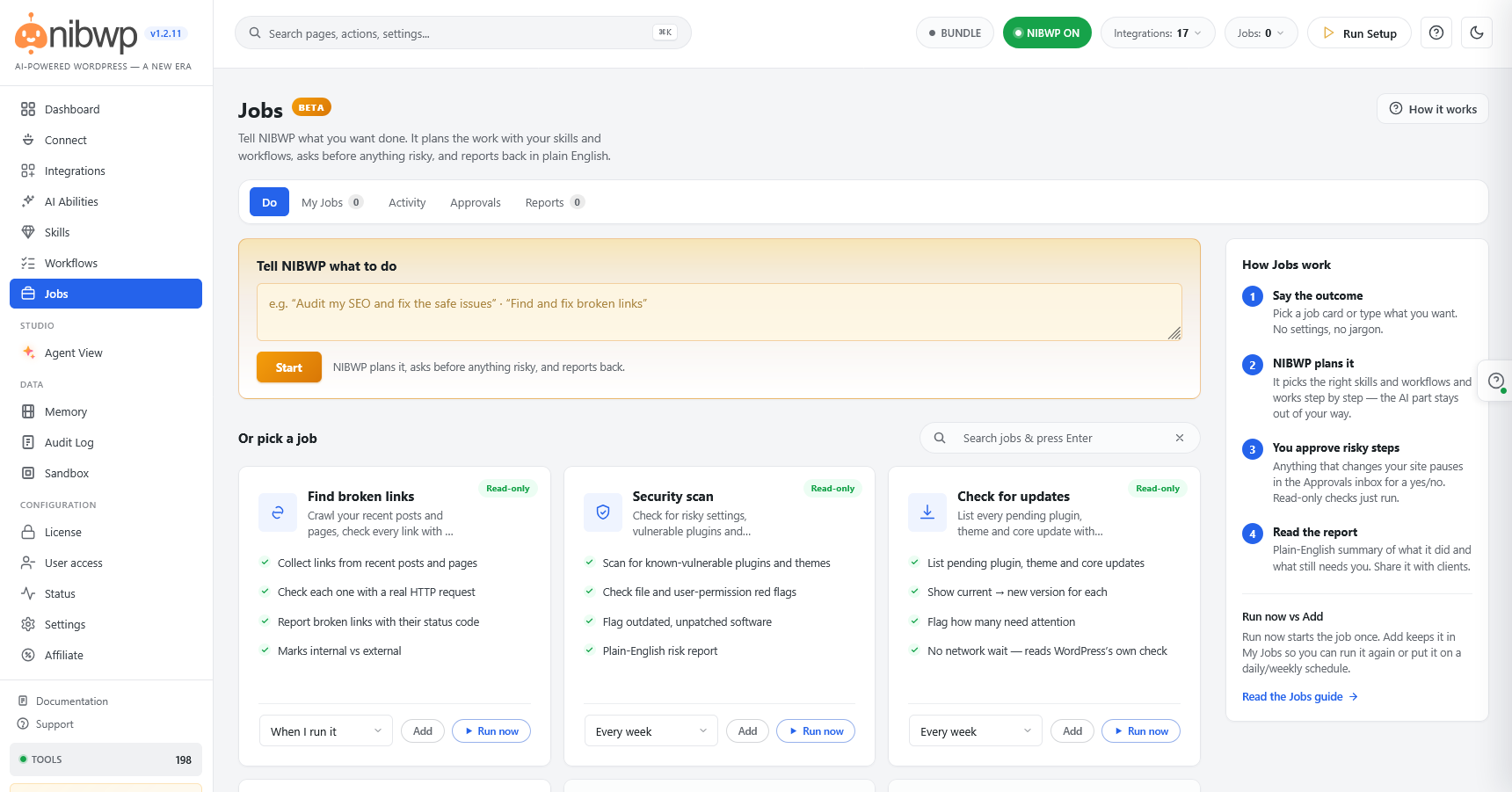
- AI Jobs – outcome-first maintenance from wp-admin: find broken links, run a security scan, check for updates, clean up the database. NIBWP plans the work, asks before changing anything, and reports back in plain English. Run on demand or on a daily or weekly schedule.
- NIBWP Design – reads your site’s own colors, fonts and spacing and decides how a page should look before anything is built, so what your assistant makes belongs to your brand.
- Audit Log – every AI action recorded locally for review, debugging and client reporting.
- Status – checks your connection end to end and says in plain words what is wrong and how to fix it.
Works with Claude, ChatGPT, Cursor & any MCP client
- Claude Desktop – add the MCP endpoint shown on the Connect screen and ask Claude to read, draft and update your posts, media, menus and memory store through conversation.
- Claude Code – wire NIBWP into your Claude Code session and let your AI read and write the live site as part of an agentic build workflow – ideal for agencies and developers working on real WordPress installs.
- ChatGPT & Google Gemini – connect the MCP endpoint as a custom connector and work with your site from the assistant you already pay for.
- Cursor, VS Code, Windsurf, Zed, JetBrains, Neovim – add the endpoint as an MCP tool server in your editor and query or update WordPress data without leaving your IDE.
- Any MCP client – GitHub Copilot, Cline, Warp, Raycast, Perplexity, Ollama and LM Studio all connect over the same authenticated HTTP MCP endpoint. 15+ clients are supported with copy-paste setup.
Built on the official WordPress Abilities API
WordPress 6.9 shipped the Abilities API – the official mechanism for plugins to register typed, AI-callable functions. NIBWP bundles the official wordpress/mcp-adapter and exposes your site through it, so your install is MCP-ready in a way that stays aligned with WordPress core’s AI roadmap – no proprietary, soon-to-diverge protocol layer.
How it compares
Some WordPress MCP plugins route every request through their own cloud servers – your content leaves your site. Others bolt on a custom API-key system and a large proprietary tool set. NIBWP takes the opposite approach: 100% self-hosted (no external relay), built on WordPress core (Abilities API + Application Passwords), with a focused, capability-checked ability set – free and no account. The MCP endpoint never sends your content anywhere; the few optional online features are listed under External services below.
NIBWP Pro
The free plugin is fully functional on its own. NIBWP Pro – a paid upgrade at https://nibwp.com, not included in this free plugin – adds 190+ typed MCP tools across 66 integrations, plus agent tooling built for people who run real sites and real client portfolios.
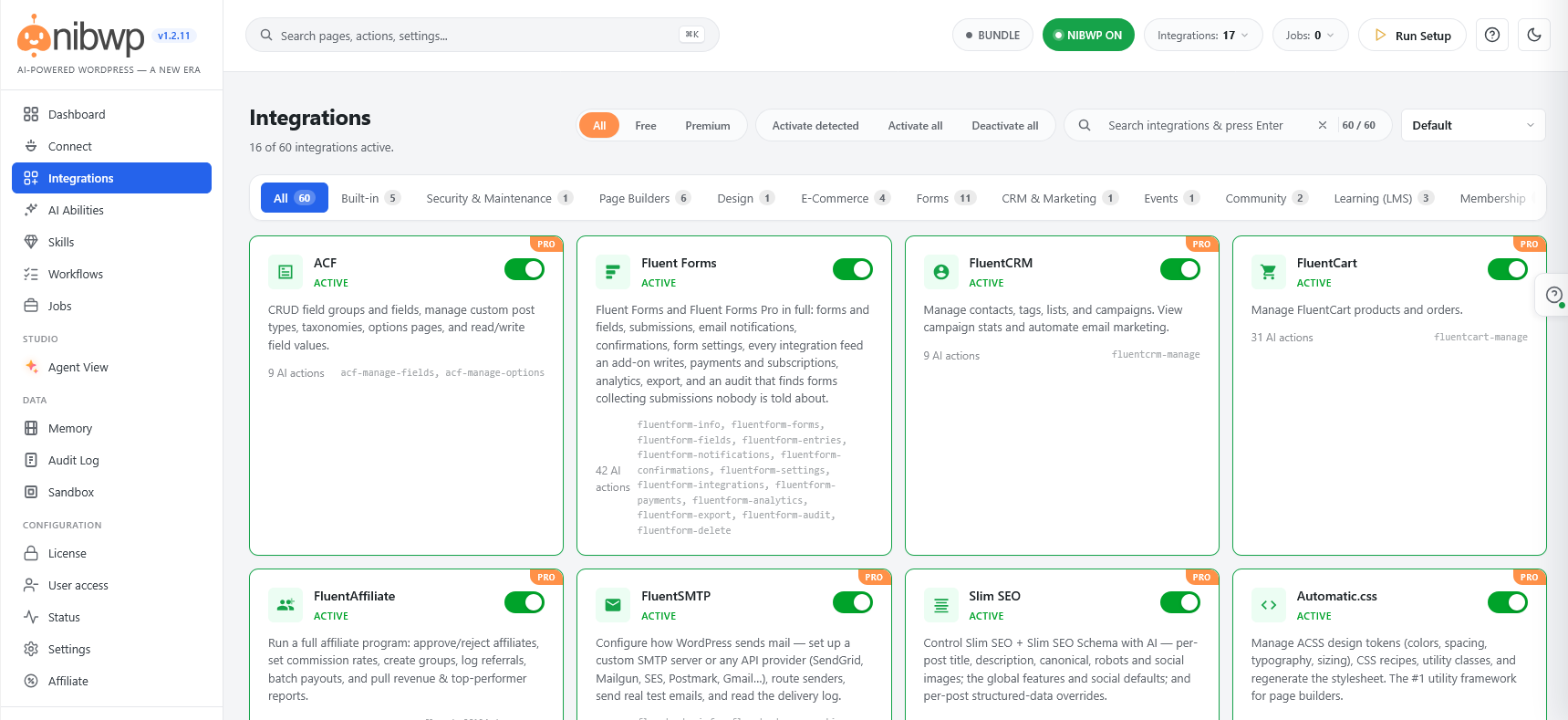
- Integrations – 66 plugin and theme integrations turn WooCommerce, ACF, the page builders, forms, SEO and LMS plugins into schema-typed MCP tools, so the agent calls a plugin’s own API instead of guessing at meta keys.
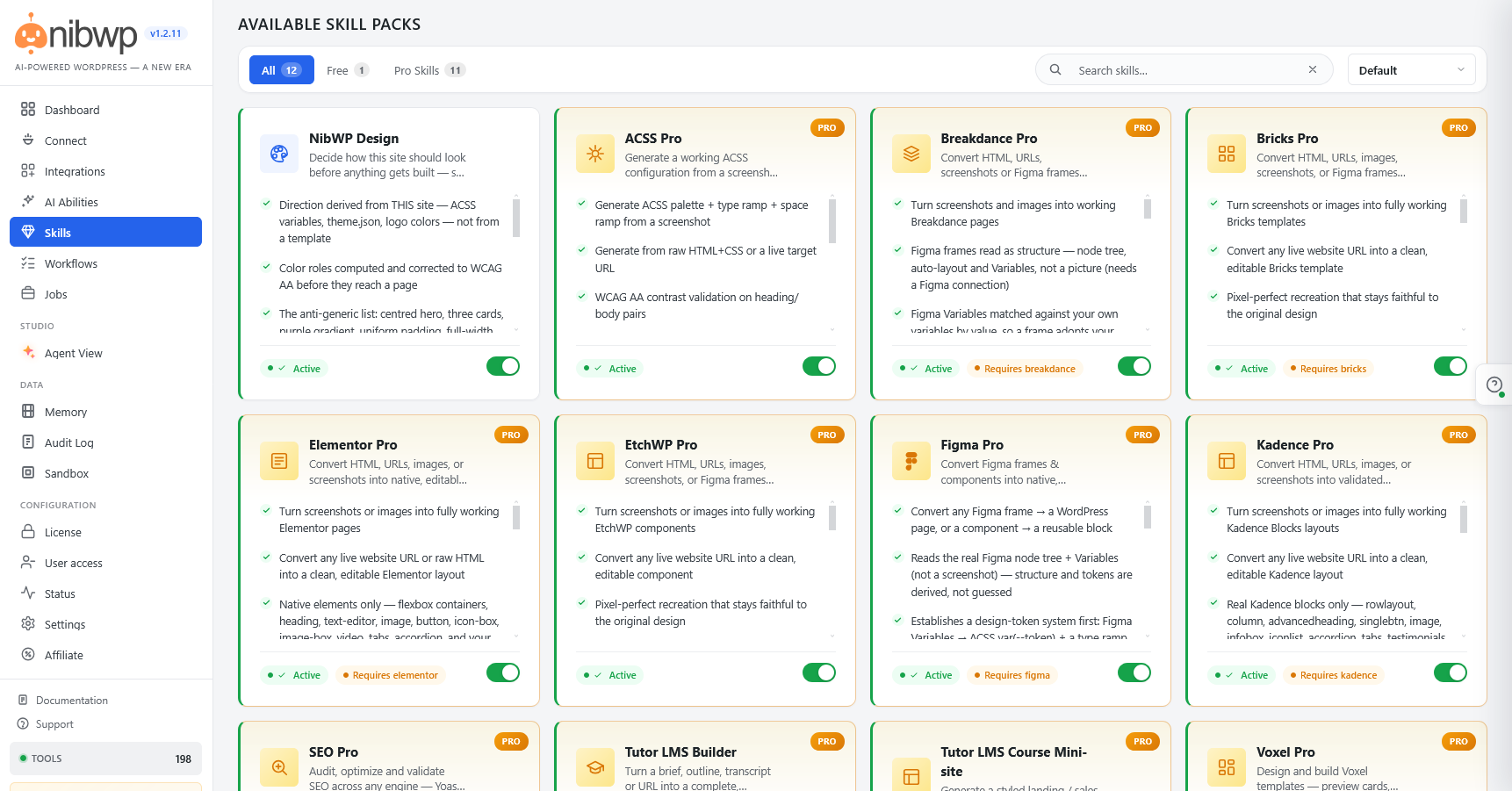
- Pro Skills – builder-aware skill packs that turn a screenshot, URL, HTML or Figma frame into a validated, on-system build.
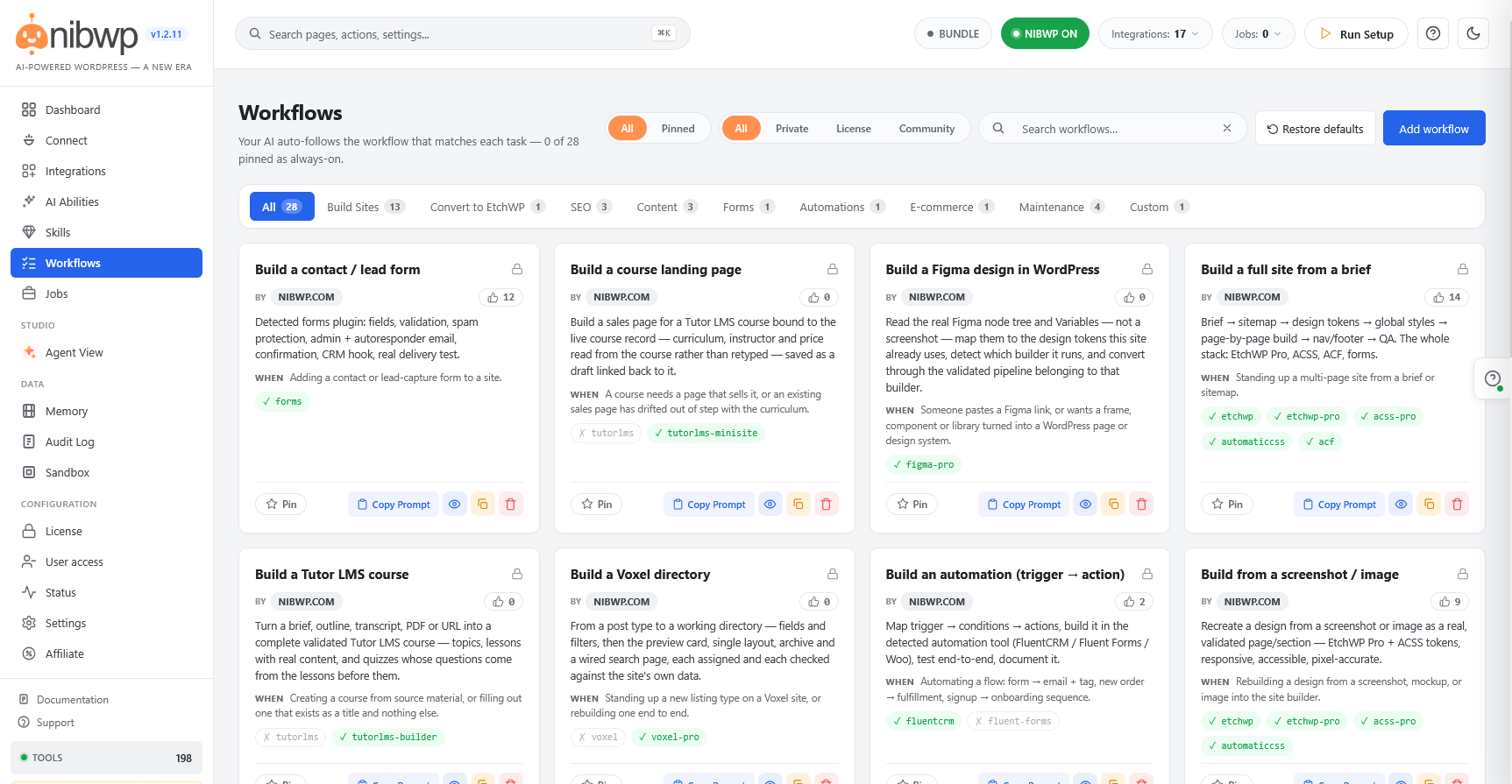
- Workflows – a structured playbook NIBWP injects as mandatory instructions: triggers, principles, ordered process steps, hard constraints, validation checks and a client-ready report. 18 default playbooks ship across nine categories (site building, SEO audits, content, WooCommerce setup, pre-launch checklists and more). Keep a workflow private to one site, share it across every site on your license, or publish it to the community Library. Define it once, run it on site one and site one hundred.
- Figma – pull a file, page, frame or node into the agent’s working context, analyse its structure, detect which builder powers the site, and convert a frame or component into native WordPress output.
- User Access – choose exactly which administrators can see and use NIBWP.
- Safety controls – read-only safe mode, per-action permissions, force-draft, rate limits, sandboxed PHP and file operations, and granular permissions across 15+ AI clients.
Pro Skills – design in, validated build out
Skills teach an agent a specific builder or framework so the output is correct, on-system and production-ready – not a guess:
- Bricks Pro – screenshot, URL, image or Figma frame to validated Bricks templates.
- Elementor Pro – HTML, URL, image or mockup to an editable, validated Elementor widget tree with global classes and dynamic tags.
- EtchWP Pro – HTML, URL, image or Figma to validated EtchWP components with BEM + ACSS tokens.
- ACSS Pro – generate a working Automatic.css configuration from a screenshot, HTML/CSS or live URL.
- Kadence Pro – native, editable Kadence Blocks from a screenshot or HTML.
- Breakdance Pro – AI-assisted, validated Breakdance builds.
- Voxel Pro – Voxel directory and listing work driven by the agent.
- Figma Pro – build a Figma frame natively inside your page builder.
- Tutor LMS Builder – turn a brief, outline, transcript or URL into a complete, validated Tutor LMS course with topics, lessons and quizzes.
- Tutor Course Mini-site – generate a full mini-site around a Tutor LMS course.
MCP tools per plugin and theme (Pro)
Each integration registers its own set of typed MCP tools. Ability counts per plugin or theme:
- Page builders and themes – Builderius (21), Breakdance (14), Voxel (13), Bricks Builder (9), Divi (8), Elementor (7), Etch (7), Kadence (6), GeneratePress (6).
- Design systems – Figma (7), Automatic.css (4), plus the ACSS Pro (5), Bricks Pro (5), EtchWP Pro (5) and Elementor Pro skill packs.
- Custom fields – Advanced Custom Fields (8), ACPT (1), JetEngine (1), Meta Box (1), Pods (1).
- E-commerce and donations – WooCommerce (16), SureCart (9), FluentCart (5), Easy Digital Downloads (4), GiveWP (3).
- Forms – WS Form (14), Forminator (9), JetFormBuilder (9), Ninja Forms (9), Formidable Forms (8), HappyForms (7), Fluent Forms (5), Gravity Forms (5), WPForms (4), Contact Form 7 (3).
- SEO – SEO Pro Skill (14), SEOPress (9), Yoast SEO (6), Rank Math (6), SEO Advanced (6), Slim SEO (4).
- CRM, email, community and affiliates – FluentCRM (7), FluentCommunity (7), FluentSMTP (6), BuddyPress (5), FluentAffiliate (1).
- LMS and membership – Tutor LMS (7), LearnDash (6), LifterLMS (4), MemberPress (4).
- Translation – Weglot (12), TranslatePress (4), WPML (4).
- Directories, events and jobs – WP Job Manager (6), The Events Calendar (5), Directorist (1).
- Utilities – Security & Maintenance (12), Redirection (4), TablePress (3), Admin and Site Enhancements (1).
- Built-in toolkits – WordPress Core (12), Migration Toolkit (8), Notifications & SMS (8), Content Fetcher (6), Content Planner (6), Memory (4).
Browse every integration and its full tool list at https://nibwp.com/integrations – for example, the Figma integration exposes nibwp/figma-list, nibwp/figma-get, nibwp/figma-pull, nibwp/figma-pro-fetch, nibwp/figma-pro-analyze, nibwp/figma-pro-detect-builder and nibwp/figma-pro-convert.
Common Pro use cases
Content automation (briefs become drafted, interlinked, SEO-ready posts), SEO at scale (empty metas, accidental noindex and missing schema found and fixed in bulk), WooCommerce operations (supplier sheets become products with variations and pricing), Elementor-to-Bricks and Bricks-to-Etch migrations, 404 cleanup after a migration, multilingual backfill, Voxel directory builds, course creation from transcripts, and monthly care-plan reporting.
Pricing, Skills and the full integration directory: https://nibwp.com/pricing, https://nibwp.com/solutions and https://nibwp.com/integrations.
External services
The MCP server itself never sends your site content anywhere. A few optional features talk to services run by NIBWP, and only when you use them.
NIBWP affiliate program (nibwp.com) – shows the current affiliate terms and lets you apply.
- When: the current offer is fetched when you open the Affiliate Program page; no site data is sent. Your application is sent only when you submit the form and tick the consent box.
- Data sent with an application: the name, email and promotion details you enter, your site address, and the plugin version.
- Provided by NIBWP: Terms, Privacy Policy.
AI client sign-in metadata – when an AI client signs in with a client ID that is a web address, NIBWP fetches that address to read the client’s published name and redirect addresses, as the MCP sign-in standard requires. No site data is sent. The address belongs to the AI client you are connecting, and its own terms and privacy policy apply.
Addresses you or your assistant choose – the broken-links job requests the links found in your own content, and media abilities download files from addresses your assistant is asked to import. Nothing is sent beyond a normal request for that address.
Installation
- Install through the WordPress.org plugin directory, or upload the
nibwpfolder to/wp-content/plugins/. - Activate the plugin.
- Open the NIBWP → Connect screen.
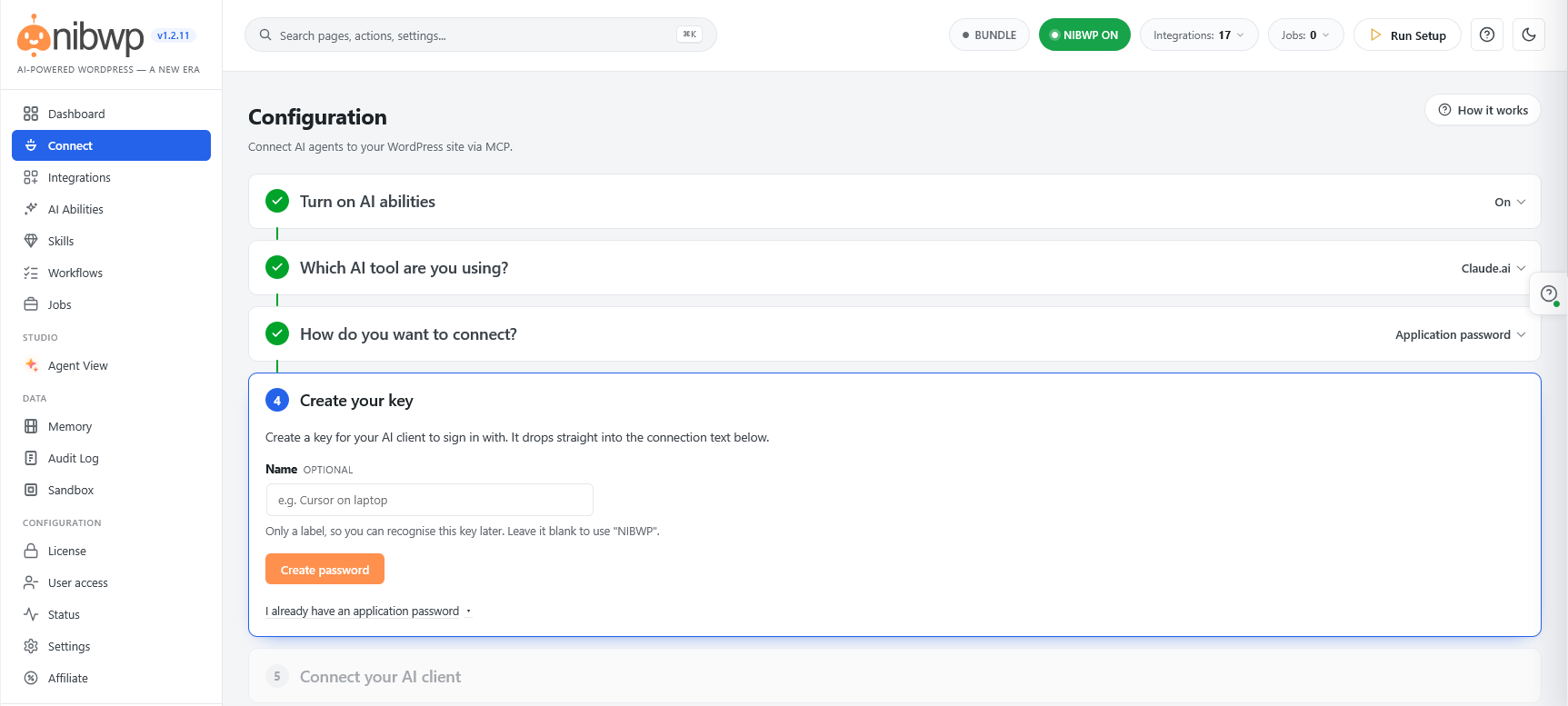
- Turn on AI Abilities, generate an Application Password, and copy the ready-made connection prompt.
- Paste the prompt into Claude, Claude Code, ChatGPT, Gemini or Cursor – it connects itself.
Journal de modifications
Every tool now checks the particular post, user, term or file it was asked about. Recommended for all sites. Also: the admin in eight languages with a right-to-left layout for Arabic.
1.2.11
- Every tool now weighs the particular post, user, term or file in front of it, so an account reaches exactly what its role reaches in wp-admin and no further.
- Custom fields, user profiles and sign-in sessions stay with the people entitled to them.
- On a multisite network the file tools answer to the network owner, the same line WordPress draws for the theme and plugin editors.
- wp-config.php, .env and their neighbours are out of reach of the file tools altogether.
- New: Bit Form — forms, fields, entries, notifications and exports, with an audit for the two ways a Bit Form enquiry disappears quietly. Part of NIBWP Pro.
- The whole admin is now available in French, Spanish, Portuguese (Portugal and Brazil), Italian, Dutch, German and Arabic.
- Arabic comes with a full right-to-left layout.
- Counts read naturally in every language, English included.
1.2.10
- Etch builds use the Automatic.css tokens your site actually defines, and reusable components save as real Etch components.
- A repair tool brings Etch pages built with earlier versions up to date.
- Design direction fits a single section into the page it joins and keeps one consistent look across pages.
- Agents can check what they built: page reads include layout and styles.
- Upload a local image straight into the Media Library, with alt text.
- New in Settings: a switch for update emails, off until you turn it on.
1.2.9
- Ask in your own words and NIBWP reaches for the right builder skill.
- Signing in from ChatGPT and Claude works on more hosting setups, including behind a proxy or CDN.
- Text with special characters stays exactly as written, everywhere it is saved.
1.2.8
- Signing in from AI clients works on many more hosts, including behind Cloudflare.
- Where a host blocks sign-in, the Connect page says exactly what to ask your host.
- One-click fix on the Status page when your server drops sign-in credentials (Apache and LiteSpeed).
1.2.4 – 1.2.7
- The Connect page is a guided flow: turn on abilities, pick your tool, choose how to connect, connect.
- Sign in or use an application password – both offered, with the one your tool supports marked.
- Agent View can take screenshots and hover, and no longer needs a browser tab kept open.
- Automatic.css variables and classes are read on every install.
1.2.0 – 1.2.3
- New: Agent View – watch your assistant work on your own site.
- New: NIBWP Design – pages built on your site’s own colors, fonts and spacing.
- New: Status – find out why a connection won’t work, in plain words.
- New: sign in instead of copying passwords, with an approval screen that lists exactly what you allow.
- New: Affiliate Program page.
Captures d'écran
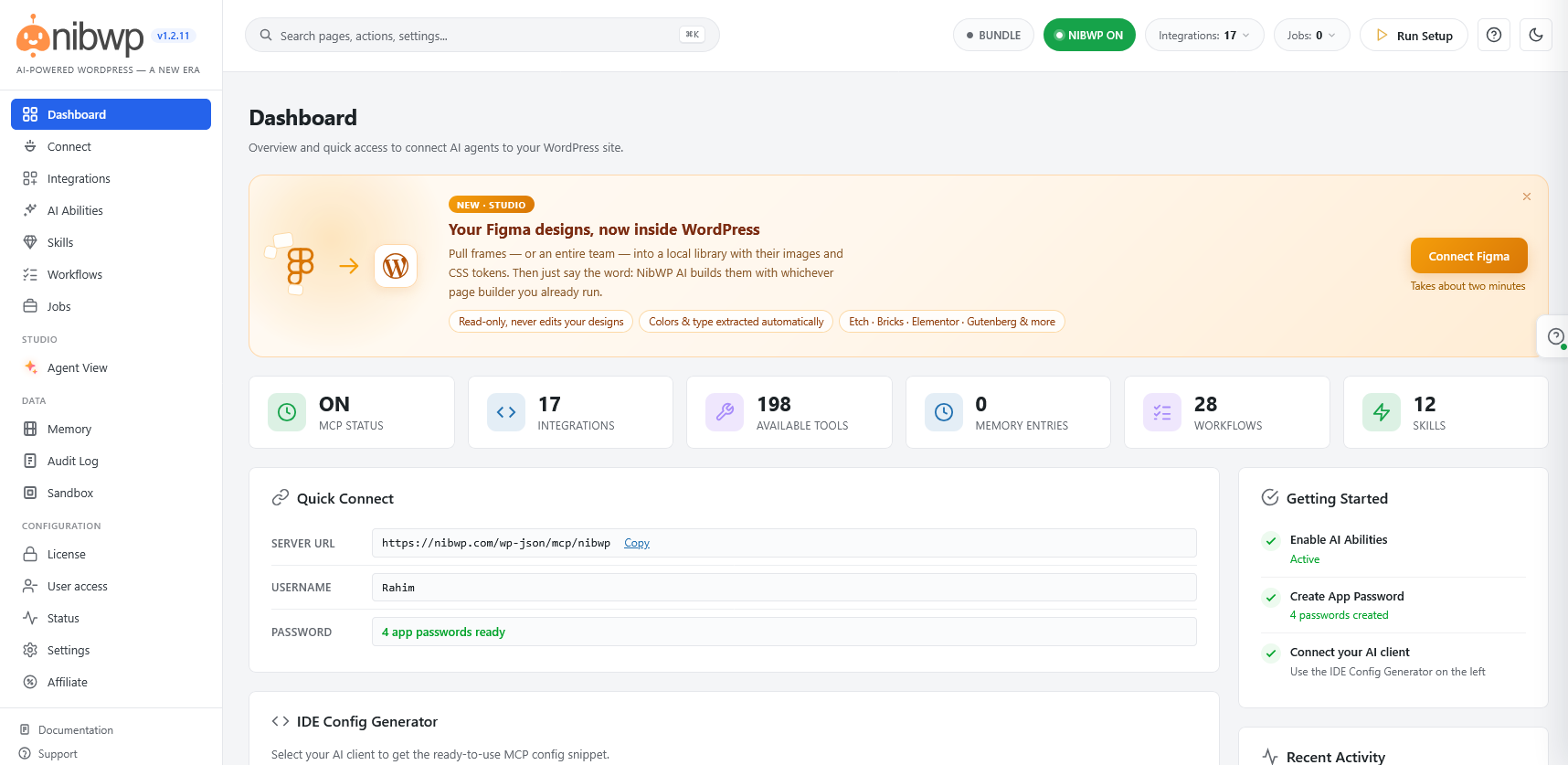
Pour les développeurs
Est-ce votre plugin ? Montrez les chiffres.
Ajoutez un badge en direct à votre site, docs ou github readme. Il se met à jour par lui-même - aucun compte n'est nécessaire.
Best NIBWP alternatives
All ai assistant plugins →



FAQ
NIBWP: quick answers
Réponses directes, extraites des données en direct WordPress.org.
Source : WordPress.org
Is NIBWP free?
Yes. NIBWP is free to download and use from the official WordPress.org plugin directory.
Is NIBWP safe to use in 2026?
NIBWP is a solid plugin choice in 2026, with a few things worth checking first. It runs on 300+ sites, is rated 5/5 and was last updated 2 months ago, and scores 72/100 on our health check.
How many websites use NIBWP?
NIBWP is active on 300+ WordPress websites and has been downloaded 4,765 times since it launched in June 2026. It was downloaded 1,061 times in the last 30 days.
Does NIBWP work with WordPress 7.1?
Yes. The developer has tested NIBWP up to WordPress 7.1.5, the latest release. It requires WordPress 6.9 or newer.
What PHP version does NIBWP need?
NIBWP requires PHP 8.0 or higher. Most hosts run PHP 8.x today, so it works on any modern WordPress hosting.
When was NIBWP last updated?
The latest version, 1.2.11, was released on September 30, 2026 (2 months ago).
Who makes NIBWP?
NIBWP is developed and maintained by NIBWP.
What are the best alternatives to NIBWP?
The most popular alternatives to NIBWP are WPVibe (100K+ installs), Hyve Lite (7K+ installs) and YLabs AI Site Manager with… (6K+ installs).
Propulsé par PageForge
Un modèle et une feuille de calcul. Une vraie page pour chaque recherche.
PageForge transforme chaque ligne d'un CSV en une page WordPress avec son propre titre, URL, SEO et schéma, construit sur la mise en page que vous Déjà conçu. Gratuit sur WordPress.org.
- CSV et XLSX, plus Google Sheets sur les professionnels et les entreprises
- Son propre titre, URL, SEO champs et schéma pour chaque page
- Fonctionne avec l'éditeur de blocs, Elementor, Divi et Avada
- Gratuit sur WordPress.org, pas de carte de crédit